CPU VS GPU
PERFORMANCE:
ACOMPARATIVE
ANALYSIS
Understanding Architectural, Computational,
and Application-Level Differences
2.
TEAM MEMBERS
Nigam PrasadLenka ( 23BCE11432)
Asher Sabu Joseph (23BCE11159)
Mrinal Mohit (23BCE11545)
Vishal Sahoo (23BCE11521)
Haris Ahmad (23BCE11109)
Harshvardhan Singh (23BCE10913)
Madhur Chaturvedi (23BCE10783)
3.
INTRODUCTION
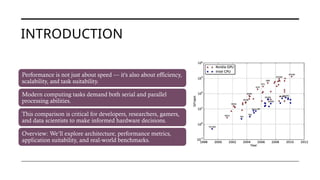
Performance is notjust about speed — it's also about efficiency,
scalability, and task suitability.
Modern computing tasks demand both serial and parallel
processing abilities.
This comparison is critical for developers, researchers, gamers,
and data scientists to make informed hardware decisions.
Overview: We’ll explore architecture, performance metrics,
application suitability, and real-world benchmarks.
4.
WHAT IS ACPU?
Primary general-purpose processor that handles
instructions for all software on your computer.
Executes complex logic operations and system-level
tasks.
Typically contains 2–64 cores in consumer to
enterprise-level machines.
Large L1/L2/L3 cache hierarchy ensures fast
access to instructions and data.
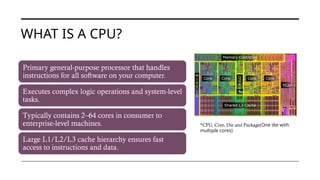
*CPU, Core, Die and Package(One die with
multiple cores)
5.
WHAT IS AGPU?
Highly specialized processor with a SIMD (Single
Instruction, Multiple Data) architecture.
Modern GPUs have thousands of CUDA cores
(NVIDIA) or Stream processors (AMD).
Great for workloads that apply the same operation
to multiple data streams.
Widely used in neural networks, ray tracing, video
upscaling, and even self-driving car vision systems.
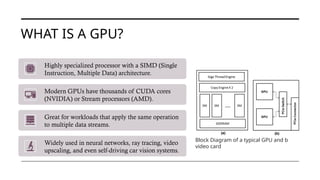
Block Diagram of a typical GPU and b
video card
6.
ARCHITECTURE
OVERVIEW
CPU: Prioritizes low-latencyfor diverse and
branching instructions, few threads.
GPU: Designed for high-throughput workloads
with repetitive operations, massive threading.
GPUs have smaller caches but access fast VRAM
in large quantities.
Thread scheduling is simpler in GPUs due to
identical instruction execution.
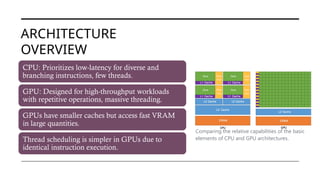
Comparing the relative capabilities of the basic
elements of CPU and GPU architectures.
7.
CPU VS GPU
ARCHITECTURE
CPUcores: Independent control logic,
large cache, speculative execution.
GPU cores: Lightweight, focused on
compute units, small instruction sets.
GPU instruction pipelines are deeper
and more uniform
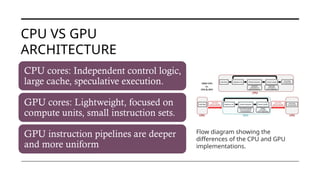
Flow diagram showing the
differences of the CPU and GPU
implementations.
8.
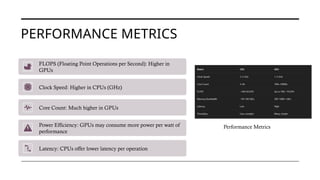
PERFORMANCE METRICS
FLOPS (FloatingPoint Operations per Second): Higher in
GPUs
Clock Speed: Higher in CPUs (GHz)
Core Count: Much higher in GPUs
Power Efficiency: GPUs may consume more power per watt of
performance
Latency: CPUs offer lower latency per operation
Performance Metrics
9.
PERFORMANCE METRICS (CPUVS GPU)
CPU Performance Metrics
CPUs are evaluated based on clock
speed (GHz), IPC, core/thread count,
and cache size.
Designed for real-time responsiveness,
logic-heavy tasks, and efficient task
switching.
Power efficiency (TDP) matters for
sustained performance and thermal
control.
GPU Performance Metrics
GPUs are measured by CUDA cores,
FLOPS, VRAM size, and memory
bandwidth.
Perfect for data-parallel tasks like AI
training, rendering, and scientific
workloads.
Tensor cores provide specialized
acceleration for deep learning and
matrix operations.
10.
CPU STRENGTHS
Great forsingle-threaded performance and multitasking.
Handles interrupts and I/O more efficiently than GPUs.
Necessary for running background processes, system management, and launching applications.
Strong in general-purpose tasks
Excellent for tasks that require fast decision-making, logic, and branching
Low-latency responsiveness (e.g., system processes, real-time user input)Ideal for operating systems, web browsing, spreadsheets, etc.
11.
GPU STRENGTHS
Excellent atparallel computations (many operations at
once)
Ideal for AI/ML training, matrix calculations, deep learning
High data throughput
Used in 3D rendering, physics simulations, video encoding
Ideal for matrix computations, deep learning, rendering
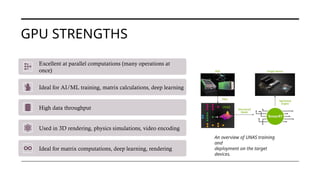
An overview of UNAS training
and
deployment on the target
devices.
12.
TASK SUITABILITY –CPU VS GPU
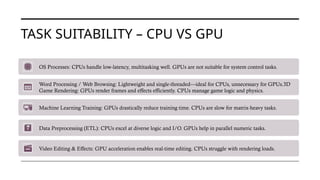
OS Processes: CPUs handle low-latency, multitasking well. GPUs are not suitable for system control tasks.
Word Processing / Web Browsing: Lightweight and single-threaded—ideal for CPUs, unnecessary for GPUs.3D
Game Rendering: GPUs render frames and effects efficiently. CPUs manage game logic and physics.
Machine Learning Training: GPUs drastically reduce training time. CPUs are slow for matrix-heavy tasks.
Data Preprocessing (ETL): CPUs excel at diverse logic and I/O. GPUs help in parallel numeric tasks.
Video Editing & Effects: GPU acceleration enables real-time editing. CPUs struggle with rendering loads.
13.
PERFORMANCE BENCHMARKS –CPU VS
GPU
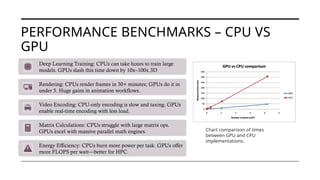
Deep Learning Training: CPUs can take hours to train large
models. GPUs slash this time down by 10x–100x.3D
Rendering: CPUs render frames in 30+ minutes; GPUs do it in
under 5. Huge gains in animation workflows.
Video Encoding: CPU-only encoding is slow and taxing. GPUs
enable real-time encoding with less load.
Matrix Calculations: CPUs struggle with large matrix ops.
GPUs excel with massive parallel math engines.
Energy Efficiency: CPUs burn more power per task. GPUs offer
more FLOPS per watt—better for HPC.
Chart comparison of times
between GPU and CPU
implementations.
14.
USE CASES –WHERE CPUS AND GPUS
EXCEL
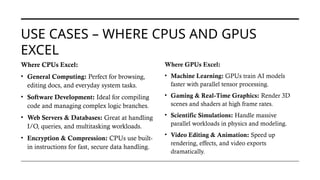
Where CPUs Excel:
• General Computing: Perfect for browsing,
editing docs, and everyday system tasks.
• Software Development: Ideal for compiling
code and managing complex logic branches.
• Web Servers & Databases: Great at handling
I/O, queries, and multitasking workloads.
• Encryption & Compression: CPUs use built-
in instructions for fast, secure data handling.
Where GPUs Excel:
• Machine Learning: GPUs train AI models
faster with parallel tensor processing.
• Gaming & Real-Time Graphics: Render 3D
scenes and shaders at high frame rates.
• Scientific Simulations: Handle massive
parallel workloads in physics and modeling.
• Video Editing & Animation: Speed up
rendering, effects, and video exports
dramatically.
15.
LIMITATIONS – CPUSVS GPUS
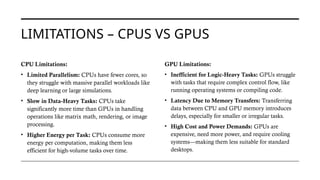
CPU Limitations:
• Limited Parallelism: CPUs have fewer cores, so
they struggle with massive parallel workloads like
deep learning or large simulations.
• Slow in Data-Heavy Tasks: CPUs take
significantly more time than GPUs in handling
operations like matrix math, rendering, or image
processing.
• Higher Energy per Task: CPUs consume more
energy per computation, making them less
efficient for high-volume tasks over time.
GPU Limitations:
• Inefficient for Logic-Heavy Tasks: GPUs struggle
with tasks that require complex control flow, like
running operating systems or compiling code.
• Latency Due to Memory Transfers: Transferring
data between CPU and GPU memory introduces
delays, especially for smaller or irregular tasks.
• High Cost and Power Demands: GPUs are
expensive, need more power, and require cooling
systems—making them less suitable for standard
desktops.
16.
FUTURE TRENDS –CPUS AND GPUS
• More Cores & Hybrid CPUs: CPUs are evolving into multi-core and hybrid designs, combining performance and
efficiency cores for smarter task handling.
• CPU-GPU Integration: Unified chips like Apple’s M-series fuse CPU and GPU on one die, reducing latency and
boosting performance for everyday use.
• Rise of Specialized Accelerators: NPUs and TPUs are emerging to handle AI workloads more efficiently than
traditional CPUs or GPUs.
• GPU Leadership in AI & HPC: GPUs continue to dominate AI, deep learning, and scientific fields due to their
unmatched parallel processing power.
• Power Efficiency Innovations: Both CPUs and GPUs are being redesigned for better performance-per-watt, using 3D
stacking and advanced chip fabrication.
• Cloud & Virtual GPUs: Cloud platforms now offer GPU instances, while virtual GPUs provide scalable power without
the cost of physical hardware
17.
WHEN TO USECPU OR GPU
Use a CPU When:
• General Tasks: Ideal for browsing, coding, system control, and everyday computing needs.
• Real-Time & Responsive Work: Handles branching logic and low-latency tasks efficiently.
• Serial Processing: Best for logic-heavy, step-by-step processes like compiling or running scripts.
Use a GPU When:
• Parallel Processing: Excels at repetitive data-heavy tasks like AI training or simulations.
• Graphics & Video Work: Renders complex visuals and high-resolution frames in real-time.
• Accelerated Computing: Powers machine learning, deep learning, and large-scale data analysis.
18.
BOTH (CPU +GPU TOGETHER)
Hybrid AI Workflows
• The CPU manages data loading, preprocessing, and orchestration of AI tasks, ensuring efficient control flow.
• Meanwhile, the GPU executes the compute-heavy parts like model training and inference at high speed.
Gaming & Content Creation
• In games, the CPU runs logic, physics, and AI while the GPU handles rendering frames, textures, and
lighting.
• In video editing, the CPU manages the interface and timeline, while the GPU accelerates rendering and
effects.
Scientific & Engineering Simulations
• CPUs control the simulation logic, scheduling, and data management in scientific applications.
• GPUs handle intensive calculations such as fluid dynamics, molecular modelling, or climate simulation.
19.
CONCLUSION – CPUVS
GPU PERFORMANCE
• CPUs are best for general-purpose tasks, sequential logic, and
real-time responsiveness.
• GPUs shine in parallel workloads like AI, graphics, and
simulations due to massive core counts.
• Performance depends on the task—speed isn’t everything; it's
about using the right tool.
• Hybrid systems leverage both, optimizing for efficiency and
workload distribution.
• Future trends show CPUs and GPUs evolving together, with
unified architectures and AI-focused enhancements.
• There’s no one-size-fits-all solution—the real power lies in
understanding and applying them wisely.