PowerBI
SELF-SERVICE BUSINESS INTELLIGENCE FOR THE DEVELOPER
Power Query, PowerPivot, Power View, Power Map, Power What…?
Hi, I’m Jeff…
 Founding partner Vanishing Clouds
 Microsoft partner for 15 years; small business/development
 MCTS, MCSE, MCAD, …
 vNext OC Treasurer
 Arch of Microsoft’s BI solutions
 Cubes (Multi-Dimensional) vs. Tabular
 PowerBI is “just Excel”
 PowerBI Desktop
 Power Query and “M”
 PowerPivot and DAX
Microsoft’s BI Spectrum
Excel
• Excellent visuals
• Limited scale, etc.
Power* COM add-ins
• Powerful ETL
• “Stairway” to DAX
• Interactive, easy visuals
Standalone
• “Just” Power*
• Monthly sprints
SSAS
• Tabular vs. Multi-Dimensional
• Install-time decision
• New language, terminology
Hadoop/HDInsight
• Big Data (in the cloud)
• Open source, MSFT commits
• “Divide and concur” using
commodity servers
Problems with Just Excel
 Joining tables via VLOOKUP
 Scale
 Shaping – preprocess with SQL, manual workflow or just copy/paste
 Sources – “modern” REST/web
 Smarts – business logic beyond a pivot table
Tables vs. Cubes
GL Accounts Region Balance
Sales North America 100
COGS North America 72
SG&A North America 10
Op Profit North America 18
Sales South America 58
COGS South America 48
  
SG&A Far East 6
Net Profit Far East 12
Regions
GL Accounts North America South America Far East
Sales 100 58 
COGS 72 48
SG&A 10  6
Net Profit 12
Op Profit 18
(pivot)
2D
GL Accounts Region Scenario Balance
Sales North America Actual 100
COGS North America Actual 72
SG&A North America Actual 10
Op Profit North America Actual 18
Sales South America Actual 58
COGS South America Actual 48
ŸŸŸ
SG&A Far East Budget 6
Net Profit Far East Budget 12
3D
GL Accounts Region District Scenario Balance
Sales North America NE Actual 25
COGS North America NE Actual 12
ŸŸŸ
?
Hierarchy
GL Accounts Region District Scenario Date Balance
Sales North America NE Actual Jan 01 25
COGS North America NE Actual Jan 01 12
ŸŸŸ
Hyper-Cube
Multi-Dimensional Cubes
 Technology from Panorama; Israeli/Canadian
 High performance; e.g., pre-calculated subtotals
 Sum quarters, then any YTD is adding at most 5 terms
 Specialized vocabulary
 Facts vs. dimensions vs. measures; star vs. snowflake
 MDX is widely seen as difficult to learn
Jan Feb Mar Apr May Jun Jul
Q1 Q2
Given:
SUM:
YTD July: Q1 Q2 Jul
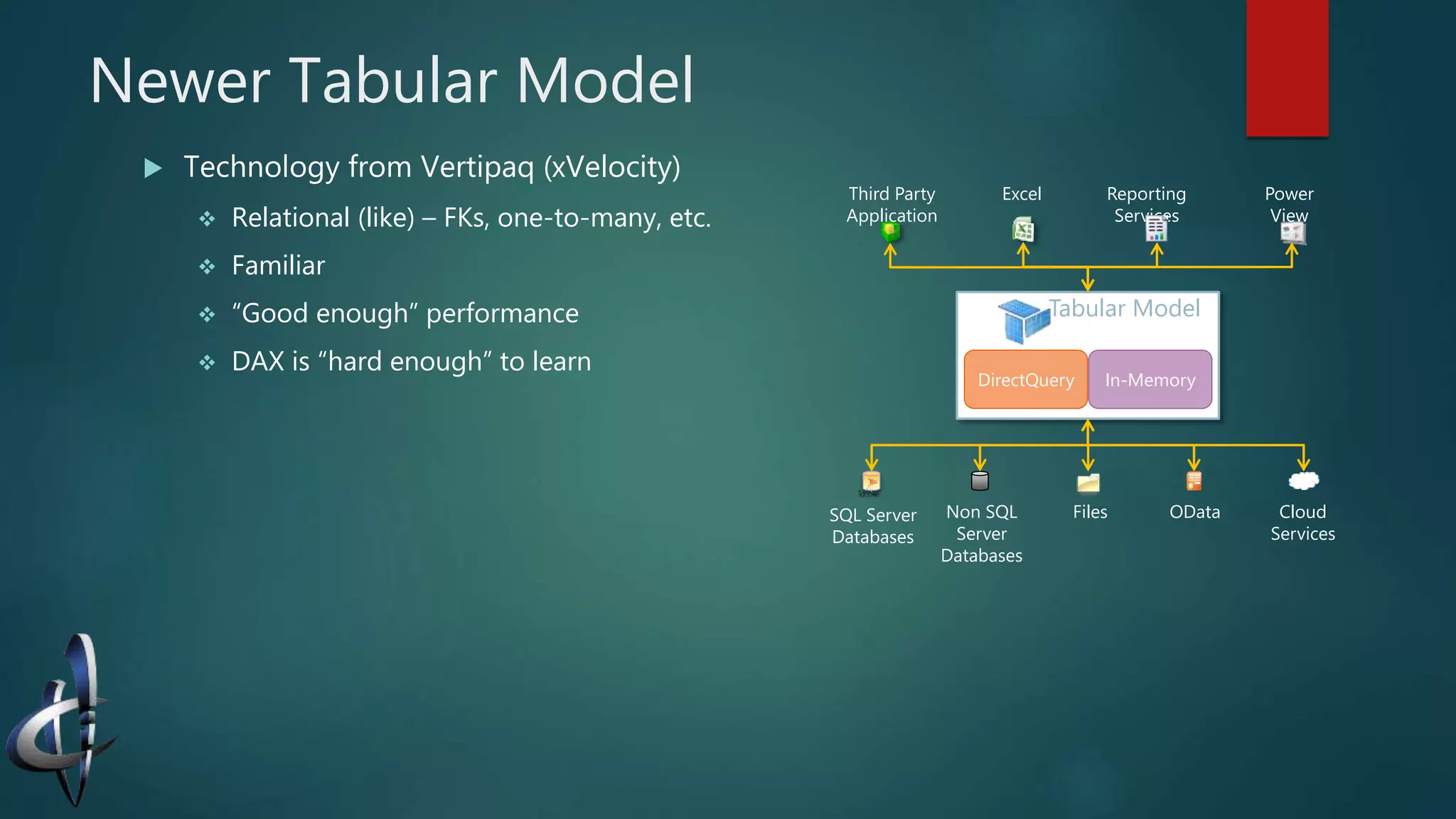
Newer Tabular Model
 Technology from Vertipaq (xVelocity)
 Relational (like) – FKs, one-to-many, etc.
 Familiar
 “Good enough” performance
 DAX is “hard enough” to learn
Tabular Model
DirectQuery In-Memory
Third Party
Application
Excel Power
View
Reporting
Services
ODataFiles Cloud
Services
SQL Server
Databases
Non SQL
Server
Databases
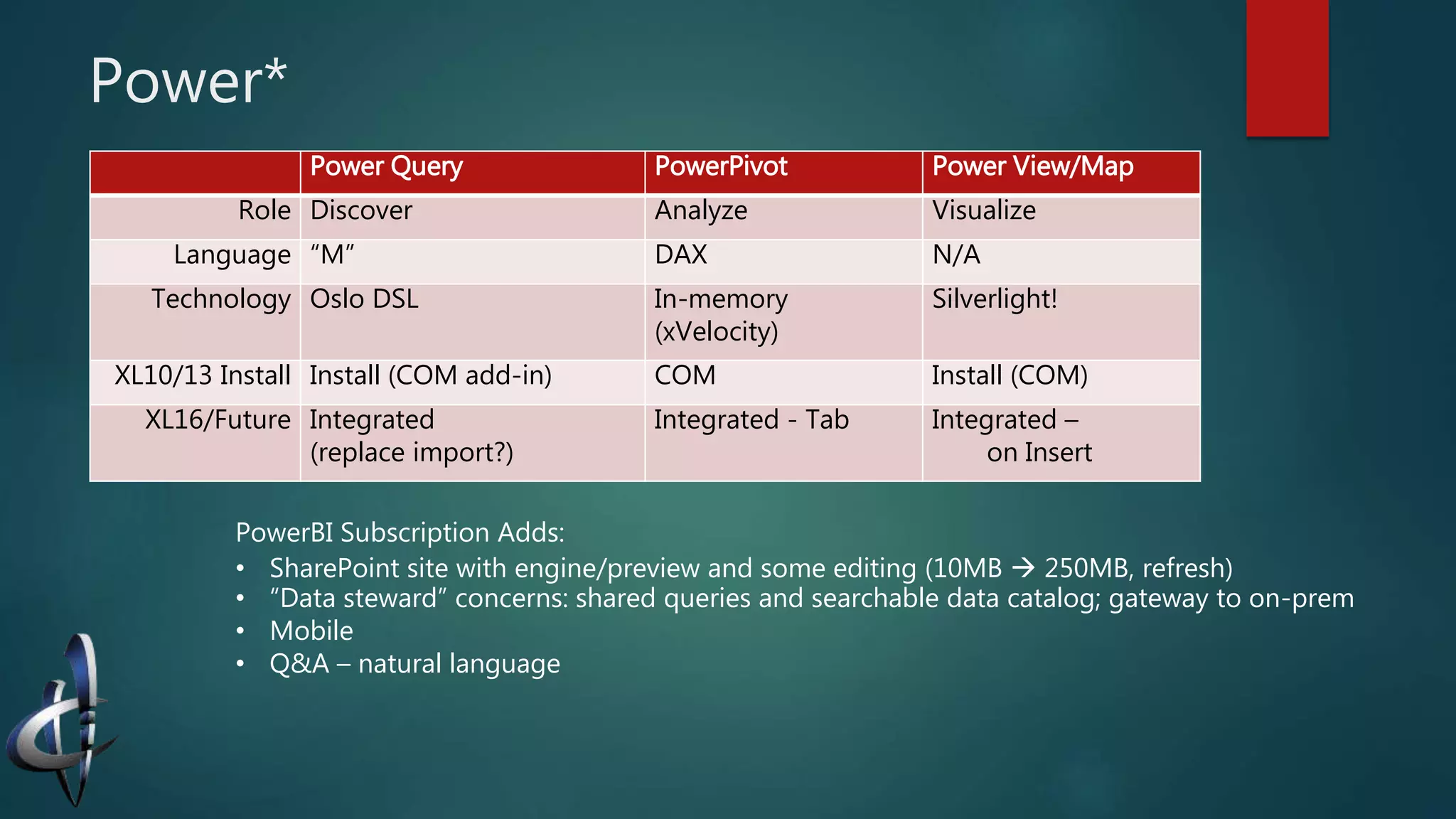
Power*
Power Query PowerPivot Power View/Map
Role Discover Analyze Visualize
Language “M” DAX N/A
Technology Oslo DSL In-memory
(xVelocity)
Silverlight!
XL10/13 Install Install (COM add-in) COM Install (COM)
XL16/Future Integrated
(replace import?)
Integrated - Tab Integrated –
on Insert
PowerBI Subscription Adds:
• SharePoint site with engine/preview and some editing (10MB  250MB, refresh)
• “Data steward” concerns: shared queries and searchable data catalog; gateway to on-prem
• Mobile
• Q&A – natural language
Demos
 Raw Excel
 Web Scraping
 Combining source: Excel and OData
 Slicers; Timelines
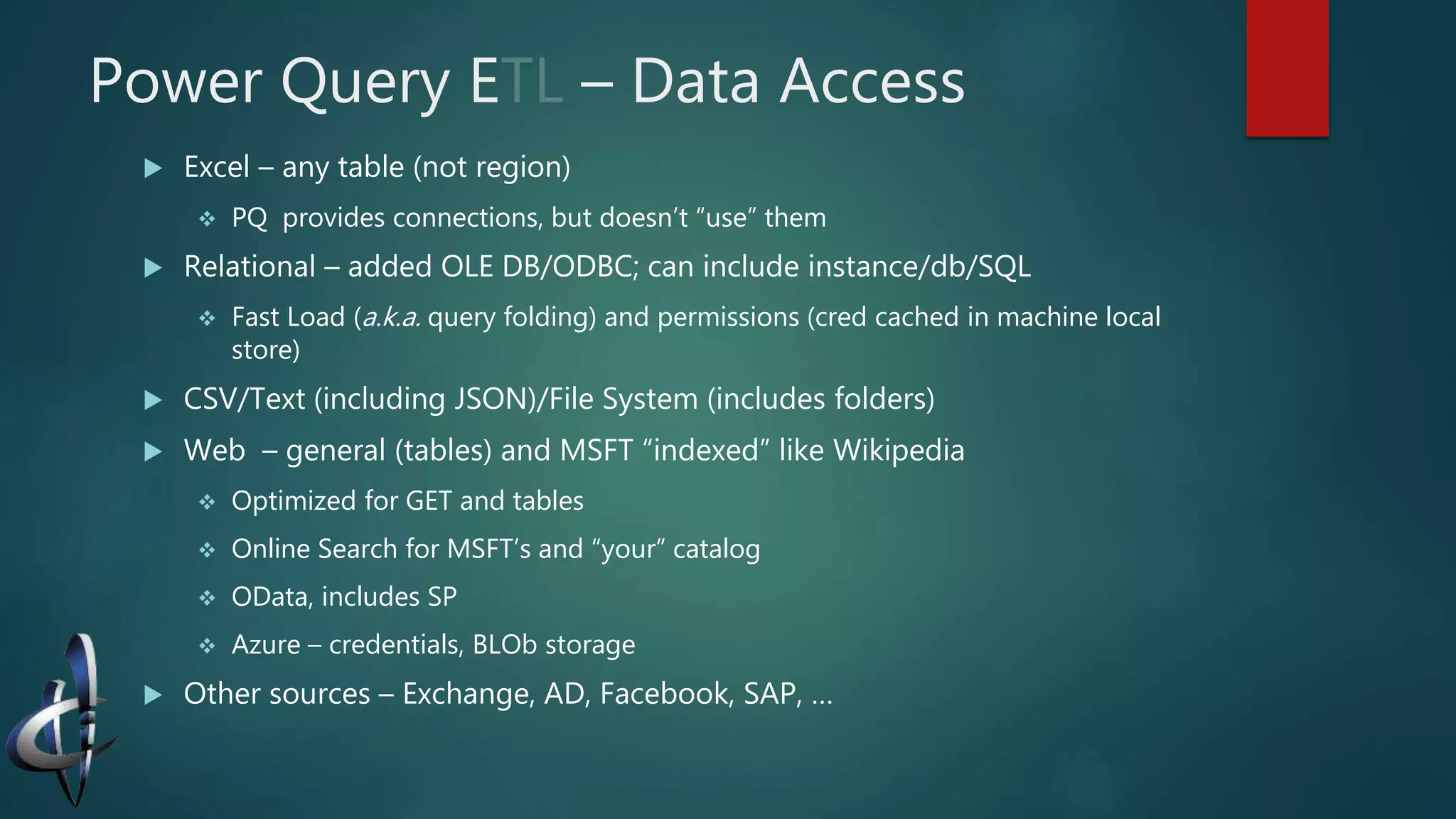
Power Query E – Data Access
 Excel – any table (not region)
 PQ provides connections, but doesn’t “use” them
 Relational – added OLE DB/ODBC; can include instance/db/SQL
 Fast Load (a.k.a. query folding) and permissions (cred cached in machine local
store)
 CSV/Text (including JSON)/File System (includes folders)
 Web – general (tables) and MSFT “indexed” like Wikipedia
 Optimized for GET and tables
 Online Search for MSFT’s and “your” catalog
 OData, includes SP
 Azure – credentials, BLOb storage
 Other sources – Exchange, AD, Facebook, SAP, …
Power Query T – Informally “M”
 Functional, strongly-typed, domain specific language
 More similar to Excel functions that OOP
 “Control flow” (if…then…else and try…otherwise) are functions
 Comments // and /*…*/
 Structured data types:
 List – an ordered sequence { … } (special form: {1..10}); also indexes
 Record – “one row” of named fields [«name» = «value»]; selects field
 Table – most important #table() function
Example:
Source = OData.Feed("http://...svc/ "),
Orders_table = Source{[Name="Orders", Signature="table"]}[Data],
https://msdn.microsoft.com/en-us/library/mt211003.aspx
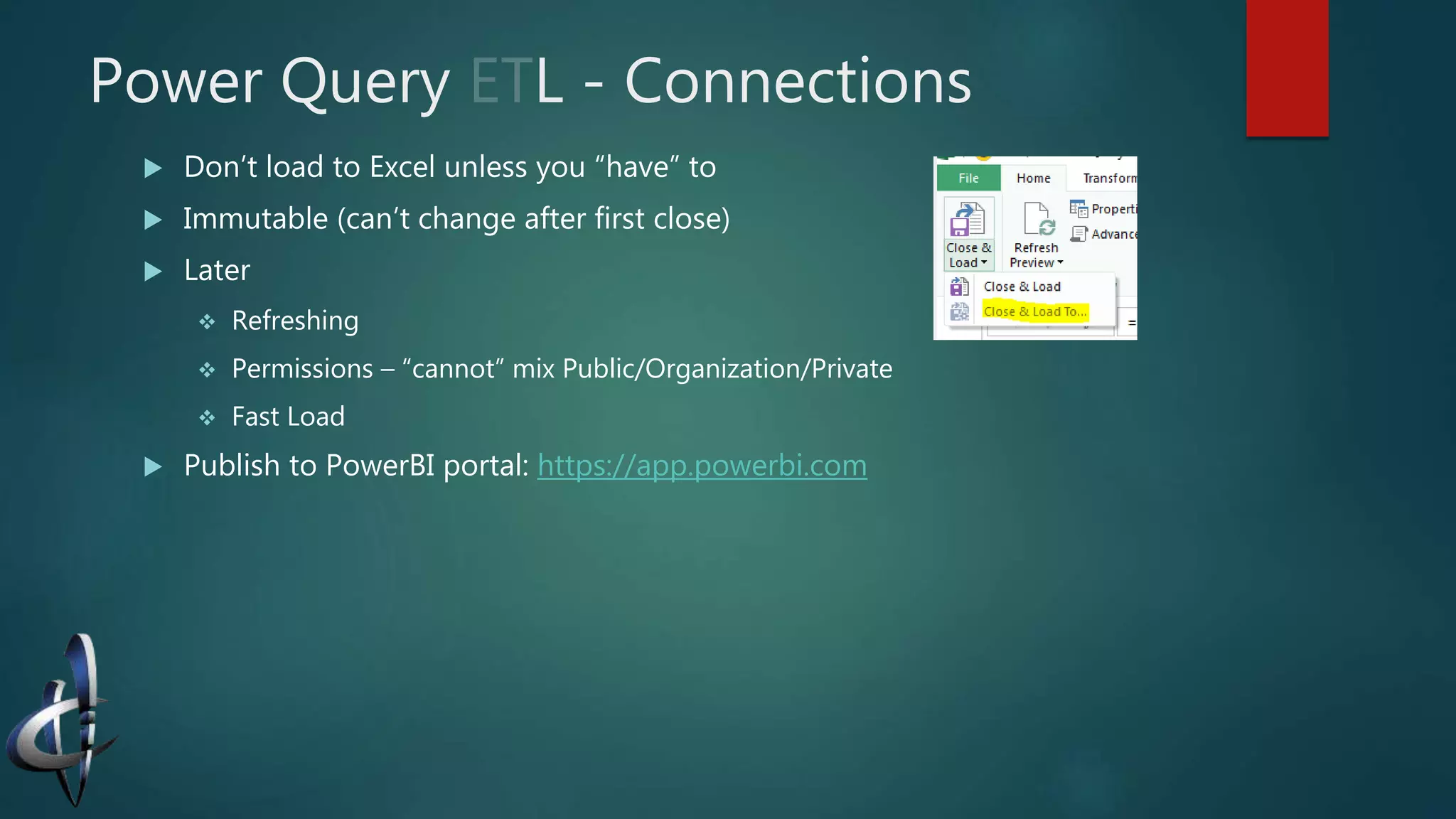
Power Query L - Connections
 Don’t load to Excel unless you “have” to
 Immutable (can’t change after first close)
 Later
 Refreshing
 Permissions – “cannot” mix Public/Organization/Private
 Fast Load
 Publish to PowerBI portal: https://app.powerbi.com
PowerPivot Model
 The Excel data model—a “hidden layer” above Excel
 From Data or PowerPivot tabs
 Column-store technology compresses most data well
 Scales to millions of rows (in XL13+ only limited by RAM)
 Hint: Bypass Excel when loading from Power Query
 Business data types (Address, URL)
 Direct support for KPIs
 Excellent time functionality—but BYOC (bring your own calendar)
Data Analysis eXtensions
 Simpler (tabular) than MDX; “part way” between M and Excel
 Syntax “reversed” from M: [] around columns
 Statically typed with liberal coercion: "1"+1 = 2; "1"&1 = "11"
 Calculated Columns vs. Calculated Fields (nee Measures)
 It’s all about the evaluation context:
 Row context – typically for calculated columns
 Filter context – typically for calculated fields/measures (think in a PivotTable)
 Powerful functions like SUMX and CALCULATE
 Related() and RelatedTable() go one-to-many but not many-to-one
 In-memory vs. Direct Query
We Haven’t Covered 
 DAX and SSAS’s Tabular mode
 SSAS Multi-Dimensional mode (pros/cons)
 PowerBI Service
 Dashboard (SharePoint portal)
 Data Steward and Shared/Recommended Queries
 On-premise data (gateway) and refreshing models
 Mobile
 Q&A Natural Language
 Reporting (much)

Power bi

  • 1.
    PowerBI SELF-SERVICE BUSINESS INTELLIGENCEFOR THE DEVELOPER Power Query, PowerPivot, Power View, Power Map, Power What…?
  • 2.
    Hi, I’m Jeff… Founding partner Vanishing Clouds  Microsoft partner for 15 years; small business/development  MCTS, MCSE, MCAD, …  vNext OC Treasurer
  • 3.
     Arch ofMicrosoft’s BI solutions  Cubes (Multi-Dimensional) vs. Tabular  PowerBI is “just Excel”  PowerBI Desktop  Power Query and “M”  PowerPivot and DAX
  • 4.
    Microsoft’s BI Spectrum Excel •Excellent visuals • Limited scale, etc. Power* COM add-ins • Powerful ETL • “Stairway” to DAX • Interactive, easy visuals Standalone • “Just” Power* • Monthly sprints SSAS • Tabular vs. Multi-Dimensional • Install-time decision • New language, terminology Hadoop/HDInsight • Big Data (in the cloud) • Open source, MSFT commits • “Divide and concur” using commodity servers
  • 5.
    Problems with JustExcel  Joining tables via VLOOKUP  Scale  Shaping – preprocess with SQL, manual workflow or just copy/paste  Sources – “modern” REST/web  Smarts – business logic beyond a pivot table
  • 6.
    Tables vs. Cubes GLAccounts Region Balance Sales North America 100 COGS North America 72 SG&A North America 10 Op Profit North America 18 Sales South America 58 COGS South America 48    SG&A Far East 6 Net Profit Far East 12 Regions GL Accounts North America South America Far East Sales 100 58  COGS 72 48 SG&A 10  6 Net Profit 12 Op Profit 18 (pivot) 2D GL Accounts Region Scenario Balance Sales North America Actual 100 COGS North America Actual 72 SG&A North America Actual 10 Op Profit North America Actual 18 Sales South America Actual 58 COGS South America Actual 48 ŸŸŸ SG&A Far East Budget 6 Net Profit Far East Budget 12 3D GL Accounts Region District Scenario Balance Sales North America NE Actual 25 COGS North America NE Actual 12 ŸŸŸ ? Hierarchy GL Accounts Region District Scenario Date Balance Sales North America NE Actual Jan 01 25 COGS North America NE Actual Jan 01 12 ŸŸŸ Hyper-Cube
  • 7.
    Multi-Dimensional Cubes  Technologyfrom Panorama; Israeli/Canadian  High performance; e.g., pre-calculated subtotals  Sum quarters, then any YTD is adding at most 5 terms  Specialized vocabulary  Facts vs. dimensions vs. measures; star vs. snowflake  MDX is widely seen as difficult to learn Jan Feb Mar Apr May Jun Jul Q1 Q2 Given: SUM: YTD July: Q1 Q2 Jul
  • 8.
    Newer Tabular Model Technology from Vertipaq (xVelocity)  Relational (like) – FKs, one-to-many, etc.  Familiar  “Good enough” performance  DAX is “hard enough” to learn Tabular Model DirectQuery In-Memory Third Party Application Excel Power View Reporting Services ODataFiles Cloud Services SQL Server Databases Non SQL Server Databases
  • 9.
    Power* Power Query PowerPivotPower View/Map Role Discover Analyze Visualize Language “M” DAX N/A Technology Oslo DSL In-memory (xVelocity) Silverlight! XL10/13 Install Install (COM add-in) COM Install (COM) XL16/Future Integrated (replace import?) Integrated - Tab Integrated – on Insert PowerBI Subscription Adds: • SharePoint site with engine/preview and some editing (10MB  250MB, refresh) • “Data steward” concerns: shared queries and searchable data catalog; gateway to on-prem • Mobile • Q&A – natural language
  • 10.
    Demos  Raw Excel Web Scraping  Combining source: Excel and OData  Slicers; Timelines
  • 11.
    Power Query E– Data Access  Excel – any table (not region)  PQ provides connections, but doesn’t “use” them  Relational – added OLE DB/ODBC; can include instance/db/SQL  Fast Load (a.k.a. query folding) and permissions (cred cached in machine local store)  CSV/Text (including JSON)/File System (includes folders)  Web – general (tables) and MSFT “indexed” like Wikipedia  Optimized for GET and tables  Online Search for MSFT’s and “your” catalog  OData, includes SP  Azure – credentials, BLOb storage  Other sources – Exchange, AD, Facebook, SAP, …
  • 12.
    Power Query T– Informally “M”  Functional, strongly-typed, domain specific language  More similar to Excel functions that OOP  “Control flow” (if…then…else and try…otherwise) are functions  Comments // and /*…*/  Structured data types:  List – an ordered sequence { … } (special form: {1..10}); also indexes  Record – “one row” of named fields [«name» = «value»]; selects field  Table – most important #table() function Example: Source = OData.Feed("http://...svc/ "), Orders_table = Source{[Name="Orders", Signature="table"]}[Data], https://msdn.microsoft.com/en-us/library/mt211003.aspx
  • 13.
    Power Query L- Connections  Don’t load to Excel unless you “have” to  Immutable (can’t change after first close)  Later  Refreshing  Permissions – “cannot” mix Public/Organization/Private  Fast Load  Publish to PowerBI portal: https://app.powerbi.com
  • 14.
    PowerPivot Model  TheExcel data model—a “hidden layer” above Excel  From Data or PowerPivot tabs  Column-store technology compresses most data well  Scales to millions of rows (in XL13+ only limited by RAM)  Hint: Bypass Excel when loading from Power Query  Business data types (Address, URL)  Direct support for KPIs  Excellent time functionality—but BYOC (bring your own calendar)
  • 15.
    Data Analysis eXtensions Simpler (tabular) than MDX; “part way” between M and Excel  Syntax “reversed” from M: [] around columns  Statically typed with liberal coercion: "1"+1 = 2; "1"&1 = "11"  Calculated Columns vs. Calculated Fields (nee Measures)  It’s all about the evaluation context:  Row context – typically for calculated columns  Filter context – typically for calculated fields/measures (think in a PivotTable)  Powerful functions like SUMX and CALCULATE  Related() and RelatedTable() go one-to-many but not many-to-one  In-memory vs. Direct Query
  • 16.
    We Haven’t Covered  DAX and SSAS’s Tabular mode  SSAS Multi-Dimensional mode (pros/cons)  PowerBI Service  Dashboard (SharePoint portal)  Data Steward and Shared/Recommended Queries  On-premise data (gateway) and refreshing models  Mobile  Q&A Natural Language  Reporting (much)

Editor's Notes

  • #5 Microsoft offers a wide spectrum of Business Intelligence tools, from individual users running “just Excel” through the Power* suite, to SQL Server Analysis Server and Azure solutions for big data.
  • #6 While “just Excel” is the most popular tool for data analysis it has issues: no “INNER JOIN” (although VLOOKUP kinda does that); it is limited to 1 million rows, often requires complex SQL to shape the data (or manual copy/paste workflows), etc.
  • #7 Cubes are the “traditional” way to do BI. At it’s simplest, a cube is like pivoting normalized data. Conceptually, the dimensions of a cube correspond to the keys of a normalized DB. (Typically we use the natural, often denormalized, keys which are more familiar to end users.) For 2D—that is 2 keys, we’re used to using a PIVOT function to show rows X columns. With 3 keys, we conceptual extend this pivot to 3D. Cubes also excel at dealing with hierarchies (geographies often “nest” as do dates; e.g., date, month, quarter, year). When we get to 4 or more keys/dimensions it gets tough to visualize but it’s the same idea—just a hyper-cube.
  • #8 Multi-dimensional BI offers high-performance but is generally considered difficult to learn, with specialized vocabulary, concepts and languages. One simple illustration of its power: by precomputing values along each “dimension” reports can be much quicker to deliver. A simple illustration is pre-summing each quarter’s total. Obviously if the user asks for a quarter’s subtotal, this is much faster. But it’s also faster to SUM(Jan...Jul), that is the year-to-date for July. Instead of summing all 7 months, you can add two quarters plus a month. This case doesn’t save a lot, but you can imagine pre-calculating lots of sums could save a lot of CPU time when reporting—at the cost of extra storage (and complexity). The “trick” becomes knowing when it’s worth doing a subtotal—and SSAS traditionally has lots of tools to let DBAs/data stewards trade off time vs. space, control when subtotals are refreshed, etc.
  • #9 The tabular model was introduced in Excel 2010 and SSAS 2008 R2. It tries to simplify the terminology/technology—or at least use more familiar concepts.