Cover Production
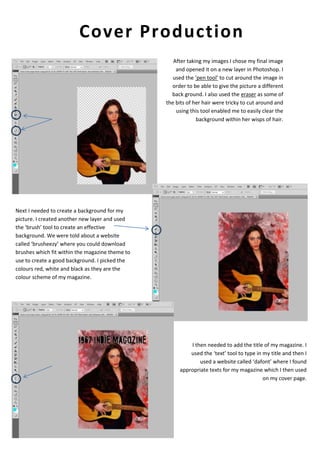
After taking my images I chose my final image
and opened it on a new layer in Photoshop. I
used the ‘pen tool’ to cut around the image in
order to be able to give the picture a different
back ground. I also used the eraser as some of
the bits of her hair were tricky to cut around and
using this tool enabled me to easily clear the
background within her wisps of hair.

Next I needed to create a background for my
picture. I created another new layer and used
the ‘brush’ tool to create an effective
background. We were told about a website
called ‘brusheezy’ where you could download
brushes which fit within the magazine theme to
use to create a good background. I picked the
colours red, white and black as they are the
colour scheme of my magazine.

I then needed to add the title of my magazine. I
used the ‘text’ tool to type in my title and then I
used a website called ‘dafont’ where I found
appropriate texts for my magazine which I then used
on my cover page.

Cover production 1

  • 1.
    Cover Production After takingmy images I chose my final image and opened it on a new layer in Photoshop. I used the ‘pen tool’ to cut around the image in order to be able to give the picture a different back ground. I also used the eraser as some of the bits of her hair were tricky to cut around and using this tool enabled me to easily clear the background within her wisps of hair. Next I needed to create a background for my picture. I created another new layer and used the ‘brush’ tool to create an effective background. We were told about a website called ‘brusheezy’ where you could download brushes which fit within the magazine theme to use to create a good background. I picked the colours red, white and black as they are the colour scheme of my magazine. I then needed to add the title of my magazine. I used the ‘text’ tool to type in my title and then I used a website called ‘dafont’ where I found appropriate texts for my magazine which I then used on my cover page.