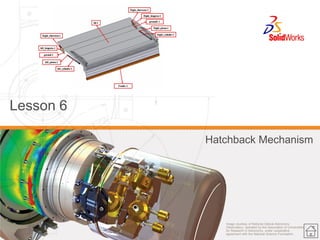
Image courtesy of National Optical Astronomy Observatory, operated by the Association of Universities for Research in Astronomy, under cooperative agreement with the National Science Foundation. 
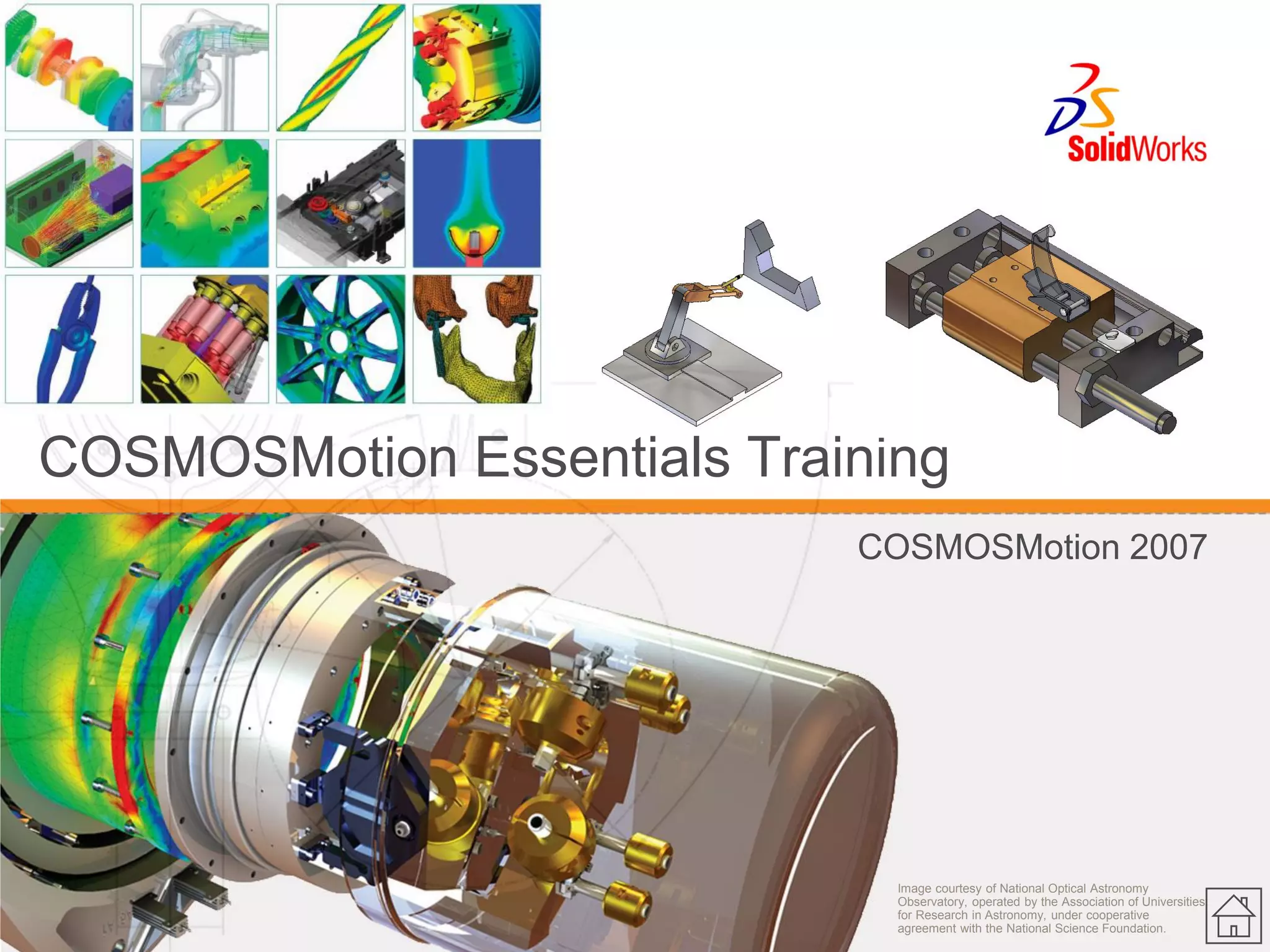
COSMOSMotion Essentials Training 
COSMOSMotion 2007
2 
© 2007 SolidWorks Corp. Confidential. 
About this course 
Prerequisites 
Course Design Philosophy 
Using this book 
A note about files 
Conventions used in this book 
Class Introductions
3 
© 2007 SolidWorks Corp. Confidential. 
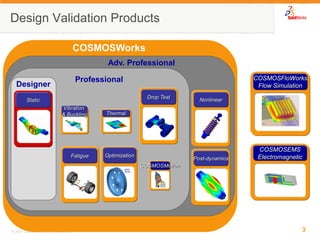
COSMOSWorks 
Adv. Professional 
Professional 
Design Validation Products 
Designer 
Static 
Vibration 
& Buckling 
Thermal 
Drop Test 
Fatigue 
Nonlinear 
Post-dynamics 
COSMOSEMS Electromagnetic 
COSMOSMotion 
COSMOSFloWorks 
Flow Simulation 
Optimization
4 
© 2007 SolidWorks Corp. Confidential. 
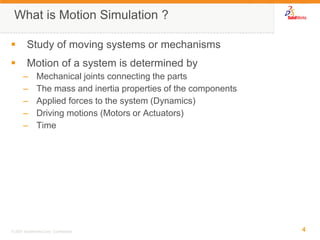
What is Motion Simulation ? 
Study of moving systems or mechanisms 
Motion of a system is determined by 
–Mechanical joints connecting the parts 
–The mass and inertia properties of the components 
–Applied forces to the system (Dynamics) 
–Driving motions (Motors or Actuators) 
–Time
5 
© 2007 SolidWorks Corp. Confidential. 
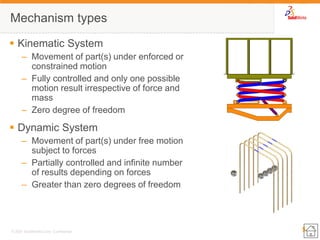
Mechanism types 
Kinematic System 
–Movement of part(s) under enforced or constrained motion 
–Fully controlled and only one possible motion result irrespective of force and mass 
–Zero degree of freedom 
Dynamic System 
–Movement of part(s) under free motion subject to forces 
–Partially controlled and infinite number of results depending on forces 
–Greater than zero degrees of freedom
6 
© 2007 SolidWorks Corp. Confidential. 
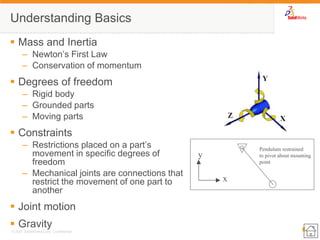
Understanding Basics 
Mass and Inertia 
–Newton’s First Law 
–Conservation of momentum 
Degrees of freedom 
–Rigid body 
–Grounded parts 
–Moving parts 
Constraints 
–Restrictions placed on a part’s movement in specific degrees of freedom 
–Mechanical joints are connections that restrict the movement of one part to another 
Joint motion 
Gravity 
x 
y 
Pendulum restrained 
to pivot about mounting 
point
7 
© 2007 SolidWorks Corp. Confidential. 
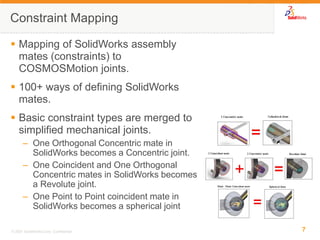
Mapping of SolidWorks assembly mates (constraints) to COSMOSMotion joints. 
100+ ways of defining SolidWorks mates. 
Basic constraint types are merged to simplified mechanical joints. 
–One Orthogonal Concentric mate in SolidWorks becomes a Concentric joint. 
–One Coincident and One Orthogonal Concentric mates in SolidWorks becomes a Revolute joint. 
–One Point to Point coincident mate in SolidWorks becomes a spherical joint 
Constraint Mapping
8 
© 2007 SolidWorks Corp. Confidential. 
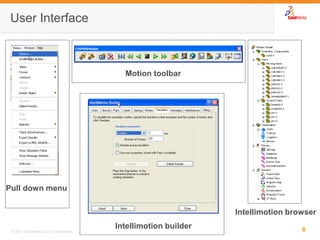
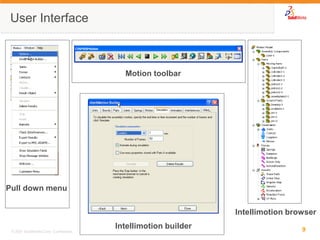
User Interface 
Pull down menu 
Intellimotion builder 
Motion toolbar 
Intellimotion browser
9 
© 2007 SolidWorks Corp. Confidential. 
User Interface 
Pull down menu 
Intellimotion builder 
Motion toolbar 
Intellimotion browser
Image courtesy of National Optical Astronomy Observatory, operated by the Association of Universities for Research in Astronomy, under cooperative agreement with the National Science Foundation. 
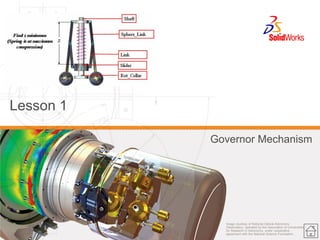
Lesson 1 
Governor Mechanism
11 
© 2007 SolidWorks Corp. Confidential. 
Lesson 1: Topics 
Introduction to the COSMOSMotion Feature Manager 
Understand basic capabilities of COSMOSMotion 
Run a Simulation 
Create a result plot
12 
© 2007 SolidWorks Corp. Confidential. 
Lesson 1: Defining and Simulating a Mechanism 
Parts 
–Moving Parts 
–Ground Parts 
Constraints 
–Joints 
–Joint Primitives 
–Cam Constraints 
Forces 
–Applied Forces 
–Flexible Connectors 
–Gravity 
Results 
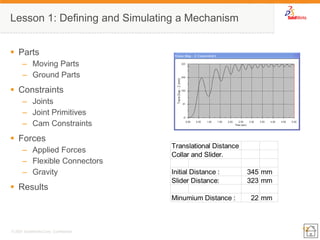
Translational DistanceCollar and Slider. Initial Distance :345mmSlider Distance:323mmMinumium Distance :22mm
Image courtesy of National Optical Astronomy Observatory, operated by the Association of Universities for Research in Astronomy, under cooperative agreement with the National Science Foundation. 
Lesson 2 
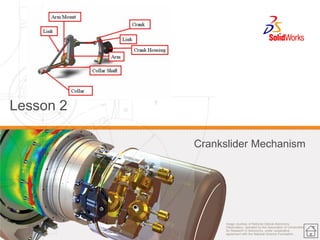
Crankslider Mechanism
14 
© 2007 SolidWorks Corp. Confidential. 
Lesson 2: Topics 
Create moving and ground parts 
Review basic joint types in COSMOSMotion 
Understand Automatic Constraint mapping 
Apply motion to a joint 
Create a result plot
15 
© 2007 SolidWorks Corp. Confidential. 
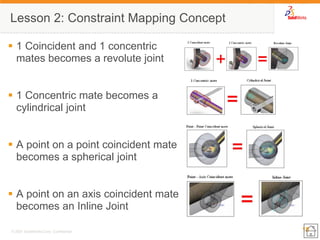
Lesson 2: Constraint Mapping Concept 
1 Coincident and 1 concentric mates becomes a revolute joint 
1 Concentric mate becomes a cylindrical joint 
A point on a point coincident mate becomes a spherical joint 
A point on an axis coincident mate becomes an Inline Joint
16 
© 2007 SolidWorks Corp. Confidential. 
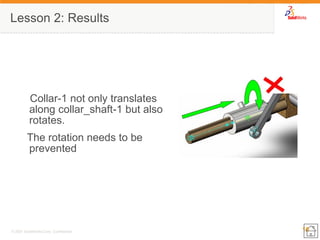
Lesson 2: Results 
Collar-1 not only translates along collar_shaft-1 but also rotates. 
The rotation needs to be prevented
17 
© 2007 SolidWorks Corp. Confidential. 
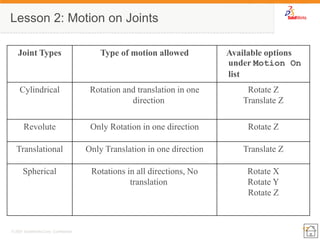
Lesson 2: Motion on Joints 
Joint Types 
Type of motion allowed 
Available options under Motion On list 
Cylindrical 
Rotation and translation in one direction 
Rotate Z 
Translate Z 
Revolute 
Only Rotation in one direction 
Rotate Z 
Translational 
Only Translation in one direction 
Translate Z 
Spherical 
Rotations in all directions, No translation 
Rotate X 
Rotate Y 
Rotate Z
18 
© 2007 SolidWorks Corp. Confidential. 
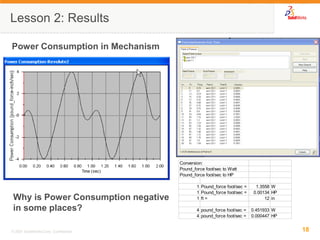
Lesson 2: Results 
Power Consumption in Mechanism 
Why is Power Consumption negative in some places? Conversion: Pound_force foot/sec to WattPound_force foot/sec to HP1Pound_force foot/sec =1.3558W1Pound_force foot/sec =0.00134HP1ft =12in4pound_force foot/sec =0.451933W4pound_force foot/sec =0.000447HP
Image courtesy of National Optical Astronomy Observatory, operated by the Association of Universities for Research in Astronomy, under cooperative agreement with the National Science Foundation. 
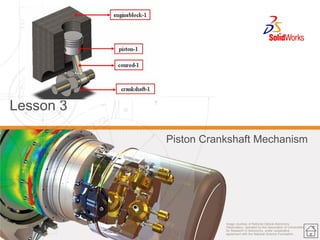
Lesson 3 
Piston Crankshaft Mechanism
20 
© 2007 SolidWorks Corp. Confidential. 
Lesson 3 Topics 
Review basic joint types in COSMOSMotion 
Create Mechanical Joints 
Apply motion to a joint 
Create and review results
21 
© 2007 SolidWorks Corp. Confidential. 
Lesson 3: Basic Joint Types 
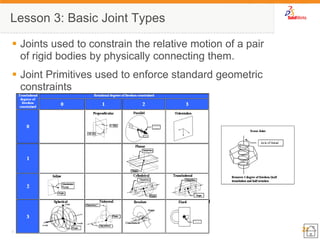
Joints used to constrain the relative motion of a pair of rigid bodies by physically connecting them. 
Joint Primitives used to enforce standard geometric constraints
22 
© 2007 SolidWorks Corp. Confidential. 
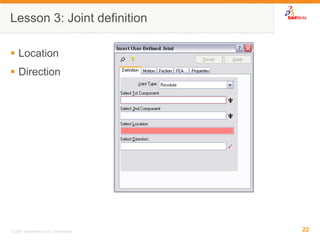
Lesson 3: Joint definition 
Location 
Direction
23 
© 2007 SolidWorks Corp. Confidential. 
Lesson 3 Results 
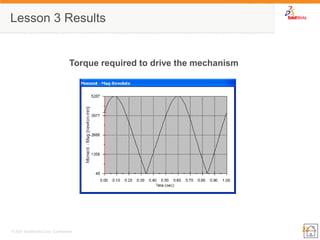
Torque required to drive the mechanism
Image courtesy of National Optical Astronomy Observatory, operated by the Association of Universities for Research in Astronomy, under cooperative agreement with the National Science Foundation. 
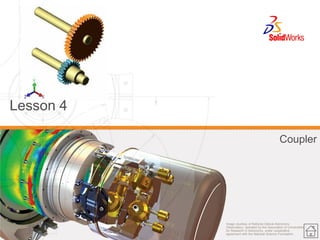
Lesson 4 
Coupler
25 
© 2007 SolidWorks Corp. Confidential. 
Lesson 4 Topics 
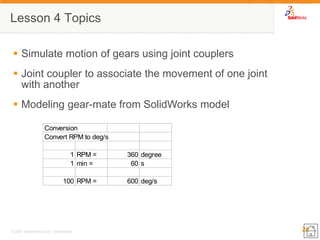
Simulate motion of gears using joint couplers 
Joint coupler to associate the movement of one joint with another 
Modeling gear-mate from SolidWorks model 
ConversionConvert RPM to deg/s1RPM =360degree1min =60s100RPM =600deg/s
26 
© 2007 SolidWorks Corp. Confidential. 
Lesson 4: Couplers 
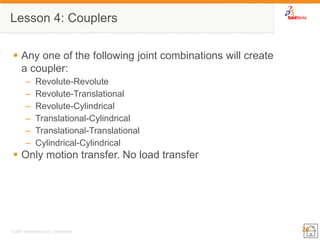
Any one of the following joint combinations will create a coupler: 
–Revolute-Revolute 
–Revolute-Translational 
–Revolute-Cylindrical 
–Translational-Cylindrical 
–Translational-Translational 
–Cylindrical-Cylindrical 
Only motion transfer. No load transfer
27 
© 2007 SolidWorks Corp. Confidential. 
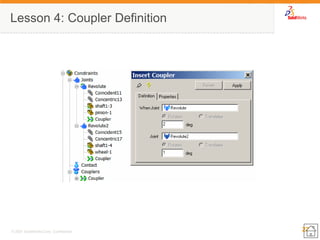
Lesson 4: Coupler Definition
28 
© 2007 SolidWorks Corp. Confidential. 
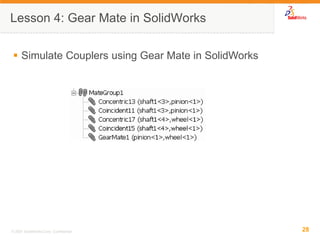
Simulate Couplers using Gear Mate in SolidWorks 
Lesson 4: Gear Mate in SolidWorks
Image courtesy of National Optical Astronomy Observatory, operated by the Association of Universities for Research in Astronomy, under cooperative agreement with the National Science Foundation. 
Lesson 5 
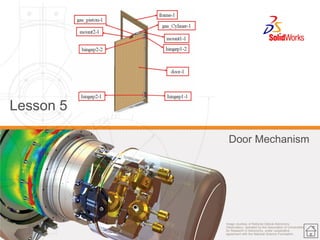
Door Mechanism
30 
© 2007 SolidWorks Corp. Confidential. 
Lesson 5 Topics 
Create springs and damper entities in COSMOSMotion 
Attach different parts together to move them as a single entity 
Constrain the motion of a cylindrical joint to achieve correct mechanism behavior 
Modify springs and dampers to achieve desired design goals
31 
© 2007 SolidWorks Corp. Confidential. 
Lesson 5 Attaching Parts 
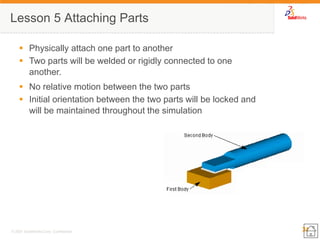
Physically attach one part to another 
Two parts will be welded or rigidly connected to one another. 
No relative motion between the two parts 
Initial orientation between the two parts will be locked and will be maintained throughout the simulation
32 
© 2007 SolidWorks Corp. Confidential. 
Lesson 5: Springs 
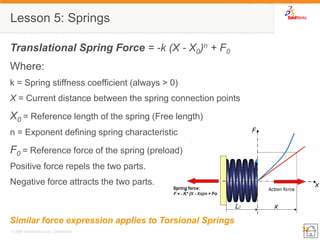
Translational Spring Force = -k (X - X0)n + F0 
Where: 
k = Spring stiffness coefficient (always > 0) 
X = Current distance between the spring connection points 
X0 = Reference length of the spring (Free length) 
n = Exponent defining spring characteristic 
F0 = Reference force of the spring (preload) 
Positive force repels the two parts. 
Negative force attracts the two parts. 
Similar force expression applies to Torsional Springs
33 
© 2007 SolidWorks Corp. Confidential. 
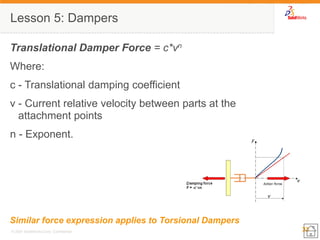
Lesson 5: Dampers 
Translational Damper Force = c*vn 
Where: 
c - Translational damping coefficient 
v - Current relative velocity between parts at the attachment points 
n - Exponent. 
Similar force expression applies to Torsional Dampers
34 
© 2007 SolidWorks Corp. Confidential. 
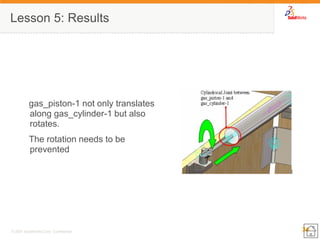
Lesson 5: Results 
gas_piston-1 not only translates along gas_cylinder-1 but also rotates. 
The rotation needs to be prevented
35 
© 2007 SolidWorks Corp. Confidential. 
Lesson 5: Results 
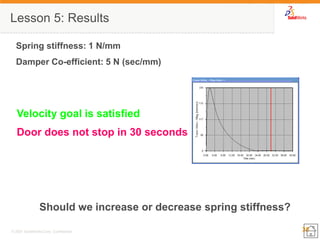
Velocity goal is satisfied 
Door does not stop in 30 seconds 
Should we increase or decrease spring stiffness? 
Spring stiffness: 1 N/mm 
Damper Co-efficient: 5 N (sec/mm)
36 
© 2007 SolidWorks Corp. Confidential. 
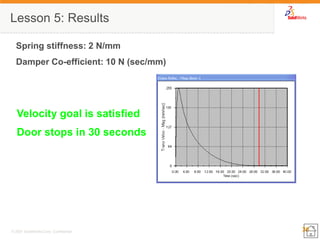
Lesson 5: Results 
Velocity goal is satisfied 
Door stops in 30 seconds 
Spring stiffness: 2 N/mm 
Damper Co-efficient: 10 N (sec/mm)
Image courtesy of National Optical Astronomy Observatory, operated by the Association of Universities for Research in Astronomy, under cooperative agreement with the National Science Foundation. 
Lesson 6 
Hatchback Mechanism
38 
© 2007 SolidWorks Corp. Confidential. 
Lesson 6 Topics 
Create an Action Only force to simulate an 
Change the mass properties of a part 
Use Impact forces to control two parts from interfering each other
39 
© 2007 SolidWorks Corp. Confidential. 
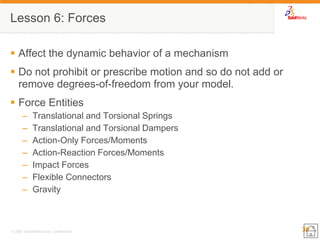
Affect the dynamic behavior of a mechanism 
Do not prohibit or prescribe motion and so do not add or remove degrees-of-freedom from your model. 
Force Entities 
–Translational and Torsional Springs 
–Translational and Torsional Dampers 
–Action-Only Forces/Moments 
–Action-Reaction Forces/Moments 
–Impact Forces 
–Flexible Connectors 
–Gravity 
Lesson 6: Forces
40 
© 2007 SolidWorks Corp. Confidential. 
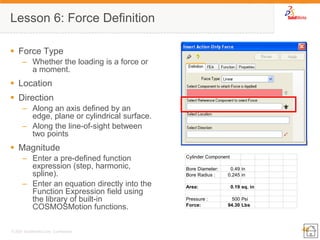
Lesson 6: Force Definition 
Force Type 
–Whether the loading is a force or a moment. 
Location 
Direction 
–Along an axis defined by an edge, plane or cylindrical surface. 
–Along the line-of-sight between two points 
Magnitude 
–Enter a pre-defined function expression (step, harmonic, spline). 
–Enter an equation directly into the Function Expression field using the library of built-in COSMOSMotion functions. Cylinder ComponentBore Diameter:0.49inBore Radius :0.245inArea:0.19sq. inPressure :500PsiForce:94.30Lbs
41 
© 2007 SolidWorks Corp. Confidential. 
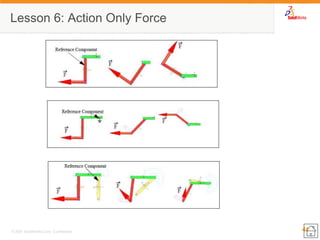
Lesson 6: Action Only Force
42 
© 2007 SolidWorks Corp. Confidential. 
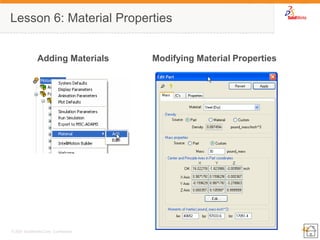
Lesson 6: Material Properties 
Adding Materials 
Modifying Material Properties
43 
© 2007 SolidWorks Corp. Confidential. 
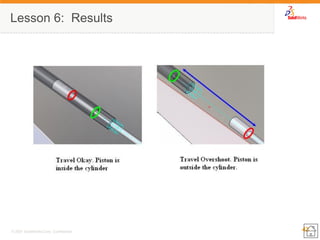
Lesson 6: Results
44 
© 2007 SolidWorks Corp. Confidential. 
Lesson 6: Impact Forces 
Intermittent force that is dependent on relative distance between two components). 
Impact forces are used to simulate the collision between two parts. 
As two parts approach within a specified distance, the impact force becomes active, and a force specified by the impact parameters is applied to both of the colliding parts. 
The collision is dependent on the materials and geometry of the bodies colliding.
45 
© 2007 SolidWorks Corp. Confidential. 
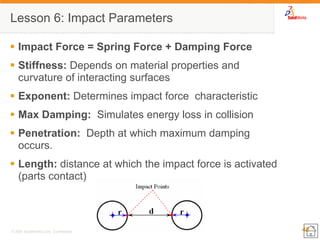
Impact Force = Spring Force + Damping Force 
Stiffness: Depends on material properties and curvature of interacting surfaces 
Exponent: Determines impact force characteristic 
Max Damping: Simulates energy loss in collision 
Penetration: Depth at which maximum damping occurs. 
Length: distance at which the impact force is activated (parts contact) 
Lesson 6: Impact Parameters
46 
© 2007 SolidWorks Corp. Confidential. 
Lesson 6: Impact Parameters 
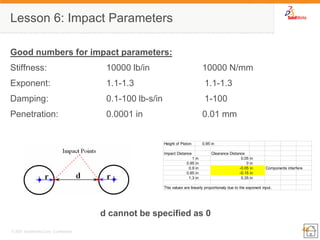
Good numbers for impact parameters: 
Stiffness: 10000 lb/in 10000 N/mm 
Exponent: 1.1-1.3 1.1-1.3 
Damping: 0.1-100 lb-s/in 1-100 
Penetration: 0.0001 in 0.01 mm 
d cannot be specified as 0 
Height of Piston:0.95inImpact Distance Clearance Distance 1in0.05in0.95in0in0.9in-0.05inComponents interfere0.85in-0.15in1.3in0.35inThis values are linearly proportionaly due to the exponent input.
47 
© 2007 SolidWorks Corp. Confidential. 
Lesson 6: Results 
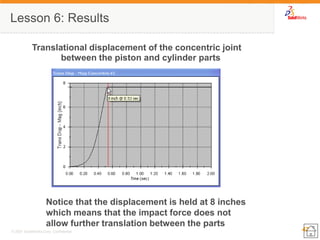
Translational displacement of the concentric joint between the piston and cylinder parts 
Notice that the displacement is held at 8 inches which means that the impact force does not allow further translation between the parts
48 
© 2007 SolidWorks Corp. Confidential. 
Lesson 6: Results 
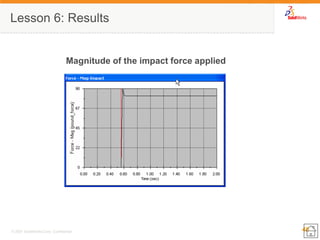
Magnitude of the impact force applied
Image courtesy of National Optical Astronomy Observatory, operated by the Association of Universities for Research in Astronomy, under cooperative agreement with the National Science Foundation. 
Lesson 7 
Contacts
50 
© 2007 SolidWorks Corp. Confidential. 
Lesson 7 Topics 
Apply Point to curve contact 
Apply Curve to curve contact 
Apply 3D Contact
51 
© 2007 SolidWorks Corp. Confidential. 
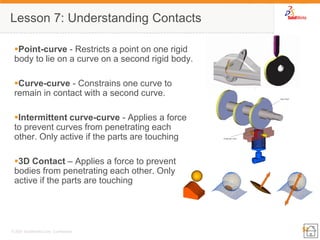
Point-curve - Restricts a point on one rigid body to lie on a curve on a second rigid body. 
Curve-curve - Constrains one curve to remain in contact with a second curve. 
Intermittent curve-curve - Applies a force to prevent curves from penetrating each other. Only active if the parts are touching 
3D Contact – Applies a force to prevent bodies from penetrating each other. Only active if the parts are touching 
Lesson 7: Understanding Contacts
52 
© 2007 SolidWorks Corp. Confidential. 
Contact is similar to an impact force in that the material properties of the parts are used to define the contact parameters. 
Contact differs from an impact force since any point along a curve or geometry is used in the contact 
Contact simulates friction forces between parts. 
Lesson 7: Impact Forces Vs Contacts
53 
© 2007 SolidWorks Corp. Confidential. 
Lesson 7: 3D Contact 
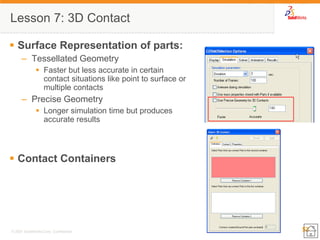
Surface Representation of parts: 
–Tessellated Geometry 
Faster but less accurate in certain contact situations like point to surface or multiple contacts 
–Precise Geometry 
Longer simulation time but produces accurate results 
Contact Containers
Image courtesy of National Optical Astronomy Observatory, operated by the Association of Universities for Research in Astronomy, under cooperative agreement with the National Science Foundation. 
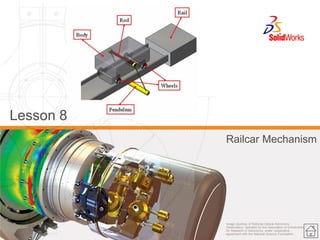
Lesson 8 
Railcar Mechanism
55 
© 2007 SolidWorks Corp. Confidential. 
Lesson 8: Topics 
Apply Gravity force to the mechanism 
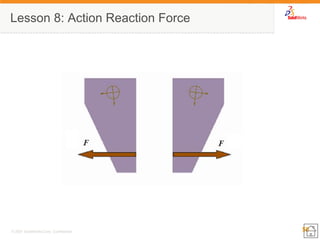
Create an Action-Reaction force to accelerate the railcar 
Learn some advanced plotting techniques in COSMOSMotion
56 
© 2007 SolidWorks Corp. Confidential. 
Lesson 8: Action Reaction Force
57 
© 2007 SolidWorks Corp. Confidential. 
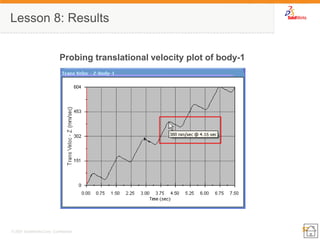
Lesson 8: Results 
Probing translational velocity plot of body-1
58 
© 2007 SolidWorks Corp. Confidential. 
Lesson 8: Results 
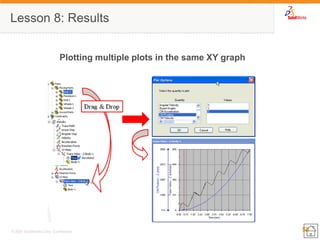
Plotting multiple plots in the same XY graph
59 
© 2007 SolidWorks Corp. Confidential. 
Lesson 8: Results 
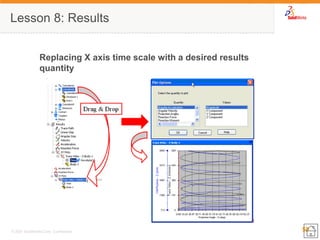
Replacing X axis time scale with a desired results quantity
Image courtesy of National Optical Astronomy Observatory, operated by the Association of Universities for Research in Astronomy, under cooperative agreement with the National Science Foundation. 
Lesson 9 
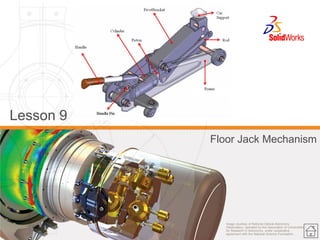
Floor Jack Mechanism
61 
© 2007 SolidWorks Corp. Confidential. 
Lesson 9 Topics 
 Apply motion to a part 
Use different types of motion functions 
Make a design change and study mechanical advantage
62 
© 2007 SolidWorks Corp. Confidential. 
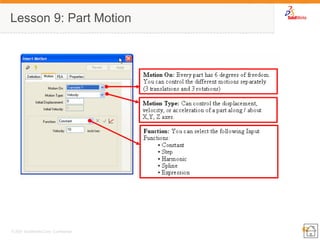
Lesson 9: Part Motion
63 
© 2007 SolidWorks Corp. Confidential. 
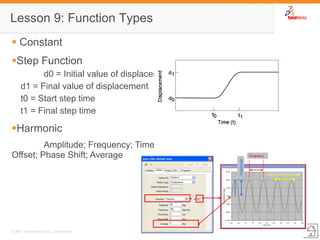
Lesson 9: Function Types 
 Constant 
Step Function 
d0 = Initial value of displacement 
d1 = Final value of displacement 
t0 = Start step time 
t1 = Final step time 
Harmonic 
Amplitude; Frequency; Time Offset; Phase Shift; Average
64 
© 2007 SolidWorks Corp. Confidential. 
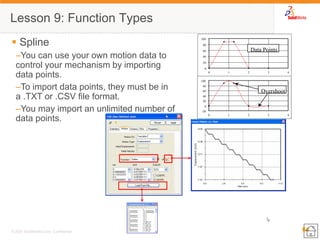
Lesson 9: Function Types 
 Spline 
–You can use your own motion data to control your mechanism by importing data points. 
–To import data points, they must be in a .TXT or .CSV file format. 
–You may import an unlimited number of data points. 
-20 
0 
20 
40 
60 
80 
100 
0 
1 
2 
3 
4 
Overshoot 
0 
20 
40 
60 
80 
100 
0 
1 
2 
3 
4 
Data Points
65 
© 2007 SolidWorks Corp. Confidential. 
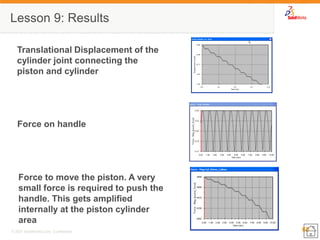
Lesson 9: Results 
Translational Displacement of the cylinder joint connecting the piston and cylinder 
Force on handle 
Force to move the piston. A very small force is required to push the handle. This gets amplified internally at the piston cylinder area

Cosmos work motion essential

  • 1.
    Image courtesy ofNational Optical Astronomy Observatory, operated by the Association of Universities for Research in Astronomy, under cooperative agreement with the National Science Foundation. COSMOSMotion Essentials Training COSMOSMotion 2007
  • 2.
    2 © 2007SolidWorks Corp. Confidential. About this course Prerequisites Course Design Philosophy Using this book A note about files Conventions used in this book Class Introductions
  • 3.
    3 © 2007SolidWorks Corp. Confidential. COSMOSWorks Adv. Professional Professional Design Validation Products Designer Static Vibration & Buckling Thermal Drop Test Fatigue Nonlinear Post-dynamics COSMOSEMS Electromagnetic COSMOSMotion COSMOSFloWorks Flow Simulation Optimization
  • 4.
    4 © 2007SolidWorks Corp. Confidential. What is Motion Simulation ? Study of moving systems or mechanisms Motion of a system is determined by –Mechanical joints connecting the parts –The mass and inertia properties of the components –Applied forces to the system (Dynamics) –Driving motions (Motors or Actuators) –Time
  • 5.
    5 © 2007SolidWorks Corp. Confidential. Mechanism types Kinematic System –Movement of part(s) under enforced or constrained motion –Fully controlled and only one possible motion result irrespective of force and mass –Zero degree of freedom Dynamic System –Movement of part(s) under free motion subject to forces –Partially controlled and infinite number of results depending on forces –Greater than zero degrees of freedom
  • 6.
    6 © 2007SolidWorks Corp. Confidential. Understanding Basics Mass and Inertia –Newton’s First Law –Conservation of momentum Degrees of freedom –Rigid body –Grounded parts –Moving parts Constraints –Restrictions placed on a part’s movement in specific degrees of freedom –Mechanical joints are connections that restrict the movement of one part to another Joint motion Gravity x y Pendulum restrained to pivot about mounting point
  • 7.
    7 © 2007SolidWorks Corp. Confidential. Mapping of SolidWorks assembly mates (constraints) to COSMOSMotion joints. 100+ ways of defining SolidWorks mates. Basic constraint types are merged to simplified mechanical joints. –One Orthogonal Concentric mate in SolidWorks becomes a Concentric joint. –One Coincident and One Orthogonal Concentric mates in SolidWorks becomes a Revolute joint. –One Point to Point coincident mate in SolidWorks becomes a spherical joint Constraint Mapping
  • 8.
    8 © 2007SolidWorks Corp. Confidential. User Interface Pull down menu Intellimotion builder Motion toolbar Intellimotion browser
  • 9.
    9 © 2007SolidWorks Corp. Confidential. User Interface Pull down menu Intellimotion builder Motion toolbar Intellimotion browser
  • 10.
    Image courtesy ofNational Optical Astronomy Observatory, operated by the Association of Universities for Research in Astronomy, under cooperative agreement with the National Science Foundation. Lesson 1 Governor Mechanism
  • 11.
    11 © 2007SolidWorks Corp. Confidential. Lesson 1: Topics Introduction to the COSMOSMotion Feature Manager Understand basic capabilities of COSMOSMotion Run a Simulation Create a result plot
  • 12.
    12 © 2007SolidWorks Corp. Confidential. Lesson 1: Defining and Simulating a Mechanism Parts –Moving Parts –Ground Parts Constraints –Joints –Joint Primitives –Cam Constraints Forces –Applied Forces –Flexible Connectors –Gravity Results Translational DistanceCollar and Slider. Initial Distance :345mmSlider Distance:323mmMinumium Distance :22mm
  • 13.
    Image courtesy ofNational Optical Astronomy Observatory, operated by the Association of Universities for Research in Astronomy, under cooperative agreement with the National Science Foundation. Lesson 2 Crankslider Mechanism
  • 14.
    14 © 2007SolidWorks Corp. Confidential. Lesson 2: Topics Create moving and ground parts Review basic joint types in COSMOSMotion Understand Automatic Constraint mapping Apply motion to a joint Create a result plot
  • 15.
    15 © 2007SolidWorks Corp. Confidential. Lesson 2: Constraint Mapping Concept 1 Coincident and 1 concentric mates becomes a revolute joint 1 Concentric mate becomes a cylindrical joint A point on a point coincident mate becomes a spherical joint A point on an axis coincident mate becomes an Inline Joint
  • 16.
    16 © 2007SolidWorks Corp. Confidential. Lesson 2: Results Collar-1 not only translates along collar_shaft-1 but also rotates. The rotation needs to be prevented
  • 17.
    17 © 2007SolidWorks Corp. Confidential. Lesson 2: Motion on Joints Joint Types Type of motion allowed Available options under Motion On list Cylindrical Rotation and translation in one direction Rotate Z Translate Z Revolute Only Rotation in one direction Rotate Z Translational Only Translation in one direction Translate Z Spherical Rotations in all directions, No translation Rotate X Rotate Y Rotate Z
  • 18.
    18 © 2007SolidWorks Corp. Confidential. Lesson 2: Results Power Consumption in Mechanism Why is Power Consumption negative in some places? Conversion: Pound_force foot/sec to WattPound_force foot/sec to HP1Pound_force foot/sec =1.3558W1Pound_force foot/sec =0.00134HP1ft =12in4pound_force foot/sec =0.451933W4pound_force foot/sec =0.000447HP
  • 19.
    Image courtesy ofNational Optical Astronomy Observatory, operated by the Association of Universities for Research in Astronomy, under cooperative agreement with the National Science Foundation. Lesson 3 Piston Crankshaft Mechanism
  • 20.
    20 © 2007SolidWorks Corp. Confidential. Lesson 3 Topics Review basic joint types in COSMOSMotion Create Mechanical Joints Apply motion to a joint Create and review results
  • 21.
    21 © 2007SolidWorks Corp. Confidential. Lesson 3: Basic Joint Types Joints used to constrain the relative motion of a pair of rigid bodies by physically connecting them. Joint Primitives used to enforce standard geometric constraints
  • 22.
    22 © 2007SolidWorks Corp. Confidential. Lesson 3: Joint definition Location Direction
  • 23.
    23 © 2007SolidWorks Corp. Confidential. Lesson 3 Results Torque required to drive the mechanism
  • 24.
    Image courtesy ofNational Optical Astronomy Observatory, operated by the Association of Universities for Research in Astronomy, under cooperative agreement with the National Science Foundation. Lesson 4 Coupler
  • 25.
    25 © 2007SolidWorks Corp. Confidential. Lesson 4 Topics Simulate motion of gears using joint couplers Joint coupler to associate the movement of one joint with another Modeling gear-mate from SolidWorks model ConversionConvert RPM to deg/s1RPM =360degree1min =60s100RPM =600deg/s
  • 26.
    26 © 2007SolidWorks Corp. Confidential. Lesson 4: Couplers Any one of the following joint combinations will create a coupler: –Revolute-Revolute –Revolute-Translational –Revolute-Cylindrical –Translational-Cylindrical –Translational-Translational –Cylindrical-Cylindrical Only motion transfer. No load transfer
  • 27.
    27 © 2007SolidWorks Corp. Confidential. Lesson 4: Coupler Definition
  • 28.
    28 © 2007SolidWorks Corp. Confidential. Simulate Couplers using Gear Mate in SolidWorks Lesson 4: Gear Mate in SolidWorks
  • 29.
    Image courtesy ofNational Optical Astronomy Observatory, operated by the Association of Universities for Research in Astronomy, under cooperative agreement with the National Science Foundation. Lesson 5 Door Mechanism
  • 30.
    30 © 2007SolidWorks Corp. Confidential. Lesson 5 Topics Create springs and damper entities in COSMOSMotion Attach different parts together to move them as a single entity Constrain the motion of a cylindrical joint to achieve correct mechanism behavior Modify springs and dampers to achieve desired design goals
  • 31.
    31 © 2007SolidWorks Corp. Confidential. Lesson 5 Attaching Parts Physically attach one part to another Two parts will be welded or rigidly connected to one another. No relative motion between the two parts Initial orientation between the two parts will be locked and will be maintained throughout the simulation
  • 32.
    32 © 2007SolidWorks Corp. Confidential. Lesson 5: Springs Translational Spring Force = -k (X - X0)n + F0 Where: k = Spring stiffness coefficient (always > 0) X = Current distance between the spring connection points X0 = Reference length of the spring (Free length) n = Exponent defining spring characteristic F0 = Reference force of the spring (preload) Positive force repels the two parts. Negative force attracts the two parts. Similar force expression applies to Torsional Springs
  • 33.
    33 © 2007SolidWorks Corp. Confidential. Lesson 5: Dampers Translational Damper Force = c*vn Where: c - Translational damping coefficient v - Current relative velocity between parts at the attachment points n - Exponent. Similar force expression applies to Torsional Dampers
  • 34.
    34 © 2007SolidWorks Corp. Confidential. Lesson 5: Results gas_piston-1 not only translates along gas_cylinder-1 but also rotates. The rotation needs to be prevented
  • 35.
    35 © 2007SolidWorks Corp. Confidential. Lesson 5: Results Velocity goal is satisfied Door does not stop in 30 seconds Should we increase or decrease spring stiffness? Spring stiffness: 1 N/mm Damper Co-efficient: 5 N (sec/mm)
  • 36.
    36 © 2007SolidWorks Corp. Confidential. Lesson 5: Results Velocity goal is satisfied Door stops in 30 seconds Spring stiffness: 2 N/mm Damper Co-efficient: 10 N (sec/mm)
  • 37.
    Image courtesy ofNational Optical Astronomy Observatory, operated by the Association of Universities for Research in Astronomy, under cooperative agreement with the National Science Foundation. Lesson 6 Hatchback Mechanism
  • 38.
    38 © 2007SolidWorks Corp. Confidential. Lesson 6 Topics Create an Action Only force to simulate an Change the mass properties of a part Use Impact forces to control two parts from interfering each other
  • 39.
    39 © 2007SolidWorks Corp. Confidential. Affect the dynamic behavior of a mechanism Do not prohibit or prescribe motion and so do not add or remove degrees-of-freedom from your model. Force Entities –Translational and Torsional Springs –Translational and Torsional Dampers –Action-Only Forces/Moments –Action-Reaction Forces/Moments –Impact Forces –Flexible Connectors –Gravity Lesson 6: Forces
  • 40.
    40 © 2007SolidWorks Corp. Confidential. Lesson 6: Force Definition Force Type –Whether the loading is a force or a moment. Location Direction –Along an axis defined by an edge, plane or cylindrical surface. –Along the line-of-sight between two points Magnitude –Enter a pre-defined function expression (step, harmonic, spline). –Enter an equation directly into the Function Expression field using the library of built-in COSMOSMotion functions. Cylinder ComponentBore Diameter:0.49inBore Radius :0.245inArea:0.19sq. inPressure :500PsiForce:94.30Lbs
  • 41.
    41 © 2007SolidWorks Corp. Confidential. Lesson 6: Action Only Force
  • 42.
    42 © 2007SolidWorks Corp. Confidential. Lesson 6: Material Properties Adding Materials Modifying Material Properties
  • 43.
    43 © 2007SolidWorks Corp. Confidential. Lesson 6: Results
  • 44.
    44 © 2007SolidWorks Corp. Confidential. Lesson 6: Impact Forces Intermittent force that is dependent on relative distance between two components). Impact forces are used to simulate the collision between two parts. As two parts approach within a specified distance, the impact force becomes active, and a force specified by the impact parameters is applied to both of the colliding parts. The collision is dependent on the materials and geometry of the bodies colliding.
  • 45.
    45 © 2007SolidWorks Corp. Confidential. Impact Force = Spring Force + Damping Force Stiffness: Depends on material properties and curvature of interacting surfaces Exponent: Determines impact force characteristic Max Damping: Simulates energy loss in collision Penetration: Depth at which maximum damping occurs. Length: distance at which the impact force is activated (parts contact) Lesson 6: Impact Parameters
  • 46.
    46 © 2007SolidWorks Corp. Confidential. Lesson 6: Impact Parameters Good numbers for impact parameters: Stiffness: 10000 lb/in 10000 N/mm Exponent: 1.1-1.3 1.1-1.3 Damping: 0.1-100 lb-s/in 1-100 Penetration: 0.0001 in 0.01 mm d cannot be specified as 0 Height of Piston:0.95inImpact Distance Clearance Distance 1in0.05in0.95in0in0.9in-0.05inComponents interfere0.85in-0.15in1.3in0.35inThis values are linearly proportionaly due to the exponent input.
  • 47.
    47 © 2007SolidWorks Corp. Confidential. Lesson 6: Results Translational displacement of the concentric joint between the piston and cylinder parts Notice that the displacement is held at 8 inches which means that the impact force does not allow further translation between the parts
  • 48.
    48 © 2007SolidWorks Corp. Confidential. Lesson 6: Results Magnitude of the impact force applied
  • 49.
    Image courtesy ofNational Optical Astronomy Observatory, operated by the Association of Universities for Research in Astronomy, under cooperative agreement with the National Science Foundation. Lesson 7 Contacts
  • 50.
    50 © 2007SolidWorks Corp. Confidential. Lesson 7 Topics Apply Point to curve contact Apply Curve to curve contact Apply 3D Contact
  • 51.
    51 © 2007SolidWorks Corp. Confidential. Point-curve - Restricts a point on one rigid body to lie on a curve on a second rigid body. Curve-curve - Constrains one curve to remain in contact with a second curve. Intermittent curve-curve - Applies a force to prevent curves from penetrating each other. Only active if the parts are touching 3D Contact – Applies a force to prevent bodies from penetrating each other. Only active if the parts are touching Lesson 7: Understanding Contacts
  • 52.
    52 © 2007SolidWorks Corp. Confidential. Contact is similar to an impact force in that the material properties of the parts are used to define the contact parameters. Contact differs from an impact force since any point along a curve or geometry is used in the contact Contact simulates friction forces between parts. Lesson 7: Impact Forces Vs Contacts
  • 53.
    53 © 2007SolidWorks Corp. Confidential. Lesson 7: 3D Contact Surface Representation of parts: –Tessellated Geometry Faster but less accurate in certain contact situations like point to surface or multiple contacts –Precise Geometry Longer simulation time but produces accurate results Contact Containers
  • 54.
    Image courtesy ofNational Optical Astronomy Observatory, operated by the Association of Universities for Research in Astronomy, under cooperative agreement with the National Science Foundation. Lesson 8 Railcar Mechanism
  • 55.
    55 © 2007SolidWorks Corp. Confidential. Lesson 8: Topics Apply Gravity force to the mechanism Create an Action-Reaction force to accelerate the railcar Learn some advanced plotting techniques in COSMOSMotion
  • 56.
    56 © 2007SolidWorks Corp. Confidential. Lesson 8: Action Reaction Force
  • 57.
    57 © 2007SolidWorks Corp. Confidential. Lesson 8: Results Probing translational velocity plot of body-1
  • 58.
    58 © 2007SolidWorks Corp. Confidential. Lesson 8: Results Plotting multiple plots in the same XY graph
  • 59.
    59 © 2007SolidWorks Corp. Confidential. Lesson 8: Results Replacing X axis time scale with a desired results quantity
  • 60.
    Image courtesy ofNational Optical Astronomy Observatory, operated by the Association of Universities for Research in Astronomy, under cooperative agreement with the National Science Foundation. Lesson 9 Floor Jack Mechanism
  • 61.
    61 © 2007SolidWorks Corp. Confidential. Lesson 9 Topics  Apply motion to a part Use different types of motion functions Make a design change and study mechanical advantage
  • 62.
    62 © 2007SolidWorks Corp. Confidential. Lesson 9: Part Motion
  • 63.
    63 © 2007SolidWorks Corp. Confidential. Lesson 9: Function Types  Constant Step Function d0 = Initial value of displacement d1 = Final value of displacement t0 = Start step time t1 = Final step time Harmonic Amplitude; Frequency; Time Offset; Phase Shift; Average
  • 64.
    64 © 2007SolidWorks Corp. Confidential. Lesson 9: Function Types  Spline –You can use your own motion data to control your mechanism by importing data points. –To import data points, they must be in a .TXT or .CSV file format. –You may import an unlimited number of data points. -20 0 20 40 60 80 100 0 1 2 3 4 Overshoot 0 20 40 60 80 100 0 1 2 3 4 Data Points
  • 65.
    65 © 2007SolidWorks Corp. Confidential. Lesson 9: Results Translational Displacement of the cylinder joint connecting the piston and cylinder Force on handle Force to move the piston. A very small force is required to push the handle. This gets amplified internally at the piston cylinder area