Arulalan.T

          Final Year MCA

          Saveetha Engg College
Project Title              


            Contour Analysis And     
                   Visualization

Guide


    Mr.Thyagarajan Shanmugham
Thanks To . . .              


            Mr.Charles Doutriaux 
                     CDAT Developer 


           Dr. Krishna AchutaRao 
                Center for Atmospheric Science  
                         IIT Delhi


            CDAT 
             Climate Data Analysis Tool
Installation 

Working in Cdat

Edit Cdat Map

Isolines

NetCDF

Demo on creating current isotherm lines over on India map 
System requirement


 Hardware

    * Dual Core Intel 2 Ghz Processor Machine
    * Decent Broadband Connection


Software

    * A linux distro ­ in my case Ubuntu 9.10
    * CDAT
    * Dependencies of CDAT 
Dependencies :
# bison *
# byacc *
# flex *
# gawk *
# g++
# gfortran (for contrib packages)
# libxt­dev
# libx11­dev
# tcsh (just highly recomended)
# xorg­dev (also called xserver­xorg­dev)
#libpng (1.1 or later ) and freetype (1.4 or later)
Installation :
export CC=gcc
export FC=gfortran
export CXX=g++


svn export http://www­
pcmdi.llnl.gov/svn/repository/cdat/tags/5.2    cdat­5.2­src

./configure ­­prefix=/usr/local/cdat5.2/     
                    ­­with­externals=/usr/local/cdat5.2/cdat_ext.

sudo make
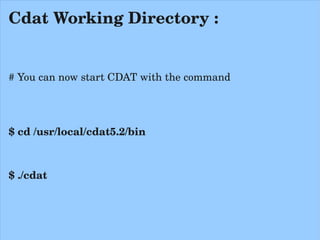
Cdat Working Directory :


# You can now start CDAT with the command


$ cd /usr/local/cdat5.2/bin


$ ./cdat
Cdat Working Directory :


# You can now start CDAT with the command


$ cd /usr/local/cdat5.2/bin


$ ./cdat
Example Program
#sample.py

import vcs, cdms2, cdutil, time, os, sys
import time

v = vcs.init()

filepath = os.path.join(sys.prefix,'sample_data/clt.nc')
cdmsfile = cdms2.open( filepath )

cf_asd = v.getboxfill( 'ASD' )
cf_asd.datawc(1e20,1e20,1e20,1e20) 
cf_asd.level_1=1e20        
cf_asd.level_2=1e20         
cf_asd.color_1=240        
cf_asd.color_2=240  

data = cdmsfile('clt', longitude=(­180, 180), latitude = (­180., 180.)) 

#data = cdmsfile('clt', longitude=(60, 100), latitude = (5., 40.))  # For India

v.plot( data,cf_asd )
 Cdat   World Map ­ Outline
   Cdat   India Map ­ Outline
#sample1.py

import vcs, cdms2, cdutil, time, os, sys
import time

v = vcs.init()

filepath = os.path.join(sys.prefix,'sample_data/clt.nc')
cdmsfile = cdms2.open( filepath )

cf_asd = v.getboxfill( 'ASD' )
cf_asd.datawc(1e20,1e20,1e20,1e20) 
cf_asd.level_1=1e20        
cf_asd.level_2=1e20         
cf_asd.color_1=240        
cf_asd.color_2=240  

data = cdmsfile('clt', longitude=(­180, 180), latitude = (­180., 180.)) 

#data = cdmsfile('clt', longitude=(60, 100), latitude = (5., 40.))  # For 
India
v.plot( data,cf_asd , continents=4 )
     Cdat   World Map ­ Continents
       Cdat   India Map ­ Continents
How To Edit Cdat Map
Our Indian Political Map wrongly depicted in CDAT as below
1) Correcting the Pakistan part , which belongs to India


2) Correcting the part of the land which is occupied by the 
Chinese in the state of jammu and kashmir


   While asking help from Mr.Charles Doutriaux [ CDAT ­ 
Developer ] regarding edit map in cdat, he gave the source 
data of cdat world map in .shp binary file.
#make_world_co­ordinates.py

import vcsaddons

v = vcs.init()

world_continents = vcsaddons.continents.Guc(x=v)

data = world_continents.load_shapefile('/home/arul/Desktop/WORLD_COUNTRIES.shp')

#wrting the data into out.txt file

fileiter=open("/home/arul/Desktop/out.txt","w")
print >> fileiter, data[:]
fileiter.close()
 out.txt
200 1 59.790276 83.623596 ­72.830238 ­12.204896 
60.238045 ­43.123886
60.174297 ­43.109169
60.110275 ­43.086662
60.082497 ­43.124443
60.019024 ­43.140419
59.989437 ­43.193470
59.992493 ­43.238892              There are more than one lakh lines like this. 
60.023605 ­43.331116
59.972763 ­43.358894              These are x,y co­ordinate points. 
59.928326 ­43.395832
59.903320 ­43.501945              Simply says, these are Latitude and 
59.954636 ­43.488258
                                  Longitude values of the whole [real] world.
59.914711 ­43.572777
59.947212 ­43.724716
59.877213 ­43.653885
59.804436 ­43.849724
59.790276 ­43.902222
59.811661 ­44.006950
59.800545 ­44.061943
59.813538 ­44.109722
My  Hacks On Cdat Map
Over World
    Over  India
My  Construction On      
     Cdat India Map
Finally
Our India
Now we have to save as the modified  out.txt  file             
     i.e WorldContinent.shp's  text file in the name of               
              “data_continent_other7” in the path                      
                    “/home/arul/PCMDI_GRAPHICS/”


   v.plot( data,cf_asd , continents=6 )
#sample2.py

import vcs, cdms2, cdutil, time, os, sys
import time

v = vcs.init()

filepath = os.path.join(sys.prefix,'sample_data/clt.nc')
cdmsfile = cdms2.open( filepath )

cf_asd = v.getboxfill( 'ASD' )
cf_asd.datawc(1e20,1e20,1e20,1e20) 
cf_asd.level_1=1e20        
cf_asd.level_2=1e20         
cf_asd.color_1=240        
cf_asd.color_2=240  

#data = cdmsfile('clt', longitude=(­180, 180), latitude = (­180., 180.)) # For 
the world

data = cdmsfile('clt', longitude=(60, 100), latitude = (5., 40.))  

v.plot( data,cf_asd, continents=6 )
 Corrected India Map in Cdat
 Corrected India region in Cdat­World Map
  Isolines
  Isolines
      ­ Contour
      ­ Isotherm
      ­ Isobar
What is Contour ?

   Contour is line drawn on a map connecting points of equal
height .

   Contour lines (also isolines) connect a series of points of 
equal elevation and are used to illustrate topography, or 
relief
 on a map. 

   They show the height of ground above Mean Sea Level 
(M.S.L.) in either feet or meters and can be drawn at any 
desired interval. 
 
What is Isotherm ?


   An isotherm ( meaning 'heat') is a line that connects 
points on a map that have the same temperature.

  Therefore, all points through which an isotherm 
passes have the same temperatures at the time 
indicated.
 
What is Isobar ?


    A line of constant pressure. Isobars are found ONLY 
on surface charts. 
   They most commonly connect lines of equal pressure 
in the units of millibars. 
   High pressure isobars generally occurs with isobars 
above 1010 mb while low pressure isobars occur with 
lower than 1010 millibars.
 
What are the Uses of Isotherm ?

      Isotherms are used to find regions with 

         * Warm air advection    
         * Cold air advection 
         * Short waves
         * Fronts
         * Temperature gradient boundaries    and 
         * Instability zones.

       They are most commonly used at pressure 
surfaces below 500 millibars and on surface charts.
Isolines in Cdat
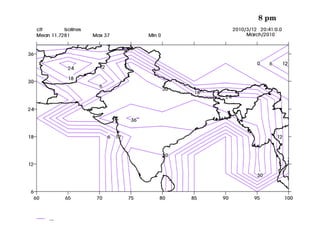
Iso Lines Over India Map
CDAT User :


How can a user create their own Isolines 
on cdat map?
CDAT User :


Generally we can't create our own isolines in 
cdat map.

We can set only levels on isolines.
levels = [10,20,30]
     Reason is  . . . 
NetCDF file
What is NetCDF File ?

     NetCDF (network Common Data Form)

     is a set of software libraries and machine-
independent data formats that support the creation,
access, and sharing of array-oriented scientific data.
Purpose of NetCDF (.nc)File


     The main purpose of netCDF is to protect
the user from having to know the details of how
the data is stored in the netCDF file.

    Cdat have clt.nc file which is reason to
create isolines on map.
My Project
is going to create our own isolines on
cdat map.
How to read/write NetCDF 
(clt.nc) file ?
$ sudo apt-get install netcdf-bin

To convert .nc binary into editable text
$ ncdump clt.nc > clt.cdl

To generate clt.nc from edited clt.cdl file
$ ncgen -b clt.cdl
What is My Project ?


     My Project going to create the isotherm
lines, which will be plot on India Cdat Map.

     We have 4 processes to do this . . .
       .
Process 1:


  1.1  WebScrape the current temperature and 
 barometer (millibar) of all over cities in India and 
 its surroundings countries from the Internet.

 1.2 Store the city name, temperature, millibar 
 into the file.
Process 2:


2.1 Combine the temperature and mb values with 
latitude and longitude of corresponding cities, which 
is already collected info file.

2.2  Make decision and covert lat into 4 intervals & 
lon into 5 intervals
Process 3:


3.1  Create the binary iso.nc file which contains 
current temperature values along with lat & lon. 


3.2  Move the “iso.nc” to the cdat location in our 
system.
Process 4:


4.1  Run the “isotherm.py” to create our isolines on 
cdat India Map. 


4.2  E­Mail to us with the attachment of the output 
image, which is created by “isotherm.py”
To automate all the 4 processes
      we may use “crontab” 
to get isotherm update on India 
    for every one hour or . . .
Data Flow Diagram For Generating Isothermal Lines From Google Temperature


     Google                 Web Scraping
     Temperature              Program
     Values


                          Store the Google
                          Temperature Values
                          into the File


                           Draw Isothermal             Isothermal Lines
                           Lines from the                On Cdat Map
                           File Values
Before going to Demo . . .
 On 12 th Mar 2010 isotherm
    lines on India from 
       1 pm to 11 pm
               1 pm
  4 pm
5 pm
6 pm
7 pm
  8 pm
 9 pm
 10 pm
11 pm
12 am
Demo . . . !
Coding . . .
Applications :


  By the visualization of Isothermal lines on map, we can 
analyses and obtain the temperature and pressure 
values.

    Using this we can analysis/predict the climate changes.

      
Applications :


 .

        Advection ­ The horizontal transfer of 
                                         heat
 
      Forecaster ­  Someone who makes 
                    predictions of the future


Applications of isolines :
           ­By Meteorologist Jeff Haby


   Q1. What is meteorologically significant about isobars or 
isohypses being closely spaced?

   Answer: A forecaster can determine the amount of thermal 
advection (temperature advection). Closely spaced contours 
indicate stronger wind.


       Source :   http://www.theweatherprediction.com/basic/isopleths/
Applications of isolines :
           ­By Meteorologist Jeff Haby


   Q2. Negative thickness advection is lower values of 
thickness moving toward a fixed point. How can this be 
determined by examining a thickness chart?

   Answer: If height contours or isobars are overlaid on the 
thickness field, a forecaster can determine the speed and 
direction cold air will have. If the lower thicknesses are 
advected by the height contours or isobars toward a fixed 
point, that fixed point will experience a cooling of weather.

     
        Source :   http://www.theweatherprediction.com/basic/isopleths/
Applications of isolines :
           ­By Meteorologist Jeff Haby


  Q3. In feet and meters, what is the average height of the 
850, 700, 500 and 300 mb surfaces?

  Answer:

  850 mb (1,500 meters, 5,000 feet)
  700 mb (3,100 meters, 10,000 feet)
  500 mb (5,500 meters, 18,000 feet)
  300 mb (9,300 meters. 30,000 feet)

    
   Source :   http://www.theweatherprediction.com/basic/isopleths/
Applications :


Isallobar / Height change contours­

     A line of equal pressure change. They 
are used to forecast the propagation of low 
and high pressure systems
      
Applications of isolines :
           ­By Meteorologist Jeff Haby


  Q4. How are isallobars significant to weather forecasting?

   Answer: They give the indication of pressure change. Lows 
tend to move toward the region with the greatest height falls. 
Values tell a forecaster if a low or high is increase or 
decreasing in intensity..


   Source :   http://www.theweatherprediction.com/basic/isopleths/
    THANK YOU

Contour Ilugc Demo Presentation