Content Strategy
A Guide for UX Designers
by Liam King
Content Strategy
A Guide for UX Designers
by Liam King
Introduction
Chapter One
Define Content
Chapter Two
Design (Content Models)
5	 Great user experience needs great content
6	 Guide overview
7	 Introducing our client: Balmain University
10	 User Stories
15	 Activity: Competitor Analysis
19	 Activity: Mapping User Flows
23	 Concept Sketching
23 6-up brainstorm
26 Present, critique, and vote on 6-up sheets
27 1-up activity
28 Present and critique 1-up sheets
30	 Start Defining Your Content Model
Table of Contents
Chapter Three
Prototyping with Proto-Content
36	 What’s wrong with Lorem Ipsum?
37	 Working with proto-content
Chapter Four
Validate Content
41	 Usability testing
43	 Hypothesise, iterate, (re)validate
48	 Here’s what our experts think about content strategy and UX
59	 About the author
Guide Overview
This hands-on guide for all UXers explores the
intersection of content strategy and UX design
on a website design project.
We’ll show you how to embed content-first
thinking into popular UX design techniques to
reveal powerful insights about the content, that
lead to a better user experience.
We’ve worked up lots of example outputs so
you can see it all in action.
Content Strategy
A Guide for UX Designers
by Liam King
7
Introducing our client:
Balmain University
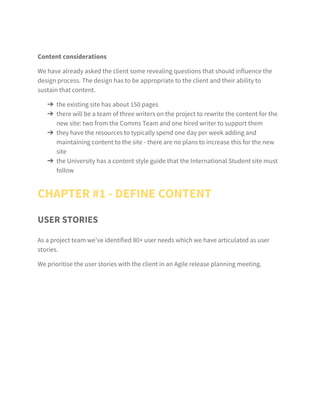
Balmain University will be the fictitious client for our example
project for this guide.
Project
B​U International Student website re-design
Scenario
T​he International Office have commissioned us to run an end-to-
end redesign and build of their existing International Student site.
The initial discovery and user research phase has been completed
and we now have an unprioritised set of user stories.
Our objective
W​e now need to define, design, prototype and validate the core user
interfaces and templates required to satisfy the highest priority
user stories. We are going to adopt a content first approach at each
stage.
Assumptions
This is an agile project that is constructed around user story
(needs) that have emerged from the user research.
8
Content considerations
We have already asked the client some revealing questions
that should influence the design process. The design has to be
appropriate to the client and their ability to sustain that content.
›› the existing site has about 150 pages
›› there will be a team of three writers on the project to rewrite
the content for the new site: two from the Comms Team and
one hired writer to support them
›› they have the resources to typically spend one day per week
adding and maintaining content to the site - there are no plans
to increase this for the new site
›› the University has a content style guide that the International
Student site must follow
Chapter One
Define Content
10
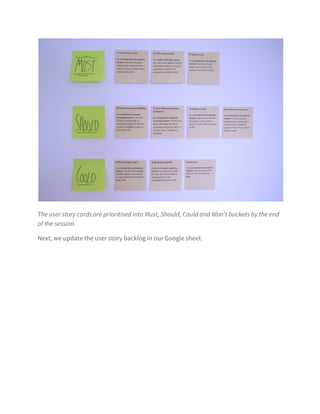
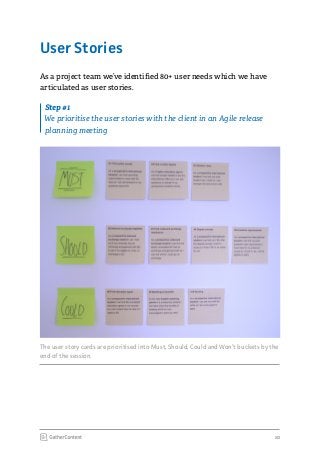
The user story cards are prioritised into Must, Should, Could and Won’t buckets by the
end of the session.
User Stories
As a project team we’ve identified 80+ user needs which we have
articulated as user stories.Next
Step #1
We prioritise the user stories with the client in an Agile release
planning meeting
11
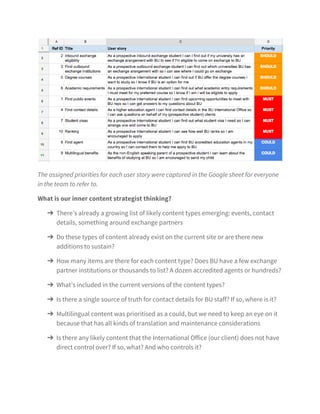
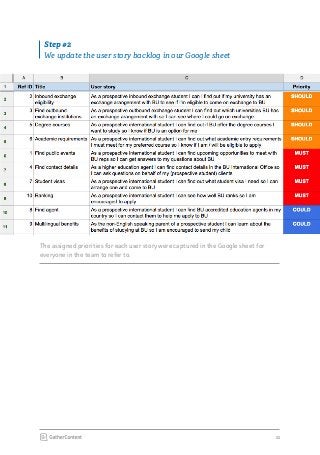
The assigned priorities for each user story were captured in the Google sheet for
everyone in the team to refer to.
Step #2
We update the user story backlog in our Google sheet
12
What is our inner content strategist
thinking?
›› There’s already a growing list of likely content types
emerging: events, contact details, something around
exchange partners
›› Do these types of content already exist on the current
site or are there new additions to sustain?
›› How many items are there for each content type?
Does BU have a few exchange partner institutions
or thousands to list? A dozen accredited agents or
hundreds?
›› What’s included in the current versions of the content
types?
›› Is there a single source of truth for contact details for BU
staff? If so, where is it?
›› Multilingual content was prioritised as a could, but we
need to keep an eye on it because that has all kinds of
translation and maintenance considerations
›› Is there any likely content that the International Office
(our client) does not have direct control over? If so, what?
And who controls it?
13
UX Designers, what
should your inner content
strategist be thinking?
CLICK TO TWEET
14
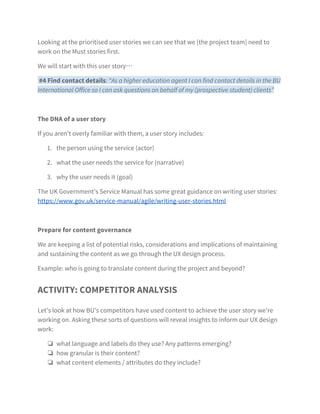
We will start with this user story...
#4 Find contact details:
“As a higher education agent I can find contact details
in the BU International Office so I can ask questions
on behalf of my (prospective student) clients”
The DNA of a user story
If you aren’t overly familiar with them, a user story includes:
1.	 the person using the service (actor)
2.	 what the user needs the service for (narrative)
3.	 why the user needs it (goal)
The UK Government’s Service Manual has some great
guidance on writing user stories: https://www.gov.uk/service-
manual/agile/writing-user-stories.html
Step #3
Looking at the prioritised user stories we can see that we
[the project team] need to work on the Must stories first
15
Prepare for content governance
We are keeping a list of potential risks, considerations and
implications of maintaining and sustaining the content as we
go through the UX design process.
Example:
Who is going to translate content during the project and
beyond?
Activity: Competitor Analysis
Let’s look at how BU’s competitors have used content to achieve the
user story we’re working on. Asking these sorts of questions will
reveal insights to inform our UX design work:
ʉʉ what language and labels do they use? Any patterns emerging?
ʉʉ how granular is their content?
ʉʉ what content elements / attributes do they include?
ʉʉ what content mediums are they using and how?
ʉʉ what tone of voice do they use?
ʉʉ what content do they leave out?
ʉʉ what content are they translating?
16
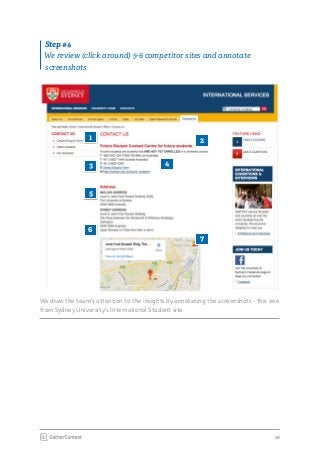
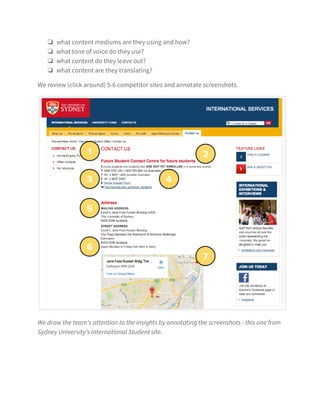
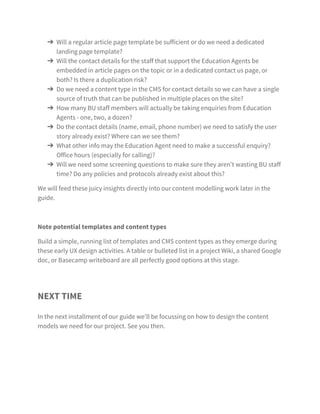
We draw the team’s attention to the insights by annotating the screenshots - this one
from Sydney University’s International Student site.
Step #4
We review (click around) 5-6 competitor sites and annotate
screenshots
1
5
2
43
6
7
17
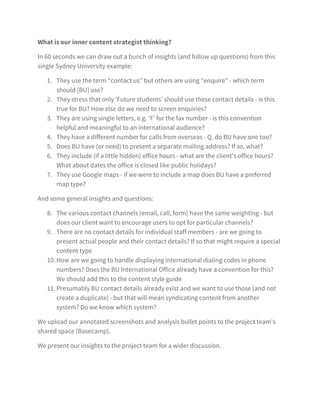
What is our inner content strategist
thinking?
In 60 seconds we can draw out a bunch of insights (and
follow up questions) from this single Sydney University
example:
1.	 They use the term “contact us” but others are using
“enquire” – which term should [BU] use?
2.	 They stress that only ‘Future students’ should use these
contact details - is this true for BU? How else do we need
to screen enquiries?
3.	 They are using single letters, e.g. ‘F’ for the fax number
- is this convention helpful and meaningful to an
international audience?
4.	 They have a different number for calls from overseas - Q.
do BU have one too?
5.	 Does BU have (or need) to present a separate mailing
address? If so, what?
6.	 They include (if a little hidden) office hours - what are the
client’s office hours? What about dates the office is closed
like public holidays?
7.	 They use Google maps – if we were to include a map does
BU have a preferred map type?
18
We present our insights to the project team for a wider
discussion.
We upload our annotated screenshots and analysis bullet
points to the project team’s shared space (Basecamp).
And some general insights and questions:
8.	 The various contact channels (email, call, form) have the
same weighting - but does our client want to encourage
users to opt for particular channels?
9.	 There are no contact details for individual staff members
- are we going to present actual people and their contact
details? If so that might require a special content type
10.	How are we going to handle displaying international
dialing codes in phone numbers? Does the BU
International Office already have a convention for this?
We should add this to the content style guide
11.	 Presumably BU contact details already exist and we want
to use those (and not create a duplicate) - but that will
mean syndicating content from another system? Do we
know which system?
19
Activity: Mapping User Flows
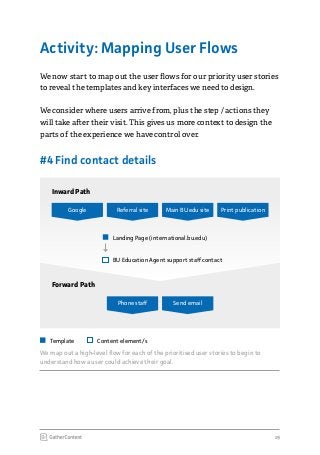
We now start to map out the user flows for our priority user stories
to reveal the templates and key interfaces we need to design.
We consider where users arrive from, plus the step / actions they
will take after their visit. This gives us more context to design the
parts of the experience we have control over.
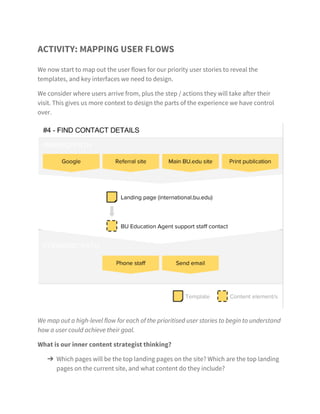
We map out a high-level flow for each of the prioritised user stories to begin to
understand how a user could achieve their goal.
#4 Find contact details
Print publicationGoogle
Inward Path
Forward Path
Referral site
Phone staff
Main BU.edu site
Send email
Landing Page (international.bu.edu)
Template Content element/s
BU Education Agent support staff contact
20
What is our inner content strategist
thinking?
Which pages will be the top landing pages on the site? Which
are the top landing pages on the current site, and what
content do they include?
›› Will a regular article page template be sufficient or do we
need a dedicated landing page template?
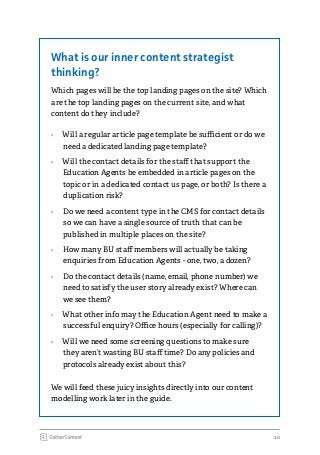
›› Will the contact details for the staff that support the
Education Agents be embedded in article pages on the
topic or in a dedicated contact us page, or both? Is there a
duplication risk?
›› Do we need a content type in the CMS for contact details
so we can have a single source of truth that can be
published in multiple places on the site?
›› How many BU staff members will actually be taking
enquiries from Education Agents - one, two, a dozen?
›› Do the contact details (name, email, phone number) we
need to satisfy the user story already exist? Where can
we see them?
›› What other info may the Education Agent need to make a
successful enquiry? Office hours (especially for calling)?
›› Will we need some screening questions to make sure
they aren’t wasting BU staff time? Do any policies and
protocols already exist about this?
We will feed these juicy insights directly into our content
modelling work later in the guide.
Download the entire guide
Download
Learn how to bridge the gap between
Content Strategy and UX with practical
examples.

Content Strategy for UX Designers

  • 1.
    Content Strategy A Guidefor UX Designers by Liam King
  • 2.
    Content Strategy A Guidefor UX Designers by Liam King
  • 3.
    Introduction Chapter One Define Content ChapterTwo Design (Content Models) 5 Great user experience needs great content 6 Guide overview 7 Introducing our client: Balmain University 10 User Stories 15 Activity: Competitor Analysis 19 Activity: Mapping User Flows 23 Concept Sketching 23 6-up brainstorm 26 Present, critique, and vote on 6-up sheets 27 1-up activity 28 Present and critique 1-up sheets 30 Start Defining Your Content Model Table of Contents
  • 4.
    Chapter Three Prototyping withProto-Content 36 What’s wrong with Lorem Ipsum? 37 Working with proto-content Chapter Four Validate Content 41 Usability testing 43 Hypothesise, iterate, (re)validate 48 Here’s what our experts think about content strategy and UX 59 About the author
  • 6.
    Guide Overview This hands-onguide for all UXers explores the intersection of content strategy and UX design on a website design project. We’ll show you how to embed content-first thinking into popular UX design techniques to reveal powerful insights about the content, that lead to a better user experience. We’ve worked up lots of example outputs so you can see it all in action. Content Strategy A Guide for UX Designers by Liam King
  • 7.
    7 Introducing our client: BalmainUniversity Balmain University will be the fictitious client for our example project for this guide. Project B​U International Student website re-design Scenario T​he International Office have commissioned us to run an end-to- end redesign and build of their existing International Student site. The initial discovery and user research phase has been completed and we now have an unprioritised set of user stories. Our objective W​e now need to define, design, prototype and validate the core user interfaces and templates required to satisfy the highest priority user stories. We are going to adopt a content first approach at each stage. Assumptions This is an agile project that is constructed around user story (needs) that have emerged from the user research.
  • 8.
    8 Content considerations We havealready asked the client some revealing questions that should influence the design process. The design has to be appropriate to the client and their ability to sustain that content. ›› the existing site has about 150 pages ›› there will be a team of three writers on the project to rewrite the content for the new site: two from the Comms Team and one hired writer to support them ›› they have the resources to typically spend one day per week adding and maintaining content to the site - there are no plans to increase this for the new site ›› the University has a content style guide that the International Student site must follow
  • 9.
  • 10.
    10 The user storycards are prioritised into Must, Should, Could and Won’t buckets by the end of the session. User Stories As a project team we’ve identified 80+ user needs which we have articulated as user stories.Next Step #1 We prioritise the user stories with the client in an Agile release planning meeting
  • 11.
    11 The assigned prioritiesfor each user story were captured in the Google sheet for everyone in the team to refer to. Step #2 We update the user story backlog in our Google sheet
  • 12.
    12 What is ourinner content strategist thinking? ›› There’s already a growing list of likely content types emerging: events, contact details, something around exchange partners ›› Do these types of content already exist on the current site or are there new additions to sustain? ›› How many items are there for each content type? Does BU have a few exchange partner institutions or thousands to list? A dozen accredited agents or hundreds? ›› What’s included in the current versions of the content types? ›› Is there a single source of truth for contact details for BU staff? If so, where is it? ›› Multilingual content was prioritised as a could, but we need to keep an eye on it because that has all kinds of translation and maintenance considerations ›› Is there any likely content that the International Office (our client) does not have direct control over? If so, what? And who controls it?
  • 13.
    13 UX Designers, what shouldyour inner content strategist be thinking? CLICK TO TWEET
  • 14.
    14 We will startwith this user story... #4 Find contact details: “As a higher education agent I can find contact details in the BU International Office so I can ask questions on behalf of my (prospective student) clients” The DNA of a user story If you aren’t overly familiar with them, a user story includes: 1. the person using the service (actor) 2. what the user needs the service for (narrative) 3. why the user needs it (goal) The UK Government’s Service Manual has some great guidance on writing user stories: https://www.gov.uk/service- manual/agile/writing-user-stories.html Step #3 Looking at the prioritised user stories we can see that we [the project team] need to work on the Must stories first
  • 15.
    15 Prepare for contentgovernance We are keeping a list of potential risks, considerations and implications of maintaining and sustaining the content as we go through the UX design process. Example: Who is going to translate content during the project and beyond? Activity: Competitor Analysis Let’s look at how BU’s competitors have used content to achieve the user story we’re working on. Asking these sorts of questions will reveal insights to inform our UX design work: ʉʉ what language and labels do they use? Any patterns emerging? ʉʉ how granular is their content? ʉʉ what content elements / attributes do they include? ʉʉ what content mediums are they using and how? ʉʉ what tone of voice do they use? ʉʉ what content do they leave out? ʉʉ what content are they translating?
  • 16.
    16 We draw theteam’s attention to the insights by annotating the screenshots - this one from Sydney University’s International Student site. Step #4 We review (click around) 5-6 competitor sites and annotate screenshots 1 5 2 43 6 7
  • 17.
    17 What is ourinner content strategist thinking? In 60 seconds we can draw out a bunch of insights (and follow up questions) from this single Sydney University example: 1. They use the term “contact us” but others are using “enquire” – which term should [BU] use? 2. They stress that only ‘Future students’ should use these contact details - is this true for BU? How else do we need to screen enquiries? 3. They are using single letters, e.g. ‘F’ for the fax number - is this convention helpful and meaningful to an international audience? 4. They have a different number for calls from overseas - Q. do BU have one too? 5. Does BU have (or need) to present a separate mailing address? If so, what? 6. They include (if a little hidden) office hours - what are the client’s office hours? What about dates the office is closed like public holidays? 7. They use Google maps – if we were to include a map does BU have a preferred map type?
  • 18.
    18 We present ourinsights to the project team for a wider discussion. We upload our annotated screenshots and analysis bullet points to the project team’s shared space (Basecamp). And some general insights and questions: 8. The various contact channels (email, call, form) have the same weighting - but does our client want to encourage users to opt for particular channels? 9. There are no contact details for individual staff members - are we going to present actual people and their contact details? If so that might require a special content type 10. How are we going to handle displaying international dialing codes in phone numbers? Does the BU International Office already have a convention for this? We should add this to the content style guide 11. Presumably BU contact details already exist and we want to use those (and not create a duplicate) - but that will mean syndicating content from another system? Do we know which system?
  • 19.
    19 Activity: Mapping UserFlows We now start to map out the user flows for our priority user stories to reveal the templates and key interfaces we need to design. We consider where users arrive from, plus the step / actions they will take after their visit. This gives us more context to design the parts of the experience we have control over. We map out a high-level flow for each of the prioritised user stories to begin to understand how a user could achieve their goal. #4 Find contact details Print publicationGoogle Inward Path Forward Path Referral site Phone staff Main BU.edu site Send email Landing Page (international.bu.edu) Template Content element/s BU Education Agent support staff contact
  • 20.
    20 What is ourinner content strategist thinking? Which pages will be the top landing pages on the site? Which are the top landing pages on the current site, and what content do they include? ›› Will a regular article page template be sufficient or do we need a dedicated landing page template? ›› Will the contact details for the staff that support the Education Agents be embedded in article pages on the topic or in a dedicated contact us page, or both? Is there a duplication risk? ›› Do we need a content type in the CMS for contact details so we can have a single source of truth that can be published in multiple places on the site? ›› How many BU staff members will actually be taking enquiries from Education Agents - one, two, a dozen? ›› Do the contact details (name, email, phone number) we need to satisfy the user story already exist? Where can we see them? ›› What other info may the Education Agent need to make a successful enquiry? Office hours (especially for calling)? ›› Will we need some screening questions to make sure they aren’t wasting BU staff time? Do any policies and protocols already exist about this? We will feed these juicy insights directly into our content modelling work later in the guide.
  • 21.
    Download the entireguide Download Learn how to bridge the gap between Content Strategy and UX with practical examples.