CARLY BRUCE
contact@carlybruce.com | 858.229.0169
User Experience Designer. Interface Choreographer.
About
Tools
Process
Case Study
Contact
Contents
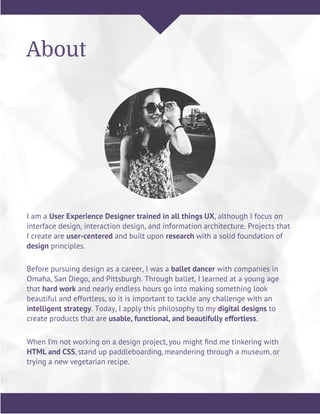
I am a User Experience Designer trained in all things UX, although I focus on
interface design, interaction design, and information architecture. Projects that
I create are user-centered and built upon research with a solid foundation of
design principles.
About
Before pursuing design as a career, I was a ballet dancer with companies in
Omaha, San Diego, and Pittsburgh. Through ballet, I learned at a young age
that hard work and nearly endless hours go into making something look
beautiful and effortless, so it is important to tackle any challenge with an
intelligent strategy. Today, I apply this philosophy to my digital designs to
create products that are usable, functional, and beautifully effortless.
When I’m not working on a design project, you might find me tinkering with
HTML and CSS, stand up paddleboarding, meandering through a museum, or
trying a new vegetarian recipe.
Tools
Primary
Secondary
Process
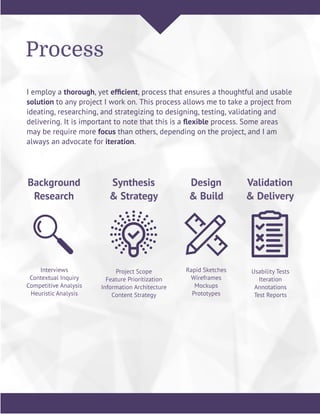
I employ a thorough, yet efficient, process that ensures a thoughtful and usable
solution to any project I work on. This process allows me to take a project from
ideating, researching, and strategizing to designing, testing, validating and
delivering. It is important to note that this is a flexible process. Some areas
may be require more focus than others, depending on the project, and I am
always an advocate for iteration.
Background
Research
Interviews
Contextual Inquiry
Competitive Analysis
Heuristic Analysis
Synthesis
& Strategy
Project Scope
Feature Prioritization
Information Architecture
Content Strategy
Design
& Build
Rapid Sketches
Wireframes
Mockups
Prototypes
Validation
& Delivery
Usability Tests
Iteration
Annotations
Test Reports
Process
Background Research
Each project begins with a discovery phase. This phase,
depending on the stage the product is in, contains a number of
steps. Typically, background research consists of getting to
know as much about a product and the space it is in as possible.
Interviews with stakeholders and existing or target users are
conducted. It is also important to research how similar products
and companies are implementing their own solutions.
Process
Interviews | Contextual Inquiry | Competitive Analysis | Heuristic Analysis
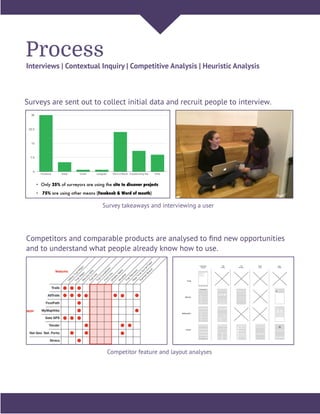
Surveys are sent out to collect initial data and recruit people to interview.
Competitors and comparable products are analysed to find new opportunities
and to understand what people already know how to use.
Trail Search
Results
Trail
Profile
Photo
Feed
User
Profile
Trail
Reviews
Trails
AllTrails
MyMapHike
Yonder
Survey takeaways and interviewing a user
Competitor feature and layout analyses
Process
Synthesis & Strategy
With the initial research completed, it is time to digest all of the
information. Thoroughly synthesizing and organizing the amount of data
that comes out of the research phase can be daunting, but it is incredibly
important to fully understand the information. This allows for more
intelligent decisions to be made about the scope of the project and strategy
moving forward.
Process
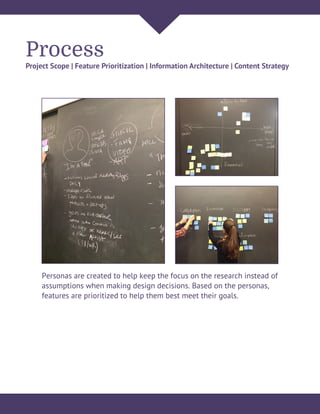
Project Scope | Feature Prioritization | Information Architecture | Content Strategy
Personas are created to help keep the focus on the research instead of
assumptions when making design decisions. Based on the personas,
features are prioritized to help them best meet their goals.
Process
Design & Build
In the design & build stage it is time to bring the research to
life by thinking through how the product will actually look and
function. Ideally, this is a highly collaborative stage so that
many ideas can be fleshed out as quickly as possible. Core,
prioritized features and flows are worked through first at
various levels of fidelity which are then turned into prototypes.
Process
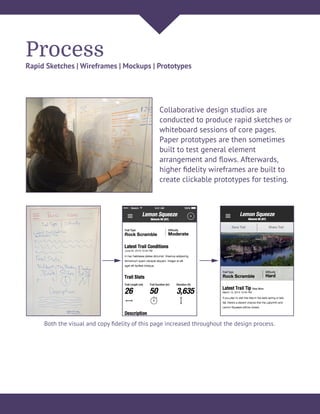
Rapid Sketches | Wireframes | Mockups | Prototypes
Collaborative design studios are
conducted to produce rapid sketches or
whiteboard sessions of core pages.
Paper prototypes are then sometimes
built to test general element
arrangement and flows. Afterwards,
higher fidelity wireframes are built to
create clickable prototypes for testing.
Both the visual and copy fidelity of this page increased throughout the design process.
Process
Validate & Deliver
Getting designs in front of real people is the best way to
validate decisions. Findings from usability tests reveal so
much that is then able to be iterated upon. These findings
are delivered with annotations and test reports.
Process
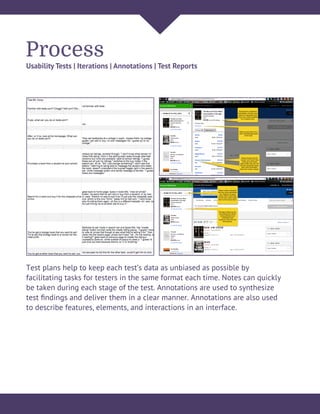
Usability Tests | Iterations | Annotations | Test Reports
Test plans help to keep each test’s data as unbiased as possible by
facilitating tasks for testers in the same format each time. Notes can quickly
be taken during each stage of the test. Annotations are used to synthesize
test findings and deliver them in a clear manner. Annotations are also used
to describe features, elements, and interactions in an interface.
Case Study
Texts.com
View Clickable Prototype
Overview
Texts.com Case Study
2.5 weeks 3 designers
Timeline Team
Managed the project
Prepared survey and interview questions
Prepared test plan for existing site
Developed and tested new sitemap
Built medium fidelity wireframes
Built a clickable prototype
Prepared test plan for my team’s design
Conducted usability testing
My Responsibilities
Research Report
Interview findings
Usability takeaways
Competitive analysis
Suggested features
Design
Sitemap
User Flows
Wireframes
Clickable Prototype
Deliverables
Texts.com facilitates textbook buying and selling between students
on campus and between students and online vendors. Textbook
prices have increased a whopping 812% in the past 30 years and
80% of the market is controlled by just four publishers. They are
determined to keep prices high, so Texts.com offers a cheaper
alternative to college students.
The Opportunity
Research
Texts.com Case Study
Our UX team was brought on board after Texts.com was fully
functional, but had not gone through any research or usability
processes, so the first task was to understand the existing product.
We conducted interviews with stakeholders and also watched college
students interact with Texts.com. This allowed us to define the scope
and strategy for how our team would approach this project.
The Challenge
Initial Research Takeaways
Increase sign-ups and click-throughs to affiliate buyers
Improve Texts.com’s learnability and recall
Discover new features that could be implemented
Stakeholders
Buy books and cheaply as possible
Sell books as conveniently to themselves as possible
Didn’t understand the dual marketplace that Texts.com provides
College Students
Strategy
Texts.com Case Study
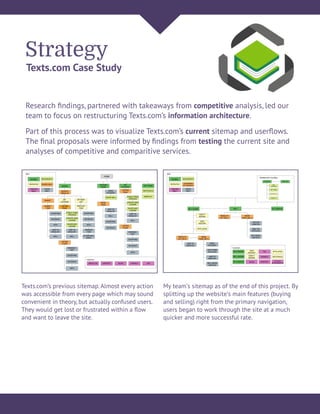
Research findings, partnered with takeaways from competitive analysis, led our
team to focus on restructuring Texts.com’s information architecture.
Texts.com’s previous sitemap. Almost every action
was accessible from every page which may sound
convenient in theory, but actually confused users.
They would get lost or frustrated within a flow
and want to leave the site.
My team’s sitemap as of the end of this project. By
splitting up the website’s main features (buying
and selling) right from the primary navigation,
users began to work through the site at a much
quicker and more successful rate.
Part of this process was to visualize Texts.com’s current sitemap and userflows.
The final proposals were informed by findings from testing the current site and
analyses of competitive and comparitive services.
Strategy Cont’d.
Texts.com Case Study
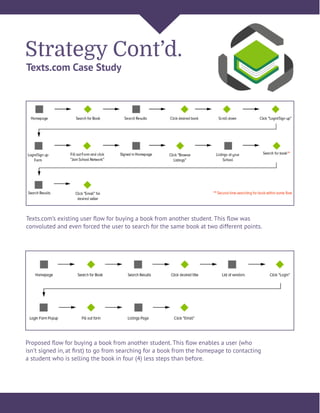
Texts.com’s existing user flow for buying a book from another student. This flow was
convoluted and even forced the user to search for the same book at two different points.
Proposed flow for buying a book from another student. This flow enables a user (who
isn’t signed in, at first) to go from searching for a book from the homepage to contacting
a student who is selling the book in four (4) less steps than before.
Design & Iterate
Texts.com Case Study
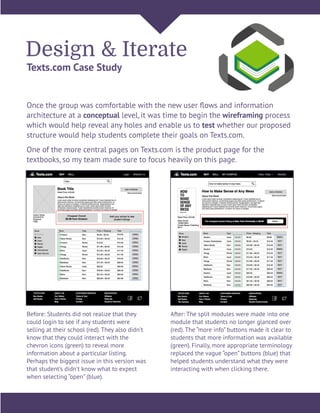
Once the group was comfortable with the new user flows and information
architecture at a conceptual level, it was time to begin the wireframing process
which would help reveal any holes and enable us to test whether our proposed
structure would help students complete their goals on Texts.com.
One of the more central pages on Texts.com is the product page for the
textbooks, so my team made sure to focus heavily on this page.
Before: Students did not realize that they
could login to see if any students were
selling at their school (red). They also didn’t
know that they could interact with the
chevron icons (green) to reveal more
information about a particular listing.
Perhaps the biggest issue in this version was
that student’s didn’t know what to expect
when selecting “open” (blue).
After: The split modules were made into one
module that students no longer glanced over
(red). The “more info” buttons made it clear to
students that more information was available
(green). Finally, more appropriate terminology
replaced the vague “open” buttons (blue) that
helped students understand what they were
interacting with when clicking there.
Reflection
Texts.com Case Study
This was an amazing opportunity to get to work with a real client. Texts.com
developers immediately began implementing my team’s findings and I have
even joined the Texts.com team on a freelance basis to continue working on
their products.
If I had the opportunity to start this project all over again, I would involve the
Text.com team in our process more (and more often). As a designer, it is
incredibly beneficial to have a product’s developers working alongside you.
I also learned that giving context to users is equivalent to giving power to
them. Your team may design the most intuitive flows and interfaces, but if there
is an absence of context your users are going to struggle.
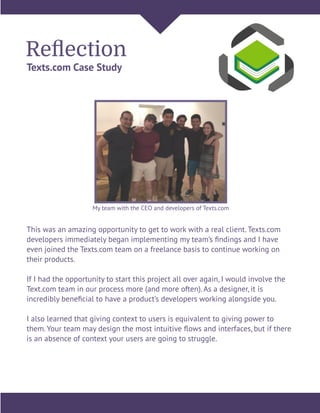
My team with the CEO and developers of Texts.com
Contact
contact@carlybruce.com
858.229.0169
linkedin.com/in/carlybruce
behance.net/carlyjbruce
@theecarls

Carly Bruce User Experience Portfolio 2015

  • 1.
    CARLY BRUCE contact@carlybruce.com |858.229.0169 User Experience Designer. Interface Choreographer.
  • 2.
  • 3.
    I am aUser Experience Designer trained in all things UX, although I focus on interface design, interaction design, and information architecture. Projects that I create are user-centered and built upon research with a solid foundation of design principles. About Before pursuing design as a career, I was a ballet dancer with companies in Omaha, San Diego, and Pittsburgh. Through ballet, I learned at a young age that hard work and nearly endless hours go into making something look beautiful and effortless, so it is important to tackle any challenge with an intelligent strategy. Today, I apply this philosophy to my digital designs to create products that are usable, functional, and beautifully effortless. When I’m not working on a design project, you might find me tinkering with HTML and CSS, stand up paddleboarding, meandering through a museum, or trying a new vegetarian recipe.
  • 4.
  • 5.
    Process I employ athorough, yet efficient, process that ensures a thoughtful and usable solution to any project I work on. This process allows me to take a project from ideating, researching, and strategizing to designing, testing, validating and delivering. It is important to note that this is a flexible process. Some areas may be require more focus than others, depending on the project, and I am always an advocate for iteration. Background Research Interviews Contextual Inquiry Competitive Analysis Heuristic Analysis Synthesis & Strategy Project Scope Feature Prioritization Information Architecture Content Strategy Design & Build Rapid Sketches Wireframes Mockups Prototypes Validation & Delivery Usability Tests Iteration Annotations Test Reports
  • 6.
    Process Background Research Each projectbegins with a discovery phase. This phase, depending on the stage the product is in, contains a number of steps. Typically, background research consists of getting to know as much about a product and the space it is in as possible. Interviews with stakeholders and existing or target users are conducted. It is also important to research how similar products and companies are implementing their own solutions.
  • 7.
    Process Interviews | ContextualInquiry | Competitive Analysis | Heuristic Analysis Surveys are sent out to collect initial data and recruit people to interview. Competitors and comparable products are analysed to find new opportunities and to understand what people already know how to use. Trail Search Results Trail Profile Photo Feed User Profile Trail Reviews Trails AllTrails MyMapHike Yonder Survey takeaways and interviewing a user Competitor feature and layout analyses
  • 8.
    Process Synthesis & Strategy Withthe initial research completed, it is time to digest all of the information. Thoroughly synthesizing and organizing the amount of data that comes out of the research phase can be daunting, but it is incredibly important to fully understand the information. This allows for more intelligent decisions to be made about the scope of the project and strategy moving forward.
  • 9.
    Process Project Scope |Feature Prioritization | Information Architecture | Content Strategy Personas are created to help keep the focus on the research instead of assumptions when making design decisions. Based on the personas, features are prioritized to help them best meet their goals.
  • 10.
    Process Design & Build Inthe design & build stage it is time to bring the research to life by thinking through how the product will actually look and function. Ideally, this is a highly collaborative stage so that many ideas can be fleshed out as quickly as possible. Core, prioritized features and flows are worked through first at various levels of fidelity which are then turned into prototypes.
  • 11.
    Process Rapid Sketches |Wireframes | Mockups | Prototypes Collaborative design studios are conducted to produce rapid sketches or whiteboard sessions of core pages. Paper prototypes are then sometimes built to test general element arrangement and flows. Afterwards, higher fidelity wireframes are built to create clickable prototypes for testing. Both the visual and copy fidelity of this page increased throughout the design process.
  • 12.
    Process Validate & Deliver Gettingdesigns in front of real people is the best way to validate decisions. Findings from usability tests reveal so much that is then able to be iterated upon. These findings are delivered with annotations and test reports.
  • 13.
    Process Usability Tests |Iterations | Annotations | Test Reports Test plans help to keep each test’s data as unbiased as possible by facilitating tasks for testers in the same format each time. Notes can quickly be taken during each stage of the test. Annotations are used to synthesize test findings and deliver them in a clear manner. Annotations are also used to describe features, elements, and interactions in an interface.
  • 14.
  • 15.
    Overview Texts.com Case Study 2.5weeks 3 designers Timeline Team Managed the project Prepared survey and interview questions Prepared test plan for existing site Developed and tested new sitemap Built medium fidelity wireframes Built a clickable prototype Prepared test plan for my team’s design Conducted usability testing My Responsibilities Research Report Interview findings Usability takeaways Competitive analysis Suggested features Design Sitemap User Flows Wireframes Clickable Prototype Deliverables Texts.com facilitates textbook buying and selling between students on campus and between students and online vendors. Textbook prices have increased a whopping 812% in the past 30 years and 80% of the market is controlled by just four publishers. They are determined to keep prices high, so Texts.com offers a cheaper alternative to college students. The Opportunity
  • 16.
    Research Texts.com Case Study OurUX team was brought on board after Texts.com was fully functional, but had not gone through any research or usability processes, so the first task was to understand the existing product. We conducted interviews with stakeholders and also watched college students interact with Texts.com. This allowed us to define the scope and strategy for how our team would approach this project. The Challenge Initial Research Takeaways Increase sign-ups and click-throughs to affiliate buyers Improve Texts.com’s learnability and recall Discover new features that could be implemented Stakeholders Buy books and cheaply as possible Sell books as conveniently to themselves as possible Didn’t understand the dual marketplace that Texts.com provides College Students
  • 17.
    Strategy Texts.com Case Study Researchfindings, partnered with takeaways from competitive analysis, led our team to focus on restructuring Texts.com’s information architecture. Texts.com’s previous sitemap. Almost every action was accessible from every page which may sound convenient in theory, but actually confused users. They would get lost or frustrated within a flow and want to leave the site. My team’s sitemap as of the end of this project. By splitting up the website’s main features (buying and selling) right from the primary navigation, users began to work through the site at a much quicker and more successful rate. Part of this process was to visualize Texts.com’s current sitemap and userflows. The final proposals were informed by findings from testing the current site and analyses of competitive and comparitive services.
  • 18.
    Strategy Cont’d. Texts.com CaseStudy Texts.com’s existing user flow for buying a book from another student. This flow was convoluted and even forced the user to search for the same book at two different points. Proposed flow for buying a book from another student. This flow enables a user (who isn’t signed in, at first) to go from searching for a book from the homepage to contacting a student who is selling the book in four (4) less steps than before.
  • 19.
    Design & Iterate Texts.comCase Study Once the group was comfortable with the new user flows and information architecture at a conceptual level, it was time to begin the wireframing process which would help reveal any holes and enable us to test whether our proposed structure would help students complete their goals on Texts.com. One of the more central pages on Texts.com is the product page for the textbooks, so my team made sure to focus heavily on this page. Before: Students did not realize that they could login to see if any students were selling at their school (red). They also didn’t know that they could interact with the chevron icons (green) to reveal more information about a particular listing. Perhaps the biggest issue in this version was that student’s didn’t know what to expect when selecting “open” (blue). After: The split modules were made into one module that students no longer glanced over (red). The “more info” buttons made it clear to students that more information was available (green). Finally, more appropriate terminology replaced the vague “open” buttons (blue) that helped students understand what they were interacting with when clicking there.
  • 20.
    Reflection Texts.com Case Study Thiswas an amazing opportunity to get to work with a real client. Texts.com developers immediately began implementing my team’s findings and I have even joined the Texts.com team on a freelance basis to continue working on their products. If I had the opportunity to start this project all over again, I would involve the Text.com team in our process more (and more often). As a designer, it is incredibly beneficial to have a product’s developers working alongside you. I also learned that giving context to users is equivalent to giving power to them. Your team may design the most intuitive flows and interfaces, but if there is an absence of context your users are going to struggle. My team with the CEO and developers of Texts.com
  • 21.