Connecting to Students Launching an Instant Messaging Service at Binghamton University Elizabeth Brown Binghamton University Libraries [email_address] Physics Roundtable SLA 2007 Annual Conference June 5, 2007
Instant Messaging at Binghamton University IM services at BU Choosing an IM client – Trillian Staffing, Training, and Marketing Launching the Service How is it Going? Assessment / Transcript Analysis
IM services at BU 7/2003 – 7/2004 Chat with a Librarian (QuestionPoint) 7/2004 – 6/2005 Ask A Librarian (Docutek VRLPlus) 3/2005 Libraries IM Task Force created 6/2005 – date Ask a Librarian (Trillian) 9/2005 – date Libraries’ Digital Reference Committee  created 1/2007 – date MeeboMe widget (Firefox)
Choosing an IM Client Mac, Linux, and PC compatible Security Ease of Use Popularity with library users and staff Features (transcripts, scripted messages, statistics)
Service – IM Providers  AOL AIM Yahoo! MSN Individual must download Security and management issues demanded multi-protocol IM software
Trillian - Features Supports AIM, ICQ, MSN, Gtalk, and Yahoo Messenger. File transferring and sharing Group conversations Automated transcript saving (.txt file) Alerts for new IM messages and users Emoticons and images Notification when an IM user is typing a response Connectivity icon in the system tray
Trillian


IM Staffing Librarians, reference staff, student assistants Staffing at reference desks and staff offices when on-call for reference Begun as a pilot service to gauge workflow Offered with other reference services (walk-up, phone, email) Email alerts to prompt staff to log onto accounts
Staff Training Staff comfortable with online reference but not necessarily IM Training session held with practice chat time Staff encouraged to download clients and create personal IM identities Staff use of IM in offices for informal communication Assistance from IM TF members to help set up IM accounts
Marketing –  Ask a Librarian Announcements Library homepage Library blog LibraryLinks  (Libraries’ newsletter) Student newpaper –  Pipe Dream Exhibit  “What’s New in the Libraries” Web Link in top banner for Libraries’ website Student Orientation Sessions Library bookmarks
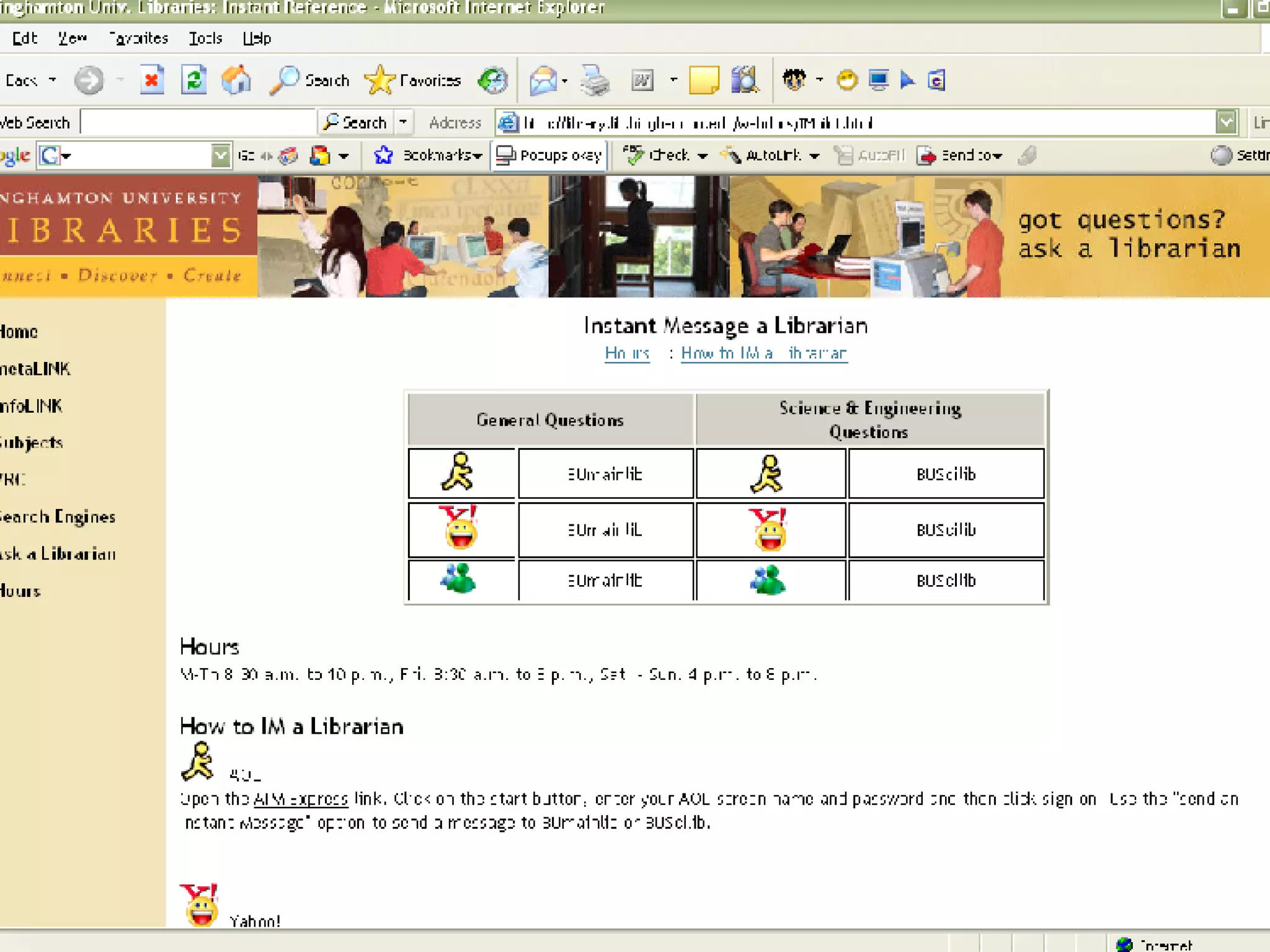
Launching IM Services Creating a webpage with contact information Ask a Librarian Trillian configured to load automatically upon machine startup Staff trained to check Trillian at start of reference shifts Updated the Libraries’ Reference Services Privacy Policy
 
 
How is it Going? Over 400 questions answered since launch Most questions from AOL AIM (~90%)  Repeat users Positive feedback from sessions “ the im chat option is terrific, pass it along :) “
How is it Going? (2) IM Service Issues Adding contacts Session connectivity Little technical support available from IM providers IM Communication Challenges Informal environment Lack of visual clues Pressure to respond / complete transaction Hanging sessions
How is it Going? (3) IM Question Types General library information - hours, policies Services - ILL, reserves Bibliographic information – locating a specific journal, book, etc. Technical problems – connecting to website, electronic journals IM User Behavior Many users happy to wait for a response Many don’t say goodbye or formally end session Users respectful of reference staff Non-BU users
Future Directions Meebome widget pilot  Ongoing commitment to IM  Who else uses IM on campus?  Analysis of session transcripts Quality of IM reference services
IM Transcript Analysis Project Evaluate data collected from IM session transcripts: July 2005 – July 2006 Statistical information Session Length IM traffic IM user audience Types of Questions  Library resources used during sessions
Assessment Outcomes Evaluate quality of IM service  (RUSA Behavior Guidelines) Improve website design and navigation  Evaluate IM staffing levels  Create FAQs or other aids  Determine need for electronic reference sources Anticipate future training needs
Transcript Analysis Project Created form in Access Database Printed and numbered transcripts Created coding guide for form Tested 30 transcripts  Solicited reference volunteers to evaluate transcripts
Acknowledgements Digital Reference Committee members: Sarah Maximiek, Erin Rushton BU Libraries Reference Staff College & Undergraduate Libraries Brown, Elizabeth, Maximiek, Sarah, and Rushton, Erin,  Connecting to Students: Launching an Instant Messaging Reference at Binghamton University,  College & Undergraduate Libraries, 13 (4) 31 – 42. http://eprints.rclis.org/archive/00008769/ http://www.slideshare.net/

Connecting To Students 5 30 07

  • 1.
    Connecting to StudentsLaunching an Instant Messaging Service at Binghamton University Elizabeth Brown Binghamton University Libraries [email_address] Physics Roundtable SLA 2007 Annual Conference June 5, 2007
  • 2.
    Instant Messaging atBinghamton University IM services at BU Choosing an IM client – Trillian Staffing, Training, and Marketing Launching the Service How is it Going? Assessment / Transcript Analysis
  • 3.
    IM services atBU 7/2003 – 7/2004 Chat with a Librarian (QuestionPoint) 7/2004 – 6/2005 Ask A Librarian (Docutek VRLPlus) 3/2005 Libraries IM Task Force created 6/2005 – date Ask a Librarian (Trillian) 9/2005 – date Libraries’ Digital Reference Committee created 1/2007 – date MeeboMe widget (Firefox)
  • 4.
    Choosing an IMClient Mac, Linux, and PC compatible Security Ease of Use Popularity with library users and staff Features (transcripts, scripted messages, statistics)
  • 5.
    Service – IMProviders AOL AIM Yahoo! MSN Individual must download Security and management issues demanded multi-protocol IM software
  • 6.
    Trillian - FeaturesSupports AIM, ICQ, MSN, Gtalk, and Yahoo Messenger. File transferring and sharing Group conversations Automated transcript saving (.txt file) Alerts for new IM messages and users Emoticons and images Notification when an IM user is typing a response Connectivity icon in the system tray
  • 7.
  • 8.
  • 9.
  • 10.
  • 11.
    IM Staffing Librarians,reference staff, student assistants Staffing at reference desks and staff offices when on-call for reference Begun as a pilot service to gauge workflow Offered with other reference services (walk-up, phone, email) Email alerts to prompt staff to log onto accounts
  • 12.
    Staff Training Staffcomfortable with online reference but not necessarily IM Training session held with practice chat time Staff encouraged to download clients and create personal IM identities Staff use of IM in offices for informal communication Assistance from IM TF members to help set up IM accounts
  • 13.
    Marketing – Ask a Librarian Announcements Library homepage Library blog LibraryLinks (Libraries’ newsletter) Student newpaper – Pipe Dream Exhibit “What’s New in the Libraries” Web Link in top banner for Libraries’ website Student Orientation Sessions Library bookmarks
  • 14.
    Launching IM ServicesCreating a webpage with contact information Ask a Librarian Trillian configured to load automatically upon machine startup Staff trained to check Trillian at start of reference shifts Updated the Libraries’ Reference Services Privacy Policy
  • 15.
  • 16.
  • 17.
    How is itGoing? Over 400 questions answered since launch Most questions from AOL AIM (~90%) Repeat users Positive feedback from sessions “ the im chat option is terrific, pass it along :) “
  • 18.
    How is itGoing? (2) IM Service Issues Adding contacts Session connectivity Little technical support available from IM providers IM Communication Challenges Informal environment Lack of visual clues Pressure to respond / complete transaction Hanging sessions
  • 19.
    How is itGoing? (3) IM Question Types General library information - hours, policies Services - ILL, reserves Bibliographic information – locating a specific journal, book, etc. Technical problems – connecting to website, electronic journals IM User Behavior Many users happy to wait for a response Many don’t say goodbye or formally end session Users respectful of reference staff Non-BU users
  • 20.
    Future Directions Meebomewidget pilot Ongoing commitment to IM Who else uses IM on campus? Analysis of session transcripts Quality of IM reference services
  • 21.
    IM Transcript AnalysisProject Evaluate data collected from IM session transcripts: July 2005 – July 2006 Statistical information Session Length IM traffic IM user audience Types of Questions Library resources used during sessions
  • 22.
    Assessment Outcomes Evaluatequality of IM service (RUSA Behavior Guidelines) Improve website design and navigation Evaluate IM staffing levels Create FAQs or other aids Determine need for electronic reference sources Anticipate future training needs
  • 23.
    Transcript Analysis ProjectCreated form in Access Database Printed and numbered transcripts Created coding guide for form Tested 30 transcripts Solicited reference volunteers to evaluate transcripts
  • 24.
    Acknowledgements Digital ReferenceCommittee members: Sarah Maximiek, Erin Rushton BU Libraries Reference Staff College & Undergraduate Libraries Brown, Elizabeth, Maximiek, Sarah, and Rushton, Erin, Connecting to Students: Launching an Instant Messaging Reference at Binghamton University, College & Undergraduate Libraries, 13 (4) 31 – 42. http://eprints.rclis.org/archive/00008769/ http://www.slideshare.net/