CONICS ARTWORK! Programming Conics Artwork on the Graphing Calculator to  successfully  TEACH the Conic Sections!! Emily Gockerman [email_address] Ursuline Academy Cincinnati, OH
PROJECT DESCRIPTION Hand out right after beginning unit! Students work on project throughout unit and find equations of each type of conic section as topic is learned
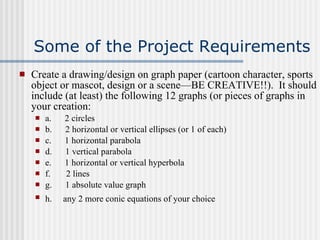
Some of the Project Requirements Create a drawing/design on graph paper (cartoon character, sports object or mascot, design or a scene—BE CREATIVE!!).  It should include (at least) the following 12 graphs (or pieces of graphs in your creation: a.       2 circles b.       2 horizontal or vertical ellipses (or 1 of each) c.        1 horizontal parabola d.       1 vertical parabola e.        1 horizontal or vertical hyperbola f.         2 lines g.       1 absolute value graph h.  any 2 more conic equations of your choice
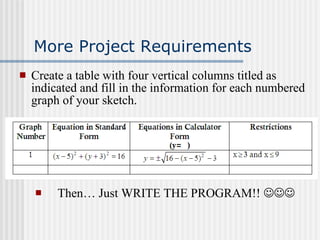
More Project Requirements Create a table with four vertical columns titled as indicated and fill in the information for each numbered graph of your sketch. Then… Just WRITE THE PROGRAM!!  
Students Turn In: Initialed Drawing/Sketch Neat copy of the table Colored Final-Printed out Design  
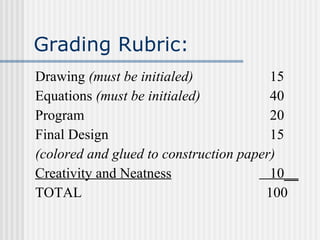
Grading Rubric:  Drawing  (must be initialed)   15 Equations  (must be initialed)   40 Program   20 Final Design    15 (colored and glued to construction paper) Creativity and Neatness   10 __ TOTAL   100
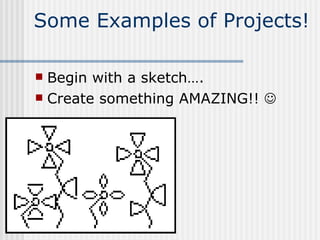
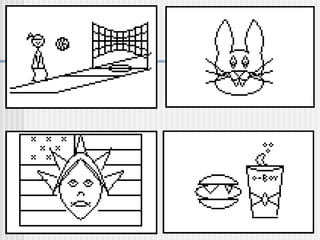
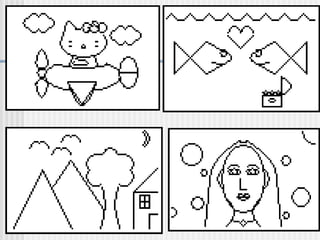
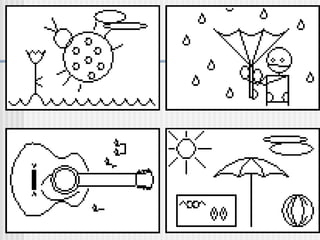
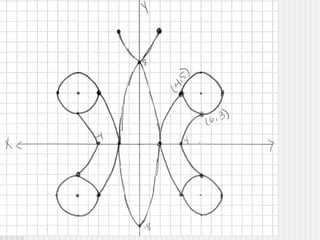
Some Examples of Projects!  Begin with a sketch…. Create something AMAZING!!  


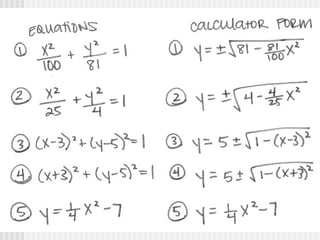
Problems Students May Encounter Solving Equations For “Calculator” or “y = ‘s” form can be tricky Finding equations of parabolas & hyperbolas Using Restrictions Making small errors when typing in program & finding those errors!
 
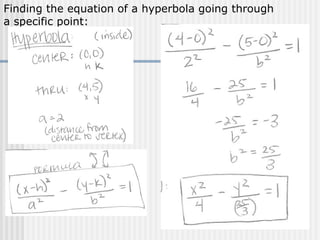
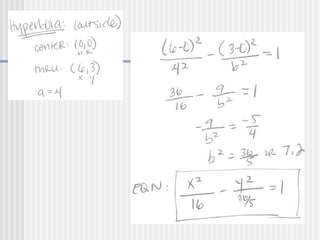
Finding the equation of a hyperbola going through  a specific point:
 
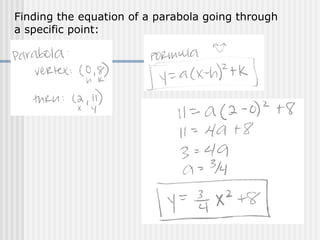
Finding the equation of a parabola going through  a specific point:
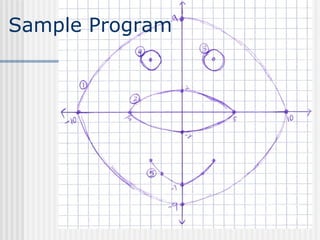
Sample Program
 
Printing Picture Using  TI-Connect Download TI Connect from TI website:  Click on  Downloads , then  Computer Software,  then  TI Connect  OR   use link below: http://education.ti.com/educationportal/sites/US/productDetail/us_ti_connect.html   Connect students’ calculators using silver linking cord, and do a screen capture, then enlarge & print!

Conics Ppt

  • 1.
    CONICS ARTWORK! ProgrammingConics Artwork on the Graphing Calculator to successfully TEACH the Conic Sections!! Emily Gockerman [email_address] Ursuline Academy Cincinnati, OH
  • 2.
    PROJECT DESCRIPTION Handout right after beginning unit! Students work on project throughout unit and find equations of each type of conic section as topic is learned
  • 3.
    Some of theProject Requirements Create a drawing/design on graph paper (cartoon character, sports object or mascot, design or a scene—BE CREATIVE!!). It should include (at least) the following 12 graphs (or pieces of graphs in your creation: a.      2 circles b.      2 horizontal or vertical ellipses (or 1 of each) c.       1 horizontal parabola d.      1 vertical parabola e.       1 horizontal or vertical hyperbola f.        2 lines g.      1 absolute value graph h. any 2 more conic equations of your choice
  • 4.
    More Project RequirementsCreate a table with four vertical columns titled as indicated and fill in the information for each numbered graph of your sketch. Then… Just WRITE THE PROGRAM!! 
  • 5.
    Students Turn In:Initialed Drawing/Sketch Neat copy of the table Colored Final-Printed out Design  
  • 6.
    Grading Rubric: Drawing (must be initialed) 15 Equations (must be initialed) 40 Program 20 Final Design 15 (colored and glued to construction paper) Creativity and Neatness 10 __ TOTAL 100
  • 7.
    Some Examples ofProjects! Begin with a sketch…. Create something AMAZING!! 
  • 8.
  • 9.
  • 10.
  • 11.
    Problems Students MayEncounter Solving Equations For “Calculator” or “y = ‘s” form can be tricky Finding equations of parabolas & hyperbolas Using Restrictions Making small errors when typing in program & finding those errors!
  • 12.
  • 13.
    Finding the equationof a hyperbola going through a specific point:
  • 14.
  • 15.
    Finding the equationof a parabola going through a specific point:
  • 16.
  • 17.
  • 18.
    Printing Picture Using TI-Connect Download TI Connect from TI website: Click on Downloads , then Computer Software, then TI Connect OR use link below: http://education.ti.com/educationportal/sites/US/productDetail/us_ti_connect.html Connect students’ calculators using silver linking cord, and do a screen capture, then enlarge & print!