COMPUTER-ASSISTED
AUDIT TOOLS AND
TECHNIQUES
Supriadi
11353104780
Learning Objectives
• Be familiar with the classes of transaction input controls
used by accounting applications.
• Understand the objectives and techniques used to
implement processing controls, including run-to-run,
operator inventions, and audit trail controls.
• Understand the methods used to establish effective output
controls for both batch and real-time systems.
10/01/2017 1
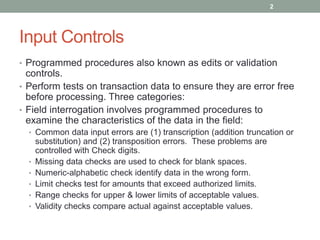
Input Controls
• Programmed procedures also known as edits or validation
controls.
• Perform tests on transaction data to ensure they are error free
before processing. Three categories:
• Field interrogation involves programmed procedures to
examine the characteristics of the data in the field:
• Common data input errors are (1) transcription (addition truncation or
substitution) and (2) transposition errors. These problems are
controlled with Check digits.
• Missing data checks are used to check for blank spaces.
• Numeric-alphabetic check identify data in the wrong form.
• Limit checks test for amounts that exceed authorized limits.
• Range checks for upper & lower limits of acceptable values.
• Validity checks compare actual against acceptable values.
2
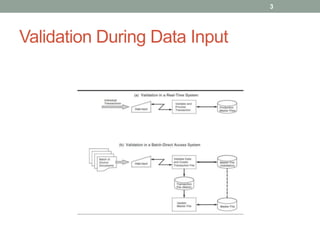
Validation During Data Input
3
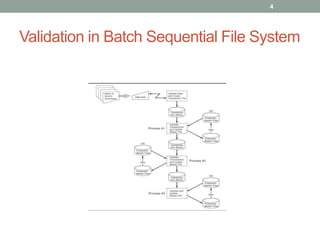
Validation in Batch Sequential File System
4
Input Controls
• Record interrogation procedures valid records by
examining the interrelationship of its field values.
• Reasonableness check determines if a value is reasonable when
considered alone with other data fields.
• Sign check verifies the sign of the field is correct.
• Sequence check use to determine if a record is out of order.
• File interrogation is to ensure the correct file is being
processed:
• Internal and external label checks verify the file being processed is
the one being called for.
• Version checks are used to verify the correct version is being
processed.
5
Processing Controls
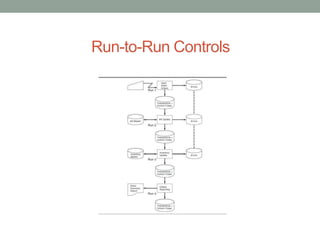
• Run-to-run controls monitor a batch as it moves from one
run to another and ensures:
• All records are processed, no record processed more than once.
• A transaction audit trail is created.
• Accomplished through batch control data that includes: unique
batch number, date, transaction code, record count, total dollar
value (control total), and a hash total.
10/01/2017 6
Processing Controls
• Common error handling techniques:
• Correct immediately: With the direct data validation approach, error
detection and correction can take place during data entry.
• Create an error file: Individual errors are flagged to prevent them
from being processed, corrected and resubmitted as a separate
batch for reprocessing.
• Reject the batch: Some errors are associated with the entire batch
making the best solution to cease processing.
10/01/2017 7
Run-to-Run Controls
8
Processing Controls
• Operator intervention increases potential for human error.
Systems with operator intervention controls less prone to
processing errors.
• Preservation of audit trail important objective of process
control.
• Transaction logs should record every transaction successfully
processed by the system.
• All automatically generated transactions should be included in the
log with the responsible end user receiving a detailed listing.
• Each transaction processed must have a unique identifier.
• A listing of all error records should go to the appropriate user to
support error correction and resubmission.
9
Transaction Log to Preserve the Audit
Trail
10
Stages in the Output Process
11
Output Controls
• Ensure system output is not lost, misplaced or corrupted
and that privacy policy not violated. Controls for batch
system output include:
• Output spooling directs output to a magnetic disk rather
than to the printer. When resources become available
output files are printed.
• Creation of the output file presents an added exposure for a
computer criminal to access, copy or destroy the file.
12
Output Controls
• Print program requires operator interventions to print,
monitor and remove the output. Program controls are
designed to:
• Prevent unauthorized copies and unauthorized browsing of
sensitive data by employees.
• Printed output reports go through the bursting stage to
have pages separated and collated.
• Primary control is supervision.
• Computer waste represents a potential risk.
• Should be shredded before disposal.
13
Output Controls
• Data control group sometimes responsible for verifying
accuracy of output before distribution.
• Report distribution risks include reports being lost, stolen
or misdirected.
• Secure mailboxes, in person pickup or secured delivery.
• End user control include error checking and secure
storage until report’s expiration period has expired.
• Real-time output threats include interception, disruption,
destruction or corruption of output.
14
Computer Aided Audit Tools & Techniques
for Testing Controls
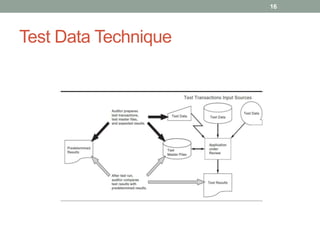
• Test data method used to establish the application
processing integrity.
• Results from test run compared to predetermined expectations to
evaluate application logic and controls.
• Test data includes both valid and invalid transactions.
• Base case system evaluation (BCSE) is a variant of test
data method in which comprehensive test data goes
through repetitive testing until a valid base case is
obtained.
• When application is modified, subsequent test (new) results can be
compared with previous results (base).
15
Test Data Technique
16
Computer Aided Audit Tools & Techniques
for Testing Controls
• Tracing takes step-by-step walk of application’s internal
logic.
• Advantages of test data technique:
• Provide explicit evidence concerning application function.
• Can be employed with only minimal disruption.
• Require only minimal auditor computer expertise.
• Disadvantages of test data technique:
• Auditors must rely on computer services personnel to obtain a copy
of the application for testing.
• Provides static picture of application integrity and not a convenient
means of gathering evidence about ongoing application
functionality.
• Relatively high cost to implement, auditing inefficiency.
10/01/2017 17
The Integrated Test Facility (ITF)
• Automated technique allows auditors to test logic and
controls during normal operations by setting up a dummy
entity within the application system.
• System discriminates between ITF and routine transactions.
• Auditor analyzes ITF results against expected results.
• Advantages of ITF:
• Supports ongoing monitoring of controls as specified by COSO
control framework.
• Applications can be economically tested without disrupting user
operations and without the intervention of computer service
personnel, improving efficiency and reliability.
• Primary disadvantage of ITF is potential for corrupting
data files.
10/01/2017 18
ITF Technique
19
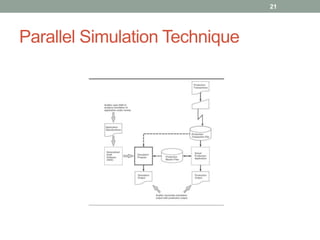
Parallel Simulation
• Requires auditor to write program that simulates key
features or processes of application under review.
• Auditor gains a thorough understanding of application under review
and identifies critical processes and controls.
• Auditor creates the simulation using program or Generalized Audit
Software (GAS).
• Auditor runs the simulated program using selected data and files.
• Auditor evaluates results and reconciles differences.
• Auditor must carefully evaluate differences between test
results and production results.
20
Parallel Simulation Technique
21

Computer-Assisted Audit Tools and Techniques

  • 1.
  • 2.
    Learning Objectives • Befamiliar with the classes of transaction input controls used by accounting applications. • Understand the objectives and techniques used to implement processing controls, including run-to-run, operator inventions, and audit trail controls. • Understand the methods used to establish effective output controls for both batch and real-time systems. 10/01/2017 1
  • 3.
    Input Controls • Programmedprocedures also known as edits or validation controls. • Perform tests on transaction data to ensure they are error free before processing. Three categories: • Field interrogation involves programmed procedures to examine the characteristics of the data in the field: • Common data input errors are (1) transcription (addition truncation or substitution) and (2) transposition errors. These problems are controlled with Check digits. • Missing data checks are used to check for blank spaces. • Numeric-alphabetic check identify data in the wrong form. • Limit checks test for amounts that exceed authorized limits. • Range checks for upper & lower limits of acceptable values. • Validity checks compare actual against acceptable values. 2
  • 4.
  • 5.
    Validation in BatchSequential File System 4
  • 6.
    Input Controls • Recordinterrogation procedures valid records by examining the interrelationship of its field values. • Reasonableness check determines if a value is reasonable when considered alone with other data fields. • Sign check verifies the sign of the field is correct. • Sequence check use to determine if a record is out of order. • File interrogation is to ensure the correct file is being processed: • Internal and external label checks verify the file being processed is the one being called for. • Version checks are used to verify the correct version is being processed. 5
  • 7.
    Processing Controls • Run-to-runcontrols monitor a batch as it moves from one run to another and ensures: • All records are processed, no record processed more than once. • A transaction audit trail is created. • Accomplished through batch control data that includes: unique batch number, date, transaction code, record count, total dollar value (control total), and a hash total. 10/01/2017 6
  • 8.
    Processing Controls • Commonerror handling techniques: • Correct immediately: With the direct data validation approach, error detection and correction can take place during data entry. • Create an error file: Individual errors are flagged to prevent them from being processed, corrected and resubmitted as a separate batch for reprocessing. • Reject the batch: Some errors are associated with the entire batch making the best solution to cease processing. 10/01/2017 7
  • 9.
  • 10.
    Processing Controls • Operatorintervention increases potential for human error. Systems with operator intervention controls less prone to processing errors. • Preservation of audit trail important objective of process control. • Transaction logs should record every transaction successfully processed by the system. • All automatically generated transactions should be included in the log with the responsible end user receiving a detailed listing. • Each transaction processed must have a unique identifier. • A listing of all error records should go to the appropriate user to support error correction and resubmission. 9
  • 11.
    Transaction Log toPreserve the Audit Trail 10
  • 12.
    Stages in theOutput Process 11
  • 13.
    Output Controls • Ensuresystem output is not lost, misplaced or corrupted and that privacy policy not violated. Controls for batch system output include: • Output spooling directs output to a magnetic disk rather than to the printer. When resources become available output files are printed. • Creation of the output file presents an added exposure for a computer criminal to access, copy or destroy the file. 12
  • 14.
    Output Controls • Printprogram requires operator interventions to print, monitor and remove the output. Program controls are designed to: • Prevent unauthorized copies and unauthorized browsing of sensitive data by employees. • Printed output reports go through the bursting stage to have pages separated and collated. • Primary control is supervision. • Computer waste represents a potential risk. • Should be shredded before disposal. 13
  • 15.
    Output Controls • Datacontrol group sometimes responsible for verifying accuracy of output before distribution. • Report distribution risks include reports being lost, stolen or misdirected. • Secure mailboxes, in person pickup or secured delivery. • End user control include error checking and secure storage until report’s expiration period has expired. • Real-time output threats include interception, disruption, destruction or corruption of output. 14
  • 16.
    Computer Aided AuditTools & Techniques for Testing Controls • Test data method used to establish the application processing integrity. • Results from test run compared to predetermined expectations to evaluate application logic and controls. • Test data includes both valid and invalid transactions. • Base case system evaluation (BCSE) is a variant of test data method in which comprehensive test data goes through repetitive testing until a valid base case is obtained. • When application is modified, subsequent test (new) results can be compared with previous results (base). 15
  • 17.
  • 18.
    Computer Aided AuditTools & Techniques for Testing Controls • Tracing takes step-by-step walk of application’s internal logic. • Advantages of test data technique: • Provide explicit evidence concerning application function. • Can be employed with only minimal disruption. • Require only minimal auditor computer expertise. • Disadvantages of test data technique: • Auditors must rely on computer services personnel to obtain a copy of the application for testing. • Provides static picture of application integrity and not a convenient means of gathering evidence about ongoing application functionality. • Relatively high cost to implement, auditing inefficiency. 10/01/2017 17
  • 19.
    The Integrated TestFacility (ITF) • Automated technique allows auditors to test logic and controls during normal operations by setting up a dummy entity within the application system. • System discriminates between ITF and routine transactions. • Auditor analyzes ITF results against expected results. • Advantages of ITF: • Supports ongoing monitoring of controls as specified by COSO control framework. • Applications can be economically tested without disrupting user operations and without the intervention of computer service personnel, improving efficiency and reliability. • Primary disadvantage of ITF is potential for corrupting data files. 10/01/2017 18
  • 20.
  • 21.
    Parallel Simulation • Requiresauditor to write program that simulates key features or processes of application under review. • Auditor gains a thorough understanding of application under review and identifies critical processes and controls. • Auditor creates the simulation using program or Generalized Audit Software (GAS). • Auditor runs the simulated program using selected data and files. • Auditor evaluates results and reconciles differences. • Auditor must carefully evaluate differences between test results and production results. 20
  • 22.