Dr.A.Senthilselvi
What is CV?
 Computer vision is an interdisciplinary scientific field
that deals with how computers can gain high-level
understanding from digital images or videos. From the
perspective of engineering, it seeks to understand and
automate tasks that the human visual system can do
Example
 One example of potential use for such technology is in
cars to aid a driver and perform the same functions as a
human. If a car was fitted with computer vision, it
could theoretically identify objects on or around the
road. This could be useful for providing the driver with
information or even for stopping the car to prevent a
collision.
Image processing is the process of doing operation in an
image, in order to get some useful information from it.
In computer vision image processing is divided into
three levels such as low level process, middle level
process and high level process.
In low level process both input and output are images.
Example: Noise removal, Image sharpening.
In the middle level process input is image and output is the
attribute taken from the input. Example: Object recognition,
Segmentation.
In high level processing, image attributes are taken as input and
the output is the understanding from the input attributes. Example:
Scene understanding, autonomous navigation .
Digital images are classified as binary image, gray scale image, true
color image and indexed image.
In binary image, each pixel is black or white in color. These images are
also called as 1bit/pixel image.
In gray scale image, each pixel is a shade of grey. These images are also
called as 8 bits/pixel images.
It means that normally these images have the brightness values from 0 to
255.
In which 0 be the value of black and 255 be the value of white.
The values between 1 and 254 mention different shades of grey levels.
In true color image each pixel has a particular color. These pixels are
represented by red, green and blue.
Images are stored using different file formats
such as TIFF,JPEG,GIF and PNG.
TIFF- For high resolution images
JPEG- For standard images
GIF- For images up to 256 colors
PNG-For images with more than 256 colors
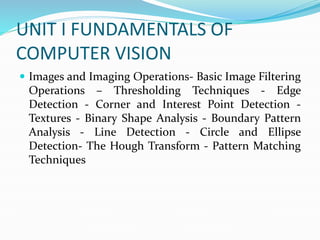
UNIT I FUNDAMENTALS OF
COMPUTER VISION
 Images and Imaging Operations- Basic Image Filtering
Operations – Thresholding Techniques - Edge
Detection - Corner and Interest Point Detection -
Textures - Binary Shape Analysis - Boundary Pattern
Analysis - Line Detection - Circle and Ellipse
Detection- The Hough Transform - Pattern Matching
Techniques
 It is the simplest type of
image. It takes only two values
i.e, Black and White or 0 and
1. The binary image consists of
a 1-bit image and it takes only
1 binary digit to represent a
pixel. Binary images are
mostly used for general shape
or outline.
 Binary images are generated
using threshold operation.
When a pixel is above the
threshold value, then it is
turned white('1') and which
are below the threshold value
then they are turned black('0')
 Grayscale images are
monochrome images, Means
they have only one color.
Grayscale images do not
contain any information
about color. Each pixel
determines available different
grey levels.
 A normal grayscale image
contains 8 bits/pixel data,
which has 256 different grey
levels. In medical images and
astronomy, 12 or 16 bits/pixel
images are used.
 The images are represented as
red, green and blue (RGB
images). And each color
image has 24 bits/pixel means
8 bits for each of the three
color band(RGB).
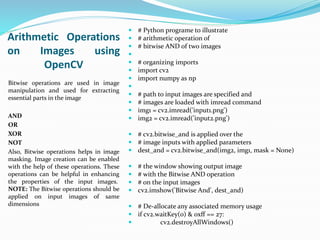
Arithmetic Operations
on Images using
OpenCV
Bitwise operations are used in image
manipulation and used for extracting
essential parts in the image
AND
OR
XOR
NOT
Also, Bitwise operations helps in image
masking. Image creation can be enabled
with the help of these operations. These
operations can be helpful in enhancing
the properties of the input images.
NOTE: The Bitwise operations should be
applied on input images of same
dimensions
 # Python programe to illustrate
 # arithmetic operation of
 # bitwise AND of two images

 # organizing imports
 import cv2
 import numpy as np

 # path to input images are specified and
 # images are loaded with imread command
 img1 = cv2.imread('input1.png')
 img2 = cv2.imread('input2.png')
 # cv2.bitwise_and is applied over the
 # image inputs with applied parameters
 dest_and = cv2.bitwise_and(img2, img1, mask = None)
 # the window showing output image
 # with the Bitwise AND operation
 # on the input images
 cv2.imshow('Bitwise And', dest_and)
 # De-allocate any associated memory usage
 if cv2.waitKey(0) & 0xff == 27:
 cv2.destroyAllWindows()

Computer vision

  • 1.
  • 2.
    What is CV? Computer vision is an interdisciplinary scientific field that deals with how computers can gain high-level understanding from digital images or videos. From the perspective of engineering, it seeks to understand and automate tasks that the human visual system can do
  • 3.
    Example  One exampleof potential use for such technology is in cars to aid a driver and perform the same functions as a human. If a car was fitted with computer vision, it could theoretically identify objects on or around the road. This could be useful for providing the driver with information or even for stopping the car to prevent a collision.
  • 4.
    Image processing isthe process of doing operation in an image, in order to get some useful information from it. In computer vision image processing is divided into three levels such as low level process, middle level process and high level process. In low level process both input and output are images. Example: Noise removal, Image sharpening.
  • 5.
    In the middlelevel process input is image and output is the attribute taken from the input. Example: Object recognition, Segmentation. In high level processing, image attributes are taken as input and the output is the understanding from the input attributes. Example: Scene understanding, autonomous navigation . Digital images are classified as binary image, gray scale image, true color image and indexed image.
  • 6.
    In binary image,each pixel is black or white in color. These images are also called as 1bit/pixel image. In gray scale image, each pixel is a shade of grey. These images are also called as 8 bits/pixel images. It means that normally these images have the brightness values from 0 to 255. In which 0 be the value of black and 255 be the value of white. The values between 1 and 254 mention different shades of grey levels. In true color image each pixel has a particular color. These pixels are represented by red, green and blue.
  • 7.
    Images are storedusing different file formats such as TIFF,JPEG,GIF and PNG. TIFF- For high resolution images JPEG- For standard images GIF- For images up to 256 colors PNG-For images with more than 256 colors
  • 8.
    UNIT I FUNDAMENTALSOF COMPUTER VISION  Images and Imaging Operations- Basic Image Filtering Operations – Thresholding Techniques - Edge Detection - Corner and Interest Point Detection - Textures - Binary Shape Analysis - Boundary Pattern Analysis - Line Detection - Circle and Ellipse Detection- The Hough Transform - Pattern Matching Techniques
  • 9.
     It isthe simplest type of image. It takes only two values i.e, Black and White or 0 and 1. The binary image consists of a 1-bit image and it takes only 1 binary digit to represent a pixel. Binary images are mostly used for general shape or outline.  Binary images are generated using threshold operation. When a pixel is above the threshold value, then it is turned white('1') and which are below the threshold value then they are turned black('0')
  • 10.
     Grayscale imagesare monochrome images, Means they have only one color. Grayscale images do not contain any information about color. Each pixel determines available different grey levels.  A normal grayscale image contains 8 bits/pixel data, which has 256 different grey levels. In medical images and astronomy, 12 or 16 bits/pixel images are used.
  • 11.
     The imagesare represented as red, green and blue (RGB images). And each color image has 24 bits/pixel means 8 bits for each of the three color band(RGB).
  • 12.
    Arithmetic Operations on Imagesusing OpenCV Bitwise operations are used in image manipulation and used for extracting essential parts in the image AND OR XOR NOT Also, Bitwise operations helps in image masking. Image creation can be enabled with the help of these operations. These operations can be helpful in enhancing the properties of the input images. NOTE: The Bitwise operations should be applied on input images of same dimensions  # Python programe to illustrate  # arithmetic operation of  # bitwise AND of two images   # organizing imports  import cv2  import numpy as np   # path to input images are specified and  # images are loaded with imread command  img1 = cv2.imread('input1.png')  img2 = cv2.imread('input2.png')  # cv2.bitwise_and is applied over the  # image inputs with applied parameters  dest_and = cv2.bitwise_and(img2, img1, mask = None)  # the window showing output image  # with the Bitwise AND operation  # on the input images  cv2.imshow('Bitwise And', dest_and)  # De-allocate any associated memory usage  if cv2.waitKey(0) & 0xff == 27:  cv2.destroyAllWindows()