UNIT 4 –COMPUTER
VISION
COMPUTER VISION
Computer vision in AI refers to the field of study and technology that
enables computers to understand and interpret visual information
from images or videos.
It involves the development of algorithms and techniques that allow
computers to analyze and process visual data to extract meaningful
insights and make decisions based on that data.
It involves various tasks, including image recognition, object
detection, image segmentation, facial recognition, scene
understanding, and more.
Image processing overview
Image processing refers to the manipulation and analysis of digital
images using various techniques and algorithms.
It involves transforming raw images into a more meaningful and
visually appealing form, extracting relevant information, and making
decisions based on that information.
COMPUTER VISION TASKS:
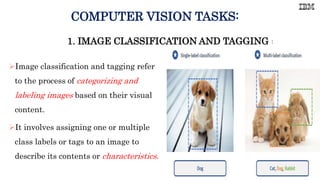
Image classification and tagging refer
to the process of categorizing and
labeling images based on their visual
content.
It involves assigning one or multiple
class labels or tags to an image to
describe its contents or characteristics.
1. IMAGE CLASSIFICATION AND TAGGING :
2. OBJECT LOCALIZATION
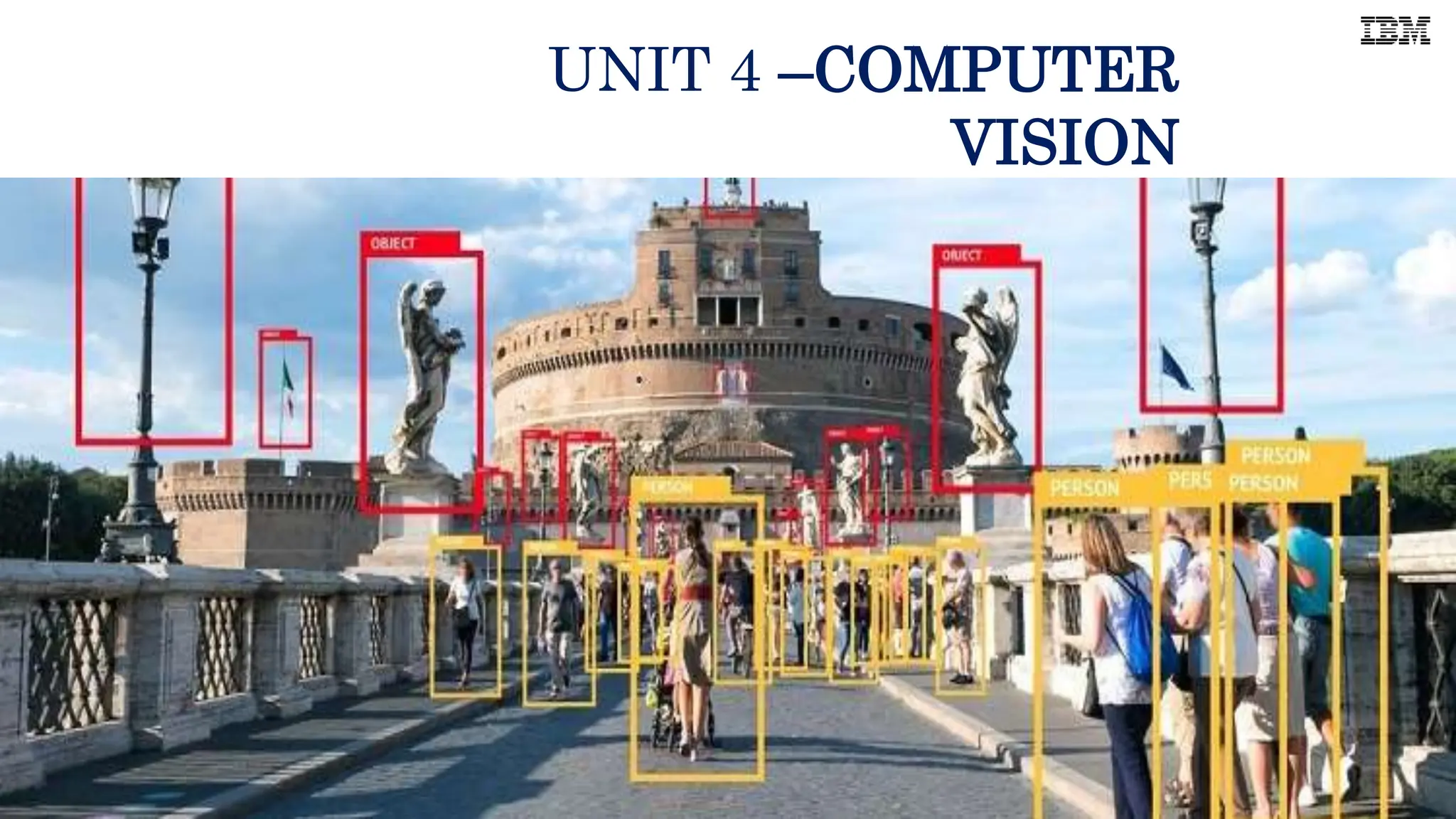
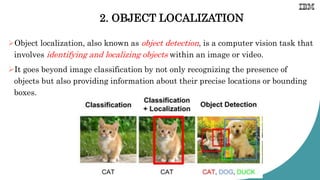
Object localization, also known as object detection, is a computer vision task that
involves identifying and localizing objects within an image or video.
It goes beyond image classification by not only recognizing the presence of
objects but also providing information about their precise locations or bounding
boxes.
3. OBJECT TRACKING
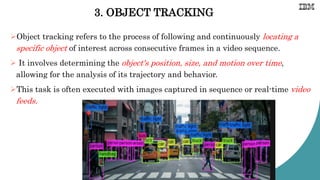
Object tracking refers to the process of following and continuously locating a
specific object of interest across consecutive frames in a video sequence.
 It involves determining the object's position, size, and motion over time,
allowing for the analysis of its trajectory and behavior.
This task is often executed with images captured in sequence or real-time video
feeds.
4. CONTENT-BASED IMAGE RETRIEVAL
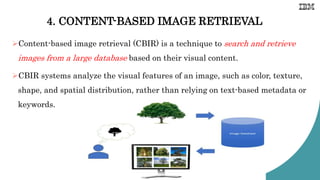
Content-based image retrieval (CBIR) is a technique to search and retrieve
images from a large database based on their visual content.
CBIR systems analyze the visual features of an image, such as color, texture,
shape, and spatial distribution, rather than relying on text-based metadata or
keywords.
HOW DOES COMPUTER VISION WORK?
Computer vision needs lots of data. It runs analyses of data over and over
until it discerns distinctions and ultimately recognize images.
Two essential technologies are used to accomplish this:
1. Deep learning
2. Convolution Neural Network (CNN).
Example:
Deep learning and CNNs are used in self-driving cars to identify objects on
the road, in facial recognition software to identify people, and in medical
imaging to diagnose diseases.
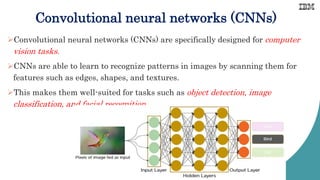
Convolutional neural networks (CNNs)
Convolutional neural networks (CNNs) are specifically designed for computer
vision tasks.
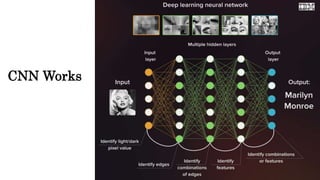
CNNs are able to learn to recognize patterns in images by scanning them for
features such as edges, shapes, and textures.
This makes them well-suited for tasks such as object detection, image
classification, and facial recognition.
CNN Works
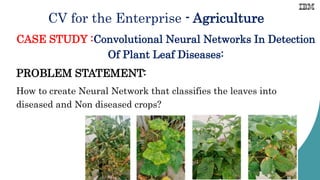
CV for the Enterprise - Agriculture
CASE STUDY :Convolutional Neural Networks In Detection
Of Plant Leaf Diseases:
PROBLEM STATEMENT:
How to create Neural Network that classifies the leaves into
diseased and Non diseased crops?
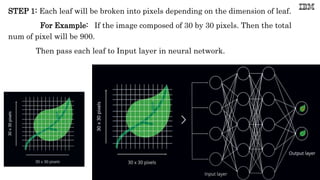
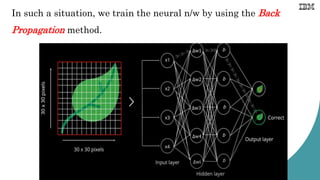
STEP 1: Each leaf will be broken into pixels depending on the dimension of leaf.
For Example: If the image composed of 30 by 30 pixels. Then the total
num of pixel will be 900.
Then pass each leaf to Input layer in neural network.
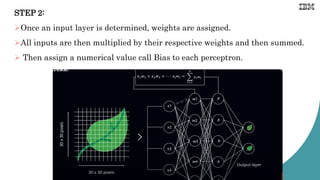
STEP 2:
Once an input layer is determined, weights are assigned.
All inputs are then multiplied by their respective weights and then summed.
 Then assign a numerical value call Bias to each perceptron.
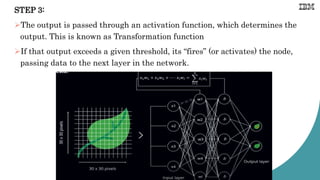
STEP 3:
The output is passed through an activation function, which determines the
output. This is known as Transformation function
If that output exceeds a given threshold, its “fires” (or activates) the node,
passing data to the next layer in the network.
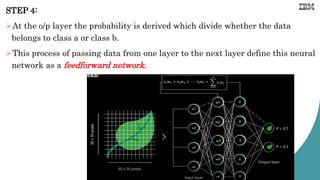
STEP 4:
At the o/p layer the probability is derived which divide whether the data
belongs to class a or class b.
This process of passing data from one layer to the next layer define this neural
network as a feedforward network.
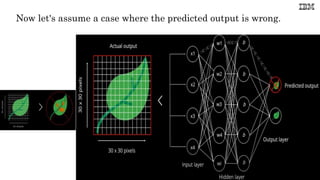
Now let's assume a case where the predicted output is wrong.
In such a situation, we train the neural n/w by using the Back
Propagation method.
Python in Computer Vision
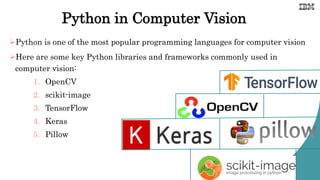
Python is one of the most popular programming languages for computer vision
Here are some key Python libraries and frameworks commonly used in
computer vision:
1. OpenCV
2. scikit-image
3. TensorFlow
4. Keras
5. Pillow
Open CV Package
OpenCV (Open Source Computer Vision Library) is a popular open-source library for
computer vision and image processing tasks.
It provides a comprehensive set of tools, algorithms, and functions that enable developers
to build applications for tasks like image and video analysis, object detection and
tracking, facial recognition, augmented reality, and more.
Package Installation: !pip install opencv-python
After running the installation command, you can import the OpenCV:
import cv2
Identify The Images:
There are two common ways to identify the images:
1. Grayscale
• Grayscale images are those images which contain only two colors black and
white. The contrast measurement of intensity is black treated as the weakest
intensity, and white as the strongest intensity.
2. RGB
• An RGB is a combination of the red, green, blue color which together makes a
new color. The computer retrieves that value from each pixel and puts the
results in an array to be interpreted.
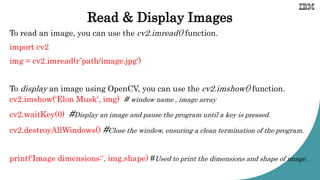
Read & Display Images
To read an image, you can use the cv2.imread() function.
import cv2
img = cv2.imread(r’path/image.jpg')
To display an image using OpenCV, you can use the cv2.imshow() function.
cv2.imshow(‘Elon Musk', img) # window name , image array
cv2.waitKey(0) #Display an image and pause the program until a key is pressed.
cv2.destroyAllWindows() #Close the window, ensuring a clean termination of the program.
print('Image dimensions:', img.shape) #Used to print the dimensions and shape of image.
Example:
import cv2
img= cv2.imread(r'C:/Users/ibmtr/OneDrive/Desktop/Elon.jpg’)
print('Image dimensions:', img.shape)
cv2.imshow('image',img)
cv2.waitKey(0)
cv2.destroyAllWindows()
OUTPUT:
Image dimensions: (1080, 1920, 3)
[Note:1080-height of the image
1920- width of the image
3-number of color channels in the image (Red, Green, and Blue)]
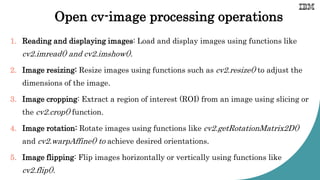
Open cv-image processing operations
1. Reading and displaying images: Load and display images using functions like
cv2.imread() and cv2.imshow().
2. Image resizing: Resize images using functions such as cv2.resize() to adjust the
dimensions of the image.
3. Image cropping: Extract a region of interest (ROI) from an image using slicing or
the cv2.crop() function.
4. Image rotation: Rotate images using functions like cv2.getRotationMatrix2D()
and cv2.warpAffine() to achieve desired orientations.
5. Image flipping: Flip images horizontally or vertically using functions like
cv2.flip().

AI UNIT 4 - SRCAS JOC.pptx enjoy this ppt

  • 1.
  • 2.
    COMPUTER VISION Computer visionin AI refers to the field of study and technology that enables computers to understand and interpret visual information from images or videos. It involves the development of algorithms and techniques that allow computers to analyze and process visual data to extract meaningful insights and make decisions based on that data. It involves various tasks, including image recognition, object detection, image segmentation, facial recognition, scene understanding, and more.
  • 3.
    Image processing overview Imageprocessing refers to the manipulation and analysis of digital images using various techniques and algorithms. It involves transforming raw images into a more meaningful and visually appealing form, extracting relevant information, and making decisions based on that information.
  • 4.
    COMPUTER VISION TASKS: Imageclassification and tagging refer to the process of categorizing and labeling images based on their visual content. It involves assigning one or multiple class labels or tags to an image to describe its contents or characteristics. 1. IMAGE CLASSIFICATION AND TAGGING :
  • 5.
    2. OBJECT LOCALIZATION Objectlocalization, also known as object detection, is a computer vision task that involves identifying and localizing objects within an image or video. It goes beyond image classification by not only recognizing the presence of objects but also providing information about their precise locations or bounding boxes.
  • 6.
    3. OBJECT TRACKING Objecttracking refers to the process of following and continuously locating a specific object of interest across consecutive frames in a video sequence.  It involves determining the object's position, size, and motion over time, allowing for the analysis of its trajectory and behavior. This task is often executed with images captured in sequence or real-time video feeds.
  • 7.
    4. CONTENT-BASED IMAGERETRIEVAL Content-based image retrieval (CBIR) is a technique to search and retrieve images from a large database based on their visual content. CBIR systems analyze the visual features of an image, such as color, texture, shape, and spatial distribution, rather than relying on text-based metadata or keywords.
  • 8.
    HOW DOES COMPUTERVISION WORK? Computer vision needs lots of data. It runs analyses of data over and over until it discerns distinctions and ultimately recognize images. Two essential technologies are used to accomplish this: 1. Deep learning 2. Convolution Neural Network (CNN). Example: Deep learning and CNNs are used in self-driving cars to identify objects on the road, in facial recognition software to identify people, and in medical imaging to diagnose diseases.
  • 9.
    Convolutional neural networks(CNNs) Convolutional neural networks (CNNs) are specifically designed for computer vision tasks. CNNs are able to learn to recognize patterns in images by scanning them for features such as edges, shapes, and textures. This makes them well-suited for tasks such as object detection, image classification, and facial recognition.
  • 10.
  • 11.
    CV for theEnterprise - Agriculture CASE STUDY :Convolutional Neural Networks In Detection Of Plant Leaf Diseases: PROBLEM STATEMENT: How to create Neural Network that classifies the leaves into diseased and Non diseased crops?
  • 12.
    STEP 1: Eachleaf will be broken into pixels depending on the dimension of leaf. For Example: If the image composed of 30 by 30 pixels. Then the total num of pixel will be 900. Then pass each leaf to Input layer in neural network.
  • 13.
    STEP 2: Once aninput layer is determined, weights are assigned. All inputs are then multiplied by their respective weights and then summed.  Then assign a numerical value call Bias to each perceptron.
  • 14.
    STEP 3: The outputis passed through an activation function, which determines the output. This is known as Transformation function If that output exceeds a given threshold, its “fires” (or activates) the node, passing data to the next layer in the network.
  • 15.
    STEP 4: At theo/p layer the probability is derived which divide whether the data belongs to class a or class b. This process of passing data from one layer to the next layer define this neural network as a feedforward network.
  • 16.
    Now let's assumea case where the predicted output is wrong.
  • 17.
    In such asituation, we train the neural n/w by using the Back Propagation method.
  • 18.
    Python in ComputerVision Python is one of the most popular programming languages for computer vision Here are some key Python libraries and frameworks commonly used in computer vision: 1. OpenCV 2. scikit-image 3. TensorFlow 4. Keras 5. Pillow
  • 19.
    Open CV Package OpenCV(Open Source Computer Vision Library) is a popular open-source library for computer vision and image processing tasks. It provides a comprehensive set of tools, algorithms, and functions that enable developers to build applications for tasks like image and video analysis, object detection and tracking, facial recognition, augmented reality, and more. Package Installation: !pip install opencv-python After running the installation command, you can import the OpenCV: import cv2
  • 20.
    Identify The Images: Thereare two common ways to identify the images: 1. Grayscale • Grayscale images are those images which contain only two colors black and white. The contrast measurement of intensity is black treated as the weakest intensity, and white as the strongest intensity. 2. RGB • An RGB is a combination of the red, green, blue color which together makes a new color. The computer retrieves that value from each pixel and puts the results in an array to be interpreted.
  • 21.
    Read & DisplayImages To read an image, you can use the cv2.imread() function. import cv2 img = cv2.imread(r’path/image.jpg') To display an image using OpenCV, you can use the cv2.imshow() function. cv2.imshow(‘Elon Musk', img) # window name , image array cv2.waitKey(0) #Display an image and pause the program until a key is pressed. cv2.destroyAllWindows() #Close the window, ensuring a clean termination of the program. print('Image dimensions:', img.shape) #Used to print the dimensions and shape of image.
  • 22.
    Example: import cv2 img= cv2.imread(r'C:/Users/ibmtr/OneDrive/Desktop/Elon.jpg’) print('Imagedimensions:', img.shape) cv2.imshow('image',img) cv2.waitKey(0) cv2.destroyAllWindows() OUTPUT: Image dimensions: (1080, 1920, 3) [Note:1080-height of the image 1920- width of the image 3-number of color channels in the image (Red, Green, and Blue)]
  • 23.
    Open cv-image processingoperations 1. Reading and displaying images: Load and display images using functions like cv2.imread() and cv2.imshow(). 2. Image resizing: Resize images using functions such as cv2.resize() to adjust the dimensions of the image. 3. Image cropping: Extract a region of interest (ROI) from an image using slicing or the cv2.crop() function. 4. Image rotation: Rotate images using functions like cv2.getRotationMatrix2D() and cv2.warpAffine() to achieve desired orientations. 5. Image flipping: Flip images horizontally or vertically using functions like cv2.flip().