Introduction to Computer Science
Computer Software
Lecture c
This material (Comp 4 Unit 3) was developed by Oregon Health & Science University, funded by the Department
of Health and Human Services, Office of the National Coordinator for Health Information Technology under
Award Number 90WT0001.
This work is licensed under the Creative Commons Attribution-NonCommercial-ShareAlike 4.0 International
License. To view a copy of this license, visit http://creativecommons.org/licenses/by-nc-sa/4.0/.
Computer Software
Learning Objectives - 1
• Define computer software and major
software types (Lecture a)
• Describe application software
classification and provide examples,
including those focused on health care
(Lecture a)
2
Computer Software
Learning Objectives - 2
• Define what an operating system (OS) is
(Lecture b)
• Explain the features and functions of
operating systems (Lecture b)
• Classify operating systems (Lecture c)
• Describe commonly used operating
systems (Lecture c)
3
Computer Software
Learning Objectives - 3
• Describe types and major attributes of files
(Lecture d)
• Explain the purpose of file systems
(Lecture d)
• Provide file management tips (Lecture d)
• Identify different implementations of file
systems (Lecture d)
4
Types of OSs
• For personal computers
• For servers
• For handheld devices
• For embedded computers
5
Operating Systems for PCs - 1
• DOS
• Microsoft Windows
– Microsoft Windows 1.0 through 2000
– Microsoft Windows NT
– Microsoft Windows XP
– Microsoft Windows Vista
– Microsoft Windows 7
– Microsoft Windows 8
– Microsoft Windows 10
6
Operating Systems for PCs - 2
• Mac OS
– Classic Mac OS -
Mac OS 9
– Mac OS X 10.1-10.4
– Mac OS X 10.5
(Leopard)
– Mac OS X 10.6
(Snow Leopard)
– Mac OS X 10.7 (Lion)
– Mac OS X 10.8
(Mountain Lion)
– Mac OS X 10.9
(Mavericks)
– Mac OS X 10.10
(Yosemite)
– Mac OS X 10.11 (El
Capitan)
7
Operating Systems for PCs - 3
• Linux
– Unix-like operating system
– Released in 1991 by Linus Torvalds
– Free and open-source software
– Interface either through command-line
interface (CLI), or a graphical user interface
(GUI)
– Some of the popular desktop environments: K
Desktop Environment (KDE), GNOME,
Pantheon, Cinnamon, Unity
8
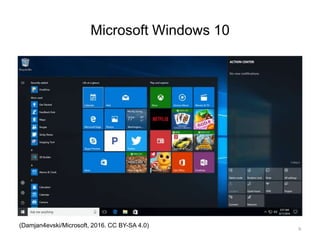
Microsoft Windows 10
(Damjan4evski/Microsoft, 2016. CC BY-SA 4.0) 9
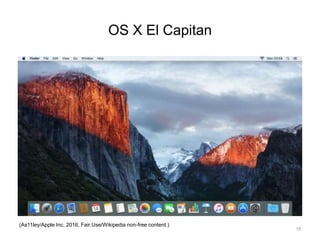
OS X El Capitan
(As11ley/Apple Inc, 2016, Fair Use/Wikipedia non-free content.)
10
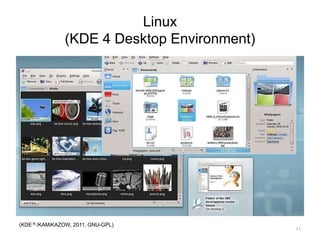
Linux
(KDE 4 Desktop Environment)
(KDE ® /KAMiKAZOW, 2011, GNU-GPL)
11
Microsoft Windows vs. Mac OS X
• Strengths of MS
Windows
– Most applications
available for MS
Windows®
– Large variety of
hardware that runs
MS Windows
• Weaknesses of MS
Windows
– Poor reliability
– Vulnerable security
• Strengths of Mac
OS X
– User friendly
– Reliable
– Secure
• Weaknesses of
Mac OS X
– Limited application
software availability
12
OS for PCs and Servers
• Unix
– Developed in 1969
– Used for mainframes
– Many different variations available
• Linux
– Open source version of Unix created by Linus
Torvalds in 1991
13
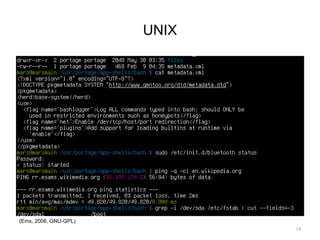
UNIX
(Emx, 2006, GNU-GPL)
14
OSs for Servers
• Mac OS X Server
• Microsoft Windows Server
– Versions 2008, 2008 R2, 2012, 2012 R2, 2016
– Windows High Performance Computing (HPC)
Server 2008, 2008 R2, 2012, 2012 R2
• Windows Small Business Server
• Windows Essential Small Business Server
• Windows Home Server
• Unix/Linux
15
OSs for Handheld Devices
• Microsoft Windows
10 Mobile
• iPhone iOS 4
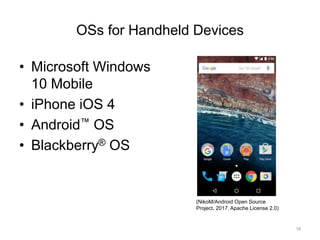
• Android™ OS
• Blackberry® OS
(NikoM/Android Open Source
Project, 2017. Apache License 2.0)
16
OS for Embedded Systems - 1
• An embedded system is a special-purpose
computer encapsulated in a larger system
• Embedded systems need their own OS
• Some are proprietary and developed for
specific hardware system alone
17
OS for Embedded Systems - 2
• Some are commercially available and
customizable
– Windows Embedded 7: Built on Windows 7
– Windows Embedded Compact: For small-
footprint devices
– Windows Embedded 8: The latest (2016)
release of Windows Embedded products
18
Embedded OS Example
• M-Turbo® ultrasound system by SonoSite,
Inc. runs Windows Embedded CE
– Handheld
– Easy to use
– Boots in less than 15 seconds
– Instant images
19
Computer Software
Summary - Lecture c
• Classify operating systems
• Describe commonly used operating
systems
20
Computer Software
References – 1 – Lecture C
References
Evans A, Martin K, Poatsey MA. (2010). Chapter 5: Using System Software: The
Operating System, Utility Programs and File Management. In: Technology in Action:
Complete. 7th ed. New Jersey: Prentice Hall.
KDE. [Webpage]. [updated 2011 Nov 12; cited 2011 Nov 12]. Available from:
http://www.kde.org.
The Linux Foundation. [Webpage]. [updated 2011 Nov 12; cited 2011 Nov 12]. Available
from: http://www.linuxfoundation.org.
Microsoft Windows. [Webpage]. [updated 2011 Nov 9; cited 2011 Nov 12]. Available from:
http://windows.microsoft.com/en-US/windows/home.
Morley Deborah, Parker Charles S. (2010). Chapter 6: System Software: Operating
Systems and Utility Programs. In: Understanding Computers Today and Tomorrow.
12th ed. Boston: Course Technology.
OS X. [Webpage]. [updated 2011 Nov 12; cited 2011 Nov 12]. Available from:
http://www.apple.com/macosx/.
21
Computer Software
References – 2 – Lecture C
References
Parsons JJ, Oja D. (2010). Chapter 4: Operating Systems and File Management. In: New
Perspectives on Computer Concepts 2011: Comprehensive. 13th ed. Boston: Course
Technology.
Shelley GB, Vermaat ME. (2010). Chapter 8: Operating Systems and Utility Programs.
In: Discovering Computers 2011: Introductory. 1st ed. Boston: Course Technology.
M-Turbo ultrasound system [Webpage]. Fujifilm SonoSite. Accessed February 24, 2017
from https://www.sonosite.com/product/sonosite-m-turbo.
The Unix System Homepage. [Webpage]. [updated 2011 Nov 12; cited 2011 Nov 12];
Available from: http://opengroup.org/unix.
Why booting is called booting. (2012, March 11). Retrieved May 1, 2016, from
http://desktopreality.com/why-booting-is-called-booting/.
Windows Embedded Web site. [Webpage]. [2015, cited 2016 Mar 07]; Available from:
https://www.microsoft.com/windowsembedded/en-us/products-solutions-
overview.aspx.
22
Computer Software
References – 3 – Lecture C
Images
Slide 9: A screenshot of Microsoft Windows 10. [image on the Internet]. Microsoft [software]
and Damjan4evski [image]. (2016, August 20). Retrieved February 24, 2017 from
https://commons.wikimedia.org/wiki/File:Windows_10_mk.png. Licensed under the
Creative Commons Creative Commons Attribution-Share Alike 4.0 International License.
Slide 10: A screenshot of Mac OS X 10.11 El Capitan default desktop. [image on the Internet].
Apple, Inc [software] and User: As11ley [image]. (2016, March 15). Retrieved February 24,
2017 from https://en.wikipedia.org/wiki/File:OS_X_El_Capitan_screenshot.png. Fair Use
exception, Wikipedia Fair Use as non-free content.
Slide 11: A screenshot of KDE Plasma Desktop 4.4. [image on the Internet]. KDE [software] and
User: KAMiKAZOW [image]. (2010, February 9). Retrieved from
https://commons.wikimedia.org/wiki/File:Plasma_Desktop_4.4.jpg. Licensed under the
GNU General Public License.
Slide 14: A screenshot of Bourne Again SHell (BASH). [image on the Internet]. GNU [software],
User: Emx [original image], and User: Iketsi [updated image]. (2013, April 18). Retrieved
February 24, 2017 from https://commons.wikimedia.org/wiki/File:Bash_screenshot.png.
Licensed under the GNU General Public License.
Slide 16: Android OS 6.0 home screen. [image on the Internet]. Android Open Source Project
[software], User: Adrianwo [original image], and User: NikoM [updated image]. (2016,
January 29). Retrieved February 24, 2017 from
https://commons.wikimedia.org/wiki/File:Android_6.0-en.png. Licensed under the Apache
License Version 2.0.
23
Introduction to Computer Science
Computer Software
Lecture C
This material was developed by Oregon
Health & Science University, funded by the
Department of Health and Human Services,
Office of the National Coordinator for Health
Information Technology under Award
Number 90WT0001.
24

Computer Software - Lecture C

  • 1.
    Introduction to ComputerScience Computer Software Lecture c This material (Comp 4 Unit 3) was developed by Oregon Health & Science University, funded by the Department of Health and Human Services, Office of the National Coordinator for Health Information Technology under Award Number 90WT0001. This work is licensed under the Creative Commons Attribution-NonCommercial-ShareAlike 4.0 International License. To view a copy of this license, visit http://creativecommons.org/licenses/by-nc-sa/4.0/.
  • 2.
    Computer Software Learning Objectives- 1 • Define computer software and major software types (Lecture a) • Describe application software classification and provide examples, including those focused on health care (Lecture a) 2
  • 3.
    Computer Software Learning Objectives- 2 • Define what an operating system (OS) is (Lecture b) • Explain the features and functions of operating systems (Lecture b) • Classify operating systems (Lecture c) • Describe commonly used operating systems (Lecture c) 3
  • 4.
    Computer Software Learning Objectives- 3 • Describe types and major attributes of files (Lecture d) • Explain the purpose of file systems (Lecture d) • Provide file management tips (Lecture d) • Identify different implementations of file systems (Lecture d) 4
  • 5.
    Types of OSs •For personal computers • For servers • For handheld devices • For embedded computers 5
  • 6.
    Operating Systems forPCs - 1 • DOS • Microsoft Windows – Microsoft Windows 1.0 through 2000 – Microsoft Windows NT – Microsoft Windows XP – Microsoft Windows Vista – Microsoft Windows 7 – Microsoft Windows 8 – Microsoft Windows 10 6
  • 7.
    Operating Systems forPCs - 2 • Mac OS – Classic Mac OS - Mac OS 9 – Mac OS X 10.1-10.4 – Mac OS X 10.5 (Leopard) – Mac OS X 10.6 (Snow Leopard) – Mac OS X 10.7 (Lion) – Mac OS X 10.8 (Mountain Lion) – Mac OS X 10.9 (Mavericks) – Mac OS X 10.10 (Yosemite) – Mac OS X 10.11 (El Capitan) 7
  • 8.
    Operating Systems forPCs - 3 • Linux – Unix-like operating system – Released in 1991 by Linus Torvalds – Free and open-source software – Interface either through command-line interface (CLI), or a graphical user interface (GUI) – Some of the popular desktop environments: K Desktop Environment (KDE), GNOME, Pantheon, Cinnamon, Unity 8
  • 9.
  • 10.
    OS X ElCapitan (As11ley/Apple Inc, 2016, Fair Use/Wikipedia non-free content.) 10
  • 11.
    Linux (KDE 4 DesktopEnvironment) (KDE ® /KAMiKAZOW, 2011, GNU-GPL) 11
  • 12.
    Microsoft Windows vs.Mac OS X • Strengths of MS Windows – Most applications available for MS Windows® – Large variety of hardware that runs MS Windows • Weaknesses of MS Windows – Poor reliability – Vulnerable security • Strengths of Mac OS X – User friendly – Reliable – Secure • Weaknesses of Mac OS X – Limited application software availability 12
  • 13.
    OS for PCsand Servers • Unix – Developed in 1969 – Used for mainframes – Many different variations available • Linux – Open source version of Unix created by Linus Torvalds in 1991 13
  • 14.
  • 15.
    OSs for Servers •Mac OS X Server • Microsoft Windows Server – Versions 2008, 2008 R2, 2012, 2012 R2, 2016 – Windows High Performance Computing (HPC) Server 2008, 2008 R2, 2012, 2012 R2 • Windows Small Business Server • Windows Essential Small Business Server • Windows Home Server • Unix/Linux 15
  • 16.
    OSs for HandheldDevices • Microsoft Windows 10 Mobile • iPhone iOS 4 • Android™ OS • Blackberry® OS (NikoM/Android Open Source Project, 2017. Apache License 2.0) 16
  • 17.
    OS for EmbeddedSystems - 1 • An embedded system is a special-purpose computer encapsulated in a larger system • Embedded systems need their own OS • Some are proprietary and developed for specific hardware system alone 17
  • 18.
    OS for EmbeddedSystems - 2 • Some are commercially available and customizable – Windows Embedded 7: Built on Windows 7 – Windows Embedded Compact: For small- footprint devices – Windows Embedded 8: The latest (2016) release of Windows Embedded products 18
  • 19.
    Embedded OS Example •M-Turbo® ultrasound system by SonoSite, Inc. runs Windows Embedded CE – Handheld – Easy to use – Boots in less than 15 seconds – Instant images 19
  • 20.
    Computer Software Summary -Lecture c • Classify operating systems • Describe commonly used operating systems 20
  • 21.
    Computer Software References –1 – Lecture C References Evans A, Martin K, Poatsey MA. (2010). Chapter 5: Using System Software: The Operating System, Utility Programs and File Management. In: Technology in Action: Complete. 7th ed. New Jersey: Prentice Hall. KDE. [Webpage]. [updated 2011 Nov 12; cited 2011 Nov 12]. Available from: http://www.kde.org. The Linux Foundation. [Webpage]. [updated 2011 Nov 12; cited 2011 Nov 12]. Available from: http://www.linuxfoundation.org. Microsoft Windows. [Webpage]. [updated 2011 Nov 9; cited 2011 Nov 12]. Available from: http://windows.microsoft.com/en-US/windows/home. Morley Deborah, Parker Charles S. (2010). Chapter 6: System Software: Operating Systems and Utility Programs. In: Understanding Computers Today and Tomorrow. 12th ed. Boston: Course Technology. OS X. [Webpage]. [updated 2011 Nov 12; cited 2011 Nov 12]. Available from: http://www.apple.com/macosx/. 21
  • 22.
    Computer Software References –2 – Lecture C References Parsons JJ, Oja D. (2010). Chapter 4: Operating Systems and File Management. In: New Perspectives on Computer Concepts 2011: Comprehensive. 13th ed. Boston: Course Technology. Shelley GB, Vermaat ME. (2010). Chapter 8: Operating Systems and Utility Programs. In: Discovering Computers 2011: Introductory. 1st ed. Boston: Course Technology. M-Turbo ultrasound system [Webpage]. Fujifilm SonoSite. Accessed February 24, 2017 from https://www.sonosite.com/product/sonosite-m-turbo. The Unix System Homepage. [Webpage]. [updated 2011 Nov 12; cited 2011 Nov 12]; Available from: http://opengroup.org/unix. Why booting is called booting. (2012, March 11). Retrieved May 1, 2016, from http://desktopreality.com/why-booting-is-called-booting/. Windows Embedded Web site. [Webpage]. [2015, cited 2016 Mar 07]; Available from: https://www.microsoft.com/windowsembedded/en-us/products-solutions- overview.aspx. 22
  • 23.
    Computer Software References –3 – Lecture C Images Slide 9: A screenshot of Microsoft Windows 10. [image on the Internet]. Microsoft [software] and Damjan4evski [image]. (2016, August 20). Retrieved February 24, 2017 from https://commons.wikimedia.org/wiki/File:Windows_10_mk.png. Licensed under the Creative Commons Creative Commons Attribution-Share Alike 4.0 International License. Slide 10: A screenshot of Mac OS X 10.11 El Capitan default desktop. [image on the Internet]. Apple, Inc [software] and User: As11ley [image]. (2016, March 15). Retrieved February 24, 2017 from https://en.wikipedia.org/wiki/File:OS_X_El_Capitan_screenshot.png. Fair Use exception, Wikipedia Fair Use as non-free content. Slide 11: A screenshot of KDE Plasma Desktop 4.4. [image on the Internet]. KDE [software] and User: KAMiKAZOW [image]. (2010, February 9). Retrieved from https://commons.wikimedia.org/wiki/File:Plasma_Desktop_4.4.jpg. Licensed under the GNU General Public License. Slide 14: A screenshot of Bourne Again SHell (BASH). [image on the Internet]. GNU [software], User: Emx [original image], and User: Iketsi [updated image]. (2013, April 18). Retrieved February 24, 2017 from https://commons.wikimedia.org/wiki/File:Bash_screenshot.png. Licensed under the GNU General Public License. Slide 16: Android OS 6.0 home screen. [image on the Internet]. Android Open Source Project [software], User: Adrianwo [original image], and User: NikoM [updated image]. (2016, January 29). Retrieved February 24, 2017 from https://commons.wikimedia.org/wiki/File:Android_6.0-en.png. Licensed under the Apache License Version 2.0. 23
  • 24.
    Introduction to ComputerScience Computer Software Lecture C This material was developed by Oregon Health & Science University, funded by the Department of Health and Human Services, Office of the National Coordinator for Health Information Technology under Award Number 90WT0001. 24

Editor's Notes

  • #2 Welcome to Introduction to Computer Science: Computer Software. This is lecture c. The component, Introduction to Computer Science, provides a basic overview of computer architecture; data organization, representation, and structure; the structure of programming languages; and networking and data communication. It also includes some basic terminology from the world of computing.
  • #3 The learning objectives for this unit, Computer Software, are to: Define computer software and major software types, Describe application software classification and provide examples, including those focused on health care,
  • #4 Define what an operating system, or OS, is, Explain the features and functions of operating systems, Classify operating systems, Describe commonly used operating systems,
  • #5 Describe types and major attributes of files, Explain the purpose of file systems, Provide file management tips, And, identify different implementations of file systems
  • #6 This lecture classifies and describes commonly used operating systems. All computers have an OS, and there are several types available. There are operating systems for personal computers, for servers, for handheld devices, and for embedded computers. All of them provide some level of the same core functionality, but differ in complexity and size.
  • #7 For PCs, there are three main types of OSs available. The first is called simply Disk Operating System, or DOS. It is the command-line system for Intel chip PCs that pre-date Microsoft Windows. The second is Microsoft Windows’ graphical user interface, or GUI-based OS for Intel chip-based PCs. Version 1.0 was introduced in 1985 with subsequent versions 2, 3, and 3.1 being introduced throughout the following seven years. Note that these initial versions of Windows were all based on DOS . Windows 95 was introduced in 1995 and had an improved GUI. Microsoft also released Windows versions 98, Millennium Edition or ME, and 2000. In 1994, Microsoft developed and introduced their business OS, Windows NT. In 2001, Windows XP combined the personal and business OS. When it was introduced in 2007, Windows Vista introduced security features and changes to the user interface, or UI . Windows Vista was met with poor critical reception, and in 2009 Microsoft introduced Windows 7 which was primarily intended to be an incremental upgrade for Windows Vista. Windows 8 was released in 2012 and introduced some changes, including a touch-optimized Windows shell. Windows 10, the latest version, was released in 2015.
  • #8 The third type of OS, Mac OS, works on Apple Macintosh personal computers, which have ranged from the classic Mac OS first introduced in 1984 through version 9 in 2001. The hallmark of the Mac OS was its completely graphical user interface—it never used a command line like DOS. Mac OS X is a completely different OS—it is a BSD UNIX OS, which makes it very secure and stable. It was first introduced in 2002 and has had six additional significant versions since then, including the Snow Leopard version, version 10.6, which uses a graphical interface called Aqua. The latest version, OS X El Capitan, was released in 2015.
  • #9 Linux is a Unix-like operating system released in 1991 by Linus Torvalds. The name "Linux" comes from combining "Unix" and "Linus". It is a free and open-source software. The user can interface with Linux either using a command-line interface, or CLI, or a graphical user interface, or GUI. Some of the popular desktop environments are the K Desktop Environment or KDE, GNOME, Pantheon, Cinnamon, and Unity.
  • #10 This is a screen shot of Windows 10. As of 2016, Windows 10 is the latest release of Microsoft Windows.
  • #11 This is a screenshot of Mac’s OS X El Capitan showing the Aqua graphical interface.
  • #12 This is Linux running the KDE 4 Desktop environment.
  • #13 When comparing Windows versus Mac OS X, the biggest strength for the Windows OS is the large number of applications available, as well as all of the compatible hardware and devices. Conversely, the weakness of Mac OS X is the limited application software availability; some software is simply not available for Mac OS X. A big benefit of Mac OS X is that it is easy to use, although the Windows 10 GUI is now quite similar to Mac OS X. Because Mac OS X is based on UNIX, it is highly reliable and secure. On the other hand, Windows is not as reliable and secure. Software running in Windows often freezes up or ends suddenly, unlike with Mac OS X, where this is a rarity. Also, far more malware targets Windows platforms than Mac OS X. Part of the reason is that Windows’ use is much more widespread than MAC OS X, making Windows a bigger target. The other part of the reason is that the Windows OS is not as secure as Mac OS X.
  • #14 UNIX is an OS developed in 1969 for mainframes. It is still used today in many different variations and versions. It is very robust, secure, and stable. In 1991, Linus Torvalds created Linux, which is a free, open-source version of UNIX. Both Linux and UNIX can be installed on both PCs and workstations as well as large servers and mainframes.
  • #15 These are the command lines in a UNIX system. Windowing environments are available for UNIX, but the command line remains available.
  • #16 There are many OS options available for servers. Mac OS X Server is identical to OS X for PCs, it just adds functionality needed for servers. Microsoft Windows Server was introduced to follow Windows NT for large server applications. Since then, there have been several versions released, with the latest being Windows Server 2016. Additionally, there are server OSs (oh-esses) designed specifically for high performance computing: HPC Server 2008, 2008 R2, 2012, and 2012 R2. On the smaller side, there are server operating systems for small businesses, medium-sized businesses, and home use. Finally, UNIX and Linux can be used as an OS for a server.
  • #17 Operating systems for handhelds are smaller and simpler than for PCs. The OS on a hand-held is so small it can be stored in ROM and loaded immediately when the device is turned on. The OS provides built-in support for touch screens, handwriting input, wireless networks, and cellular communication. Some examples include Microsoft Windows 10 Mobile OS for phones; iPhone iOS 9, based on Mac OS X for iPhones; Blackberry OS for Blackberries; and the Android OS, which is based on Linux for Android phones.
  • #18 An embedded system is a special-purpose computer encapsulated in a larger mechanical or electrical system. There are embedded computers in everything from home appliances to power-steering modules to home electronics. These systems still need their own operating system. Some operating systems are developed specifically for those devices and are proprietary.
  • #19 Some embedded systems are commercially available and customizable. Microsoft offers a family of embedded operating systems based on Windows. Among those currently used in 2016 are: Windows Embedded 7, Windows Embedded Compact, and Windows Embedded 8.
  • #20 M-Turbo is an example of a medical device that uses an embedded OS. In this case, it uses Windows Embedded CE, which is another type of embedded OS from Microsoft. This hand-held, portable ultrasound device boots quickly and provides instant ultrasound images that can be transferred to a computer using USB technology.
  • #21 This concludes Lecture c of the unit on Computer Software. In summary, this lecture classified and described some of the more common operating systems, including the features and benefits of several of them.
  • #22 References slide. No audio.
  • #23 References slide. No audio.
  • #24 References slide. No audio.
  • #25 No audio.