Copyright © 2006 by The McGraw-Hill Companies, Inc. All rights reserved.
McGraw-Hill Technology Education
Copyright © 2005 by The McGraw-Hill Companies, Inc. All rights reserved.
Copyright © 2006 by The McGraw-Hill Companies, Inc. All rights reserved.
McGraw-Hill Technology Education
Chapter 6B
Survey of PC and
Network Operating
Systems
PC Operating Systems
• Microsoft Windows is the most popular
– Installed more than other OS combined
– Installed on about 95% of computers
– Apple and Linux represent the other 5%
PC Operating Systems
• DOS
– Disk Operating System
– Single user single-tasking OS
– Command line interface
– 16-bit OS
– Does not require Powerful computer
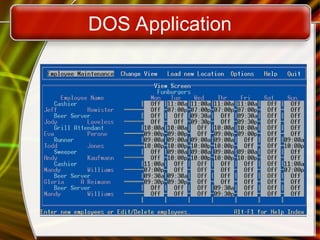
– A restaurant may still be using employee
scheduling application written for it 10 or 15
years ago
DOS Application
PC Operating Systems
• Windows NT
– Designed for a powerful system
– 32-bit OS
– Very stable
– It had become too large to run on most of
the PCs used by consumers at the time
– Windows NT Workstation
• Single user multi tasking OS
– Windows NT Server
• Multi user multi tasking OS
• Network operating system
PC Operating Systems
• Windows 9x
– 95, 98, and Millennium Edition (Me)
– 32-bit OS
• Supported 16-bit programs well
– Still found in large corporations
– 95 introduced the Start button
– 98 introduced active desktop and IE
– Me(Melinium) improved multimedia
software, support for digital video editing
PC Operating Systems
• Windows 2000
– Look of 9x with NT stability
– Optimized for office and small businesses
and developers
– Application software ran very well
PC Operating Systems
• Windows XP
– Microsoft’s newest desktop product
– Different look from 2000
– Many different versions
– Digital multimedia support was enhanced
– Communications was enhanced
PC Operating Systems
• UNIX
– Runs on all computer types
– Very stable and fast
– Command-line interface
– CAD software, popular for high-powered
workstations.
PC Operating Systems
• Linux
– Free or inexpensive version of UNIX
– The biggest nontechnical difference
between UNIX and Linux is price
– 32-bit OS
– Very stable and fast
– Linux released by Red Hat (RHCE)
– Windows GUI(also known as shell)
• Command line interface is available
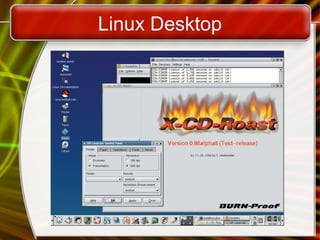
Linux Desktop
PC Operating Systems
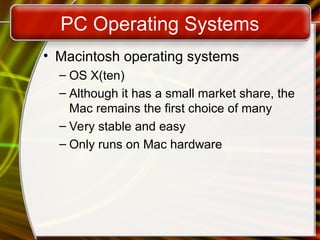
• Macintosh operating systems
– OS X(ten)
– Although it has a small market share, the
Mac remains the first choice of many
– Very stable and easy
– Only runs on Mac hardware
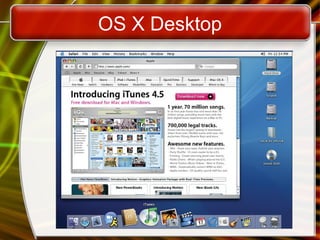
OS X Desktop
NOS Features
• Network operating system
• Fast and stable
• Runs on servers
• Multi-user and multitasking OS
• 32- or 64-bit
NOS Features
• File and print sharing
– Users access the same files
– Hundreds of users use a printer
– Different OS can interact
– work in a small office, want to share a
printer connected to your desktop computer
with your coworkers, can do this, whether
you are running Windows, Linux, or Mac
OS X
NOS Features
• Data integrity
– Backups copies data onto tape
– Network redundancy, such as schemes in
which one network server is a “mirror” of
another server and is available immediately
if the first server fails.
– RAID copies data onto other drives
• Redundant Array of Inexpensive Disks
• Relies on two or more hard drives
• May speed access to data
NOS Features
• Data security
– Access to data can be restricted
– Access to server resources is controlled
– Audits can be kept
– If you are connecting to a server to retrieve
files, must have client software that is
allowed to connect
Networking Operating Systems
• NT Server
– Same core as NT Workstation
– Security added
– Authenticating users and controlling their
access to network
– Multi user capability added
– RAID support included
– Writing the same data to multiple disks, so
it is preserved in case one disk fails
Networking Operating Systems
• Windows 2000 Server
– Same technology as 2000 workstation
– Active Directory (AD)
• Central database of server resources
• Simplifies network management
– Distributed programs supported
– Server Standard Edition (up to 2 processor)
– Advanced Server Edition (up to 4)
– Data Center Edition (up to 32)
• not sold separately, but is sold through
computer manufacturers
Networking Operating Systems
• Windows 2003 Server
– Designed to compete with UNIX
– XP like interface
– Better support for XP computers
– MS .NET framework supported
– Distributed programs are supported
– Server Standard Edition
– Data Center Edition
Networking Operating Systems
• UNIX for servers
– Oldest NOS in widespread use
– Stable secure and fast
– Main OS for Internet transactions
– Large organizations depend on UNIX
– Insurance, medicine, banking, and
manufacturing etc.
Networking Operating Systems
• Linux for servers
– Popular in small businesses
– Stable, fast and inexpensive
– Linux’s popularity is growing
Embedded Operating Systems
• Devices have EOS built in
• Cell phones, PDAs
• Stable and fast
Embedded Operating Systems
• Windows XP embedded
– Based on Windows XP
– Customized for each device
Embedded Operating Systems
• Windows CE(embedded compact)
– Not based on a desktop OS
– Customized for each device
– PDA and cell phones
– For real time environment
– Microsoft Automotive will run in cars
Embedded Operating Systems
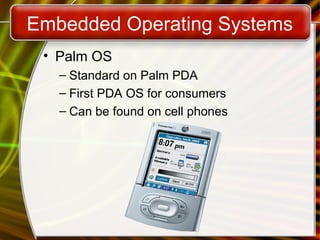
• Palm OS
– Standard on Palm PDA
– First PDA OS for consumers
– Can be found on cell phones
Embedded Operating Systems
• Pocket PC
– From microsoft
– Developed to compete with Palm
– Interacts securely with business networks
– Can control PCs through PC
Embedded Operating Systems
• Symbian
– Found in smart cell phones (Nokia and
Sony Ericson)
– Games, Instant Messaging, Internet
– Full color display
Copyright © 2006 by The McGraw-Hill Companies, Inc. All rights reserved.
McGraw-Hill Technology Education
Chapter 6B
End of Chapter

Intro_Chapter_06B.ppt all about inroduction that u want

  • 1.
    Copyright © 2006by The McGraw-Hill Companies, Inc. All rights reserved. McGraw-Hill Technology Education McGraw-Hill Technology Education Copyright © 2005 by The McGraw-Hill Companies, Inc. All rights reserved.
  • 2.
    Copyright © 2006by The McGraw-Hill Companies, Inc. All rights reserved. McGraw-Hill Technology Education Chapter 6B Survey of PC and Network Operating Systems
  • 3.
    PC Operating Systems •Microsoft Windows is the most popular – Installed more than other OS combined – Installed on about 95% of computers – Apple and Linux represent the other 5%
  • 4.
    PC Operating Systems •DOS – Disk Operating System – Single user single-tasking OS – Command line interface – 16-bit OS – Does not require Powerful computer – A restaurant may still be using employee scheduling application written for it 10 or 15 years ago
  • 5.
  • 6.
    PC Operating Systems •Windows NT – Designed for a powerful system – 32-bit OS – Very stable – It had become too large to run on most of the PCs used by consumers at the time – Windows NT Workstation • Single user multi tasking OS – Windows NT Server • Multi user multi tasking OS • Network operating system
  • 7.
    PC Operating Systems •Windows 9x – 95, 98, and Millennium Edition (Me) – 32-bit OS • Supported 16-bit programs well – Still found in large corporations – 95 introduced the Start button – 98 introduced active desktop and IE – Me(Melinium) improved multimedia software, support for digital video editing
  • 8.
    PC Operating Systems •Windows 2000 – Look of 9x with NT stability – Optimized for office and small businesses and developers – Application software ran very well
  • 9.
    PC Operating Systems •Windows XP – Microsoft’s newest desktop product – Different look from 2000 – Many different versions – Digital multimedia support was enhanced – Communications was enhanced
  • 10.
    PC Operating Systems •UNIX – Runs on all computer types – Very stable and fast – Command-line interface – CAD software, popular for high-powered workstations.
  • 11.
    PC Operating Systems •Linux – Free or inexpensive version of UNIX – The biggest nontechnical difference between UNIX and Linux is price – 32-bit OS – Very stable and fast – Linux released by Red Hat (RHCE) – Windows GUI(also known as shell) • Command line interface is available
  • 12.
  • 13.
    PC Operating Systems •Macintosh operating systems – OS X(ten) – Although it has a small market share, the Mac remains the first choice of many – Very stable and easy – Only runs on Mac hardware
  • 14.
  • 15.
    NOS Features • Networkoperating system • Fast and stable • Runs on servers • Multi-user and multitasking OS • 32- or 64-bit
  • 16.
    NOS Features • Fileand print sharing – Users access the same files – Hundreds of users use a printer – Different OS can interact – work in a small office, want to share a printer connected to your desktop computer with your coworkers, can do this, whether you are running Windows, Linux, or Mac OS X
  • 17.
    NOS Features • Dataintegrity – Backups copies data onto tape – Network redundancy, such as schemes in which one network server is a “mirror” of another server and is available immediately if the first server fails. – RAID copies data onto other drives • Redundant Array of Inexpensive Disks • Relies on two or more hard drives • May speed access to data
  • 18.
    NOS Features • Datasecurity – Access to data can be restricted – Access to server resources is controlled – Audits can be kept – If you are connecting to a server to retrieve files, must have client software that is allowed to connect
  • 19.
    Networking Operating Systems •NT Server – Same core as NT Workstation – Security added – Authenticating users and controlling their access to network – Multi user capability added – RAID support included – Writing the same data to multiple disks, so it is preserved in case one disk fails
  • 20.
    Networking Operating Systems •Windows 2000 Server – Same technology as 2000 workstation – Active Directory (AD) • Central database of server resources • Simplifies network management – Distributed programs supported – Server Standard Edition (up to 2 processor) – Advanced Server Edition (up to 4) – Data Center Edition (up to 32) • not sold separately, but is sold through computer manufacturers
  • 21.
    Networking Operating Systems •Windows 2003 Server – Designed to compete with UNIX – XP like interface – Better support for XP computers – MS .NET framework supported – Distributed programs are supported – Server Standard Edition – Data Center Edition
  • 22.
    Networking Operating Systems •UNIX for servers – Oldest NOS in widespread use – Stable secure and fast – Main OS for Internet transactions – Large organizations depend on UNIX – Insurance, medicine, banking, and manufacturing etc.
  • 23.
    Networking Operating Systems •Linux for servers – Popular in small businesses – Stable, fast and inexpensive – Linux’s popularity is growing
  • 24.
    Embedded Operating Systems •Devices have EOS built in • Cell phones, PDAs • Stable and fast
  • 25.
    Embedded Operating Systems •Windows XP embedded – Based on Windows XP – Customized for each device
  • 26.
    Embedded Operating Systems •Windows CE(embedded compact) – Not based on a desktop OS – Customized for each device – PDA and cell phones – For real time environment – Microsoft Automotive will run in cars
  • 27.
    Embedded Operating Systems •Palm OS – Standard on Palm PDA – First PDA OS for consumers – Can be found on cell phones
  • 28.
    Embedded Operating Systems •Pocket PC – From microsoft – Developed to compete with Palm – Interacts securely with business networks – Can control PCs through PC
  • 29.
    Embedded Operating Systems •Symbian – Found in smart cell phones (Nokia and Sony Ericson) – Games, Instant Messaging, Internet – Full color display
  • 30.
    Copyright © 2006by The McGraw-Hill Companies, Inc. All rights reserved. McGraw-Hill Technology Education Chapter 6B End of Chapter

Editor's Notes

  • #6 NT (New Technology) Designed for using on powerful computers like workstation
  • #7 Look good but not stable
  • #11 Upgradation of Unix Open source