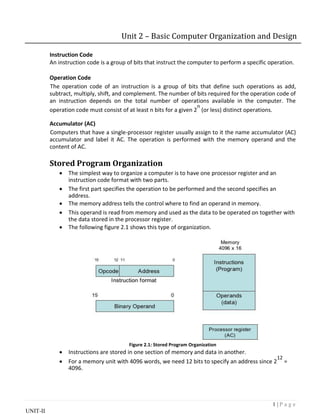
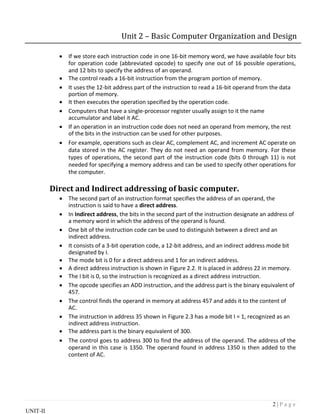
1 | P a g e
UNIT-II
Unit 2 – Basic Computer Organization and Design
Instruction Code
An instruction code is a group of bits that instruct the computer to perform a specific operation.
Operation Code
The operation code of an instruction is a group of bits that define such operations as add,
subtract, multiply, shift, and complement. The number of bits required for the operation code of
an instruction depends on the total number of operations available in the computer. The
operation code must consist of at least n bits for a given 2
n
(or less) distinct operations.
Accumulator (AC)
Computers that have a single-processor register usually assign to it the name accumulator (AC)
accumulator and label it AC. The operation is performed with the memory operand and the
content of AC.
Stored Program Organization
 The simplest way to organize a computer is to have one processor register and an
instruction code format with two parts.

 The first part specifies the operation to be performed and the second specifies an
address.

 The memory address tells the control where to find an operand in memory.

 This operand is read from memory and used as the data to be operated on together with
the data stored in the processor register.

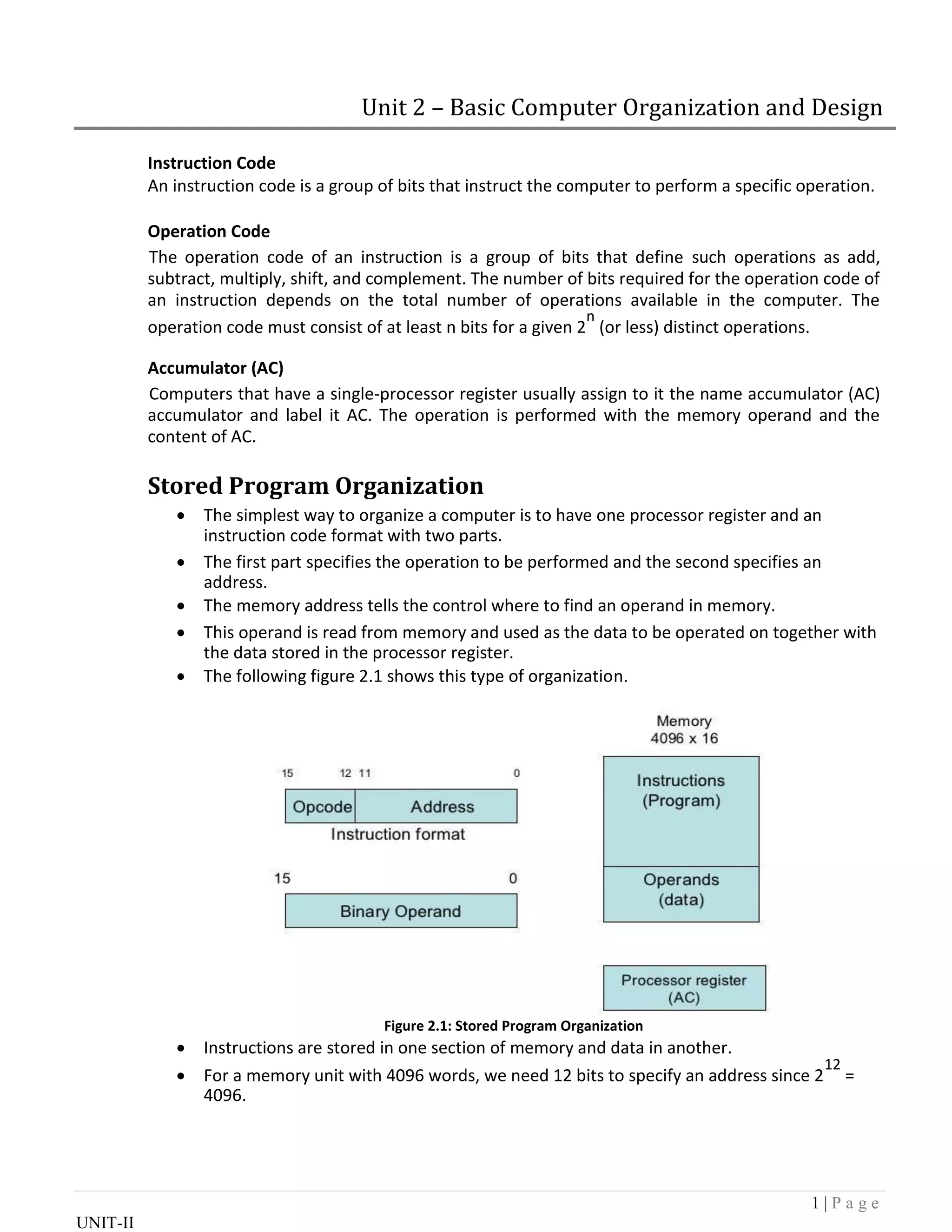
 The following figure 2.1 shows this type of organization.
Figure 2.1: Stored Program Organization
 Instructions are stored in one section of memory and data in another.

 For a memory unit with 4096 words, we need 12 bits to specify an address since 2
12
=
4096.
2 | P a g e
UNIT-II
Unit 2 – Basic Computer Organization and Design
 If we store each instruction code in one 16-bit memory word, we have available four bits
for operation code (abbreviated opcode) to specify one out of 16 possible operations,
and 12 bits to specify the address of an operand.

 The control reads a 16-bit instruction from the program portion of memory.

 It uses the 12-bit address part of the instruction to read a 16-bit operand from the data
portion of memory.

 It then executes the operation specified by the operation code.

 Computers that have a single-processor register usually assign to it the name
accumulator and label it AC.

 If an operation in an instruction code does not need an operand from memory, the rest
of the bits in the instruction can be used for other purposes.

 For example, operations such as clear AC, complement AC, and increment AC operate on
data stored in the AC register. They do not need an operand from memory. For these
types of operations, the second part of the instruction code (bits 0 through 11) is not
needed for specifying a memory address and can be used to specify other operations for
the computer.

Direct and Indirect addressing of basic computer.
 The second part of an instruction format specifies the address of an operand, the
instruction is said to have a direct address.

 In Indirect address, the bits in the second part of the instruction designate an address of
a memory word in which the address of the operand is found.

 One bit of the instruction code can be used to distinguish between a direct and an
indirect address.

 It consists of a 3-bit operation code, a 12-bit address, and an indirect address mode bit
designated by I.

 The mode bit is 0 for a direct address and 1 for an indirect address.
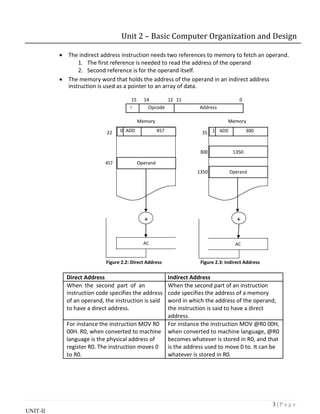
 A direct address instruction is shown in Figure 2.2. It is placed in address 22 in memory.
 The I bit is 0, so the instruction is recognized as a direct address instruction.

 The opcode specifies an ADD instruction, and the address part is the binary equivalent of
457.

 The control finds the operand in memory at address 457 and adds it to the content of
AC.

 The instruction in address 35 shown in Figure 2.3 has a mode bit I = 1, recognized as an
indirect address instruction.

 The address part is the binary equivalent of 300.

 The control goes to address 300 to find the address of the operand. The address of the
operand in this case is 1350. The operand found in address 1350 is then added to the
content of AC.
3 | P a g e
UNIT-II
Unit 2 – Basic Computer Organization and Design
 The indirect address instruction needs two references to memory to fetch an operand.

1. The first reference is needed to read the address of the operand
2. Second reference is for the operand itself.
 The memory word that holds the address of the operand in an indirect address
instruction is used as a pointer to an array of data.
15 14 12 11 0
I Opcode Address
Memory Memory
22 0 ADD 457 35 1 ADD 300
300 1350
457 Operand
1350 Operand
+ +
AC AC
Figure 2.2: Direct Address Figure 2.3: Indirect Address
Direct Address Indirect Address
When the second part of an When the second part of an instruction
instruction code specifies the address code specifies the address of a memory
of an operand, the instruction is said word in which the address of the operand,
to have a direct address. the instruction is said to have a direct
address.
For instance the instruction MOV R0 For instance the instruction MOV @R0 00H,
00H. R0, when converted to machine when converted to machine language, @R0
language is the physical address of becomes whatever is stored in R0, and that
register R0. The instruction moves 0 is the address used to move 0 to. It can be
to R0. whatever is stored in R0.
4 | P a g e
UNIT-II
Unit 2 – Basic Computer Organization and Design
Registers of basic computer
 It is necessary to provide a register in the control unit for storing the instruction code
after it is read from memory.

 The computer needs processor registers for manipulating data and a register for holding
a memory address.

 These requirements dictate the register configuration shown in Figure 2.4.
Figure 2.4: Basic Computer Register and Memory
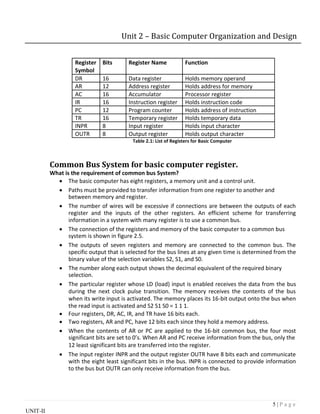
 The data register (DR) holds the operand read from memory.

 The accumulator (AC) register is a general purpose processing register.
 The instruction read from memory is placed in the instruction register (IR).
 The temporary register (TR) is used for holding temporary data during the processing.
 The memory address register (AR) has 12 bits.

 The program counter (PC) also has 12 bits and it holds the address of the next instruction
to be read from memory after the current instruction is executed.

 Instruction words are read and executed in sequence unless a branch instruction is
encountered. A branch instruction calls for a transfer to a nonconsecutive instruction in
the program.

 Two registers are used for input and output. The input register (INPR) receives an 8-bit
character from an input device. The output register (OUTR) holds an 8-bit character for
an output device.
5 | P a g e
UNIT-II
Unit 2 – Basic Computer Organization and Design
Register Bits Register Name Function
Symbol
DR 16 Data register Holds memory operand
AR 12 Address register Holds address for memory
AC 16 Accumulator Processor register
IR 16 Instruction register Holds instruction code
PC 12 Program counter Holds address of instruction
TR 16 Temporary register Holds temporary data
INPR 8 Input register Holds input character
OUTR 8 Output register Holds output character
Table 2.1: List of Registers for Basic Computer
Common Bus System for basic computer register.
What is the requirement of common bus System?
 The basic computer has eight registers, a memory unit and a control unit.

 Paths must be provided to transfer information from one register to another and
between memory and register.

 The number of wires will be excessive if connections are between the outputs of each
register and the inputs of the other registers. An efficient scheme for transferring
information in a system with many register is to use a common bus.

 The connection of the registers and memory of the basic computer to a common bus
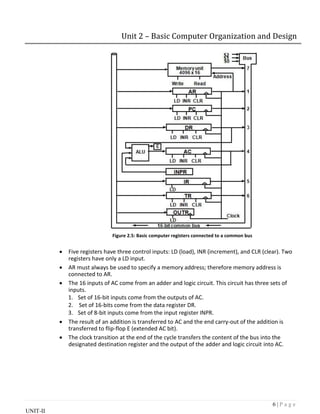
system is shown in figure 2.5.

 The outputs of seven registers and memory are connected to the common bus. The
specific output that is selected for the bus lines at any given time is determined from the
binary value of the selection variables S2, S1, and S0.

 The number along each output shows the decimal equivalent of the required binary
selection.

 The particular register whose LD (load) input is enabled receives the data from the bus
during the next clock pulse transition. The memory receives the contents of the bus
when its write input is activated. The memory places its 16-bit output onto the bus when
the read input is activated and S2 S1 S0 = 1 1 1.
 Four registers, DR, AC, IR, and TR have 16 bits each.
 Two registers, AR and PC, have 12 bits each since they hold a memory address.

 When the contents of AR or PC are applied to the 16-bit common bus, the four most
significant bits are set to 0’s. When AR and PC receive information from the bus, only the

12 least significant bits are transferred into the register.

 The input register INPR and the output register OUTR have 8 bits each and communicate
with the eight least significant bits in the bus. INPR is connected to provide information
to the bus but OUTR can only receive information from the bus.
6 | P a g e
UNIT-II
Unit 2 – Basic Computer Organization and Design
Figure 2.5: Basic computer registers connected to a common bus
 Five registers have three control inputs: LD (load), INR (increment), and CLR (clear). Two
registers have only a LD input.

 AR must always be used to specify a memory address; therefore memory address is
connected to AR.

 The 16 inputs of AC come from an adder and logic circuit. This circuit has three sets of
inputs.

1. Set of 16-bit inputs come from the outputs of AC.
2. Set of 16-bits come from the data register DR.
3. Set of 8-bit inputs come from the input register INPR.
 The result of an addition is transferred to AC and the end carry-out of the addition is
transferred to flip-flop E (extended AC bit).

 The clock transition at the end of the cycle transfers the content of the bus into the
designated destination register and the output of the adder and logic circuit into AC.
7 | P a g e
UNIT-II
Unit 2 – Basic Computer Organization and Design
Instruction Format with its types.
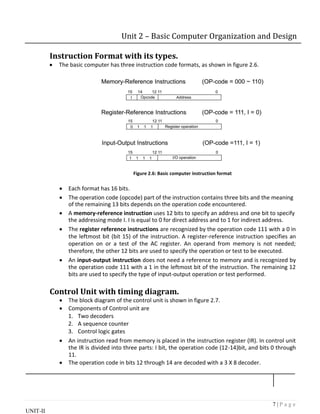
 The basic computer has three instruction code formats, as shown in figure 2.6.
Figure 2.6: Basic computer instruction format
 Each format has 16 bits.

 The operation code (opcode) part of the instruction contains three bits and the meaning
of the remaining 13 bits depends on the operation code encountered.

 A memory-reference instruction uses 12 bits to specify an address and one bit to specify
the addressing mode I. I is equal to 0 for direct address and to 1 for indirect address.

 The register reference instructions are recognized by the operation code 111 with a 0 in
the leftmost bit (bit 15) of the instruction. A register-reference instruction specifies an
operation on or a test of the AC register. An operand from memory is not needed;
therefore, the other 12 bits are used to specify the operation or test to be executed.

 An input-output instruction does not need a reference to memory and is recognized by
the operation code 111 with a 1 in the leftmost bit of the instruction. The remaining 12
bits are used to specify the type of input-output operation or test performed.

Control Unit with timing diagram.
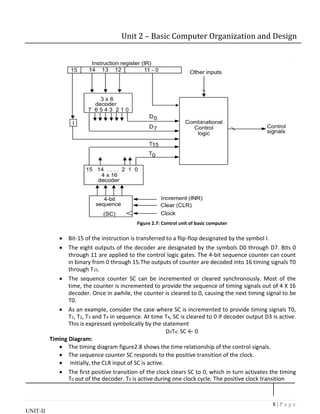
 The block diagram of the control unit is shown in figure 2.7.
 Components of Control unit are

1. Two decoders
2. A sequence counter
3. Control logic gates
 An instruction read from memory is placed in the instruction register (IR). In control unit
the IR is divided into three parts: I bit, the operation code (12-14)bit, and bits 0 through
11.

 The operation code in bits 12 through 14 are decoded with a 3 X 8 decoder.
8 | P a g e
UNIT-II
Unit 2 – Basic Computer Organization and Design
Figure 2.7: Control unit of basic computer
 Bit-15 of the instruction is transferred to a flip-flop designated by the symbol I.

 The eight outputs of the decoder are designated by the symbols D0 through D7. Bits 0
through 11 are applied to the control logic gates. The 4‐bit sequence counter can count
in binary from 0 through 15.The outputs of counter are decoded into 16 timing signals T0
through T15.

 The sequence counter SC can be incremented or cleared synchronously. Most of the
time, the counter is incremented to provide the sequence of timing signals out of 4 X 16
decoder. Once in awhile, the counter is cleared to 0, causing the next timing signal to be
T0.

 As an example, consider the case where SC is incremented to provide timing signals T0,
T1, T2, T3 and T4 in sequence. At time T4, SC is cleared to 0 if decoder output D3 is active.
This is expressed symbolically by the statement
D3T4: SC ← 0
Timing Diagram:
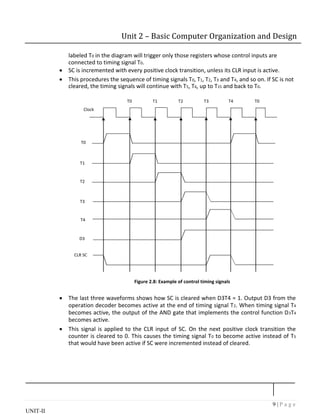
 The timing diagram figure2.8 shows the time relationship of the control signals.

 The sequence counter SC responds to the positive transition of the clock.
 Initially, the CLR input of SC is active.

 The first positive transition of the clock clears SC to 0, which in turn activates the timing
T0 out of the decoder. T0 is active during one clock cycle. The positive clock transition
9 | P a g e
UNIT-II
Unit 2 – Basic Computer Organization and Design
labeled T0 in the diagram will trigger only those registers whose control inputs are
connected to timing signal T0.
 SC is incremented with every positive clock transition, unless its CLR input is active.

 This procedures the sequence of timing signals T0, T1, T2, T3 and T4, and so on. If SC is not
cleared, the timing signals will continue with T5, T6, up to T15 and back to T0.
T0 T1 T2 T3 T4 T0
Clock
T0
T1
T2
T3
T4
D3
CLR SC
Figure 2.8: Example of control timing signals
 The last three waveforms shows how SC is cleared when D3T4 = 1. Output D3 from the
operation decoder becomes active at the end of timing signal T2. When timing signal T4
becomes active, the output of the AND gate that implements the control function D3T4
becomes active.

 This signal is applied to the CLR input of SC. On the next positive clock transition the
counter is cleared to 0. This causes the timing signal T0 to become active instead of T5
that would have been active if SC were incremented instead of cleared.
10 | P a g e
UNIT-II
Unit 2 – Basic Computer Organization and Design
Instruction cycle
 A program residing in the memory unit of the computer consists of a sequence of
instructions. In the basic computer each instruction cycle consists of the following
phases:
1. Fetch an instruction from memory.
2. Decode the instruction.
3. Read the effective address from memory if the instruction has an indirect address.
4. Execute the instruction.
 After step 4, the control goes back to step 1 to fetch, decode and execute the nex
instruction.

 This process continues unless a HALT instruction is encountered.
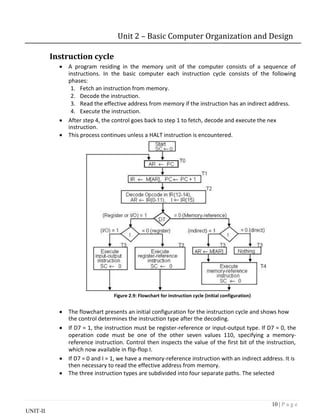
Figure 2.9: Flowchart for instruction cycle (initial configuration)
 The flowchart presents an initial configuration for the instruction cycle and shows how
the control determines the instruction type after the decoding.

 If D7 = 1, the instruction must be register-reference or input-output type. If D7 = 0, the
operation code must be one of the other seven values 110, specifying a memory-
reference instruction. Control then inspects the value of the first bit of the instruction,
which now available in flip-flop I.

 If D7 = 0 and I = 1, we have a memory-reference instruction with an indirect address. It is
then necessary to read the effective address from memory.

 The three instruction types are subdivided into four separate paths. The selected
11 | P a g e
UNIT-II
Unit 2 – Basic Computer Organization and Design
operation is activated with the clock transition associated with timing signal T3.This can
be symbolized as follows:
D’7 I T3: AR

M [AR]
D’7 I’ T3: Nothing
D7 I’ T3: Execute a register-reference instruction
D7 I T3: Execute an input-output instruction
 When a memory-reference instruction with I = 0 is encountered, it is not necessary to do
anything since the effective address is already in AR.

 However, the sequence counter SC must be incremented when D’7 I T3 = 1, so that the
execution of the memory-reference instruction can be continued with timing variable T4.

 A register-reference or input-output instruction can be executed with the click
associated with timing signal T3. After the instruction is executed, SC is cleared to 0 and
control returns to the fetch phase with T0 =1. SC is either incremented or cleared to 0
with every positive clock transition.

Register reference instruction.
 When the register-reference instruction is decoded, D7 bit is set to 1.

 Each control function needs the Boolean relation D7 I' T3
15 12 11 0
0 1 1 1 Register Operation
 There are 12 register-reference instructions listed below:
r: SC0 Clear SC
CLA rB11: AC  0 Clear AC
CLE rB10: E  0 Clear E
CMA rB9: AC  AC’ Complement AC
CME rB8: E  E’ Complement E
CIR rB7: AC  shr AC, AC(15)  E, E  AC(0) Circular Right
CIL rB6: AC  shl AC, AC(0)  E, E  AC(15) Circular Left
INC rB5: AC  AC + 1 Increment AC
SPA rB4: if (AC(15) = 0) then (PC  PC+1) Skip if positive
SNA rB3: if (AC(15) = 1) then (PC  PC+1 Skip if negative
SZA rB2: if (AC = 0) then (PC  PC+1) Skip if AC is zero
SZE rB1: if (E = 0) then (PC  PC+1) Skip if E is zero
HLT rB0: S  0 (S is a start-stop flip-flop) Halt computer
 These 12 bits are available in IR (0-11). They were also transferred to AR during time T2.
 These instructions are executed at timing cycle T3.

 The first seven register-reference instructions perform clear, complement, circular shift,
and increment microoperations on the AC or E registers.

 The next four instructions cause a skip of the next instruction in sequence when
12 | P a g e
UNIT-II
Unit 2 – Basic Computer Organization and Design
condition is satisfied. The skipping of the instruction is achieved by incrementing PC.
 The condition control statements must be recognized as part of the control conditions.
The AC is positive when the sign bit in AC(15) = 0; it is negative when AC(15) = 1. The
content of AC is zero (AC = 0) if all the flip-flops of the register are zero.

 The HLT instruction clears a start-stop flip-flop S and stops the sequence counter from
counting. To restore the operation of the computer, the start-stop flip-flop must be set
manually.
Memory reference instructions
 When the memory-reference instruction is decoded, D7 bit is set to 0.
15 14 12 11 0
I 000~110 Address
 The following table lists seven memory-reference instructions.
Symbol Operation Symbolic Description
Decoder
AND D0 AC  AC  M[AR]
ADD D1 AC  AC + M[AR], E  Cout
LDA D2 AC  M[AR]
STA D3 M[AR]  AC
BUN D4 PC  AR
BSA D5 M[AR]  PC, PC  AR + 1
ISZ D6 M[AR]  M[AR] + 1, if M[AR] + 1 = 0 then PC  PC+1
 The effective address of the instruction is in the address register AR and was placed
there during timing signal T2 when I = 0, or during timing signal T3 when I = 1.

 The execution of the memory-reference instructions starts with timing signal T4.
AND to AC
This is an instruction that performs the AND logic operation on pairs of bits in AC and the
memory word specified by the effective address. The result of the operation is
transferred to AC.
D0T4: DRM[AR]
D0T5: AC  AC  DR, SC  0
ADD to AC
This instruction adds the content of the memory word specified by the effective address
to the value of AC. The sum is transferred into AC and the output carry Cout is transferred
to the E (extended accumulator) flip-flop.
D1T4: DR  M[AR]
D1T5: AC  AC + DR, E  Cout, SC  0
13 | P a g e
UNIT-II
Unit 2 – Basic Computer Organization and Design
LDA: Load to AC
This instruction transfers the memory word specified by the effective address to AC.
D2T4: DR  M[AR]
D2T5: AC  DR, SC  0
STA: Store AC
This instruction stores the content of AC into the memory word specified by the effective
address.
D3T4: M[AR]  AC, SC  0
BUN: Branch Unconditionally
This instruction transfers the program to instruction specified by the effective address.
The BUN instruction allows the programmer to specify an instruction out of sequence
and the program branches (or jumps) unconditionally.
D4T4: PC  AR, SC  0
BSA: Branch and Save Return Address
This instruction is useful for branching to a portion of the program called a subroutine or
procedure. When executed, the BSA instruction stores the address of the next
instruction in sequence (which is available in PC) into a memory location specified by the
effective address.
M[AR]  PC, PC  AR + 1
M[135] 21, PC 135 + 1 = 136
Figure2.10: Example of BSA instruction execution
It is not possible to perform the operation of the BSA instruction in one clock cycle when
we use the bus system of the basic computer. To use the memory and the bus properly,
the BSA instruction must be executed with a sequence of two microoperations:
D5T4: M[AR]  PC, AR  AR + 1
D5T5: PC  AR, SC  0
ISZ: Increment and Skip if Zero
These instruction increments the word specified by the effective address, and if the
incremented value is equal to 0, PC is incremented by 1. Since it is not possible to
14 | P a g e
UNIT-II
Unit 2 – Basic Computer Organization and Design
increment a word inside the memory, it is necessary to read the word into DR, increment
DR, and store the word back into memory.
D6T4: DR  M[AR]
D6T5: DR  DR + 1
D6T4: M[AR]  DR, if (DR = 0) then (PC  PC + 1), SC  0
Control Flowchart
Figure 2.11: Flowchart for memory-reference instructions
15 | P a g e
UNIT-II
Unit 2 – Basic Computer Organization and Design
Input-output configuration of basic computer
 A computer can serve no useful purpose unless it communicates with the external
environment.

 To exhibit the most basic requirements for input and output communication, we will use
a terminal unit with a keyboard and printer.
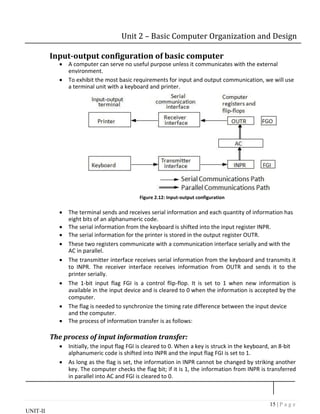
Figure 2.12: Input-output configuration
 The terminal sends and receives serial information and each quantity of information has
eight bits of an alphanumeric code.

 The serial information from the keyboard is shifted into the input register INPR.
 The serial information for the printer is stored in the output register OUTR.

 These two registers communicate with a communication interface serially and with the
AC in parallel.

 The transmitter interface receives serial information from the keyboard and transmits it
to INPR. The receiver interface receives information from OUTR and sends it to the
printer serially.

 The 1-bit input flag FGI is a control flip-flop. It is set to 1 when new information is
available in the input device and is cleared to 0 when the information is accepted by the
computer.

 The flag is needed to synchronize the timing rate difference between the input device
and the computer.

 The process of information transfer is as follows:
The process of input information transfer:
 Initially, the input flag FGI is cleared to 0. When a key is struck in the keyboard, an 8-bit
alphanumeric code is shifted into INPR and the input flag FGI is set to 1.

 As long as the flag is set, the information in INPR cannot be changed by striking another
key. The computer checks the flag bit; if it is 1, the information from INPR is transferred
in parallel into AC and FGI is cleared to 0.
16 | P a g e
UNIT-II
Unit 2 – Basic Computer Organization and Design
 Once the flag is cleared, new information can be shifted into INPR by striking another
key.
The process of outputting information:
 The output register OUTR works similarly but the direction of information flow is
reversed.

 Initially, the output flag FGO is set to 1. The computer checks the flag bit; if it is 1, the
information from AC is transferred in parallel to OUTR and FGO is cleared to 0. The
output device accepts the coded information, prints the corresponding character, and
when the operation is completed, it sets FGO to 1.

 The computer does not load a new character into OUTR when FGO is 0 because this
condition indicates that the output device is in the process of printing the character.

Input-Output instructions
 Input and output instructions are needed for transferring information to and from AC
register, for checking the flag bits, and for controlling the interrupt facility.

 Input-output instructions have an operation code 1111 and are recognized by the control
when D7 = 1 and I = 1.

 The remaining bits of the instruction specify the particular operation.

 The control functions and microoperations for the input-output instructions are listed
below.
INP AC(0-7)  INPR, FGI  0 Input char. to AC
OUT OUTR  AC(0-7), FGO  0 Output char. from AC
SKI if(FGI = 1) then (PC  PC + 1) Skip on input flag
SKO if(FGO = 1) then (PC  PC + 1) Skip on output flag
ION IEN  1 Interrupt enable on
IOF IEN  0 Interrupt enable off
Table 2.2: Input Output Instructions
 The INP instruction transfers the input information from INPR into the eight low-order
bits of AC and also clears the input flag to 0.

 The OUT instruction transfers the eight least significant bits of AC into the output
register OUTR and clears the output flag to 0.

 The next two instructions in Table 2.2 check the status of the flags and cause a skip of
the next instruction if the flag is 1.

 The instruction that is skipped will normally be a branch instruction to return and check
the flag again.

 The branch instruction is not skipped if the flag is 0. If the flag is 1, the branch instruction
is skipped and an input or output instruction is executed.

 The last two instructions set and clear an interrupt enable flip-flop IEN. The purpose of
IEN is explained in conjunction with the interrupt operation.
17 | P a g e
UNIT-II
Unit 2 – Basic Computer Organization and Design
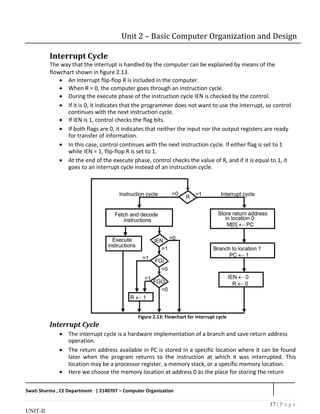
Interrupt Cycle
The way that the interrupt is handled by the computer can be explained by means of the
flowchart shown in figure 2.13.

 An interrupt flip-flop R is included in the computer.
 When R = 0, the computer goes through an instruction cycle.
 During the execute phase of the instruction cycle IEN is checked by the control.

 If it is 0, it indicates that the programmer does not want to use the interrupt, so control
continues with the next instruction cycle.

 If IEN is 1, control checks the flag bits.

 If both flags are 0, it indicates that neither the input nor the output registers are ready
for transfer of information.

 In this case, control continues with the next instruction cycle. If either flag is set to 1
while IEN = 1, flip-flop R is set to 1.

 At the end of the execute phase, control checks the value of R, and if it is equal to 1, it
goes to an interrupt cycle instead of an instruction cycle.
Figure 2.13: Flowchart for interrupt cycle
Interrupt Cycle
 The interrupt cycle is a hardware implementation of a branch and save return address
operation.

 The return address available in PC is stored in a specific location where it can be found
later when the program returns to the instruction at which it was interrupted. This
location may be a processor register, a memory stack, or a specific memory location.
 Here we choose the memory location at address 0 as the place for storing the return
Swati Sharma , CE Department | 2140707 – Computer Organization
18 | P a g e
UNIT-II
Unit 2 – Basic Computer Organization and Design
address.
 Control then inserts address 1 into PC and clears IEN and R so that no more interruptions
can occur until the interrupt request from the flag has been serviced.

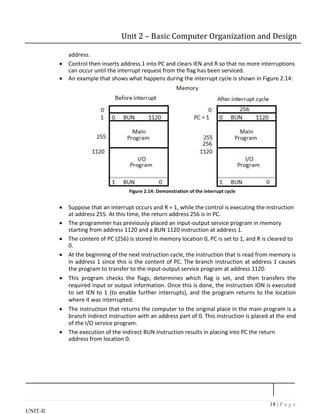
 An example that shows what happens during the interrupt cycle is shown in Figure 2.14:
Figure 2.14: Demonstration of the interrupt cycle
 Suppose that an interrupt occurs and R = 1, while the control is executing the instruction
at address 255. At this time, the return address 256 is in PC.

 The programmer has previously placed an input-output service program in memory
starting from address 1120 and a BUN 1120 instruction at address 1.

 The content of PC (256) is stored in memory location 0, PC is set to 1, and R is cleared to
0.

 At the beginning of the next instruction cycle, the instruction that is read from memory is
in address 1 since this is the content of PC. The branch instruction at address 1 causes
the program to transfer to the input-output service program at address 1120.

 This program checks the flags, determines which flag is set, and then transfers the
required input or output information. Once this is done, the instruction ION is executed
to set IEN to 1 (to enable further interrupts), and the program returns to the location
where it was interrupted.

 The instruction that returns the computer to the original place in the main program is a
branch indirect instruction with an address part of 0. This instruction is placed at the end
of the I/O service program.

 The execution of the indirect BUN instruction results in placing into PC the return
address from location 0.
19 | P a g e
UNIT-II
Unit 2 – Basic Computer Organization and Design
Register transfer statements for the interrupt cycle
 The flip-flop is set to 1 if IEN = 1 and either FGI or FGO are equal to 1. This can happen
with any clock transition except when timing signals T0, T1 or T2 are active.

 The condition for setting flip-flop R= 1 can be expressed with the following register
transfer statement:
T0T1T2  (IEN) (FGI + FGO): R  1
 The symbol + between FGI and FGO in the control function designates a logic OR
operation. This is AND with IEN and T0T1 T2 .

 The fetch and decode phases of the instruction cycle must be modified and Replace T0,
T1, T2 with R'T0, R'T1, R'T2

 Therefore the interrupt cycle statements are :
RT0: AR  0, TR  PC

RT1: M[AR]  TR, PC  0
RT2: PC  PC + 1, IEN  0, R  0, SC  0

 During the first timing signal AR is cleared to 0, and the content of PC is transferred to
the temporary register TR.

 With the second timing signal, the return address is stored in memory at location 0 and
PC is cleared to 0.

 The third timing signal increments PC to 1, clears IEN and R, and control goes back to T0
by clearing SC to 0.

 The beginning of the next instruction cycle has the condition RT0 and the content of PC is
equal to 1. The control then goes through an instruction cycle that fetches and executes
the BUN instruction in location 1.
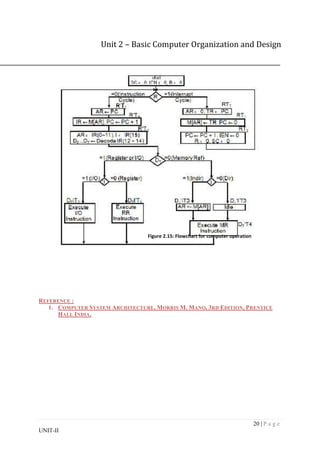
Flow chart for computer operation.
 The final flowchart of the instruction cycle, including the interrupt cycle for the basic
computer, is shown in Figure 2.15.

 The interrupt flip-flop R may be set at any time during the indirect or execute phases.
 The control returns to timing signal T0 after SC is cleared to 0.

 If R = 1, the computer goes through an interrupt cycle. If R = 0, the computer goes
through an instruction cycle.

 If the instruction is one of the memory-reference instructions, the computer first checks
if there is an indirect address and then continues to execute the decoded instruction
according to the flowchart.

 If the instruction is one of the register-reference instructions, it is executed with one of
the microoperations register reference.

 If it is an input-output instruction, it is executed with one of the microoperation’s input-
output reference.
20 | P a g e
UNIT-II
Unit 2 – Basic Computer Organization and Design
Figure 2.15: Flowchart for computer operation
REFERENCE :
1. COMPUTER SYSTEM ARCHITECTURE, MORRIS M. MANO, 3RD EDITION, PRENTICE
HALL INDIA.

computer organization.pdf

  • 1.
    1 | Pa g e UNIT-II Unit 2 – Basic Computer Organization and Design Instruction Code An instruction code is a group of bits that instruct the computer to perform a specific operation. Operation Code The operation code of an instruction is a group of bits that define such operations as add, subtract, multiply, shift, and complement. The number of bits required for the operation code of an instruction depends on the total number of operations available in the computer. The operation code must consist of at least n bits for a given 2 n (or less) distinct operations. Accumulator (AC) Computers that have a single-processor register usually assign to it the name accumulator (AC) accumulator and label it AC. The operation is performed with the memory operand and the content of AC. Stored Program Organization  The simplest way to organize a computer is to have one processor register and an instruction code format with two parts.   The first part specifies the operation to be performed and the second specifies an address.   The memory address tells the control where to find an operand in memory.   This operand is read from memory and used as the data to be operated on together with the data stored in the processor register.   The following figure 2.1 shows this type of organization. Figure 2.1: Stored Program Organization  Instructions are stored in one section of memory and data in another.   For a memory unit with 4096 words, we need 12 bits to specify an address since 2 12 = 4096.
  • 2.
    2 | Pa g e UNIT-II Unit 2 – Basic Computer Organization and Design  If we store each instruction code in one 16-bit memory word, we have available four bits for operation code (abbreviated opcode) to specify one out of 16 possible operations, and 12 bits to specify the address of an operand.   The control reads a 16-bit instruction from the program portion of memory.   It uses the 12-bit address part of the instruction to read a 16-bit operand from the data portion of memory.   It then executes the operation specified by the operation code.   Computers that have a single-processor register usually assign to it the name accumulator and label it AC.   If an operation in an instruction code does not need an operand from memory, the rest of the bits in the instruction can be used for other purposes.   For example, operations such as clear AC, complement AC, and increment AC operate on data stored in the AC register. They do not need an operand from memory. For these types of operations, the second part of the instruction code (bits 0 through 11) is not needed for specifying a memory address and can be used to specify other operations for the computer.  Direct and Indirect addressing of basic computer.  The second part of an instruction format specifies the address of an operand, the instruction is said to have a direct address.   In Indirect address, the bits in the second part of the instruction designate an address of a memory word in which the address of the operand is found.   One bit of the instruction code can be used to distinguish between a direct and an indirect address.   It consists of a 3-bit operation code, a 12-bit address, and an indirect address mode bit designated by I.   The mode bit is 0 for a direct address and 1 for an indirect address.  A direct address instruction is shown in Figure 2.2. It is placed in address 22 in memory.  The I bit is 0, so the instruction is recognized as a direct address instruction.   The opcode specifies an ADD instruction, and the address part is the binary equivalent of 457.   The control finds the operand in memory at address 457 and adds it to the content of AC.   The instruction in address 35 shown in Figure 2.3 has a mode bit I = 1, recognized as an indirect address instruction.   The address part is the binary equivalent of 300.   The control goes to address 300 to find the address of the operand. The address of the operand in this case is 1350. The operand found in address 1350 is then added to the content of AC.
  • 3.
    3 | Pa g e UNIT-II Unit 2 – Basic Computer Organization and Design  The indirect address instruction needs two references to memory to fetch an operand.  1. The first reference is needed to read the address of the operand 2. Second reference is for the operand itself.  The memory word that holds the address of the operand in an indirect address instruction is used as a pointer to an array of data. 15 14 12 11 0 I Opcode Address Memory Memory 22 0 ADD 457 35 1 ADD 300 300 1350 457 Operand 1350 Operand + + AC AC Figure 2.2: Direct Address Figure 2.3: Indirect Address Direct Address Indirect Address When the second part of an When the second part of an instruction instruction code specifies the address code specifies the address of a memory of an operand, the instruction is said word in which the address of the operand, to have a direct address. the instruction is said to have a direct address. For instance the instruction MOV R0 For instance the instruction MOV @R0 00H, 00H. R0, when converted to machine when converted to machine language, @R0 language is the physical address of becomes whatever is stored in R0, and that register R0. The instruction moves 0 is the address used to move 0 to. It can be to R0. whatever is stored in R0.
  • 4.
    4 | Pa g e UNIT-II Unit 2 – Basic Computer Organization and Design Registers of basic computer  It is necessary to provide a register in the control unit for storing the instruction code after it is read from memory.   The computer needs processor registers for manipulating data and a register for holding a memory address.   These requirements dictate the register configuration shown in Figure 2.4. Figure 2.4: Basic Computer Register and Memory  The data register (DR) holds the operand read from memory.   The accumulator (AC) register is a general purpose processing register.  The instruction read from memory is placed in the instruction register (IR).  The temporary register (TR) is used for holding temporary data during the processing.  The memory address register (AR) has 12 bits.   The program counter (PC) also has 12 bits and it holds the address of the next instruction to be read from memory after the current instruction is executed.   Instruction words are read and executed in sequence unless a branch instruction is encountered. A branch instruction calls for a transfer to a nonconsecutive instruction in the program.   Two registers are used for input and output. The input register (INPR) receives an 8-bit character from an input device. The output register (OUTR) holds an 8-bit character for an output device.
  • 5.
    5 | Pa g e UNIT-II Unit 2 – Basic Computer Organization and Design Register Bits Register Name Function Symbol DR 16 Data register Holds memory operand AR 12 Address register Holds address for memory AC 16 Accumulator Processor register IR 16 Instruction register Holds instruction code PC 12 Program counter Holds address of instruction TR 16 Temporary register Holds temporary data INPR 8 Input register Holds input character OUTR 8 Output register Holds output character Table 2.1: List of Registers for Basic Computer Common Bus System for basic computer register. What is the requirement of common bus System?  The basic computer has eight registers, a memory unit and a control unit.   Paths must be provided to transfer information from one register to another and between memory and register.   The number of wires will be excessive if connections are between the outputs of each register and the inputs of the other registers. An efficient scheme for transferring information in a system with many register is to use a common bus.   The connection of the registers and memory of the basic computer to a common bus system is shown in figure 2.5.   The outputs of seven registers and memory are connected to the common bus. The specific output that is selected for the bus lines at any given time is determined from the binary value of the selection variables S2, S1, and S0.   The number along each output shows the decimal equivalent of the required binary selection.   The particular register whose LD (load) input is enabled receives the data from the bus during the next clock pulse transition. The memory receives the contents of the bus when its write input is activated. The memory places its 16-bit output onto the bus when the read input is activated and S2 S1 S0 = 1 1 1.  Four registers, DR, AC, IR, and TR have 16 bits each.  Two registers, AR and PC, have 12 bits each since they hold a memory address.   When the contents of AR or PC are applied to the 16-bit common bus, the four most significant bits are set to 0’s. When AR and PC receive information from the bus, only the  12 least significant bits are transferred into the register.   The input register INPR and the output register OUTR have 8 bits each and communicate with the eight least significant bits in the bus. INPR is connected to provide information to the bus but OUTR can only receive information from the bus.
  • 6.
    6 | Pa g e UNIT-II Unit 2 – Basic Computer Organization and Design Figure 2.5: Basic computer registers connected to a common bus  Five registers have three control inputs: LD (load), INR (increment), and CLR (clear). Two registers have only a LD input.   AR must always be used to specify a memory address; therefore memory address is connected to AR.   The 16 inputs of AC come from an adder and logic circuit. This circuit has three sets of inputs.  1. Set of 16-bit inputs come from the outputs of AC. 2. Set of 16-bits come from the data register DR. 3. Set of 8-bit inputs come from the input register INPR.  The result of an addition is transferred to AC and the end carry-out of the addition is transferred to flip-flop E (extended AC bit).   The clock transition at the end of the cycle transfers the content of the bus into the designated destination register and the output of the adder and logic circuit into AC.
  • 7.
    7 | Pa g e UNIT-II Unit 2 – Basic Computer Organization and Design Instruction Format with its types.  The basic computer has three instruction code formats, as shown in figure 2.6. Figure 2.6: Basic computer instruction format  Each format has 16 bits.   The operation code (opcode) part of the instruction contains three bits and the meaning of the remaining 13 bits depends on the operation code encountered.   A memory-reference instruction uses 12 bits to specify an address and one bit to specify the addressing mode I. I is equal to 0 for direct address and to 1 for indirect address.   The register reference instructions are recognized by the operation code 111 with a 0 in the leftmost bit (bit 15) of the instruction. A register-reference instruction specifies an operation on or a test of the AC register. An operand from memory is not needed; therefore, the other 12 bits are used to specify the operation or test to be executed.   An input-output instruction does not need a reference to memory and is recognized by the operation code 111 with a 1 in the leftmost bit of the instruction. The remaining 12 bits are used to specify the type of input-output operation or test performed.  Control Unit with timing diagram.  The block diagram of the control unit is shown in figure 2.7.  Components of Control unit are  1. Two decoders 2. A sequence counter 3. Control logic gates  An instruction read from memory is placed in the instruction register (IR). In control unit the IR is divided into three parts: I bit, the operation code (12-14)bit, and bits 0 through 11.   The operation code in bits 12 through 14 are decoded with a 3 X 8 decoder.
  • 8.
    8 | Pa g e UNIT-II Unit 2 – Basic Computer Organization and Design Figure 2.7: Control unit of basic computer  Bit-15 of the instruction is transferred to a flip-flop designated by the symbol I.   The eight outputs of the decoder are designated by the symbols D0 through D7. Bits 0 through 11 are applied to the control logic gates. The 4‐bit sequence counter can count in binary from 0 through 15.The outputs of counter are decoded into 16 timing signals T0 through T15.   The sequence counter SC can be incremented or cleared synchronously. Most of the time, the counter is incremented to provide the sequence of timing signals out of 4 X 16 decoder. Once in awhile, the counter is cleared to 0, causing the next timing signal to be T0.   As an example, consider the case where SC is incremented to provide timing signals T0, T1, T2, T3 and T4 in sequence. At time T4, SC is cleared to 0 if decoder output D3 is active. This is expressed symbolically by the statement D3T4: SC ← 0 Timing Diagram:  The timing diagram figure2.8 shows the time relationship of the control signals.   The sequence counter SC responds to the positive transition of the clock.  Initially, the CLR input of SC is active.   The first positive transition of the clock clears SC to 0, which in turn activates the timing T0 out of the decoder. T0 is active during one clock cycle. The positive clock transition
  • 9.
    9 | Pa g e UNIT-II Unit 2 – Basic Computer Organization and Design labeled T0 in the diagram will trigger only those registers whose control inputs are connected to timing signal T0.  SC is incremented with every positive clock transition, unless its CLR input is active.   This procedures the sequence of timing signals T0, T1, T2, T3 and T4, and so on. If SC is not cleared, the timing signals will continue with T5, T6, up to T15 and back to T0. T0 T1 T2 T3 T4 T0 Clock T0 T1 T2 T3 T4 D3 CLR SC Figure 2.8: Example of control timing signals  The last three waveforms shows how SC is cleared when D3T4 = 1. Output D3 from the operation decoder becomes active at the end of timing signal T2. When timing signal T4 becomes active, the output of the AND gate that implements the control function D3T4 becomes active.   This signal is applied to the CLR input of SC. On the next positive clock transition the counter is cleared to 0. This causes the timing signal T0 to become active instead of T5 that would have been active if SC were incremented instead of cleared.
  • 10.
    10 | Pa g e UNIT-II Unit 2 – Basic Computer Organization and Design Instruction cycle  A program residing in the memory unit of the computer consists of a sequence of instructions. In the basic computer each instruction cycle consists of the following phases: 1. Fetch an instruction from memory. 2. Decode the instruction. 3. Read the effective address from memory if the instruction has an indirect address. 4. Execute the instruction.  After step 4, the control goes back to step 1 to fetch, decode and execute the nex instruction.   This process continues unless a HALT instruction is encountered. Figure 2.9: Flowchart for instruction cycle (initial configuration)  The flowchart presents an initial configuration for the instruction cycle and shows how the control determines the instruction type after the decoding.   If D7 = 1, the instruction must be register-reference or input-output type. If D7 = 0, the operation code must be one of the other seven values 110, specifying a memory- reference instruction. Control then inspects the value of the first bit of the instruction, which now available in flip-flop I.   If D7 = 0 and I = 1, we have a memory-reference instruction with an indirect address. It is then necessary to read the effective address from memory.   The three instruction types are subdivided into four separate paths. The selected
  • 11.
    11 | Pa g e UNIT-II Unit 2 – Basic Computer Organization and Design operation is activated with the clock transition associated with timing signal T3.This can be symbolized as follows: D’7 I T3: AR  M [AR] D’7 I’ T3: Nothing D7 I’ T3: Execute a register-reference instruction D7 I T3: Execute an input-output instruction  When a memory-reference instruction with I = 0 is encountered, it is not necessary to do anything since the effective address is already in AR.   However, the sequence counter SC must be incremented when D’7 I T3 = 1, so that the execution of the memory-reference instruction can be continued with timing variable T4.   A register-reference or input-output instruction can be executed with the click associated with timing signal T3. After the instruction is executed, SC is cleared to 0 and control returns to the fetch phase with T0 =1. SC is either incremented or cleared to 0 with every positive clock transition.  Register reference instruction.  When the register-reference instruction is decoded, D7 bit is set to 1.   Each control function needs the Boolean relation D7 I' T3 15 12 11 0 0 1 1 1 Register Operation  There are 12 register-reference instructions listed below: r: SC0 Clear SC CLA rB11: AC  0 Clear AC CLE rB10: E  0 Clear E CMA rB9: AC  AC’ Complement AC CME rB8: E  E’ Complement E CIR rB7: AC  shr AC, AC(15)  E, E  AC(0) Circular Right CIL rB6: AC  shl AC, AC(0)  E, E  AC(15) Circular Left INC rB5: AC  AC + 1 Increment AC SPA rB4: if (AC(15) = 0) then (PC  PC+1) Skip if positive SNA rB3: if (AC(15) = 1) then (PC  PC+1 Skip if negative SZA rB2: if (AC = 0) then (PC  PC+1) Skip if AC is zero SZE rB1: if (E = 0) then (PC  PC+1) Skip if E is zero HLT rB0: S  0 (S is a start-stop flip-flop) Halt computer  These 12 bits are available in IR (0-11). They were also transferred to AR during time T2.  These instructions are executed at timing cycle T3.   The first seven register-reference instructions perform clear, complement, circular shift, and increment microoperations on the AC or E registers.   The next four instructions cause a skip of the next instruction in sequence when
  • 12.
    12 | Pa g e UNIT-II Unit 2 – Basic Computer Organization and Design condition is satisfied. The skipping of the instruction is achieved by incrementing PC.  The condition control statements must be recognized as part of the control conditions. The AC is positive when the sign bit in AC(15) = 0; it is negative when AC(15) = 1. The content of AC is zero (AC = 0) if all the flip-flops of the register are zero.   The HLT instruction clears a start-stop flip-flop S and stops the sequence counter from counting. To restore the operation of the computer, the start-stop flip-flop must be set manually. Memory reference instructions  When the memory-reference instruction is decoded, D7 bit is set to 0. 15 14 12 11 0 I 000~110 Address  The following table lists seven memory-reference instructions. Symbol Operation Symbolic Description Decoder AND D0 AC  AC  M[AR] ADD D1 AC  AC + M[AR], E  Cout LDA D2 AC  M[AR] STA D3 M[AR]  AC BUN D4 PC  AR BSA D5 M[AR]  PC, PC  AR + 1 ISZ D6 M[AR]  M[AR] + 1, if M[AR] + 1 = 0 then PC  PC+1  The effective address of the instruction is in the address register AR and was placed there during timing signal T2 when I = 0, or during timing signal T3 when I = 1.   The execution of the memory-reference instructions starts with timing signal T4. AND to AC This is an instruction that performs the AND logic operation on pairs of bits in AC and the memory word specified by the effective address. The result of the operation is transferred to AC. D0T4: DRM[AR] D0T5: AC  AC  DR, SC  0 ADD to AC This instruction adds the content of the memory word specified by the effective address to the value of AC. The sum is transferred into AC and the output carry Cout is transferred to the E (extended accumulator) flip-flop. D1T4: DR  M[AR] D1T5: AC  AC + DR, E  Cout, SC  0
  • 13.
    13 | Pa g e UNIT-II Unit 2 – Basic Computer Organization and Design LDA: Load to AC This instruction transfers the memory word specified by the effective address to AC. D2T4: DR  M[AR] D2T5: AC  DR, SC  0 STA: Store AC This instruction stores the content of AC into the memory word specified by the effective address. D3T4: M[AR]  AC, SC  0 BUN: Branch Unconditionally This instruction transfers the program to instruction specified by the effective address. The BUN instruction allows the programmer to specify an instruction out of sequence and the program branches (or jumps) unconditionally. D4T4: PC  AR, SC  0 BSA: Branch and Save Return Address This instruction is useful for branching to a portion of the program called a subroutine or procedure. When executed, the BSA instruction stores the address of the next instruction in sequence (which is available in PC) into a memory location specified by the effective address. M[AR]  PC, PC  AR + 1 M[135] 21, PC 135 + 1 = 136 Figure2.10: Example of BSA instruction execution It is not possible to perform the operation of the BSA instruction in one clock cycle when we use the bus system of the basic computer. To use the memory and the bus properly, the BSA instruction must be executed with a sequence of two microoperations: D5T4: M[AR]  PC, AR  AR + 1 D5T5: PC  AR, SC  0 ISZ: Increment and Skip if Zero These instruction increments the word specified by the effective address, and if the incremented value is equal to 0, PC is incremented by 1. Since it is not possible to
  • 14.
    14 | Pa g e UNIT-II Unit 2 – Basic Computer Organization and Design increment a word inside the memory, it is necessary to read the word into DR, increment DR, and store the word back into memory. D6T4: DR  M[AR] D6T5: DR  DR + 1 D6T4: M[AR]  DR, if (DR = 0) then (PC  PC + 1), SC  0 Control Flowchart Figure 2.11: Flowchart for memory-reference instructions
  • 15.
    15 | Pa g e UNIT-II Unit 2 – Basic Computer Organization and Design Input-output configuration of basic computer  A computer can serve no useful purpose unless it communicates with the external environment.   To exhibit the most basic requirements for input and output communication, we will use a terminal unit with a keyboard and printer. Figure 2.12: Input-output configuration  The terminal sends and receives serial information and each quantity of information has eight bits of an alphanumeric code.   The serial information from the keyboard is shifted into the input register INPR.  The serial information for the printer is stored in the output register OUTR.   These two registers communicate with a communication interface serially and with the AC in parallel.   The transmitter interface receives serial information from the keyboard and transmits it to INPR. The receiver interface receives information from OUTR and sends it to the printer serially.   The 1-bit input flag FGI is a control flip-flop. It is set to 1 when new information is available in the input device and is cleared to 0 when the information is accepted by the computer.   The flag is needed to synchronize the timing rate difference between the input device and the computer.   The process of information transfer is as follows: The process of input information transfer:  Initially, the input flag FGI is cleared to 0. When a key is struck in the keyboard, an 8-bit alphanumeric code is shifted into INPR and the input flag FGI is set to 1.   As long as the flag is set, the information in INPR cannot be changed by striking another key. The computer checks the flag bit; if it is 1, the information from INPR is transferred in parallel into AC and FGI is cleared to 0.
  • 16.
    16 | Pa g e UNIT-II Unit 2 – Basic Computer Organization and Design  Once the flag is cleared, new information can be shifted into INPR by striking another key. The process of outputting information:  The output register OUTR works similarly but the direction of information flow is reversed.   Initially, the output flag FGO is set to 1. The computer checks the flag bit; if it is 1, the information from AC is transferred in parallel to OUTR and FGO is cleared to 0. The output device accepts the coded information, prints the corresponding character, and when the operation is completed, it sets FGO to 1.   The computer does not load a new character into OUTR when FGO is 0 because this condition indicates that the output device is in the process of printing the character.  Input-Output instructions  Input and output instructions are needed for transferring information to and from AC register, for checking the flag bits, and for controlling the interrupt facility.   Input-output instructions have an operation code 1111 and are recognized by the control when D7 = 1 and I = 1.   The remaining bits of the instruction specify the particular operation.   The control functions and microoperations for the input-output instructions are listed below. INP AC(0-7)  INPR, FGI  0 Input char. to AC OUT OUTR  AC(0-7), FGO  0 Output char. from AC SKI if(FGI = 1) then (PC  PC + 1) Skip on input flag SKO if(FGO = 1) then (PC  PC + 1) Skip on output flag ION IEN  1 Interrupt enable on IOF IEN  0 Interrupt enable off Table 2.2: Input Output Instructions  The INP instruction transfers the input information from INPR into the eight low-order bits of AC and also clears the input flag to 0.   The OUT instruction transfers the eight least significant bits of AC into the output register OUTR and clears the output flag to 0.   The next two instructions in Table 2.2 check the status of the flags and cause a skip of the next instruction if the flag is 1.   The instruction that is skipped will normally be a branch instruction to return and check the flag again.   The branch instruction is not skipped if the flag is 0. If the flag is 1, the branch instruction is skipped and an input or output instruction is executed.   The last two instructions set and clear an interrupt enable flip-flop IEN. The purpose of IEN is explained in conjunction with the interrupt operation.
  • 17.
    17 | Pa g e UNIT-II Unit 2 – Basic Computer Organization and Design Interrupt Cycle The way that the interrupt is handled by the computer can be explained by means of the flowchart shown in figure 2.13.   An interrupt flip-flop R is included in the computer.  When R = 0, the computer goes through an instruction cycle.  During the execute phase of the instruction cycle IEN is checked by the control.   If it is 0, it indicates that the programmer does not want to use the interrupt, so control continues with the next instruction cycle.   If IEN is 1, control checks the flag bits.   If both flags are 0, it indicates that neither the input nor the output registers are ready for transfer of information.   In this case, control continues with the next instruction cycle. If either flag is set to 1 while IEN = 1, flip-flop R is set to 1.   At the end of the execute phase, control checks the value of R, and if it is equal to 1, it goes to an interrupt cycle instead of an instruction cycle. Figure 2.13: Flowchart for interrupt cycle Interrupt Cycle  The interrupt cycle is a hardware implementation of a branch and save return address operation.   The return address available in PC is stored in a specific location where it can be found later when the program returns to the instruction at which it was interrupted. This location may be a processor register, a memory stack, or a specific memory location.  Here we choose the memory location at address 0 as the place for storing the return Swati Sharma , CE Department | 2140707 – Computer Organization
  • 18.
    18 | Pa g e UNIT-II Unit 2 – Basic Computer Organization and Design address.  Control then inserts address 1 into PC and clears IEN and R so that no more interruptions can occur until the interrupt request from the flag has been serviced.   An example that shows what happens during the interrupt cycle is shown in Figure 2.14: Figure 2.14: Demonstration of the interrupt cycle  Suppose that an interrupt occurs and R = 1, while the control is executing the instruction at address 255. At this time, the return address 256 is in PC.   The programmer has previously placed an input-output service program in memory starting from address 1120 and a BUN 1120 instruction at address 1.   The content of PC (256) is stored in memory location 0, PC is set to 1, and R is cleared to 0.   At the beginning of the next instruction cycle, the instruction that is read from memory is in address 1 since this is the content of PC. The branch instruction at address 1 causes the program to transfer to the input-output service program at address 1120.   This program checks the flags, determines which flag is set, and then transfers the required input or output information. Once this is done, the instruction ION is executed to set IEN to 1 (to enable further interrupts), and the program returns to the location where it was interrupted.   The instruction that returns the computer to the original place in the main program is a branch indirect instruction with an address part of 0. This instruction is placed at the end of the I/O service program.   The execution of the indirect BUN instruction results in placing into PC the return address from location 0.
  • 19.
    19 | Pa g e UNIT-II Unit 2 – Basic Computer Organization and Design Register transfer statements for the interrupt cycle  The flip-flop is set to 1 if IEN = 1 and either FGI or FGO are equal to 1. This can happen with any clock transition except when timing signals T0, T1 or T2 are active.   The condition for setting flip-flop R= 1 can be expressed with the following register transfer statement: T0T1T2  (IEN) (FGI + FGO): R  1  The symbol + between FGI and FGO in the control function designates a logic OR operation. This is AND with IEN and T0T1 T2 .   The fetch and decode phases of the instruction cycle must be modified and Replace T0, T1, T2 with R'T0, R'T1, R'T2   Therefore the interrupt cycle statements are : RT0: AR  0, TR  PC  RT1: M[AR]  TR, PC  0 RT2: PC  PC + 1, IEN  0, R  0, SC  0   During the first timing signal AR is cleared to 0, and the content of PC is transferred to the temporary register TR.   With the second timing signal, the return address is stored in memory at location 0 and PC is cleared to 0.   The third timing signal increments PC to 1, clears IEN and R, and control goes back to T0 by clearing SC to 0.   The beginning of the next instruction cycle has the condition RT0 and the content of PC is equal to 1. The control then goes through an instruction cycle that fetches and executes the BUN instruction in location 1. Flow chart for computer operation.  The final flowchart of the instruction cycle, including the interrupt cycle for the basic computer, is shown in Figure 2.15.   The interrupt flip-flop R may be set at any time during the indirect or execute phases.  The control returns to timing signal T0 after SC is cleared to 0.   If R = 1, the computer goes through an interrupt cycle. If R = 0, the computer goes through an instruction cycle.   If the instruction is one of the memory-reference instructions, the computer first checks if there is an indirect address and then continues to execute the decoded instruction according to the flowchart.   If the instruction is one of the register-reference instructions, it is executed with one of the microoperations register reference.   If it is an input-output instruction, it is executed with one of the microoperation’s input- output reference.
  • 20.
    20 | Pa g e UNIT-II Unit 2 – Basic Computer Organization and Design Figure 2.15: Flowchart for computer operation REFERENCE : 1. COMPUTER SYSTEM ARCHITECTURE, MORRIS M. MANO, 3RD EDITION, PRENTICE HALL INDIA.