COMPUTER
A computer is a general purpose device that can be programmed to carry out a set
of arithmetic or logical operations automatically. Since a sequence of operations can be readily
changed, the computer can solve more than one kind of problem.
Conventionally, a computer consists of at least one processing element, typically a central
processing unit (CPU), and some form of memory. The processing element carries out arithmetic
and logic operations, and a sequencing and control unit can change the order of operations in
response to stored information. Peripheral devices allow information to be retrieved from an
external source, and the result of operations saved and retrieved.
Contrary to popular belief, computers existed from antiquity. Any tool used for calculation could
be referred to as a computer. The earliest computers were tally sticks in use since around 20,000
BC. Mechanical analog computers started appearing in first century and were used in medieval
era for astronomical calculations. In World War II, mechanical analog computers were used for
specialized military applications. During this time the first electronic digital computers were
developed. Originally they were the size of a large room, consuming as much power as several
hundred modern personal computers (PCs).
Modern computers based on integrated circuits are millions to billions of times more capable than
the early machines, and occupy a fraction of the space. Simple computers are small enough to fit
into mobile devices, and mobile computers can be powered by small batteries. Personal
computers in their various forms are icons of the Information Age and are what most people think
of as “computers.” However, the embedded found in many devices from MP3 players to fighter
aircraft and from toys to industrial robots are the most numerous.
FIVE ELEMENTS IN COMPUTER SYSTEM
Storage
Arithmetic and Logical Unit (ALU)
Control Unit
Input Devices
Output Devices
DIFFERENT TYPES OF COMPUTERS (ACCORDING TO SIZE)
A number of different dimensions can be used to classify computers into different types.
Traditionally, the size and the capabilities of computers are used as the main criterion and the
computers are classified into the following types.
PC – The personal computer (PC) is small in size and is designed for general use by a single
person.
Desktop – A PC that is not designed for portability. A desktop computer is typically set up in a
permanent location.
Laptops (Notebooks) – A portable computer that includes a battery to provide power for some
specific period of time.
Palmtop – More commonly known as Personal Digital Assistants (PDAs). Palmtops are small,
lightweight and tightly integrated computers which usually do not have keyboards but rely on
touch screen technology for user input. Palmtops are equipped with a battery with reasonable life.
Workstation – A desktop computer with a powerful processor, additional memory and enhanced
capabilities for performing a special group of tasks, such as 3D graphics.
Server – A computer that has been optimized to provide services to other computers over a
network. Servers usually have powerful processors, lots of memory and large hard drives.
Mainframe – Mainframes are huge computers, which could fill an entire room or even a whole
floor. Over the years, the size of computers has diminished while the power has increased; the
term mainframe has fallen out of use. You will still hear the term used, particularly in large
companies to describe the huge machines processing millions of transactions every day.
Supercomputer – This type of computer is usually very expensive. Although some
supercomputers are single computer systems, most comprised multiple high performance
computers working parallel as a single system.The best-known supercomputers are built by Cray
Supercomputers.
DIFFERENT TYPES OF COMPUTERS (ACCORDING TO PURPOSE)
1. General-Purpose Computers= this machines have the capability of dealing with variety of
different problems, and are able to act in response to programs created to meet different needs.
A general-purpose computer is one that has the ability to store different programs of instruction
and thus to perform a variety of operations.
2. Special-Purpose Computers = as to the name implies, is designed to perform one specific
tasks. The program of instructions is built into, or permanently stored in the machine.
Specialization results in the given task being performed very quickly and efficiently. Most special
purpose computers have the capability of performing just one task. They are frequently referred
to us "dedicated," because of their limitations to the specific task at hand.
CLASSIFICATION OF COMPUTERS ACCORDING TO CAPACITY
The term "capacity" refers to the volume of work or the data processing capacity a computer can
handle. Their performance is judged by the:
1. Amount of data that can be stored in memory.
2. Speed of internal operation of the computer.
3. Number and type of peripheral devices.
4. Amount and type of software available for use with the computer.
The capacity of early generation computers were determined by their physical size- the large the
size, the greater the volume. In computer terms, size and speed of operation are at present
proportionate to each other. Generally, though, recent, technology is tending to create smaller
machines, making it possible to package equivalent speed and capacity in a smaller format.
COMPUTER SYSTEM CLASSIFICATION
1. MICROCOMPUTERS= The mass production of silicon chips since 1971 has made it possible
to put a "brain"into all sorts of machines. One such machine is the microcomputer. This machines
has takes fullest advantage of the use of large-scale integration on silicon chips. The
microprocessors literally contain a computer on a chip that can pass through the eye of needle.
Microcomputers memories are generally made of semiconductors fabricated on silicons chips. It
is a digital computer system under the control of a stored program that uses a microprocessor, a
programmable read-only memory (ROM), and a random-access memory (RAM), The ROM
defines the instructions to be executed by the computer while RAM is the functional equivalent of
computer memory.
2. MINICOMPUTERS= Technological advances in the 1960's enabled manufactures to respond
to the growing demand for a similar stand-alone machine, the minicomputer, to handle task that
large computers could not perform economically. Minicomputer system (or small mainframe
computers) provide faster operating speeds and larger storage capacities than microcomputers
systems. They can support a large number of high-speed input/output devices. Several desk
drives can be used to provide online access to large data files as required for direct- access
processing.
Operating system developed for minicomputer systems generally support both multiprogramming
and virtual storage. This means that many programs can be run concurrently. This type of
computer system is very flexible and can be expanded to meet the needs of users.
Minicomputers usually have from 8k to 256K memory storage locations, and a relatively
established applications software. Although the minicomputer is not as powerful as the medium
or large-size computer, it is quite close.
3. MEDIUM-SIZE COMPUTERS= it provide faster operating speeds and larger storage
capabilities than small computer systems. They can support a large number of high-speed input-
output devices, and several disk drives can be used to provide online access processing. Also
support both multiprogramming and virtual storage. This allows the running of a variety of
programs concurrently.
Medium-size computer system are very flexible; they can be expanded to meet the needs of
users. The possibility of increasing the data processing capability of a computer by adding
devices, such additional memory, and other peripheral devices, is called expandability.
4. LARGE COMPUTERS=are the ultimate in system sophistication, flexibility, and speed. They
usually contain full control systems with minimal operator intervention. Large computer systems
range from single-processing configurations to nationwide computer based networks involving
general large computers.Large computers have storage capacities from 512K to 819K, and these
computers have internal operating speeds measured in terms of nanoseconds, as a compared to
smaller computers where speed in terms of microseconds.
5. SUPERCOMPUTERS= the biggest and fastest machines today are the supercomputers that
are used when billions or even trillions of calculations are needed. These machines are essential
for applications ranging from nuclear weapon to accurate weather forecasting.
Supercomputers are machines that have capabilities far beyond even the traditional large scale
systems. Their speed is in the 100-million-instructions-per-second range.
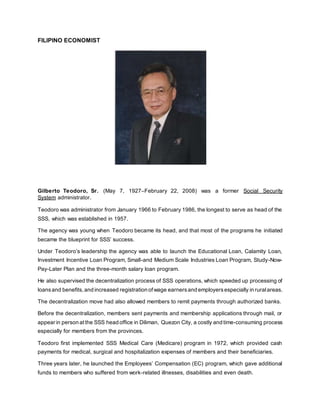
FILIPINO ECONOMIST
Gilberto Teodoro, Sr. (May 7, 1927–February 22, 2008) was a former Social Security
System administrator.
Teodoro was administrator from January 1966 to February 1986, the longest to serve as head of the
SSS, which was established in 1957.
The agency was young when Teodoro became its head, and that most of the programs he initiated
became the blueprint for SSS’ success.
Under Teodoro’s leadership the agency was able to launch the Educational Loan, Calamity Loan,
Investment Incentive Loan Program, Small-and Medium Scale Industries Loan Program, Study-Now-
Pay-Later Plan and the three-month salary loan program.
He also supervised the decentralization process of SSS operations, which speeded up processing of
loansand benefits, and increased registration ofwage earnersand employersespecially in ruralareas.
The decentralization move had also allowed members to remit payments through authorized banks.
Before the decentralization, members sent payments and membership applications through mail, or
appear in person at the SSS head office in Diliman, Quezon City, a costly and time-consuming process
especially for members from the provinces.
Teodoro first implemented SSS Medical Care (Medicare) program in 1972, which provided cash
payments for medical, surgical and hospitalization expenses of members and their beneficiaries.
Three years later, he launched the Employees’ Compensation (EC) program, which gave additional
funds to members who suffered from work-related illnesses, disabilities and even death.
The administration of the Medicare program was transferred to the Philippine Health Insurance
Corporation in 1995, but the SSS has continued to provide EC benefits to members.
Also under Teodoro’s leadership, the SSS started granting funeral and maternity benefits and
survivors and dependents pension in the 1970s. In 1973, SSS coverage was extended to overseas
Filipino workers and in 1980 to self-employed persons.
SSS investment income during Teodoro’s term enabled the fund to increase benefits several times
over despite a slow increase in contribution rates.
Moreover, SSS fund placements in various government banking institutions had yielded high returns,
which helped spur economic growth and fund public infrastructure projects.

Computer new

  • 1.
    COMPUTER A computer isa general purpose device that can be programmed to carry out a set of arithmetic or logical operations automatically. Since a sequence of operations can be readily changed, the computer can solve more than one kind of problem. Conventionally, a computer consists of at least one processing element, typically a central processing unit (CPU), and some form of memory. The processing element carries out arithmetic and logic operations, and a sequencing and control unit can change the order of operations in response to stored information. Peripheral devices allow information to be retrieved from an external source, and the result of operations saved and retrieved. Contrary to popular belief, computers existed from antiquity. Any tool used for calculation could be referred to as a computer. The earliest computers were tally sticks in use since around 20,000 BC. Mechanical analog computers started appearing in first century and were used in medieval era for astronomical calculations. In World War II, mechanical analog computers were used for specialized military applications. During this time the first electronic digital computers were developed. Originally they were the size of a large room, consuming as much power as several hundred modern personal computers (PCs). Modern computers based on integrated circuits are millions to billions of times more capable than the early machines, and occupy a fraction of the space. Simple computers are small enough to fit into mobile devices, and mobile computers can be powered by small batteries. Personal computers in their various forms are icons of the Information Age and are what most people think of as “computers.” However, the embedded found in many devices from MP3 players to fighter aircraft and from toys to industrial robots are the most numerous. FIVE ELEMENTS IN COMPUTER SYSTEM Storage Arithmetic and Logical Unit (ALU) Control Unit Input Devices Output Devices
  • 2.
    DIFFERENT TYPES OFCOMPUTERS (ACCORDING TO SIZE) A number of different dimensions can be used to classify computers into different types. Traditionally, the size and the capabilities of computers are used as the main criterion and the computers are classified into the following types. PC – The personal computer (PC) is small in size and is designed for general use by a single person. Desktop – A PC that is not designed for portability. A desktop computer is typically set up in a permanent location. Laptops (Notebooks) – A portable computer that includes a battery to provide power for some specific period of time. Palmtop – More commonly known as Personal Digital Assistants (PDAs). Palmtops are small, lightweight and tightly integrated computers which usually do not have keyboards but rely on touch screen technology for user input. Palmtops are equipped with a battery with reasonable life. Workstation – A desktop computer with a powerful processor, additional memory and enhanced capabilities for performing a special group of tasks, such as 3D graphics. Server – A computer that has been optimized to provide services to other computers over a network. Servers usually have powerful processors, lots of memory and large hard drives. Mainframe – Mainframes are huge computers, which could fill an entire room or even a whole floor. Over the years, the size of computers has diminished while the power has increased; the term mainframe has fallen out of use. You will still hear the term used, particularly in large companies to describe the huge machines processing millions of transactions every day. Supercomputer – This type of computer is usually very expensive. Although some supercomputers are single computer systems, most comprised multiple high performance computers working parallel as a single system.The best-known supercomputers are built by Cray Supercomputers. DIFFERENT TYPES OF COMPUTERS (ACCORDING TO PURPOSE) 1. General-Purpose Computers= this machines have the capability of dealing with variety of different problems, and are able to act in response to programs created to meet different needs. A general-purpose computer is one that has the ability to store different programs of instruction and thus to perform a variety of operations. 2. Special-Purpose Computers = as to the name implies, is designed to perform one specific tasks. The program of instructions is built into, or permanently stored in the machine. Specialization results in the given task being performed very quickly and efficiently. Most special purpose computers have the capability of performing just one task. They are frequently referred to us "dedicated," because of their limitations to the specific task at hand.
  • 3.
    CLASSIFICATION OF COMPUTERSACCORDING TO CAPACITY The term "capacity" refers to the volume of work or the data processing capacity a computer can handle. Their performance is judged by the: 1. Amount of data that can be stored in memory. 2. Speed of internal operation of the computer. 3. Number and type of peripheral devices. 4. Amount and type of software available for use with the computer. The capacity of early generation computers were determined by their physical size- the large the size, the greater the volume. In computer terms, size and speed of operation are at present proportionate to each other. Generally, though, recent, technology is tending to create smaller machines, making it possible to package equivalent speed and capacity in a smaller format. COMPUTER SYSTEM CLASSIFICATION 1. MICROCOMPUTERS= The mass production of silicon chips since 1971 has made it possible to put a "brain"into all sorts of machines. One such machine is the microcomputer. This machines has takes fullest advantage of the use of large-scale integration on silicon chips. The microprocessors literally contain a computer on a chip that can pass through the eye of needle. Microcomputers memories are generally made of semiconductors fabricated on silicons chips. It is a digital computer system under the control of a stored program that uses a microprocessor, a programmable read-only memory (ROM), and a random-access memory (RAM), The ROM defines the instructions to be executed by the computer while RAM is the functional equivalent of computer memory. 2. MINICOMPUTERS= Technological advances in the 1960's enabled manufactures to respond to the growing demand for a similar stand-alone machine, the minicomputer, to handle task that large computers could not perform economically. Minicomputer system (or small mainframe computers) provide faster operating speeds and larger storage capacities than microcomputers systems. They can support a large number of high-speed input/output devices. Several desk drives can be used to provide online access to large data files as required for direct- access processing. Operating system developed for minicomputer systems generally support both multiprogramming and virtual storage. This means that many programs can be run concurrently. This type of computer system is very flexible and can be expanded to meet the needs of users. Minicomputers usually have from 8k to 256K memory storage locations, and a relatively established applications software. Although the minicomputer is not as powerful as the medium or large-size computer, it is quite close. 3. MEDIUM-SIZE COMPUTERS= it provide faster operating speeds and larger storage capabilities than small computer systems. They can support a large number of high-speed input- output devices, and several disk drives can be used to provide online access processing. Also
  • 4.
    support both multiprogrammingand virtual storage. This allows the running of a variety of programs concurrently. Medium-size computer system are very flexible; they can be expanded to meet the needs of users. The possibility of increasing the data processing capability of a computer by adding devices, such additional memory, and other peripheral devices, is called expandability. 4. LARGE COMPUTERS=are the ultimate in system sophistication, flexibility, and speed. They usually contain full control systems with minimal operator intervention. Large computer systems range from single-processing configurations to nationwide computer based networks involving general large computers.Large computers have storage capacities from 512K to 819K, and these computers have internal operating speeds measured in terms of nanoseconds, as a compared to smaller computers where speed in terms of microseconds. 5. SUPERCOMPUTERS= the biggest and fastest machines today are the supercomputers that are used when billions or even trillions of calculations are needed. These machines are essential for applications ranging from nuclear weapon to accurate weather forecasting. Supercomputers are machines that have capabilities far beyond even the traditional large scale systems. Their speed is in the 100-million-instructions-per-second range.
  • 5.
    FILIPINO ECONOMIST Gilberto Teodoro,Sr. (May 7, 1927–February 22, 2008) was a former Social Security System administrator. Teodoro was administrator from January 1966 to February 1986, the longest to serve as head of the SSS, which was established in 1957. The agency was young when Teodoro became its head, and that most of the programs he initiated became the blueprint for SSS’ success. Under Teodoro’s leadership the agency was able to launch the Educational Loan, Calamity Loan, Investment Incentive Loan Program, Small-and Medium Scale Industries Loan Program, Study-Now- Pay-Later Plan and the three-month salary loan program. He also supervised the decentralization process of SSS operations, which speeded up processing of loansand benefits, and increased registration ofwage earnersand employersespecially in ruralareas. The decentralization move had also allowed members to remit payments through authorized banks. Before the decentralization, members sent payments and membership applications through mail, or appear in person at the SSS head office in Diliman, Quezon City, a costly and time-consuming process especially for members from the provinces. Teodoro first implemented SSS Medical Care (Medicare) program in 1972, which provided cash payments for medical, surgical and hospitalization expenses of members and their beneficiaries. Three years later, he launched the Employees’ Compensation (EC) program, which gave additional funds to members who suffered from work-related illnesses, disabilities and even death.
  • 6.
    The administration ofthe Medicare program was transferred to the Philippine Health Insurance Corporation in 1995, but the SSS has continued to provide EC benefits to members. Also under Teodoro’s leadership, the SSS started granting funeral and maternity benefits and survivors and dependents pension in the 1970s. In 1973, SSS coverage was extended to overseas Filipino workers and in 1980 to self-employed persons. SSS investment income during Teodoro’s term enabled the fund to increase benefits several times over despite a slow increase in contribution rates. Moreover, SSS fund placements in various government banking institutions had yielded high returns, which helped spur economic growth and fund public infrastructure projects.