1
Computer Networks
L O : To create a simple computer network
Success Criteria
● To understand the meaning of a computer network
● To identify the components of a computer network
● To create a basic network
2
Computer Network
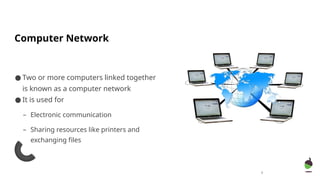
● Two or more computers linked together
is known as a computer network
● It is used for
– Electronic communication
– Sharing resources like printers and
exchanging files
3
4
Discuss advantages and disadvantages of a computer
network
What is hardware?
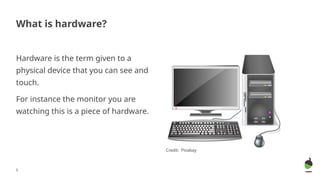
Hardware is the term given to a
physical device that you can see and
touch.
For instance the monitor you are
watching this is a piece of hardware.
Credit: Pixabay
5
So what is networking
hardware?
The physical devices that are needed
in order to create a network.
Examples – hub, cable, router, server
6
Credit: Pixabay
Network cable
Hub
Option 3 Router
Server
7
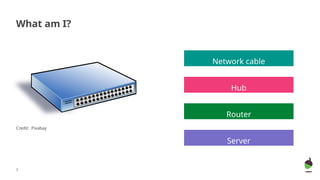
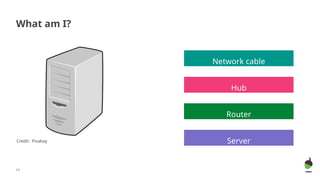
What am I?
Credit: Pixabay
Network cable
Hub
Option 3 Router
Server
8
What am I?
Credit: Pixabay
Network cable
Hub
Option 3 Router
Server
9
What am I?
Credit: Pixabay
Network cable
Hub
Option 3 Router
Server
10
What am I?
Credit: Pixabay
11
What am I?
Credit: Pixabay
Network cable
Hub
Option 3 Router
Server
Network cable
Hub
Option 3 Router
Server
12
What am I?
Credit: Pixabay
Network cable
Hub
Option 3 Router
Server
13
What am I?
Credit: Pixabay
Network cable
Hub
Option 3 Router
Server
14
What am I?
Credit: Pixabay
Network cables
●To connect together different
devices, you need cables.
●They have plastic plugs that
connect into sockets on devices.
●The cable is made up of a number
of copper wires.
15
Credit: Pixabay
Task 1 part 1: Build a network - scenario 1
●A small company has 4 people
working for it with 4 computers.
●All of the computers need to be
networked together using cables so
that they can communicate.
●Task - Connect each computer to each
other computer using lines for cables.
16
Credit: Free stock photos
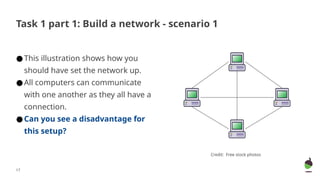
Task 1 part 1: Build a network - scenario 1
●This illustration shows how you
should have set the network up.
●All computers can communicate
with one another as they all have a
connection.
●Can you see a disadvantage for
this setup?
17
Credit: Free stock photos
Task 1 part 1: Build a network - scenario 1
●This setup requires a lot of cabling.
●With more computers, this can
become unmanageable and
expensive.
●How many cables would be needed
for a room with 6 computers?
18
Credit: Free stock photos
Task 1 part 2: Build a network - scenario 1
●15 separate cables would be
required to connect 6 computers.
●Imagine how complex it would be
for 20 computers!
19
Credit: Free stock photos
Hub
●A hub connects a number of
computers together.
●Ports allow cables to be plugged in
from each connected computer.
●A message sent from computer A
to computer B travels via the hub.
20
Credit: Pixabay
Task 2: Build a network - scenario 2
●The company wishes to install a
hub to reduce the overall number
of cables used to network the 4
computers.
●Connect the computers together
with the addition of a hub.
21
Credit: Free stock photos
?
●The hub becomes the central
device in the network.
●All messages between the
computers will pass through the
hub.
22
Credit: Computer: Free stock photos
Hub: Pixabay
Task 2: Build a network - scenario 2
Server
●Some networks will have a server.
●A server is a powerful computer which
provides services.
23
Credit: Needpix
Server
●There are many different types of
server, for example, a file server
which stores files (i.e. text, images,
sound, or video) that can be
accessed by all devices on the
network.
●You could also have servers for
mail and applications!
●Research work: Find out other
types of servers!
24
Credit: Needpix
●The company network currently
looks like this.
●Imagine that computer A is turned
off.
●Can computer C access files that
are stored on computer A?
25
Credit: Computer: Free stock photos
Hub: Pixabay
A
D
B
C
Hub
Task 3: Build a network - scenario 3
●The company wishes to install a file
server so that all 4 computers can
store their files in a central
location.
●Add a file server to network
diagram.
26
Credit: Computer: Free stock photos
Hub: Pixabay
A
D
B
C
Hub
?
Task 3: Build a network - scenario 3
●A file server has been connected to
the hub.
●The personal computers are no
longer reliant on each other. All
files can be stored and accessed
centrally on the file server.
27
Hub
Credit:
Computer: Free stock photos
Hub: Pixabay
Server: Needpix
Task 3: Build a network - scenario 3
Router
●When a network needs to be connected to another network over a
large area, a router is needed.
●A router forwards messages from one network to another.
●A common job of a router is to join a home network to the
internet via an internet service provider (ISP).
●The company wants to connect its
network to the internet so that the
4 users can carry out internet
research on their computers via
the web.
●add a router and an ISP (an ISP is
normally represented by a cloud)
29
Hub
Credit:
Computer: Free stock photos
Hub: Pixabay
Server: Needpix
Task 5: Build a network - scenario 4
ISP
connection to
the internet
●The router is connected to the hub,
just as the file server was in the
previous scenario.
●All personal computers now have
access to the router.
●All personal computers can now
carry out research on the web via
the internet.
30
Hub
Credit:
Computer: Free stock photos
Hub: Pixabay
Server: Needpix ISP
Task 5: Build a network - scenario 4
Activity
1. The company wants to create a network with 5 users. It should be connected to the
internet so that the users can carry out internet research on their computers via
the web. Create a simple network for this task.
2. A company wants to set up a network with 14 computers. A hub can connect 7
devices at a time. The network should have access to the internet. Create a
network configuration for the same.
3. A company wants to set up a network with 10 computers. The network should have
access to the internet and a shared file location. Create a network configuration for
the same.
31
32
Lesson2
LO : To analyse different types of network
SC :
- To explain different types of network
Starter
● https://forms.office.com/r/TB4XK7ghzr
33
Types of network based on
geographical area
● PAN
● LAN
● WAN
● MAN
● Client server
● Peer to peer
34
Types of network based on
architecture
TASK: Create a poster/PowerPoint to
explain different types of network
PAN – Personal area
network
● It is a network for communication
among personal devices.
● Devices can be connected through
wires or wirelessly
● It covers very short distance of few
meters.
● Example :Bluetooth
● It covers limited geographical area of
few kilometers.
● It is controlled and managed by a
single person/organization.
● Devices connected wirelessly makes a
WLAN (Wi-fi)
● Example : Network within a school
35
LAN – Local area network
WAN – Wide area network
● It covers a large geographical area like
cities, countries, etc.
● Largest WAN - Internet
● Computers are interconnected within
the same geographical area.
● Example: Different branches of an
organization in a city.
● It spans larger than a LAN but smaller
than a WAN.
36
MAN – Metropolitan area
network
Client server architecture
37
Peer to peer architecture
Client server architecture
● Centralised network
● Server monitors all clients
● De centralized network
● All system has same responsibilities.
38
Peer to peer architecture
39
Lesson3
LO : To describe network topologies and
mobile OS
SC :
- To explain different types of network topologies
- To explain a mobile OS and its types
Network Topology
● The physical arrangement of a network
– Bus – all computers are connected to a single main cable
– Ring – all computers are connected to each other
– The system with a token will process at a time
– Star – all computers are connected to a hub or switch
40
Identify the topologies.
41
Mobile Operating Systems
● It is the operating systems used in smartphones, tablets and other devices.
– Example - iOS, Android
● Desktop OS – OS for desktop computers
– Example – Windows, Linux
● What can be the difference between desktop OS and mobile OS?
● https://www.cambridge.org/go/ereader/read/9781108948593/#book/2109?groupId
=0
42
Activity
● Which is your favourite OS? Why?
Make a poster/inforgraphic.
43
44
Topic : Transmission channels
LO : To analyse different types of transmission channels
Transmission channels-It shows the way to transmit the data
There are two types of transmission channels:
● Wired
– Coaxial cable
– Twisted pair cable
● Wireless
– Radiowaves
– Bluetooth
– Infrared
45
Ethernet and Wifi
● LAN can be wired or wireless.
● Ethernet is a wired LAN
● Wi- fi(wireless fidelity) is wireless LAN
46
Activity
1. Compare wired LAN(Ethernet) with wireless LAN.
2. Create a poster/ PowerPoint to explain different types of transmission
channels
OR
3. Research Antivirus software
• What is the main purpose of antivirus software?
• Identify the key features of an antivirus software.
• How can antivirus software help protect a computer?
• How to use antivirus software effectively?
47

Computer netwrok, network hardware and its types

  • 1.
    1 Computer Networks L O: To create a simple computer network
  • 2.
    Success Criteria ● Tounderstand the meaning of a computer network ● To identify the components of a computer network ● To create a basic network 2
  • 3.
    Computer Network ● Twoor more computers linked together is known as a computer network ● It is used for – Electronic communication – Sharing resources like printers and exchanging files 3
  • 4.
    4 Discuss advantages anddisadvantages of a computer network
  • 5.
    What is hardware? Hardwareis the term given to a physical device that you can see and touch. For instance the monitor you are watching this is a piece of hardware. Credit: Pixabay 5
  • 6.
    So what isnetworking hardware? The physical devices that are needed in order to create a network. Examples – hub, cable, router, server 6 Credit: Pixabay
  • 7.
    Network cable Hub Option 3Router Server 7 What am I? Credit: Pixabay
  • 8.
    Network cable Hub Option 3Router Server 8 What am I? Credit: Pixabay
  • 9.
    Network cable Hub Option 3Router Server 9 What am I? Credit: Pixabay
  • 10.
    Network cable Hub Option 3Router Server 10 What am I? Credit: Pixabay
  • 11.
    11 What am I? Credit:Pixabay Network cable Hub Option 3 Router Server
  • 12.
    Network cable Hub Option 3Router Server 12 What am I? Credit: Pixabay
  • 13.
    Network cable Hub Option 3Router Server 13 What am I? Credit: Pixabay
  • 14.
    Network cable Hub Option 3Router Server 14 What am I? Credit: Pixabay
  • 15.
    Network cables ●To connecttogether different devices, you need cables. ●They have plastic plugs that connect into sockets on devices. ●The cable is made up of a number of copper wires. 15 Credit: Pixabay
  • 16.
    Task 1 part1: Build a network - scenario 1 ●A small company has 4 people working for it with 4 computers. ●All of the computers need to be networked together using cables so that they can communicate. ●Task - Connect each computer to each other computer using lines for cables. 16 Credit: Free stock photos
  • 17.
    Task 1 part1: Build a network - scenario 1 ●This illustration shows how you should have set the network up. ●All computers can communicate with one another as they all have a connection. ●Can you see a disadvantage for this setup? 17 Credit: Free stock photos
  • 18.
    Task 1 part1: Build a network - scenario 1 ●This setup requires a lot of cabling. ●With more computers, this can become unmanageable and expensive. ●How many cables would be needed for a room with 6 computers? 18 Credit: Free stock photos
  • 19.
    Task 1 part2: Build a network - scenario 1 ●15 separate cables would be required to connect 6 computers. ●Imagine how complex it would be for 20 computers! 19 Credit: Free stock photos
  • 20.
    Hub ●A hub connectsa number of computers together. ●Ports allow cables to be plugged in from each connected computer. ●A message sent from computer A to computer B travels via the hub. 20 Credit: Pixabay
  • 21.
    Task 2: Builda network - scenario 2 ●The company wishes to install a hub to reduce the overall number of cables used to network the 4 computers. ●Connect the computers together with the addition of a hub. 21 Credit: Free stock photos ?
  • 22.
    ●The hub becomesthe central device in the network. ●All messages between the computers will pass through the hub. 22 Credit: Computer: Free stock photos Hub: Pixabay Task 2: Build a network - scenario 2
  • 23.
    Server ●Some networks willhave a server. ●A server is a powerful computer which provides services. 23 Credit: Needpix
  • 24.
    Server ●There are manydifferent types of server, for example, a file server which stores files (i.e. text, images, sound, or video) that can be accessed by all devices on the network. ●You could also have servers for mail and applications! ●Research work: Find out other types of servers! 24 Credit: Needpix
  • 25.
    ●The company networkcurrently looks like this. ●Imagine that computer A is turned off. ●Can computer C access files that are stored on computer A? 25 Credit: Computer: Free stock photos Hub: Pixabay A D B C Hub Task 3: Build a network - scenario 3
  • 26.
    ●The company wishesto install a file server so that all 4 computers can store their files in a central location. ●Add a file server to network diagram. 26 Credit: Computer: Free stock photos Hub: Pixabay A D B C Hub ? Task 3: Build a network - scenario 3
  • 27.
    ●A file serverhas been connected to the hub. ●The personal computers are no longer reliant on each other. All files can be stored and accessed centrally on the file server. 27 Hub Credit: Computer: Free stock photos Hub: Pixabay Server: Needpix Task 3: Build a network - scenario 3
  • 28.
    Router ●When a networkneeds to be connected to another network over a large area, a router is needed. ●A router forwards messages from one network to another. ●A common job of a router is to join a home network to the internet via an internet service provider (ISP).
  • 29.
    ●The company wantsto connect its network to the internet so that the 4 users can carry out internet research on their computers via the web. ●add a router and an ISP (an ISP is normally represented by a cloud) 29 Hub Credit: Computer: Free stock photos Hub: Pixabay Server: Needpix Task 5: Build a network - scenario 4 ISP connection to the internet
  • 30.
    ●The router isconnected to the hub, just as the file server was in the previous scenario. ●All personal computers now have access to the router. ●All personal computers can now carry out research on the web via the internet. 30 Hub Credit: Computer: Free stock photos Hub: Pixabay Server: Needpix ISP Task 5: Build a network - scenario 4
  • 31.
    Activity 1. The companywants to create a network with 5 users. It should be connected to the internet so that the users can carry out internet research on their computers via the web. Create a simple network for this task. 2. A company wants to set up a network with 14 computers. A hub can connect 7 devices at a time. The network should have access to the internet. Create a network configuration for the same. 3. A company wants to set up a network with 10 computers. The network should have access to the internet and a shared file location. Create a network configuration for the same. 31
  • 32.
    32 Lesson2 LO : Toanalyse different types of network SC : - To explain different types of network
  • 33.
  • 34.
    Types of networkbased on geographical area ● PAN ● LAN ● WAN ● MAN ● Client server ● Peer to peer 34 Types of network based on architecture TASK: Create a poster/PowerPoint to explain different types of network
  • 35.
    PAN – Personalarea network ● It is a network for communication among personal devices. ● Devices can be connected through wires or wirelessly ● It covers very short distance of few meters. ● Example :Bluetooth ● It covers limited geographical area of few kilometers. ● It is controlled and managed by a single person/organization. ● Devices connected wirelessly makes a WLAN (Wi-fi) ● Example : Network within a school 35 LAN – Local area network
  • 36.
    WAN – Widearea network ● It covers a large geographical area like cities, countries, etc. ● Largest WAN - Internet ● Computers are interconnected within the same geographical area. ● Example: Different branches of an organization in a city. ● It spans larger than a LAN but smaller than a WAN. 36 MAN – Metropolitan area network
  • 37.
  • 38.
    Client server architecture ●Centralised network ● Server monitors all clients ● De centralized network ● All system has same responsibilities. 38 Peer to peer architecture
  • 39.
    39 Lesson3 LO : Todescribe network topologies and mobile OS SC : - To explain different types of network topologies - To explain a mobile OS and its types
  • 40.
    Network Topology ● Thephysical arrangement of a network – Bus – all computers are connected to a single main cable – Ring – all computers are connected to each other – The system with a token will process at a time – Star – all computers are connected to a hub or switch 40
  • 41.
  • 42.
    Mobile Operating Systems ●It is the operating systems used in smartphones, tablets and other devices. – Example - iOS, Android ● Desktop OS – OS for desktop computers – Example – Windows, Linux ● What can be the difference between desktop OS and mobile OS? ● https://www.cambridge.org/go/ereader/read/9781108948593/#book/2109?groupId =0 42
  • 43.
    Activity ● Which isyour favourite OS? Why? Make a poster/inforgraphic. 43
  • 44.
    44 Topic : Transmissionchannels LO : To analyse different types of transmission channels
  • 45.
    Transmission channels-It showsthe way to transmit the data There are two types of transmission channels: ● Wired – Coaxial cable – Twisted pair cable ● Wireless – Radiowaves – Bluetooth – Infrared 45
  • 46.
    Ethernet and Wifi ●LAN can be wired or wireless. ● Ethernet is a wired LAN ● Wi- fi(wireless fidelity) is wireless LAN 46
  • 47.
    Activity 1. Compare wiredLAN(Ethernet) with wireless LAN. 2. Create a poster/ PowerPoint to explain different types of transmission channels OR 3. Research Antivirus software • What is the main purpose of antivirus software? • Identify the key features of an antivirus software. • How can antivirus software help protect a computer? • How to use antivirus software effectively? 47