Course Instructor:
Nasir Ayub
Course Title: Computer Networks
Course Code: …
Credit Hours: 3(2,1)
Reference Books:
1. Computer Networking: A Top-Down Approach Featuring the Internet, 6th edition by James F.
Kurose and Keith W. Ross
2. Computer Networks, 5th Edition by Andrew S. Tanenbaum
3. Data and Computer Communications, 10th Edition by William Stallings 4. Data
Communication and Computer Networks, 5th Edition by Behrouz A. Forouzan
 As mention in course outlines.
At the end of the course the students will be able to:
1. Describe the key terminologies and technologies of
computer networks
2. Explain the services and functions provided by each layer
in the Internet protocol stack.
3. Identify various internetworking devices and protocols, and
their functions in a network.
4. Analyze working and performance of key technologies,
algorithms and protocols.
5. Build Computer Network on various Topologies
4
1
Chapter 1: Introduction, Computer Networking: A Top-Down Approach,
8th edition, Jim Kurose, Keith Ross, Pearson, 2020
 Computer Network
 What is the Internet?
 What is a protocol?
 Network edge: hosts, access network, physical media
 Network core: packet/circuit switching, internet structure
 Performance: loss, delay, throughput
 Security
 Protocol layers, service models
 History
 A computer network is a system that connects two or more computing devices for
transmitting and sharing information.
 Computing devices include everything from a mobile phone to a server.
 These devices are connected using physical wires such as fiber optics, but they can
also be wireless.
Internet
The Internet: a “nuts and bolts” view
Introduction: 1-8
mobile network
home network
enterprise
network
national or global ISP
local or
regional ISP
datacenter
network
content
provider
network
Packet switches: forward
packets (chunks of data)
 routers, switches
Communication links
 fiber, copper, radio, satellite
 transmission rate: bandwidth
Billions of connected
computing devices:
 hosts = end systems
 running network apps at
Internet’s “edge”
Networks
 collection of devices, routers,
links: managed by an organization
 Internet: “network of networks”
• Interconnected ISPs
The Internet: a “nuts and bolts” view
Introduction: 1-9
mobile network
home network
enterprise
network
national or global ISP
local or
regional ISP
datacenter
network
content
provider
network
 protocols are everywhere
• control sending, receiving of
messages
• e.g., HTTP (Web), streaming video,
Skype, TCP, IP, WiFi, 4G, Ethernet
 Internet standards
• RFC: Request for Comments
• IETF: Internet Engineering Task
Force
Ethernet
HTTP
Skype
IP
WiFi
4G
TCP
Streaming
video
 Infrastructure that provides
services to applications:
• Web, streaming video, multimedia
teleconferencing, email, games, e-
commerce, social media, inter-
connected appliances, …
The Internet: a “service” view
Introduction: 1-10
mobile network
home network
enterprise
network
national or global ISP
local or
regional ISP
datacenter
network
content
provider
network
HTTP
Skype
Streaming
video
 provides programming interface
to distributed applications:
• “hooks” allowing sending/receiving
apps to “connect” to, use Internet
transport service
• provides service options
What’s a protocol?
Introduction: 1-11
Human protocols:
 “what’s the time?”
 “I have a question”
 introductions
… specific messages sent
… specific actions taken
when message received,
or other events
Network protocols:
 computers (devices) rather than humans
 all communication activity in Internet
governed by protocols
Protocols define the format, order of
messages sent and received among
network entities, and actions taken
on msg transmission, receipt
What’s a protocol?
Introduction: 1-12
A human protocol and a computer network protocol:
Q: other human protocols?
Hi
Hi
Got the
time?
2:00
time
TCP connection
response
<file>
TCP connection
request
GET http://gaia.cs.umass.edu/kurose_ross
Chapter 1: roadmap
Introduction: 1-13
 What is the Internet?
 What is a protocol?
 Network edge: hosts, access network,
physical media
 Network core: packet/circuit
switching, internet structure
 Performance: loss, delay, throughput
 Security
 Protocol layers, service models
 History
A closer look at Internet structure
Introduction: 1-14
mobile network
home network
enterprise
network
national or global ISP
local or
regional ISP
datacenter
network
content
provider
network
Network edge:
 hosts: clients and servers
 servers often in data centers
A closer look at Internet structure
Introduction: 1-15
mobile network
home network
enterprise
network
national or global ISP
local or
regional ISP
datacenter
network
content
provider
network
Network edge:
 hosts: clients and servers
 servers often in data centers
Access networks, physical media:
wired, wireless communication links
A closer look at Internet structure
Network edge:
 hosts: clients and servers
 servers often in data centers
Access networks, physical media:
wired, wireless communication links
Network core:
 interconnected routers
 network of networks
Introduction: 1-16
mobile network
home network
enterprise
network
national or global ISP
local or
regional ISP
datacenter
network
content
provider
network
Access networks and physical media
Introduction: 1-17
mobile network
home network
enterprise
network
national or global ISP
local or
regional ISP
datacenter
network
content
provider
network
Q: How to connect end systems
to edge router?
 residential access nets
 institutional access networks (school,
company)
 mobile access networks (WiFi, 4G/5G)
What to look for:
 transmission rate (bits per second) of access
network?
 shared or dedicated access among users?
Thanks
18
Chapter 1: Introduction, Computer Networking: A Top-Down Approach,
8th edition, Jim Kurose, Keith Ross, Pearson, 2020
Introduction: 1-20
Communications Channels
 A communication channel is the medium used to transport information
from one network device to another.
 Wired channels transport data through wires and cables.
 Wireless channels transport data from one device to another without
the use of cable or wires.
Physical
Transmission Media
Wireless
Transmission Media
Introduction: 1-21
Computer Network Components
 Major Parts:
• Network Interface Card / Ethernet Card
• Cables And Connectors RJ45 Connector
• Hub
• Router
• Modem
• Switch
Introduction: 1-22
Network Interface Card (NIC) / Ethernet Card
 NIC is a hardware component used to connect
a computer with another computer onto a
network
 It can support a transfer rate of 10,100 to
1000 Mb/s.
 The MAC address or physical address is
encoded on the network card chip which is
assigned by the IEEE to identify a network
card uniquely. The MAC address is stored in
the PROM (Programmable read-only
memory).
Introduction: 1-23
Links: physical media
 bit: propagates between
transmitter/receiver pairs
 physical link: what lies
between transmitter &
receiver
 guided media:
• signals propagate in solid
media: copper, fiber, coax
 unguided media:
• signals propagate freely,
e.g., radio
Twisted pair (TP)
 two insulated copper wires
• Category 5: 100 Mbps, 1 Gbps Ethernet
• Category 6: 10Gbps Ethernet
Introduction: 1-24
Links: physical media
Coaxial cable:
 two concentric copper conductors
 bidirectional
 broadband:
• multiple frequency channels on cable
• 100’s Mbps per channel
Fiber optic cable:
 glass fiber carrying light pulses, each
pulse a bit
 high-speed operation:
• high-speed point-to-point
transmission (10’s-100’s Gbps)
 low error rate:
• repeaters spaced far apart
• immune to electromagnetic noise
Introduction: 1-25
Hub
 A Hub is a hardware device that divides the
network connection among multiple devices.
When computer requests for some
information from a network, it first sends the
request to the Hub through cable.
 Hub will broadcast this request to the entire
network. All the devices will check whether
the request belongs to them or not. If not, the
request will be dropped.
Introduction: 1-26
Switch
 A switch is a hardware device that connects multiple
devices on a computer network.
 The Switch contains the updated table that decides
where the data is transmitted or not.
 Switch delivers the message to the correct destination
based on the physical address present in the incoming
message.
 It determines the device to whom the message is to be
transmitted. Therefore, we can say that switch provides
a direct connection between the source and destination.
Introduction: 1-27
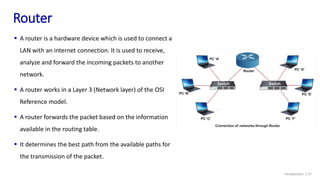
Router
 A router is a hardware device which is used to connect a
LAN with an internet connection. It is used to receive,
analyze and forward the incoming packets to another
network.
 A router works in a Layer 3 (Network layer) of the OSI
Reference model.
 A router forwards the packet based on the information
available in the routing table.
 It determines the best path from the available paths for
the transmission of the packet.
Introduction: 1-28
Wireless access networks
Shared wireless access network connects end system to router
 via base station aka “access point”
Wireless local area networks
(WLANs)
 typically within or around
building (~100 ft)
 802.11b/g/n (WiFi): 11, 54, 450
Mbps transmission rate
to Internet
to Internet
Wide-area cellular access networks
 provided by mobile, cellular network
operator (10’s km)
 10’s Mbps
 4G cellular networks (5G coming)
Introduction: 1-29
Access networks: enterprise networks
 companies, universities, etc.
 mix of wired, wireless link technologies, connecting a mix of switches
and routers (we’ll cover differences shortly)
 Ethernet: wired access at 100Mbps, 1Gbps, 10Gbps
 WiFi: wireless access points at 11, 54, 450 Mbps
Ethernet
switch
institutional mail,
web servers
institutional router
Enterprise link to
ISP (Internet)
Introduction: 1-30
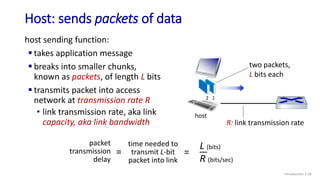
Host: sends packets of data
host sending function:
 takes application message
 breaks into smaller chunks,
known as packets, of length L bits
 transmits packet into access
network at transmission rate R
• link transmission rate, aka link
capacity, aka link bandwidth R: link transmission rate
host
1
2
two packets,
L bits each
packet
transmission
delay
time needed to
transmit L-bit
packet into link
L (bits)
R (bits/sec)
= =
Introduction: 1-31
Links: physical media
Wireless radio
 signal carried in
electromagnetic spectrum
 no physical “wire”
 broadcast and “half-duplex”
(sender to receiver)
 propagation environment
effects:
• reflection
• obstruction by objects
• interference
Radio link types:
 terrestrial microwave
• up to 45 Mbps channels
 Wireless LAN (WiFi)
• Up to 100’s Mbps
 wide-area (e.g., cellular)
• 4G cellular: ~ 10’s Mbps
 satellite
• up to 45 Mbps per channel
• 270 msec end-end delay
Introduction: 1-32
Links: Signals
Wireless radio
 A signal is an electromagnetic wave that carries information from one
place to another, using a specific propagation medium, such as air,
vacuum, water, and solid.
 In electronics, the signal is defined as a current, voltage, or wave carrying
information. It can travel short distances or long distances depending on
the requirements.
 The speed of a signal wave is equal to the speed of light.
Introduction: 1-33
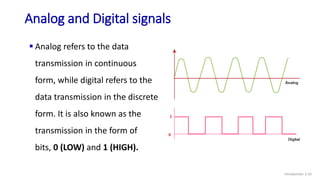
Analog and Digital signals
 Analog refers to the data
transmission in continuous
form, while digital refers to the
data transmission in the discrete
form. It is also known as the
transmission in the form of
bits, 0 (LOW) and 1 (HIGH).
Thanks
34
Chapter 1: Introduction, Computer Networking: A Top-Down Approach,
8th edition, Jim Kurose, Keith Ross, Pearson, 2020
 Five components of data communication
 Data Flow
 Topologies
Topics from shared video
Introduction: 1-36
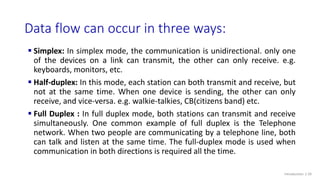
 Simplex: In simplex mode, the communication is unidirectional. only one
of the devices on a link can transmit, the other can only receive. e.g.
keyboards, monitors, etc.
 Half-duplex: In this mode, each station can both transmit and receive, but
not at the same time. When one device is sending, the other can only
receive, and vice-versa. e.g. walkie-talkies, CB(citizens band) etc.
 Full Duplex : In full duplex mode, both stations can transmit and receive
simultaneously. One common example of full duplex is the Telephone
network. When two people are communicating by a telephone line, both
can talk and listen at the same time. The full-duplex mode is used when
communication in both directions is required all the time.
Data flow can occur in three ways:
Introduction: 1-39
Data flow can occur in three ways:
Introduction: 1-40
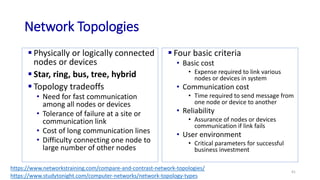
Network Topologies
 Physically or logically connected
nodes or devices
 Star, ring, bus, tree, hybrid
 Topology tradeoffs
• Need for fast communication
among all nodes or devices
• Tolerance of failure at a site or
communication link
• Cost of long communication lines
• Difficulty connecting one node to
large number of other nodes
 Four basic criteria
• Basic cost
• Expense required to link various
nodes or devices in system
• Communication cost
• Time required to send message from
one node or device to another
• Reliability
• Assurance of nodes or devices
communication if link fails
• User environment
• Critical parameters for successful
business investment
41
https://www.networkstraining.com/compare-and-contrast-network-topologies/
https://www.studytonight.com/computer-networks/network-topology-types
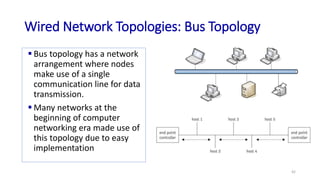
Wired Network Topologies: Bus Topology
 Bus topology has a network
arrangement where nodes
make use of a single
communication line for data
transmission.
 Many networks at the
beginning of computer
networking era made use of
this topology due to easy
implementation
42
Bus Topology
 Advantages
• Since there is a single communication line, means the same medium is shared.
Therefore, the major advantage of using this topology is its simplicity.
• Easy to setup and extend.
• Less costly. Less cabling needs.
 Disadvantages
• On the other hand, having a single communication line for data transmission makes
it easier for collision to occur, which is seen as a disadvantage of using this network
topology.
• If the single network cable has a problem or disconnection, the whole network
breaks.
• Difficult to identify a problem.
• All devices receive all signals from every other host. This is not efficient.
43
Wired Network Topologies: Star Topology
 The star network topology is one of the
most commonly used topologies today
because of its simplicity and efficiency.
 In this kind of topology, a centralized
node is located at the core of the
network topology, in which all the other
nodes must communicate through.
 This topology is mostly used in homes
and offices today. For example, the
classic Ethernet LAN networks are using
the Star Topology. There is an Ethernet
Switch (centralized node) on which all
computers and network devices are
connected to.
44
Star Topology
 Advantages
• Easy to install and implement with wiring etc.
• Easy to troubleshoot and detect problems in the network.
• If one device fails, it does not affect the other devices in the network.
• You can easily add or remove devices without affecting the rest of the network.
• Centralized management and monitoring through the central switch/hub.
 Disadvantages
• Cost of installation is high.
• Expensive to use.
• If the hub fails, then the whole network is stopped because all the nodes depend on
the hub.
• Performance is based on the hub capability
45
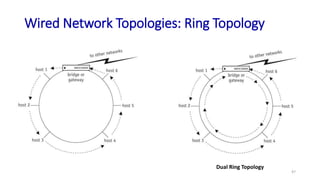
Wired Network Topologies: Ring Topology
 It is called ring topology because it forms a ring as each computer is
connected to another computer, with the last one connected to the first.
• Exactly two neighbors for each device.
 Features of Ring Topology
• A number of repeaters are used for Ring topology with large number of nodes,
because if someone wants to send some data to the last node in the ring topology
with 100 nodes, then the data will have to pass through 99 nodes to reach the 100th
node. Hence to prevent data loss repeaters are used in the network.
• The transmission is unidirectional, but it can be made bidirectional by having 2
connections between each Network Node, it is called Dual Ring Topology.
• In Dual Ring Topology, two ring networks are formed, and data flow is in opposite
direction in them. Also, if one ring fails, the second ring can act as a backup, to keep
the network up.
• Data is transferred in a sequential manner that is bit by bit. Data transmitted, has to
pass through each node of the network, till the destination node.
46
Wired Network Topologies: Ring Topology
47
Dual Ring Topology
Ring Topology
 Advantages
• The advantage of using this network topology is the ability to have fast
network throughput.
• Less packet collisions.
• High speed transfers.
• Token is used between nodes thus making this performing better than bus
topology.
 Disadvantage
• The disadvantage is the point of failure, as a single node can break the
transmission of data on the network.
• Troubleshooting is difficult in ring topology.
• Adding or deleting the computers disturbs the network activity.
48
Wired Network Topologies: Tree Topology
 Collection of buses connected by
branching cable
• No closed loops
 Designers create networks using
bridges
 Message from any site
• Received by all other sites until reaching
end point
 Reaches end point controller
without acceptance
• Host absorbs message
 Advantage
• Message traffic still flows even if single
node fails
49
Tree Topology
 Advantages of Tree Topology
• Extension of bus and star topologies.
• Expansion of nodes is possible and easy.
• Easily managed and maintained.
• Error detection is easily done.
 Disadvantages of Tree Topology
• Heavily cabled.
• Costly.
• If more nodes are added maintenance is difficult.
• Central hub fails, network fails.
50
 It is a point-to-point connection
to other nodes or devices. All
the network nodes are
connected to each other.
 There are two techniques to
transmit data over the Mesh
topology, they are :
• Routing
• Flooding
51
Wired Network Topologies: Mesh Topology
Mesh Topology
 Advantages of Mesh Topology
• Each connection can carry its own data load.
• It is robust.
• Fault is diagnosed easily.
• Provides security and privacy.
 Disadvantages of Mesh Topology
• Installation and configuration is difficult.
• Cabling cost is more.
• Bulk wiring is required.
52
Wired Network Topologies: Hybrid Topology
 It is two different types of topologies which is a mixture of two or more topologies.
For example if in an office in one department ring topology is used and in another
star topology is used, connecting these topologies will result in Hybrid Topology
(ring topology and star topology).
53
Hybrid Topology
 Advantages of Hybrid Topology
• Reliable as Error detecting and trouble shooting is easy.
• Effective.
• Scalable as size can be increased easily.
• Flexible.
 Disadvantages of Hybrid Topology
• Complex in design.
• Costly.
54
Chapter 1: roadmap
Introduction: 1-55
 What is the Internet?
 What is a protocol?
 Network edge: hosts, access network,
physical media
 Network core: packet/circuit
switching, internet structure
 Performance: loss, delay, throughput
 Security
 Protocol layers, service models
 History
The network core
mesh of interconnected
routers
packet-switching: hosts break
application-layer messages
into packets
• forward packets from one router
to the next, across links on path
from source to destination
• each packet transmitted at full
link capacity
Introduction: 1-56
mobile network
home network
enterprise
network
national or global ISP
local or
regional ISP
datacenter
network
content
provider
network
Packet-switching: store-and-forward(check Notes!!!)
 Transmission delay: takes L/R seconds to
transmit (push out) L-bit packet into link at R
bps
 Store and forward: entire packet must arrive at
router before it can be transmitted on next link
 End-end delay: 2L/R (above), assuming zero
propagation delay (more on delay shortly)
Introduction: 1-57
source
R bps
destination
1
2
3
L bits
per packet
R bps
One-hop numerical example:
 L = 10 Kbits
 R = 100 Mbps
 one-hop transmission delay
= 0.1 msec
Packet-switching: queueing delay, loss
Packet queuing and loss: if arrival rate (in bps) to link exceeds
transmission rate (bps) of link for a period of time:
 packets will queue, waiting to be transmitted on output link
 packets can be dropped (lost) if memory (buffer) in router fills
up
Introduction: 1-58
A
B
C
R = 100 Mb/s
R = 1.5 Mb/s
D
E
queue of packets
waiting for output link
Two key network-core functions
Introduction: 1-59
Forwarding:
 local action:
move arriving
packets from
router’s input link
to appropriate
router output link
1
2
3
destination address in arriving
packet’s header
routing algorithm
header value output link
0100
0101
0111
1001
3
2
2
1
Routing:
 global action:
determine source-
destination paths
taken by packets
 routing algorithms
local forwarding table
routing algorithm
Alternative to packet switching: circuit switching
end-end resources allocated to,
reserved for “call” between source
and destination
 in diagram, each link has four circuits.
• call gets 2nd circuit in top link and 1st
circuit in right link.
 dedicated resources: no sharing
• circuit-like (guaranteed) performance
 circuit segment idle if not used by call (no
sharing)
 commonly used in traditional telephone
networks
Introduction: 1-60
Chapter 1: Introduction, Computer Networking: A Top-Down Approach,
8th edition, Jim Kurose, Keith Ross, Pearson, 2020
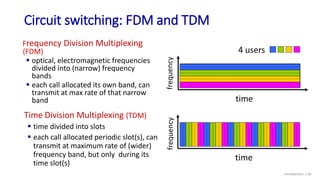
Circuit switching: FDM and TDM
Introduction: 1-62
frequency
time
frequency
time
4 users
Frequency Division Multiplexing
(FDM)
 optical, electromagnetic frequencies
divided into (narrow) frequency
bands
 each call allocated its own band, can
transmit at max rate of that narrow
band
Time Division Multiplexing (TDM)
 time divided into slots
 each call allocated periodic slot(s), can
transmit at maximum rate of (wider)
frequency band, but only during its
time slot(s)
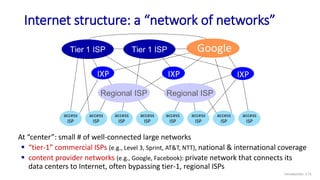
Internet structure: a “network of networks”
 Hosts connect to Internet via access Internet Service
Providers (ISPs)
• residential, enterprise (company, university, commercial) ISPs
 Access ISPs in turn must be interconnected
• so that any two hosts can send packets to each other
 Resulting network of networks is very complex
• evolution was driven by economics and national policies
 Let’s take a stepwise approach to describe current
Internet structure
Introduction: 1-63
Internet structure: a “network of networks”
Introduction: 1-64
Question: given millions of access ISPs, how to connect them together?
access
net
access
net
access
net
access
net
access
net
access
net
access
net
access
net
access
net
access
net
access
net
access
net
access
net
access
net
access
net
access
net
Internet structure: a “network of networks”
Introduction: 1-65
Question: given millions of access ISPs, how to connect them together?
access
net
access
net
access
net
access
net
access
net
access
net
access
net
access
net
access
net
access
net
access
net
access
net
access
net
access
net
access
net
access
net
connecting each access ISP to
each other directly doesn’t scale:
O(N2) connections.
Internet structure: a “network of networks”
Introduction: 1-66
Option: connect each access ISP to one global transit ISP?
Customer and provider ISPs have economic agreement.
global
ISP
access
net
access
net
access
net
access
net
access
net
access
net
access
net
access
net
access
net
access
net
access
net
access
net
access
net
access
net
access
net
access
net
ISP A
ISP C
ISP B
Internet structure: a “network of networks”
Introduction: 1-67
access
net
access
net
access
net
access
net
access
net
access
net
access
net
access
net
access
net
access
net
access
net
access
net
access
net
access
net
access
net
access
net
But if one global ISP is viable business, there will be competitors ….
ISP A
ISP C
ISP B
Internet structure: a “network of networks”
Introduction: 1-68
access
net
access
net
access
net
access
net
access
net
access
net
access
net
access
net
access
net
access
net
access
net
access
net
access
net
access
net
access
net
access
net
But if one global ISP is viable business, there will be competitors …. who will
want to be connected
IXP
peering link
Internet exchange point
IXP
ISP A
ISP C
ISP B
Internet structure: a “network of networks”
Introduction: 1-69
access
net
access
net
access
net
access
net
access
net
access
net
access
net
access
net
access
net
access
net
access
net
… and regional networks may arise to connect access nets to ISPs
IXP
IXP
access
net
access
net
regional ISP
access
net access
net
access
net
ISP A
ISP C
ISP B
Internet structure: a “network of networks”
Introduction: 1-70
access
net
access
net
access
net
access
net
access
net
access
net
access
net
access
net
access
net
access
net
access
net
… and content provider networks (e.g., Google, Microsoft, Akamai) may
run their own network, to bring services, content close to end users
IXP
IXP
access
net
access
net
access
net access
net
access
net
Content provider network
regional ISP
Internet structure: a “network of networks”
Introduction: 1-71
Tier 1 ISP Tier 1 ISP
Regional ISP Regional ISP
access
ISP
access
ISP
access
ISP
access
ISP
access
ISP
access
ISP
access
ISP
access
ISP
IXP IXP IXP
At “center”: small # of well-connected large networks
 “tier-1” commercial ISPs (e.g., Level 3, Sprint, AT&T, NTT), national & international coverage
 content provider networks (e.g., Google, Facebook): private network that connects its
data centers to Internet, often bypassing tier-1, regional ISPs
Google
Chapter 1: Introduction, Computer Networking: A Top-Down Approach,
8th edition, Jim Kurose, Keith Ross, Pearson, 2020
Chapter 1: roadmap
Introduction: 1-73
 What is the Internet?
 What is a protocol?
 Network edge: hosts, access network,
physical media
 Network core: packet/circuit
switching, internet structure
 Performance: loss, delay, throughput
 Security
 Protocol layers, service models
 History
Protocol “layers” and reference models
Introduction: 1-74
Networks are complex,
with many “pieces”:
 hosts
 routers
 links of various media
 applications
 protocols
 hardware, software
Question:
is there any hope of
organizing structure of
network?
…. or at least our
discussion of networks?
Example: organization of air travel
Introduction: 1-75
airline travel: a series of steps, involving many services
ticket (purchase)
baggage (check)
gates (load)
runway takeoff
airplane routing
ticket (complain)
baggage (claim)
gates (unload)
runway landing
airplane routing
airplane routing
Example: organization of air travel
Introduction: 1-76
ticket (purchase)
baggage (check)
gates (load)
runway takeoff
airplane routing
ticket (complain)
baggage (claim)
gates (unload)
runway landing
airplane routing
airplane routing
ticketing service
baggage service
gate service
runway service
routing service
layers: each layer implements a service
 via its own internal-layer actions
 relying on services provided by layer below
Q: describe in words
the service provided
in each layer above
Why layering?
Introduction: 1-77
dealing with complex systems:
 explicit structure allows identification, relationship of
complex system’s pieces
• layered reference model for discussion
 modularization eases maintenance, updating of system
• change in layer's service implementation: transparent to rest of
system
• e.g., change in gate procedure doesn’t affect rest of system
Internet protocol stack
Introduction: 1-78
 application: supporting network applications
• IMAP, SMTP, HTTP
 transport: process-process data transfer
• TCP, UDP
 network: routing of datagrams from source to
destination
• IP, routing protocols
 link: data transfer between neighboring
network elements
• Ethernet, 802.11 (WiFi), PPP
 physical: bits “on the wire”
application
transport
network
link
physical
Encapsulation
Introduction: 1-79
source
application
transport
network
link
physical
Ht
Hn M
segment Ht
datagram
destination
application
transport
network
link
physical
Ht
Hn
Hl M
Ht
Hn M
Ht M
M
network
link
physical
link
physical
Ht
Hn
Hl M
Ht
Hn M
Ht
Hn M
Ht
Hn
Hl M
router
switch
message M
Ht M
Hn
frame
Chapter 1: roadmap
Introduction: 1-80
 What is the Internet?
 What is a protocol?
 Network edge: hosts, access network,
physical media
 Network core: packet/circuit
switching, internet structure
 Performance: loss, delay, throughput
 Security
 Protocol layers, service models
 History
Internet history
Introduction: 1-81
 1961: Kleinrock - queueing
theory shows effectiveness of
packet-switching
 1964: Baran - packet-switching
in military nets
 1967: ARPAnet conceived by
Advanced Research Projects
Agency
 1969: first ARPAnet node
operational
 1972:
• ARPAnet public demo
• NCP (Network Control Protocol)
first host-host protocol
• first e-mail program
• ARPAnet has 15 nodes
1961-1972: Early packet-switching principles
Internet history
Introduction: 1-82
 1970: ALOHAnet satellite network
in Hawaii
 1974: Cerf and Kahn - architecture
for interconnecting networks
 1976: Ethernet at Xerox PARC
 late70’s: proprietary architectures:
DECnet, SNA, XNA
 late 70’s: switching fixed length
packets (ATM precursor)
 1979: ARPAnet has 200 nodes
1972-1980: Internetworking, new and proprietary nets
Cerf and Kahn’s internetworking
principles:
 minimalism, autonomy - no
internal changes required to
interconnect networks
 best-effort service model
 stateless routing
 decentralized control
define today’s Internet architecture
Internet history
Introduction: 1-83
 1983: deployment of TCP/IP
 1982: smtp e-mail protocol
defined
 1983: DNS defined for name-
to-IP-address translation
 1985: ftp protocol defined
 1988: TCP congestion control
 new national networks: CSnet,
BITnet, NSFnet, Minitel
 100,000 hosts connected to
confederation of networks
1980-1990: new protocols, a proliferation of networks
Internet history
Introduction: 1-84
 early 1990s: ARPAnet
decommissioned
 1991: NSF lifts restrictions on
commercial use of NSFnet
(decommissioned, 1995)
 early 1990s: Web
• hypertext [Bush 1945, Nelson 1960’s]
• HTML, HTTP: Berners-Lee
• 1994: Mosaic, later Netscape
• late 1990s: commercialization of the
Web
late 1990s – 2000s:
 more killer apps: instant
messaging, P2P file sharing
 network security to forefront
 est. 50 million host, 100 million+
users
 backbone links running at Gbps
1990, 2000s: commercialization, the Web, new applications
Internet history
Introduction: 1-85
 ~18B devices attached to Internet (2017)
• rise of smartphones (iPhone: 2007)
 aggressive deployment of broadband access
 increasing ubiquity of high-speed wireless access: 4G/5G, WiFi
 emergence of online social networks:
• Facebook: ~ 2.5 billion users
 service providers (Google, FB, Microsoft) create their own networks
• bypass commercial Internet to connect “close” to end user, providing
“instantaneous” access to search, video content, …
 enterprises run their services in “cloud” (e.g., Amazon Web Services,
Microsoft Azure)
2005-present: more new applications, Internet is “everywhere”
Chapter 1: summary
Introduction: 1-86
We’ve covered a “ton” of material!
 Internet overview
 what’s a protocol?
 network edge, access network, core
• packet-switching versus circuit-
switching
• Internet structure
 performance: loss, delay, throughput
 layering, service models
 security
 history
You now have:
 context, overview,
vocabulary, “feel”
of networking
 more depth,
detail, and fun to
follow!

Lec-01 Introduction Computer Networks...

  • 1.
  • 2.
    Course Title: ComputerNetworks Course Code: … Credit Hours: 3(2,1) Reference Books: 1. Computer Networking: A Top-Down Approach Featuring the Internet, 6th edition by James F. Kurose and Keith W. Ross 2. Computer Networks, 5th Edition by Andrew S. Tanenbaum 3. Data and Computer Communications, 10th Edition by William Stallings 4. Data Communication and Computer Networks, 5th Edition by Behrouz A. Forouzan
  • 3.
     As mentionin course outlines.
  • 4.
    At the endof the course the students will be able to: 1. Describe the key terminologies and technologies of computer networks 2. Explain the services and functions provided by each layer in the Internet protocol stack. 3. Identify various internetworking devices and protocols, and their functions in a network. 4. Analyze working and performance of key technologies, algorithms and protocols. 5. Build Computer Network on various Topologies 4
  • 5.
    1 Chapter 1: Introduction,Computer Networking: A Top-Down Approach, 8th edition, Jim Kurose, Keith Ross, Pearson, 2020
  • 6.
     Computer Network What is the Internet?  What is a protocol?  Network edge: hosts, access network, physical media  Network core: packet/circuit switching, internet structure  Performance: loss, delay, throughput  Security  Protocol layers, service models  History
  • 7.
     A computernetwork is a system that connects two or more computing devices for transmitting and sharing information.  Computing devices include everything from a mobile phone to a server.  These devices are connected using physical wires such as fiber optics, but they can also be wireless.
  • 8.
    Internet The Internet: a“nuts and bolts” view Introduction: 1-8 mobile network home network enterprise network national or global ISP local or regional ISP datacenter network content provider network Packet switches: forward packets (chunks of data)  routers, switches Communication links  fiber, copper, radio, satellite  transmission rate: bandwidth Billions of connected computing devices:  hosts = end systems  running network apps at Internet’s “edge” Networks  collection of devices, routers, links: managed by an organization
  • 9.
     Internet: “networkof networks” • Interconnected ISPs The Internet: a “nuts and bolts” view Introduction: 1-9 mobile network home network enterprise network national or global ISP local or regional ISP datacenter network content provider network  protocols are everywhere • control sending, receiving of messages • e.g., HTTP (Web), streaming video, Skype, TCP, IP, WiFi, 4G, Ethernet  Internet standards • RFC: Request for Comments • IETF: Internet Engineering Task Force Ethernet HTTP Skype IP WiFi 4G TCP Streaming video
  • 10.
     Infrastructure thatprovides services to applications: • Web, streaming video, multimedia teleconferencing, email, games, e- commerce, social media, inter- connected appliances, … The Internet: a “service” view Introduction: 1-10 mobile network home network enterprise network national or global ISP local or regional ISP datacenter network content provider network HTTP Skype Streaming video  provides programming interface to distributed applications: • “hooks” allowing sending/receiving apps to “connect” to, use Internet transport service • provides service options
  • 11.
    What’s a protocol? Introduction:1-11 Human protocols:  “what’s the time?”  “I have a question”  introductions … specific messages sent … specific actions taken when message received, or other events Network protocols:  computers (devices) rather than humans  all communication activity in Internet governed by protocols Protocols define the format, order of messages sent and received among network entities, and actions taken on msg transmission, receipt
  • 12.
    What’s a protocol? Introduction:1-12 A human protocol and a computer network protocol: Q: other human protocols? Hi Hi Got the time? 2:00 time TCP connection response <file> TCP connection request GET http://gaia.cs.umass.edu/kurose_ross
  • 13.
    Chapter 1: roadmap Introduction:1-13  What is the Internet?  What is a protocol?  Network edge: hosts, access network, physical media  Network core: packet/circuit switching, internet structure  Performance: loss, delay, throughput  Security  Protocol layers, service models  History
  • 14.
    A closer lookat Internet structure Introduction: 1-14 mobile network home network enterprise network national or global ISP local or regional ISP datacenter network content provider network Network edge:  hosts: clients and servers  servers often in data centers
  • 15.
    A closer lookat Internet structure Introduction: 1-15 mobile network home network enterprise network national or global ISP local or regional ISP datacenter network content provider network Network edge:  hosts: clients and servers  servers often in data centers Access networks, physical media: wired, wireless communication links
  • 16.
    A closer lookat Internet structure Network edge:  hosts: clients and servers  servers often in data centers Access networks, physical media: wired, wireless communication links Network core:  interconnected routers  network of networks Introduction: 1-16 mobile network home network enterprise network national or global ISP local or regional ISP datacenter network content provider network
  • 17.
    Access networks andphysical media Introduction: 1-17 mobile network home network enterprise network national or global ISP local or regional ISP datacenter network content provider network Q: How to connect end systems to edge router?  residential access nets  institutional access networks (school, company)  mobile access networks (WiFi, 4G/5G) What to look for:  transmission rate (bits per second) of access network?  shared or dedicated access among users?
  • 18.
  • 19.
    Chapter 1: Introduction,Computer Networking: A Top-Down Approach, 8th edition, Jim Kurose, Keith Ross, Pearson, 2020
  • 20.
    Introduction: 1-20 Communications Channels A communication channel is the medium used to transport information from one network device to another.  Wired channels transport data through wires and cables.  Wireless channels transport data from one device to another without the use of cable or wires. Physical Transmission Media Wireless Transmission Media
  • 21.
    Introduction: 1-21 Computer NetworkComponents  Major Parts: • Network Interface Card / Ethernet Card • Cables And Connectors RJ45 Connector • Hub • Router • Modem • Switch
  • 22.
    Introduction: 1-22 Network InterfaceCard (NIC) / Ethernet Card  NIC is a hardware component used to connect a computer with another computer onto a network  It can support a transfer rate of 10,100 to 1000 Mb/s.  The MAC address or physical address is encoded on the network card chip which is assigned by the IEEE to identify a network card uniquely. The MAC address is stored in the PROM (Programmable read-only memory).
  • 23.
    Introduction: 1-23 Links: physicalmedia  bit: propagates between transmitter/receiver pairs  physical link: what lies between transmitter & receiver  guided media: • signals propagate in solid media: copper, fiber, coax  unguided media: • signals propagate freely, e.g., radio Twisted pair (TP)  two insulated copper wires • Category 5: 100 Mbps, 1 Gbps Ethernet • Category 6: 10Gbps Ethernet
  • 24.
    Introduction: 1-24 Links: physicalmedia Coaxial cable:  two concentric copper conductors  bidirectional  broadband: • multiple frequency channels on cable • 100’s Mbps per channel Fiber optic cable:  glass fiber carrying light pulses, each pulse a bit  high-speed operation: • high-speed point-to-point transmission (10’s-100’s Gbps)  low error rate: • repeaters spaced far apart • immune to electromagnetic noise
  • 25.
    Introduction: 1-25 Hub  AHub is a hardware device that divides the network connection among multiple devices. When computer requests for some information from a network, it first sends the request to the Hub through cable.  Hub will broadcast this request to the entire network. All the devices will check whether the request belongs to them or not. If not, the request will be dropped.
  • 26.
    Introduction: 1-26 Switch  Aswitch is a hardware device that connects multiple devices on a computer network.  The Switch contains the updated table that decides where the data is transmitted or not.  Switch delivers the message to the correct destination based on the physical address present in the incoming message.  It determines the device to whom the message is to be transmitted. Therefore, we can say that switch provides a direct connection between the source and destination.
  • 27.
    Introduction: 1-27 Router  Arouter is a hardware device which is used to connect a LAN with an internet connection. It is used to receive, analyze and forward the incoming packets to another network.  A router works in a Layer 3 (Network layer) of the OSI Reference model.  A router forwards the packet based on the information available in the routing table.  It determines the best path from the available paths for the transmission of the packet.
  • 28.
    Introduction: 1-28 Wireless accessnetworks Shared wireless access network connects end system to router  via base station aka “access point” Wireless local area networks (WLANs)  typically within or around building (~100 ft)  802.11b/g/n (WiFi): 11, 54, 450 Mbps transmission rate to Internet to Internet Wide-area cellular access networks  provided by mobile, cellular network operator (10’s km)  10’s Mbps  4G cellular networks (5G coming)
  • 29.
    Introduction: 1-29 Access networks:enterprise networks  companies, universities, etc.  mix of wired, wireless link technologies, connecting a mix of switches and routers (we’ll cover differences shortly)  Ethernet: wired access at 100Mbps, 1Gbps, 10Gbps  WiFi: wireless access points at 11, 54, 450 Mbps Ethernet switch institutional mail, web servers institutional router Enterprise link to ISP (Internet)
  • 30.
    Introduction: 1-30 Host: sendspackets of data host sending function:  takes application message  breaks into smaller chunks, known as packets, of length L bits  transmits packet into access network at transmission rate R • link transmission rate, aka link capacity, aka link bandwidth R: link transmission rate host 1 2 two packets, L bits each packet transmission delay time needed to transmit L-bit packet into link L (bits) R (bits/sec) = =
  • 31.
    Introduction: 1-31 Links: physicalmedia Wireless radio  signal carried in electromagnetic spectrum  no physical “wire”  broadcast and “half-duplex” (sender to receiver)  propagation environment effects: • reflection • obstruction by objects • interference Radio link types:  terrestrial microwave • up to 45 Mbps channels  Wireless LAN (WiFi) • Up to 100’s Mbps  wide-area (e.g., cellular) • 4G cellular: ~ 10’s Mbps  satellite • up to 45 Mbps per channel • 270 msec end-end delay
  • 32.
    Introduction: 1-32 Links: Signals Wirelessradio  A signal is an electromagnetic wave that carries information from one place to another, using a specific propagation medium, such as air, vacuum, water, and solid.  In electronics, the signal is defined as a current, voltage, or wave carrying information. It can travel short distances or long distances depending on the requirements.  The speed of a signal wave is equal to the speed of light.
  • 33.
    Introduction: 1-33 Analog andDigital signals  Analog refers to the data transmission in continuous form, while digital refers to the data transmission in the discrete form. It is also known as the transmission in the form of bits, 0 (LOW) and 1 (HIGH).
  • 34.
  • 35.
    Chapter 1: Introduction,Computer Networking: A Top-Down Approach, 8th edition, Jim Kurose, Keith Ross, Pearson, 2020
  • 36.
     Five componentsof data communication  Data Flow  Topologies Topics from shared video Introduction: 1-36
  • 39.
     Simplex: Insimplex mode, the communication is unidirectional. only one of the devices on a link can transmit, the other can only receive. e.g. keyboards, monitors, etc.  Half-duplex: In this mode, each station can both transmit and receive, but not at the same time. When one device is sending, the other can only receive, and vice-versa. e.g. walkie-talkies, CB(citizens band) etc.  Full Duplex : In full duplex mode, both stations can transmit and receive simultaneously. One common example of full duplex is the Telephone network. When two people are communicating by a telephone line, both can talk and listen at the same time. The full-duplex mode is used when communication in both directions is required all the time. Data flow can occur in three ways: Introduction: 1-39
  • 40.
    Data flow canoccur in three ways: Introduction: 1-40
  • 41.
    Network Topologies  Physicallyor logically connected nodes or devices  Star, ring, bus, tree, hybrid  Topology tradeoffs • Need for fast communication among all nodes or devices • Tolerance of failure at a site or communication link • Cost of long communication lines • Difficulty connecting one node to large number of other nodes  Four basic criteria • Basic cost • Expense required to link various nodes or devices in system • Communication cost • Time required to send message from one node or device to another • Reliability • Assurance of nodes or devices communication if link fails • User environment • Critical parameters for successful business investment 41 https://www.networkstraining.com/compare-and-contrast-network-topologies/ https://www.studytonight.com/computer-networks/network-topology-types
  • 42.
    Wired Network Topologies:Bus Topology  Bus topology has a network arrangement where nodes make use of a single communication line for data transmission.  Many networks at the beginning of computer networking era made use of this topology due to easy implementation 42
  • 43.
    Bus Topology  Advantages •Since there is a single communication line, means the same medium is shared. Therefore, the major advantage of using this topology is its simplicity. • Easy to setup and extend. • Less costly. Less cabling needs.  Disadvantages • On the other hand, having a single communication line for data transmission makes it easier for collision to occur, which is seen as a disadvantage of using this network topology. • If the single network cable has a problem or disconnection, the whole network breaks. • Difficult to identify a problem. • All devices receive all signals from every other host. This is not efficient. 43
  • 44.
    Wired Network Topologies:Star Topology  The star network topology is one of the most commonly used topologies today because of its simplicity and efficiency.  In this kind of topology, a centralized node is located at the core of the network topology, in which all the other nodes must communicate through.  This topology is mostly used in homes and offices today. For example, the classic Ethernet LAN networks are using the Star Topology. There is an Ethernet Switch (centralized node) on which all computers and network devices are connected to. 44
  • 45.
    Star Topology  Advantages •Easy to install and implement with wiring etc. • Easy to troubleshoot and detect problems in the network. • If one device fails, it does not affect the other devices in the network. • You can easily add or remove devices without affecting the rest of the network. • Centralized management and monitoring through the central switch/hub.  Disadvantages • Cost of installation is high. • Expensive to use. • If the hub fails, then the whole network is stopped because all the nodes depend on the hub. • Performance is based on the hub capability 45
  • 46.
    Wired Network Topologies:Ring Topology  It is called ring topology because it forms a ring as each computer is connected to another computer, with the last one connected to the first. • Exactly two neighbors for each device.  Features of Ring Topology • A number of repeaters are used for Ring topology with large number of nodes, because if someone wants to send some data to the last node in the ring topology with 100 nodes, then the data will have to pass through 99 nodes to reach the 100th node. Hence to prevent data loss repeaters are used in the network. • The transmission is unidirectional, but it can be made bidirectional by having 2 connections between each Network Node, it is called Dual Ring Topology. • In Dual Ring Topology, two ring networks are formed, and data flow is in opposite direction in them. Also, if one ring fails, the second ring can act as a backup, to keep the network up. • Data is transferred in a sequential manner that is bit by bit. Data transmitted, has to pass through each node of the network, till the destination node. 46
  • 47.
    Wired Network Topologies:Ring Topology 47 Dual Ring Topology
  • 48.
    Ring Topology  Advantages •The advantage of using this network topology is the ability to have fast network throughput. • Less packet collisions. • High speed transfers. • Token is used between nodes thus making this performing better than bus topology.  Disadvantage • The disadvantage is the point of failure, as a single node can break the transmission of data on the network. • Troubleshooting is difficult in ring topology. • Adding or deleting the computers disturbs the network activity. 48
  • 49.
    Wired Network Topologies:Tree Topology  Collection of buses connected by branching cable • No closed loops  Designers create networks using bridges  Message from any site • Received by all other sites until reaching end point  Reaches end point controller without acceptance • Host absorbs message  Advantage • Message traffic still flows even if single node fails 49
  • 50.
    Tree Topology  Advantagesof Tree Topology • Extension of bus and star topologies. • Expansion of nodes is possible and easy. • Easily managed and maintained. • Error detection is easily done.  Disadvantages of Tree Topology • Heavily cabled. • Costly. • If more nodes are added maintenance is difficult. • Central hub fails, network fails. 50
  • 51.
     It isa point-to-point connection to other nodes or devices. All the network nodes are connected to each other.  There are two techniques to transmit data over the Mesh topology, they are : • Routing • Flooding 51 Wired Network Topologies: Mesh Topology
  • 52.
    Mesh Topology  Advantagesof Mesh Topology • Each connection can carry its own data load. • It is robust. • Fault is diagnosed easily. • Provides security and privacy.  Disadvantages of Mesh Topology • Installation and configuration is difficult. • Cabling cost is more. • Bulk wiring is required. 52
  • 53.
    Wired Network Topologies:Hybrid Topology  It is two different types of topologies which is a mixture of two or more topologies. For example if in an office in one department ring topology is used and in another star topology is used, connecting these topologies will result in Hybrid Topology (ring topology and star topology). 53
  • 54.
    Hybrid Topology  Advantagesof Hybrid Topology • Reliable as Error detecting and trouble shooting is easy. • Effective. • Scalable as size can be increased easily. • Flexible.  Disadvantages of Hybrid Topology • Complex in design. • Costly. 54
  • 55.
    Chapter 1: roadmap Introduction:1-55  What is the Internet?  What is a protocol?  Network edge: hosts, access network, physical media  Network core: packet/circuit switching, internet structure  Performance: loss, delay, throughput  Security  Protocol layers, service models  History
  • 56.
    The network core meshof interconnected routers packet-switching: hosts break application-layer messages into packets • forward packets from one router to the next, across links on path from source to destination • each packet transmitted at full link capacity Introduction: 1-56 mobile network home network enterprise network national or global ISP local or regional ISP datacenter network content provider network
  • 57.
    Packet-switching: store-and-forward(check Notes!!!) Transmission delay: takes L/R seconds to transmit (push out) L-bit packet into link at R bps  Store and forward: entire packet must arrive at router before it can be transmitted on next link  End-end delay: 2L/R (above), assuming zero propagation delay (more on delay shortly) Introduction: 1-57 source R bps destination 1 2 3 L bits per packet R bps One-hop numerical example:  L = 10 Kbits  R = 100 Mbps  one-hop transmission delay = 0.1 msec
  • 58.
    Packet-switching: queueing delay,loss Packet queuing and loss: if arrival rate (in bps) to link exceeds transmission rate (bps) of link for a period of time:  packets will queue, waiting to be transmitted on output link  packets can be dropped (lost) if memory (buffer) in router fills up Introduction: 1-58 A B C R = 100 Mb/s R = 1.5 Mb/s D E queue of packets waiting for output link
  • 59.
    Two key network-corefunctions Introduction: 1-59 Forwarding:  local action: move arriving packets from router’s input link to appropriate router output link 1 2 3 destination address in arriving packet’s header routing algorithm header value output link 0100 0101 0111 1001 3 2 2 1 Routing:  global action: determine source- destination paths taken by packets  routing algorithms local forwarding table local forwarding table routing algorithm
  • 60.
    Alternative to packetswitching: circuit switching end-end resources allocated to, reserved for “call” between source and destination  in diagram, each link has four circuits. • call gets 2nd circuit in top link and 1st circuit in right link.  dedicated resources: no sharing • circuit-like (guaranteed) performance  circuit segment idle if not used by call (no sharing)  commonly used in traditional telephone networks Introduction: 1-60
  • 61.
    Chapter 1: Introduction,Computer Networking: A Top-Down Approach, 8th edition, Jim Kurose, Keith Ross, Pearson, 2020
  • 62.
    Circuit switching: FDMand TDM Introduction: 1-62 frequency time frequency time 4 users Frequency Division Multiplexing (FDM)  optical, electromagnetic frequencies divided into (narrow) frequency bands  each call allocated its own band, can transmit at max rate of that narrow band Time Division Multiplexing (TDM)  time divided into slots  each call allocated periodic slot(s), can transmit at maximum rate of (wider) frequency band, but only during its time slot(s)
  • 63.
    Internet structure: a“network of networks”  Hosts connect to Internet via access Internet Service Providers (ISPs) • residential, enterprise (company, university, commercial) ISPs  Access ISPs in turn must be interconnected • so that any two hosts can send packets to each other  Resulting network of networks is very complex • evolution was driven by economics and national policies  Let’s take a stepwise approach to describe current Internet structure Introduction: 1-63
  • 64.
    Internet structure: a“network of networks” Introduction: 1-64 Question: given millions of access ISPs, how to connect them together? access net access net access net access net access net access net access net access net access net access net access net access net access net access net access net access net
  • 65.
    Internet structure: a“network of networks” Introduction: 1-65 Question: given millions of access ISPs, how to connect them together? access net access net access net access net access net access net access net access net access net access net access net access net access net access net access net access net connecting each access ISP to each other directly doesn’t scale: O(N2) connections.
  • 66.
    Internet structure: a“network of networks” Introduction: 1-66 Option: connect each access ISP to one global transit ISP? Customer and provider ISPs have economic agreement. global ISP access net access net access net access net access net access net access net access net access net access net access net access net access net access net access net access net
  • 67.
    ISP A ISP C ISPB Internet structure: a “network of networks” Introduction: 1-67 access net access net access net access net access net access net access net access net access net access net access net access net access net access net access net access net But if one global ISP is viable business, there will be competitors ….
  • 68.
    ISP A ISP C ISPB Internet structure: a “network of networks” Introduction: 1-68 access net access net access net access net access net access net access net access net access net access net access net access net access net access net access net access net But if one global ISP is viable business, there will be competitors …. who will want to be connected IXP peering link Internet exchange point IXP
  • 69.
    ISP A ISP C ISPB Internet structure: a “network of networks” Introduction: 1-69 access net access net access net access net access net access net access net access net access net access net access net … and regional networks may arise to connect access nets to ISPs IXP IXP access net access net regional ISP access net access net access net
  • 70.
    ISP A ISP C ISPB Internet structure: a “network of networks” Introduction: 1-70 access net access net access net access net access net access net access net access net access net access net access net … and content provider networks (e.g., Google, Microsoft, Akamai) may run their own network, to bring services, content close to end users IXP IXP access net access net access net access net access net Content provider network regional ISP
  • 71.
    Internet structure: a“network of networks” Introduction: 1-71 Tier 1 ISP Tier 1 ISP Regional ISP Regional ISP access ISP access ISP access ISP access ISP access ISP access ISP access ISP access ISP IXP IXP IXP At “center”: small # of well-connected large networks  “tier-1” commercial ISPs (e.g., Level 3, Sprint, AT&T, NTT), national & international coverage  content provider networks (e.g., Google, Facebook): private network that connects its data centers to Internet, often bypassing tier-1, regional ISPs Google
  • 72.
    Chapter 1: Introduction,Computer Networking: A Top-Down Approach, 8th edition, Jim Kurose, Keith Ross, Pearson, 2020
  • 73.
    Chapter 1: roadmap Introduction:1-73  What is the Internet?  What is a protocol?  Network edge: hosts, access network, physical media  Network core: packet/circuit switching, internet structure  Performance: loss, delay, throughput  Security  Protocol layers, service models  History
  • 74.
    Protocol “layers” andreference models Introduction: 1-74 Networks are complex, with many “pieces”:  hosts  routers  links of various media  applications  protocols  hardware, software Question: is there any hope of organizing structure of network? …. or at least our discussion of networks?
  • 75.
    Example: organization ofair travel Introduction: 1-75 airline travel: a series of steps, involving many services ticket (purchase) baggage (check) gates (load) runway takeoff airplane routing ticket (complain) baggage (claim) gates (unload) runway landing airplane routing airplane routing
  • 76.
    Example: organization ofair travel Introduction: 1-76 ticket (purchase) baggage (check) gates (load) runway takeoff airplane routing ticket (complain) baggage (claim) gates (unload) runway landing airplane routing airplane routing ticketing service baggage service gate service runway service routing service layers: each layer implements a service  via its own internal-layer actions  relying on services provided by layer below Q: describe in words the service provided in each layer above
  • 77.
    Why layering? Introduction: 1-77 dealingwith complex systems:  explicit structure allows identification, relationship of complex system’s pieces • layered reference model for discussion  modularization eases maintenance, updating of system • change in layer's service implementation: transparent to rest of system • e.g., change in gate procedure doesn’t affect rest of system
  • 78.
    Internet protocol stack Introduction:1-78  application: supporting network applications • IMAP, SMTP, HTTP  transport: process-process data transfer • TCP, UDP  network: routing of datagrams from source to destination • IP, routing protocols  link: data transfer between neighboring network elements • Ethernet, 802.11 (WiFi), PPP  physical: bits “on the wire” application transport network link physical
  • 79.
    Encapsulation Introduction: 1-79 source application transport network link physical Ht Hn M segmentHt datagram destination application transport network link physical Ht Hn Hl M Ht Hn M Ht M M network link physical link physical Ht Hn Hl M Ht Hn M Ht Hn M Ht Hn Hl M router switch message M Ht M Hn frame
  • 80.
    Chapter 1: roadmap Introduction:1-80  What is the Internet?  What is a protocol?  Network edge: hosts, access network, physical media  Network core: packet/circuit switching, internet structure  Performance: loss, delay, throughput  Security  Protocol layers, service models  History
  • 81.
    Internet history Introduction: 1-81 1961: Kleinrock - queueing theory shows effectiveness of packet-switching  1964: Baran - packet-switching in military nets  1967: ARPAnet conceived by Advanced Research Projects Agency  1969: first ARPAnet node operational  1972: • ARPAnet public demo • NCP (Network Control Protocol) first host-host protocol • first e-mail program • ARPAnet has 15 nodes 1961-1972: Early packet-switching principles
  • 82.
    Internet history Introduction: 1-82 1970: ALOHAnet satellite network in Hawaii  1974: Cerf and Kahn - architecture for interconnecting networks  1976: Ethernet at Xerox PARC  late70’s: proprietary architectures: DECnet, SNA, XNA  late 70’s: switching fixed length packets (ATM precursor)  1979: ARPAnet has 200 nodes 1972-1980: Internetworking, new and proprietary nets Cerf and Kahn’s internetworking principles:  minimalism, autonomy - no internal changes required to interconnect networks  best-effort service model  stateless routing  decentralized control define today’s Internet architecture
  • 83.
    Internet history Introduction: 1-83 1983: deployment of TCP/IP  1982: smtp e-mail protocol defined  1983: DNS defined for name- to-IP-address translation  1985: ftp protocol defined  1988: TCP congestion control  new national networks: CSnet, BITnet, NSFnet, Minitel  100,000 hosts connected to confederation of networks 1980-1990: new protocols, a proliferation of networks
  • 84.
    Internet history Introduction: 1-84 early 1990s: ARPAnet decommissioned  1991: NSF lifts restrictions on commercial use of NSFnet (decommissioned, 1995)  early 1990s: Web • hypertext [Bush 1945, Nelson 1960’s] • HTML, HTTP: Berners-Lee • 1994: Mosaic, later Netscape • late 1990s: commercialization of the Web late 1990s – 2000s:  more killer apps: instant messaging, P2P file sharing  network security to forefront  est. 50 million host, 100 million+ users  backbone links running at Gbps 1990, 2000s: commercialization, the Web, new applications
  • 85.
    Internet history Introduction: 1-85 ~18B devices attached to Internet (2017) • rise of smartphones (iPhone: 2007)  aggressive deployment of broadband access  increasing ubiquity of high-speed wireless access: 4G/5G, WiFi  emergence of online social networks: • Facebook: ~ 2.5 billion users  service providers (Google, FB, Microsoft) create their own networks • bypass commercial Internet to connect “close” to end user, providing “instantaneous” access to search, video content, …  enterprises run their services in “cloud” (e.g., Amazon Web Services, Microsoft Azure) 2005-present: more new applications, Internet is “everywhere”
  • 86.
    Chapter 1: summary Introduction:1-86 We’ve covered a “ton” of material!  Internet overview  what’s a protocol?  network edge, access network, core • packet-switching versus circuit- switching • Internet structure  performance: loss, delay, throughput  layering, service models  security  history You now have:  context, overview, vocabulary, “feel” of networking  more depth, detail, and fun to follow!

Editor's Notes

  • #9 A packet switch takes a packet arriving on one of its incoming communication links and forwards that packet on one of its outgoing communication links. Packet switches come in many shapes and flavors, but the two most prominent types in today’s Internet are routers and link-layer switches. Both types of switches forward packets toward their ultimate destinations
  • #13 Explain important points distributed entities, exchanging messages (governed by protocols) Time going down go over definition of protocol (showing format, order of messages sent and received, and actions taken) We’ll see these kinds of diagrams a lot
  • #17 -Throughout this book we will use the terms hosts and end systems interchangeably; that is, host = end system. Hosts are sometimes further divided into two categories: clients and servers.
  • #58  𝑑 𝑒𝑛𝑑−𝑡𝑜−𝑒𝑛𝑑(𝑡𝑟𝑎𝑛𝑠𝑚𝑖𝑠𝑠𝑖𝑜𝑛) =N(L/R) Where “N’ is the number of links/hops. There are N-1 number of Routers
  • #79 Internet Message Access Protocol (IMAP) means that all of your email is saved on your Internet Service Provider's servers. If you are using IMAP, you can run an email program at home and an email program at work and both programs will access the same set up messages and folders…