Computer Networks
Subject: Information technology
Done by: Orucova Aysel
Teacher: Selimxanova Sunyexanim
Azerbaijan Architecture and Construction University
Content
• Introduction to Computer
Networks
• Types of Networks
• Network Topologies
• Networking Hardwares
• References
• A network consists of two or more computers that are
linked in order to share resources (such as printers
and CDs), exchange files, or allow electronic
communications.
• The computers on a network may be linked through
cables, telephone lines, radio waves, satellites, or
infrared light beams.
• A popular example of a computer network is the
Internet, which allows millions of users to share
information.
What is Network?
1. At least two computers that have
something to share.
2. A cable or wireless pathway, called
Transmission Media, for computers to
signal each other.
3. Rules, called Protocols, so that
computers can use the unified principle of
data communication.
4. Networking Interface Cards (NIC)
Every Network Includes:
File Sharing: Networks offer a quick and easy way to share files
directly.
Resource Sharing: All computers in the network can share
resources such as printers, fax machines, modems and scanners.
Communication: Those on the network can communicate with
each other via e-mail, instant messages etc.
Flexible Access: Networks allow their users to access files from
computers throughout the network.
Sharing of Information: Computer networks enable us to share
data and information with the computers that are located
geographically large distance apart.
Advantages of Computer Networks
What is a Topology?
• Network topologies describe the ways in
which the elements of a network are mapped.
They describe the physical and logical
arrangement of the network nodes.
• The physical topology of a network refers to
the configuration of cables, computers, and
other peripherals
Different Types of Topologies
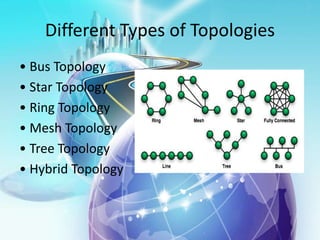
• Bus Topology
• Star Topology
• Ring Topology
• Mesh Topology
• Tree Topology
• Hybrid Topology
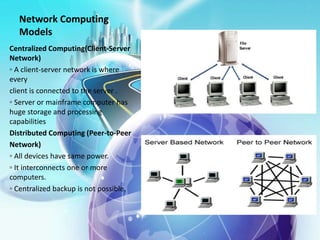
Network Computing
Models
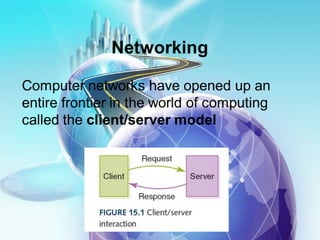
Centralized Computing(Client-Server
Network)
◦ A client-server network is where
every
client is connected to the server .
◦ Server or mainframe computer has
huge storage and processing
capabilities
Distributed Computing (Peer-to-Peer
Network)
◦ All devices have same power.
◦ It interconnects one or more
computers.
◦ Centralized backup is not possible.
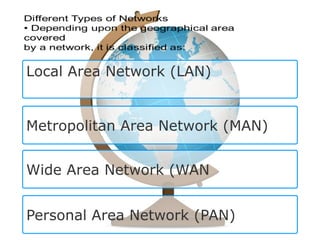
Local Area Network (LAN)
Metropolitan Area Network (MAN)
Wide Area Network (WAN
Personal Area Network (PAN)
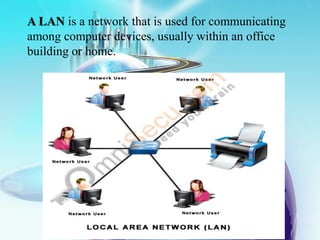
A LAN is a network that is used for communicating
among computer devices, usually within an office
building or home.
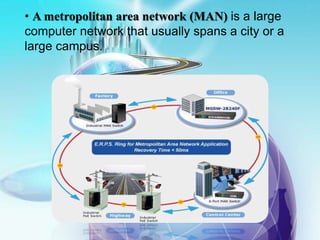
• A metropolitan area network (MAN) is a large
computer network that usually spans a city or a
large campus.
Wide Area Network (WAN)
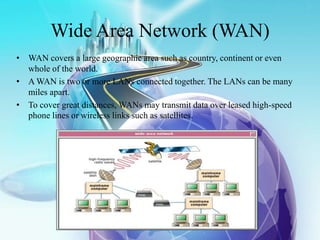
• WAN covers a large geographic area such as country, continent or even
whole of the world.
• A WAN is two or more LANs connected together. The LANs can be many
miles apart.
• To cover great distances, WANs may transmit data over leased high-speed
phone lines or wireless links such as satellites.
Personal Area Network (PAN)
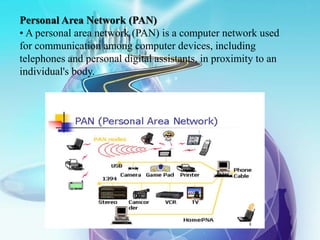
• A personal area network (PAN) is a computer network used
for communication among computer devices, including
telephones and personal digital assistants, in proximity to an
individual's body.
Data Link Layer in Internet
 We know that Internet consists of individual
systems that are connected to each other.
 Basically, it is wide are network that is built
up from point-to-point leased lines.
 In these point-to-point lines, two major data
link protocols are used:
 Serial Line Internet Protocol (SLIP)
 Point-to-Point Protocol (PPP)
Differences Between SLIP & PPP
• SLIP
• SLIP stands for Serial Line
Internet Protocol.
• SLIP does not perform error
detection & correction.
• SLIP supports only IP.
• IP address is assigned
• dynamically
• SLIP is not approved
Internet
• PPP
• PPP stands for Point-to-
Point Protocol
• PPP performs error
detection & correction.
• PPP supports multiple
protocols.
• PPP provides
authentication.
• PPP is approved Internet
standard.
What is Networking Hardware?
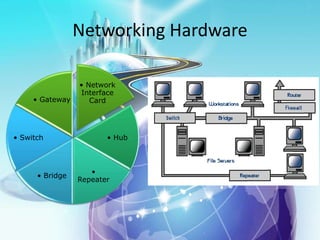
• Networking hardware includes all computers,
peripherals, interface cards and other
equipment needed to perform data-
processing and communications within the
network.
Networking Hardware
• Network
Interface
Card
• Hub
•
Repeater
• Bridge
• Switch
• Gateway
References
• http://www.journals.elsevier.com/computer-
networks/
• https://www.coursera.org/course/comnetworks
• https://www.udacity.com/course/computer-
networking--ud436
• http://www.tutorialspoint.com/computer_fundam
entals/computer_networking.htm
Thank you for your attention! 

info technology.pptx

  • 1.
    Computer Networks Subject: Informationtechnology Done by: Orucova Aysel Teacher: Selimxanova Sunyexanim Azerbaijan Architecture and Construction University
  • 2.
    Content • Introduction toComputer Networks • Types of Networks • Network Topologies • Networking Hardwares • References
  • 3.
    • A networkconsists of two or more computers that are linked in order to share resources (such as printers and CDs), exchange files, or allow electronic communications. • The computers on a network may be linked through cables, telephone lines, radio waves, satellites, or infrared light beams. • A popular example of a computer network is the Internet, which allows millions of users to share information. What is Network?
  • 4.
    1. At leasttwo computers that have something to share. 2. A cable or wireless pathway, called Transmission Media, for computers to signal each other. 3. Rules, called Protocols, so that computers can use the unified principle of data communication. 4. Networking Interface Cards (NIC) Every Network Includes:
  • 6.
    File Sharing: Networksoffer a quick and easy way to share files directly. Resource Sharing: All computers in the network can share resources such as printers, fax machines, modems and scanners. Communication: Those on the network can communicate with each other via e-mail, instant messages etc. Flexible Access: Networks allow their users to access files from computers throughout the network. Sharing of Information: Computer networks enable us to share data and information with the computers that are located geographically large distance apart. Advantages of Computer Networks
  • 7.
    What is aTopology? • Network topologies describe the ways in which the elements of a network are mapped. They describe the physical and logical arrangement of the network nodes. • The physical topology of a network refers to the configuration of cables, computers, and other peripherals
  • 8.
    Different Types ofTopologies • Bus Topology • Star Topology • Ring Topology • Mesh Topology • Tree Topology • Hybrid Topology
  • 9.
    Network Computing Models Centralized Computing(Client-Server Network) ◦A client-server network is where every client is connected to the server . ◦ Server or mainframe computer has huge storage and processing capabilities Distributed Computing (Peer-to-Peer Network) ◦ All devices have same power. ◦ It interconnects one or more computers. ◦ Centralized backup is not possible.
  • 10.
    Local Area Network(LAN) Metropolitan Area Network (MAN) Wide Area Network (WAN Personal Area Network (PAN)
  • 11.
    A LAN isa network that is used for communicating among computer devices, usually within an office building or home.
  • 12.
    • A metropolitanarea network (MAN) is a large computer network that usually spans a city or a large campus.
  • 13.
    Wide Area Network(WAN) • WAN covers a large geographic area such as country, continent or even whole of the world. • A WAN is two or more LANs connected together. The LANs can be many miles apart. • To cover great distances, WANs may transmit data over leased high-speed phone lines or wireless links such as satellites.
  • 14.
    Personal Area Network(PAN) • A personal area network (PAN) is a computer network used for communication among computer devices, including telephones and personal digital assistants, in proximity to an individual's body.
  • 15.
    Data Link Layerin Internet  We know that Internet consists of individual systems that are connected to each other.  Basically, it is wide are network that is built up from point-to-point leased lines.  In these point-to-point lines, two major data link protocols are used:  Serial Line Internet Protocol (SLIP)  Point-to-Point Protocol (PPP)
  • 16.
    Differences Between SLIP& PPP • SLIP • SLIP stands for Serial Line Internet Protocol. • SLIP does not perform error detection & correction. • SLIP supports only IP. • IP address is assigned • dynamically • SLIP is not approved Internet • PPP • PPP stands for Point-to- Point Protocol • PPP performs error detection & correction. • PPP supports multiple protocols. • PPP provides authentication. • PPP is approved Internet standard.
  • 17.
    What is NetworkingHardware? • Networking hardware includes all computers, peripherals, interface cards and other equipment needed to perform data- processing and communications within the network.
  • 18.
    Networking Hardware • Network Interface Card •Hub • Repeater • Bridge • Switch • Gateway
  • 19.
    References • http://www.journals.elsevier.com/computer- networks/ • https://www.coursera.org/course/comnetworks •https://www.udacity.com/course/computer- networking--ud436 • http://www.tutorialspoint.com/computer_fundam entals/computer_networking.htm Thank you for your attention! 