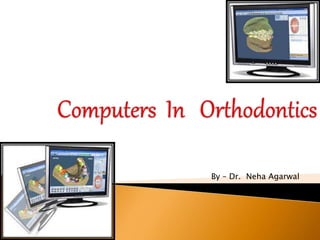
By – Dr. Neha Agarwal
The development of computer has had a huge influence on both the
individual & society across the whole spectrum of everyday living. Digital
revolution no longer is the domain of only a few.
The use of computers in dental education and practice goes
back to the mid 1960's when they were used for specific and limited tasks
in the administration of dental schools and large dental practices. An early
educational use was in the marking and collating of multiple choice
examinations in some universities.
Orthodontists with their love for technolgy and miniaturization
have not remained untouched.
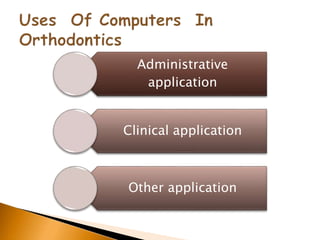
Orthodontic offices use computers for many purposes
ranging from administrative applications, clinical applications
to research applications.
The advantages of computers outweigh their only
disadvantage of lacking the flexibility & insight of a human
brain
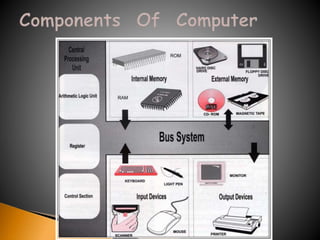
A Computer can be described
as an automatic electronic
device capable of accepting
information (data), perform
operations and calculations
according to instructions
given and supply the results
of operations
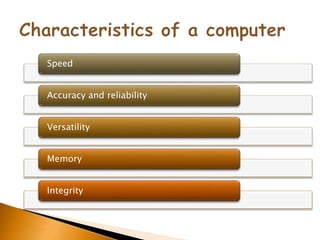
Speed
Accuracy and reliability
Versatility
Memory
Integrity
Administrative
application
Clinical application
Other application
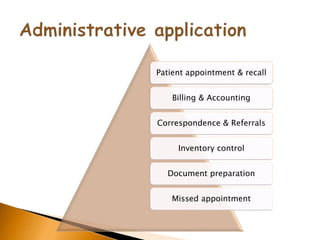
Patient appointment & recall
Billing & Accounting
Correspondence & Referrals
Inventory control
Document preparation
Missed appointment
Patient record storage & retrival
Patient evaluation , examination ,
treatment planning
Patient motivation
Appliance design using CAD CAM
Computerized imaging , cephelometrics,
& growth prediction
Clinical diagnosis & treatment planning
Creating a data base of
survey informaion
Continuing medical
education
Research
Case presentation
RMO’S jiffy orthodontic evaluation:
 First to provide a computer aided cephalometric
diagnosis to the dental profession in the late 1960’s
 Marketed a software package described as JOE
 JOE generates tracings of lateral or frontal
cephalograms using Ricketts,Jarabak, Sassouni-
plus,Steiner and Grummons analyses
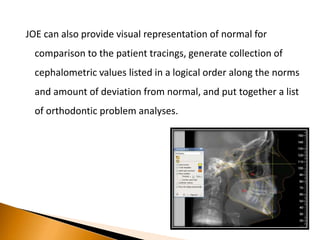
JOE can also provide visual representation of normal for
comparison to the patient tracings, generate collection of
cephalometric values listed in a logical order along the norms
and amount of deviation from normal, and put together a list
of orthodontic problem analyses.
 Is a cephalometric IBM compatible system whose development
is aimed to provide orthodontists with an user friendly
program.
 PorDios works with a digitizer in the standard way and also
enables the use of a video or scanner as means of digitization
of X-rays.
 Cephalometric analyses used are Bjork,Burstone, Coben,
Downs, Frontal, McNamara, PROFILE,Ricketts, Steiner and
Tweed
 Produces occlusograms from photocopies of dental casts
 User can alter the existing programmed analyses or can
develop his own
 Has built in calculation functions for showing discrepancies
between the actual mean and its deviation from the norms.
 Main system can automatically alter the orientation of a
picture in order to have the profile looking to the left or right
side of the screen.
 PorDios is multilingual .
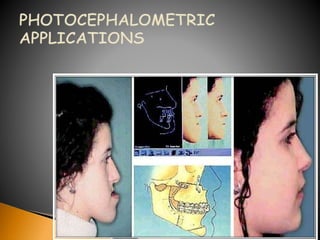
 Photocephalomeric application work by linking digitized
lateral cephalograms to lateral facial bitmapped images for
automatic facial transformation.
 Treatment visualization application perform cephalometric
prediction & image transformation in a manner that appears
to be virtually simultaneous.
 The cephalometric profile tracing is superimposed over the
image profile .
 Manipulation of the skeletal & dental structures is done on
the cephalometric portion of the pair.
 The predicted cephalometric profile changes are
automatically applied to facial image changes
 Digi graph is a synthesis of video imaging, computer technology and
sonic digitizing.
 Enables to perform non- invasive and non radiographic
cephalometric analysis
 It was developed by Dr.Mark Lemschen& Mr.Gary Engle’
 Digigraph workstation comprise a computer, an RGB videocamera, a
sonic digitizing probe with receptor microphones & patient seat
with a headholder to stabilize the patient during digitizing.
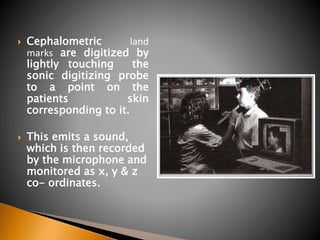
 Cephalometric land
marks are digitized by
lightly touching the
sonic digitizing probe
to a point on the
patients skin
corresponding to it.
 This emits a sound,
which is then recorded
by the microphone and
monitored as x, y & z
co- ordinates.
 Landmarks can be identified as a point in 3 dimensions
 Landmarks can be digitized in less than 5 minutes & any of the
commonly used ceohalometric analyses generated.
 The program is capable of 14 analyses including Ricketts lateral & frontal,
Vari simplex, Holdaway, Alabama,Jarabak, Steiners, Downs, Burstone,
Mc.Namara, Tweed, Grummons frontal,Standard lateral & Standard
frontal.
 Measurements for any selected analysis can be displayed on the monitor
and the observed values are shown along with the patient norm
adjusted for age, sex, race and head size including standard deviations.
 Patients radiograph tracings, cephalograms, photos & models to be
stored on the computer disk, reducing storage requirements.
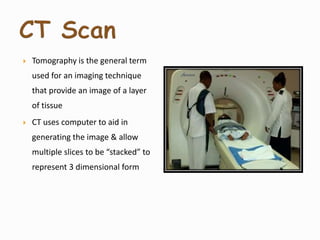
 Tomography is the general term
used for an imaging technique
that provide an image of a layer
of tissue
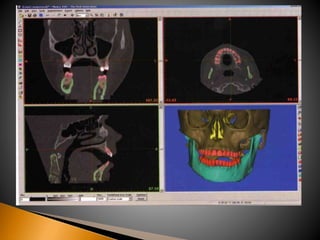
 CT uses computer to aid in
generating the image & allow
multiple slices to be “stacked” to
represent 3 dimensional form
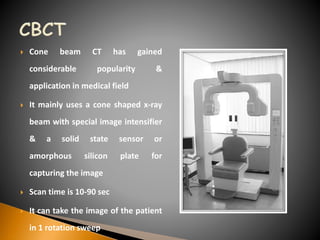
 Cone beam CT has gained
considerable popularity &
application in medical field
 It mainly uses a cone shaped x-ray
beam with special image intensifier
& a solid state sensor or
amorphous silicon plate for
capturing the image
 Scan time is 10-90 sec
 It can take the image of the patient
in 1 rotation sweep
 Provides additional diagnostic information on size, shape, and
position of the condylar heads
 Width of the tooth bearing portion
 Morphology, inclination, displacement or deviation of the
lateral and medial surface of mandibular rami and body.
 Dental root positioning
 Localization of impacted or supernumerary tooth
 Palatal morphology & morphology of sites for placing implants
& osteotomies
 OrthoCAD™ software has been developed by CADENT,Inc. (Computer
Aided Dentistry, Fairview, NJ, USA)to enable the orthodontist to view,
manipulate, measure and analyze 3D digital study models easily and
quickly
 Impressions of the maxillary and mandibular dentitions, together with a
bite registration are sent overnight to an ORTHOCAD processing facility &
within few days 3D digital study models, are downloaded manually or
automatically from the worldwide website using a utility called OrthoCAD
Downloader. The average file size for each 3D model is 3 Mb.
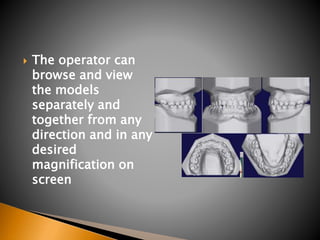
 The operator can
browse and view
the models
separately and
together from any
direction and in any
desired
magnification on
screen
 The software comes with several diagnostic tools
such as:
measurement analysis (e.g. Bolton analysis, arch
width and length analyses); midline analysis (the
ability to split the model sagittally or transversely
for better comparisons); and overbite and overjet
analysis
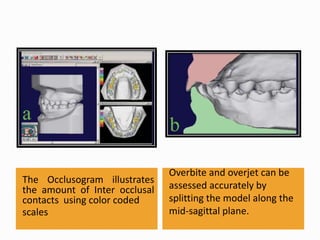
The Occlusogram illustrates
the amount of Inter occlusal
contacts using color coded
scales
Overbite and overjet can be
assessed accurately by
splitting the model along the
mid-sagittal plane.
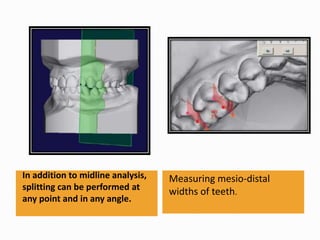
In addition to midline analysis,
splitting can be performed at
any point and in any angle.
Measuring mesio-distal
widths of teeth.
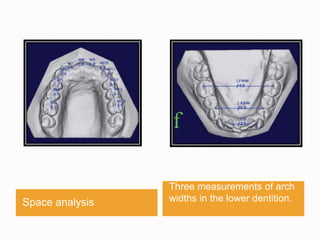
Space analysis
Three measurements of arch
widths in the lower dentition.
 Align® Technology, Inc. developed the Invisalign
appliance for orthodontic tooth movement in the USA
in 1998.
 It is an ‘invisible’ way to straighten teeth into a perfect
occlusion using thin, clear, overlay sequential
appliances.
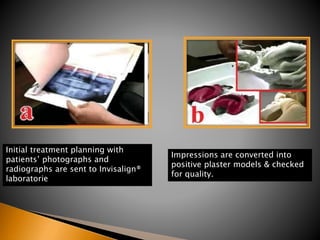
Initial treatment planning with
patients’ photographs and
radiographs are sent to Invisalign®
laboratorie
Impressions are converted into
positive plaster models & checked
for quality.
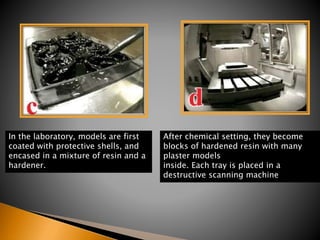
In the laboratory, models are first
coated with protective shells, and
encased in a mixture of resin and a
hardener.
After chemical setting, they become
blocks of hardened resin with many
plaster models
inside. Each tray is placed in a
destructive scanning machine
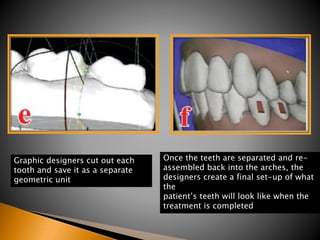
Graphic designers cut out each
tooth and save it as a separate
geometric unit
Once the teeth are separated and re-
assembled back into the arches, the
designers create a final set-up of what
the
patient’s teeth will look like when the
treatment is completed
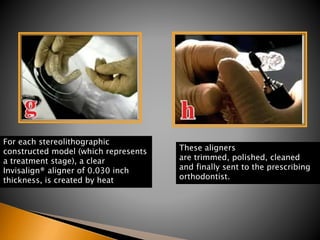
For each stereolithographic
constructed model (which represents
a treatment stage), a clear
Invisalign® aligner of 0.030 inch
thickness, is created by heat
These aligners
are trimmed, polished, cleaned
and finally sent to the prescribing
orthodontist.
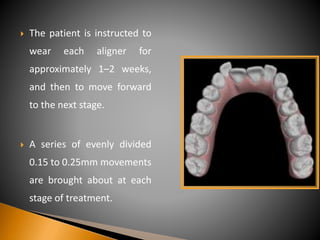
 The patient is instructed to
wear each aligner for
approximately 1–2 weeks,
and then to move forward
to the next stage.
 A series of evenly divided
0.15 to 0.25mm movements
are brought about at each
stage of treatment.
 Virtual treatment sequence presents an opportunity to
the clinician & the patient for evaluation of the
proposed post treatment occlusion on screen, before
treatment commences
 Proposed treatment can be evaluated by thorough
examination of the entire sequence of tooth
movement ,from many visual perspectives
 It is obvious that the treatment procedures do not allow for continued
eruption of teeth or significant arch changes during growth.
 Dental movements can be achieved with this system, but not basal
orthopedic change. change of tooth morphology during the treatment
phase (e.g. restorations or composite build-ups) can destroy the use of
subsequent aligners.
 Technique may not fully take into account optimum root positions at the
end of the treatment, thereby ignoring one of the key factors in achieving
prolonged stability and function.
 The scope of computer use in orthodontics is enormous.
 It finds applications from simple databases for orthodontics
practice to complex image processing techniques for efficient
diagnosis.
 The trends of computer technology, particularly Internet
technology, will turn orthodontic treatment into a new face,
where information can be obtained not only in a digital
manner but also in a remote manner.
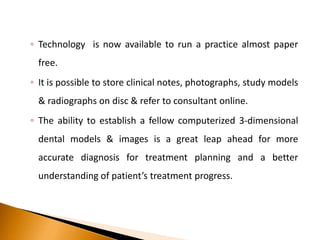
◦ Technology is now available to run a practice almost paper
free.
◦ It is possible to store clinical notes, photographs, study models
& radiographs on disc & refer to consultant online.
◦ The ability to establish a fellow computerized 3-dimensional
dental models & images is a great leap ahead for more
accurate diagnosis for treatment planning and a better
understanding of patient’s treatment progress.

Computer in orthodontics

  • 1.
    By – Dr.Neha Agarwal
  • 2.
    The development ofcomputer has had a huge influence on both the individual & society across the whole spectrum of everyday living. Digital revolution no longer is the domain of only a few. The use of computers in dental education and practice goes back to the mid 1960's when they were used for specific and limited tasks in the administration of dental schools and large dental practices. An early educational use was in the marking and collating of multiple choice examinations in some universities.
  • 3.
    Orthodontists with theirlove for technolgy and miniaturization have not remained untouched. Orthodontic offices use computers for many purposes ranging from administrative applications, clinical applications to research applications. The advantages of computers outweigh their only disadvantage of lacking the flexibility & insight of a human brain
  • 4.
    A Computer canbe described as an automatic electronic device capable of accepting information (data), perform operations and calculations according to instructions given and supply the results of operations
  • 6.
  • 7.
  • 8.
    Patient appointment &recall Billing & Accounting Correspondence & Referrals Inventory control Document preparation Missed appointment
  • 9.
    Patient record storage& retrival Patient evaluation , examination , treatment planning Patient motivation Appliance design using CAD CAM Computerized imaging , cephelometrics, & growth prediction Clinical diagnosis & treatment planning
  • 10.
    Creating a database of survey informaion Continuing medical education Research Case presentation
  • 13.
    RMO’S jiffy orthodonticevaluation:  First to provide a computer aided cephalometric diagnosis to the dental profession in the late 1960’s  Marketed a software package described as JOE  JOE generates tracings of lateral or frontal cephalograms using Ricketts,Jarabak, Sassouni- plus,Steiner and Grummons analyses
  • 14.
    JOE can alsoprovide visual representation of normal for comparison to the patient tracings, generate collection of cephalometric values listed in a logical order along the norms and amount of deviation from normal, and put together a list of orthodontic problem analyses.
  • 15.
     Is acephalometric IBM compatible system whose development is aimed to provide orthodontists with an user friendly program.  PorDios works with a digitizer in the standard way and also enables the use of a video or scanner as means of digitization of X-rays.  Cephalometric analyses used are Bjork,Burstone, Coben, Downs, Frontal, McNamara, PROFILE,Ricketts, Steiner and Tweed
  • 16.
     Produces occlusogramsfrom photocopies of dental casts  User can alter the existing programmed analyses or can develop his own  Has built in calculation functions for showing discrepancies between the actual mean and its deviation from the norms.  Main system can automatically alter the orientation of a picture in order to have the profile looking to the left or right side of the screen.  PorDios is multilingual .
  • 18.
     Photocephalomeric applicationwork by linking digitized lateral cephalograms to lateral facial bitmapped images for automatic facial transformation.  Treatment visualization application perform cephalometric prediction & image transformation in a manner that appears to be virtually simultaneous.  The cephalometric profile tracing is superimposed over the image profile .  Manipulation of the skeletal & dental structures is done on the cephalometric portion of the pair.  The predicted cephalometric profile changes are automatically applied to facial image changes
  • 19.
     Digi graphis a synthesis of video imaging, computer technology and sonic digitizing.  Enables to perform non- invasive and non radiographic cephalometric analysis  It was developed by Dr.Mark Lemschen& Mr.Gary Engle’  Digigraph workstation comprise a computer, an RGB videocamera, a sonic digitizing probe with receptor microphones & patient seat with a headholder to stabilize the patient during digitizing.
  • 20.
     Cephalometric land marksare digitized by lightly touching the sonic digitizing probe to a point on the patients skin corresponding to it.  This emits a sound, which is then recorded by the microphone and monitored as x, y & z co- ordinates.
  • 21.
     Landmarks canbe identified as a point in 3 dimensions  Landmarks can be digitized in less than 5 minutes & any of the commonly used ceohalometric analyses generated.  The program is capable of 14 analyses including Ricketts lateral & frontal, Vari simplex, Holdaway, Alabama,Jarabak, Steiners, Downs, Burstone, Mc.Namara, Tweed, Grummons frontal,Standard lateral & Standard frontal.  Measurements for any selected analysis can be displayed on the monitor and the observed values are shown along with the patient norm adjusted for age, sex, race and head size including standard deviations.  Patients radiograph tracings, cephalograms, photos & models to be stored on the computer disk, reducing storage requirements.
  • 22.
     Tomography isthe general term used for an imaging technique that provide an image of a layer of tissue  CT uses computer to aid in generating the image & allow multiple slices to be “stacked” to represent 3 dimensional form
  • 24.
     Cone beamCT has gained considerable popularity & application in medical field  It mainly uses a cone shaped x-ray beam with special image intensifier & a solid state sensor or amorphous silicon plate for capturing the image  Scan time is 10-90 sec  It can take the image of the patient in 1 rotation sweep
  • 25.
     Provides additionaldiagnostic information on size, shape, and position of the condylar heads  Width of the tooth bearing portion  Morphology, inclination, displacement or deviation of the lateral and medial surface of mandibular rami and body.  Dental root positioning  Localization of impacted or supernumerary tooth  Palatal morphology & morphology of sites for placing implants & osteotomies
  • 26.
     OrthoCAD™ softwarehas been developed by CADENT,Inc. (Computer Aided Dentistry, Fairview, NJ, USA)to enable the orthodontist to view, manipulate, measure and analyze 3D digital study models easily and quickly  Impressions of the maxillary and mandibular dentitions, together with a bite registration are sent overnight to an ORTHOCAD processing facility & within few days 3D digital study models, are downloaded manually or automatically from the worldwide website using a utility called OrthoCAD Downloader. The average file size for each 3D model is 3 Mb.
  • 27.
     The operatorcan browse and view the models separately and together from any direction and in any desired magnification on screen
  • 28.
     The softwarecomes with several diagnostic tools such as: measurement analysis (e.g. Bolton analysis, arch width and length analyses); midline analysis (the ability to split the model sagittally or transversely for better comparisons); and overbite and overjet analysis
  • 29.
    The Occlusogram illustrates theamount of Inter occlusal contacts using color coded scales Overbite and overjet can be assessed accurately by splitting the model along the mid-sagittal plane.
  • 30.
    In addition tomidline analysis, splitting can be performed at any point and in any angle. Measuring mesio-distal widths of teeth.
  • 31.
    Space analysis Three measurementsof arch widths in the lower dentition.
  • 32.
     Align® Technology,Inc. developed the Invisalign appliance for orthodontic tooth movement in the USA in 1998.  It is an ‘invisible’ way to straighten teeth into a perfect occlusion using thin, clear, overlay sequential appliances.
  • 33.
    Initial treatment planningwith patients’ photographs and radiographs are sent to Invisalign® laboratorie Impressions are converted into positive plaster models & checked for quality.
  • 34.
    In the laboratory,models are first coated with protective shells, and encased in a mixture of resin and a hardener. After chemical setting, they become blocks of hardened resin with many plaster models inside. Each tray is placed in a destructive scanning machine
  • 35.
    Graphic designers cutout each tooth and save it as a separate geometric unit Once the teeth are separated and re- assembled back into the arches, the designers create a final set-up of what the patient’s teeth will look like when the treatment is completed
  • 36.
    For each stereolithographic constructedmodel (which represents a treatment stage), a clear Invisalign® aligner of 0.030 inch thickness, is created by heat These aligners are trimmed, polished, cleaned and finally sent to the prescribing orthodontist.
  • 37.
     The patientis instructed to wear each aligner for approximately 1–2 weeks, and then to move forward to the next stage.  A series of evenly divided 0.15 to 0.25mm movements are brought about at each stage of treatment.
  • 38.
     Virtual treatmentsequence presents an opportunity to the clinician & the patient for evaluation of the proposed post treatment occlusion on screen, before treatment commences  Proposed treatment can be evaluated by thorough examination of the entire sequence of tooth movement ,from many visual perspectives
  • 39.
     It isobvious that the treatment procedures do not allow for continued eruption of teeth or significant arch changes during growth.  Dental movements can be achieved with this system, but not basal orthopedic change. change of tooth morphology during the treatment phase (e.g. restorations or composite build-ups) can destroy the use of subsequent aligners.  Technique may not fully take into account optimum root positions at the end of the treatment, thereby ignoring one of the key factors in achieving prolonged stability and function.
  • 40.
     The scopeof computer use in orthodontics is enormous.  It finds applications from simple databases for orthodontics practice to complex image processing techniques for efficient diagnosis.  The trends of computer technology, particularly Internet technology, will turn orthodontic treatment into a new face, where information can be obtained not only in a digital manner but also in a remote manner.
  • 41.
    ◦ Technology isnow available to run a practice almost paper free. ◦ It is possible to store clinical notes, photographs, study models & radiographs on disc & refer to consultant online. ◦ The ability to establish a fellow computerized 3-dimensional dental models & images is a great leap ahead for more accurate diagnosis for treatment planning and a better understanding of patient’s treatment progress.