Computer Graphics : generation
of points, lines. Bresenham’s
Algorithm
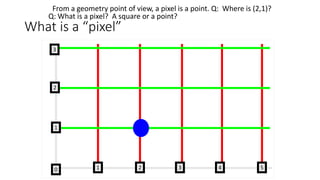
What is a “pixel”
From a geometry point of view, a pixel is a point. Q: Where is (2,1)?
2
2
1
10 3 4
3
5
Q: What is a pixel? A square or a point?
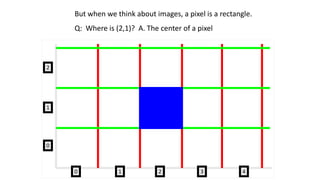
But when we think about images, a pixel is a rectangle.
Q: Where is (2,1)? A. The center of a pixel
1
2
0
10 3 4
2
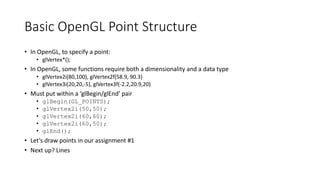
Basic OpenGL Point Structure
• In OpenGL, to specify a point:
• glVertex*();
• In OpenGL, some functions require both a dimensionality and a data type
• glVertex2i(80,100), glVertex2f(58.9, 90.3)
• glVertex3i(20,20,-5), glVertex3f(-2.2,20.9,20)
• Must put within a ‘glBegin/glEnd’ pair
• glBegin(GL_POINTS);
• glVertex2i(50,50);
• glVertex2i(60,60);
• glVertex2i(60,50);
• glEnd();
• Let’s draw points in our assignment #1
• Next up? Lines
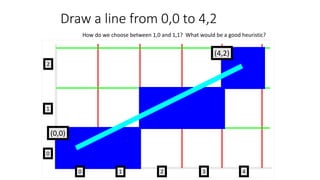
Draw a line from 0,0 to 4,2
2
2
1
10
0
3 4
How do we choose between 1,0 and 1,1? What would be a good heuristic?
(0,0)
(4,2)
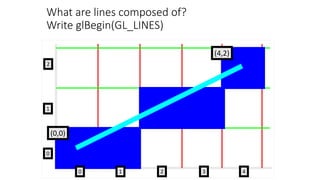
What are lines composed of?
Write glBegin(GL_LINES)
2
2
1
10
0
3 4
(0,0)
(4,2)
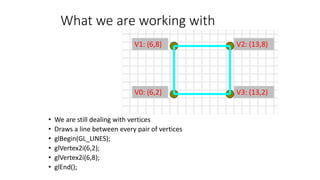
What we are working with
V0: (6,2)
V1: (6,8)
V3: (13,2)
V2: (13,8)
• We are still dealing with vertices
• Draws a line between every pair of vertices
• glBegin(GL_LINES);
• glVertex2i(6,2);
• glVertex2i(6,8);
• glEnd();
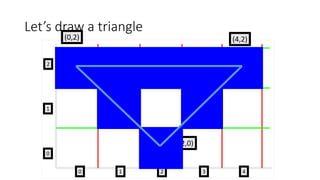
Let’s draw a triangle
(2,0)
(4,2)(0,2)
2
2
1
10
0
3 4
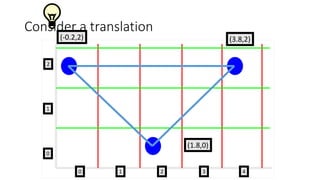
Consider a translation
(1.8,0)
(3.8,2)(-0.2,2)
2
2
1
10
0
3 4
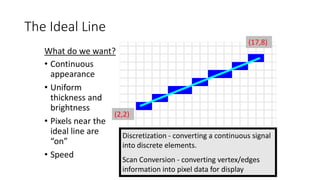
The Ideal Line
• Continuous
appearance
• Uniform
thickness and
brightness
• Pixels near the
ideal line are
“on”
• Speed
(2,2)
(17,8)
Discretization - converting a continuous signal
into discrete elements.
Scan Conversion - converting vertex/edges
information into pixel data for display
What do we want?
Slope-Intercept Method
• From algebra: y = mx + b
• m = slope b = y intercept Let’s write some code
class Point
{
public:
int x, y;
int r,g,b;
};
unsigned byte framebuffer[IMAGE_WIDTH*IMAGE_HEIGHT*3];
DrawLine (Point point1, Point point2)
{
}
Slope-Intercept Method
• From algebra: y = mx + b
• m = slope b = y intercept Let’s write some code
DrawLine (Point point1, Point point2){
m=(point2.y-point1.y) / (point2.x-point2.x);
b=point1.y + (-point1.x) * m;
for i=point1.x to point2.x
SetPixel(i , round(m*i+b)), pixel1.r, pixel1.g,
pixel1.b;}
SetPixel(int x, int y, int r, int g, int b){
framebuffer[(y * IMAGE_WIDTH+x) * 3 + 0]=r;
framebuffer[(y * IMAGE_WIDTH+x) * 3 + 1]=g;
framebuffer[(y * IMAGE_WIDTH+x) * 3 + 2]=b;}
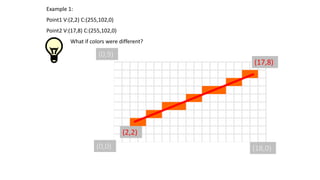
Example 1:
Point1 V:(2,2) C:(255,102,0)
Point2 V:(17,8) C:(255,102,0)
What if colors were different?
(17,8)
(2,2)
(0,0) (18,0)
(0,9)
How do we change the framebuffer?
(17,8)
(2,2)
(0,0) (18,0)
(0,9) What’s the index into GLubyte framebuffer[]? Point is 9,5
Example:
(7,9)
(12,0)
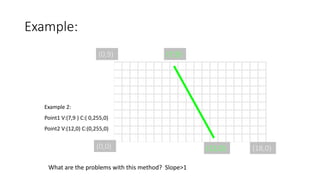
Example 2:
Point1 V:(7,9 ) C:( 0,255,0)
Point2 V:(12,0) C:(0,255,0)
(0,0) (18,0)
(0,9)
What are the problems with this method? Slope>1
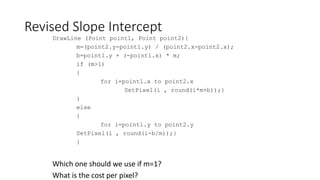
Revised Slope Intercept
DrawLine (Point point1, Point point2){
m=(point2.y-point1.y) / (point2.x-point2.x);
b=point1.y + (-point1.x) * m;
if (m>1)
{
for i=point1.x to point2.x
SetPixel(i , round(i*m+b));}
}
else
{
for i=point1.y to point2.y
SetPixel(i , round(i-b/m));}
}
Which one should we use if m=1?
What is the cost per pixel?
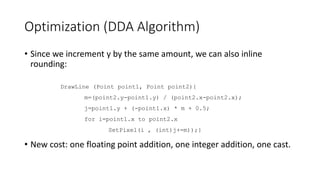
Optimization (DDA Algorithm)
• Since we increment y by the same amount, we can also inline
rounding:
• New cost: one floating point addition, one integer addition, one cast.
DrawLine (Point point1, Point point2){
m=(point2.y-point1.y) / (point2.x-point2.x);
j=point1.y + (-point1.x) * m + 0.5;
for i=point1.x to point2.x
SetPixel(i , (int)j+=m));}
Bresenham’s Line Drawing
• In general:
• Addition and Subtraction are faster than Multiplication which is faster than
Division
• Integer calculations are faster than Floating point
• Made all math just integers
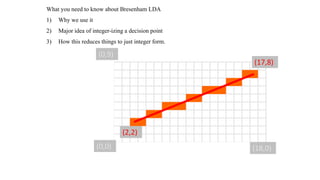
What you need to know about Bresenham LDA
1) Why we use it
2) Major idea of integer-izing a decision point
3) How this reduces things to just integer form.
(17,8)
(2,2)
(0,0) (18,0)
(0,9)
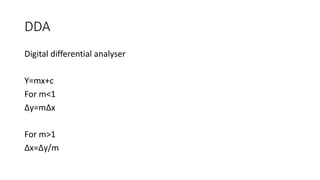
DDA
Digital differential analyser
Y=mx+c
For m<1
∆y=m∆x
For m>1
∆x=∆y/m
Question
A line has two end points at (10,10) and (20,30). Plot the intermediate
points using DDA algorithm.
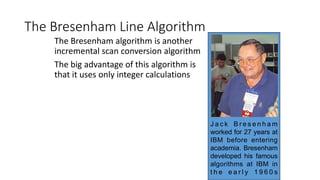
The Bresenham Line Algorithm
The Bresenham algorithm is another
incremental scan conversion algorithm
The big advantage of this algorithm is
that it uses only integer calculations
J a c k B r e s e n h a m
worked for 27 years at
IBM before entering
academia. Bresenham
developed his famous
algorithms at IBM in
t h e e a r l y 1 9 6 0 s
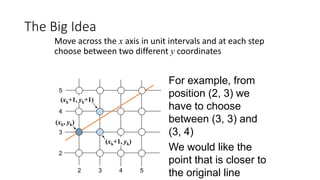
The Big Idea
Move across the x axis in unit intervals and at each step
choose between two different y coordinates
2 3 4 5
2
4
3
5
For example, from
position (2, 3) we
have to choose
between (3, 3) and
(3, 4)
We would like the
point that is closer to
the original line
(xk, yk)
(xk+1, yk)
(xk+1, yk+1)
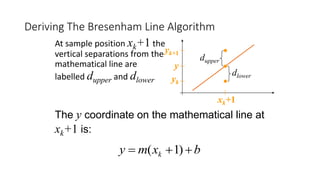
The y coordinate on the mathematical line at
xk+1 is:
Deriving The Bresenham Line Algorithm
At sample position xk+1 the
vertical separations from the
mathematical line are
labelled dupper and dlower
bxmy k  )1(
y
yk
yk+1
xk+1
dlower
dupper
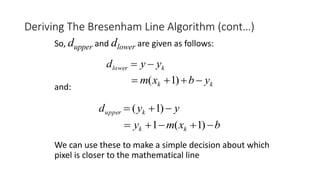
So, dupper and dlower are given as follows:
and:
We can use these to make a simple decision about which
pixel is closer to the mathematical line
Deriving The Bresenham Line Algorithm (cont…)
klower yyd 
kk ybxm  )1(
yyd kupper  )1(
bxmy kk  )1(1
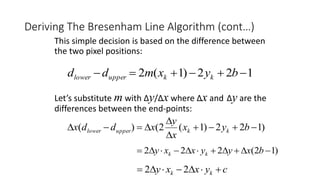
This simple decision is based on the difference between
the two pixel positions:
Let’s substitute m with ∆y/∆x where ∆x and ∆y are the
differences between the end-points:
Deriving The Bresenham Line Algorithm (cont…)
122)1(2  byxmdd kkupperlower
)122)1(2()( 


 byx
x
y
xddx kkupperlower
)12(222  bxyyxxy kk
cyxxy kk  22
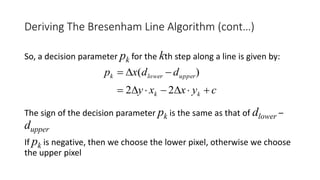
So, a decision parameter pk for the kth step along a line is given by:
The sign of the decision parameter pk is the same as that of dlower –
dupper
If pk is negative, then we choose the lower pixel, otherwise we choose
the upper pixel
Deriving The Bresenham Line Algorithm (cont…)
cyxxy
ddxp
kk
upperlowerk


22
)(
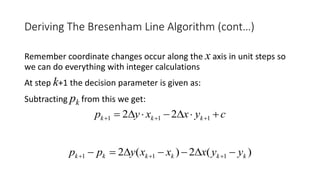
Remember coordinate changes occur along the x axis in unit steps so
we can do everything with integer calculations
At step k+1 the decision parameter is given as:
Subtracting pk from this we get:
Deriving The Bresenham Line Algorithm (cont…)
cyxxyp kkk   111 22
)(2)(2 111 kkkkkk yyxxxypp  
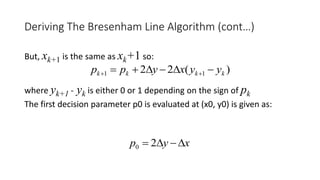
But, xk+1 is the same as xk+1 so:
where yk+1 - yk is either 0 or 1 depending on the sign of pk
The first decision parameter p0 is evaluated at (x0, y0) is given as:
Deriving The Bresenham Line Algorithm (cont…)
)(22 11 kkkk yyxypp  
xyp  20
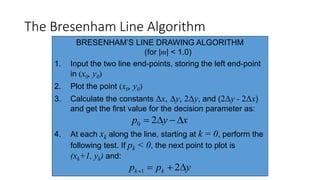
The Bresenham Line Algorithm
BRESENHAM’S LINE DRAWING ALGORITHM
(for |m| < 1.0)
1. Input the two line end-points, storing the left end-point
in (x0, y0)
2. Plot the point (x0, y0)
3. Calculate the constants Δx, Δy, 2Δy, and (2Δy - 2Δx)
and get the first value for the decision parameter as:
4. At each xk along the line, starting at k = 0, perform the
following test. If pk < 0, the next point to plot is
(xk+1, yk) and:
xyp  20
ypp kk  21
The Bresenham Line Algorithm (cont…)
The algorithm and derivation above assumes slopes are
less than 1. for other slopes we need to adjust the
algorithm slightly.
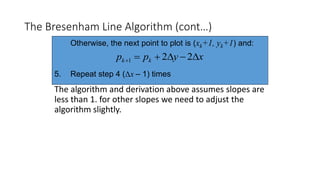
Otherwise, the next point to plot is (xk+1, yk+1) and:
5. Repeat step 4 (Δx – 1) times
xypp kk  221
Adjustment
For m>1, we will find whether we will increment x while incrementing y
each time.
After solving, the equation for decision parameter pk will be very
similar, just the x and y in the equation will get interchanged.
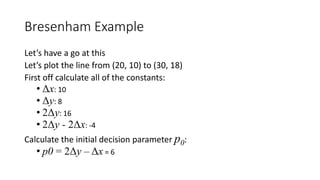
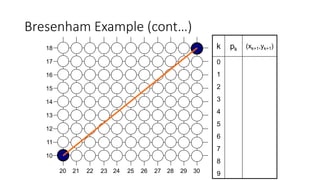
Bresenham Example
Let’s have a go at this
Let’s plot the line from (20, 10) to (30, 18)
First off calculate all of the constants:
• Δx: 10
• Δy: 8
• 2Δy: 16
• 2Δy - 2Δx: -4
Calculate the initial decision parameter p0:
• p0 = 2Δy – Δx = 6
Bresenham Example (cont…)
17
16
15
14
13
12
11
10
18
292726252423222120 28 30
k pk (xk+1,yk+1)
0
1
2
3
4
5
6
7
8
9
Bresenham Exercise
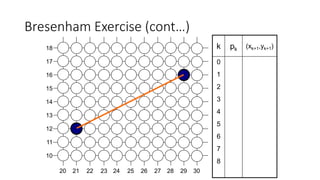
Go through the steps of the Bresenham line drawing algorithm for a
line going from (21,12) to (29,16)
Bresenham Exercise (cont…)
17
16
15
14
13
12
11
10
18
292726252423222120 28 30
k pk (xk+1,yk+1)
0
1
2
3
4
5
6
7
8
A Simple Circle Drawing Algorithm
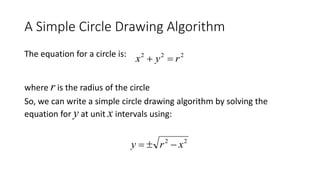
The equation for a circle is:
where r is the radius of the circle
So, we can write a simple circle drawing algorithm by solving the
equation for y at unit x intervals using:
222
ryx 
22
xry 
A Simple Circle Drawing Algorithm (cont…)
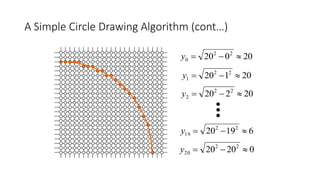
20020 22
0 y
20120 22
1 y
20220 22
2 y
61920 22
19 y
02020 22
20 y
A Simple Circle Drawing Algorithm (cont…)
However, unsurprisingly this is not a brilliant solution!
Firstly, the resulting circle has large gaps where the slope approaches
the vertical
Secondly, the calculations are not very efficient
• The square (multiply) operations
• The square root operation – try really hard to avoid these!
We need a more efficient, more accurate solution
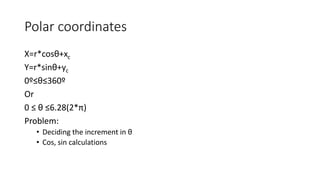
Polar coordinates
X=r*cosθ+xc
Y=r*sinθ+yc
0º≤θ≤360º
Or
0 ≤ θ ≤6.28(2*π)
Problem:
• Deciding the increment in θ
• Cos, sin calculations
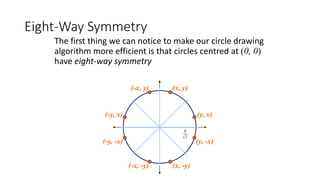
Eight-Way Symmetry
The first thing we can notice to make our circle drawing
algorithm more efficient is that circles centred at (0, 0)
have eight-way symmetry
(x, y)
(y, x)
(y, -x)
(x, -y)(-x, -y)
(-y, -x)
(-y, x)
(-x, y)
2
R
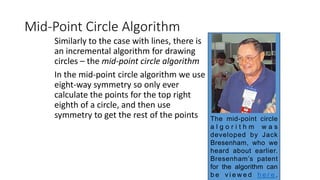
Mid-Point Circle Algorithm
Similarly to the case with lines, there is
an incremental algorithm for drawing
circles – the mid-point circle algorithm
In the mid-point circle algorithm we use
eight-way symmetry so only ever
calculate the points for the top right
eighth of a circle, and then use
symmetry to get the rest of the points The mid-point circle
a l g o r i t h m w a s
developed by Jack
Bresenham, who we
heard about earlier.
Bresenham’s patent
for the algorithm can
b e v i e w e d h e r e .
Mid-Point Circle Algorithm (cont…)
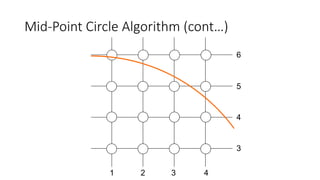
6
2 3 41
5
4
3
Mid-Point Circle Algorithm (cont…)
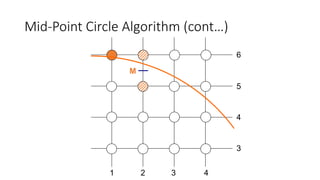
M
6
2 3 41
5
4
3
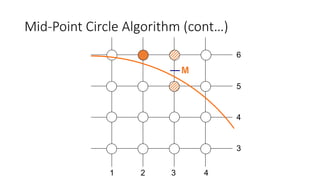
Mid-Point Circle Algorithm (cont…)
M
6
2 3 41
5
4
3
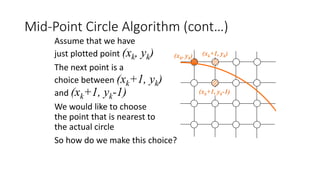
Mid-Point Circle Algorithm (cont…)
(xk+1, yk)
(xk+1, yk-1)
(xk, yk)
Assume that we have
just plotted point (xk, yk)
The next point is a
choice between (xk+1, yk)
and (xk+1, yk-1)
We would like to choose
the point that is nearest to
the actual circle
So how do we make this choice?
Mid-Point Circle Algorithm (cont…)
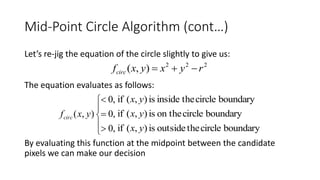
Let’s re-jig the equation of the circle slightly to give us:
The equation evaluates as follows:
By evaluating this function at the midpoint between the candidate
pixels we can make our decision
222
),( ryxyxfcirc 








,0
,0
,0
),( yxfcirc
boundarycircletheinsideis),(if yx
boundarycircleon theis),(if yx
boundarycircletheoutsideis),(if yx
Mid-Point Circle Algorithm (cont…)
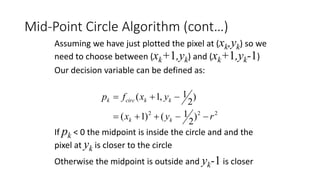
Assuming we have just plotted the pixel at (xk,yk) so we
need to choose between (xk+1,yk) and (xk+1,yk-1)
Our decision variable can be defined as:
If pk < 0 the midpoint is inside the circle and and the
pixel at yk is closer to the circle
Otherwise the midpoint is outside and yk-1 is closer
222
)
2
1()1(
)
2
1,1(
ryx
yxfp
kk
kkcirck


Mid-Point Circle Algorithm (cont…)
To ensure things are as efficient as possible we can do all of our calculations
incrementally
First consider:
or:
where yk+1 is either yk or yk-1 depending on the sign of pk
 
  2
2
1
2
111
2
1]1)1[(
2
1,1
ryx
yxfp
kk
kkcirck




1)()()1(2 1
22
11   kkkkkkk yyyyxpp
Mid-Point Circle Algorithm (cont…)
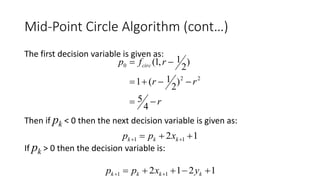
The first decision variable is given as:
Then if pk < 0 then the next decision variable is given as:
If pk > 0 then the decision variable is:
r
rr
rfp circ



4
5
)
2
1(1
)
2
1,1(
22
0
12 11   kkk xpp
1212 11   kkkk yxpp
The Mid-Point Circle Algorithm
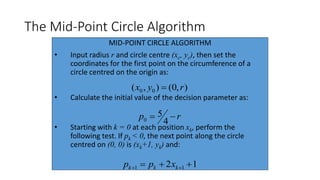
MID-POINT CIRCLE ALGORITHM
• Input radius r and circle centre (xc, yc), then set the
coordinates for the first point on the circumference of a
circle centred on the origin as:
• Calculate the initial value of the decision parameter as:
• Starting with k = 0 at each position xk, perform the
following test. If pk < 0, the next point along the circle
centred on (0, 0) is (xk+1, yk) and:
),0(),( 00 ryx 
rp 
4
5
0
12 11   kkk xpp
The Mid-Point Circle Algorithm (cont…)
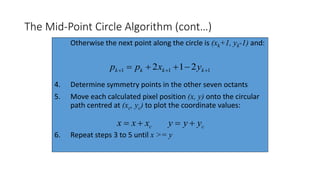
Otherwise the next point along the circle is (xk+1, yk-1) and:
4. Determine symmetry points in the other seven octants
5. Move each calculated pixel position (x, y) onto the circular
path centred at (xc, yc) to plot the coordinate values:
6. Repeat steps 3 to 5 until x >= y
111 212   kkkk yxpp
cxxx  cyyy 
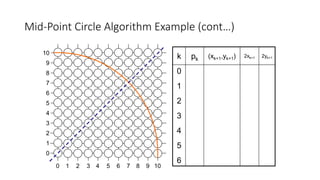
Mid-Point Circle Algorithm Example
To see the mid-point circle algorithm in action lets use it to draw a
circle centred at (0,0) with radius 10
Mid-Point Circle Algorithm Example (cont…)
9
7
6
5
4
3
2
1
0
8
976543210 8 10
10
k pk (xk+1,yk+1) 2xk+1 2yk+1
0
1
2
3
4
5
6
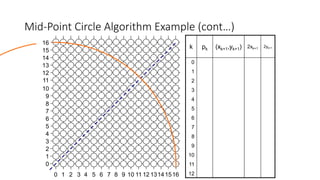
Mid-Point Circle Algorithm Exercise
Use the mid-point circle algorithm to draw the circle centred at (0,0)
with radius 15
Mid-Point Circle Algorithm Example (cont…)
k pk (xk+1,yk+1) 2xk+1 2yk+1
0
1
2
3
4
5
6
7
8
9
10
11
12
9
7
6
5
4
3
2
1
0
8
976543210 8 10
10
131211 14
15
13
12
14
11
16
1516

Computer graphics 2

  • 1.
    Computer Graphics :generation of points, lines. Bresenham’s Algorithm
  • 2.
    What is a“pixel” From a geometry point of view, a pixel is a point. Q: Where is (2,1)? 2 2 1 10 3 4 3 5 Q: What is a pixel? A square or a point?
  • 3.
    But when wethink about images, a pixel is a rectangle. Q: Where is (2,1)? A. The center of a pixel 1 2 0 10 3 4 2
  • 4.
    Basic OpenGL PointStructure • In OpenGL, to specify a point: • glVertex*(); • In OpenGL, some functions require both a dimensionality and a data type • glVertex2i(80,100), glVertex2f(58.9, 90.3) • glVertex3i(20,20,-5), glVertex3f(-2.2,20.9,20) • Must put within a ‘glBegin/glEnd’ pair • glBegin(GL_POINTS); • glVertex2i(50,50); • glVertex2i(60,60); • glVertex2i(60,50); • glEnd(); • Let’s draw points in our assignment #1 • Next up? Lines
  • 5.
    Draw a linefrom 0,0 to 4,2 2 2 1 10 0 3 4 How do we choose between 1,0 and 1,1? What would be a good heuristic? (0,0) (4,2)
  • 6.
    What are linescomposed of? Write glBegin(GL_LINES) 2 2 1 10 0 3 4 (0,0) (4,2)
  • 7.
    What we areworking with V0: (6,2) V1: (6,8) V3: (13,2) V2: (13,8) • We are still dealing with vertices • Draws a line between every pair of vertices • glBegin(GL_LINES); • glVertex2i(6,2); • glVertex2i(6,8); • glEnd();
  • 8.
    Let’s draw atriangle (2,0) (4,2)(0,2) 2 2 1 10 0 3 4
  • 9.
  • 10.
    The Ideal Line •Continuous appearance • Uniform thickness and brightness • Pixels near the ideal line are “on” • Speed (2,2) (17,8) Discretization - converting a continuous signal into discrete elements. Scan Conversion - converting vertex/edges information into pixel data for display What do we want?
  • 11.
    Slope-Intercept Method • Fromalgebra: y = mx + b • m = slope b = y intercept Let’s write some code class Point { public: int x, y; int r,g,b; }; unsigned byte framebuffer[IMAGE_WIDTH*IMAGE_HEIGHT*3]; DrawLine (Point point1, Point point2) { }
  • 12.
    Slope-Intercept Method • Fromalgebra: y = mx + b • m = slope b = y intercept Let’s write some code DrawLine (Point point1, Point point2){ m=(point2.y-point1.y) / (point2.x-point2.x); b=point1.y + (-point1.x) * m; for i=point1.x to point2.x SetPixel(i , round(m*i+b)), pixel1.r, pixel1.g, pixel1.b;} SetPixel(int x, int y, int r, int g, int b){ framebuffer[(y * IMAGE_WIDTH+x) * 3 + 0]=r; framebuffer[(y * IMAGE_WIDTH+x) * 3 + 1]=g; framebuffer[(y * IMAGE_WIDTH+x) * 3 + 2]=b;}
  • 13.
    Example 1: Point1 V:(2,2)C:(255,102,0) Point2 V:(17,8) C:(255,102,0) What if colors were different? (17,8) (2,2) (0,0) (18,0) (0,9)
  • 14.
    How do wechange the framebuffer? (17,8) (2,2) (0,0) (18,0) (0,9) What’s the index into GLubyte framebuffer[]? Point is 9,5
  • 15.
    Example: (7,9) (12,0) Example 2: Point1 V:(7,9) C:( 0,255,0) Point2 V:(12,0) C:(0,255,0) (0,0) (18,0) (0,9) What are the problems with this method? Slope>1
  • 16.
    Revised Slope Intercept DrawLine(Point point1, Point point2){ m=(point2.y-point1.y) / (point2.x-point2.x); b=point1.y + (-point1.x) * m; if (m>1) { for i=point1.x to point2.x SetPixel(i , round(i*m+b));} } else { for i=point1.y to point2.y SetPixel(i , round(i-b/m));} } Which one should we use if m=1? What is the cost per pixel?
  • 17.
    Optimization (DDA Algorithm) •Since we increment y by the same amount, we can also inline rounding: • New cost: one floating point addition, one integer addition, one cast. DrawLine (Point point1, Point point2){ m=(point2.y-point1.y) / (point2.x-point2.x); j=point1.y + (-point1.x) * m + 0.5; for i=point1.x to point2.x SetPixel(i , (int)j+=m));}
  • 18.
    Bresenham’s Line Drawing •In general: • Addition and Subtraction are faster than Multiplication which is faster than Division • Integer calculations are faster than Floating point • Made all math just integers
  • 19.
    What you needto know about Bresenham LDA 1) Why we use it 2) Major idea of integer-izing a decision point 3) How this reduces things to just integer form. (17,8) (2,2) (0,0) (18,0) (0,9)
  • 20.
    DDA Digital differential analyser Y=mx+c Form<1 ∆y=m∆x For m>1 ∆x=∆y/m
  • 21.
    Question A line hastwo end points at (10,10) and (20,30). Plot the intermediate points using DDA algorithm.
  • 22.
    The Bresenham LineAlgorithm The Bresenham algorithm is another incremental scan conversion algorithm The big advantage of this algorithm is that it uses only integer calculations J a c k B r e s e n h a m worked for 27 years at IBM before entering academia. Bresenham developed his famous algorithms at IBM in t h e e a r l y 1 9 6 0 s
  • 23.
    The Big Idea Moveacross the x axis in unit intervals and at each step choose between two different y coordinates 2 3 4 5 2 4 3 5 For example, from position (2, 3) we have to choose between (3, 3) and (3, 4) We would like the point that is closer to the original line (xk, yk) (xk+1, yk) (xk+1, yk+1)
  • 24.
    The y coordinateon the mathematical line at xk+1 is: Deriving The Bresenham Line Algorithm At sample position xk+1 the vertical separations from the mathematical line are labelled dupper and dlower bxmy k  )1( y yk yk+1 xk+1 dlower dupper
  • 25.
    So, dupper anddlower are given as follows: and: We can use these to make a simple decision about which pixel is closer to the mathematical line Deriving The Bresenham Line Algorithm (cont…) klower yyd  kk ybxm  )1( yyd kupper  )1( bxmy kk  )1(1
  • 26.
    This simple decisionis based on the difference between the two pixel positions: Let’s substitute m with ∆y/∆x where ∆x and ∆y are the differences between the end-points: Deriving The Bresenham Line Algorithm (cont…) 122)1(2  byxmdd kkupperlower )122)1(2()(     byx x y xddx kkupperlower )12(222  bxyyxxy kk cyxxy kk  22
  • 27.
    So, a decisionparameter pk for the kth step along a line is given by: The sign of the decision parameter pk is the same as that of dlower – dupper If pk is negative, then we choose the lower pixel, otherwise we choose the upper pixel Deriving The Bresenham Line Algorithm (cont…) cyxxy ddxp kk upperlowerk   22 )(
  • 28.
    Remember coordinate changesoccur along the x axis in unit steps so we can do everything with integer calculations At step k+1 the decision parameter is given as: Subtracting pk from this we get: Deriving The Bresenham Line Algorithm (cont…) cyxxyp kkk   111 22 )(2)(2 111 kkkkkk yyxxxypp  
  • 29.
    But, xk+1 isthe same as xk+1 so: where yk+1 - yk is either 0 or 1 depending on the sign of pk The first decision parameter p0 is evaluated at (x0, y0) is given as: Deriving The Bresenham Line Algorithm (cont…) )(22 11 kkkk yyxypp   xyp  20
  • 30.
    The Bresenham LineAlgorithm BRESENHAM’S LINE DRAWING ALGORITHM (for |m| < 1.0) 1. Input the two line end-points, storing the left end-point in (x0, y0) 2. Plot the point (x0, y0) 3. Calculate the constants Δx, Δy, 2Δy, and (2Δy - 2Δx) and get the first value for the decision parameter as: 4. At each xk along the line, starting at k = 0, perform the following test. If pk < 0, the next point to plot is (xk+1, yk) and: xyp  20 ypp kk  21
  • 31.
    The Bresenham LineAlgorithm (cont…) The algorithm and derivation above assumes slopes are less than 1. for other slopes we need to adjust the algorithm slightly. Otherwise, the next point to plot is (xk+1, yk+1) and: 5. Repeat step 4 (Δx – 1) times xypp kk  221
  • 32.
    Adjustment For m>1, wewill find whether we will increment x while incrementing y each time. After solving, the equation for decision parameter pk will be very similar, just the x and y in the equation will get interchanged.
  • 33.
    Bresenham Example Let’s havea go at this Let’s plot the line from (20, 10) to (30, 18) First off calculate all of the constants: • Δx: 10 • Δy: 8 • 2Δy: 16 • 2Δy - 2Δx: -4 Calculate the initial decision parameter p0: • p0 = 2Δy – Δx = 6
  • 34.
  • 35.
    Bresenham Exercise Go throughthe steps of the Bresenham line drawing algorithm for a line going from (21,12) to (29,16)
  • 36.
  • 37.
    A Simple CircleDrawing Algorithm The equation for a circle is: where r is the radius of the circle So, we can write a simple circle drawing algorithm by solving the equation for y at unit x intervals using: 222 ryx  22 xry 
  • 38.
    A Simple CircleDrawing Algorithm (cont…) 20020 22 0 y 20120 22 1 y 20220 22 2 y 61920 22 19 y 02020 22 20 y
  • 39.
    A Simple CircleDrawing Algorithm (cont…) However, unsurprisingly this is not a brilliant solution! Firstly, the resulting circle has large gaps where the slope approaches the vertical Secondly, the calculations are not very efficient • The square (multiply) operations • The square root operation – try really hard to avoid these! We need a more efficient, more accurate solution
  • 40.
    Polar coordinates X=r*cosθ+xc Y=r*sinθ+yc 0º≤θ≤360º Or 0 ≤θ ≤6.28(2*π) Problem: • Deciding the increment in θ • Cos, sin calculations
  • 41.
    Eight-Way Symmetry The firstthing we can notice to make our circle drawing algorithm more efficient is that circles centred at (0, 0) have eight-way symmetry (x, y) (y, x) (y, -x) (x, -y)(-x, -y) (-y, -x) (-y, x) (-x, y) 2 R
  • 42.
    Mid-Point Circle Algorithm Similarlyto the case with lines, there is an incremental algorithm for drawing circles – the mid-point circle algorithm In the mid-point circle algorithm we use eight-way symmetry so only ever calculate the points for the top right eighth of a circle, and then use symmetry to get the rest of the points The mid-point circle a l g o r i t h m w a s developed by Jack Bresenham, who we heard about earlier. Bresenham’s patent for the algorithm can b e v i e w e d h e r e .
  • 43.
    Mid-Point Circle Algorithm(cont…) 6 2 3 41 5 4 3
  • 44.
    Mid-Point Circle Algorithm(cont…) M 6 2 3 41 5 4 3
  • 45.
    Mid-Point Circle Algorithm(cont…) M 6 2 3 41 5 4 3
  • 46.
    Mid-Point Circle Algorithm(cont…) (xk+1, yk) (xk+1, yk-1) (xk, yk) Assume that we have just plotted point (xk, yk) The next point is a choice between (xk+1, yk) and (xk+1, yk-1) We would like to choose the point that is nearest to the actual circle So how do we make this choice?
  • 47.
    Mid-Point Circle Algorithm(cont…) Let’s re-jig the equation of the circle slightly to give us: The equation evaluates as follows: By evaluating this function at the midpoint between the candidate pixels we can make our decision 222 ),( ryxyxfcirc          ,0 ,0 ,0 ),( yxfcirc boundarycircletheinsideis),(if yx boundarycircleon theis),(if yx boundarycircletheoutsideis),(if yx
  • 48.
    Mid-Point Circle Algorithm(cont…) Assuming we have just plotted the pixel at (xk,yk) so we need to choose between (xk+1,yk) and (xk+1,yk-1) Our decision variable can be defined as: If pk < 0 the midpoint is inside the circle and and the pixel at yk is closer to the circle Otherwise the midpoint is outside and yk-1 is closer 222 ) 2 1()1( ) 2 1,1( ryx yxfp kk kkcirck  
  • 49.
    Mid-Point Circle Algorithm(cont…) To ensure things are as efficient as possible we can do all of our calculations incrementally First consider: or: where yk+1 is either yk or yk-1 depending on the sign of pk     2 2 1 2 111 2 1]1)1[( 2 1,1 ryx yxfp kk kkcirck     1)()()1(2 1 22 11   kkkkkkk yyyyxpp
  • 50.
    Mid-Point Circle Algorithm(cont…) The first decision variable is given as: Then if pk < 0 then the next decision variable is given as: If pk > 0 then the decision variable is: r rr rfp circ    4 5 ) 2 1(1 ) 2 1,1( 22 0 12 11   kkk xpp 1212 11   kkkk yxpp
  • 51.
    The Mid-Point CircleAlgorithm MID-POINT CIRCLE ALGORITHM • Input radius r and circle centre (xc, yc), then set the coordinates for the first point on the circumference of a circle centred on the origin as: • Calculate the initial value of the decision parameter as: • Starting with k = 0 at each position xk, perform the following test. If pk < 0, the next point along the circle centred on (0, 0) is (xk+1, yk) and: ),0(),( 00 ryx  rp  4 5 0 12 11   kkk xpp
  • 52.
    The Mid-Point CircleAlgorithm (cont…) Otherwise the next point along the circle is (xk+1, yk-1) and: 4. Determine symmetry points in the other seven octants 5. Move each calculated pixel position (x, y) onto the circular path centred at (xc, yc) to plot the coordinate values: 6. Repeat steps 3 to 5 until x >= y 111 212   kkkk yxpp cxxx  cyyy 
  • 53.
    Mid-Point Circle AlgorithmExample To see the mid-point circle algorithm in action lets use it to draw a circle centred at (0,0) with radius 10
  • 54.
    Mid-Point Circle AlgorithmExample (cont…) 9 7 6 5 4 3 2 1 0 8 976543210 8 10 10 k pk (xk+1,yk+1) 2xk+1 2yk+1 0 1 2 3 4 5 6
  • 55.
    Mid-Point Circle AlgorithmExercise Use the mid-point circle algorithm to draw the circle centred at (0,0) with radius 15
  • 56.
    Mid-Point Circle AlgorithmExample (cont…) k pk (xk+1,yk+1) 2xk+1 2yk+1 0 1 2 3 4 5 6 7 8 9 10 11 12 9 7 6 5 4 3 2 1 0 8 976543210 8 10 10 131211 14 15 13 12 14 11 16 1516