COMPUTER AIDED
DESIGN
With PTC Creo
WHAT IS CAD?
 Computer-Aided Design (CAD) or Computer-Aided Design and
Drafting (CADD) - A computer technology that designs a product
and documents the design's process
WHAT FOR?
It uses lines, circles and other forms to build and shape your product. In 3D to
look at it from different angles, to get a complete picture of your model
To produce detailed engineering designs through 3-D and 2-D drawings of
the physical components of manufactured products.
 To create conceptual design, product layout, strength and dynamic
analysis of assembly and the manufacturing processes themselves.
 To prepare environmental impact reports, in which computer-aided
designs are used in photographs to produce a rendering of the
appearance when the new structures are built.
BENEFITS
 FORYOUR COMPANY?
 Lower product development costs
 Shorter design cycle
 CAD facilitate the manufacturing process by transferring detailed
diagrams of a product’s materials, processes, tolerances and dimensions
with specific conventions for the product in question.
“CAD tools assist you to make the most of your design's potential”
WHO IS IT FOR?
 If you are an Architect, Engineer, Drafter or Artist you have probably used
2D or 3D CAD programs.These programs can help you explore design
ideas, visualize concepts through computer drawings, and simulate how a
design will perform in the real world
 Civil-Engineers
 Architects
 Animation industry
 Automobile industry
 Aircraft industry
 Gaming industry
 Web-designers
 Fashion Designers
 Machine-Manufacturers
 Students & Universities
BRANDS &
COMPETITION
CAPABILITIES
AGE
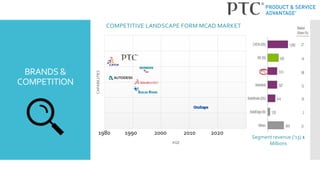
COMPETITIVE LANDSCAPE FORM MCAD MARKET
1990 2000 2010 20201980
Segment revenue (‘13) $
Millions
PTC CREO
 « A Powerful Integrated Family of Product Design Softwares used by
thousand leading manufacturers worldwide. »
 PTC Creo is our solution to create, analyze, view and share your design
using 2D CAD or 3D CAD.
 What do we provide you?
 Simulation
 Leveraging Design Datas Computer Aided
Manufacturing
 Working in a Multi-CAD Environment
 Industrial Design
 Concept Design
 Routed Systems Design
 3D Design
PTC’S PRODUCTS
 YOUR DESIRE,OUR SOFTWARE
 PTC Creo Parametric
 PTC Creo Simulate
 PTC CreoView MCAD/ECAD
 PTC Creo Schematics
 PTC Creo Layout
 PTC Creo Sketch
 PTC Creo Illustrate
 PTC Creo Options Modeler
WHYSHOULD
YOUCHOOSE
PTC?
 The Industry’s Leading 3D CAD Software
 With PTC’s Creo product development software, you will design your
product not only the way your CAD tool requires but the wayYOU
WANT it to be.
 EASY to use
 FLEXIBLE & SCALABLE access to the right capabilities; “The right tool at
the right time.”
 INTEROPERABLE;Your data flow simultaneously
 COMBINE Parametric and Direct Modeling
 MULTI-CAD Data handling from any CAD source
“Our software is intuitive and all is to work together.We’ve been at the
cutting-edge of CAD for more than 30 years. Come join us.”
CUSTOMERS’
OVERVIEW
 reduced design costs by 10% with PTC Creo
 AutomationDesign is 10% more efficient using
PTC Creo
 completes projects and
tasks 20% faster with PTC Creo
 reduces timeTimeTo Market to 6
months with PTC Creo
Still not convince?
SOURCES AND
USEFUL
LINKS
 http://www.ptc.com/cad
 http://www.ptc.com/cad/creo
 http://whatis.techtarget.com/definition/CAD-computer-aided-
design
THANKYOU !

COMPUTER AIDED DESIGN - CAD

  • 1.
  • 2.
    WHAT IS CAD? Computer-Aided Design (CAD) or Computer-Aided Design and Drafting (CADD) - A computer technology that designs a product and documents the design's process
  • 3.
    WHAT FOR? It useslines, circles and other forms to build and shape your product. In 3D to look at it from different angles, to get a complete picture of your model To produce detailed engineering designs through 3-D and 2-D drawings of the physical components of manufactured products.  To create conceptual design, product layout, strength and dynamic analysis of assembly and the manufacturing processes themselves.  To prepare environmental impact reports, in which computer-aided designs are used in photographs to produce a rendering of the appearance when the new structures are built.
  • 4.
    BENEFITS  FORYOUR COMPANY? Lower product development costs  Shorter design cycle  CAD facilitate the manufacturing process by transferring detailed diagrams of a product’s materials, processes, tolerances and dimensions with specific conventions for the product in question. “CAD tools assist you to make the most of your design's potential”
  • 5.
    WHO IS ITFOR?  If you are an Architect, Engineer, Drafter or Artist you have probably used 2D or 3D CAD programs.These programs can help you explore design ideas, visualize concepts through computer drawings, and simulate how a design will perform in the real world  Civil-Engineers  Architects  Animation industry  Automobile industry  Aircraft industry  Gaming industry  Web-designers  Fashion Designers  Machine-Manufacturers  Students & Universities
  • 6.
    BRANDS & COMPETITION CAPABILITIES AGE COMPETITIVE LANDSCAPEFORM MCAD MARKET 1990 2000 2010 20201980 Segment revenue (‘13) $ Millions
  • 7.
    PTC CREO  «A Powerful Integrated Family of Product Design Softwares used by thousand leading manufacturers worldwide. »  PTC Creo is our solution to create, analyze, view and share your design using 2D CAD or 3D CAD.  What do we provide you?  Simulation  Leveraging Design Datas Computer Aided Manufacturing  Working in a Multi-CAD Environment  Industrial Design  Concept Design  Routed Systems Design  3D Design
  • 8.
    PTC’S PRODUCTS  YOURDESIRE,OUR SOFTWARE  PTC Creo Parametric  PTC Creo Simulate  PTC CreoView MCAD/ECAD  PTC Creo Schematics  PTC Creo Layout  PTC Creo Sketch  PTC Creo Illustrate  PTC Creo Options Modeler
  • 9.
    WHYSHOULD YOUCHOOSE PTC?  The Industry’sLeading 3D CAD Software  With PTC’s Creo product development software, you will design your product not only the way your CAD tool requires but the wayYOU WANT it to be.  EASY to use  FLEXIBLE & SCALABLE access to the right capabilities; “The right tool at the right time.”  INTEROPERABLE;Your data flow simultaneously  COMBINE Parametric and Direct Modeling  MULTI-CAD Data handling from any CAD source “Our software is intuitive and all is to work together.We’ve been at the cutting-edge of CAD for more than 30 years. Come join us.”
  • 10.
    CUSTOMERS’ OVERVIEW  reduced designcosts by 10% with PTC Creo  AutomationDesign is 10% more efficient using PTC Creo  completes projects and tasks 20% faster with PTC Creo  reduces timeTimeTo Market to 6 months with PTC Creo Still not convince?
  • 11.
    SOURCES AND USEFUL LINKS  http://www.ptc.com/cad http://www.ptc.com/cad/creo  http://whatis.techtarget.com/definition/CAD-computer-aided- design THANKYOU !

Editor's Notes

  • #7 - 1981 – Dassault creadted CATIA – Solidworks was created in 1995 - Autodesk launched Auto CAD in 1982 - PTC Pro/engineers in 1988 – Today they work with creo - Siemens 1995 – introduced Solid Edge - 2012 - Onshape
  • #8 Industrial Design Take advantage of technical surfacing capabilities, advanced surfacing, rendering, and reverse engineering. Concept Design Explore innovative product development opportunities Routed Systems Design 2D for piping, cabling, and harnesses, and then use them to drive the associated 3D CAD models. 3D Design Simulation Analyze and validate the performance of your 3D CAD designs before you make the first part. Leveraging Design Data Across the Organization Make sure stakeholders throughout the organization can easily view, interact, and share product data. Computer Aided Manufacturing (CAM) Ensure product designs transition to manufacturing with NC, tooling and mold design solutions. Designing in a Multi-CAD Environment Work effectively with data from multiple CAD systems in a single design environment.
  • #9 With a whide range of product offerings, PTC shows how willing they are to undersatnd and adapt to their customers’ needs.
  • #10 What you need to remember about PTC on the CAD segment
  • #11 JANUS = Technical support for devices AD = quality engineering and modeling design GB = American lighting a ceilling fan company EO = « uses computer design to bring the beauty of internet into your home »
  • #12 https://ptc.gosavo.com/CustomPage/View.aspx?id=39188236