Computer Education for Grade 10 – Quarter 1 – Lesson 1
John Lester B. Magdaraog, LPT
Teacher
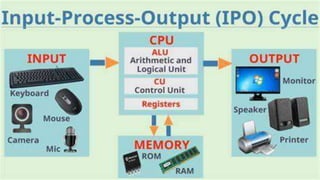
Pattern or approach that is widely used in system
for transforming input data into output. This is
used to describe the structure of a process.
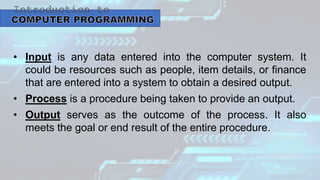
• Input is any data entered into the computer system. It
could be resources such as people, item details, or finance
that are entered into a system to obtain a desired output.
• Process is a procedure being taken to provide an output.
• Output serves as the outcome of the process. It also
meets the goal or end result of the entire procedure.
• Computer Program is series of instruction written to
perform a specified task on a computer. The
program has an executable form that the computer
can use directly to perform instruction.
• Programmer the person who writes, develops, and
debugs a computer program.
• Programming art and science of creating programs. It is the
process done by programmers to instruct a computer on
how to perform a task.
• Programming language is a tool that is used by
programmer to communicate with computer. It allows
programmers to write commands or instruction that can be
easily understood by a person and translated into codes
that are machine-readable.
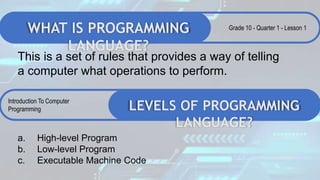
WHAT IS PROGRAMMING
LANGUAGE?
This is a set of rules that provides a way of telling
a computer what operations to perform.
Grade 10 - Quarter 1 - Lesson 1
LEVELS OF PROGRAMMING
LANGUAGE?
Introduction To Computer
Programming
a. High-level Program
b. Low-level Program
c. Executable Machine Code
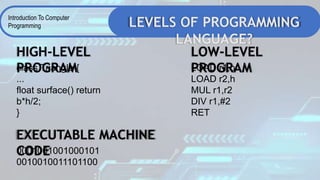
LEVELS OF PROGRAMMING
LANGUAGE?
Introduction To Computer
Programming
class Triangle {
...
float surface() return
b*h/2;
}
HIGH-LEVEL
PROGRAM LOAD r1,b
LOAD r2,h
MUL r1,r2
DIV r1,#2
RET
LOW-LEVEL
PROGRAM
EXECUTABLE MACHINE
CODE
0001001001000101
0010010011101100
TYPES OF PROGRAMMING
LANGUAGES
Introduction To Computer
Programming
Machine Language
• Operation code – such as addition or subtraction.
• Operands – that identify the data to be processed.
• Machine language is machine dependent as it is the
only language the computer can understand.
• Very efficient code but very difficult to write.
FIRST GENERATION LANGUAGES
TYPES OF PROGRAMMING
LANGUAGES
Introduction To Computer
Programming
Assembly Language
• Symbolic operation codes replaced
binary operation codes.
• Assembly language programs needed to
be “assembled” for execution by the
computer. Each assembly language
instruction is translated into one machine
language instruction.
• Very efficient code and easier to write.
SECOND GENERATION
LANGUAGES
TYPES OF PROGRAMMING
LANGUAGES
Introduction To Computer
Programming
• Closer to English but included simple mathematical notation.
• Programs written in source code which must be translated into
machine language programs called object code.
THIRD GENERATION LANGUAGES
• A high level language (4GL) that requires fewer instructions to
accomplish a task than a third generation language.
• Used with databases
FOURTH GENERATION
LANGUAGES
TYPES OF PROGRAMMING
LANGUAGES
Introduction To Computer
Programming
• Declarative languages
• Functional(?): Lisp, Scheme, SML
• Also called applicative
• Everything is a function
• Logic: Prolog
• Based on mathematical
• logic
• Rule- or Constraint-based
FIFTH GENERATION LANGUAGES
SDLC
Software Development
Life Cycle
REQUIREMENTS
• Gathering of requirements
defines by the user and the
computer.
• Requirements for the product
are usually defined in the form
of documentations,
procedures, rules, and SOPs,
written in English or any other
language which can be done
through interviews,
observations, or surveys.
PLANNING/DESIGN
• Planning for the
implementation of a project is
created by describing the
platforms, technologies, and
initial architecture(design) of
the program.
• Step includes fair amount of
creative work.
• They are written in such a
way that can be easily
understood by programmers,
usually through pseudo codes
or algorithms.
IMPLEMENTATION
• Stage that is closely
connected with programming
is the implementation stage.
• At this phase, the source is
written according to the given
task and design.
TESTING AND DEBUGGING
• One of the very important parts of
software development is product
testing.
• Product testing is done by the user
of the software, who evaluates the
software and adds comments and
suggestions about the software for
improvement.
• Programmers will modify the
program which includes fixing of
errors called bugs. The process of
fixing errors is called debugging.
DEPLOYMENT
• Process which puts a given
software product into
exploitation. A special
program called installer was
developed to ensure quick
and easy installation of the
product.
• The manual on how to use the
product is also included in the
deployment.
SUPPORT AND MAINTENANCE
• Final stage in programming is the
maintenance or updating of the
program.
• Point where the programmer is
tasked to keep the program
running smoothly, provide update
and improvements in
consideration of development
and the changes in the field
where it is used.
SDLC
Software Development
Life Cycle
Computer Education for Grade 10 – Quarter 1 – Lesson 1
John Lester B. Magdaraog, LPT
Teacher
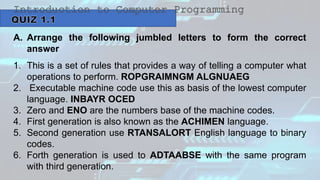
A. Arrange the following jumbled letters to form the correct
answer
1. This is a set of rules that provides a way of telling a computer what
operations to perform. ROPGRAIMNGM ALGNUAEG
2. Executable machine code use this as basis of the lowest computer
language. INBAYR OCED
3. Zero and ENO are the numbers base of the machine codes.
4. First generation is also known as the ACHIMEN language.
5. Second generation use RTANSALORT English language to binary
codes.
6. Forth generation is used to ADTAABSE with the same program
with third generation.
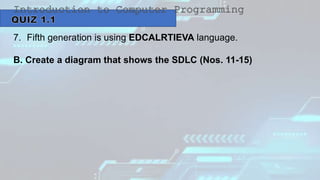
7. Fifth generation is using EDCALRTIEVA language.
B. Create a diagram that shows the SDLC (Nos. 11-15)

COMPUTER 10 QUARTER 1 LESSON 1 K12 LESSON

  • 1.
    Computer Education forGrade 10 – Quarter 1 – Lesson 1 John Lester B. Magdaraog, LPT Teacher
  • 2.
    Pattern or approachthat is widely used in system for transforming input data into output. This is used to describe the structure of a process.
  • 4.
    • Input isany data entered into the computer system. It could be resources such as people, item details, or finance that are entered into a system to obtain a desired output. • Process is a procedure being taken to provide an output. • Output serves as the outcome of the process. It also meets the goal or end result of the entire procedure.
  • 5.
    • Computer Programis series of instruction written to perform a specified task on a computer. The program has an executable form that the computer can use directly to perform instruction. • Programmer the person who writes, develops, and debugs a computer program.
  • 6.
    • Programming artand science of creating programs. It is the process done by programmers to instruct a computer on how to perform a task. • Programming language is a tool that is used by programmer to communicate with computer. It allows programmers to write commands or instruction that can be easily understood by a person and translated into codes that are machine-readable.
  • 7.
    WHAT IS PROGRAMMING LANGUAGE? Thisis a set of rules that provides a way of telling a computer what operations to perform. Grade 10 - Quarter 1 - Lesson 1 LEVELS OF PROGRAMMING LANGUAGE? Introduction To Computer Programming a. High-level Program b. Low-level Program c. Executable Machine Code
  • 8.
    LEVELS OF PROGRAMMING LANGUAGE? IntroductionTo Computer Programming class Triangle { ... float surface() return b*h/2; } HIGH-LEVEL PROGRAM LOAD r1,b LOAD r2,h MUL r1,r2 DIV r1,#2 RET LOW-LEVEL PROGRAM EXECUTABLE MACHINE CODE 0001001001000101 0010010011101100
  • 9.
    TYPES OF PROGRAMMING LANGUAGES IntroductionTo Computer Programming Machine Language • Operation code – such as addition or subtraction. • Operands – that identify the data to be processed. • Machine language is machine dependent as it is the only language the computer can understand. • Very efficient code but very difficult to write. FIRST GENERATION LANGUAGES
  • 10.
    TYPES OF PROGRAMMING LANGUAGES IntroductionTo Computer Programming Assembly Language • Symbolic operation codes replaced binary operation codes. • Assembly language programs needed to be “assembled” for execution by the computer. Each assembly language instruction is translated into one machine language instruction. • Very efficient code and easier to write. SECOND GENERATION LANGUAGES
  • 11.
    TYPES OF PROGRAMMING LANGUAGES IntroductionTo Computer Programming • Closer to English but included simple mathematical notation. • Programs written in source code which must be translated into machine language programs called object code. THIRD GENERATION LANGUAGES • A high level language (4GL) that requires fewer instructions to accomplish a task than a third generation language. • Used with databases FOURTH GENERATION LANGUAGES
  • 12.
    TYPES OF PROGRAMMING LANGUAGES IntroductionTo Computer Programming • Declarative languages • Functional(?): Lisp, Scheme, SML • Also called applicative • Everything is a function • Logic: Prolog • Based on mathematical • logic • Rule- or Constraint-based FIFTH GENERATION LANGUAGES
  • 13.
  • 14.
    REQUIREMENTS • Gathering ofrequirements defines by the user and the computer. • Requirements for the product are usually defined in the form of documentations, procedures, rules, and SOPs, written in English or any other language which can be done through interviews, observations, or surveys.
  • 15.
    PLANNING/DESIGN • Planning forthe implementation of a project is created by describing the platforms, technologies, and initial architecture(design) of the program. • Step includes fair amount of creative work. • They are written in such a way that can be easily understood by programmers, usually through pseudo codes or algorithms.
  • 16.
    IMPLEMENTATION • Stage thatis closely connected with programming is the implementation stage. • At this phase, the source is written according to the given task and design.
  • 17.
    TESTING AND DEBUGGING •One of the very important parts of software development is product testing. • Product testing is done by the user of the software, who evaluates the software and adds comments and suggestions about the software for improvement. • Programmers will modify the program which includes fixing of errors called bugs. The process of fixing errors is called debugging.
  • 18.
    DEPLOYMENT • Process whichputs a given software product into exploitation. A special program called installer was developed to ensure quick and easy installation of the product. • The manual on how to use the product is also included in the deployment.
  • 19.
    SUPPORT AND MAINTENANCE •Final stage in programming is the maintenance or updating of the program. • Point where the programmer is tasked to keep the program running smoothly, provide update and improvements in consideration of development and the changes in the field where it is used.
  • 20.
  • 21.
    Computer Education forGrade 10 – Quarter 1 – Lesson 1 John Lester B. Magdaraog, LPT Teacher
  • 22.
    A. Arrange thefollowing jumbled letters to form the correct answer 1. This is a set of rules that provides a way of telling a computer what operations to perform. ROPGRAIMNGM ALGNUAEG 2. Executable machine code use this as basis of the lowest computer language. INBAYR OCED 3. Zero and ENO are the numbers base of the machine codes. 4. First generation is also known as the ACHIMEN language. 5. Second generation use RTANSALORT English language to binary codes. 6. Forth generation is used to ADTAABSE with the same program with third generation.
  • 23.
    7. Fifth generationis using EDCALRTIEVA language. B. Create a diagram that shows the SDLC (Nos. 11-15)