Using
OpenStack With
OpenDaylight
Kyle Mestery, Cisco
Ryan Moats, IBM
Brent Salisbury, Red Hat
Madhu Venugopal, Red Hat
2-5-2014
What You Will Walk Away With
• Hands on experience bringing up OpenDaylight on
Fedora
• Hands on experience bringing up a multi-node
OpenStack environment
• Hands on experience using OpenDaylight with
OpenStack Neutron for virtual tenant networks
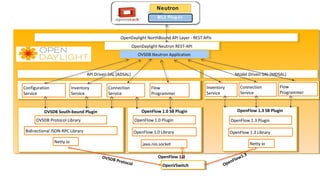
Neutron
Controller

ML2 Plug-In

OpenDaylight NorthBound API Layer - -REST APIs
OpenDaylight NorthBound API Layer REST APIs
OpenDaylight Neutron REST-API
OVSDB Neutron Application

API Driven SAL (ADSAL)
Configuration
Service

Inventory
Service

Connection
Service

Model Driven SAL (MDSAL)
Flow
Programmer

Connection
Service

Inventory
Service

OpenFlow 1.3 SB Plugin

OpenFlow 1.0 SB Plugin

OVSDB South-bound Plugin
OVSDB Protocol Library

OpenFlow 1.0 Plugin

Netty.io

OpenFlow 1.3 Plugin

OpenFlow 1.0 Library

Bidirectional JSON-RPC Library

OpenFlow 1.3 Library
Netty io

java.nio.socket
OVSD
B

Proto
col

OpenFlow 1.0
OpenVSwitch

Flow
Programmer

e
Op

1.3
low
nF
What You Will Need
• OpenDaylight Virtualization Edition with OVSDB
• Can be in a VM or on your laptop directly

• Two or more OpenStack Nodes
• One node running control software and optionally compute services
• One or more compute nodes
Logistics
• The Fedora20 VM has the following information:
• Users:
• root/password
• odl/odl

• Setup for DHCP for the image itself.
Boot Your VM Images
• Boot the VM which you will run OpenDaylight inside of.
• Optionally bring-up OpenDaylight on your laptop natively.
• This will work in either scenario.

• Verify IP addresses on your VMs (may require reboots).
• This should be done for all VMs.
• This may change once you import the OVF file.
OpenDaylight Configuration and Startup
• Edit your ODL configuration:

• opendaylight/configuration/config.ini (change of.address)

• Optionally enable OpenFlow 1.3

• opendaylight/configuration/config.ini (uncomment this)

• Bring OpenDaylight to life:
• Handy RUN.sh script

• This contains options for both OpenFlow 1.0 (default) or OpenFlow 1.3 (optional)

• Post ODL fixup:

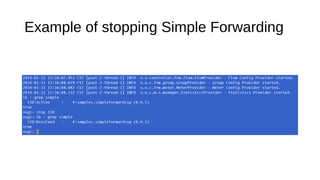
• From OSGI console:

• lb | grep simple
• stop <simple forwarding ID>
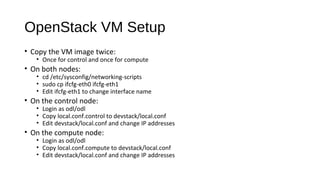
OpenStack VM Setup
• Copy the VM image twice:

• Once for control and once for compute

• On both nodes:

• cd /etc/sysconfig/networking-scripts
• sudo cp ifcfg-eth0 ifcfg-eth1
• Edit ifcfg-eth1 to change interface name

• On the control node:

• Login as odl/odl
• Copy local.conf.control to devstack/local.conf
• Edit devstack/local.conf and change IP addresses

• On the compute node:

• Login as odl/odl
• Copy local.conf.compute to devstack/local.conf
• Edit devstack/local.conf and change IP addresses
Example of stopping Simple Forwarding
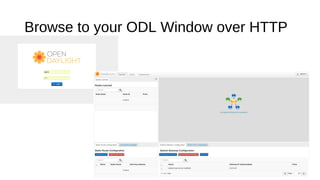
Browse to your ODL Window over HTTP
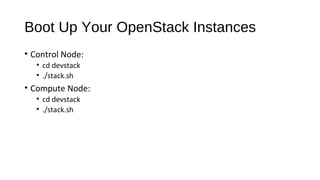
Boot Up Your OpenStack Instances
• Control Node:
• cd devstack
• ./stack.sh

• Compute Node:
• cd devstack
• ./stack.sh
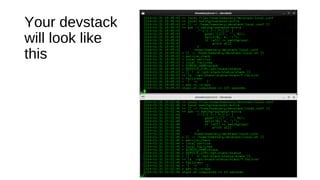
Your devstack
will look like
this
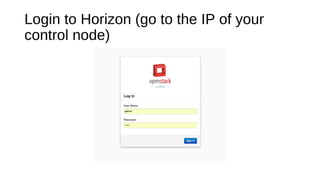
Login to Horizon (go to the IP of your
control node)
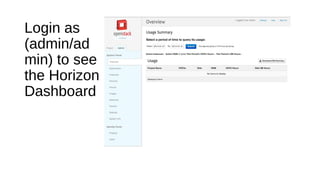
Login as
(admin/ad
min) to see
the Horizon
Dashboard
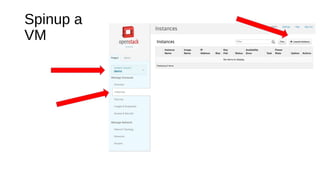
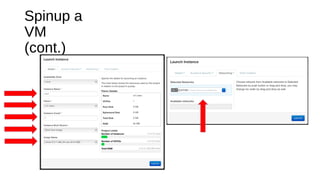
Spinup a
VM
Spinup a
VM
(cont.)
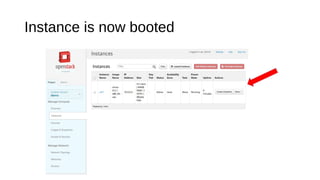
Instance is now booted
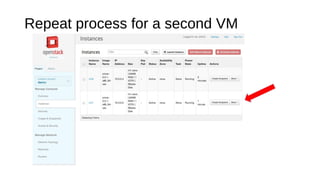
Repeat process for a second VM
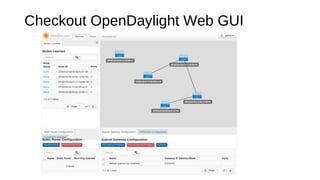
Checkout OpenDaylight Web GUI
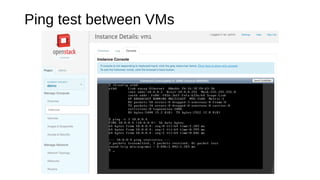
Ping test between VMs
Thank You!

OpenDaylight Integration with OpenStack Neutron: A Tutorial

  • 1.
    Using OpenStack With OpenDaylight Kyle Mestery,Cisco Ryan Moats, IBM Brent Salisbury, Red Hat Madhu Venugopal, Red Hat 2-5-2014
  • 2.
    What You WillWalk Away With • Hands on experience bringing up OpenDaylight on Fedora • Hands on experience bringing up a multi-node OpenStack environment • Hands on experience using OpenDaylight with OpenStack Neutron for virtual tenant networks
  • 3.
    Neutron Controller ML2 Plug-In OpenDaylight NorthBoundAPI Layer - -REST APIs OpenDaylight NorthBound API Layer REST APIs OpenDaylight Neutron REST-API OpenDaylight Neutron REST-API OVSDB Neutron Application OVSDB Neutron Application API Driven SAL (ADSAL) API Driven SAL (ADSAL) Configuration Service Inventory Service Connection Service Model Driven SAL (MDSAL) Model Driven SAL (MDSAL) Flow Programmer Connection Service Inventory Service OpenFlow 1.3 SB Plugin OpenFlow 1.0 SB Plugin OVSDB South-bound Plugin OVSDB Protocol Library OpenFlow 1.0 Plugin Netty.io OpenFlow 1.3 Plugin OpenFlow 1.0 Library Bidirectional JSON-RPC Library OpenFlow 1.3 Library Netty io java.nio.socket OVSD B Proto col OpenFlow 1.0 OpenVSwitch Flow Programmer e Op 1.3 low nF
  • 4.
    What You WillNeed • OpenDaylight Virtualization Edition with OVSDB • Can be in a VM or on your laptop directly • Two or more OpenStack Nodes • One node running control software and optionally compute services • One or more compute nodes
  • 5.
    Logistics • The Fedora20VM has the following information: • Users: • root/password • odl/odl • Setup for DHCP for the image itself.
  • 6.
    Boot Your VMImages • Boot the VM which you will run OpenDaylight inside of. • Optionally bring-up OpenDaylight on your laptop natively. • This will work in either scenario. • Verify IP addresses on your VMs (may require reboots). • This should be done for all VMs. • This may change once you import the OVF file.
  • 7.
    OpenDaylight Configuration andStartup • Edit your ODL configuration: • opendaylight/configuration/config.ini (change of.address) • Optionally enable OpenFlow 1.3 • opendaylight/configuration/config.ini (uncomment this) • Bring OpenDaylight to life: • Handy RUN.sh script • This contains options for both OpenFlow 1.0 (default) or OpenFlow 1.3 (optional) • Post ODL fixup: • From OSGI console: • lb | grep simple • stop <simple forwarding ID>
  • 8.
    OpenStack VM Setup •Copy the VM image twice: • Once for control and once for compute • On both nodes: • cd /etc/sysconfig/networking-scripts • sudo cp ifcfg-eth0 ifcfg-eth1 • Edit ifcfg-eth1 to change interface name • On the control node: • Login as odl/odl • Copy local.conf.control to devstack/local.conf • Edit devstack/local.conf and change IP addresses • On the compute node: • Login as odl/odl • Copy local.conf.compute to devstack/local.conf • Edit devstack/local.conf and change IP addresses
  • 9.
    Example of stoppingSimple Forwarding
  • 10.
    Browse to yourODL Window over HTTP
  • 11.
    Boot Up YourOpenStack Instances • Control Node: • cd devstack • ./stack.sh • Compute Node: • cd devstack • ./stack.sh
  • 12.
  • 13.
    Login to Horizon(go to the IP of your control node)
  • 14.
    Login as (admin/ad min) tosee the Horizon Dashboard
  • 15.
  • 16.
  • 17.
  • 18.
    Repeat process fora second VM
  • 19.
  • 20.
  • 21.