Completing the Square EXIT NEXT Click one of the buttons below  or press the enter key
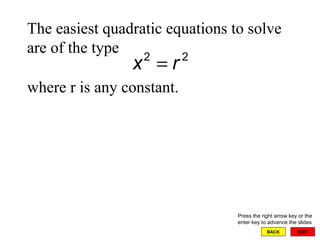
EXIT BACK The easiest quadratic equations to solve are of the type where r is any constant. Press the right arrow key or the enter key to advance the slides
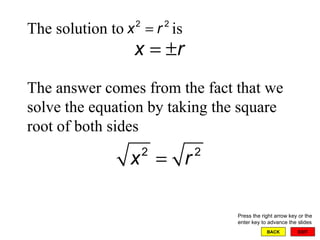
EXIT BACK The solution to  is Press the right arrow key or the enter key to advance the slides The answer comes from the fact that we solve the equation by taking the square root of both sides
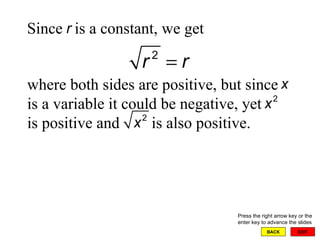
EXIT BACK Since  is a constant, we get where both sides are positive, but since  is a variable it could be negative, yet  is positive and  is also positive. Press the right arrow key or the enter key to advance the slides
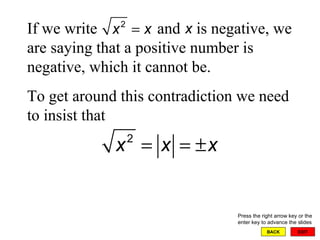
EXIT BACK If we write  and  is negative, we are saying that a positive number is negative, which it cannot be. To get around this contradiction we need to insist that Press the right arrow key or the enter key to advance the slides
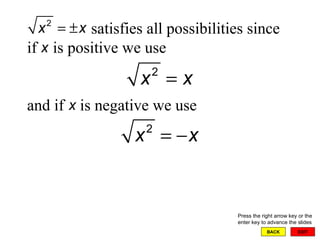
EXIT BACK satisfies all possibilities since if  is positive we use and if  is negative we use Press the right arrow key or the enter key to advance the slides
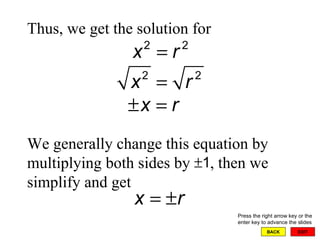
EXIT BACK Thus, we get the solution for We generally change this equation by multiplying both sides by  , then we simplify and get  Press the right arrow key or the enter key to advance the slides
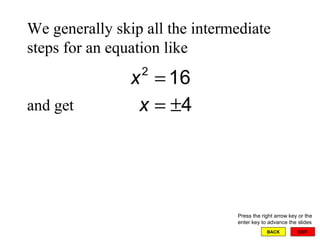
EXIT BACK We generally skip all the intermediate steps for an equation like  and get  Press the right arrow key or the enter key to advance the slides
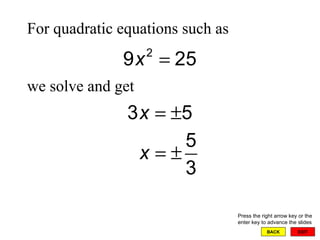
EXIT BACK For quadratic equations such as  we solve and get Press the right arrow key or the enter key to advance the slides
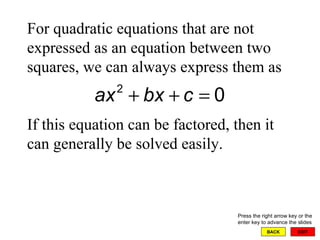
EXIT BACK For quadratic equations that are not expressed as an equation between two squares, we can always express them as If this equation can be factored, then it can generally be solved easily. Press the right arrow key or the enter key to advance the slides
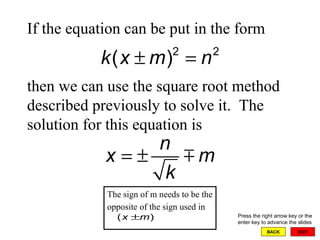
EXIT BACK If the equation can be put in the form  then we can use the square root method described previously to solve it.  The solution for this equation is  Press the right arrow key or the enter key to advance the slides The sign of m needs to be the opposite of the sign used in
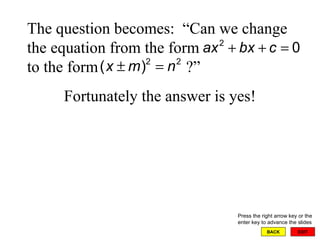
EXIT BACK The question becomes:  “Can we change the equation from the form to the form  ?”  Fortunately the answer is yes! Press the right arrow key or the enter key to advance the slides
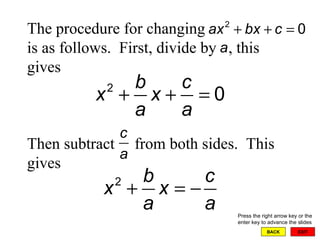
EXIT BACK The procedure for changing is as follows.  First, divide by  , this gives Then subtract  from both sides.  This gives  Press the right arrow key or the enter key to advance the slides
EXIT BACK We pause at this point to review the process of squaring a binomial.  We will use this procedure to help us complete the square. Press the right arrow key or the enter key to advance the slides
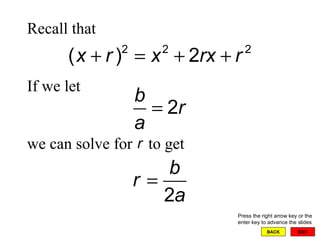
EXIT BACK Recall that If we let we can solve for  to get  Press the right arrow key or the enter key to advance the slides
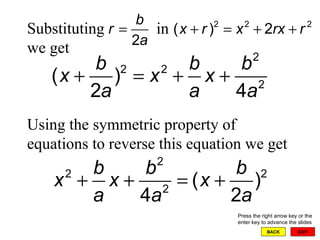
EXIT BACK Substituting  in  we get   Using the symmetric property of equations to reverse this equation we get   Press the right arrow key or the enter key to advance the slides
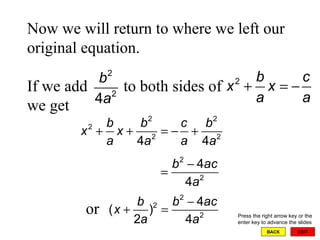
EXIT BACK Now we will return to where we left our original equation.   If we add  to both sides of we get   Press the right arrow key or the enter key to advance the slides or
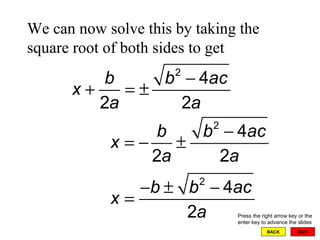
EXIT BACK We can now solve this by taking the square root of both sides to get Press the right arrow key or the enter key to advance the slides
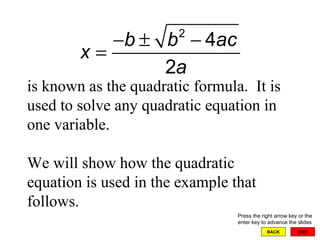
EXIT BACK   is known as the quadratic formula.  It is used to solve any quadratic equation in one variable. We will show how the quadratic equation is used in the example that follows.  Press the right arrow key or the enter key to advance the slides
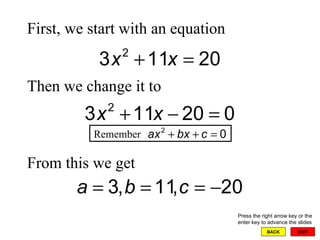
EXIT BACK First, we start with an equation Then we change it to From this we get   Press the right arrow key or the enter key to advance the slides Remember
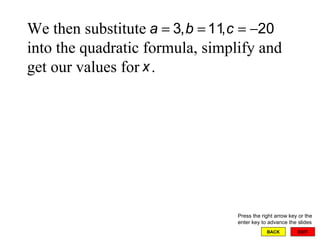
EXIT BACK We then substitute  into the quadratic formula, simplify and get our values for  .  Press the right arrow key or the enter key to advance the slides
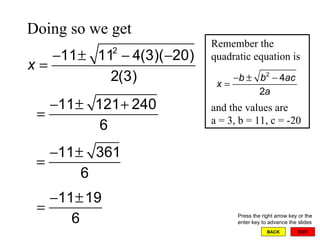
Remember the quadratic equation is and the values are a = 3, b = 11, c = -20 EXIT BACK Doing so we get Press the right arrow key or the enter key to advance the slides
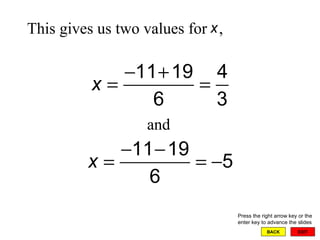
EXIT BACK This gives us two values for  ,   and Press the right arrow key or the enter key to advance the slides
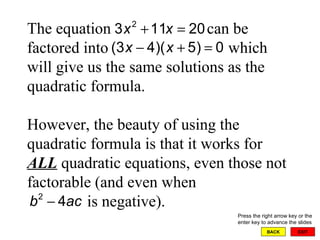
EXIT BACK The equation  can be factored into  which will give us the same solutions as the quadratic formula.  However, the beauty of using the quadratic formula is that it works for  ALL  quadratic equations, even those not factorable (and even when    is negative). Press the right arrow key or the enter key to advance the slides
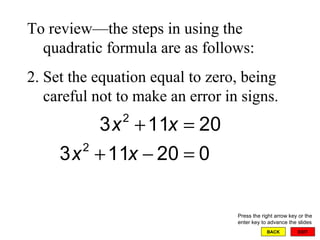
EXIT BACK To review—the steps in using the quadratic formula are as follows: Set the equation equal to zero, being careful not to make an error in signs. Press the right arrow key or the enter key to advance the slides
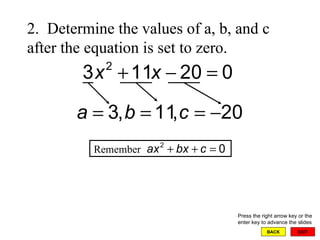
EXIT BACK 2.  Determine the values of a, b, and c after the equation is set to zero. Press the right arrow key or the enter key to advance the slides Remember
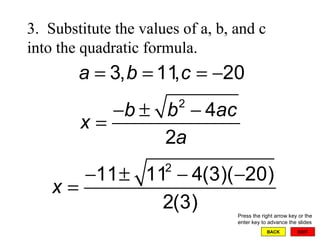
EXIT BACK 3.  Substitute the values of a, b, and c into the quadratic formula. Press the right arrow key or the enter key to advance the slides
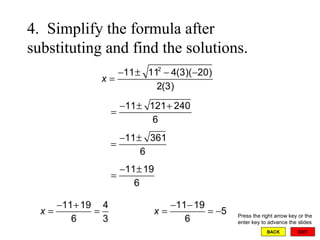
EXIT BACK 4.  Simplify the formula after substituting and find the solutions. Press the right arrow key or the enter key to advance the slides

Completing the square

  • 1.
    Completing the SquareEXIT NEXT Click one of the buttons below or press the enter key
  • 2.
    EXIT BACK Theeasiest quadratic equations to solve are of the type where r is any constant. Press the right arrow key or the enter key to advance the slides
  • 3.
    EXIT BACK Thesolution to is Press the right arrow key or the enter key to advance the slides The answer comes from the fact that we solve the equation by taking the square root of both sides
  • 4.
    EXIT BACK Since is a constant, we get where both sides are positive, but since is a variable it could be negative, yet is positive and is also positive. Press the right arrow key or the enter key to advance the slides
  • 5.
    EXIT BACK Ifwe write and is negative, we are saying that a positive number is negative, which it cannot be. To get around this contradiction we need to insist that Press the right arrow key or the enter key to advance the slides
  • 6.
    EXIT BACK satisfiesall possibilities since if is positive we use and if is negative we use Press the right arrow key or the enter key to advance the slides
  • 7.
    EXIT BACK Thus,we get the solution for We generally change this equation by multiplying both sides by , then we simplify and get Press the right arrow key or the enter key to advance the slides
  • 8.
    EXIT BACK Wegenerally skip all the intermediate steps for an equation like and get Press the right arrow key or the enter key to advance the slides
  • 9.
    EXIT BACK Forquadratic equations such as we solve and get Press the right arrow key or the enter key to advance the slides
  • 10.
    EXIT BACK Forquadratic equations that are not expressed as an equation between two squares, we can always express them as If this equation can be factored, then it can generally be solved easily. Press the right arrow key or the enter key to advance the slides
  • 11.
    EXIT BACK Ifthe equation can be put in the form then we can use the square root method described previously to solve it. The solution for this equation is Press the right arrow key or the enter key to advance the slides The sign of m needs to be the opposite of the sign used in
  • 12.
    EXIT BACK Thequestion becomes: “Can we change the equation from the form to the form ?” Fortunately the answer is yes! Press the right arrow key or the enter key to advance the slides
  • 13.
    EXIT BACK Theprocedure for changing is as follows. First, divide by , this gives Then subtract from both sides. This gives Press the right arrow key or the enter key to advance the slides
  • 14.
    EXIT BACK Wepause at this point to review the process of squaring a binomial. We will use this procedure to help us complete the square. Press the right arrow key or the enter key to advance the slides
  • 15.
    EXIT BACK Recallthat If we let we can solve for to get Press the right arrow key or the enter key to advance the slides
  • 16.
    EXIT BACK Substituting in we get Using the symmetric property of equations to reverse this equation we get Press the right arrow key or the enter key to advance the slides
  • 17.
    EXIT BACK Nowwe will return to where we left our original equation. If we add to both sides of we get Press the right arrow key or the enter key to advance the slides or
  • 18.
    EXIT BACK Wecan now solve this by taking the square root of both sides to get Press the right arrow key or the enter key to advance the slides
  • 19.
    EXIT BACK is known as the quadratic formula. It is used to solve any quadratic equation in one variable. We will show how the quadratic equation is used in the example that follows. Press the right arrow key or the enter key to advance the slides
  • 20.
    EXIT BACK First,we start with an equation Then we change it to From this we get Press the right arrow key or the enter key to advance the slides Remember
  • 21.
    EXIT BACK Wethen substitute into the quadratic formula, simplify and get our values for . Press the right arrow key or the enter key to advance the slides
  • 22.
    Remember the quadraticequation is and the values are a = 3, b = 11, c = -20 EXIT BACK Doing so we get Press the right arrow key or the enter key to advance the slides
  • 23.
    EXIT BACK Thisgives us two values for , and Press the right arrow key or the enter key to advance the slides
  • 24.
    EXIT BACK Theequation can be factored into which will give us the same solutions as the quadratic formula. However, the beauty of using the quadratic formula is that it works for ALL quadratic equations, even those not factorable (and even when is negative). Press the right arrow key or the enter key to advance the slides
  • 25.
    EXIT BACK Toreview—the steps in using the quadratic formula are as follows: Set the equation equal to zero, being careful not to make an error in signs. Press the right arrow key or the enter key to advance the slides
  • 26.
    EXIT BACK 2. Determine the values of a, b, and c after the equation is set to zero. Press the right arrow key or the enter key to advance the slides Remember
  • 27.
    EXIT BACK 3. Substitute the values of a, b, and c into the quadratic formula. Press the right arrow key or the enter key to advance the slides
  • 28.
    EXIT BACK 4. Simplify the formula after substituting and find the solutions. Press the right arrow key or the enter key to advance the slides