1
PROJECT TITLE
College Admission System
By
Hitesh Jangid
Under Guidance
Of
Mr. Sandeep Deora
Submitted to the School of Computer and information Sciences in partial
fulfillment of the requirements for the degree of
Masters
Of
Computers Application
Indira Gandhi National Open University
2
This is to certify that the project report entitled College Admission System submitted to Indira
Gandhi National Open University in partial fulfilment of the requirement for the award of the
degree of MASTER OF COMPUTER APPLICATIONS (MCA) is an original work carried out
by Mr Hitesh Jangid, enrolment no. 1485650807, under my guidance. The matter embodied in
this project is authentic and is genuine work done by the student and has not been submitted
whether to this University or to any other University / Institute for the fulfilment of the
requirement of any course of study.
.......................................
...........
.................................
Signature of the Student Signature of
The Counsellor
Date Date:
Name and Address Name, Designation &
Of the Student Address of the Counsellor
Hitesh Jangid Mr. Sandeep Deora
3
ABSTRACT
Abstraction is an indispensable part of the design process and is essential for problem
partitioning. Partitioning essentially is the exercise in determining the system components are
not isolated from each other but interacts with other components. Abstraction is used for exiting
components as well as components that are being designed. Using this abstraction behaviour
of the entire system can be understood.
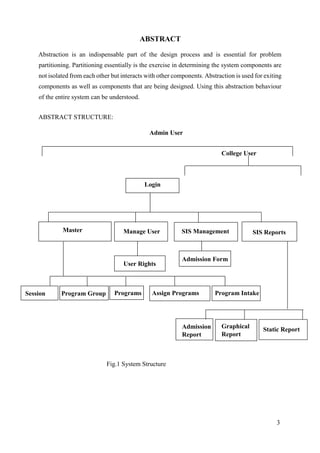
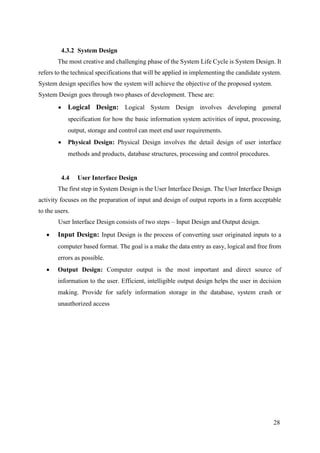
ABSTRACT STRUCTURE:
Fig.1 System Structure
Login
Master SIS ManagementManage User SIS Reports
Admission Form
User Rights
Static ReportAdmission
Report
Graphical
Report
Session Program Group Programs Assign Programs Program Intake
College User
Admin User
4
ACKNOWLEDGEMENT
At the outset, we offer our sincere thanks and deep gratitude to Mr. Sandeep Deora sir.
I had the privilege to receive great inspiration and guidance from him, which helped us to set
the objectives of this study and complete the report. I am fortunate to have constant
encouragement and practical guidance in all aspect of our study. His experience in this line has
been a boon to us in this respect.
5
TABLE OF CONTENTS
Page
CHAPTER 1: INTRODUCTION 7
1.1 Background 7
1.2 Objective 7
1.3 Purpose, Scope and Applicability 8
1.3.1 Purpose 9
1.3.2 Scope 9
1.4 Achievements 9
1.5 Organization of Report 9
CHAPTER 2: SERVEY OF TECHNOLOGY 10
CHAPTER 3: REQUIREMENTS AND ANALYSIS 10
3.1 Problem Definition 10
3.2 Requirement Specification 11
3.3 Planning and Scheduling 13
3.4 Software and Hardware Requirements 18
3.4.1 Hardware Requirements 18
3.4.2 Software Requirements 18
CHAPTER 4: SYSTEM DESIGN 19
4.1 Data Flow Diagram 20
4.2 Data Dictionary & Data Model 22
4.2.1 Schema Design 23
4.2.2 Data Model 27
4.3 Analysis & Designing 27
4.3.1 System Analysis
4.3.2 System Designing
27
28
4.4 User Interface Design 28
4.5 Three Tier Architecture 30
CHAPTER 5: IMPLEMENTATION AND TESTING 74 32
5.1 Coding Details and Screen Shot 32
5.2.1 Coding 32
6
5.2.2 Screen Shot 99
5.2 Testing Approach 104
5.2.1 Testing Procedure 104
5.2.2 System Testing 105
CHAPTER 6: TEST PLAN IDENTIFIER 105
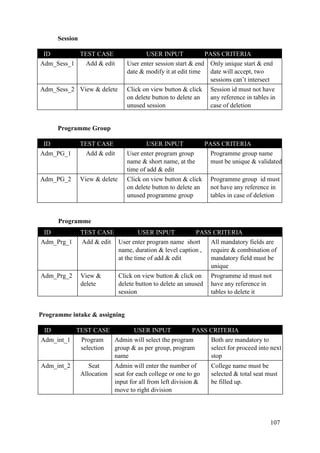
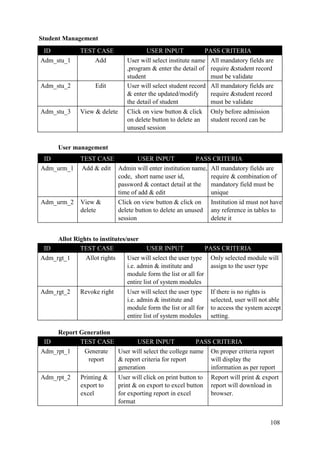
6.1 Test Cases 105
6.2 User Documentation 109
CHAPTER 7: Project Evaluation 109
7.1 Salient Features 109
7.2 Limitations of the System 110
7.3 Future scope of the Project 110
7
Chapter 1 INTRODUCTION
1.1 Introduction
Today, computerized processing of transaction data is an activity of almost any organization.
In this generation, everybody’s life becomes in computerized. They go ahead with the
computer. The areas of computer applications are literally too numerous to mention. Computers
have become an integral part of man’s every-day. They dominate every sphere of life be it
entertainment, education, banking, insurance, medicine, design or manufacturing. Actually this
generation is the era of rapid growth of Information Technology. IT has change the working
process in all fields of human being. So they continue grow and the open new horizons of
discovery and application. One of the primary reasons for the immense popularly of computers
is the speed with which they can accomplish specific tasks. However computer applications
are not always easy to use.
It is a simple small system illustrated by using the most common features of Visual Basic. This
project includes student admissoin and record management in the Colleges & Universities.
With this project it is tried to manage this things easily and with less time of the organization
“Tumkur University”. The problem while managing data in traditional method i.e in excel &
paperwork, they lost some of information of newly enrolled students, sometime it happen that
colleges give admission more than available seats which become issue in the time of
examination. University wants to restrict & allow colleges to fill the admission within the
allotted seat in particular that session.
The basic web language used in this project is Php and the database of the whole project is
created used MYSQL Server. The front end is designed in HTML jQuery & CSS and the back
end is mysql database. By using the front-end user can access data from database as well as
store data in the database. By using the Menu system user can use the other functioning of the
application.
1.2 Objective
Tumkur University having about 80 affiliated college & 3 constituent colleges. Which are offer
main stream UG & PG courses as well as some professional courses like BCA ,MCA & MBA.
Each academic session, University accept new admission from the affiliated & constituent
8
colleges as per seat allocation. In the manual/current system these colleges provide the original
documents, the list of students & the soft copy excel sheet which has the entire information of
the student after the ending of admission season & a representative of these college appear
itself to deliver all these data.
University want to receive all these data on real time & want to apply a uniform method
to get the information from all the colleges for verification.
The student admission process is managed in all the academic institutes i.e. school &
colleges, mostly in a manual procedure. But in the manual procedure there may be so many
drawbacks. In the manual procedure it is quite lengthy to keep all the records. Sometimes
information may be recorded incorrectly. The major objective of the proposed computerized
system is to overcome the drawback of the existing manual system to provide a paperless office
environment. The other objective of this system includes providing an information sources,
increasing efficiency, productivity and build greater user satisfaction and eliminating
duplication of records. So we have found the required information quickly to improve the
various data processing. The proposed system is important for the store of data with minimum
redundancy. It is also important for further use. This will maintain the data integrity. During
the designing of the software my main objective will be make it a user friendly one.
Primary Objectives can be notified as listed below:
o Develop a model of the enterprise from an information viewpoint in order to
improve communications, both within and outside the organization.
o Monitoring student data, document and reports that create, process, store, and
disseminate information.
o Utilization of information resources effectively to achieve the overall goals and
mission of the organization.
1.3 Purpose and Scope
1.3.1 Purpose
College Admission System would have the following goals.
• Provide a user interface to add, view, modify & delete records in different courses.
• Provide a user interface to register student.
9
• Provide a user interface to change user settings like password and view profiles.
• Provide a user interface for administrator to manage the user & students record &
module accessibility rights.
• Provide a master data functioning to add dynamic list of different kind of data like
session master, Program course master etc.
• System is developed in aspect to enhance the functioning area from admission
module to Student Information System where user can manage student’s
information, their promotion in the next level, attendance & marks.
1.3.2 Scope
The main scope and deliverables of the project would be to:
• Understand and prepare detailed requirement and specifications
• Prepare high level and detailed design specifications of the system
• Prepare Test Plan and Test cases
• Develop the system and coding
• Perform unit testing, integration and system testing
• Demonstrate a bug free application after suitable modification if needed.
1.4 Achievements
By successfully implementing College Admission System, a substantial knowledge has been
acquired on the implementation of a server based database system. This knowledge will be
useful in the future in creating any type of application or database systems.
The objective of College Admission System was the creation of a useful application for the
colleges which has been fulfilled. This system can be easily modified to serve the needs of any
reminder.
1.5 Organization of Report
This report is organized in seven chapters, as indicated in the Table of Contents. These chapters
deal with the important aspects of the Systems Development Cycle. Each of the chapters is
divided into Headings and Sub-Headings. Chapter 1 introduces the project, its background and
purpose. The technologies used in the project and the reason thereof are explained in Chapter
2. Chapter 3 broadly deals with the requirements, analysis and planning of the project. All the
design aspects have been dealt with in Chapter 4 including schema design, interface design,
10
security and test cases. The actual implementation has been discussed in Chapter 5, which
includes coding and testing of the working of the system. Chapter 6 discusses the test reports
and project documentation and finally the conclusions have been drawn in Chapter 7. At the
end of the report, the references made and the glossary has been included.
Chapter 2. SURVEY OF TECHNOLOGY
In a web based application like FEDENA, Edu Craft, there is a scope for a large number of
platforms, languages, web servers and frameworks to choose from. Before selecting from this
large array of technologies, the following aspects, which are characteristic to web based
application like this one, have been kept in mind:
• Dynamic page generation
• Data validation
• Performance
• Reliability
• Scalability
• Security
• Portability
• Performance
• Time constraint
• Cost constraint
Chapter 3. REQUIREMENTS AND ANALYSIS
3.1. Problem Definition
The first step to the system analysis process involves the identification of need. The intent is to
understand the software objectives and to define the goals required to meet the objectives.
The existing system
Description of the existing system is explained below-
(a) Form Received From Students: University & college accept the form from the
students, thus they manage the data into files & excel sheet with the each of
information that students has provided. In other case Colleges send these excel
11
sheet to university to manage record & to get enrolment no for the students in
each offered courses.
(b) University’s expect from all colleges to provide all mandatory information &
verified student’s document and information which is most important for further
student reports i.e. Marks-sheet / Reports Card, Migration certificate & Degree.
Drawbacks of the existing system:-
The main drawbacks of the existing system are:
• Maintenance of paper is very tedious process.
• Take extra time & may cause of delay in providing data form the college if they
don’t prepare it in time.
• Data inconsistency can occur due to the duplication of information.
• The data processing speed of the manual process is very slow.
• Redundant and repetitive works had to be done manually.
• Difficult to find out the information of single or as per required search criteria
• Searching process is very problematic since data are stored in files.
• Data may be lost.
• Reports are generated manually. There is also a chance of missing of the reports
when they are generated manually.
• Number of Admitted student can exceed if there is no restriction in the system
& can cause of illegal issues.
• No. seats can be changed as per UGC rule, should be maintain.
3.2 Requirement Specification
Requirements Specification involves the basic requirements that the system to be
developed should possess. These can be broadly classified into two types.
1. Performance Requirements.
2. Functional Requirements.
Understanding the requirements specification is critical for the project’s success otherwise the
system does not get developed according to the customer’s wishes.
Performance Requirements:
1. The system should be built in a way such that it is independent of the type of database used
(MYSQL, SQL Server etc).
2. Response should be fast.
3. High throughput.
12
4. Security should be high such that no intruder can tamper with data.
5. The access of the system should be traceable to identify who are the users of the system and
when they last logged in to the system.
Feasibility study
Feasibility Study is one of the fundamental aspects in design of system.
The key-points are as follows:-
1) Form a project team and appoint a project leader.
2) Prepare system flow chart.
3) Enumerate potential candidate systems.
4) Describe and identify characteristics of candidate systems.
5) Determine and evaluate performance and cost effectiveness of each candidate system.
6) Weight system performance and cost data.
7) Select the best candidate system.
8) Prepare and report final project directive to management.
Three key considerations are involved in the feasibility analysis:
i. Technical
ii. Operational
iii. Economical
Technical Feasibility:
It specifies whether the proposed solution in the project is possible to be implemented
using available hardware and software.
Operational Feasibility:
Operational feasibility considers the factors that how the software will satisfy the need
of the users, how it could be changed for future requirements and the operational factors of the
computer.
Economical Feasibility :
This defines the measurement cost effectiveness of the project. It further consists of two
parts:
a. Direct cost.
b. Indirect cost.
Economical Feasibility of the Project:
a) Initial cost for development is not high since a machine with required configuration was
available in the company.
b) Necessary software for back-end and front-end use were also available there.
13
3.3 Planning and Scheduling
1. Purpose
The purpose of Project Plan is to define all the techniques, procedures, and methodologies
that will be used in the project to assure timely delivery of the software that meets specified
requirements within project resources. This will be reviewing and auditing the software
products and activities to verify that they comply with the applicable procedures and
standards and providing the software project and other appropriate managers with the results
of these reviews and audits.
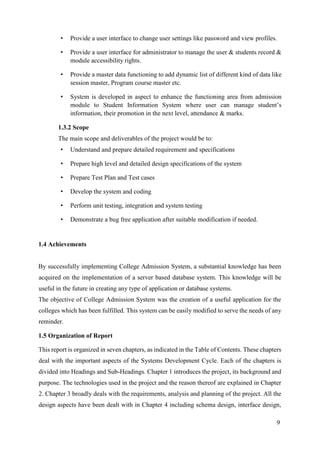
Giant Chart for College Admission System
Process Name
Week
1
Week
2
Week
3
Week
4
Week
5
Week
6
Week
7
Week
8
Week
9
Collect System Requirement
Prepare SRS Report
Module development
Module Testing
Test Case Resolutions
Implementation
User Training
Software Handover
Fig 5: Giant Chart for College Admission System
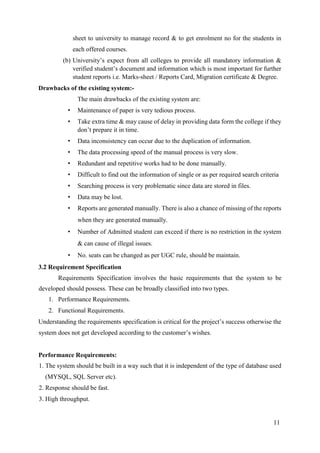
The table below show the Project Phases in terms of date during the project development
Phases Start Date End Date
Inception Feb 15th
2016 Feb 22th
2016
Implementation Feb 23h
2016 Apr 30th
2016
Elaboration May 1st
2016 May 10th
2016
Table.1 Project Phase Schedule
14
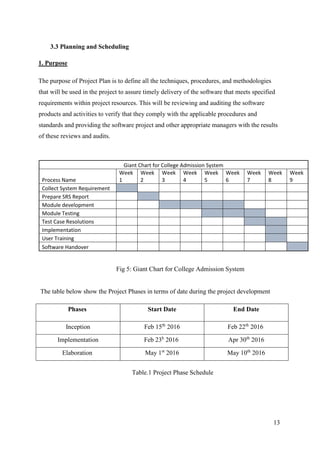
The Table below shows the break-down of time spent in each phase for Research, Design,
Coding, Testing and Documentation.
Inception(Hours) Implementation(Hours) Elaboration(Hours) Total
Research 20 25 5 50
Design 17 20 5 42
Coding 0 210 37 247
Testing 0 15 30 45
Documentation 20 28 20 68
Total 57 298 97 452
Table.2 Phase Breakdown
The Pie chart in Fig.1 shows the hour break down for each phase.
Fig.1 Project Phase Schedule
15
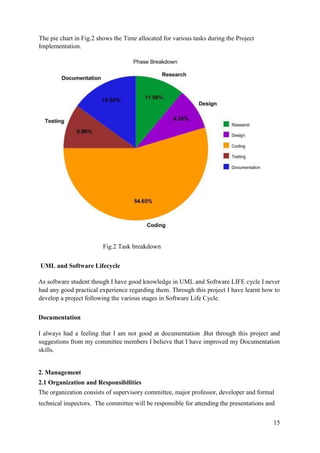
The pie chart in Fig.2 shows the Time allocated for various tasks during the Project
Implementation.
Fig.2 Task breakdown
UML and Software Lifecycle
As software student though I have good knowledge in UML and Software LIFE cycle I never
had any good practical experience regarding them. Through this project I have learnt how to
develop a project following the various stages in Software Life Cycle.
Documentation
I always had a feeling that I am not good at documentation .But through this project and
suggestions from my committee members I believe that I have improved my Documentation
skills.
2. Management
2.1 Organization and Responsibilities
The organization consists of supervisory committee, major professor, developer and formal
technical inspectors. The committee will be responsible for attending the presentations and
16
reviews at the end of each phase. After each presentation, the committee will provide
feedback and suggestions regarding the project.
Project Manager
The project manage will be responsible for supervising and evaluating the work and progress
done by the developer on a weekly basis.
Developer
The developer should submit all the deliverables and complete the project functionalities on
time. He should keep updating his weekly progress to the Major Professor.
Formal Technical Inspectors
The formal technical inspectors will be responsible for a technical review of the architecture
design artifacts and the formal requirements specifications and will also be required to submit
a formal report based on their findings.
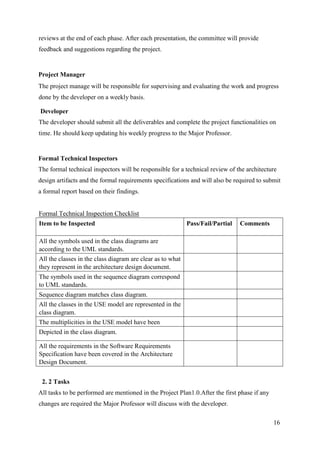
Formal Technical Inspection Checklist
Item to be Inspected Pass/Fail/Partial Comments
All the symbols used in the class diagrams are
according to the UML standards.
All the classes in the class diagram are clear as to what
they represent in the architecture design document.
The symbols used in the sequence diagram correspond
to UML standards.
Sequence diagram matches class diagram.
All the classes in the USE model are represented in the
class diagram.
The multiplicities in the USE model have been
Depicted in the class diagram.
All the requirements in the Software Requirements
Specification have been covered in the Architecture
Design Document.
2. 2 Tasks
All tasks to be performed are mentioned in the Project Plan1.0.After the first phase if any
changes are required the Major Professor will discuss with the developer.
17
4. Documentation
The documentation will consist of all the deliverables. They are vision document, project
plan, software quality assurance plan, formal requirements specification, architecture design,
test plan, formal technical inspection, prototype, user manual, component design, source
code, assessment evaluation, project evaluation, references, and formal technical inspection
letters. The committee members will review all documentation for final approval.
All documentation will be posted on the developer’s website.
5. Reviews and Audits
All the deliverables produced in each phase of project development are reviewed by the major
professor and supervising committee. These are evaluated by the committee, at the end of
each phase and provide comments on the software prototype as well as suggestions for any
changes or addition to the requirements specification. The two formal technical inspectors
will assess the architecture design artefacts and submit a formal report based on their
findings.
6. Test and Problem Reporting
All the testing procedures used for the project would be mentioned in the test plan document
at the end of second phase. The results would be reviewed and all the unresolved problems
will be reported to the committee members.
7. Tools, Techniques and Methodologies
The following tools, techniques and methods would be used for the project for the specified
purpose:
• Coding: - CSS, HTML, PHP ,Dreamweaver IDE, MySQL server & SQLyog
• Testing:-Manual & Automation testing QTP
• Documentation:-MS Word, Rational Rose, MS Project, OCL.
8. Records collection, Maintenance, and Retention
Three sets of design documentation would be produced and distributed to the University
Library, Major Professor and developer. The source code, documentation and web pages are
submitted to the Major Professor in the form of a CD.
18
9. Deliverables
The deliverables for all the three phases are listed below:
Phase I
• Vision Document 1.0
• Project Plan 1.0
• Software Quality Assurance Plan
Phase II
• Action Items –identified during phase I
• Vision Document 2.0
• Project Plan 2.0
• Formal Requirements Specification
• Architecture Design
• Test Plan
• Formal Technical Inspection
• Executable Architecture Prototype
Phase III
• Action Items - identified during phase I
• User Manual
• Component Design
• Source Code
• Assessment Evaluation
• Project Evaluation
• References
• Formal Technical Inspection
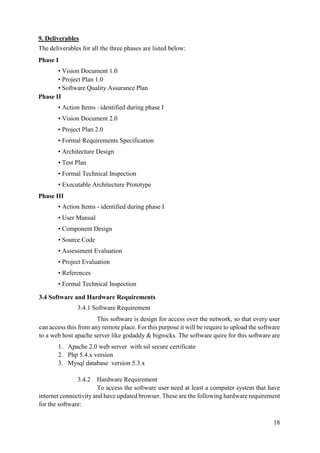
3.4 Software and Hardware Requirements
3.4.1 Software Requirement
This software is design for access over the network, so that every user
can access this from any remote place. For this purpose it will be require to upload the software
to a web host apache server like godaddy & bigrocks. The software quire for this software are
1. Apache 2.0 web server with ssl secure certificate
2. Php 5.4.x version
3. Mysql database version 5.3.x
3.4.2 Hardware Requirement
To access the software user need at least a computer system that have
internet connectivity and have updated browser. These are the following hardware requirement
for the software:
19
1. Mozilla Firefox 17.0+ ,Chrome browser, opera browser
2. Internet connection having minimum 512kbps bandwidth
3. System requirement depends on browser basis
CHAPTER 4: SYSTEM DESIGN
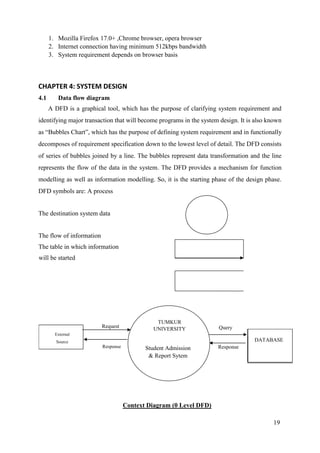
4.1 Data flow diagram
A DFD is a graphical tool, which has the purpose of clarifying system requirement and
identifying major transaction that will become programs in the system design. It is also known
as “Bubbles Chart”, which has the purpose of defining system requirement and in functionally
decomposes of requirement specification down to the lowest level of detail. The DFD consists
of series of bubbles joined by a line. The bubbles represent data transformation and the line
represents the flow of the data in the system. The DFD provides a mechanism for function
modelling as well as information modelling. So, it is the starting phase of the design phase.
DFD symbols are: A process
The destination system data
The flow of information
The table in which information
will be started
DATABASE
Context Diagram (0 Level DFD)
Response
QueryRequest
Response
External
Source
TUMKUR
UNIVERSITY
Student Admission
& Report Sytem
20
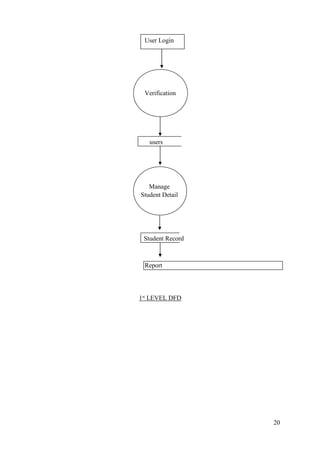
Report
1st
LEVEL DFD
User Login
Verification
users
Manage
Student Detail
Student Record
21
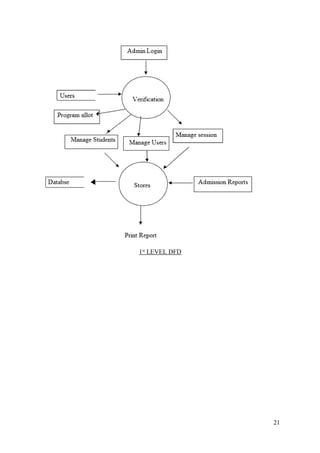
1st
LEVEL DFD
22
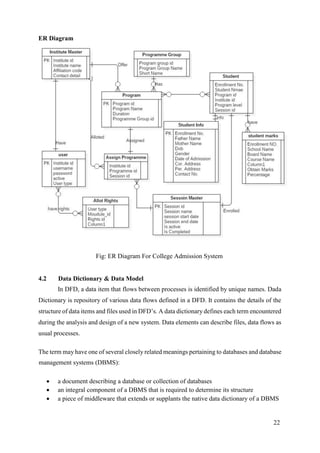
ER Diagram
Fig: ER Diagram For College Admission System
4.2 Data Dictionary & Data Model
In DFD, a data item that flows between processes is identified by unique names. Dada
Dictionary is repository of various data flows defined in a DFD. It contains the details of the
structure of data items and files used in DFD’s. A data dictionary defines each term encountered
during the analysis and design of a new system. Data elements can describe files, data flows as
usual processes.
The term may have one of several closely related meanings pertaining to databases and database
management systems (DBMS):
 a document describing a database or collection of databases
 an integral component of a DBMS that is required to determine its structure
 a piece of middleware that extends or supplants the native data dictionary of a DBMS
23
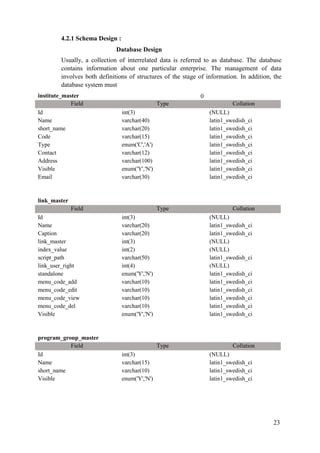
4.2.1 Schema Design :
Database Design
Usually, a collection of interrelated data is referred to as database. The database
contains information about one particular enterprise. The management of data
involves both definitions of structures of the stage of information. In addition, the
database system must
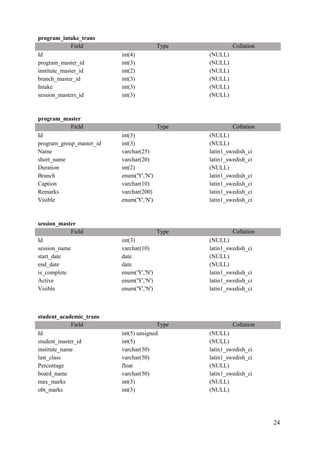
institute_master 0
Field Type Collation
Id int(3) (NULL)
Name varchar(40) latin1_swedish_ci
short_name varchar(20) latin1_swedish_ci
Code varchar(15) latin1_swedish_ci
Type enum('C','A') latin1_swedish_ci
Contact varchar(12) latin1_swedish_ci
Address varchar(100) latin1_swedish_ci
Visible enum('Y','N') latin1_swedish_ci
Email varchar(30) latin1_swedish_ci
link_master
Field Type Collation
Id int(3) (NULL)
Name varchar(20) latin1_swedish_ci
Caption varchar(20) latin1_swedish_ci
link_master int(3) (NULL)
index_value int(2) (NULL)
script_path varchar(50) latin1_swedish_ci
link_user_right int(4) (NULL)
standalone enum('Y','N') latin1_swedish_ci
menu_code_add varchar(10) latin1_swedish_ci
menu_code_edit varchar(10) latin1_swedish_ci
menu_code_view varchar(10) latin1_swedish_ci
menu_code_del varchar(10) latin1_swedish_ci
Visible enum('Y','N') latin1_swedish_ci
program_group_master
Field Type Collation
Id int(3) (NULL)
Name varchar(15) latin1_swedish_ci
short_name varchar(10) latin1_swedish_ci
Visible enum('Y','N') latin1_swedish_ci
24
program_intake_trans
Field Type Collation
Id int(4) (NULL)
program_master_id int(3) (NULL)
institute_master_id int(2) (NULL)
branch_master_id int(3) (NULL)
Intake int(3) (NULL)
session_masters_id int(3) (NULL)
program_master
Field Type Collation
Id int(3) (NULL)
program_group_master_id int(3) (NULL)
Name varchar(25) latin1_swedish_ci
short_name varchar(20) latin1_swedish_ci
Duration int(2) (NULL)
Branch enum('Y','N') latin1_swedish_ci
Caption varchar(10) latin1_swedish_ci
Remarks varchar(200) latin1_swedish_ci
Visible enum('Y','N') latin1_swedish_ci
session_master
Field Type Collation
Id int(3) (NULL)
session_name varchar(10) latin1_swedish_ci
start_date date (NULL)
end_date date (NULL)
is_complete enum('Y','N') latin1_swedish_ci
Active enum('Y','N') latin1_swedish_ci
Visible enum('Y','N') latin1_swedish_ci
student_academic_trans
Field Type Collation
Id int(5) unsigned (NULL)
student_master_id int(5) (NULL)
institute_name varchar(50) latin1_swedish_ci
last_class varchar(50) latin1_swedish_ci
Percentage float (NULL)
board_name varchar(50) latin1_swedish_ci
max_marks int(3) (NULL)
obt_marks int(3) (NULL)
25
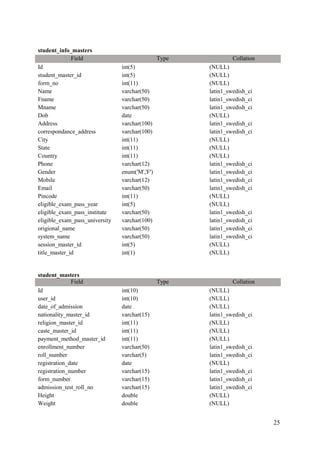
student_info_masters
Field Type Collation
Id int(5) (NULL)
student_master_id int(5) (NULL)
form_no int(11) (NULL)
Name varchar(50) latin1_swedish_ci
Fname varchar(50) latin1_swedish_ci
Mname varchar(50) latin1_swedish_ci
Dob date (NULL)
Address varchar(100) latin1_swedish_ci
correspondance_address varchar(100) latin1_swedish_ci
City int(11) (NULL)
State int(11) (NULL)
Country int(11) (NULL)
Phone varchar(12) latin1_swedish_ci
Gender enum('M','F') latin1_swedish_ci
Mobile varchar(12) latin1_swedish_ci
Email varchar(50) latin1_swedish_ci
Pincode int(11) (NULL)
eligible_exam_pass_year int(5) (NULL)
eligible_exam_pass_institute varchar(50) latin1_swedish_ci
eligible_exam_pass_university varchar(100) latin1_swedish_ci
origional_name varchar(50) latin1_swedish_ci
system_name varchar(50) latin1_swedish_ci
session_master_id int(5) (NULL)
title_master_id int(1) (NULL)
student_masters
Field Type Collation
Id int(10) (NULL)
user_id int(10) (NULL)
date_of_admission date (NULL)
nationality_master_id varchar(15) latin1_swedish_ci
religion_master_id int(11) (NULL)
caste_master_id int(11) (NULL)
payment_method_master_id int(11) (NULL)
enrollment_number varchar(50) latin1_swedish_ci
roll_number varchar(5) latin1_swedish_ci
registration_date date (NULL)
registration_number varchar(15) latin1_swedish_ci
form_number varchar(15) latin1_swedish_ci
admission_test_roll_no varchar(15) latin1_swedish_ci
Height double (NULL)
Weight double (NULL)
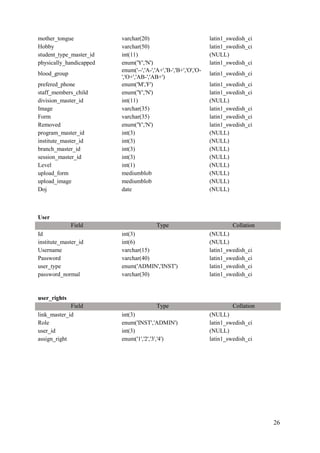
26
mother_tongue varchar(20) latin1_swedish_ci
Hobby varchar(50) latin1_swedish_ci
student_type_master_id int(11) (NULL)
physically_handicapped enum('Y','N') latin1_swedish_ci
blood_group
enum('--','A-','A+','B-','B+','O','O-
','O+','AB-','AB+')
latin1_swedish_ci
prefered_phone enum('M','F') latin1_swedish_ci
staff_members_child enum('Y','N') latin1_swedish_ci
division_master_id int(11) (NULL)
Image varchar(35) latin1_swedish_ci
Form varchar(35) latin1_swedish_ci
Removed enum('Y','N') latin1_swedish_ci
program_master_id int(3) (NULL)
institute_master_id int(3) (NULL)
branch_master_id int(3) (NULL)
session_master_id int(3) (NULL)
Level int(1) (NULL)
upload_form mediumblob (NULL)
upload_image mediumblob (NULL)
Doj date (NULL)
User
Field Type Collation
Id int(3) (NULL)
institute_master_id int(6) (NULL)
Username varchar(15) latin1_swedish_ci
Password varchar(40) latin1_swedish_ci
user_type enum('ADMIN','INST') latin1_swedish_ci
password_normal varchar(30) latin1_swedish_ci
user_rights
Field Type Collation
link_master_id int(3) (NULL)
Role enum('INST','ADMIN') latin1_swedish_ci
user_id int(3) (NULL)
assign_right enum('1','2','3','4') latin1_swedish_ci
27
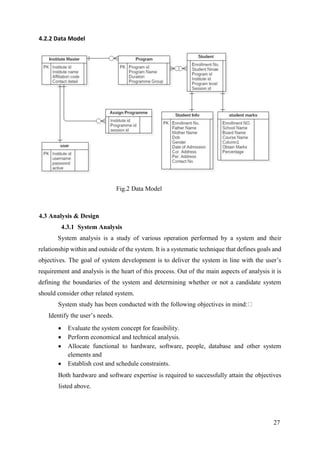
4.2.2 Data Model
Fig.2 Data Model
4.3 Analysis & Design
4.3.1 System Analysis
System analysis is a study of various operation performed by a system and their
relationship within and outside of the system. It is a systematic technique that defines goals and
objectives. The goal of system development is to deliver the system in line with the user’s
requirement and analysis is the heart of this process. Out of the main aspects of analysis it is
defining the boundaries of the system and determining whether or not a candidate system
should consider other related system.
System study has been conducted with the following objectives in mind:
Identify the user’s needs.
 Evaluate the system concept for feasibility.
 Perform economical and technical analysis.
 Allocate functional to hardware, software, people, database and other system
elements and
 Establish cost and schedule constraints.
Both hardware and software expertise is required to successfully attain the objectives
listed above.
28
4.3.2 System Design
The most creative and challenging phase of the System Life Cycle is System Design. It
refers to the technical specifications that will be applied in implementing the candidate system.
System design specifies how the system will achieve the objective of the proposed system.
System Design goes through two phases of development. These are:
 Logical Design: Logical System Design involves developing general
specification for how the basic information system activities of input, processing,
output, storage and control can meet end user requirements.
 Physical Design: Physical Design involves the detail design of user interface
methods and products, database structures, processing and control procedures.
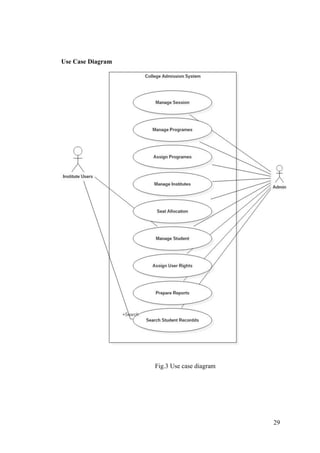
4.4 User Interface Design
The first step in System Design is the User Interface Design. The User Interface Design
activity focuses on the preparation of input and design of output reports in a form acceptable
to the users.
User Interface Design consists of two steps – Input Design and Output design.
 Input Design: Input Design is the process of converting user originated inputs to a
computer based format. The goal is a make the data entry as easy, logical and free from
errors as possible.
 Output Design: Computer output is the most important and direct source of
information to the user. Efficient, intelligible output design helps the user in decision
making. Provide for safely information storage in the database, system crash or
unauthorized access
29
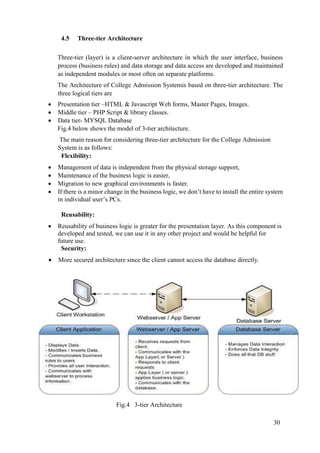
Use Case Diagram
Fig.3 Use case diagram
30
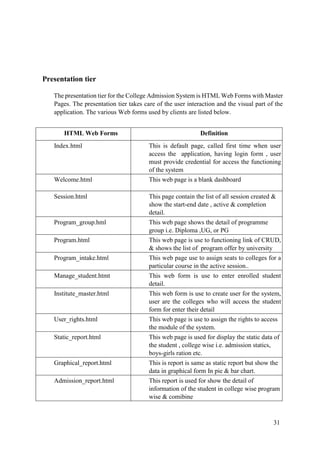
4.5 Three-tier Architecture
Three-tier (layer) is a client-server architecture in which the user interface, business
process (business rules) and data storage and data access are developed and maintained
as independent modules or most often on separate platforms.
The Architecture of College Admission Systemis based on three-tier architecture. The
three logical tiers are
 Presentation tier –HTML & Javascript Web forms, Master Pages, Images.
 Middle tier – PHP Script & library classes.
 Data tier- MYSQL Database
Fig.4 below shows the model of 3-tier architecture.
The main reason for considering three-tier architecture for the College Admission
System is as follows:
Flexibility:
 Management of data is independent from the physical storage support,
 Maintenance of the business logic is easier,
 Migration to new graphical environments is faster.
 If there is a minor change in the business logic, we don’t have to install the entire system
in individual user’s PCs.
Reusability:
 Reusability of business logic is greater for the presentation layer. As this component is
developed and tested, we can use it in any other project and would be helpful for
future use.
Security:
 More secured architecture since the client cannot access the database directly.
Fig.4 3-tier Architecture
31
Presentation tier
The presentation tier for the College Admission System is HTML Web Forms with Master
Pages. The presentation tier takes care of the user interaction and the visual part of the
application. The various Web forms used by clients are listed below.
HTML Web Forms Definition
Index.html This is default page, called first time when user
access the application, having login form , user
must provide credential for access the functioning
of the system
Welcome.html This web page is a blank dashboard
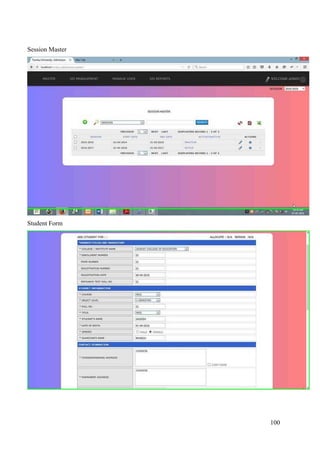
Session.html This page contain the list of all session created &
show the start-end date , active & completion
detail.
Program_group.hml This web page shows the detail of programme
group i.e. Diploma ,UG, or PG
Program.html This web page is use to functioning link of CRUD,
& shows the list of program offer by university
Program_intake.html This web page use to assign seats to colleges for a
particular course in the active session..
Manage_student.htmt This web form is use to enter enrolled student
detail.
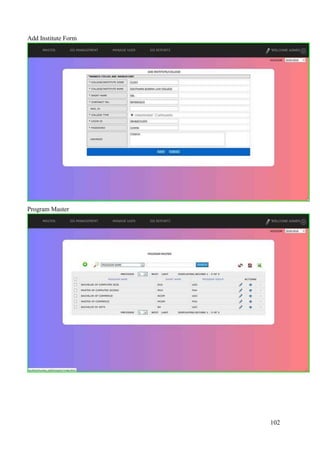
Institute_master.html This web form is use to create user for the system,
user are the colleges who will access the student
form for enter their detail
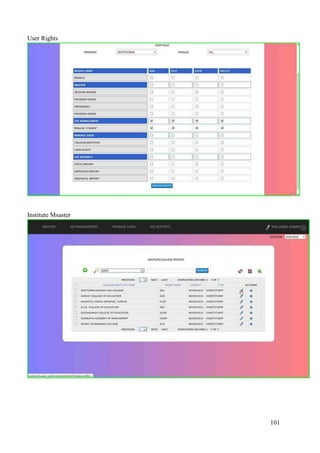
User_rights.html This web page is use to assign the rights to access
the module of the system.
Static_report.html This web page is used for display the static data of
the student , college wise i.e. admission statics,
boys-girls ration etc.
Graphical_report.html This is report is same as static report but show the
data in graphical form In pie & bar chart.
Admission_report.html This report is used for show the detail of
information of the student in college wise program
wise & comibine
32
5.2.1 Coding Sections
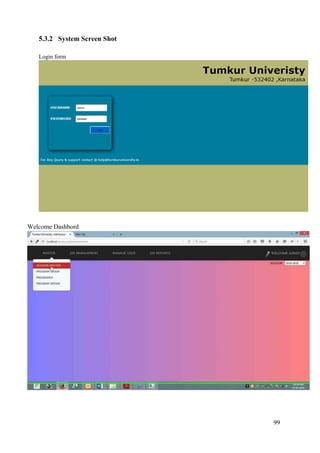
Login :
<?php
@session_start();
if(isset($_SESSION['user_name']))
{
header('location:welcome.html');}
?>
<!DOCTYPE HTML PUBLIC "-//W3C//DTD HTML 4.01 Transitional//EN"
"http://www.w3.org/TR/html4/loose.dtd">
<html>
<head>
<!-- TemplateBeginEditable name="doctitle" -->
<title>Tumkur Univeristy -Admission</title>
<!-- TemplateEndEditable -->
<link rel="shortcut icon" href="" />
<link type="text/css" rel="stylesheet" href="css/index.css">
<script type="text/javascript" src="js/jquery.min.js"></script>
<script type="text/javascript">
</script>
<!-- TemplateBeginEditable name="head" -->
<!-- TemplateEndEditable -->
</head>
<body style="background-color:#b7b775">
<div align="right" style="padding:15px;font-family:Verdana, Geneva, sans-serif"> <span
style="font-size:50px;"><strong>Tumkur Univeristy</strong><br>
<span style="font-size:27px;">Tumkur -532402 ,Karnataka </span></span> </div>
<div id="newsletter_subscription">
<form id="login" action="login_action.php" method="post" name="newsletter">
<div style="width: 300px; padding: 40px 10px; margin: 40px; border-radius: 10px 10px
10px 10px; border-color: rgb(255, 255, 255); box-shadow:4px 4px 16px #000000;">
<label for="username" id="name"><strong>USERNAME</strong></label>
&emsp;&nbsp;
<input name="username" <?php echo @$_SESSION['un'];@$_SESSION['un']=""?>
id="NL_user_name" type="text">
<br>
<br>
<label for="password"><strong>PASSWORD</strong></label>
&emsp;
33
<input name="password" id="password" type="password">
<br>
<br>
<input id="submit" value="Login" type="submit"/>
<label>&nbsp;</label>
<br>
<span>
<?php echo @$_SESSION['msg'];@$_SESSION['msg']="" ?>
&nbsp;</span> </div>
<span style="bottom:0;float:rights;"> For Any Query & support contact @ <span
style="text-transform:lowercase"><a href="mailto:help@tumkuruniversity.in" style="text-
decoration:none;color:#fff">help@tumkuruniversity.in</a></span></span>
</form>
</div>
</body>
<script type="text/javascript">
$(function(){
$('#submit').live('click',function(){
if($('#NL_user_name').val()=="")
{alert('Username Can Not Left Blank');return false;}
else if($('#password').val()=="")
{alert('Password Can Not Left Blank');return false;}
}
);
});
</script>
</html>
Login_action.php
<?php
include "conn.php";
@session_start();
if(isset($_POST['username']) && isset($_POST['password']))
{
foreach($_POST as $key=>$value)
{
$_POST[$key]=mysql_real_escape_string($value);
}
$user=$_POST['username'];
$password=$_POST['password'];
$query="SELECT id,institute_master_id, username, password, user_type FROM user
where username='{$user}' AND password='".sha1($password)."'";
//exit;
$data=mysql_query($query) or die("first error");
34
if(mysql_num_rows($data)==1)
{
$data=mysql_fetch_array($data);
if(strnatcasecmp($data['user_type'],'INST')===0)
{
$query="select * from institute_master where id='{$data['institute_master_id']}'";
$_SESSION['msg']="";
$inst_name=mysql_query($query);
$inst_name=mysql_fetch_array($inst_name) or die ("institute query error in
login_action");
$_SESSION['user_type']="INST";
$_SESSION['user_name']=$inst_name['name'];
$_SESSION['code']=$inst_name['code'];
$_SESSION['user_id'] =$inst_name['id'];
}
elseif(strnatcasecmp($data['user_type'],'ADMIN')===0)
{
$_SESSION['user_type']="ADMIN";
$_SESSION['user_name']="ADMIN";
$_SESSION['user_id']=0;
}
}
else
{
$_SESSION['msg']=' <center> <label style="font-size:14px;color: rgb(255, 159,
45);">Wrong Username Or Password</label></center>';
header('Location:index.php');
}
///////////////////GET ACTIVE SESSION //////////////////////////////////
$_SESSION['active_session']="";
$active_session=mysql_query("select * from session_master where visible='Y' AND
active='Y'");
if(mysql_num_rows($active_session)==1)
{
$active_session=mysql_fetch_array($active_session);
$_SESSION['active_session']=$active_session['session_name'];
$_SESSION['active_session_id']=$active_session['id'];
header('Location:welcome.php');
}
else
{$_SESSION['msg']=' <center> <label style="font-size:14px;color: rgb(255, 159,
45);">No Academic Session Active</label></center>';}
header('Location:index.php');
}
$_SESSION['un']="value='{$_POST['username']}'";
35
?>
Logout.php:
<?php
include "conn.php";
@session_unset();
@session_destroy();
header('location:index.php');
?>
Header.php
<?php
@mysql_connect('localhost','root','');
@mysql_select_db('tumkur_add');
@session_start();
ini_set('session.gc_maxlifetime',300);
putenv("allow_url_include=0");
$working_directory=explode('/',$_SERVER['REQUEST_URI']);
$_SESSION['working_directory']="/".current(array_filter($working_directory)).'/';
if(!isset($_SESSION['user_name']))
{
header("Location:{$_SESSION['working_directory']}/index.php");
}
else
{
$flag=0;
$query="SELECT
script_path FROM link_master lm RIGHT JOIN user_rights ur ON ur.`link_master_id` =
lm.`id` WHERE lm.visible='Y' AND ur.user_id= {$_SESSION['user_id']} AND ur.`role`
='".$_SESSION['user_type']."'";
$data=mysql_query($query);
if(mysql_num_rows($data))
{
while($sql=mysql_fetch_array($data))
{
$requested_path= $_SERVER['REQUEST_URI'];
$allowed_path=$_SESSION['working_directory'].$sql['script_path'];
36
if(strnatcasecmp($requested_path,$allowed_path)===0 ||
basename($_SERVER['REQUEST_URI'])==="welcome.html")
{$flag=1;
break;
}
}
}
}
?>
<!DOCTYPE HTML PUBLIC "-//W3C//DTD HTML 4.01 Transitional//EN">
<head>
<title>Tumkur Univeristy -Admission</title>
<link rel="shortcut icon" href="" />
<link type="text/css" rel="stylesheet" href="<?php echo $_SESSION['working_directory']
?>css/style.css">
<link type="text/css" rel="stylesheet" href="<?php echo $_SESSION['working_directory']
?>css/index.css">
<link type="text/css" rel="stylesheet" href="<?php echo $_SESSION['working_directory']
?>css/menu_styles.css">
<link type="text/css" rel="stylesheet" href="<?php echo $_SESSION['working_directory']
?>css/jquery-ui-1.8.4.custom.css">
<script type="text/javascript" src="<?php echo $_SESSION['working_directory']
?>js/jquery.min.js"></script>
<script type="text/javascript" src="<?php echo $_SESSION['working_directory']
?>js/jquery.js"></script>
<script src="<?php echo $_SESSION['working_directory'] ?> js/jquery-ui-
1.10.3.custom.min.js" type="text/javascript"></script>
<style>
* {
text-transform: uppercase;
}
</style>
</head>
<body>
<div id="wait" >
<img src="<?php echo $_SESSION['working_directory']?>images/ajax.gif" /></div>
<div id='cssmenu'>
<ul>
<?php
$query="SELECT * FROM link_master l RIGHT JOIN user_rights ur ON l.id =
ur.`link_master_id` WHERE ur.user_id ={$_SESSION['user_id']} AND
ur.`role`='{$_SESSION['user_type']}' AND l.`id` IS NOT NULL AND l.visible='Y'
GROUP BY l.id ORDER BY link_master , index_value ";
$data=mysql_query($query);
$i=0;
37
while($sql=mysql_fetch_array($data))
{
if($sql['index_value']==1)
{
$i++;
echo "<li class='parent {$i}'><a
href='".$_SESSION['working_directory'].$sql['script_path']."'><span>".$sql['caption']."</spa
n></a><li>";
}
if($sql['index_value']>1)
{
echo "<li class='has_sub sub_{$i}'><a
href='".$_SESSION['working_directory'].strtolower($sql['script_path'])."'><span>".$sql['capt
ion']."</span></a></li>";
}
}
?>
</ul>
<span id='welcome'>
<ul>
<li> <a href="<?php echo $_SESSION['working_directory'] ?>setting.html" id="setting">
<div>SETTING</div>
</a> </li>
<li> <?php echo "WELCOME ".strtoupper($_SESSION['user_name']);?> </li>
<li><a href="<?php echo $_SESSION['working_directory']; ?>logout.html" id="logout">
<div></div>
</a> </li>
</ul>
</span> </div>
<div id='notification'>
<?php
if(@$_SESSION['active_session']=="")
{
$query="select * from session_master where active='Y' AND visible ='Y'";
$active_session=mysql_query($query);
if(mysql_num_rows($active_session))
{
$active_session=mysql_fetch_array($active_session);
$_SESSION['active_session']=$active_session['session_name'];
$_SESSION['active_session_id']=$active_session['id'];;
}
}
if(isset($_SESSION['active_session']))
{if(@$_SESSION['active_session']!="")
38
{echo '<span style="float:right">SESSION&emsp;<select name="session"
style="width:100px" class="selecteclass"><option selected="selected"
value="1">'.$_SESSION['active_session'].'</option></select></span>';
}}
echo '<span id="notification-line" style="float:left;color:#ffffff;font-
weight:bold">&nbsp;'.$_SESSION['msg'].'</span>';
$_SESSION['msg']="";
ob_start();
include_once "export.php";
$xls= new Export();
?>
</div>
<script type="text/javascript">
$(function(){
var parent=$('.parent');
for(i=1;i<=parent.length;i++)
{var child_menu="";
child=$('.sub_'+i);
$('.'+i).append('<ul></ul>');
for(j=1;j<=child.length;j++)
{$('.'+i).find('ul').append($('.sub_'+i));
}
}
})
</script>
Manage.php:
<?php
include "conn.php";
@session_start();
// echo "<pre>";
//$handicaped=array(1=>'HEARING IMPAIRED', 'VISUALLY IMPAIRED',
'ORTHOPAEDICALLY IMPAIRED','MENTALLY CHALLANGED','OTHER') ;
if(!count($_REQUEST))
{
echo "<h1>Forbidden Page</h1>";}
if(isset($_POST['p_id']))
{
$array=$_POST['checked'];
$result="";
foreach($array as $k=>$id)
39
{ $result.= "'".$id."',";}
$result.="'qazwsxedc'";
$result=mysql_query("update prgram_master set visible = 'N' where id
IN(".$result.")") or die(mysql_error()); }
if(isset($_POST['country']) && isset($_POST['level']))
{
if($_POST['country']!="" && $_POST['level']!="")
{
$query="SELECT `state_id`, `state`, `shortname` FROM `state_masters`
where removed='N' AND country_id=".$_POST['country'] ;
$data=mysql_query($query) or die("State Error");
$sql=mysql_fetch_array($data);
$content='<option value="-1" selected="selected">SELECT</option>';
while($sql=mysql_fetch_array($data))
{
$content.='<option value="'.$sql['state_id'].'" data-
id="'.$sql['id'].$sql['shortname'].'">'.$sql['state'].'</option>';
}
echo $content;
}
}
if(isset($_POST['city']) && isset($_POST['state']))
{
if($_POST['city']!="" && $_POST['state']!="")
{
$query="SELECT `city_id`, `statecity_id`, `city`, `shortname` FROM
`city_masters` where visible='Y' AND statecity_id=".$_POST['state']." order by city" ;
$data=mysql_query($query) or die("City Error");
$content='<option value="-1" selected="selected">SELECT</option>';
while($sql=mysql_fetch_array($data))
{
$content.='<option value="'.$sql['id'].'" data-
id="'.$sql['id'].$sql['shortname'].'">'.$sql['city'].'</option>';
}
echo $content;
}
}
/////////////////////////for branch //////////////////////////////////////
if(isset($_POST['st_programb']) && isset($_POST['COR_NAME']))
{
foreach($_POST as $key=> $value)
{$_POST[$key]=$value;}
$program=$_POST['COR_NAME'];
40
$ins_id=$_POST['st_programb'];
if(isset($_SESSION['user_id']))
{
$ins_id=$_SESSION['user_id'];
}
$query="SELECT bm.id, UPPER(bm.`name`) AS NAME FROM branch_masters bm
WHERE bm.id IN(SELECT branch_master_id FROM program_branch_trans WHERE
`program_master_id`=$program) ORDER BY id ";
$_SESSION['user_code'];
}
if(isset($_POST['inst_me']) && isset($_POST['inst_ad']))
{
foreach($_POST as $key=>$value)
{$_POST[$key]=mysql_real_escape_string($value);}
$query="SELECT PM.`short_name` ,PM.`id` FROM program_intake_trans PIT LEFT
JOIN program_master PM ON PIT.`program_master_id`=PM.id WHERE
PIT.`session_masters_id`={$_SESSION['active_session_id']} AND
PIT.`institute_master_id`={$_POST['inst_me']} AND PM.`visible`='y'";
$data=mysql_query($query) or die(mysql_error());
$content=' <option value="-1" >SELECT</option>';
if(mysql_num_rows($data))
{
while($sql=mysql_fetch_array($data))
{
$content.= '<option value="'.$sql['id'].'" data-
id="'.$sql['short_name'].'"><span>'.$sql['short_name'].'</span></option>';
}
}
echo $content;
}
if(isset($_POST['get_branch'])&& isset($_POST['branch']) )
{
$content="";
foreach($_POST as $key =>$value)
{$_POST[$key]=mysql_real_escape_string($value);}
if(isset($_POST['inst_me']))
{$user_id=$_POST['inst_me'];
}
if(isset($_SESSION['user_id']))
{
$user_id=$_SESSION['user_id'];
}
41
$query="SELECT DISTINCT bm.id,bm.name,pbt.`intake` FROM branch_masters bm,
program_branch_trans pbt WHERE bm.visible='Y' AND BM.`id`=PBT.`branch_master_id`
AND bm.id IN (SELECT branch_master_id FROM program_branch_trans WHERE
program_master_id={$_POST['get_branch']} AND institute_master_id='{$user_id}')";
$data=mysql_query($query);
if(@mysql_num_rows($data))
{
while($sql=mysql_fetch_array($data))
{$content.= '<option value="'.$sql['id'].'" data-
id="'.$sql['id'].'"><span>'.$sql['name'].'</span></option>';
}
echo ' <tr id="btr">
<th class="myclass" width="32%">&nbsp;*&nbsp;SELECT BRANCH</th>
<td class="myclass md" colspan="5" ><SELECT class="selectclass"
name="BATCH" id="BATCH">
<option selected="selected">SELECT</option>
'.$content.'
</select>
</td>
</tr>';
}
}
if(isset($_POST['course']) && isset($_POST['level']))
{
if($_POST['course']!="" && $_POST['level']!="")
{
$query="SELECT `id`, `duration`, `branch`, `caption`
FROM `program_master`
where visible='Y' AND id=".$_POST['course'] ;
$data=mysql_query($query) or die(mysql_error());
$sql=mysql_fetch_array($data);
$content='<option value="-1">SELECT</option>';
for($i=1;$i<=$sql['duration'];$i++)
{
$content.='<option value="'.$i.'" data-id="'.$i.'-'.$sql['caption'].'">'.strtoupper($i.'
'.$sql['caption']).'</option>';
}
echo $content;
}
}
function get_limit($getinto,$branch,$prg_set_it,$inst_me=0)
{
$user_id=-1;
42
if(isset($_SESSION['user_id']))
{
$user_id=$_SESSION['user_id'];
}
if($inst_me!=0 && $inst_me!==true)
{$user_id=$inst_me;
}
$query="SELECT intake FROM program_intake_trans WHERE
program_master_id={$prg_set_it} AND institute_master_id={$user_id} AND
branch_master_id={$branch} AND
session_masters_id={$_SESSION['active_session_id']}";
$intake= mysql_query($query);
if(mysql_num_rows($intake)==1)
{
$intake=mysql_fetch_array($intake);
$intake=$intake['intake'];
}
else
{$intake=0;
}
$query="SELECT COUNT(id) as total FROM student_masters WHERE
institute_master_id={$user_id} AND branch_master_id={$branch} AND
program_master_id={$prg_set_it} AND session_master_id =
{$_SESSION['active_session_id']}";;
$data= mysql_query($query);
if(mysql_num_rows($data)==1)
{
$data=mysql_fetch_array($data);
if($data['total']==$intake)
{return 0;}
return $data['total'].'_'.$intake;
}
else
return "0".'_'.$intake;
}
if(isset($_POST['getinto']) && isset($_POST['branch']) &&
isset($_POST['prg_set_it']))
{
foreach($_POST as $key=> $value)
{$_POST[$key]=$value;}
$user_id=-1;
if(isset($_POST['inst_me']))
43
{
if($_POST['inst_me']===true)
$user_id=$_SESSION['user_id'];
else
$user_id=$_POST['inst_me'];
}
echo get_limit($_POST['getinto'] ,$_POST['branch'],$_POST['prg_set_it'],$user_id);
exit();
/*
$query="SELECT intake FROM program_intake_trans WHERE
program_master_id={$_POST['prg_set_it']} AND institute_master_id={$user_id} AND
branch_master_id={$_POST['branch']} AND
session_master_id={$_SESSION['active_session_id']}";
$intake= mysql_query($query);
if(mysql_num_rows($intake)==1)
{
$intake=mysql_fetch_array($intake);
$intake=$intake['intake'];
}
else
{
$query="SELECT intake FROM `program_branch_trans` WHERE
program_master_id={$_POST['prg_set_it']} AND institute_master_id={$user_id} AND
branch_master_id={$_POST['branch']} AND
session_master_id={$_SESSION['active_session_id']}";
$intake=mysql_query($query);
if(mysql_num_rows($intake)==1)
{$intake=mysql_fetch_array($intake);
$intake=$intake['intake'];
}else
{$intake=0;
} }
$query="SELECT COUNT(id) as total FROM student_masters WHERE
institute_master_id={$user_id} AND branch_master_id={$_POST['branch']} AND
program_master_id={$_POST['prg_set_it']}";
$data= mysql_query($query);
if(mysql_num_rows($data)==1)
{
$data=mysql_fetch_array($data);
echo $total_allocated=$data['total'].'_'.$intake;
}
else
echo "0".'_'.$intake;
*/
44
}
if(isset($_POST['getpg']) && isset($_POST['assign_pg']))
{
$query="SELECT pm.id, pm.name, pm.short_name FROM program_master pm WHERE
pm.program_group_master_id={$_POST['getpg']} AND pm.visible='Y'";
$data=mysql_query($query) or die("City Error");
$content='<option value="-1">SELECT</option>';
while($sql=mysql_fetch_array($data))
{
$content.='<option value="'.$sql['id'].'" data-
id="'.$sql['id'].$sql['short_name'].'">'.$sql['short_name'].'</option>';
}
echo $content;
exit();
}
/////////////////////////////////////////Check for active session/////////////////////////////////////////////////////
if(isset($_GET['session']))
{
$id=base64_decode($_GET['session']);
$query="select * from session_master where active='Y' AND visible ='Y'";
if(mysql_num_rows(mysql_query($query)))
{
$is_active=mysql_query("select * from session_master where active='Y' AND visible ='Y'
AND id=$id");
if(mysql_num_rows($is_active))
{
mysql_query("update session_master set active='N' where visible='Y'");
$_SESSION['msg']="SESSION HAS INACTIVE NOW";
$_SESSION['active_session']="";
$_SESSION['active_session_id']=0;}
else
{
$_SESSION['msg']=" AT A TIME ONLY ONE SESSION CAN BE ACTIVE";}
}
45
else
{
mysql_query("update session_master set active='N' where visible='Y'");
$query="update session_master set active='Y' where visible='Y' AND id=$id";
$success=mysql_query($query);
if($success)
{$_SESSION['active_session']="";
$_SESSION['msg']="SESSION HAS BEEN ACTIVATED";
}
}
header('Location:session_master') ;
}
//////////////////////////////////////////////////////////////////////////////////////////////////////////
if( (isset($_POST['st_save']) || isset($_POST['st_n_save'])))
{
//if($_POST['stumaster']!='de54gdg758jgtyuom463sqwe243a')
{
echo $_SESSION['msg']="TOKEN KEY HAS BROKEN";
}
foreach($_POST as $key=>$value)
{
///////////////////////// for 1 dimentional array ////////////////////
if(!is_array($_POST[$key]))
{
$_POST[$key]=mysql_real_escape_string($value);
}
///////////////////////////for 2 diemntional array ////////////////////////
elseif(is_array($_POST[$key]))
{
foreach($value as $index=>$index_value)
{
$_POST[$key][$index]=mysql_real_escape_string($index_value);
}
}
}
if(isset($_SESSION['user_id']) && $_SESSION['user_type']!=='ADMIN')
{ $user_id=$_SESSION['user_id'];}
elseif(isset($_POST['inst_name']))
{$user_id=$_POST['inst_name'];}
$handicaped="";
if(isset($_POST['IS_HANDI']))
{
46
$handicaped=$_POST['IS_HANDI'];}
$s_name=$_POST['S_F_NAME'];
//$l_name=$_POST['S_L_NAME'];
///////////////////////////////////// QUERY FOR INSERT INTO STUDENT MASTER
///////////////////////////////////
$st_id=mysql_query("SELECT (MAX(id)+1) AS student_id FROM`student_masters`");
if(mysql_num_rows($st_id))
{
$st_id=mysql_fetch_array($st_id);
$st_id=$st_id['student_id'];
}
else
$st_id=1;
echo $st_id;
$upload_form="";
$upload_image="";
if(isset($_FILES['ST_FORM']) && $_FILES['ST_FORM']['size']>0)
{
print_r($_FILES['ST_FORM']);
$upload_form=addslashes(file_get_contents($_FILES['ST_FORM']['tmp_name']));
}
if(isset($_FILES['ST_PHOTO']) && $_FILES['ST_PHOTO']['size']>0)
{
print_r($_FILES['ST_PHOTO']);
$upload_image=addslashes(file_get_contents($_FILES['ST_PHOTO']['tmp_name']));
}
$branch="-1";
if(isset($_POST['BRANCH']))
{$branch=$_POST['BRANCH'];
}
$flag=get_limit(1,$branch,$_POST['COR_NAME'],$user_id);
if($flag!==0)
{
if($_POST['AD_DATE']!="")
{
$date=@explode('-',$_POST['AD_DATE']);
$_POST['AD_DATE']=@$date[2].'-'.@$date[1].'-'.@$date[0];
}
if($_POST['JOIN_DATE']!="")
{
$date=@explode('-',$_POST['JOIN_DATE']);
$_POST['JOIN_DATE']=@$date[2].'-'.@$date[1].'-'.@$date[0];
}
47
if(isset($_POST['REG_DATE']))
{
$date=@explode('-',$_POST['REG_DATE']);
$_POST['REG_DATE']=@$date[2].'-'.@$date[1].'-'.@$date[0];
}
echo $query="INSERT INTO `student_masters`
(
`institute_master_id`,
`program_master_id`,
`level`,
`branch_master_id`,
`date_of_admission`,
`nationality_master_id`,
`religion_master_id`,
`caste_master_id`,
`enrollment_number`,
`roll_number`,
`registration_date`,
`registration_number`,
`form_number`,
`admission_test_roll_no`,
`physically_handicapped`,
`blood_group`,
upload_form,
upload_image,
doj,
session_master_id)
VALUES (
'".$user_id."',
'".$_POST['COR_NAME']."',
'".$_POST['LEVEL']."',
'".$branch."',
'".$_POST['AD_DATE']."',
'".$_POST['ST_NATION']."',
'".$_POST['RELIGION']."',
'".$_POST['CATEGORY']."',
'".$_POST['ENRL_NO']."',
'".$_POST['ROLL_NO']."',
'".$_POST['REG_DATE']."',
'".$_POST['REG_NO']."',
'".$_POST['FORM_NO']."',
'".$_POST['ADD_ROLL_NO']."',
'".$handicaped."',
'".$_POST['ST_BLD_GRP']."',
'".$upload_form."',
'".$upload_image."',
'{$_POST['JOIN_DATE']}',
48
'{$_SESSION['active_session_id']}'
)";
mysql_query($query);
$st_id=mysql_insert_id();
/*if(isset($_FILES['ST_FORM']))
{
$ext=substr($_FILES['ST_FORM']['name'],strrpos($_FILES['ST_FORM']['name'],'.')
);
move_uploaded_file($_FILES['ST_FORM']['tmp_name'],'student_management/st_images/f_'
.sha1($st_id).$ext);
}
if(isset($_FILES['ST_PHOTO']))
{
$ext=substr($_FILES['ST_PHOTO']['name'],strrpos($_FILES['ST_PHOTO']['name'],'
.'));
move_uploaded_file($_FILES['ST_PHOTO']['tmp_name'],'student_management/st_i
mages/i_'.sha1($st_id).$ext);}
*/
///////////////////////////////////////////////////////////////////////////////////////////////////////
$date=explode('-',$_POST['ST_DOB']);
$_POST['ST_DOB']=$date[2].'-'.$date[1].'-'.$date[0];
//////////////////// QUERY FOR INSERT INTO STUDENT_INFO_MASTER BY INSERTING
STUDENT_MASTER_ID//////////////////
$active_session=$_SESSION['active_session_id'];
echo $query="INSERT INTO `student_info_masters`
(`student_master_id`,
`form_no`,
`name`,
`fname`,
`dob`,
`gender`,
title_master_id,
`correspondance_address`,
`address`,
`pincode`,
`phone`,
`mobile`,
`email`,
session_master_id
)
VALUES ($st_id,
'".$_POST['FORM_NO']."',
'".$s_name."',
'".$_POST['ST_FA_NAME']."',
49
'".$_POST['ST_DOB']."',
'".$_POST['ST_GEN']."',
'{$_POST['TITLE']}',
'".$_POST['ST_CO_ADD']."',
'".$_POST['ST_P_ADD']."',
'".$_POST['PIN_NO']."',
'".$_POST['PHONE_NO']."',
'".$_POST['MOBILE_NO']."',
'".$_POST['EMAIL']."',
'".$active_session."'
);";
mysql_query($query) or die('student_info_masters errors');
//echo count($_POST['ST_UB_NAME']);
for($i=0;$i<count($_POST['ST_UB_NAME']);$i++)
{
if($_POST['ST_UB_NAME']!="")
{
$query="INSERT INTO `student_academic_trans`
(`student_master_id`,
`institute_name`,
`last_class`,
`percentage`,
`max_marks`,
`obt_marks`,
`board_name`)
VALUES ('$st_id',
'".$_POST['ST_INS_NAME'][$i]."',
'".$_POST['PR_COURSE'][$i]."',
'".$_POST['ST_PER'][$i]."',
'".$_POST['ST_MAX'][$i]."',
'".$_POST['ST_MARKS'][$i]."',
'".$_POST['ST_UB_NAME'][$i]."');";
mysql_query($query) ;
}
else
{break;}
}
/*$date=explode('-',$_POST['ST_C_DATE']);
$_POST['ST_C_DATE']=@$date[2].'-'.@$date[1].'-'.@$date[0];
$query="INSERT INTO `student_bank_trans`
(`account_name`,
`account_number`,
`mandate_number`,
`student_master_id`,
`bank_name`,
`bank_branch_name`,
50
`payment_method`,
`amount`,
`dd_check__no`,
`dd_check_date`)
VALUES ('".$_POST['ST_AC_NAME']."',
'".$_POST['ST_AC_NO']."',
'".$_POST['ST_MANDATE']."',
'".$st_id."',
'".$_POST['ST_BANK']."',
'".$_POST['ST_BANK_BRANCH']."',
'".$_POST['ST_PAY_MT']."',
'".$_POST['ST_AMT']."',
'".$_POST['ST_C_NO']."',
'".$_POST['ST_C_DATE']."');
"; */
mysql_query($query) or die("STUDENT DATA IS NOT ABLE TO SAVE")
;
$_SESSION['msg']='RECORD HAS BEEN SAVED' ;
if(isset($_POST['st_n_save']))
{ header('location:student_management/student_add.php');
}
else
{ header('location:student_management/');
}
}
else
{
$_SESSION['msg']='ALL SEAT HAS FULL IN SELECTED COURSE';
//header('location:student_management/student_add.php');
}
}
//////////////////////////////////////////////////////////////////////////////////////////////////////
//////////////////////////////////////////////////////////////////////////////////////////////////////////
if(isset($_POST['stu_save']))
{
/* if($_POST['stumaster']!='de54gdg758jgtyuom463sqwe243a')
{
echo $_SESSION['msg']="TOKEN KEY HAS BROKEN";
}*/
foreach($_POST as $key=>$value)
51
{
///////////////////////// for 1 dimentional array ////////////////////
if(!is_array($_POST[$key]))
{
$_POST[$key]=mysql_real_escape_string($value);
}
///////////////////////////for 2 diemntional array ////////////////////////
elseif(is_array($_POST[$key]))
{
foreach($value as $index=>$index_value)
{
$_POST[$key][$index]=mysql_real_escape_string($index_value);
}
}
}
if(isset($_SESSION['user_id']) && $_SESSION['user_type']!=='ADMIN')
{ $user_id=$_SESSION['user_id'];}
elseif(isset($_POST['inst_name']))
{$user_id=$_POST['inst_name'];}
$handicaped="";
if(isset($_POST['IS_HANDI']))
{
$handicaped=$_POST['IS_HANDI'];}
$s_name=$_POST['S_F_NAME'];
//$l_name=$_POST['S_L_NAME'];
///////////////////////////////////// QUERY FOR update INTO STUDENT MASTER
///////////////////////////////////
$st_id=base64_decode($_POST['st_id']);
$upload_form="";
$upload_image="";
if(isset($_FILES['ST_FORM']) && $_FILES['ST_FORM']['size']>0)
{
print_r($_FILES['ST_FORM']);
$upload_form=addslashes(file_get_contents($_FILES['ST_FORM']['tmp_name']));
}
if(isset($_FILES['ST_PHOTO']) && $_FILES['ST_PHOTO']['size']>0)
{
print_r($_FILES['ST_PHOTO']);
$upload_image=addslashes(file_get_contents($_FILES['ST_PHOTO']['tmp_name']));
}
$branch="-1";
if(isset($_POST['BRANCH']))
{$branch=$_POST['BRANCH'];
}
52
$flag=get_limit(1,$branch,$_POST['COR_NAME'],$user_id);
if($flag!==0)
{
if($_POST['AD_DATE']!="")
{
$date=@explode('-',$_POST['AD_DATE']);
$_POST['AD_DATE']=@$date[2].'-'.@$date[1].'-'.@$date[0];
}
if($_POST['JOIN_DATE']!="")
{
$date=@explode('-',$_POST['JOIN_DATE']);
$_POST['JOIN_DATE']=@$date[2].'-'.@$date[1].'-'.@$date[0];
}
if(isset($_POST['REG_DATE']))
{
$date=@explode('-',$_POST['REG_DATE']);
$_POST['REG_DATE']=@$date[2].'-'.@$date[1].'-'.@$date[0];
}
$query="UPDATE `student_masters`
SET
`institute_master_id`= '".$user_id."',
`program_master_id`= '".$_POST['COR_NAME']."',
`level`='".$_POST['LEVEL']."',
`branch_master_id`= '".$branch."',
`date_of_admission`= '".$_POST['AD_DATE']."',
`nationality_master_id`= '".$_POST['ST_NATION']."',
`religion_master_id`='".$_POST['RELIGION']."',
`caste_master_id`= '".$_POST['CATEGORY']."',
`enrollment_number`= '".$_POST['ENRL_NO']."',
`roll_number`= '".$_POST['ROLL_NO']."',
`registration_date`= '".$_POST['REG_DATE']."',
`registration_number`= '".$_POST['REG_NO']."',
`form_number`= '".$_POST['FORM_NO']."',
`admission_test_roll_no`= '".$_POST['ADD_ROLL_NO']."',
`physically_handicapped`='".$handicaped."',
`blood_group`='".$_POST['ST_BLD_GRP']."',
upload_form='".$upload_form."',
upload_image='".$upload_image."',
doj='{$_POST['JOIN_DATE']}' WHERE id={$st_id}";
mysql_query($query);
/*if(isset($_FILES['ST_FORM']))
{
$ext=substr($_FILES['ST_FORM']['name'],strrpos($_FILES['ST_FORM']['name'],'.')
);
53
move_uploaded_file($_FILES['ST_FORM']['tmp_name'],'student_management/st_images/f_'
.sha1($st_id).$ext);
}
if(isset($_FILES['ST_PHOTO']))
{
$ext=substr($_FILES['ST_PHOTO']['name'],strrpos($_FILES['ST_PHOTO']['name'],'
.'));
move_uploaded_file($_FILES['ST_PHOTO']['tmp_name'],'student_management/st_i
mages/i_'.sha1($st_id).$ext);}
*/
///////////////////////////////////////////////////////////////////////////////////////////////////////
$date=explode('-',$_POST['ST_DOB']);
$_POST['ST_DOB']=$date[2].'-'.$date[1].'-'.$date[0];
//////////////////// QUERY FOR UPDATE STUDENT_INFO_MASTER BY INSERTING
STUDENT_MASTER_ID//////////////////
$active_session=$_SESSION['active_session_id'];
echo $query="UPDATE `student_info_masters`
SET
`form_no`= '".$_POST['FORM_NO']."',
`name`='".$s_name."',
`fname`='".$_POST['ST_FA_NAME']."',
`dob`='".$_POST['ST_DOB']."',
`gender`='".$_POST['ST_GEN']."',
title_master_id='{$_POST['TITLE']}',
`correspondance_address`='".$_POST['ST_CO_ADD']."',
`address`='".$_POST['ST_P_ADD']."',
`pincode`='".$_POST['PIN_NO']."',
`phone`='".$_POST['PHONE_NO']."',
`mobile`='".$_POST['MOBILE_NO']."',
`email`='".$_POST['EMAIL']."'
WHERE `student_master_id`={$st_id}";
mysql_query($query) or die('student_info_masters errors');
//echo count($_POST['ST_UB_NAME']);
for($i=0;$i<count($_POST['ST_UB_NAME']);$i++)
{
if($_POST['ST_UB_NAME']!="")
{
mysql_query("DELETE FROM `student_academic_trans` WHERE
student_master_id={$st_id}") ;
$query="INSERT INTO
(`student_master_id`,
`institute_name`,
`last_class`,
`percentage`,
54
`max_marks`,
`obt_marks`,
`board_name`)
VALUES ('$st_id',
'".$_POST['ST_INS_NAME'][$i]."',
'".$_POST['PR_COURSE'][$i]."',
'".$_POST['ST_PER'][$i]."',
'".$_POST['ST_MAX'][$i]."',
'".$_POST['ST_MARKS'][$i]."',
'".$_POST['ST_UB_NAME'][$i]."');";
mysql_query($query) ;
}
else
{break;}
}
/*$date=explode('-',$_POST['ST_C_DATE']);
$_POST['ST_C_DATE']=@$date[2].'-'.@$date[1].'-'.@$date[0];
$query="update `student_bank_trans`
set `account_name`'".$_POST['ST_AC_NAME']."',
`account_number`= '".$_POST['ST_AC_NO']."',
`mandate_number`='".$_POST['ST_MANDATE']."',
`bank_name`= '".$_POST['ST_BANK']."',
`bank_branch_name`= '".$_POST['ST_BANK_BRANCH']."',
`payment_method`= '".$_POST['ST_PAY_MT']."',
`amount`= '".$_POST['ST_AMT']."',
`dd_check__no`= '".$_POST['ST_C_NO']."',
`dd_check_date`= '".$_POST['ST_C_DATE']."'
where `student_master_id`= '".$st_id."'
"; */
mysql_query($query) or die("STUDENT DATA IS NOT ABLE TO SAVE")
;
$_SESSION['msg']='RECORD HAS BEEN SAVED' ;
if(isset($_POST['stu_save']))
{ header('location:student_management/');
}
}
else
{
//$_SESSION['msg']='ALL SEAT HAS FULL IN SELECTED COURSE';
//header('location:student_management/student_add.php');
}
}
///////////////////////////////////////////STUDENT Updates ends//////////////////////////////////////////////
55
if(isset($_POST['program']) and (isset($_POST['assign_pg']) || isset($_POST['branch'])))
{
$pg=$_POST['pg'];
if(isset($_POST['ci_type']))
{
$ci_type=$_POST['ci_type'];
}
$program= $_POST['program'];
$session=1;
// to retrivce user who are not assinging in selected role;
$query="SELECT
i.id,
UPPER(i.name) AS NAME
FROM
institute_master i
WHERE i.id NOT IN
(SELECT DISTINCT
i.id
FROM
institute_master i
LEFT JOIN program_intake_trans pit
ON pit.`institute_master_id` = i.id
WHERE `program_master_id` = '{$program}'
AND pit.`session_masters_id` =".$_SESSION['active_session_id']."
ORDER BY i.`id`)
AND i.visible = 'Y'
ORDER BY i.name";
if( isset($_POST['branch']))
{
//echo $query="SELECT bm.id, pit.intake, UPPER(bm.`name`) AS NAME FROM
branch_masters bm, `program_branch_trans` pit WHERE bm.`id`=pit.`branch_master_id`
AND bm.id NOT IN(SELECT branch_master_id FROM program_branch_trans WHERE
`program_master_id`=$program AND institute_master_id='{$ci_type}') ORDER BY id ";
// AND `session_masters_id`={$session})
$query="SELECT bm.id, UPPER(bm.`name`) AS NAME FROM branch_masters bm
WHERE bm.id NOT IN(SELECT DISTINCT branch_master_id FROM
program_branch_trans WHERE `program_master_id`=$program AND
institute_master_id='{$ci_type}') AND bm.visible='Y' ORDER BY id ";
}
$not_assign=@mysql_query($query);
56
// to retrive user who have assinged in selected role
// $query="SELECT DISTINCT i.`id`,pit.intake, UPPER(i.`name`) AS NAME FROM
`institute_master` i,`program_branch_trans` pit WHERE i.id IN(SELECT
`institute_master_id` FROM `program_intake_trans` pit,institute_master i WHERE
i.id=pit.`institute_master_id` AND `program_master_id`='{$program}' ORDER BY
i.`name`) ";
//AND `session_masters_id`={$session}
$query="SELECT
i.id,
pit.intake,
UPPER(i.name) AS NAME
FROM
institute_master i LEFT JOIN
program_intake_trans pit
ON pit.institute_master_id =i.id
WHERE `program_master_id` = '{$program}'
AND pit.`session_masters_id` = ".$_SESSION['active_session_id']."
AND i.id IN
(SELECT DISTINCT
i.id
FROM
institute_master i
LEFT JOIN program_intake_trans pit
ON pit.`institute_master_id` = i.id
WHERE `program_master_id` = '{$program}'
AND pit.`session_masters_id` = ".$_SESSION['active_session_id']."
ORDER BY i.`id`)
ORDER BY i.name";
// same here for if user is client
if( isset($_POST['branch']))
{
$query="SELECT bm.id, pit.intake, UPPER(bm.`name`) AS NAME FROM
branch_masters bm, program_branch_trans pit WHERE bm.`id`=pit.`branch_master_id`
AND bm.id IN(SELECT branch_master_id FROM program_branch_trans WHERE
`program_master_id`=$program AND institute_master_id='{$ci_type}') ORDER BY id ";
// AND `session_masters_id`={$session})
}
$assign_content="";
$not_assing_connent="";
$assign=mysql_query($query) or die(mysql_error());
while($sql=mysql_fetch_array($assign))
{
57
$assign_content.="<tr><td class='myclass' width='22px'><input type='checkbox'
name='ci_type' value='{$sql['id']}'></td><td class='myclass'>{$sql['NAME']}<input
style='float:right' value='{$sql['intake']}' type='text' class='intake_a number' size='3'
maxlength='3'></td></tr>
";}
while($sql=mysql_fetch_array($not_assign))
{
$not_assing_connent.="<tr><td class='myclass' width='22px'><input type='checkbox'
value='{$sql['id']}'></td><td class='myclass'>{$sql['NAME']}<input style='float:right'
type='text' class='intake_u number' size='3' maxlength='3'></td></tr>";
}
$contents=" <table border='0px'>
<tbody>
<tr>
<td rowspan='3'><div class='form_div' style='width:350px; height:350px; overflow:auto;
margin:0px'>
<table id='unassign' width='100%'>
<tr class='a'><td class='myclass' width='22px'><input type='checkbox' onclick='return
checkall(this)'></td><td class='myclass'><strong><center>COLLEGES -
UNASSIGNED&nbsp;<input style='float:right' type='text' id='intake_u' class='intake_u
number' size='3' maxlength='3'></center></strong></td></tr>$not_assing_connent
</table>
</div>
</td>
<td>&nbsp;</td>
</td>
<td rowspan='3'><div class='form_div' style='width:350px; height:350px; overflow:auto;
margin:0px'>
<table id='assign' width='100%'>
<tr class='b checkbox'><td class='myclass' width='22px'><input type='checkbox'></td><td
class='myclass'><strong><center>COLLEGE - ASSIGNED<input style='float:right'
type='text' class='intake_a number' disabled='disabled' id='intake_a' size='3'
maxlength='3'></center></strong></td></tr>$assign_content
</table>
</div>
</td>
</tr>
<tr>
<td> <ul class='right_link_ul'><li id='move_right' class='li'></li>
<li class='li' id='move_left'></li>
</ul>
</td></tr>
<tr><td>&nbsp;</td></tr>".' <tr><td colspan="3">
58
<center><input type="submit" class="submitclass" name="b_save" id="b_save"
value="SAVE" >&emsp;<input type="submit" name="b_cancel" value="CANCEL"
id="b_cancel" class="submitclass" ></center></td>
</tr>
'."
</tbody>
</table>
</div>
</center>
</div>
";
echo $contents;
}
if(isset($_POST['program']) and isset($_POST['intake']) and
(isset($_POST['ci_type']) || isset($_POST['assign']) or isset($_POST['unassign'])))
{
$program=$_POST['program'];
$intake=$_POST['intake'];
if(isset($_POST['assign']))
{
$assign=$_POST['assign'];
}
elseif(isset($_POST['unassign']))
{
$assign=$_POST['unassign'];
}
foreach($assign as $key =>$value)
{
$branch=-1;
$institute=$value;
if(isset($_POST['ci_type']))
{ $branch=$value;
$institute=$_POST['ci_type'];
}
if(isset($_POST['assign']))
{
echo $intake_value=$intake[$key];
if($intake_value=="")
{$intake_value=0;
}
59
$query="INSERT INTO `program_intake_trans` ( `program_master_id`,
`institute_master_id`,`intake`, `branch_master_id`,`session_masters_id`)
VALUES ( {$program}, {$institute},{$intake_value},{$branch},
'{$_SESSION['active_session_id']}')";
if(isset($_POST['ci_type']))
{
$query="INSERT INTO `program_branch_trans`
(`program_master_id`,`branch_master_id`, `intake`,`institute_master_id`,session_masters_id)
VALUES ('{$program}','$branch', '{$intake_value}',
'{$institute}','{$_SESSION['active_session_id']}')"; }
}
elseif(isset($_POST['unassign']))
{
$query ="DELETE FROM `program_intake_trans` WHERE
program_master_id='{$program}' and institute_master_id=$institute";
if(isset($_POST['ci_type']))
{
$query="DELETE FROM `program_branch_trans` WHERE
program_master_id='{$program}' and institute_master_id=$institute AND
branch_master_id= $branch";
}
}
// echo $query."hitesh";
@mysql_query($query) or die("ERROR");
}
}
if(isset($_POST['delete_inst']) && isset($_POST['delete_inst_data']))
{
$data=explode('__',$_POST['delete_inst_data']);
print_r($data);
foreach($data as $value)
{
$query= "update ";
}
}
///////////////////////////////////////////////////////////////////////////////////////////////
//-------------------fetch module function for users ---------------------------------------//
if(isset($_POST['assign_rg'])&& isset($_POST['pg_mod']['id']) &&
isset($_POST['pg_mod']['name']) && isset($_POST['user_type']['id']) &&
isset($_POST['user_type']['short']))
{
$module_filter="";
60
foreach($_POST as $key=>$value)
{
///////////////////////// for 1 dimentional array ////////////////////
if(!is_array($_POST[$key]))
{
$_POST[$key]=mysql_real_escape_string($value);
}
///////////////////////////for 2 diemntional array ////////////////////////
elseif(is_array($_POST[$key]))
{
foreach($value as $index=>$index_value)
{
$_POST[$key][$index]=mysql_real_escape_string($index_value);
}
}
}
if($_POST['pg_mod']['id']==$_POST['pg_mod']['value'] &&
$_POST['pg_mod']['value']!=='true')
{ $module_filter="AND lk.`link_master`=".$_POST['pg_mod']['value'] ;}
$query="SELECT lk.`id`, lk.`name`, lk.`caption`, lk.`link_master`, lk.`index_value`,
lk.`standalone`, lk.`visible`, GROUP_CONCAT(assign_right SEPARATOR '--') AS
menu_rights FROM `link_master` lk LEFT JOIN user_rights ur ON lk.`id` =
ur.`link_master_id` WHERE `visible`='Y' AND ur.`role` = '{$_POST['user_type']['short']}'
{$module_filter} GROUP BY link_master_id
UNION
SELECT lk.`id`, lk.`name`, lk.`caption`, lk.`link_master`, lk.`index_value`,
lk.`standalone`, lk.`visible`, CONCAT('') FROM `link_master` lk WHERE `visible`='Y'
AND lk.id NOT IN (SELECT lk.`id` FROM `link_master` lk LEFT JOIN user_rights ur
ON lk.`id`=ur.`link_master_id` WHERE `visible`='Y' AND ur.`role` =
'{$_POST['user_type']['short']}'
GROUP BY lk.`id`)
{$module_filter}
ORDER BY link_master, index_value";
$query_data=mysql_query($query) or die('User Rights Query Error');;
$class="red"
?>
<form name="form" id="form" method="post">
<table style="margin:auto" width="100%" cellspacing="5px">
<tr>
<th class="<?php echo $class?>">Module Name</th>
<th class="<?php echo $class?>">ADD</th>
<th class="<?php echo $class?>">EDIT</th>
<th class="<?php echo $class?>">VIEW</th>
61
<th class="<?php echo $class?>">DELETE</th>
</tr>
<?php
while($menu_data=mysql_fetch_array($query_data))
{
$menu_rights=explode("--",$menu_data['menu_rights']);
$rights=array();
for($i=0;$i<count($menu_rights);$i++)
{
$rights+=
array($menu_rights[$i]=>$menu_rights[$i]);
}
$menu_rights=$rights+array_fill(1,4,'');
if($menu_data['standalone']==='Y')
{$class="red";
$onclick= 'onclick="return checkallchild(this)"';}
else
{
$class="myclass";
$onclick= 'onclick="return check_parent(this)"';
}
?>
<tr>
<th class="<?php echo $class?>"><label><?php echo
$menu_data['caption']?></label></th>
<td class="<?php echo $class?>"><input type="checkbox" <?php
if(!empty($menu_rights[1])){echo "checked='checked'";}?> name="<?php echo
$menu_data['name']?>" class="add<?php echo $menu_data['link_master']?>" data-id="<?php
echo $menu_data['id']?>" data-order='1' data-index="<?php echo
$menu_data['link_master']?>" <?php echo $onclick?>></td>
<td class="<?php echo $class?>"><input type="checkbox" <?php
if(!empty($menu_rights[2])){echo "checked='checked'";}?> name="<?php echo
$menu_data['name']?>" class="edit<?php echo $menu_data['link_master']?>" data-
id="<?php echo $menu_data['id']?>" data-order='2' data-index="<?php echo
$menu_data['link_master']?>" <?php echo $onclick?>></td>
<td class="<?php echo $class?>"><input type="checkbox" <?php
if(!empty($menu_rights[3])){echo "checked='checked'";}?> name="<?php echo
$menu_data['name']?>" class="view<?php echo $menu_data['link_master']?>" data-
id="<?php echo $menu_data['id']?>" data-order='3' data-index="<?php echo
$menu_data['link_master']?>" <?php echo $onclick?>></td>
<td class="<?php echo $class?>"><input type="checkbox" <?php
if(!empty($menu_rights[4])){echo "checked='checked'";}?> name="<?php echo
$menu_data['name']?>" class="delete<?php echo $menu_data['link_master']?>" data-
62
id="<?php echo $menu_data['id']?>" data-order='4' data-index="<?php echo
$menu_data['link_master']?>" <?php echo $onclick?>></td>
</tr>
<?php
}
?>
<tr>
<td colspan="5"><input class="submitclass" name="save_rights" id="save_rights"
value="ASSIGN RIGHTS" type="submit">
</center>
</table>
</form>
<?php }
if(isset($_POST['checked_data']) && isset($_POST['user_type']) &&
is_array($_POST['user_type']) && isset($_POST['pg_mod']['value']))
{
$assign_rights="";
$link_master_id="";
$_POST['user_type']['short']==='ADMIN'?$user_id=0:$user_id=1;
$data=$_POST['checked_data']+$_POST['user_type'];
$insert_query="INSERT INTO `user_rights` (`link_master_id`, `role`,
user_id,`assign_right`) VALUES (0,0,'0',0) ";
$run_insert=false;
$run_delete_module="";
foreach($data as $key=>$value)
{
if(is_array($value))
{
//print_r($value);
foreach($value as $index=>$index_value)
{
$_POST[$key][$index]=mysql_real_escape_string($index_value);
}
if($data[$key]['checked']==='true')
{
$run_insert=true;
$insert_query.=",({$data[$key]['id']},'{$_POST['user_type']['short']}','{$user_id}',{$d
ata[$key]['order']})";
}
63
continue;
}
$_POST[$key]=mysql_real_escape_string($value);
}
$assign_rights.="0";
$link_master_id.="0";
if(($_POST['pg_mod']['value']+$_POST['pg_mod']['id'])>1 &&
($_POST['pg_mod']['id']==$_POST['pg_mod']['value']))
{
$run_delete_module="AND link_master_id={$_POST['pg_mod']['id']}";
}
$delete_query="DELETE FROM `user_rights` WHERE `role` =
'{$_POST['user_type']['short']}' AND `user_id` = '{$user_id}' {$run_delete_module}";
mysql_query($delete_query) or die('Rights Delete Error');
if($run_insert===true)
{
mysql_query( $insert_query) or die('Rights Delete Error');
}
}
?>
Allote_rights.php
<?php
include "../header.php";
?>
<style>
td {
text-align: center;
padding: 5px;
}
#move_right {
background: url(../images/arrow.png) -58px 0px no-repeat;
margin-left: 10px;
}
#move_left {
background: url(../images/arrow.png) 5px 0px no-repeat;
margin-top: 3pc;
}
.li {
height: 52px;
display: block;
width: 65px;
64
}
</style>
<div id="main" style="font-family:Verdana, Geneva, sans-serif;font-size:12px" >
<div style="margin-top:20px"><br />
<br />
<form name="form" method="post">
<table style="margin:auto" width="86%" cellspacing="5px">
<tr>
<td colspan="5"><label>USER ROLE</label></td>
</tr>
<tbody>
<tr>
<td width="18%"><label style=" padding-right: 46px;"
for="program">PROGRAM</label></td>
<td class="myclass" width="19%"><select class="select" id="user-type"
name="user-type" style="width:100%">
<option value="-1" selected="selected">&emsp;SELECT &emsp;</option>
<option value="1" data-id="ADMINISTRATOR" data-
short="ADMIN">ADMINISTRATOR</option>
<option value="2" data-id="INSTITUTIONS" data-
short="INST">INSTITUTIONS</option>
</select></td>
<td width="8%">&nbsp;</td>
<td width="13%"><label style="float:left" for="pg">MODULE</label></td>
<td class="myclass" width="19%"><select name="pg_mod" id="pg_mod"
style="width:100%">
<option value="-1" selected="selected">&emsp;SELECT &emsp;</option>
<option value="true" data-name="" data-id="true" data-value="true"
>ALL</option>
<?php
$query="SELECT `id`, `name`, `caption`,link_master FROM `link_master` where
index_value=1 AND visible='Y'";
$con=mysql_query($query) or die("Query Error");
while($sql=mysql_fetch_array($con))
{?>
<option data-id="<?php echo $sql['id']?>" data-value="<?php echo $sql['id']?>"
data-name="<?php echo $sql['name']?>" value="<?php echo $sql['id']?>"><?php echo
$sql['caption'];?></option>
<?php }?>
</select></td>
</tr>
</tbody>
</table>
</form>
<br>
<br>
<div id="data" style="margin:auto; display:none;width:900px;padding:10px"> </div>
65
</div>
</div>
<!--right_content_inner_div-->
</div>
<!--right_div ends-->
</div>
<!--right_container div ends-->
<script type="text/javascript">
$('#user-type').live('change',function(){
$('#pg_mod')[0].selectedIndex=0;
});
$('#pg_mod').live('change',function(){
var mod_index =$(this)[0].selectedIndex
var usr_index =$('#user-type')[0].selectedIndex
if(usr_index==0)
{
alert('USER TYPE IS NOT SELECTED');
$(this)[0].selectedIndex=0;
return false;
}
$('#data').html("");
if(mod_index)
{
var user_type=$('#user-type option').eq(usr_index).data();
var pg_mod=$('#pg_mod option').eq(mod_index).data();
$.post('../manage.html',{pg_mod:pg_mod,user_type:user_type,assign_rg:'type'},functi
on(data){
$('#wait').css('visibility','visible');
$('#data').html("");
$('#data').html(data).slideDown('slow');;
$('#wait').css('visibility','hidden');
});
}
return false;} )
;
$('#save_rights').live('click',function()
{
// $(this).css('background','url(../images/arrow_mouse_down.png) -58px 0px no-
repeat');
var usr_index =$('#user-type')[0].selectedIndex
var user_type=$('#user-type option').eq(usr_index).data();
checked=$('#form input[type="checkbox"]');
66
checked_data= new Array();
for(i=0;i<checked.length;i++)
{
checked_data[i]=checked.eq(i).data()['checked']=checked.eq(i).is(':checked');
checked_data[i]= checked.eq(i).data();
}
pg_mod=$('#pg_mod option').eq($('#pg_mod')[0].selectedIndex).data();
$('#wait').css('visibility','visible');
$.post('../manage.html',{pg_mod:pg_mod,user_type:user_type,checked_data:checked
_data},function(data)
{ $('notification-line').append(data);
$('#wait').css('visibility','hidden');
}
);
return false;
});
function check_parent(e){
get_checked=$(e).closest('table').find('.'+$(e).attr('class')).first();
if($(get_checked).is(':checked')===false && $(e).is(':checked')===true)
{$(get_checked).attr('checked','checked');
console.log($(get_checked));
}
if($(e).is(':checked')===false && $(get_checked).is(':checked')===true)
{
if($(e).closest('table').find('.'+$(e).attr('class')+':checked').length===1)
{$(get_checked).removeAttr('checked');}
console.log( vall=$(e).closest('table').find('.'+$(e).attr('class')+':checked').length)
}
}
function checkallchild(e)
{
var is_checked = $(e).is(':checked');
var boxes=$('.'+$(e).attr('class'));
if(is_checked)
{
for (var i = 0; i < boxes.length; i++)
{
boxes[i].checked = true;
}
}
67
else
{
for (var i = 0; i < boxes.length; i++)
{
boxes[i].checked = false;
}
}
}
</script>
</div>
<!-- content_outer_div ends-->
</body></html>
Institute_index.php :
<?php
include "../header.php";
?>
<div id="main">
<br>
<br>
<br>
<div id="site_content">
<div style="margin:auto; width:200px; font-size:12px; font-family:Verdana, Geneva, sans-
serif">INSITUTE/COLLEGE MASTER</div>
<br>
<div id="nav-wrapper" style="width:990px; margin:auto">
<?php
$web_root = dirname($_SERVER['PHP_SELF']);
$start_no=1;
$current_page=1;
if(isset($_GET['page']))
{
$current_page=$_GET['page'];
$start_no=(($current_page-1)*10)+ 1;}
$out_of=$start_no+9;
$query="SELECT * FROM institute_master WHERE visible='Y' LIMIT ".($start_no-1
).",".(10);
$con=mysql_query($query) or die("Query Error");
//$max_no = mysql_num_rows(mysql_query("select id from institute_master where
visible='Y'")); //visible ='Y'"));
68
if(isset($_REQUEST['SEARCH']))
{
$_REQUEST['search_text']=mysql_real_escape_string($_REQUEST['search_text']);
$query="select * from institute_master where ".$_REQUEST['search_field']." like
'%".$_REQUEST['search_text']."%' and visible='Y' LIMIT ".($start_no-1 ).",10";
$con=mysql_query($query) or die("Query Error");
//$max_no = mysql_num_rows($con);
}
$max_no = mysql_num_rows($con);
if($max_no>0);
{$page=ceil($max_no/10);
}
if($max_no==0)
{$start_no=0;
$out_of=0;}
?>
<!--div id="menu" style="margin:0px;
height:35px;
background:url(images/three_0.gif) repeat-x;">
<span id="nav">FOLDER MASTER</span>
</div-->
<center>
<div align="left">
<table style="border-collapse:collapse; margin:0px;">
<tbody>
<tr>
<td nowrap="nowrap" width="9%"><form name="searchform" id="usersIndexForm"
method="post" style="margin-left:10%;">
<table style="border-collapse:collapse;" border="0" width="100%">
<tbody>
<tr>
<td colspan="4" height="10"></td>
</tr>
<tr>
<td><a href="add.html" title="ADD RECORD" ><img
src="../images/add_icon.gif" alt="" height="23" width="23"> </a></td>
<td><a href="#" onclick="return delete_record();" title="DELETE RECORD"
><img src="../images/delete_icon.gif" alt="" height="23" width="23"> </a></td>
<td class="gridtop" nowrap="nowrap" width="2%"><img
src="../images/search.jpg" title="SEARCH RECORD" border="0" ></td>
<td class="gridtop" nowrap="nowrap" width="5%"><select
style="width:210px" name="search_field" id="search_field" class="selectclass">
69
<option selected="selected" value="name">NAME&nbsp;</option>
<option value="TYPE">TYPE</option>
<option value="short_name">SHORT NAME</option>
</select></td>
<td class="gridtop" nowrap="nowrap" width="10%"><input
name="search_text" id="search_text" size="30" maxlength="250" class="textclass"
type="text"></td>
<td class="gridtop" nowrap="nowrap" width="83%"><input name="SEARCH"
value="SEARCH" class="submitclass" type="submit" onclick="return
validateSearch()"></td>
</tr>
</tbody>
</table>
</form></td>
<td width="5%"><table style="border-collapse:collapse;" border="0" width="100%">
<tbody>
<tr>
<td class="gridtop" width="5%"></td>
<td class="gridtop" width="2%"><a href="" title="REFRESH THIS
PAGE"><img src="../images/tool_reload.png" alt="" height="22" width="22"></a></td>
<td class="gridtop" width="2%"><a href="#" target="_new" title="EXPORT IN
PDF"><img src="../images/tool_pdf.jpg" style="border-radius:5px;" alt="" height="22"
width="22"></a></td>
<td class="gridtop" width="2%"><input type="hidden" name="data"
value="document">
<a href="../test.html?data=prg_group" title="EXPORT IN EXCEL"><img
src="../images/xls.png" alt="" height="22" width="22"></a></td>
<td class="gridtop" width="2%"></td>
</tr>
</tbody>
</table></td>
</tr>
</tbody>
</table>
</div>
<form id="User" name="User" method="post">
<fieldset style="display:none;">
<input name="_method" value="POST" type="hidden">
</fieldset>
<div id="main_div">
<table width="95%" id="container" align="center">
<tbody>
<tr>
<th colspan="9" class="grid" width="100%"><center>
&nbsp; &nbsp;
<?php if($current_page>=2)
{
70
echo "<a
href='{$web_root}?page=".($current_page-1)."'>PREVIOUS</a>";
}
else
{ echo "<span>PREVIOUS</span>";}
?>
&nbsp; &nbsp;
<select id="paginate" class="selectclass" style="width:40px"
onchange="if(this.options[this.selectedIndex].value !=
''){window.top.location.href=this.options[this.selectedIndex].value}">
<?php
$selected="";
for($i=1;$i<=$page;$i++)
{
if($i==$current_page)
{$selected="selected='selected'";}
echo "<option {$selected} value='{$web_root}?page=$i'>$i </option>";
$selected="";}
?>
</select>
&nbsp; &nbsp;
<?php
if($current_page<$page)
{
echo "<a
href='{$web_root}?page=".($current_page+1)."'>NEXT</a>";
}
else
{ echo "<span>NEXT</span>";}
?>
&nbsp; &nbsp;<span>
<?php if($current_page<$page && $page>1) echo "<a
href='{$web_root}?page=$page'>LAST</a>";else{echo "LAST";} ?>
</span>&nbsp; &nbsp; &nbsp; &nbsp; &nbsp; &nbsp;
<?php
if($max_no<$out_of)
{$out_of=$max_no;}
echo "DISPLAYING RECORD $start_no - {$out_of} OF
$max_no" ?>
</center></th>
</tr>
71
<tr>
<th class="grid" style="text-align:center;background:#EEEEEE" width="4%"> <div
class="input checkbox">
<input name="bCheckAll" onClick="checkall(this)" class="checked" value="1"
id="bCheckAll" type="checkbox">
</div>
</th>
<th class="grid" style="text-align:center" > <a href=""
class="whiteclass">COLLEGE/INSTITUTE NAME</a> </th>
<th class="grid" style="text-align:center"><a href="#" class="whiteclass">SHORT
NAME</a> </th>
<th class="grid" style="text-align:center"><a href="#"
class="whiteclass">CONTACT</a> </th>
<th class="grid" style="text-align:center"><a href="#"
class="whiteclass">TYPE</a> </th>
<th class="grid" colspan="3" style="text-align:center"
width="15%">ACTIONS</th>
</tr>
<?php
while($sql=mysql_fetch_array($con))
{
?>
<tr bgcolor="#EEEEEE">
<td class=" myclass" style="text-align:center"><input id="<?php echo $sql['id'] ?>"
name="<?php echo $sql['id'] ?>" value="<?php echo base64_encode($sql['id']) ?>"
type="checkbox"></td>
<td class="grid2"><?php echo strtoupper($sql['name']) ?></td>
<td class="grid2"><?php echo strtoupper($sql['short_name']) ?></td>
<td class="grid2" style="text-align:center" width="5%"><?php echo $sql['contact'];
$a_checked="";$c_checked="";
if($sql['type']='c' || $sql['type']='C')
{$c_checked='CONSTITUENT';}
elseif($sql['type']='a' || $sql['type']='A')
{$a_checked='AFFILIATED';}
?></td>
<td class="grid2"><?php echo strtoupper($c_checked) ?></td>
<td class="grid2" style="text-align:center" width="5%"><a
href="edit.html?institute=<?php echo base64_encode($sql['id'])?>" title="EDIT THIS
RECORD"><img src="../images/edit.gif" alt=""></a></td>
<td class="grid2" style="text-align:center" width="5%"><a
href="view.html?p_id='<?php echo base64_encode($sql['id'])?>'" title="VIEW RECORD"
onClick="edit_record()" target="_self"><img src="../images/view.gif" alt=""></a></td>
<td class="grid2" style="text-align:center" width="5%">-</td>
</tr>
<?php }?>
<tr>
<th colspan="9" class="grid" width="100%"><center>
72
&nbsp; &nbsp;
<?php if($current_page>=2)
{
echo "<a
href='{$web_root}?page=".($current_page-1)."'>PREVIOUS</a>";
}
else
{ echo "<span>PREVIOUS</span>";}
?>
&nbsp; &nbsp;
<select id="paginate" class="selectclass" style="width:40px"
onchange="if(this.options[this.selectedIndex].value !=
''){window.top.location.href=this.options[this.selectedIndex].value}">
<?php
$selected="";
for($i=1;$i<=$page;$i++)
{
if($i==$current_page)
{$selected="selected='selected'";}
echo "<option {$selected} value='{$web_root}?page=$i'>$i </option>";
$selected="";}
?>
</select>
&nbsp; &nbsp;
<?php
if($current_page<$page)
{
echo "<a
href='{$web_root}?page=".($current_page+1)."'>NEXT</a>";
}
else
{ echo "<span>NEXT</span>";}
?>
&nbsp; &nbsp;<span>
<?php if($current_page<$page && $page>1) echo "<a
href='{$web_root}?page=$page'>LAST</a>";else{echo "LAST";} ?>
</span>&nbsp; &nbsp; &nbsp; &nbsp; &nbsp; &nbsp;
<?php
if($max_no<$out_of)
{$out_of=$max_no;}
echo "DISPLAYING RECORD $start_no - {$out_of} OF $max_no" ?>
73
</center></th>
</tr>
</tbody>
</table>
</div>
</form>
</center>
</body>
<script type="text/javascript">
function delete_record()
{
var delete_inst_data =new Array();
var count = $("input[type=checkbox]:checked").length;
data=data=$("input[type=checkbox]:checked").map(function(){return
$(this).val();}).get().join('__')
if(confirm('All SELECTED '+count+" RECORDS AER GOING TO REMOVE"))
{
$.post("../manage.php",{delete_inst:true,delete_inst_data:data},function(data){alert(data)});
return false;
}
else
return false;
}
</script>
</html>
Student_add.php
<?php
@session_start();
include "../header.php";
//print_r($_SESSION);
if(isset($_SESSION['active_session']))
{if($_SESSION['active_session']=="")
{$_SESSION['msg']="NO SESSION IS ACTIVE";
header('location:index.html');}}
$institute="";
$by_admin=1;
if(isset( $_SESSION['user_id']) || isset($_POST['U-code']))
{
if( $_SESSION['user_id']!=0)
{
$institute=strtoupper($_SESSION['user_name']);
74
$prg_query="SELECT
pm.`id`,
pm.`program_group_master_id`,
pm.`name`,
pm.`short_name`,
pm.`duration`,
pm.`caption`
FROM
`program_master` pm
RIGHT JOIN `program_intake_trans`
ON pm.`id` = `program_intake_trans`.`program_master_id`
WHERE pm.`visible` = 'Y'
AND `program_intake_trans`.`intake`>0 AND
session_masters_id={$_SESSION['active_session_id']} AND
institute_master_id={$_SESSION['user_id']}";
$by_admin=0;
}
}
?>
<div id="main">
<div class="content">
<div id="Id_main_fields"> </div>
<br />
<br />
<table id="st_form_ct" style="margin:auto;" >
<tr>
<td><form id="pg_add" name="pg_add" enctype="multipart/form-data"
action="../manage.html" method="POST">
<table id="st_adm_from" width="875px" cellspacing="5px" >
<tr>
<td colspan="3" valign="bottom"><div style="margin:auto;font-size:13px;font-
family:Verdana, Geneva, sans-serif; width:auto">ADD STUDENT FOR :&nbsp;:<span
id="crspan"><?php echo $institute;?></span></div></td>
<td colspan="3" id='intake'><div style="width:220px;font-size:13px;font-
family:Verdana, Geneva, sans-serif;">ALLOCATED :&nbsp;<span
id="alspan">N/A</span>&emsp;REMAIN &nbsp;:<span
id="rmspan">N/A</span></div></td>
</tr>
<tr>
<th colspan="6" class="red"> <b>*MARKED FIELDS ARE MANDATORY</b>
</th>
</tr>
<tbody>
<?php if(!strnatcasecmp($_SESSION['user_type'],'Admin'))
{?>
<tr class="first">
75
<th class="myclass" width="30%">&nbsp;*&nbsp;COLLEGE / INSTITUTE
NAME </th>
<td class="myclass md" colspan="5" ><select class="selectclass"
style="width:auto" name="inst_name" id="inst_name">
<option value="-1" selected="selected">SELECT</option>
<?php
$query="SELECT
`id`,
`name`,
`short_name`,
`code`,
`type`,
`contact`,
`address`,
`visible`
FROM `institute_master` WHERE VISIBLE='Y'
";
$data=mysql_query($query);
while($sql=mysql_fetch_array($data))
{
echo '<option value="'.$sql['id'].'" data-
id="'.$sql['short_name'].'"><span>'.$sql['name'].'</span></option>';
}
?>
</select></td>
</tr>
<?php }?>
<tr class="first">
<th class="myclass" width="30%">&nbsp;*&nbsp;ENROLLMENT
NUMBER</th>
<td class="myclass md" colspan="5" ><INPUT type="text" name="ENRL_NO"
id="ENRL_NO" maxlength="10"></td>
</tr>
<tr class="first">
<th class="myclass" width="30%">&nbsp;&nbsp;&nbsp;FORM NUMBER</th>
<td class="myclass" colspan="5" ><INPUT type="text" name="FORM_NO"
id="FORM_NO" maxlength="10"></td>
</tr>
<tr class="first">
<th class="myclass" width="30%">&nbsp;&nbsp;&nbsp;REGISTRATION
NUMBER</th>
<td class="myclass" colspan="5" ><INPUT type="text" name="REG_NO"
id="REG_NO" maxlength="10"></td>
</tr>
<tr class="first">
76
<th class="myclass" width="30%">&nbsp;&nbsp;&nbsp;REGISTRATION
DATE</th>
<td class="myclass" colspan="5" ><INPUT type="text" readonly="readonly"
name="REG_DATE" id="REG_DATE" ></td>
</tr>
<tr class="first">
<th class="myclass" width="30%">&nbsp;&nbsp;&nbsp;Entrance Test ROLL
NO.</th>
<td class="myclass" colspan="5" ><INPUT type="text"
name="ADD_ROLL_NO" id="ADD_ROLE_NO" maxlength="10"></td>
</tr>
</tbody>
<tbody>
<tr class="first">
<th class="red" colspan="6">STUDNET INFORMATION</th>
<tr class="first">
<th class="myclass" width="30%">&nbsp;*&nbsp;COURSE</th>
<td class="myclass md" colspan="5" ><select class="selectclass"
name="COR_NAME" id="COR_NAME">
<option value="-1" selected="selected">SELECT</option>
<?php
if($by_admin!=1)
{
$data=mysql_query($prg_query);
while($sql=mysql_fetch_array($data))
{
echo '<option value="'.$sql['id'].'" data-
id="'.$sql['short_name'].'"><span>'.$sql['short_name'].'</span></option>';
}}
?>
</select></td>
</tr>
<tr id='ltr' class="first">
<th class="myclass" width="30%">&nbsp;*&nbsp;SELECT LEVEL </th>
<td class="myclass md" colspan="5" ><select class="selectclass"
name="LEVEL" id="LEVEL">
<option value="-1" selected="selected">SELECT</option>
</select></td>
</tr>
<tr class="first">
<th class="myclass" width="30%">&nbsp;*&nbsp;ROLL NO.</th>
<td class="myclass md" colspan="5" ><input type="text" name="ROLL_NO"
id="ROLL_NO"></td>
</tr>
<tr class="first">
<th class="myclass" width="30%">&nbsp;*&nbsp;TITLE.</th>
77
<td class="myclass md" colspan="5" ><select class="selectclass" name="TITLE"
id="TITLE">
<option selected="selected">SELECT</option>
<?php
echo $query="SELECT
`id`,
`name`,
`gender`
FROM `title_masters` ";
$data=mysql_query($query);
while($sql=mysql_fetch_array($data))
{echo '<option value="'.$sql['id'].'" data-name='.$sql['name'].' data-
title="'.$sql['gender'].'">'.strtoupper($sql['name']).'</option>';}
?>
</select></td>
</tr>
<tr class="first">
<th class="myclass" width="30%">&nbsp;*&nbsp;STUDENT'S NAME</th>
<td class="myclass md" colspan="5" ><INPUT type="text" maxlength="20"
name="S_F_NAME" id="S_F_NAME"></td>
</tr>
<tr class="first">
<th class="myclass" width="30%">&nbsp;*&nbsp;DATE OF BIRTH</th>
<td class="myclass md" colspan="5" ><INPUT type="text" readonly="readonly"
maxlength="12" name="ST_DOB" id="ST_DOB"></td>
</tr>
<tr class="first">
<th class="myclass" width="30%">&nbsp;*&nbsp;GENDER</th>
<td class="myclass md" id='gender' colspan="5" ><input type="radio" value="M"
name="ST_GEN" id="ST_GEN_M">
<label for="ST_GEN_M">MALE</label>
<input type="radio" value='F' name="ST_GEN" id="ST_GEN_F">
<label for="ST_GEN_F">FEMALE</label></td>
</tr>
<tr class="first">
<th class="myclass" width="30%">&nbsp;*&nbsp;FATHER'S NAME</th>
<td class="myclass md" colspan="5" ><INPUT type="text" maxlength="40"
name="ST_FA_NAME" id="S_FA_NAME"></td>
</tr>
</tbody>
<tbody id='contact'>
<tr>
<th class="red" colspan="6">CONTACT IFORMATION</th>
</tr>
<tr class="first">
78
<th class="myclass" width="30%">&nbsp;*&nbsp;CORRENSPONDING
ADDRESS</th>
<td class="myclass md" colspan="5" ><textarea style="resize:none" rows="4"
cols="40" name="ST_CO_ADD" id="ST_CO_ADD" maxlength="200"></textarea>
<INPUT type="checkbox" ID="COPY">
<LABEL FOR="COPY">COPY SAME</LABEL></td>
</tr>
<tr class="first">
<th class="myclass" width="30%">&nbsp;*&nbsp;PARMANENT
ADDRESS</th>
<td class="myclass md" colspan="5"><textarea maxlength="200"
style="resize:none" rows="4" cols="40" name="ST_P_ADD"
id="ST_P_ADD"></textarea></td>
</tr>
<tr class="first">
<th class="myclass" width="30%">&nbsp;*&nbsp;PIN NO.</th>
<td class="myclass md" colspan="5" ><INPUT type="text" class="number"
name="PIN_NO" id="PIN_NO" maxlength="6"></td>
</tr>
<tr class="first">
<th class="myclass" width="30%">&nbsp;&nbsp;&nbsp;NATIONALITY</th>
<td class="myclass" colspan="5" ><SELECT name="ST_NATION"
id="ST_NATION" class="selectclass">
<option value="-1" selected="selected">SELECT</option>
<option value="INDIAN" selected="selected">INDIAN</option>
</SELECT></td>
</tr>
<tr class="first">
<th class="myclass" width="30%">&nbsp;&nbsp;&nbsp;LANDLINE NO.</th>
<td class="myclass" colspan="5" ><INPUT type="text" name="PHONE_NO"
class="number" id="PHONE_NO" maxlength="11"></td>
</tr>
<tr class="first">
<th class="myclass" width="30%">&nbsp;*&nbsp;MOBILE NO.</th>
<td class="myclass md" colspan="5" ><INPUT type="text"
name="MOBILE_NO" class="number" id="MOBILE_NO" maxlength="10"></td>
</tr>
<tr class="first">
<th class="myclass" width="30%">&nbsp;&nbsp;&nbsp;STUDENT E-MAIL
ID</th>
<td class="myclass" colspan="5" ><INPUT type="text" name="EMAIL"
id="EMAIL" maxlength="100"></td>
</tr>
</tbody>
<tbody id="admission">
<tr class="first">
79
<th class="myclass" width="30%">&nbsp;&nbsp;&nbsp;ADMISSION
DATE</th>
<td class="myclass" colspan="5" ><INPUT type="text" name="AD_DATE"
id="AD_DATE" readonly="readonly" maxlength="12"></td>
</tr>
<tr class="first">
<th class="myclass" width="30%">&nbsp;&nbsp;&nbsp;JOINING DATE</th>
<td class="myclass" colspan="5" ><INPUT type="text" name="JOIN_DATE"
id="JOIN_DATE" readonly="readonly" maxlength="12"></td>
</tr>
<tr class="first">
<th class="myclass" width="30%">&nbsp;&nbsp;&nbsp;BLOOD GROUP</th>
<td class="myclass" colspan="5" ><select class="selectclass"
name="ST_BLD_GRP" id="ST_BLD_GRP">
<OPTION value="0" selected="selected">SELECT</OPTION>
<?php
$query="SELECT id, group_name FROM
`blood_group_master` ";
$blood_data=mysql_query($query);
while($sql_blood=mysql_fetch_array($blood_data))
{
echo "<option data-id={$sql_blood['id']}
value='{$sql_blood['group_name']}'>{$sql_blood['group_name']}</option>";
}
?>
</SELECT></td>
</tr>
</tbody>
<tr class="first">
<th class="red" colspan="6">ACADEMIC INFORMATION <SPAN
style="float:right"><span style="color:#FFF" class="add">[add new]</span>&nbsp;<span
style="color:#FFF" class="remove">[remove]</span></SPAN></th>
</tr>
<tbody id="ST_EDU">
<tr>
<th class="myclass" rowspan="2"><CENTER>
BOARD/UNIVERISTY NAME
</CENTER></th>
<th class="myclass" rowspan="2"><CENTER>
INSTITUTE/COLLEGE NAME
</CENTER></th>
<th class="myclass" rowspan="2"><CENTER>
PREVIOUS COURSE
</CENTER></th>
<th class="myclass" colspan="3"><CENTER>
MARKS DETAIL
</CENTER></th>
80
</tr>
<th class="myclass">MAX</th>
<th class="myclass">OBTAIN</th>
<th class="myclass">PER(%)</th>
<TR> </TR>
<tr class="first">
<th class="myclass" style="padding-right:0px" width="30%"><input
type="checkbox">
<INPUT type="text" name="ST_UB_NAME[]" id="ST_UB_NAME[]"
maxlength="45" style="width:205px;"></th>
<th class="myclass"><INPUT type="text" name="ST_INS_NAME[]"
id="ST_INS_NAME" maxlength="35" style="width:170px"></th>
<th class="myclass"><INPUT type="text" name="PR_COURSE[]"
id="PR_COURSE" maxlength="25" style="width:160px"></th>
<th class="myclass"><INPUT type="text" class="marks number max"
name="ST_MAX[]" size="3" id="ST_MAX" maxlength="5"></th>
<th class="myclass"><INPUT type="text" class="marks number obt"
name="ST_MARKS[]" size="3" id="ST_MARKS" maxlength="5"></th>
<th class="myclass"><INPUT type="text" class="marks number per"
readonly="readonly" name="ST_PER[]" size="3" id="ST_PER" maxlength="5"></th>
</tr>
</tbody>
<tbody id="OTHER_INFO">
<tr class="first">
<th class="red" colspan="6">OTHER INFORMATION</th>
</tr>
<tr class="first">
<th class="myclass" width="30%">&nbsp;&nbsp;&nbsp;PHYSICALLY
HANDICAPED</th>
<td class="myclass" colspan="5"><INPUT type="radio" name="IS_HANDI"
ID="yes" value="Y">
<LABEL for="yes">YES</LABEL>
&emsp;
<INPUT type="radio" name="IS_HANDI" checked="checked" ID="no"
value="N">
<LABEL for="no">NO</LABEL></td>
</tr>
<tr class="first">
<th class="myclass" width="30%">&nbsp;&nbsp;&nbsp;RELIGION</th>
<td class="myclass" colspan="5" ><select class="selectclass"
name="RELIGION" id="RELIGION">
<OPTION value="-1" selected="selected">SELECT</OPTION>
<?php
$query="SELECT
`id`,
`name`,
81
`code`,
`minority`
FROM `religion_masters`";
$data=mysql_query($query);
while($sql=mysql_fetch_array($data))
{echo '<option value="'.$sql['id'].'" data-
title="'.$sql['code'].'">'.strtoupper($sql['name']).'</option>';}
?>
</SELECT></td>
</tr>
<tr class="first">
<th class="myclass" width="30%">&nbsp;&nbsp;&nbsp;CATEGORY</th>
<td class="myclass" colspan="5" ><select class="selectclass"
name="CATEGORY" id="CATEGORY">
<OPTION value="-1" selected="selected">SELECT</OPTION>
<?php
$query="SELECT
`id`,
`name`,
`code`
FROM `category_masters`";
$data=mysql_query($query);
while($sql=mysql_fetch_array($data))
{echo '<option value="'.$sql['id'].'" data-
title="'.$sql['code'].'">'.strtoupper($sql['code']).'</option>';}
?>
</SELECT></td>
</tr>
<tr>
<th class="myclass">&nbsp;&nbsp;&nbsp;UPLOAD FORM</th>
<td class="myclass" colspan="5" ><input type="file" name="ST_FORM"
id="ST_FORM"></td>
</tr>
<input type="hidden" name="stumaster"
value="de54gdg758jgtyuom463sqwe243a">
<tr>
<th class="myclass">&nbsp;&nbsp;&nbsp;STUDENT'S PHOTO</th>
<td class="myclass" colspan="5" ><input type="file" name="ST_PHOTO"
accept="image/*" id="ST_PHOTO"></td>
</tr>
</tbody>
<tbody id="last_tbody">
<tr>
<th class="myclass" id="submit" colspan="6"><div
style="width:230px;margin:auto">
82
<input type="submit" class="submitclass" name="st_save" id="st_save"
value="SAVE" >
&emsp;
<input type="submit" class="submitclass" name="st_save_n" id="st_save_n"
value="SAVE & NEW" >
&emsp;
<input type="submit" name="st_cancel" value="CANCEL" id="st_cancel"
class="submitclass" >
</div></th>
</tr>
</tbody>
</table>
</form></td>
</tr>
</table>
</div>
</div>
</body><script type="text/javascript">
$('#st_cancel').live('click',function(){window.location='index.html'; return false;});
$(function(){
$('#REG_DATE').datepicker();
$('#AD_DATE').datepicker();
$('#JOIN_DATE').datepicker();
$('#ST_C_DATE').datepicker();
$('#ST_DOB').datepicker();
});
function date_validate(date)
{
var today = new Date();
var tdate=today.getDate();
var tmonth=today.getMonth()+1;
var tyear=today.getFullYear()
date=$(date).val().split('-')
var sdate=date[0];
var smonth=date[1];
var syear=date[2];
if((syear>=tyear))
{if (smonth>=tmonth)
{
if(sdate>tdate)
83
{ alert("Selected Date Can't Greater Than Current Date!");
date.focus();
tmonth.length
if(tmonth.toLocaleString().length==1)
{tmonth="0"+tmonth;}
sdate=tdate+'-'+tmonth+'-'+tyear;
$('#date').val(sdate); return false;
}}}
return true;}
$('#TITLE').live('change',function(){
if($(this)[0].selectedIndex)
{ var title=$(this).find('option:selected').data('title');
$('#ST_GEN_F')[0].checked=false;
$('#ST_GEN_M')[0].checked=false;
if(title=='M' || title=='m')
{
$('#ST_GEN_M')[0].checked=true;
}
else if(title=='F' || title=='f')
{
$('#ST_GEN_F')[0].checked=true;
}
}
});
$('#ST_PAY_MT').live('change',function(){
$('.AMT').find('input,label').addClass('invis').hide();
$('.AMT').hide();
$('.AMT td').removeClass('md');
if($(this)[0].selectedIndex)
{$('.AMT').show();
$('.AMT td').addClass('md');
var selected=$(this).find('option:selected');
if($(selected).attr('data-id')=='cash' && $(selected).val()=='CASH')
{
$('.AMT').find('input:lt(1),label:lt(1)').show();
$('.AMT').find('input:lt(1),label:lt(1)').removeClass('invis');
}
else
{
$('.AMT').find('input,label').removeClass('invis').show();
$('.AMT').find('label').eq(1).text(selected.val()+' NO.');
$('.AMT').find('label').eq(2).text(selected.val()+' DATE')
84
}
}
return false;
});
$('#st_save,#st_save_n').live('click',function()
{
var form=$(this).closest('form');
var input=$(form).find('.md input[type="text"]:not(.invis)');
var selected=$(form).find('.md select');
var checkbox=$(form).find('.md input[type="checkbox"]');
var radio=$(form).find('.md input[type="radio"]:checked');
var textarea=$(form).find('.md textarea');
for(var i=0;i<input.length;i++)
{
if(($(input).eq(i).val()==null ||$(input).eq(i).val()=="") )
{alert("*MARKED FIELDS ARE MANDATORY");
alert($(input).eq(i).attr('id'));
$(input).eq(i).focus();
return false;
}
}
for(var i=0;i<selected.length;i++)
{
if($(selected)[i].selectedIndex==0 ||$(selected).eq(i).val()=="")
{alert("*MARKED FIELDS ARE MANDATORY");
alert($(selected).eq(i).attr('id'));
$(selected).eq(i).focus();
return false;
}
}
if(!$(radio).length || $(radio).eq(i).val()=="")
{alert("*MARKED FIELDS ARE MANDATORY");
$(radio).eq(i).focus();
return false;
}
for(var i=0;i<textarea.length;i++)
{
if($(textarea).eq(i).val()==null ||$(textarea).eq(i).val()=="")
{alert("*MARKED FIELDS ARE MANDATORY");
alert($(textarea).eq(i).val());
$(textarea).eq(i).focus();
return false;
85
}
}
call($('#MOBILE_NO'));
if($('#PHONE_NO').val()!="")
{ if(!call($('#PHONE_NO'))===false)
{return false;};}
if($('#EMAIL').val()!="")
{if(email($('#EMAIL'))===false)
{return false;};}
if($('#REG_DATE').val()!="")
{
if(date_validate($('#REG_DATE'))===false)
{return false};}
if($('#ST_DOB').val()!="")
{
if(date_validate($('#ST_DOB'))===false)
{return false};}
if($('#JOIN_DATE').val()!="")
{
if(date_validate($('#JOIN_DATE'))===false)
{return false};}
if($('#AD_DATE').val()!="")
{
if(date_validate($('#AD_DATE'))===false)
{return false};}
alert(''); });
$('#COUNTRY').live('change',function(){
if($(this)[0].selectedIndex)
{
$.post('../manage.html',{country:$(this).val(),level:true},function(data){
$('#STATE').html(data);
})
}
});
$('#STATE').live('change',function(){
if($(this)[0].selectedIndex)
{
$.post('../manage.html',{state:$(this).val(),city:true},function(data){
$('#CITY').html(data);
}) ;
}
});
86
$('#COPY').live('click',function(){
$('#ST_P_ADD').val("");
if($(this).is(':checked'))
{
$('#ST_P_ADD').val($('#ST_CO_ADD').val());
}
})
$('.max , .obt').live('blur',function(){
var tr= $(this).closest('tr')
var max_m=$(tr).find('.max');
var obt_m=$(tr).find('.obt');
if(max_m.val()!="" && obt_m.val()!="")
{
if(Number(max_m.val())< Number(obt_m.val()))
{
alert('Wronmg Obtained Marks Entered');
obt_m.val('').focus();
return false;
}
var per=((obt_m.val()/max_m.val())*100).toFixed(2);
$(tr).find('.per').val(per)
}
});
$('.add').live('click',function(){
$('#ST_EDU').append("<tr>"+$('#ST_EDU .first').html()+"</tr>");
$('#ST_EDU tr').last().find('input').val("");
return false;
});
$('.remove').live('click',function(){
var checkbox=$('#ST_EDU input[type="checkbox"]:checked');
if(!checkbox.length)
{alert("NO ROW IS SELECTED FOR REMOVE");}
else
{alert("First Row Cannot Remove ")}
for(i=1;i<checkbox.length;i++)
{
$(checkbox).eq(i).closest('tr').remove();
}
return false;
87
});
$('#EMAIL').live('blur',function()
{email(this);
});
$('#MOBILE_NO').live('blur',function()
{call(this);}
);
$('#COR_NAME').live('change',function()
{ $('#btr').remove();
var inst_me=true;
if($('#inst_name').length)
{
if(!$('#inst_name')[0].selectedIndex)
{alert("Institute Is Not Selected")
$(this)[0].selectedIndex=0;
return false;
}
var inst_me=$('#inst_name').val();
}
get_branch=$(this).val();
if($(this)[0].selectedIndex)
{
$.post('../manage.html',{get_branch:get_branch,branch:true,inst_me:inst_me},functio
n(data){
$('#ltr').after(data);
});
$.post('../manage.html',{course:get_branch,level:true},function(data){
$('#LEVEL').html(data);
}) ;
getinto(inst_me,get_branch);
}
});
$('#BATCH').live('change',function(){
inst_me= $('#inst_name').val();
get_branch=$('#COR_NAME').val();
getinto(inst_me,get_branch);
});
function getinto(inst_me,get_branch)
{
var branch=-1;
88
if($('#BATCH').length && $('#BATCH')[0].selectedIndex)
{branch=$('#BATCH').val();
}
$.post('../manage.html',{getinto:true,branch:branch,prg_set_it:get_branch,inst_me:inst_me},f
unction(data){
data=data.split('_');
$('#last_tbody').show('fast');
if(!isNaN(data[0]) && !isNaN(data[1]))
{$('#alspan').text(data[0]);
$('#rmspan').text(data[1]-data[0]);
if(parseInt(data[0])===parseInt(data[1]))
{$('#last_tbody').hide('fast');
}
}
});
}
$('#inst_name').live('change',function(){
$('#wait').css('visibility','visible');
$('#crspan').text("");
if($(this)[0].selectedIndex)
{
$('#crspan').text($(this).find('option:selected').text().toUpperCase());
$.post('../manage.html',{inst_me:$(this).val(),inst_ad:true},function(data){
$('#COR_NAME').html(data);
$('#alspan,#rmspan').text('N/A')
}); }
$('#wait').css('visibility','hidden');
return false;});
function call(e)
{
var reg = /^([0-9-])+/;
if(!reg.test($(e).val()) || ($(e).val().length>11 || $(e).val().length<10))
{ alert("Entered Contact No Is Not Valid");return false;}
return true }
function email(e)
{
var reg = /^([A-Za-z0-9_-.])+@([A-Za-z0-9_-.])+.([A-Za-z]{2,4})$/;
if(!reg.test($(e).val()))
{ alert("Entered Email Is Not Valid");
return false;}
return true }
</script>
<?php
include_once "../footer.php";
?>
89
</html>
Program_intake.php
<?php include "../header.php"?>
<div id="main"> <br>
<br>
<br>
<div style="margin:auto; width:200px; font-size:12px; font-family:Verdana, Geneva, sans-
serif">PROGRAM GROUP MASTER</div>
<br>
<div id="nav-wrapper" style="width:990px; margin:auto">
<?php
$web_root = dirname($_SERVER['PHP_SELF']);
$start_no=1;
$current_page=1;
if(isset($_GET['page']))
{
$current_page=$_GET['page'];
$start_no=(($current_page-1)*10)+ 1;}
$out_of=$start_no+9;
$query="SELECT id, name, short_name FROM program_group_master WHERE visible='Y'
LIMIT ".($start_no-1 ).",".(10);
$con=mysql_query($query) or die("Query Error");
//$max_no = mysql_num_rows(mysql_query("select id from program_group_master where
visible='Y'")); //visible ='Y'"));
if(isset($_REQUEST['SEARCH']))
{
$_REQUEST['search_text']=mysql_real_escape_string($_REQUEST['search_text']);
$query="select id, name ,short_name from program_group_master where
".$_REQUEST['search_field']." like '%".$_REQUEST['search_text']."%' and visible='Y'
LIMIT ".($start_no-1 ).",10";
$con=mysql_query($query) or die("Query Error");
//$max_no = mysql_num_rows($con);
}
$max_no = mysql_num_rows($con);
if($max_no>0);
{$page=ceil($max_no/10);
}
90
if($max_no==0)
{$start_no=0;
$out_of=0;}
?>
<!--div id="menu" style="margin:0px;
height:35px;
background:url(images/three_0.gif) repeat-x;">
<span id="nav">FOLDER MASTER</span>
</div-->
<div align="left">
<table style="border-collapse:collapse; margin:0px;">
<tbody>
<tr>
<td nowrap="nowrap" width="9%"><form name="searchform"
id="usersIndexForm" method="post" style="margin-left:10%;">
<table style="border-collapse:collapse;" border="0" width="100%">
<tbody>
<tr>
<td colspan="4" height="10"></td>
</tr>
<tr>
<td><a href="prg_group_add.php" title="ADD RECORD" ><img
src="../images/add_icon.gif" alt="" height="23" width="23"> </a></td>
<td><a href="" onclick="return delete_record();" title="DELETE RECORD"
><img src="../images/delete_icon.gif" alt="" height="23" width="23"> </a></td>
<td class="gridtop" nowrap="nowrap" width="2%"><img
src="../images/search.jpg" title="SEARCH RECORD" border="0" ></td>
<td class="gridtop" nowrap="nowrap" width="5%"><select
style="width:210px" name="search_field" id="search_field" class="selectclass">
<option selected="selected" value="name">GROUP
NAME&nbsp;</option>
<option value="short_name">SHORT NAME</option>
</select></td>
<td class="gridtop" nowrap="nowrap" width="10%"><input
name="search_text" id="search_text" size="30" maxlength="250" class="textclass"
type="text"></td>
<td class="gridtop" nowrap="nowrap" width="83%"><input name="SEARCH"
value="SEARCH" class="submitclass" type="submit" onclick="return
validateSearch()"></td>
</tr>
</tbody>
</table>
</form></td>
91
<td width="5%"><table style="border-collapse:collapse;" border="0"
width="100%">
<tbody>
<tr>
<td class="gridtop" width="5%"></td>
<td class="gridtop" width="2%"><a href="" title="REFRESH THIS
PAGE"><img src="../images/tool_reload.png" alt="" height="22" width="22"></a></td>
<td class="gridtop" width="2%"><a href="#" target="_new" title="EXPORT IN
PDF"><img src="../images/tool_pdf.jpg" style="border-radius:5px;" alt="" height="22"
width="22"></a></td>
<td class="gridtop" width="2%"><input type="hidden" name="data"
value="document">
<a href="../test.php?data=prg_group" title="EXPORT IN EXCEL"><img
src="../images/xls.png" alt="" height="22" width="22"></a></td>
<td class="gridtop" width="2%"></td>
</tr>
</tbody>
</table></td>
</tr>
</tbody>
</table>
</div>
<form id="User" name="User" method="post">
<fieldset style="display:none;">
<input name="_method" value="POST" type="hidden">
</fieldset>
<div style="overflow:auto; max-height:405px;" id="main_div">
<table width="95%" id="container" align="center">
<tbody>
<tr>
<th colspan="6" class="grid" width="100%"><center>
&nbsp; &nbsp;
<?php if($current_page>=2)
{
echo "<a
href='{$web_root}?page=".($current_page-1)."'>PREVIOUS</a>";
}
else
{ echo "<span>PREVIOUS</span>";}
?>
&nbsp; &nbsp;
<select style="width:45px" id="paginate" class="selectclass"
onchange="if(this.options[this.selectedIndex].value !=
''){window.top.location.href=this.options[this.selectedIndex].value}">
<?php
$selected="";
92
for($i=1;$i<=$page;$i++)
{
if($i==$current_page)
{$selected="selected='selected'";}
echo "<option {$selected} value='{$web_root}?page=$i'>$i </option>";
$selected="";}
?>
</select>
&nbsp; &nbsp;
<?php
if($current_page<$page)
{
echo "<a
href='{$web_root}?page=".($current_page+1)."'>NEXT</a>";
}
else
{ echo "<span>NEXT</span>";}
?>
&nbsp; &nbsp;<span>
<?php if($current_page<$page && $page>1) echo "<a
href='{$web_root}?page=$page'>LAST</a>";else{echo "LAST";} ?>
</span>&nbsp; &nbsp; &nbsp; &nbsp; &nbsp; &nbsp;
<?php
if($max_no<$out_of)
{$out_of=$max_no;}
echo "DISPLAYING RECORD $start_no - {$out_of} OF
$max_no" ?>
</center></th>
</tr>
<tr>
<th class="grid" style="text-align:center;background:#EEEEEE" width="4%"> <div
class="input checkbox">
<input name="bCheckAll" onClick="checkall(this)" class="checked" value="1"
id="bCheckAll" type="checkbox">
</div>
</th>
<th class="grid" style="text-align:center" > <a href=""
class="whiteclass">PROGRAM GROUP</a> </th>
<th class="grid" style="text-align:center"><a href="#" class="whiteclass">SHORT
NAME</a> </th>
<th class="grid" colspan="3" style="text-align:center"
width="15%">ACTIONS</th>
93
</tr>
<?php
while($sql=mysql_fetch_array($con))
{
?>
<tr bgcolor="#EEEEEE">
<td class=" myclass" style="text-align:center"><input id="<?php echo $sql['id'] ?>"
name="<?php echo $sql['id'] ?>" value="110" type="checkbox"></td>
<td class="grid2"><?php echo strtoupper($sql['name']) ?></td>
<td class="grid2"><?php echo strtoupper($sql['short_name']) ?></td>
<td class="grid2" style="text-align:center" width="5%"><a
href="prg_group_edit.php?p_id='<?php echo base64_encode($sql['id'])?>'" title="EDIT
THIS RECORD"><img src="../images/edit.gif" alt=""></a></td>
<td class="grid2" style="text-align:center" width="5%"><a
href="prg_group_view.php?p_id='<?php echo base64_encode($sql['id'])?>'" title="VIEW
RECORD" onClick="edit_record()" target="_self"><img src="../images/view.gif"
alt=""></a></td>
<td class="grid2" style="text-align:center" width="5%"><a
href="../download.php?p_id='<?php echo base64_encode($sql['id'])?>'" title="DELETE
RECORD" target="_self" onclick="return confirm('ARE YOU SURE YOU WANT TO
DELETE?');"><img src="../images/delete.gif" alt=""></a></td>
</tr>
<?php }?>
<tr>
<th colspan="6" class="grid" width="100%"><center>
&nbsp; &nbsp;
<?php if($current_page>=2)
{
echo "<a
href='{$web_root}?page=".($current_page-1)."'>PREVIOUS</a>";
}
else
{ echo "<span>PREVIOUS</span>";}
?>
&nbsp; &nbsp;
<select id="paginate" style="width:45px" class="selectclass"
onchange="if(this.options[this.selectedIndex].value !=
''){window.top.location.href=this.options[this.selectedIndex].value}">
<?php
$selected="";
for($i=1;$i<=$page;$i++)
{
if($i==$current_page)
{$selected="selected='selected'";}
94
echo "<option {$selected} value='{$web_root}?page=$i'>$i </option>";
$selected="";}
?>
</select>
&nbsp; &nbsp;
<?php
if($current_page<$page)
{
echo "<a
href='{$web_root}?page=".($current_page+1)."'>NEXT</a>";
}
else
{ echo "<span>NEXT</span>";}
?>
&nbsp; &nbsp;<span>
<?php if($current_page<$page && $page>1) echo "<a
href='{$web_root}?page=$page'>LAST</a>";else{echo "LAST";} ?>
</span>&nbsp; &nbsp; &nbsp; &nbsp; &nbsp; &nbsp;
<?php
if($max_no<$out_of)
{$out_of=$max_no;}
echo "DISPLAYING RECORD $start_no - {$out_of} OF
$max_no" ?>
</center></th>
</tr>
</tbody>
</table>
</div>
</form>
</div>
</div>
</body></html>
Setting.php
<?php
@session_start();
include_once "conn.php";
if(isset($_POST['cancel']))
@header('location:welcome.html');
if(isset($_POST['save']) && $_SESSION['user_type']!="")
{
foreach($_POST as $key=>$value)
{$_POST[$key]=mysql_real_escape_string($value);}
95
if($_POST['pass1']===$_POST['pass2'])
{
if(isset($_POST['select_list']))
{$query="update user set password='".sha1($_POST['pass1'])."',
password_normal='".$_POST['pass2']."' where institute_master_id=".$_POST['select_list'];
if(mysql_query($query))
$_SESSION['msg']="PASSWORD HAS BEEN CHANGED";
}
else
{
$query="select * from user where institute_master_id='".$_SESSION['user_id']."' AND
password='".sha1($_POST['oldpassword'])."' AND
password_normal='".$_POST['oldpassword']."'";
$data=mysql_query($query);
$password=mysql_fetch_array($data);
if(mysql_num_rows($data) &&
!strnatcasecmp($password['password_normal'],$_POST['oldpassword']))
{
$query="update user set password='".sha1($_POST['pass1'])."',
password_normal='".$_POST['pass2']."' where institute_master_id='".$_SESSION['code']."'";
if(mysql_query($query))
{$_SESSION['msg']="PASSWORD HAS BEEN CHANGED";
// @header('location:welcome.html');
}
}
else
{$_SESSION['msg']="OLD PASSWORD IS WRONG";
//@header('location:'.$_SERVER['PHP_SELF']);
}
}
}
else
{$_SESSION['msg']="THEIR IS SOMETHING IS WRONG, PASSWORD DIDN'T
UPDATE";}
}
$is_admin=0;
if(!strnatcasecmp($_SESSION['user_name'],'admin') &&
!strnatcasecmp($_SESSION['user_type'],'admin'))
{
96
$is_admin=true;
}
include "header.php";
?>
<div id="main"> <br>
<br>
<div style="margin:auto;font-size:13px;font-family:Verdana, Geneva, sans-serif;
width:150px">CHANGE PASSWORD</div>
<form name="form" id="form" method="post" action="<?php echo
$_SERVER['REQUEST_URI']?>">
<table style="margin:auto" width="696px" cellspacing="5px">
<tr>
<th class="myclass" colspan="3">&nbsp;</th>
</tr>
<?php if(!$is_admin)
{?>
<tbody id='old_c'>
<tr id='confirm'>
<td style='width:200px' class='myclass'>* OLD PASSWORD</td>
<td class='myclass pass' colspan='2'><input autocomplete="off" type='text' value=''
size="35" name='oldpassword' id='oldpassword' /></td>
</tr>
</tbody>
<?php }
else
{?>
<tbody id='list_c'>
<tr id='confirm'>
<td style='width:200px' class='myclass'>* SELECT USER</td>
<td class='myclass pass' colspan='2'>
<select class="selectclass" style="width:auto; margin:2px" name="select_list"
id="select_list">
<option selected="selected" value="-1">SELECT</option>
<option data-id="1" value="0">ADMIN</option>
<?php
$query="SELECT
u.`id`,
i.`name`,
u.`user_type` ,
u.`username`
FROM
97
`user` u LEFT JOIN
institute_master i ON
i.`id` = u.`institute_master_id`
WHERE i.name IS NOT NULL AND u.`username` IS NOT NULL AND user_type IS
NOT NULL ORDER BY i.name";
$data=mysql_query($query);
while($sql=mysql_fetch_array($data))
{
echo '<option value="'.$sql['id'].'" data-
id="'.$sql['user_type'].'">'.$sql['name'].'</option>';
}
?>
</td>
</tr>
</tbody>
<?php
}?>
<tr>
<td style="width:200px" class="myclass">
* NEW PASSWORD </td>
<td class="myclass pass"colspan="2">
<input type="password" maxlength="15" autocomplete="off" size="35" name="pass1"
id="pass1" />
</td>
</tr>
<tr>
<td class="myclass"> * CONFIRM PASSWORD </td>
<td class="myclass" colspan="2">
<input type="password" autocomplete="off" name="pass2" maxlength="15" size="35"
id="pass2" />
</td>
</tr>
<tr>
<td class="myclass"> View Case </td>
<td class="myclass" colspan="2">
<input type="radio" name="case" id="none" value="0" />
<label for="none" style="text-transform:none">none </label>
<input type="radio" name="case" id="caps" value="1" />
<label for="caps" style="text-transform:capitalize"> capitalize
</label>
<input type="radio" name="case" id="lower" value="2" />
<label for="lower" style="text-transform:lowercase">lowercase
</label>
<input type="radio" name="case" id="upper" value="3" />
<label for="upper" style="text-transform:uppercase"> uppercase
98
</label>
</td>
</tr>
<tr>
<th class="red" colspan="3"> <center>
<input type="submit" name="save" id="save" class="submitclass" value="Save"
onclick="return validate()">
<input type="submit" style="margin-left:12px;" name="cancel" id="cancel"
value="Cancel" class="submitclass">
</center>
</th>
</tr> </table>
</form>
</div>
</div>
<script type="text/javascript">
var conform= $('#old_c').html();
function validate()
{
if($('#select_list').length && !$('#select_list')[0].selectedIndex)
{ alert("User Is Not Selected.");
$('#select_list').focus();
return false;}
if($('#oldpassword').val()=="")
{
alert("Old password Cannot be blank.");
form.password.focus();
return false;
}
if( document.form.pass1.value=="")
{
alert("New Password cannot be blank.");
form.pass1.focus();
return false;
}
if( document.form.pass1.value!= document.form.pass2.value)
{ alert("Confirm Password Is Not Matched");
form.pass2.focus();
return false;
}
}
</script>
</body></html>
99
5.3.2 System Screen Shot
Login form
Welcome Dashbord
100
Session Master
Student Form
101
User Rights
Institute Msaster
102
Add Institute Form
Program Master
103
Edit Program Detail
Assign Program To Institute
104
User Setting
5.2 TESTING APPROACH
5.2.1 Testing Procedure
In system testing, performance and acceptance standards are developed for
substandard performance or service interruption that results in system failure are checked
during the test. The purpose of system testing is to identify the correct errors in the candidate
system.
A system should always be tested before implementing it, as regards its individual
programs, the system as a whole, user’s acceptance etc. This is because implanting a major
job, which requires lot of man, and lot of other resources. So, errors not detected before
implementation may cost lot. Effective testing early in the process translates directly into long
term cost saving from reduced number of errors.
Testing is done on the basis of following principles:
 All tests should be treatable to customer requirements. The objective of system testing
is to uncover errors. The most severe defects are those that cause the program to fail
to meet its requirements.
105
 Test should be planned long run before testing begins. Test planning can begin as
soon as requirement model is complete. Therefore, all tests can be planned and
designed before any code has been generated.
 Testing should begin “in the small” and progress towards “in the large”. The first test
planned and executed generally focus on individual program modules. As testing
progresses, testing shifts focus in an attempt to find errors in integrated clusters of
modules and ultimately the entire system.
5.2.2 System Testing
After a successful testing of individual programs, the system can run through a series
of tests to ensure the working of a system as a whole. The objectives of testing the entire
system is to verify the programs meet the original programming specification, to ensure the
computer operation staff has adequate documentation to run the system and to ensure that the
user is able to input data when all the programs are connected with files and input/output.
5.2.3 Testing Report
As soon as the software is complete, I tested the software in the following manner:-
 First, I tested the software with Test Data which acted correctly and the response
is positive.
 Having positive response I tested the software using Real Time Data and it
worked properly.
After a thorough testing of different aspects of the system as described above, the
system worked error free and the same is ready for implementation.
Chapter 6 TEST CASES
6.1 Test Plan Identifier
The goal of this document is to develop a test plan for the Online Book Store design
system. This document defines all the procedures and activities required to prepare for testing
of the functionalities of the system which are specified in Vision document. The objectives of
the test plan are to define the activities to perform testing, define the test deliverables
documents and to identify the various risks and contingencies involved in testing.
Features To Be Tested
The following list describes the features to be tested in CRUD i.e. Create, Read,
Update & Delete cases:
106
USER:
• Login
• Change Password
• Add Student
• Generate Reports
ADMIN:
• CRUD Session
• CRUD Program Group
• CRUD Programme
• Assign Program & Intake Seat Allocation
• CRUD Student Records
• CRUD Institutions
• Allot Rights to institutes/user
• Generate Reports
User:
ID TEST CASE USER INPUT PASS CRITERIA
USER _1 Login User enter the user name &
password for login
Redirect to dashboard else
shows the “Incorrect
username & password
message”
USER_2 Change Password User will enter old password
to change current & enter new
password & to confirmed it
Display the message on
success & validation
message on incorrect data
USER_3 Student Registration User enter all mandatory fields
for student information
Save only when all
mandatory filed fill else
Display reminder &
validation messages
USER_4 Report Generation Use will select report criteria
for report
On selection of proper
criteria report will visible
Login and Change institute/user & admin password
ID TEST CASE USER INPUT PASS CRITERIA
Admin _1 Login Admin will enter the user name
& password for login
Redirect to dashboard else
shows the “Incorrect username
& password message”
Admin _2 Change
Password
Admin will select user from the
list included itself & enter the
new password
User & password are mandatory
fields for changing password
107
Session
ID TEST CASE USER INPUT PASS CRITERIA
Adm_Sess_1 Add & edit User enter session start & end
date & modify it at edit time
Only unique start & end
date will accept, two
sessions can’t intersect
Adm_Sess_2 View & delete Click on view button & click
on delete button to delete an
unused session
Session id must not have
any reference in tables in
case of deletion
Programme Group
ID TEST CASE USER INPUT PASS CRITERIA
Adm_PG_1 Add & edit User enter program group
name & short name, at the
time of add & edit
Programme group name
must be unique & validated
Adm_PG_2 View & delete Click on view button & click
on delete button to delete an
unused programme group
Programme group id must
not have any reference in
tables in case of deletion
Programme
ID TEST CASE USER INPUT PASS CRITERIA
Adm_Prg_1 Add & edit User enter program name short
name, duration & level caption ,
at the time of add & edit
All mandatory fields are
require & combination of
mandatory field must be
unique
Adm_Prg_2 View &
delete
Click on view button & click on
delete button to delete an unused
session
Programme id must not
have any reference in
tables to delete it
Programme intake & assigning
ID TEST CASE USER INPUT PASS CRITERIA
Adm_int_1 Program
selection
Admin will select the program
group & as per group, program
name
Both are mandatory to
select for proceed into next
stop
Adm_int_2 Seat
Allocation
Admin will enter the number of
seat for each college or one to go
input for all from left division &
move to right division
College name must be
selected & total seat must
be filled up.
108
Student Management
ID TEST CASE USER INPUT PASS CRITERIA
Adm_stu_1 Add User will select institute name
,program & enter the detail of
student
All mandatory fields are
require &student record
must be validate
Adm_stu_2 Edit User will select student record
& enter the updated/modify
the detail of student
All mandatory fields are
require &student record
must be validate
Adm_stu_3 View & delete Click on view button & click
on delete button to delete an
unused session
Only before admission
student record can be
User management
ID TEST CASE USER INPUT PASS CRITERIA
Adm_urm_1 Add & edit Admin will enter institution name,
code, short name user id,
password & contact detail at the
time of add & edit
All mandatory fields are
require & combination of
mandatory field must be
unique
Adm_urm_2 View &
delete
Click on view button & click on
delete button to delete an unused
session
Institution id must not have
any reference in tables to
delete it
Allot Rights to institutes/user
ID TEST CASE USER INPUT PASS CRITERIA
Adm_rgt_1 Allot rights User will select the user type
i.e. admin & institute and
module form the list or all for
entire list of system modules
Only selected module will
assign to the user type
Adm_rgt_2 Revoke right User will select the user type
i.e. admin & institute and
module form the list or all for
entire list of system modules
If there is no rights is
selected, user will not able
to access the system accept
setting.
Report Generation
ID TEST CASE USER INPUT PASS CRITERIA
Adm_rpt_1 Generate
report
User will select the college name
& report criteria for report
generation
On proper criteria report
will display the
information as per report
Adm_rpt_2 Printing &
export to
excel
User will click on print button to
print & on export to excel button
for exporting report in excel
format
Report will print & export
report will download in
browser.
109
6.2 Documentation
System Documentation means coordinated effort to communicate the information of
the system in a written form. Its purpose is to ensure that the details of the system are
understood by all the persons concerned during the development process and subsequent
operation. In coding phase, the output document is the code itself. However, some amount of
internal documentation in the code can be extremely useful in enhancing the understand ability.
Internal documentation of code is done using comments in the program. Comments are textual
statements that are meant for the program reader and are not executed. The comments should
explain what the code is doing and not how it is doing. This means that comments is not
required for every line of the code.
Providing comments for modules is most useful, as modules from the unit testing,
compiling, verification and modification. Comments for a module are often called prologue for
the module. It describes to have the following information in the prologue.
 Module functionality or what the module is doing.
 Parameter and their purpose.
 Assumptions about the inputs, if any.
 Global variables accessed and/or modified in the modules.
Chapter 7 PROJECT EVALUATION
7.1 Salient Features/Limitation/Future Scope
Salient Features
The proposed system provides many facilities. Some of these are:
 The system has capability of taking correct date.
 Better accuracy, speed and reliability.
 More users friendly.
 It provides the required information quality.
 System provides satisfactory services.
 System enhancement data security.
 The most important facility is that the system is time saving.
110
7.2 Limitation
Though, the proposed system has many useful features, it has some limitation
Also because availability of all the required software and hardware facility is more expensive
and difficult process. Though the new system has no doubt many advantages and flexibilities,
the system also has some limitations as follows:
 Security and authentication is not considered (partially).
 Distribution aspect of information is ignored.
 The System Has Only A Fixed Number Of Queries For Information Processing.
7.3 Future Scope
Software development is never –ending process and continues the life of the software
as per the changing needs of the user from time to time. The project is no doubt has been
developed keeping in mind easy modification and enhancement that may be required from time
to time.
However, there are many scopes to modify this software. As because due to shortage
of time, we here become unable to include many things. We are trying to cover all their existing
system for sales return records of the items but due to shortage of time we become unable to
include many things. Due to lake of time I here include none of them and a future scope one
can develop these returns which are so much essential. Only with a little more doing it is
possible to design the formats for those returns. Moreover, an on-line system will be more
helpful to the organization. . With almost the same data with only a little modification an on-
line system can be designed to fulfill their demands. All these can be considered to be future
scope for this project.
This document evaluates the experience of the development of the College Admission System
project. A brief description of the tools, process, techniques employed as well as the mistakes
made is presented so that lessons are documented and learned.
Table below shows the time spent for each task at each phase. Design is the most important
task that was performed at last two phases .Coding was performed in last two phases but
mainly in the implementation phase.

Ignou MCA mini project report

  • 1.
    1 PROJECT TITLE College AdmissionSystem By Hitesh Jangid Under Guidance Of Mr. Sandeep Deora Submitted to the School of Computer and information Sciences in partial fulfillment of the requirements for the degree of Masters Of Computers Application Indira Gandhi National Open University
  • 2.
    2 This is tocertify that the project report entitled College Admission System submitted to Indira Gandhi National Open University in partial fulfilment of the requirement for the award of the degree of MASTER OF COMPUTER APPLICATIONS (MCA) is an original work carried out by Mr Hitesh Jangid, enrolment no. 1485650807, under my guidance. The matter embodied in this project is authentic and is genuine work done by the student and has not been submitted whether to this University or to any other University / Institute for the fulfilment of the requirement of any course of study. ....................................... ........... ................................. Signature of the Student Signature of The Counsellor Date Date: Name and Address Name, Designation & Of the Student Address of the Counsellor Hitesh Jangid Mr. Sandeep Deora
  • 3.
    3 ABSTRACT Abstraction is anindispensable part of the design process and is essential for problem partitioning. Partitioning essentially is the exercise in determining the system components are not isolated from each other but interacts with other components. Abstraction is used for exiting components as well as components that are being designed. Using this abstraction behaviour of the entire system can be understood. ABSTRACT STRUCTURE: Fig.1 System Structure Login Master SIS ManagementManage User SIS Reports Admission Form User Rights Static ReportAdmission Report Graphical Report Session Program Group Programs Assign Programs Program Intake College User Admin User
  • 4.
    4 ACKNOWLEDGEMENT At the outset,we offer our sincere thanks and deep gratitude to Mr. Sandeep Deora sir. I had the privilege to receive great inspiration and guidance from him, which helped us to set the objectives of this study and complete the report. I am fortunate to have constant encouragement and practical guidance in all aspect of our study. His experience in this line has been a boon to us in this respect.
  • 5.
    5 TABLE OF CONTENTS Page CHAPTER1: INTRODUCTION 7 1.1 Background 7 1.2 Objective 7 1.3 Purpose, Scope and Applicability 8 1.3.1 Purpose 9 1.3.2 Scope 9 1.4 Achievements 9 1.5 Organization of Report 9 CHAPTER 2: SERVEY OF TECHNOLOGY 10 CHAPTER 3: REQUIREMENTS AND ANALYSIS 10 3.1 Problem Definition 10 3.2 Requirement Specification 11 3.3 Planning and Scheduling 13 3.4 Software and Hardware Requirements 18 3.4.1 Hardware Requirements 18 3.4.2 Software Requirements 18 CHAPTER 4: SYSTEM DESIGN 19 4.1 Data Flow Diagram 20 4.2 Data Dictionary & Data Model 22 4.2.1 Schema Design 23 4.2.2 Data Model 27 4.3 Analysis & Designing 27 4.3.1 System Analysis 4.3.2 System Designing 27 28 4.4 User Interface Design 28 4.5 Three Tier Architecture 30 CHAPTER 5: IMPLEMENTATION AND TESTING 74 32 5.1 Coding Details and Screen Shot 32 5.2.1 Coding 32
  • 6.
    6 5.2.2 Screen Shot99 5.2 Testing Approach 104 5.2.1 Testing Procedure 104 5.2.2 System Testing 105 CHAPTER 6: TEST PLAN IDENTIFIER 105 6.1 Test Cases 105 6.2 User Documentation 109 CHAPTER 7: Project Evaluation 109 7.1 Salient Features 109 7.2 Limitations of the System 110 7.3 Future scope of the Project 110
  • 7.
    7 Chapter 1 INTRODUCTION 1.1Introduction Today, computerized processing of transaction data is an activity of almost any organization. In this generation, everybody’s life becomes in computerized. They go ahead with the computer. The areas of computer applications are literally too numerous to mention. Computers have become an integral part of man’s every-day. They dominate every sphere of life be it entertainment, education, banking, insurance, medicine, design or manufacturing. Actually this generation is the era of rapid growth of Information Technology. IT has change the working process in all fields of human being. So they continue grow and the open new horizons of discovery and application. One of the primary reasons for the immense popularly of computers is the speed with which they can accomplish specific tasks. However computer applications are not always easy to use. It is a simple small system illustrated by using the most common features of Visual Basic. This project includes student admissoin and record management in the Colleges & Universities. With this project it is tried to manage this things easily and with less time of the organization “Tumkur University”. The problem while managing data in traditional method i.e in excel & paperwork, they lost some of information of newly enrolled students, sometime it happen that colleges give admission more than available seats which become issue in the time of examination. University wants to restrict & allow colleges to fill the admission within the allotted seat in particular that session. The basic web language used in this project is Php and the database of the whole project is created used MYSQL Server. The front end is designed in HTML jQuery & CSS and the back end is mysql database. By using the front-end user can access data from database as well as store data in the database. By using the Menu system user can use the other functioning of the application. 1.2 Objective Tumkur University having about 80 affiliated college & 3 constituent colleges. Which are offer main stream UG & PG courses as well as some professional courses like BCA ,MCA & MBA. Each academic session, University accept new admission from the affiliated & constituent
  • 8.
    8 colleges as perseat allocation. In the manual/current system these colleges provide the original documents, the list of students & the soft copy excel sheet which has the entire information of the student after the ending of admission season & a representative of these college appear itself to deliver all these data. University want to receive all these data on real time & want to apply a uniform method to get the information from all the colleges for verification. The student admission process is managed in all the academic institutes i.e. school & colleges, mostly in a manual procedure. But in the manual procedure there may be so many drawbacks. In the manual procedure it is quite lengthy to keep all the records. Sometimes information may be recorded incorrectly. The major objective of the proposed computerized system is to overcome the drawback of the existing manual system to provide a paperless office environment. The other objective of this system includes providing an information sources, increasing efficiency, productivity and build greater user satisfaction and eliminating duplication of records. So we have found the required information quickly to improve the various data processing. The proposed system is important for the store of data with minimum redundancy. It is also important for further use. This will maintain the data integrity. During the designing of the software my main objective will be make it a user friendly one. Primary Objectives can be notified as listed below: o Develop a model of the enterprise from an information viewpoint in order to improve communications, both within and outside the organization. o Monitoring student data, document and reports that create, process, store, and disseminate information. o Utilization of information resources effectively to achieve the overall goals and mission of the organization. 1.3 Purpose and Scope 1.3.1 Purpose College Admission System would have the following goals. • Provide a user interface to add, view, modify & delete records in different courses. • Provide a user interface to register student.
  • 9.
    9 • Provide auser interface to change user settings like password and view profiles. • Provide a user interface for administrator to manage the user & students record & module accessibility rights. • Provide a master data functioning to add dynamic list of different kind of data like session master, Program course master etc. • System is developed in aspect to enhance the functioning area from admission module to Student Information System where user can manage student’s information, their promotion in the next level, attendance & marks. 1.3.2 Scope The main scope and deliverables of the project would be to: • Understand and prepare detailed requirement and specifications • Prepare high level and detailed design specifications of the system • Prepare Test Plan and Test cases • Develop the system and coding • Perform unit testing, integration and system testing • Demonstrate a bug free application after suitable modification if needed. 1.4 Achievements By successfully implementing College Admission System, a substantial knowledge has been acquired on the implementation of a server based database system. This knowledge will be useful in the future in creating any type of application or database systems. The objective of College Admission System was the creation of a useful application for the colleges which has been fulfilled. This system can be easily modified to serve the needs of any reminder. 1.5 Organization of Report This report is organized in seven chapters, as indicated in the Table of Contents. These chapters deal with the important aspects of the Systems Development Cycle. Each of the chapters is divided into Headings and Sub-Headings. Chapter 1 introduces the project, its background and purpose. The technologies used in the project and the reason thereof are explained in Chapter 2. Chapter 3 broadly deals with the requirements, analysis and planning of the project. All the design aspects have been dealt with in Chapter 4 including schema design, interface design,
  • 10.
    10 security and testcases. The actual implementation has been discussed in Chapter 5, which includes coding and testing of the working of the system. Chapter 6 discusses the test reports and project documentation and finally the conclusions have been drawn in Chapter 7. At the end of the report, the references made and the glossary has been included. Chapter 2. SURVEY OF TECHNOLOGY In a web based application like FEDENA, Edu Craft, there is a scope for a large number of platforms, languages, web servers and frameworks to choose from. Before selecting from this large array of technologies, the following aspects, which are characteristic to web based application like this one, have been kept in mind: • Dynamic page generation • Data validation • Performance • Reliability • Scalability • Security • Portability • Performance • Time constraint • Cost constraint Chapter 3. REQUIREMENTS AND ANALYSIS 3.1. Problem Definition The first step to the system analysis process involves the identification of need. The intent is to understand the software objectives and to define the goals required to meet the objectives. The existing system Description of the existing system is explained below- (a) Form Received From Students: University & college accept the form from the students, thus they manage the data into files & excel sheet with the each of information that students has provided. In other case Colleges send these excel
  • 11.
    11 sheet to universityto manage record & to get enrolment no for the students in each offered courses. (b) University’s expect from all colleges to provide all mandatory information & verified student’s document and information which is most important for further student reports i.e. Marks-sheet / Reports Card, Migration certificate & Degree. Drawbacks of the existing system:- The main drawbacks of the existing system are: • Maintenance of paper is very tedious process. • Take extra time & may cause of delay in providing data form the college if they don’t prepare it in time. • Data inconsistency can occur due to the duplication of information. • The data processing speed of the manual process is very slow. • Redundant and repetitive works had to be done manually. • Difficult to find out the information of single or as per required search criteria • Searching process is very problematic since data are stored in files. • Data may be lost. • Reports are generated manually. There is also a chance of missing of the reports when they are generated manually. • Number of Admitted student can exceed if there is no restriction in the system & can cause of illegal issues. • No. seats can be changed as per UGC rule, should be maintain. 3.2 Requirement Specification Requirements Specification involves the basic requirements that the system to be developed should possess. These can be broadly classified into two types. 1. Performance Requirements. 2. Functional Requirements. Understanding the requirements specification is critical for the project’s success otherwise the system does not get developed according to the customer’s wishes. Performance Requirements: 1. The system should be built in a way such that it is independent of the type of database used (MYSQL, SQL Server etc). 2. Response should be fast. 3. High throughput.
  • 12.
    12 4. Security shouldbe high such that no intruder can tamper with data. 5. The access of the system should be traceable to identify who are the users of the system and when they last logged in to the system. Feasibility study Feasibility Study is one of the fundamental aspects in design of system. The key-points are as follows:- 1) Form a project team and appoint a project leader. 2) Prepare system flow chart. 3) Enumerate potential candidate systems. 4) Describe and identify characteristics of candidate systems. 5) Determine and evaluate performance and cost effectiveness of each candidate system. 6) Weight system performance and cost data. 7) Select the best candidate system. 8) Prepare and report final project directive to management. Three key considerations are involved in the feasibility analysis: i. Technical ii. Operational iii. Economical Technical Feasibility: It specifies whether the proposed solution in the project is possible to be implemented using available hardware and software. Operational Feasibility: Operational feasibility considers the factors that how the software will satisfy the need of the users, how it could be changed for future requirements and the operational factors of the computer. Economical Feasibility : This defines the measurement cost effectiveness of the project. It further consists of two parts: a. Direct cost. b. Indirect cost. Economical Feasibility of the Project: a) Initial cost for development is not high since a machine with required configuration was available in the company. b) Necessary software for back-end and front-end use were also available there.
  • 13.
    13 3.3 Planning andScheduling 1. Purpose The purpose of Project Plan is to define all the techniques, procedures, and methodologies that will be used in the project to assure timely delivery of the software that meets specified requirements within project resources. This will be reviewing and auditing the software products and activities to verify that they comply with the applicable procedures and standards and providing the software project and other appropriate managers with the results of these reviews and audits. Giant Chart for College Admission System Process Name Week 1 Week 2 Week 3 Week 4 Week 5 Week 6 Week 7 Week 8 Week 9 Collect System Requirement Prepare SRS Report Module development Module Testing Test Case Resolutions Implementation User Training Software Handover Fig 5: Giant Chart for College Admission System The table below show the Project Phases in terms of date during the project development Phases Start Date End Date Inception Feb 15th 2016 Feb 22th 2016 Implementation Feb 23h 2016 Apr 30th 2016 Elaboration May 1st 2016 May 10th 2016 Table.1 Project Phase Schedule
  • 14.
    14 The Table belowshows the break-down of time spent in each phase for Research, Design, Coding, Testing and Documentation. Inception(Hours) Implementation(Hours) Elaboration(Hours) Total Research 20 25 5 50 Design 17 20 5 42 Coding 0 210 37 247 Testing 0 15 30 45 Documentation 20 28 20 68 Total 57 298 97 452 Table.2 Phase Breakdown The Pie chart in Fig.1 shows the hour break down for each phase. Fig.1 Project Phase Schedule
  • 15.
    15 The pie chartin Fig.2 shows the Time allocated for various tasks during the Project Implementation. Fig.2 Task breakdown UML and Software Lifecycle As software student though I have good knowledge in UML and Software LIFE cycle I never had any good practical experience regarding them. Through this project I have learnt how to develop a project following the various stages in Software Life Cycle. Documentation I always had a feeling that I am not good at documentation .But through this project and suggestions from my committee members I believe that I have improved my Documentation skills. 2. Management 2.1 Organization and Responsibilities The organization consists of supervisory committee, major professor, developer and formal technical inspectors. The committee will be responsible for attending the presentations and
  • 16.
    16 reviews at theend of each phase. After each presentation, the committee will provide feedback and suggestions regarding the project. Project Manager The project manage will be responsible for supervising and evaluating the work and progress done by the developer on a weekly basis. Developer The developer should submit all the deliverables and complete the project functionalities on time. He should keep updating his weekly progress to the Major Professor. Formal Technical Inspectors The formal technical inspectors will be responsible for a technical review of the architecture design artifacts and the formal requirements specifications and will also be required to submit a formal report based on their findings. Formal Technical Inspection Checklist Item to be Inspected Pass/Fail/Partial Comments All the symbols used in the class diagrams are according to the UML standards. All the classes in the class diagram are clear as to what they represent in the architecture design document. The symbols used in the sequence diagram correspond to UML standards. Sequence diagram matches class diagram. All the classes in the USE model are represented in the class diagram. The multiplicities in the USE model have been Depicted in the class diagram. All the requirements in the Software Requirements Specification have been covered in the Architecture Design Document. 2. 2 Tasks All tasks to be performed are mentioned in the Project Plan1.0.After the first phase if any changes are required the Major Professor will discuss with the developer.
  • 17.
    17 4. Documentation The documentationwill consist of all the deliverables. They are vision document, project plan, software quality assurance plan, formal requirements specification, architecture design, test plan, formal technical inspection, prototype, user manual, component design, source code, assessment evaluation, project evaluation, references, and formal technical inspection letters. The committee members will review all documentation for final approval. All documentation will be posted on the developer’s website. 5. Reviews and Audits All the deliverables produced in each phase of project development are reviewed by the major professor and supervising committee. These are evaluated by the committee, at the end of each phase and provide comments on the software prototype as well as suggestions for any changes or addition to the requirements specification. The two formal technical inspectors will assess the architecture design artefacts and submit a formal report based on their findings. 6. Test and Problem Reporting All the testing procedures used for the project would be mentioned in the test plan document at the end of second phase. The results would be reviewed and all the unresolved problems will be reported to the committee members. 7. Tools, Techniques and Methodologies The following tools, techniques and methods would be used for the project for the specified purpose: • Coding: - CSS, HTML, PHP ,Dreamweaver IDE, MySQL server & SQLyog • Testing:-Manual & Automation testing QTP • Documentation:-MS Word, Rational Rose, MS Project, OCL. 8. Records collection, Maintenance, and Retention Three sets of design documentation would be produced and distributed to the University Library, Major Professor and developer. The source code, documentation and web pages are submitted to the Major Professor in the form of a CD.
  • 18.
    18 9. Deliverables The deliverablesfor all the three phases are listed below: Phase I • Vision Document 1.0 • Project Plan 1.0 • Software Quality Assurance Plan Phase II • Action Items –identified during phase I • Vision Document 2.0 • Project Plan 2.0 • Formal Requirements Specification • Architecture Design • Test Plan • Formal Technical Inspection • Executable Architecture Prototype Phase III • Action Items - identified during phase I • User Manual • Component Design • Source Code • Assessment Evaluation • Project Evaluation • References • Formal Technical Inspection 3.4 Software and Hardware Requirements 3.4.1 Software Requirement This software is design for access over the network, so that every user can access this from any remote place. For this purpose it will be require to upload the software to a web host apache server like godaddy & bigrocks. The software quire for this software are 1. Apache 2.0 web server with ssl secure certificate 2. Php 5.4.x version 3. Mysql database version 5.3.x 3.4.2 Hardware Requirement To access the software user need at least a computer system that have internet connectivity and have updated browser. These are the following hardware requirement for the software:
  • 19.
    19 1. Mozilla Firefox17.0+ ,Chrome browser, opera browser 2. Internet connection having minimum 512kbps bandwidth 3. System requirement depends on browser basis CHAPTER 4: SYSTEM DESIGN 4.1 Data flow diagram A DFD is a graphical tool, which has the purpose of clarifying system requirement and identifying major transaction that will become programs in the system design. It is also known as “Bubbles Chart”, which has the purpose of defining system requirement and in functionally decomposes of requirement specification down to the lowest level of detail. The DFD consists of series of bubbles joined by a line. The bubbles represent data transformation and the line represents the flow of the data in the system. The DFD provides a mechanism for function modelling as well as information modelling. So, it is the starting phase of the design phase. DFD symbols are: A process The destination system data The flow of information The table in which information will be started DATABASE Context Diagram (0 Level DFD) Response QueryRequest Response External Source TUMKUR UNIVERSITY Student Admission & Report Sytem
  • 20.
  • 21.
  • 22.
    22 ER Diagram Fig: ERDiagram For College Admission System 4.2 Data Dictionary & Data Model In DFD, a data item that flows between processes is identified by unique names. Dada Dictionary is repository of various data flows defined in a DFD. It contains the details of the structure of data items and files used in DFD’s. A data dictionary defines each term encountered during the analysis and design of a new system. Data elements can describe files, data flows as usual processes. The term may have one of several closely related meanings pertaining to databases and database management systems (DBMS):  a document describing a database or collection of databases  an integral component of a DBMS that is required to determine its structure  a piece of middleware that extends or supplants the native data dictionary of a DBMS
  • 23.
    23 4.2.1 Schema Design: Database Design Usually, a collection of interrelated data is referred to as database. The database contains information about one particular enterprise. The management of data involves both definitions of structures of the stage of information. In addition, the database system must institute_master 0 Field Type Collation Id int(3) (NULL) Name varchar(40) latin1_swedish_ci short_name varchar(20) latin1_swedish_ci Code varchar(15) latin1_swedish_ci Type enum('C','A') latin1_swedish_ci Contact varchar(12) latin1_swedish_ci Address varchar(100) latin1_swedish_ci Visible enum('Y','N') latin1_swedish_ci Email varchar(30) latin1_swedish_ci link_master Field Type Collation Id int(3) (NULL) Name varchar(20) latin1_swedish_ci Caption varchar(20) latin1_swedish_ci link_master int(3) (NULL) index_value int(2) (NULL) script_path varchar(50) latin1_swedish_ci link_user_right int(4) (NULL) standalone enum('Y','N') latin1_swedish_ci menu_code_add varchar(10) latin1_swedish_ci menu_code_edit varchar(10) latin1_swedish_ci menu_code_view varchar(10) latin1_swedish_ci menu_code_del varchar(10) latin1_swedish_ci Visible enum('Y','N') latin1_swedish_ci program_group_master Field Type Collation Id int(3) (NULL) Name varchar(15) latin1_swedish_ci short_name varchar(10) latin1_swedish_ci Visible enum('Y','N') latin1_swedish_ci
  • 24.
    24 program_intake_trans Field Type Collation Idint(4) (NULL) program_master_id int(3) (NULL) institute_master_id int(2) (NULL) branch_master_id int(3) (NULL) Intake int(3) (NULL) session_masters_id int(3) (NULL) program_master Field Type Collation Id int(3) (NULL) program_group_master_id int(3) (NULL) Name varchar(25) latin1_swedish_ci short_name varchar(20) latin1_swedish_ci Duration int(2) (NULL) Branch enum('Y','N') latin1_swedish_ci Caption varchar(10) latin1_swedish_ci Remarks varchar(200) latin1_swedish_ci Visible enum('Y','N') latin1_swedish_ci session_master Field Type Collation Id int(3) (NULL) session_name varchar(10) latin1_swedish_ci start_date date (NULL) end_date date (NULL) is_complete enum('Y','N') latin1_swedish_ci Active enum('Y','N') latin1_swedish_ci Visible enum('Y','N') latin1_swedish_ci student_academic_trans Field Type Collation Id int(5) unsigned (NULL) student_master_id int(5) (NULL) institute_name varchar(50) latin1_swedish_ci last_class varchar(50) latin1_swedish_ci Percentage float (NULL) board_name varchar(50) latin1_swedish_ci max_marks int(3) (NULL) obt_marks int(3) (NULL)
  • 25.
    25 student_info_masters Field Type Collation Idint(5) (NULL) student_master_id int(5) (NULL) form_no int(11) (NULL) Name varchar(50) latin1_swedish_ci Fname varchar(50) latin1_swedish_ci Mname varchar(50) latin1_swedish_ci Dob date (NULL) Address varchar(100) latin1_swedish_ci correspondance_address varchar(100) latin1_swedish_ci City int(11) (NULL) State int(11) (NULL) Country int(11) (NULL) Phone varchar(12) latin1_swedish_ci Gender enum('M','F') latin1_swedish_ci Mobile varchar(12) latin1_swedish_ci Email varchar(50) latin1_swedish_ci Pincode int(11) (NULL) eligible_exam_pass_year int(5) (NULL) eligible_exam_pass_institute varchar(50) latin1_swedish_ci eligible_exam_pass_university varchar(100) latin1_swedish_ci origional_name varchar(50) latin1_swedish_ci system_name varchar(50) latin1_swedish_ci session_master_id int(5) (NULL) title_master_id int(1) (NULL) student_masters Field Type Collation Id int(10) (NULL) user_id int(10) (NULL) date_of_admission date (NULL) nationality_master_id varchar(15) latin1_swedish_ci religion_master_id int(11) (NULL) caste_master_id int(11) (NULL) payment_method_master_id int(11) (NULL) enrollment_number varchar(50) latin1_swedish_ci roll_number varchar(5) latin1_swedish_ci registration_date date (NULL) registration_number varchar(15) latin1_swedish_ci form_number varchar(15) latin1_swedish_ci admission_test_roll_no varchar(15) latin1_swedish_ci Height double (NULL) Weight double (NULL)
  • 26.
    26 mother_tongue varchar(20) latin1_swedish_ci Hobbyvarchar(50) latin1_swedish_ci student_type_master_id int(11) (NULL) physically_handicapped enum('Y','N') latin1_swedish_ci blood_group enum('--','A-','A+','B-','B+','O','O- ','O+','AB-','AB+') latin1_swedish_ci prefered_phone enum('M','F') latin1_swedish_ci staff_members_child enum('Y','N') latin1_swedish_ci division_master_id int(11) (NULL) Image varchar(35) latin1_swedish_ci Form varchar(35) latin1_swedish_ci Removed enum('Y','N') latin1_swedish_ci program_master_id int(3) (NULL) institute_master_id int(3) (NULL) branch_master_id int(3) (NULL) session_master_id int(3) (NULL) Level int(1) (NULL) upload_form mediumblob (NULL) upload_image mediumblob (NULL) Doj date (NULL) User Field Type Collation Id int(3) (NULL) institute_master_id int(6) (NULL) Username varchar(15) latin1_swedish_ci Password varchar(40) latin1_swedish_ci user_type enum('ADMIN','INST') latin1_swedish_ci password_normal varchar(30) latin1_swedish_ci user_rights Field Type Collation link_master_id int(3) (NULL) Role enum('INST','ADMIN') latin1_swedish_ci user_id int(3) (NULL) assign_right enum('1','2','3','4') latin1_swedish_ci
  • 27.
    27 4.2.2 Data Model Fig.2Data Model 4.3 Analysis & Design 4.3.1 System Analysis System analysis is a study of various operation performed by a system and their relationship within and outside of the system. It is a systematic technique that defines goals and objectives. The goal of system development is to deliver the system in line with the user’s requirement and analysis is the heart of this process. Out of the main aspects of analysis it is defining the boundaries of the system and determining whether or not a candidate system should consider other related system. System study has been conducted with the following objectives in mind: Identify the user’s needs.  Evaluate the system concept for feasibility.  Perform economical and technical analysis.  Allocate functional to hardware, software, people, database and other system elements and  Establish cost and schedule constraints. Both hardware and software expertise is required to successfully attain the objectives listed above.
  • 28.
    28 4.3.2 System Design Themost creative and challenging phase of the System Life Cycle is System Design. It refers to the technical specifications that will be applied in implementing the candidate system. System design specifies how the system will achieve the objective of the proposed system. System Design goes through two phases of development. These are:  Logical Design: Logical System Design involves developing general specification for how the basic information system activities of input, processing, output, storage and control can meet end user requirements.  Physical Design: Physical Design involves the detail design of user interface methods and products, database structures, processing and control procedures. 4.4 User Interface Design The first step in System Design is the User Interface Design. The User Interface Design activity focuses on the preparation of input and design of output reports in a form acceptable to the users. User Interface Design consists of two steps – Input Design and Output design.  Input Design: Input Design is the process of converting user originated inputs to a computer based format. The goal is a make the data entry as easy, logical and free from errors as possible.  Output Design: Computer output is the most important and direct source of information to the user. Efficient, intelligible output design helps the user in decision making. Provide for safely information storage in the database, system crash or unauthorized access
  • 29.
    29 Use Case Diagram Fig.3Use case diagram
  • 30.
    30 4.5 Three-tier Architecture Three-tier(layer) is a client-server architecture in which the user interface, business process (business rules) and data storage and data access are developed and maintained as independent modules or most often on separate platforms. The Architecture of College Admission Systemis based on three-tier architecture. The three logical tiers are  Presentation tier –HTML & Javascript Web forms, Master Pages, Images.  Middle tier – PHP Script & library classes.  Data tier- MYSQL Database Fig.4 below shows the model of 3-tier architecture. The main reason for considering three-tier architecture for the College Admission System is as follows: Flexibility:  Management of data is independent from the physical storage support,  Maintenance of the business logic is easier,  Migration to new graphical environments is faster.  If there is a minor change in the business logic, we don’t have to install the entire system in individual user’s PCs. Reusability:  Reusability of business logic is greater for the presentation layer. As this component is developed and tested, we can use it in any other project and would be helpful for future use. Security:  More secured architecture since the client cannot access the database directly. Fig.4 3-tier Architecture
  • 31.
    31 Presentation tier The presentationtier for the College Admission System is HTML Web Forms with Master Pages. The presentation tier takes care of the user interaction and the visual part of the application. The various Web forms used by clients are listed below. HTML Web Forms Definition Index.html This is default page, called first time when user access the application, having login form , user must provide credential for access the functioning of the system Welcome.html This web page is a blank dashboard Session.html This page contain the list of all session created & show the start-end date , active & completion detail. Program_group.hml This web page shows the detail of programme group i.e. Diploma ,UG, or PG Program.html This web page is use to functioning link of CRUD, & shows the list of program offer by university Program_intake.html This web page use to assign seats to colleges for a particular course in the active session.. Manage_student.htmt This web form is use to enter enrolled student detail. Institute_master.html This web form is use to create user for the system, user are the colleges who will access the student form for enter their detail User_rights.html This web page is use to assign the rights to access the module of the system. Static_report.html This web page is used for display the static data of the student , college wise i.e. admission statics, boys-girls ration etc. Graphical_report.html This is report is same as static report but show the data in graphical form In pie & bar chart. Admission_report.html This report is used for show the detail of information of the student in college wise program wise & comibine
  • 32.
    32 5.2.1 Coding Sections Login: <?php @session_start(); if(isset($_SESSION['user_name'])) { header('location:welcome.html');} ?> <!DOCTYPE HTML PUBLIC "-//W3C//DTD HTML 4.01 Transitional//EN" "http://www.w3.org/TR/html4/loose.dtd"> <html> <head> <!-- TemplateBeginEditable name="doctitle" --> <title>Tumkur Univeristy -Admission</title> <!-- TemplateEndEditable --> <link rel="shortcut icon" href="" /> <link type="text/css" rel="stylesheet" href="css/index.css"> <script type="text/javascript" src="js/jquery.min.js"></script> <script type="text/javascript"> </script> <!-- TemplateBeginEditable name="head" --> <!-- TemplateEndEditable --> </head> <body style="background-color:#b7b775"> <div align="right" style="padding:15px;font-family:Verdana, Geneva, sans-serif"> <span style="font-size:50px;"><strong>Tumkur Univeristy</strong><br> <span style="font-size:27px;">Tumkur -532402 ,Karnataka </span></span> </div> <div id="newsletter_subscription"> <form id="login" action="login_action.php" method="post" name="newsletter"> <div style="width: 300px; padding: 40px 10px; margin: 40px; border-radius: 10px 10px 10px 10px; border-color: rgb(255, 255, 255); box-shadow:4px 4px 16px #000000;"> <label for="username" id="name"><strong>USERNAME</strong></label> &emsp;&nbsp; <input name="username" <?php echo @$_SESSION['un'];@$_SESSION['un']=""?> id="NL_user_name" type="text"> <br> <br> <label for="password"><strong>PASSWORD</strong></label> &emsp;
  • 33.
    33 <input name="password" id="password"type="password"> <br> <br> <input id="submit" value="Login" type="submit"/> <label>&nbsp;</label> <br> <span> <?php echo @$_SESSION['msg'];@$_SESSION['msg']="" ?> &nbsp;</span> </div> <span style="bottom:0;float:rights;"> For Any Query & support contact @ <span style="text-transform:lowercase"><a href="mailto:help@tumkuruniversity.in" style="text- decoration:none;color:#fff">help@tumkuruniversity.in</a></span></span> </form> </div> </body> <script type="text/javascript"> $(function(){ $('#submit').live('click',function(){ if($('#NL_user_name').val()=="") {alert('Username Can Not Left Blank');return false;} else if($('#password').val()=="") {alert('Password Can Not Left Blank');return false;} } ); }); </script> </html> Login_action.php <?php include "conn.php"; @session_start(); if(isset($_POST['username']) && isset($_POST['password'])) { foreach($_POST as $key=>$value) { $_POST[$key]=mysql_real_escape_string($value); } $user=$_POST['username']; $password=$_POST['password']; $query="SELECT id,institute_master_id, username, password, user_type FROM user where username='{$user}' AND password='".sha1($password)."'"; //exit; $data=mysql_query($query) or die("first error");
  • 34.
    34 if(mysql_num_rows($data)==1) { $data=mysql_fetch_array($data); if(strnatcasecmp($data['user_type'],'INST')===0) { $query="select * frominstitute_master where id='{$data['institute_master_id']}'"; $_SESSION['msg']=""; $inst_name=mysql_query($query); $inst_name=mysql_fetch_array($inst_name) or die ("institute query error in login_action"); $_SESSION['user_type']="INST"; $_SESSION['user_name']=$inst_name['name']; $_SESSION['code']=$inst_name['code']; $_SESSION['user_id'] =$inst_name['id']; } elseif(strnatcasecmp($data['user_type'],'ADMIN')===0) { $_SESSION['user_type']="ADMIN"; $_SESSION['user_name']="ADMIN"; $_SESSION['user_id']=0; } } else { $_SESSION['msg']=' <center> <label style="font-size:14px;color: rgb(255, 159, 45);">Wrong Username Or Password</label></center>'; header('Location:index.php'); } ///////////////////GET ACTIVE SESSION ////////////////////////////////// $_SESSION['active_session']=""; $active_session=mysql_query("select * from session_master where visible='Y' AND active='Y'"); if(mysql_num_rows($active_session)==1) { $active_session=mysql_fetch_array($active_session); $_SESSION['active_session']=$active_session['session_name']; $_SESSION['active_session_id']=$active_session['id']; header('Location:welcome.php'); } else {$_SESSION['msg']=' <center> <label style="font-size:14px;color: rgb(255, 159, 45);">No Academic Session Active</label></center>';} header('Location:index.php'); } $_SESSION['un']="value='{$_POST['username']}'";
  • 35.
    35 ?> Logout.php: <?php include "conn.php"; @session_unset(); @session_destroy(); header('location:index.php'); ?> Header.php <?php @mysql_connect('localhost','root',''); @mysql_select_db('tumkur_add'); @session_start(); ini_set('session.gc_maxlifetime',300); putenv("allow_url_include=0"); $working_directory=explode('/',$_SERVER['REQUEST_URI']); $_SESSION['working_directory']="/".current(array_filter($working_directory)).'/'; if(!isset($_SESSION['user_name'])) { header("Location:{$_SESSION['working_directory']}/index.php"); } else { $flag=0; $query="SELECT script_path FROMlink_master lm RIGHT JOIN user_rights ur ON ur.`link_master_id` = lm.`id` WHERE lm.visible='Y' AND ur.user_id= {$_SESSION['user_id']} AND ur.`role` ='".$_SESSION['user_type']."'"; $data=mysql_query($query); if(mysql_num_rows($data)) { while($sql=mysql_fetch_array($data)) { $requested_path= $_SERVER['REQUEST_URI']; $allowed_path=$_SESSION['working_directory'].$sql['script_path'];
  • 36.
    36 if(strnatcasecmp($requested_path,$allowed_path)===0 || basename($_SERVER['REQUEST_URI'])==="welcome.html") {$flag=1; break; } } } } ?> <!DOCTYPE HTMLPUBLIC "-//W3C//DTD HTML 4.01 Transitional//EN"> <head> <title>Tumkur Univeristy -Admission</title> <link rel="shortcut icon" href="" /> <link type="text/css" rel="stylesheet" href="<?php echo $_SESSION['working_directory'] ?>css/style.css"> <link type="text/css" rel="stylesheet" href="<?php echo $_SESSION['working_directory'] ?>css/index.css"> <link type="text/css" rel="stylesheet" href="<?php echo $_SESSION['working_directory'] ?>css/menu_styles.css"> <link type="text/css" rel="stylesheet" href="<?php echo $_SESSION['working_directory'] ?>css/jquery-ui-1.8.4.custom.css"> <script type="text/javascript" src="<?php echo $_SESSION['working_directory'] ?>js/jquery.min.js"></script> <script type="text/javascript" src="<?php echo $_SESSION['working_directory'] ?>js/jquery.js"></script> <script src="<?php echo $_SESSION['working_directory'] ?> js/jquery-ui- 1.10.3.custom.min.js" type="text/javascript"></script> <style> * { text-transform: uppercase; } </style> </head> <body> <div id="wait" > <img src="<?php echo $_SESSION['working_directory']?>images/ajax.gif" /></div> <div id='cssmenu'> <ul> <?php $query="SELECT * FROM link_master l RIGHT JOIN user_rights ur ON l.id = ur.`link_master_id` WHERE ur.user_id ={$_SESSION['user_id']} AND ur.`role`='{$_SESSION['user_type']}' AND l.`id` IS NOT NULL AND l.visible='Y' GROUP BY l.id ORDER BY link_master , index_value "; $data=mysql_query($query); $i=0;
  • 37.
    37 while($sql=mysql_fetch_array($data)) { if($sql['index_value']==1) { $i++; echo "<li class='parent{$i}'><a href='".$_SESSION['working_directory'].$sql['script_path']."'><span>".$sql['caption']."</spa n></a><li>"; } if($sql['index_value']>1) { echo "<li class='has_sub sub_{$i}'><a href='".$_SESSION['working_directory'].strtolower($sql['script_path'])."'><span>".$sql['capt ion']."</span></a></li>"; } } ?> </ul> <span id='welcome'> <ul> <li> <a href="<?php echo $_SESSION['working_directory'] ?>setting.html" id="setting"> <div>SETTING</div> </a> </li> <li> <?php echo "WELCOME ".strtoupper($_SESSION['user_name']);?> </li> <li><a href="<?php echo $_SESSION['working_directory']; ?>logout.html" id="logout"> <div></div> </a> </li> </ul> </span> </div> <div id='notification'> <?php if(@$_SESSION['active_session']=="") { $query="select * from session_master where active='Y' AND visible ='Y'"; $active_session=mysql_query($query); if(mysql_num_rows($active_session)) { $active_session=mysql_fetch_array($active_session); $_SESSION['active_session']=$active_session['session_name']; $_SESSION['active_session_id']=$active_session['id'];; } } if(isset($_SESSION['active_session'])) {if(@$_SESSION['active_session']!="")
  • 38.
    38 {echo '<span style="float:right">SESSION&emsp;<selectname="session" style="width:100px" class="selecteclass"><option selected="selected" value="1">'.$_SESSION['active_session'].'</option></select></span>'; }} echo '<span id="notification-line" style="float:left;color:#ffffff;font- weight:bold">&nbsp;'.$_SESSION['msg'].'</span>'; $_SESSION['msg']=""; ob_start(); include_once "export.php"; $xls= new Export(); ?> </div> <script type="text/javascript"> $(function(){ var parent=$('.parent'); for(i=1;i<=parent.length;i++) {var child_menu=""; child=$('.sub_'+i); $('.'+i).append('<ul></ul>'); for(j=1;j<=child.length;j++) {$('.'+i).find('ul').append($('.sub_'+i)); } } }) </script> Manage.php: <?php include "conn.php"; @session_start(); // echo "<pre>"; //$handicaped=array(1=>'HEARING IMPAIRED', 'VISUALLY IMPAIRED', 'ORTHOPAEDICALLY IMPAIRED','MENTALLY CHALLANGED','OTHER') ; if(!count($_REQUEST)) { echo "<h1>Forbidden Page</h1>";} if(isset($_POST['p_id'])) { $array=$_POST['checked']; $result=""; foreach($array as $k=>$id)
  • 39.
    39 { $result.= "'".$id."',";} $result.="'qazwsxedc'"; $result=mysql_query("updateprgram_master set visible = 'N' where id IN(".$result.")") or die(mysql_error()); } if(isset($_POST['country']) && isset($_POST['level'])) { if($_POST['country']!="" && $_POST['level']!="") { $query="SELECT `state_id`, `state`, `shortname` FROM `state_masters` where removed='N' AND country_id=".$_POST['country'] ; $data=mysql_query($query) or die("State Error"); $sql=mysql_fetch_array($data); $content='<option value="-1" selected="selected">SELECT</option>'; while($sql=mysql_fetch_array($data)) { $content.='<option value="'.$sql['state_id'].'" data- id="'.$sql['id'].$sql['shortname'].'">'.$sql['state'].'</option>'; } echo $content; } } if(isset($_POST['city']) && isset($_POST['state'])) { if($_POST['city']!="" && $_POST['state']!="") { $query="SELECT `city_id`, `statecity_id`, `city`, `shortname` FROM `city_masters` where visible='Y' AND statecity_id=".$_POST['state']." order by city" ; $data=mysql_query($query) or die("City Error"); $content='<option value="-1" selected="selected">SELECT</option>'; while($sql=mysql_fetch_array($data)) { $content.='<option value="'.$sql['id'].'" data- id="'.$sql['id'].$sql['shortname'].'">'.$sql['city'].'</option>'; } echo $content; } } /////////////////////////for branch ////////////////////////////////////// if(isset($_POST['st_programb']) && isset($_POST['COR_NAME'])) { foreach($_POST as $key=> $value) {$_POST[$key]=$value;} $program=$_POST['COR_NAME'];
  • 40.
    40 $ins_id=$_POST['st_programb']; if(isset($_SESSION['user_id'])) { $ins_id=$_SESSION['user_id']; } $query="SELECT bm.id, UPPER(bm.`name`)AS NAME FROM branch_masters bm WHERE bm.id IN(SELECT branch_master_id FROM program_branch_trans WHERE `program_master_id`=$program) ORDER BY id "; $_SESSION['user_code']; } if(isset($_POST['inst_me']) && isset($_POST['inst_ad'])) { foreach($_POST as $key=>$value) {$_POST[$key]=mysql_real_escape_string($value);} $query="SELECT PM.`short_name` ,PM.`id` FROM program_intake_trans PIT LEFT JOIN program_master PM ON PIT.`program_master_id`=PM.id WHERE PIT.`session_masters_id`={$_SESSION['active_session_id']} AND PIT.`institute_master_id`={$_POST['inst_me']} AND PM.`visible`='y'"; $data=mysql_query($query) or die(mysql_error()); $content=' <option value="-1" >SELECT</option>'; if(mysql_num_rows($data)) { while($sql=mysql_fetch_array($data)) { $content.= '<option value="'.$sql['id'].'" data- id="'.$sql['short_name'].'"><span>'.$sql['short_name'].'</span></option>'; } } echo $content; } if(isset($_POST['get_branch'])&& isset($_POST['branch']) ) { $content=""; foreach($_POST as $key =>$value) {$_POST[$key]=mysql_real_escape_string($value);} if(isset($_POST['inst_me'])) {$user_id=$_POST['inst_me']; } if(isset($_SESSION['user_id'])) { $user_id=$_SESSION['user_id']; }
  • 41.
    41 $query="SELECT DISTINCT bm.id,bm.name,pbt.`intake`FROM branch_masters bm, program_branch_trans pbt WHERE bm.visible='Y' AND BM.`id`=PBT.`branch_master_id` AND bm.id IN (SELECT branch_master_id FROM program_branch_trans WHERE program_master_id={$_POST['get_branch']} AND institute_master_id='{$user_id}')"; $data=mysql_query($query); if(@mysql_num_rows($data)) { while($sql=mysql_fetch_array($data)) {$content.= '<option value="'.$sql['id'].'" data- id="'.$sql['id'].'"><span>'.$sql['name'].'</span></option>'; } echo ' <tr id="btr"> <th class="myclass" width="32%">&nbsp;*&nbsp;SELECT BRANCH</th> <td class="myclass md" colspan="5" ><SELECT class="selectclass" name="BATCH" id="BATCH"> <option selected="selected">SELECT</option> '.$content.' </select> </td> </tr>'; } } if(isset($_POST['course']) && isset($_POST['level'])) { if($_POST['course']!="" && $_POST['level']!="") { $query="SELECT `id`, `duration`, `branch`, `caption` FROM `program_master` where visible='Y' AND id=".$_POST['course'] ; $data=mysql_query($query) or die(mysql_error()); $sql=mysql_fetch_array($data); $content='<option value="-1">SELECT</option>'; for($i=1;$i<=$sql['duration'];$i++) { $content.='<option value="'.$i.'" data-id="'.$i.'-'.$sql['caption'].'">'.strtoupper($i.' '.$sql['caption']).'</option>'; } echo $content; } } function get_limit($getinto,$branch,$prg_set_it,$inst_me=0) { $user_id=-1;
  • 42.
    42 if(isset($_SESSION['user_id'])) { $user_id=$_SESSION['user_id']; } if($inst_me!=0 && $inst_me!==true) {$user_id=$inst_me; } $query="SELECTintake FROM program_intake_trans WHERE program_master_id={$prg_set_it} AND institute_master_id={$user_id} AND branch_master_id={$branch} AND session_masters_id={$_SESSION['active_session_id']}"; $intake= mysql_query($query); if(mysql_num_rows($intake)==1) { $intake=mysql_fetch_array($intake); $intake=$intake['intake']; } else {$intake=0; } $query="SELECT COUNT(id) as total FROM student_masters WHERE institute_master_id={$user_id} AND branch_master_id={$branch} AND program_master_id={$prg_set_it} AND session_master_id = {$_SESSION['active_session_id']}";; $data= mysql_query($query); if(mysql_num_rows($data)==1) { $data=mysql_fetch_array($data); if($data['total']==$intake) {return 0;} return $data['total'].'_'.$intake; } else return "0".'_'.$intake; } if(isset($_POST['getinto']) && isset($_POST['branch']) && isset($_POST['prg_set_it'])) { foreach($_POST as $key=> $value) {$_POST[$key]=$value;} $user_id=-1; if(isset($_POST['inst_me']))
  • 43.
    43 { if($_POST['inst_me']===true) $user_id=$_SESSION['user_id']; else $user_id=$_POST['inst_me']; } echo get_limit($_POST['getinto'] ,$_POST['branch'],$_POST['prg_set_it'],$user_id); exit(); /* $query="SELECTintake FROM program_intake_trans WHERE program_master_id={$_POST['prg_set_it']} AND institute_master_id={$user_id} AND branch_master_id={$_POST['branch']} AND session_master_id={$_SESSION['active_session_id']}"; $intake= mysql_query($query); if(mysql_num_rows($intake)==1) { $intake=mysql_fetch_array($intake); $intake=$intake['intake']; } else { $query="SELECT intake FROM `program_branch_trans` WHERE program_master_id={$_POST['prg_set_it']} AND institute_master_id={$user_id} AND branch_master_id={$_POST['branch']} AND session_master_id={$_SESSION['active_session_id']}"; $intake=mysql_query($query); if(mysql_num_rows($intake)==1) {$intake=mysql_fetch_array($intake); $intake=$intake['intake']; }else {$intake=0; } } $query="SELECT COUNT(id) as total FROM student_masters WHERE institute_master_id={$user_id} AND branch_master_id={$_POST['branch']} AND program_master_id={$_POST['prg_set_it']}"; $data= mysql_query($query); if(mysql_num_rows($data)==1) { $data=mysql_fetch_array($data); echo $total_allocated=$data['total'].'_'.$intake; } else echo "0".'_'.$intake; */
  • 44.
    44 } if(isset($_POST['getpg']) && isset($_POST['assign_pg'])) { $query="SELECTpm.id, pm.name, pm.short_name FROM program_master pm WHERE pm.program_group_master_id={$_POST['getpg']} AND pm.visible='Y'"; $data=mysql_query($query) or die("City Error"); $content='<option value="-1">SELECT</option>'; while($sql=mysql_fetch_array($data)) { $content.='<option value="'.$sql['id'].'" data- id="'.$sql['id'].$sql['short_name'].'">'.$sql['short_name'].'</option>'; } echo $content; exit(); } /////////////////////////////////////////Check for active session///////////////////////////////////////////////////// if(isset($_GET['session'])) { $id=base64_decode($_GET['session']); $query="select * from session_master where active='Y' AND visible ='Y'"; if(mysql_num_rows(mysql_query($query))) { $is_active=mysql_query("select * from session_master where active='Y' AND visible ='Y' AND id=$id"); if(mysql_num_rows($is_active)) { mysql_query("update session_master set active='N' where visible='Y'"); $_SESSION['msg']="SESSION HAS INACTIVE NOW"; $_SESSION['active_session']=""; $_SESSION['active_session_id']=0;} else { $_SESSION['msg']=" AT A TIME ONLY ONE SESSION CAN BE ACTIVE";} }
  • 45.
    45 else { mysql_query("update session_master setactive='N' where visible='Y'"); $query="update session_master set active='Y' where visible='Y' AND id=$id"; $success=mysql_query($query); if($success) {$_SESSION['active_session']=""; $_SESSION['msg']="SESSION HAS BEEN ACTIVATED"; } } header('Location:session_master') ; } ////////////////////////////////////////////////////////////////////////////////////////////////////////// if( (isset($_POST['st_save']) || isset($_POST['st_n_save']))) { //if($_POST['stumaster']!='de54gdg758jgtyuom463sqwe243a') { echo $_SESSION['msg']="TOKEN KEY HAS BROKEN"; } foreach($_POST as $key=>$value) { ///////////////////////// for 1 dimentional array //////////////////// if(!is_array($_POST[$key])) { $_POST[$key]=mysql_real_escape_string($value); } ///////////////////////////for 2 diemntional array //////////////////////// elseif(is_array($_POST[$key])) { foreach($value as $index=>$index_value) { $_POST[$key][$index]=mysql_real_escape_string($index_value); } } } if(isset($_SESSION['user_id']) && $_SESSION['user_type']!=='ADMIN') { $user_id=$_SESSION['user_id'];} elseif(isset($_POST['inst_name'])) {$user_id=$_POST['inst_name'];} $handicaped=""; if(isset($_POST['IS_HANDI'])) {
  • 46.
    46 $handicaped=$_POST['IS_HANDI'];} $s_name=$_POST['S_F_NAME']; //$l_name=$_POST['S_L_NAME']; ///////////////////////////////////// QUERY FORINSERT INTO STUDENT MASTER /////////////////////////////////// $st_id=mysql_query("SELECT (MAX(id)+1) AS student_id FROM`student_masters`"); if(mysql_num_rows($st_id)) { $st_id=mysql_fetch_array($st_id); $st_id=$st_id['student_id']; } else $st_id=1; echo $st_id; $upload_form=""; $upload_image=""; if(isset($_FILES['ST_FORM']) && $_FILES['ST_FORM']['size']>0) { print_r($_FILES['ST_FORM']); $upload_form=addslashes(file_get_contents($_FILES['ST_FORM']['tmp_name'])); } if(isset($_FILES['ST_PHOTO']) && $_FILES['ST_PHOTO']['size']>0) { print_r($_FILES['ST_PHOTO']); $upload_image=addslashes(file_get_contents($_FILES['ST_PHOTO']['tmp_name'])); } $branch="-1"; if(isset($_POST['BRANCH'])) {$branch=$_POST['BRANCH']; } $flag=get_limit(1,$branch,$_POST['COR_NAME'],$user_id); if($flag!==0) { if($_POST['AD_DATE']!="") { $date=@explode('-',$_POST['AD_DATE']); $_POST['AD_DATE']=@$date[2].'-'.@$date[1].'-'.@$date[0]; } if($_POST['JOIN_DATE']!="") { $date=@explode('-',$_POST['JOIN_DATE']); $_POST['JOIN_DATE']=@$date[2].'-'.@$date[1].'-'.@$date[0]; }
  • 47.
    47 if(isset($_POST['REG_DATE'])) { $date=@explode('-',$_POST['REG_DATE']); $_POST['REG_DATE']=@$date[2].'-'.@$date[1].'-'.@$date[0]; } echo $query="INSERT INTO`student_masters` ( `institute_master_id`, `program_master_id`, `level`, `branch_master_id`, `date_of_admission`, `nationality_master_id`, `religion_master_id`, `caste_master_id`, `enrollment_number`, `roll_number`, `registration_date`, `registration_number`, `form_number`, `admission_test_roll_no`, `physically_handicapped`, `blood_group`, upload_form, upload_image, doj, session_master_id) VALUES ( '".$user_id."', '".$_POST['COR_NAME']."', '".$_POST['LEVEL']."', '".$branch."', '".$_POST['AD_DATE']."', '".$_POST['ST_NATION']."', '".$_POST['RELIGION']."', '".$_POST['CATEGORY']."', '".$_POST['ENRL_NO']."', '".$_POST['ROLL_NO']."', '".$_POST['REG_DATE']."', '".$_POST['REG_NO']."', '".$_POST['FORM_NO']."', '".$_POST['ADD_ROLL_NO']."', '".$handicaped."', '".$_POST['ST_BLD_GRP']."', '".$upload_form."', '".$upload_image."', '{$_POST['JOIN_DATE']}',
  • 48.
    48 '{$_SESSION['active_session_id']}' )"; mysql_query($query); $st_id=mysql_insert_id(); /*if(isset($_FILES['ST_FORM'])) { $ext=substr($_FILES['ST_FORM']['name'],strrpos($_FILES['ST_FORM']['name'],'.') ); move_uploaded_file($_FILES['ST_FORM']['tmp_name'],'student_management/st_images/f_' .sha1($st_id).$ext); } if(isset($_FILES['ST_PHOTO'])) { $ext=substr($_FILES['ST_PHOTO']['name'],strrpos($_FILES['ST_PHOTO']['name'],' .')); move_uploaded_file($_FILES['ST_PHOTO']['tmp_name'],'student_management/st_i mages/i_'.sha1($st_id).$ext);} */ /////////////////////////////////////////////////////////////////////////////////////////////////////// $date=explode('-',$_POST['ST_DOB']); $_POST['ST_DOB']=$date[2].'-'.$date[1].'-'.$date[0]; //////////////////// QUERY FORINSERT INTO STUDENT_INFO_MASTER BY INSERTING STUDENT_MASTER_ID////////////////// $active_session=$_SESSION['active_session_id']; echo $query="INSERT INTO `student_info_masters` (`student_master_id`, `form_no`, `name`, `fname`, `dob`, `gender`, title_master_id, `correspondance_address`, `address`, `pincode`, `phone`, `mobile`, `email`, session_master_id ) VALUES ($st_id, '".$_POST['FORM_NO']."', '".$s_name."', '".$_POST['ST_FA_NAME']."',
  • 49.
    49 '".$_POST['ST_DOB']."', '".$_POST['ST_GEN']."', '{$_POST['TITLE']}', '".$_POST['ST_CO_ADD']."', '".$_POST['ST_P_ADD']."', '".$_POST['PIN_NO']."', '".$_POST['PHONE_NO']."', '".$_POST['MOBILE_NO']."', '".$_POST['EMAIL']."', '".$active_session."' );"; mysql_query($query) or die('student_info_masterserrors'); //echo count($_POST['ST_UB_NAME']); for($i=0;$i<count($_POST['ST_UB_NAME']);$i++) { if($_POST['ST_UB_NAME']!="") { $query="INSERT INTO `student_academic_trans` (`student_master_id`, `institute_name`, `last_class`, `percentage`, `max_marks`, `obt_marks`, `board_name`) VALUES ('$st_id', '".$_POST['ST_INS_NAME'][$i]."', '".$_POST['PR_COURSE'][$i]."', '".$_POST['ST_PER'][$i]."', '".$_POST['ST_MAX'][$i]."', '".$_POST['ST_MARKS'][$i]."', '".$_POST['ST_UB_NAME'][$i]."');"; mysql_query($query) ; } else {break;} } /*$date=explode('-',$_POST['ST_C_DATE']); $_POST['ST_C_DATE']=@$date[2].'-'.@$date[1].'-'.@$date[0]; $query="INSERT INTO `student_bank_trans` (`account_name`, `account_number`, `mandate_number`, `student_master_id`, `bank_name`, `bank_branch_name`,
  • 50.
    50 `payment_method`, `amount`, `dd_check__no`, `dd_check_date`) VALUES ('".$_POST['ST_AC_NAME']."', '".$_POST['ST_AC_NO']."', '".$_POST['ST_MANDATE']."', '".$st_id."', '".$_POST['ST_BANK']."', '".$_POST['ST_BANK_BRANCH']."', '".$_POST['ST_PAY_MT']."', '".$_POST['ST_AMT']."', '".$_POST['ST_C_NO']."', '".$_POST['ST_C_DATE']."'); "; */ mysql_query($query)or die("STUDENT DATA IS NOT ABLE TO SAVE") ; $_SESSION['msg']='RECORD HAS BEEN SAVED' ; if(isset($_POST['st_n_save'])) { header('location:student_management/student_add.php'); } else { header('location:student_management/'); } } else { $_SESSION['msg']='ALL SEAT HAS FULL IN SELECTED COURSE'; //header('location:student_management/student_add.php'); } } ////////////////////////////////////////////////////////////////////////////////////////////////////// ////////////////////////////////////////////////////////////////////////////////////////////////////////// if(isset($_POST['stu_save'])) { /* if($_POST['stumaster']!='de54gdg758jgtyuom463sqwe243a') { echo $_SESSION['msg']="TOKEN KEY HAS BROKEN"; }*/ foreach($_POST as $key=>$value)
  • 51.
    51 { ///////////////////////// for 1dimentional array //////////////////// if(!is_array($_POST[$key])) { $_POST[$key]=mysql_real_escape_string($value); } ///////////////////////////for 2 diemntional array //////////////////////// elseif(is_array($_POST[$key])) { foreach($value as $index=>$index_value) { $_POST[$key][$index]=mysql_real_escape_string($index_value); } } } if(isset($_SESSION['user_id']) && $_SESSION['user_type']!=='ADMIN') { $user_id=$_SESSION['user_id'];} elseif(isset($_POST['inst_name'])) {$user_id=$_POST['inst_name'];} $handicaped=""; if(isset($_POST['IS_HANDI'])) { $handicaped=$_POST['IS_HANDI'];} $s_name=$_POST['S_F_NAME']; //$l_name=$_POST['S_L_NAME']; ///////////////////////////////////// QUERY FOR update INTO STUDENT MASTER /////////////////////////////////// $st_id=base64_decode($_POST['st_id']); $upload_form=""; $upload_image=""; if(isset($_FILES['ST_FORM']) && $_FILES['ST_FORM']['size']>0) { print_r($_FILES['ST_FORM']); $upload_form=addslashes(file_get_contents($_FILES['ST_FORM']['tmp_name'])); } if(isset($_FILES['ST_PHOTO']) && $_FILES['ST_PHOTO']['size']>0) { print_r($_FILES['ST_PHOTO']); $upload_image=addslashes(file_get_contents($_FILES['ST_PHOTO']['tmp_name'])); } $branch="-1"; if(isset($_POST['BRANCH'])) {$branch=$_POST['BRANCH']; }
  • 52.
    52 $flag=get_limit(1,$branch,$_POST['COR_NAME'],$user_id); if($flag!==0) { if($_POST['AD_DATE']!="") { $date=@explode('-',$_POST['AD_DATE']); $_POST['AD_DATE']=@$date[2].'-'.@$date[1].'-'.@$date[0]; } if($_POST['JOIN_DATE']!="") { $date=@explode('-',$_POST['JOIN_DATE']); $_POST['JOIN_DATE']=@$date[2].'-'.@$date[1].'-'.@$date[0]; } if(isset($_POST['REG_DATE'])) { $date=@explode('-',$_POST['REG_DATE']); $_POST['REG_DATE']=@$date[2].'-'.@$date[1].'-'.@$date[0]; } $query="UPDATE `student_masters` SET `institute_master_id`= '".$user_id."', `program_master_id`='".$_POST['COR_NAME']."', `level`='".$_POST['LEVEL']."', `branch_master_id`= '".$branch."', `date_of_admission`= '".$_POST['AD_DATE']."', `nationality_master_id`= '".$_POST['ST_NATION']."', `religion_master_id`='".$_POST['RELIGION']."', `caste_master_id`= '".$_POST['CATEGORY']."', `enrollment_number`= '".$_POST['ENRL_NO']."', `roll_number`= '".$_POST['ROLL_NO']."', `registration_date`= '".$_POST['REG_DATE']."', `registration_number`= '".$_POST['REG_NO']."', `form_number`= '".$_POST['FORM_NO']."', `admission_test_roll_no`= '".$_POST['ADD_ROLL_NO']."', `physically_handicapped`='".$handicaped."', `blood_group`='".$_POST['ST_BLD_GRP']."', upload_form='".$upload_form."', upload_image='".$upload_image."', doj='{$_POST['JOIN_DATE']}' WHERE id={$st_id}"; mysql_query($query); /*if(isset($_FILES['ST_FORM'])) { $ext=substr($_FILES['ST_FORM']['name'],strrpos($_FILES['ST_FORM']['name'],'.') );
  • 53.
    53 move_uploaded_file($_FILES['ST_FORM']['tmp_name'],'student_management/st_images/f_' .sha1($st_id).$ext); } if(isset($_FILES['ST_PHOTO'])) { $ext=substr($_FILES['ST_PHOTO']['name'],strrpos($_FILES['ST_PHOTO']['name'],' .')); move_uploaded_file($_FILES['ST_PHOTO']['tmp_name'],'student_management/st_i mages/i_'.sha1($st_id).$ext);} */ /////////////////////////////////////////////////////////////////////////////////////////////////////// $date=explode('-',$_POST['ST_DOB']); $_POST['ST_DOB']=$date[2].'-'.$date[1].'-'.$date[0]; //////////////////// QUERY FORUPDATE STUDENT_INFO_MASTER BY INSERTING STUDENT_MASTER_ID////////////////// $active_session=$_SESSION['active_session_id']; echo $query="UPDATE `student_info_masters` SET `form_no`= '".$_POST['FORM_NO']."', `name`='".$s_name."', `fname`='".$_POST['ST_FA_NAME']."', `dob`='".$_POST['ST_DOB']."', `gender`='".$_POST['ST_GEN']."', title_master_id='{$_POST['TITLE']}', `correspondance_address`='".$_POST['ST_CO_ADD']."', `address`='".$_POST['ST_P_ADD']."', `pincode`='".$_POST['PIN_NO']."', `phone`='".$_POST['PHONE_NO']."', `mobile`='".$_POST['MOBILE_NO']."', `email`='".$_POST['EMAIL']."' WHERE `student_master_id`={$st_id}"; mysql_query($query) or die('student_info_masters errors'); //echo count($_POST['ST_UB_NAME']); for($i=0;$i<count($_POST['ST_UB_NAME']);$i++) { if($_POST['ST_UB_NAME']!="") { mysql_query("DELETE FROM `student_academic_trans` WHERE student_master_id={$st_id}") ; $query="INSERT INTO (`student_master_id`, `institute_name`, `last_class`, `percentage`,
  • 54.
    54 `max_marks`, `obt_marks`, `board_name`) VALUES ('$st_id', '".$_POST['ST_INS_NAME'][$i]."', '".$_POST['PR_COURSE'][$i]."', '".$_POST['ST_PER'][$i]."', '".$_POST['ST_MAX'][$i]."', '".$_POST['ST_MARKS'][$i]."', '".$_POST['ST_UB_NAME'][$i]."');"; mysql_query($query) ; } else {break;} } /*$date=explode('-',$_POST['ST_C_DATE']); $_POST['ST_C_DATE']=@$date[2].'-'.@$date[1].'-'.@$date[0]; $query="update`student_bank_trans` set `account_name`'".$_POST['ST_AC_NAME']."', `account_number`= '".$_POST['ST_AC_NO']."', `mandate_number`='".$_POST['ST_MANDATE']."', `bank_name`= '".$_POST['ST_BANK']."', `bank_branch_name`= '".$_POST['ST_BANK_BRANCH']."', `payment_method`= '".$_POST['ST_PAY_MT']."', `amount`= '".$_POST['ST_AMT']."', `dd_check__no`= '".$_POST['ST_C_NO']."', `dd_check_date`= '".$_POST['ST_C_DATE']."' where `student_master_id`= '".$st_id."' "; */ mysql_query($query) or die("STUDENT DATA IS NOT ABLE TO SAVE") ; $_SESSION['msg']='RECORD HAS BEEN SAVED' ; if(isset($_POST['stu_save'])) { header('location:student_management/'); } } else { //$_SESSION['msg']='ALL SEAT HAS FULL IN SELECTED COURSE'; //header('location:student_management/student_add.php'); } } ///////////////////////////////////////////STUDENT Updates ends//////////////////////////////////////////////
  • 55.
    55 if(isset($_POST['program']) and (isset($_POST['assign_pg'])|| isset($_POST['branch']))) { $pg=$_POST['pg']; if(isset($_POST['ci_type'])) { $ci_type=$_POST['ci_type']; } $program= $_POST['program']; $session=1; // to retrivce user who are not assinging in selected role; $query="SELECT i.id, UPPER(i.name) AS NAME FROM institute_master i WHERE i.id NOT IN (SELECT DISTINCT i.id FROM institute_master i LEFT JOIN program_intake_trans pit ON pit.`institute_master_id` = i.id WHERE `program_master_id` = '{$program}' AND pit.`session_masters_id` =".$_SESSION['active_session_id']." ORDER BY i.`id`) AND i.visible = 'Y' ORDER BY i.name"; if( isset($_POST['branch'])) { //echo $query="SELECT bm.id, pit.intake, UPPER(bm.`name`) AS NAME FROM branch_masters bm, `program_branch_trans` pit WHERE bm.`id`=pit.`branch_master_id` AND bm.id NOT IN(SELECT branch_master_id FROM program_branch_trans WHERE `program_master_id`=$program AND institute_master_id='{$ci_type}') ORDER BY id "; // AND `session_masters_id`={$session}) $query="SELECT bm.id, UPPER(bm.`name`) AS NAME FROM branch_masters bm WHERE bm.id NOT IN(SELECT DISTINCT branch_master_id FROM program_branch_trans WHERE `program_master_id`=$program AND institute_master_id='{$ci_type}') AND bm.visible='Y' ORDER BY id "; } $not_assign=@mysql_query($query);
  • 56.
    56 // to retriveuser who have assinged in selected role // $query="SELECT DISTINCT i.`id`,pit.intake, UPPER(i.`name`) AS NAME FROM `institute_master` i,`program_branch_trans` pit WHERE i.id IN(SELECT `institute_master_id` FROM `program_intake_trans` pit,institute_master i WHERE i.id=pit.`institute_master_id` AND `program_master_id`='{$program}' ORDER BY i.`name`) "; //AND `session_masters_id`={$session} $query="SELECT i.id, pit.intake, UPPER(i.name) AS NAME FROM institute_master i LEFT JOIN program_intake_trans pit ON pit.institute_master_id =i.id WHERE `program_master_id` = '{$program}' AND pit.`session_masters_id` = ".$_SESSION['active_session_id']." AND i.id IN (SELECT DISTINCT i.id FROM institute_master i LEFT JOIN program_intake_trans pit ON pit.`institute_master_id` = i.id WHERE `program_master_id` = '{$program}' AND pit.`session_masters_id` = ".$_SESSION['active_session_id']." ORDER BY i.`id`) ORDER BY i.name"; // same here for if user is client if( isset($_POST['branch'])) { $query="SELECT bm.id, pit.intake, UPPER(bm.`name`) AS NAME FROM branch_masters bm, program_branch_trans pit WHERE bm.`id`=pit.`branch_master_id` AND bm.id IN(SELECT branch_master_id FROM program_branch_trans WHERE `program_master_id`=$program AND institute_master_id='{$ci_type}') ORDER BY id "; // AND `session_masters_id`={$session}) } $assign_content=""; $not_assing_connent=""; $assign=mysql_query($query) or die(mysql_error()); while($sql=mysql_fetch_array($assign)) {
  • 57.
    57 $assign_content.="<tr><td class='myclass' width='22px'><inputtype='checkbox' name='ci_type' value='{$sql['id']}'></td><td class='myclass'>{$sql['NAME']}<input style='float:right' value='{$sql['intake']}' type='text' class='intake_a number' size='3' maxlength='3'></td></tr> ";} while($sql=mysql_fetch_array($not_assign)) { $not_assing_connent.="<tr><td class='myclass' width='22px'><input type='checkbox' value='{$sql['id']}'></td><td class='myclass'>{$sql['NAME']}<input style='float:right' type='text' class='intake_u number' size='3' maxlength='3'></td></tr>"; } $contents=" <table border='0px'> <tbody> <tr> <td rowspan='3'><div class='form_div' style='width:350px; height:350px; overflow:auto; margin:0px'> <table id='unassign' width='100%'> <tr class='a'><td class='myclass' width='22px'><input type='checkbox' onclick='return checkall(this)'></td><td class='myclass'><strong><center>COLLEGES - UNASSIGNED&nbsp;<input style='float:right' type='text' id='intake_u' class='intake_u number' size='3' maxlength='3'></center></strong></td></tr>$not_assing_connent </table> </div> </td> <td>&nbsp;</td> </td> <td rowspan='3'><div class='form_div' style='width:350px; height:350px; overflow:auto; margin:0px'> <table id='assign' width='100%'> <tr class='b checkbox'><td class='myclass' width='22px'><input type='checkbox'></td><td class='myclass'><strong><center>COLLEGE - ASSIGNED<input style='float:right' type='text' class='intake_a number' disabled='disabled' id='intake_a' size='3' maxlength='3'></center></strong></td></tr>$assign_content </table> </div> </td> </tr> <tr> <td> <ul class='right_link_ul'><li id='move_right' class='li'></li> <li class='li' id='move_left'></li> </ul> </td></tr> <tr><td>&nbsp;</td></tr>".' <tr><td colspan="3">
  • 58.
    58 <center><input type="submit" class="submitclass"name="b_save" id="b_save" value="SAVE" >&emsp;<input type="submit" name="b_cancel" value="CANCEL" id="b_cancel" class="submitclass" ></center></td> </tr> '." </tbody> </table> </div> </center> </div> "; echo $contents; } if(isset($_POST['program']) and isset($_POST['intake']) and (isset($_POST['ci_type']) || isset($_POST['assign']) or isset($_POST['unassign']))) { $program=$_POST['program']; $intake=$_POST['intake']; if(isset($_POST['assign'])) { $assign=$_POST['assign']; } elseif(isset($_POST['unassign'])) { $assign=$_POST['unassign']; } foreach($assign as $key =>$value) { $branch=-1; $institute=$value; if(isset($_POST['ci_type'])) { $branch=$value; $institute=$_POST['ci_type']; } if(isset($_POST['assign'])) { echo $intake_value=$intake[$key]; if($intake_value=="") {$intake_value=0; }
  • 59.
    59 $query="INSERT INTO `program_intake_trans`( `program_master_id`, `institute_master_id`,`intake`, `branch_master_id`,`session_masters_id`) VALUES ( {$program}, {$institute},{$intake_value},{$branch}, '{$_SESSION['active_session_id']}')"; if(isset($_POST['ci_type'])) { $query="INSERT INTO `program_branch_trans` (`program_master_id`,`branch_master_id`, `intake`,`institute_master_id`,session_masters_id) VALUES ('{$program}','$branch', '{$intake_value}', '{$institute}','{$_SESSION['active_session_id']}')"; } } elseif(isset($_POST['unassign'])) { $query ="DELETE FROM `program_intake_trans` WHERE program_master_id='{$program}' and institute_master_id=$institute"; if(isset($_POST['ci_type'])) { $query="DELETE FROM `program_branch_trans` WHERE program_master_id='{$program}' and institute_master_id=$institute AND branch_master_id= $branch"; } } // echo $query."hitesh"; @mysql_query($query) or die("ERROR"); } } if(isset($_POST['delete_inst']) && isset($_POST['delete_inst_data'])) { $data=explode('__',$_POST['delete_inst_data']); print_r($data); foreach($data as $value) { $query= "update "; } } /////////////////////////////////////////////////////////////////////////////////////////////// //-------------------fetch module function for users ---------------------------------------// if(isset($_POST['assign_rg'])&& isset($_POST['pg_mod']['id']) && isset($_POST['pg_mod']['name']) && isset($_POST['user_type']['id']) && isset($_POST['user_type']['short'])) { $module_filter="";
  • 60.
    60 foreach($_POST as $key=>$value) { /////////////////////////for 1 dimentional array //////////////////// if(!is_array($_POST[$key])) { $_POST[$key]=mysql_real_escape_string($value); } ///////////////////////////for 2 diemntional array //////////////////////// elseif(is_array($_POST[$key])) { foreach($value as $index=>$index_value) { $_POST[$key][$index]=mysql_real_escape_string($index_value); } } } if($_POST['pg_mod']['id']==$_POST['pg_mod']['value'] && $_POST['pg_mod']['value']!=='true') { $module_filter="AND lk.`link_master`=".$_POST['pg_mod']['value'] ;} $query="SELECT lk.`id`, lk.`name`, lk.`caption`, lk.`link_master`, lk.`index_value`, lk.`standalone`, lk.`visible`, GROUP_CONCAT(assign_right SEPARATOR '--') AS menu_rights FROM `link_master` lk LEFT JOIN user_rights ur ON lk.`id` = ur.`link_master_id` WHERE `visible`='Y' AND ur.`role` = '{$_POST['user_type']['short']}' {$module_filter} GROUP BY link_master_id UNION SELECT lk.`id`, lk.`name`, lk.`caption`, lk.`link_master`, lk.`index_value`, lk.`standalone`, lk.`visible`, CONCAT('') FROM `link_master` lk WHERE `visible`='Y' AND lk.id NOT IN (SELECT lk.`id` FROM `link_master` lk LEFT JOIN user_rights ur ON lk.`id`=ur.`link_master_id` WHERE `visible`='Y' AND ur.`role` = '{$_POST['user_type']['short']}' GROUP BY lk.`id`) {$module_filter} ORDER BY link_master, index_value"; $query_data=mysql_query($query) or die('User Rights Query Error');; $class="red" ?> <form name="form" id="form" method="post"> <table style="margin:auto" width="100%" cellspacing="5px"> <tr> <th class="<?php echo $class?>">Module Name</th> <th class="<?php echo $class?>">ADD</th> <th class="<?php echo $class?>">EDIT</th> <th class="<?php echo $class?>">VIEW</th>
  • 61.
    61 <th class="<?php echo$class?>">DELETE</th> </tr> <?php while($menu_data=mysql_fetch_array($query_data)) { $menu_rights=explode("--",$menu_data['menu_rights']); $rights=array(); for($i=0;$i<count($menu_rights);$i++) { $rights+= array($menu_rights[$i]=>$menu_rights[$i]); } $menu_rights=$rights+array_fill(1,4,''); if($menu_data['standalone']==='Y') {$class="red"; $onclick= 'onclick="return checkallchild(this)"';} else { $class="myclass"; $onclick= 'onclick="return check_parent(this)"'; } ?> <tr> <th class="<?php echo $class?>"><label><?php echo $menu_data['caption']?></label></th> <td class="<?php echo $class?>"><input type="checkbox" <?php if(!empty($menu_rights[1])){echo "checked='checked'";}?> name="<?php echo $menu_data['name']?>" class="add<?php echo $menu_data['link_master']?>" data-id="<?php echo $menu_data['id']?>" data-order='1' data-index="<?php echo $menu_data['link_master']?>" <?php echo $onclick?>></td> <td class="<?php echo $class?>"><input type="checkbox" <?php if(!empty($menu_rights[2])){echo "checked='checked'";}?> name="<?php echo $menu_data['name']?>" class="edit<?php echo $menu_data['link_master']?>" data- id="<?php echo $menu_data['id']?>" data-order='2' data-index="<?php echo $menu_data['link_master']?>" <?php echo $onclick?>></td> <td class="<?php echo $class?>"><input type="checkbox" <?php if(!empty($menu_rights[3])){echo "checked='checked'";}?> name="<?php echo $menu_data['name']?>" class="view<?php echo $menu_data['link_master']?>" data- id="<?php echo $menu_data['id']?>" data-order='3' data-index="<?php echo $menu_data['link_master']?>" <?php echo $onclick?>></td> <td class="<?php echo $class?>"><input type="checkbox" <?php if(!empty($menu_rights[4])){echo "checked='checked'";}?> name="<?php echo $menu_data['name']?>" class="delete<?php echo $menu_data['link_master']?>" data-
  • 62.
    62 id="<?php echo $menu_data['id']?>"data-order='4' data-index="<?php echo $menu_data['link_master']?>" <?php echo $onclick?>></td> </tr> <?php } ?> <tr> <td colspan="5"><input class="submitclass" name="save_rights" id="save_rights" value="ASSIGN RIGHTS" type="submit"> </center> </table> </form> <?php } if(isset($_POST['checked_data']) && isset($_POST['user_type']) && is_array($_POST['user_type']) && isset($_POST['pg_mod']['value'])) { $assign_rights=""; $link_master_id=""; $_POST['user_type']['short']==='ADMIN'?$user_id=0:$user_id=1; $data=$_POST['checked_data']+$_POST['user_type']; $insert_query="INSERT INTO `user_rights` (`link_master_id`, `role`, user_id,`assign_right`) VALUES (0,0,'0',0) "; $run_insert=false; $run_delete_module=""; foreach($data as $key=>$value) { if(is_array($value)) { //print_r($value); foreach($value as $index=>$index_value) { $_POST[$key][$index]=mysql_real_escape_string($index_value); } if($data[$key]['checked']==='true') { $run_insert=true; $insert_query.=",({$data[$key]['id']},'{$_POST['user_type']['short']}','{$user_id}',{$d ata[$key]['order']})"; }
  • 63.
    63 continue; } $_POST[$key]=mysql_real_escape_string($value); } $assign_rights.="0"; $link_master_id.="0"; if(($_POST['pg_mod']['value']+$_POST['pg_mod']['id'])>1 && ($_POST['pg_mod']['id']==$_POST['pg_mod']['value'])) { $run_delete_module="AND link_master_id={$_POST['pg_mod']['id']}"; } $delete_query="DELETEFROM `user_rights` WHERE `role` = '{$_POST['user_type']['short']}' AND `user_id` = '{$user_id}' {$run_delete_module}"; mysql_query($delete_query) or die('Rights Delete Error'); if($run_insert===true) { mysql_query( $insert_query) or die('Rights Delete Error'); } } ?> Allote_rights.php <?php include "../header.php"; ?> <style> td { text-align: center; padding: 5px; } #move_right { background: url(../images/arrow.png) -58px 0px no-repeat; margin-left: 10px; } #move_left { background: url(../images/arrow.png) 5px 0px no-repeat; margin-top: 3pc; } .li { height: 52px; display: block; width: 65px;
  • 64.
    64 } </style> <div id="main" style="font-family:Verdana,Geneva, sans-serif;font-size:12px" > <div style="margin-top:20px"><br /> <br /> <form name="form" method="post"> <table style="margin:auto" width="86%" cellspacing="5px"> <tr> <td colspan="5"><label>USER ROLE</label></td> </tr> <tbody> <tr> <td width="18%"><label style=" padding-right: 46px;" for="program">PROGRAM</label></td> <td class="myclass" width="19%"><select class="select" id="user-type" name="user-type" style="width:100%"> <option value="-1" selected="selected">&emsp;SELECT &emsp;</option> <option value="1" data-id="ADMINISTRATOR" data- short="ADMIN">ADMINISTRATOR</option> <option value="2" data-id="INSTITUTIONS" data- short="INST">INSTITUTIONS</option> </select></td> <td width="8%">&nbsp;</td> <td width="13%"><label style="float:left" for="pg">MODULE</label></td> <td class="myclass" width="19%"><select name="pg_mod" id="pg_mod" style="width:100%"> <option value="-1" selected="selected">&emsp;SELECT &emsp;</option> <option value="true" data-name="" data-id="true" data-value="true" >ALL</option> <?php $query="SELECT `id`, `name`, `caption`,link_master FROM `link_master` where index_value=1 AND visible='Y'"; $con=mysql_query($query) or die("Query Error"); while($sql=mysql_fetch_array($con)) {?> <option data-id="<?php echo $sql['id']?>" data-value="<?php echo $sql['id']?>" data-name="<?php echo $sql['name']?>" value="<?php echo $sql['id']?>"><?php echo $sql['caption'];?></option> <?php }?> </select></td> </tr> </tbody> </table> </form> <br> <br> <div id="data" style="margin:auto; display:none;width:900px;padding:10px"> </div>
  • 65.
    65 </div> </div> <!--right_content_inner_div--> </div> <!--right_div ends--> </div> <!--right_container divends--> <script type="text/javascript"> $('#user-type').live('change',function(){ $('#pg_mod')[0].selectedIndex=0; }); $('#pg_mod').live('change',function(){ var mod_index =$(this)[0].selectedIndex var usr_index =$('#user-type')[0].selectedIndex if(usr_index==0) { alert('USER TYPE IS NOT SELECTED'); $(this)[0].selectedIndex=0; return false; } $('#data').html(""); if(mod_index) { var user_type=$('#user-type option').eq(usr_index).data(); var pg_mod=$('#pg_mod option').eq(mod_index).data(); $.post('../manage.html',{pg_mod:pg_mod,user_type:user_type,assign_rg:'type'},functi on(data){ $('#wait').css('visibility','visible'); $('#data').html(""); $('#data').html(data).slideDown('slow');; $('#wait').css('visibility','hidden'); }); } return false;} ) ; $('#save_rights').live('click',function() { // $(this).css('background','url(../images/arrow_mouse_down.png) -58px 0px no- repeat'); var usr_index =$('#user-type')[0].selectedIndex var user_type=$('#user-type option').eq(usr_index).data(); checked=$('#form input[type="checkbox"]');
  • 66.
    66 checked_data= new Array(); for(i=0;i<checked.length;i++) { checked_data[i]=checked.eq(i).data()['checked']=checked.eq(i).is(':checked'); checked_data[i]=checked.eq(i).data(); } pg_mod=$('#pg_mod option').eq($('#pg_mod')[0].selectedIndex).data(); $('#wait').css('visibility','visible'); $.post('../manage.html',{pg_mod:pg_mod,user_type:user_type,checked_data:checked _data},function(data) { $('notification-line').append(data); $('#wait').css('visibility','hidden'); } ); return false; }); function check_parent(e){ get_checked=$(e).closest('table').find('.'+$(e).attr('class')).first(); if($(get_checked).is(':checked')===false && $(e).is(':checked')===true) {$(get_checked).attr('checked','checked'); console.log($(get_checked)); } if($(e).is(':checked')===false && $(get_checked).is(':checked')===true) { if($(e).closest('table').find('.'+$(e).attr('class')+':checked').length===1) {$(get_checked).removeAttr('checked');} console.log( vall=$(e).closest('table').find('.'+$(e).attr('class')+':checked').length) } } function checkallchild(e) { var is_checked = $(e).is(':checked'); var boxes=$('.'+$(e).attr('class')); if(is_checked) { for (var i = 0; i < boxes.length; i++) { boxes[i].checked = true; } }
  • 67.
    67 else { for (var i= 0; i < boxes.length; i++) { boxes[i].checked = false; } } } </script> </div> <!-- content_outer_div ends--> </body></html> Institute_index.php : <?php include "../header.php"; ?> <div id="main"> <br> <br> <br> <div id="site_content"> <div style="margin:auto; width:200px; font-size:12px; font-family:Verdana, Geneva, sans- serif">INSITUTE/COLLEGE MASTER</div> <br> <div id="nav-wrapper" style="width:990px; margin:auto"> <?php $web_root = dirname($_SERVER['PHP_SELF']); $start_no=1; $current_page=1; if(isset($_GET['page'])) { $current_page=$_GET['page']; $start_no=(($current_page-1)*10)+ 1;} $out_of=$start_no+9; $query="SELECT * FROM institute_master WHERE visible='Y' LIMIT ".($start_no-1 ).",".(10); $con=mysql_query($query) or die("Query Error"); //$max_no = mysql_num_rows(mysql_query("select id from institute_master where visible='Y'")); //visible ='Y'"));
  • 68.
    68 if(isset($_REQUEST['SEARCH'])) { $_REQUEST['search_text']=mysql_real_escape_string($_REQUEST['search_text']); $query="select * frominstitute_master where ".$_REQUEST['search_field']." like '%".$_REQUEST['search_text']."%' and visible='Y' LIMIT ".($start_no-1 ).",10"; $con=mysql_query($query) or die("Query Error"); //$max_no = mysql_num_rows($con); } $max_no = mysql_num_rows($con); if($max_no>0); {$page=ceil($max_no/10); } if($max_no==0) {$start_no=0; $out_of=0;} ?> <!--div id="menu" style="margin:0px; height:35px; background:url(images/three_0.gif) repeat-x;"> <span id="nav">FOLDER MASTER</span> </div--> <center> <div align="left"> <table style="border-collapse:collapse; margin:0px;"> <tbody> <tr> <td nowrap="nowrap" width="9%"><form name="searchform" id="usersIndexForm" method="post" style="margin-left:10%;"> <table style="border-collapse:collapse;" border="0" width="100%"> <tbody> <tr> <td colspan="4" height="10"></td> </tr> <tr> <td><a href="add.html" title="ADD RECORD" ><img src="../images/add_icon.gif" alt="" height="23" width="23"> </a></td> <td><a href="#" onclick="return delete_record();" title="DELETE RECORD" ><img src="../images/delete_icon.gif" alt="" height="23" width="23"> </a></td> <td class="gridtop" nowrap="nowrap" width="2%"><img src="../images/search.jpg" title="SEARCH RECORD" border="0" ></td> <td class="gridtop" nowrap="nowrap" width="5%"><select style="width:210px" name="search_field" id="search_field" class="selectclass">
  • 69.
    69 <option selected="selected" value="name">NAME&nbsp;</option> <optionvalue="TYPE">TYPE</option> <option value="short_name">SHORT NAME</option> </select></td> <td class="gridtop" nowrap="nowrap" width="10%"><input name="search_text" id="search_text" size="30" maxlength="250" class="textclass" type="text"></td> <td class="gridtop" nowrap="nowrap" width="83%"><input name="SEARCH" value="SEARCH" class="submitclass" type="submit" onclick="return validateSearch()"></td> </tr> </tbody> </table> </form></td> <td width="5%"><table style="border-collapse:collapse;" border="0" width="100%"> <tbody> <tr> <td class="gridtop" width="5%"></td> <td class="gridtop" width="2%"><a href="" title="REFRESH THIS PAGE"><img src="../images/tool_reload.png" alt="" height="22" width="22"></a></td> <td class="gridtop" width="2%"><a href="#" target="_new" title="EXPORT IN PDF"><img src="../images/tool_pdf.jpg" style="border-radius:5px;" alt="" height="22" width="22"></a></td> <td class="gridtop" width="2%"><input type="hidden" name="data" value="document"> <a href="../test.html?data=prg_group" title="EXPORT IN EXCEL"><img src="../images/xls.png" alt="" height="22" width="22"></a></td> <td class="gridtop" width="2%"></td> </tr> </tbody> </table></td> </tr> </tbody> </table> </div> <form id="User" name="User" method="post"> <fieldset style="display:none;"> <input name="_method" value="POST" type="hidden"> </fieldset> <div id="main_div"> <table width="95%" id="container" align="center"> <tbody> <tr> <th colspan="9" class="grid" width="100%"><center> &nbsp; &nbsp; <?php if($current_page>=2) {
  • 70.
    70 echo "<a href='{$web_root}?page=".($current_page-1)."'>PREVIOUS</a>"; } else { echo"<span>PREVIOUS</span>";} ?> &nbsp; &nbsp; <select id="paginate" class="selectclass" style="width:40px" onchange="if(this.options[this.selectedIndex].value != ''){window.top.location.href=this.options[this.selectedIndex].value}"> <?php $selected=""; for($i=1;$i<=$page;$i++) { if($i==$current_page) {$selected="selected='selected'";} echo "<option {$selected} value='{$web_root}?page=$i'>$i </option>"; $selected="";} ?> </select> &nbsp; &nbsp; <?php if($current_page<$page) { echo "<a href='{$web_root}?page=".($current_page+1)."'>NEXT</a>"; } else { echo "<span>NEXT</span>";} ?> &nbsp; &nbsp;<span> <?php if($current_page<$page && $page>1) echo "<a href='{$web_root}?page=$page'>LAST</a>";else{echo "LAST";} ?> </span>&nbsp; &nbsp; &nbsp; &nbsp; &nbsp; &nbsp; <?php if($max_no<$out_of) {$out_of=$max_no;} echo "DISPLAYING RECORD $start_no - {$out_of} OF $max_no" ?> </center></th> </tr>
  • 71.
    71 <tr> <th class="grid" style="text-align:center;background:#EEEEEE"width="4%"> <div class="input checkbox"> <input name="bCheckAll" onClick="checkall(this)" class="checked" value="1" id="bCheckAll" type="checkbox"> </div> </th> <th class="grid" style="text-align:center" > <a href="" class="whiteclass">COLLEGE/INSTITUTE NAME</a> </th> <th class="grid" style="text-align:center"><a href="#" class="whiteclass">SHORT NAME</a> </th> <th class="grid" style="text-align:center"><a href="#" class="whiteclass">CONTACT</a> </th> <th class="grid" style="text-align:center"><a href="#" class="whiteclass">TYPE</a> </th> <th class="grid" colspan="3" style="text-align:center" width="15%">ACTIONS</th> </tr> <?php while($sql=mysql_fetch_array($con)) { ?> <tr bgcolor="#EEEEEE"> <td class=" myclass" style="text-align:center"><input id="<?php echo $sql['id'] ?>" name="<?php echo $sql['id'] ?>" value="<?php echo base64_encode($sql['id']) ?>" type="checkbox"></td> <td class="grid2"><?php echo strtoupper($sql['name']) ?></td> <td class="grid2"><?php echo strtoupper($sql['short_name']) ?></td> <td class="grid2" style="text-align:center" width="5%"><?php echo $sql['contact']; $a_checked="";$c_checked=""; if($sql['type']='c' || $sql['type']='C') {$c_checked='CONSTITUENT';} elseif($sql['type']='a' || $sql['type']='A') {$a_checked='AFFILIATED';} ?></td> <td class="grid2"><?php echo strtoupper($c_checked) ?></td> <td class="grid2" style="text-align:center" width="5%"><a href="edit.html?institute=<?php echo base64_encode($sql['id'])?>" title="EDIT THIS RECORD"><img src="../images/edit.gif" alt=""></a></td> <td class="grid2" style="text-align:center" width="5%"><a href="view.html?p_id='<?php echo base64_encode($sql['id'])?>'" title="VIEW RECORD" onClick="edit_record()" target="_self"><img src="../images/view.gif" alt=""></a></td> <td class="grid2" style="text-align:center" width="5%">-</td> </tr> <?php }?> <tr> <th colspan="9" class="grid" width="100%"><center>
  • 72.
    72 &nbsp; &nbsp; <?php if($current_page>=2) { echo"<a href='{$web_root}?page=".($current_page-1)."'>PREVIOUS</a>"; } else { echo "<span>PREVIOUS</span>";} ?> &nbsp; &nbsp; <select id="paginate" class="selectclass" style="width:40px" onchange="if(this.options[this.selectedIndex].value != ''){window.top.location.href=this.options[this.selectedIndex].value}"> <?php $selected=""; for($i=1;$i<=$page;$i++) { if($i==$current_page) {$selected="selected='selected'";} echo "<option {$selected} value='{$web_root}?page=$i'>$i </option>"; $selected="";} ?> </select> &nbsp; &nbsp; <?php if($current_page<$page) { echo "<a href='{$web_root}?page=".($current_page+1)."'>NEXT</a>"; } else { echo "<span>NEXT</span>";} ?> &nbsp; &nbsp;<span> <?php if($current_page<$page && $page>1) echo "<a href='{$web_root}?page=$page'>LAST</a>";else{echo "LAST";} ?> </span>&nbsp; &nbsp; &nbsp; &nbsp; &nbsp; &nbsp; <?php if($max_no<$out_of) {$out_of=$max_no;} echo "DISPLAYING RECORD $start_no - {$out_of} OF $max_no" ?>
  • 73.
    73 </center></th> </tr> </tbody> </table> </div> </form> </center> </body> <script type="text/javascript"> function delete_record() { vardelete_inst_data =new Array(); var count = $("input[type=checkbox]:checked").length; data=data=$("input[type=checkbox]:checked").map(function(){return $(this).val();}).get().join('__') if(confirm('All SELECTED '+count+" RECORDS AER GOING TO REMOVE")) { $.post("../manage.php",{delete_inst:true,delete_inst_data:data},function(data){alert(data)}); return false; } else return false; } </script> </html> Student_add.php <?php @session_start(); include "../header.php"; //print_r($_SESSION); if(isset($_SESSION['active_session'])) {if($_SESSION['active_session']=="") {$_SESSION['msg']="NO SESSION IS ACTIVE"; header('location:index.html');}} $institute=""; $by_admin=1; if(isset( $_SESSION['user_id']) || isset($_POST['U-code'])) { if( $_SESSION['user_id']!=0) { $institute=strtoupper($_SESSION['user_name']);
  • 74.
    74 $prg_query="SELECT pm.`id`, pm.`program_group_master_id`, pm.`name`, pm.`short_name`, pm.`duration`, pm.`caption` FROM `program_master` pm RIGHT JOIN`program_intake_trans` ON pm.`id` = `program_intake_trans`.`program_master_id` WHERE pm.`visible` = 'Y' AND `program_intake_trans`.`intake`>0 AND session_masters_id={$_SESSION['active_session_id']} AND institute_master_id={$_SESSION['user_id']}"; $by_admin=0; } } ?> <div id="main"> <div class="content"> <div id="Id_main_fields"> </div> <br /> <br /> <table id="st_form_ct" style="margin:auto;" > <tr> <td><form id="pg_add" name="pg_add" enctype="multipart/form-data" action="../manage.html" method="POST"> <table id="st_adm_from" width="875px" cellspacing="5px" > <tr> <td colspan="3" valign="bottom"><div style="margin:auto;font-size:13px;font- family:Verdana, Geneva, sans-serif; width:auto">ADD STUDENT FOR :&nbsp;:<span id="crspan"><?php echo $institute;?></span></div></td> <td colspan="3" id='intake'><div style="width:220px;font-size:13px;font- family:Verdana, Geneva, sans-serif;">ALLOCATED :&nbsp;<span id="alspan">N/A</span>&emsp;REMAIN &nbsp;:<span id="rmspan">N/A</span></div></td> </tr> <tr> <th colspan="6" class="red"> <b>*MARKED FIELDS ARE MANDATORY</b> </th> </tr> <tbody> <?php if(!strnatcasecmp($_SESSION['user_type'],'Admin')) {?> <tr class="first">
  • 75.
    75 <th class="myclass" width="30%">&nbsp;*&nbsp;COLLEGE/ INSTITUTE NAME </th> <td class="myclass md" colspan="5" ><select class="selectclass" style="width:auto" name="inst_name" id="inst_name"> <option value="-1" selected="selected">SELECT</option> <?php $query="SELECT `id`, `name`, `short_name`, `code`, `type`, `contact`, `address`, `visible` FROM `institute_master` WHERE VISIBLE='Y' "; $data=mysql_query($query); while($sql=mysql_fetch_array($data)) { echo '<option value="'.$sql['id'].'" data- id="'.$sql['short_name'].'"><span>'.$sql['name'].'</span></option>'; } ?> </select></td> </tr> <?php }?> <tr class="first"> <th class="myclass" width="30%">&nbsp;*&nbsp;ENROLLMENT NUMBER</th> <td class="myclass md" colspan="5" ><INPUT type="text" name="ENRL_NO" id="ENRL_NO" maxlength="10"></td> </tr> <tr class="first"> <th class="myclass" width="30%">&nbsp;&nbsp;&nbsp;FORM NUMBER</th> <td class="myclass" colspan="5" ><INPUT type="text" name="FORM_NO" id="FORM_NO" maxlength="10"></td> </tr> <tr class="first"> <th class="myclass" width="30%">&nbsp;&nbsp;&nbsp;REGISTRATION NUMBER</th> <td class="myclass" colspan="5" ><INPUT type="text" name="REG_NO" id="REG_NO" maxlength="10"></td> </tr> <tr class="first">
  • 76.
    76 <th class="myclass" width="30%">&nbsp;&nbsp;&nbsp;REGISTRATION DATE</th> <tdclass="myclass" colspan="5" ><INPUT type="text" readonly="readonly" name="REG_DATE" id="REG_DATE" ></td> </tr> <tr class="first"> <th class="myclass" width="30%">&nbsp;&nbsp;&nbsp;Entrance Test ROLL NO.</th> <td class="myclass" colspan="5" ><INPUT type="text" name="ADD_ROLL_NO" id="ADD_ROLE_NO" maxlength="10"></td> </tr> </tbody> <tbody> <tr class="first"> <th class="red" colspan="6">STUDNET INFORMATION</th> <tr class="first"> <th class="myclass" width="30%">&nbsp;*&nbsp;COURSE</th> <td class="myclass md" colspan="5" ><select class="selectclass" name="COR_NAME" id="COR_NAME"> <option value="-1" selected="selected">SELECT</option> <?php if($by_admin!=1) { $data=mysql_query($prg_query); while($sql=mysql_fetch_array($data)) { echo '<option value="'.$sql['id'].'" data- id="'.$sql['short_name'].'"><span>'.$sql['short_name'].'</span></option>'; }} ?> </select></td> </tr> <tr id='ltr' class="first"> <th class="myclass" width="30%">&nbsp;*&nbsp;SELECT LEVEL </th> <td class="myclass md" colspan="5" ><select class="selectclass" name="LEVEL" id="LEVEL"> <option value="-1" selected="selected">SELECT</option> </select></td> </tr> <tr class="first"> <th class="myclass" width="30%">&nbsp;*&nbsp;ROLL NO.</th> <td class="myclass md" colspan="5" ><input type="text" name="ROLL_NO" id="ROLL_NO"></td> </tr> <tr class="first"> <th class="myclass" width="30%">&nbsp;*&nbsp;TITLE.</th>
  • 77.
    77 <td class="myclass md"colspan="5" ><select class="selectclass" name="TITLE" id="TITLE"> <option selected="selected">SELECT</option> <?php echo $query="SELECT `id`, `name`, `gender` FROM `title_masters` "; $data=mysql_query($query); while($sql=mysql_fetch_array($data)) {echo '<option value="'.$sql['id'].'" data-name='.$sql['name'].' data- title="'.$sql['gender'].'">'.strtoupper($sql['name']).'</option>';} ?> </select></td> </tr> <tr class="first"> <th class="myclass" width="30%">&nbsp;*&nbsp;STUDENT'S NAME</th> <td class="myclass md" colspan="5" ><INPUT type="text" maxlength="20" name="S_F_NAME" id="S_F_NAME"></td> </tr> <tr class="first"> <th class="myclass" width="30%">&nbsp;*&nbsp;DATE OF BIRTH</th> <td class="myclass md" colspan="5" ><INPUT type="text" readonly="readonly" maxlength="12" name="ST_DOB" id="ST_DOB"></td> </tr> <tr class="first"> <th class="myclass" width="30%">&nbsp;*&nbsp;GENDER</th> <td class="myclass md" id='gender' colspan="5" ><input type="radio" value="M" name="ST_GEN" id="ST_GEN_M"> <label for="ST_GEN_M">MALE</label> <input type="radio" value='F' name="ST_GEN" id="ST_GEN_F"> <label for="ST_GEN_F">FEMALE</label></td> </tr> <tr class="first"> <th class="myclass" width="30%">&nbsp;*&nbsp;FATHER'S NAME</th> <td class="myclass md" colspan="5" ><INPUT type="text" maxlength="40" name="ST_FA_NAME" id="S_FA_NAME"></td> </tr> </tbody> <tbody id='contact'> <tr> <th class="red" colspan="6">CONTACT IFORMATION</th> </tr> <tr class="first">
  • 78.
    78 <th class="myclass" width="30%">&nbsp;*&nbsp;CORRENSPONDING ADDRESS</th> <tdclass="myclass md" colspan="5" ><textarea style="resize:none" rows="4" cols="40" name="ST_CO_ADD" id="ST_CO_ADD" maxlength="200"></textarea> <INPUT type="checkbox" ID="COPY"> <LABEL FOR="COPY">COPY SAME</LABEL></td> </tr> <tr class="first"> <th class="myclass" width="30%">&nbsp;*&nbsp;PARMANENT ADDRESS</th> <td class="myclass md" colspan="5"><textarea maxlength="200" style="resize:none" rows="4" cols="40" name="ST_P_ADD" id="ST_P_ADD"></textarea></td> </tr> <tr class="first"> <th class="myclass" width="30%">&nbsp;*&nbsp;PIN NO.</th> <td class="myclass md" colspan="5" ><INPUT type="text" class="number" name="PIN_NO" id="PIN_NO" maxlength="6"></td> </tr> <tr class="first"> <th class="myclass" width="30%">&nbsp;&nbsp;&nbsp;NATIONALITY</th> <td class="myclass" colspan="5" ><SELECT name="ST_NATION" id="ST_NATION" class="selectclass"> <option value="-1" selected="selected">SELECT</option> <option value="INDIAN" selected="selected">INDIAN</option> </SELECT></td> </tr> <tr class="first"> <th class="myclass" width="30%">&nbsp;&nbsp;&nbsp;LANDLINE NO.</th> <td class="myclass" colspan="5" ><INPUT type="text" name="PHONE_NO" class="number" id="PHONE_NO" maxlength="11"></td> </tr> <tr class="first"> <th class="myclass" width="30%">&nbsp;*&nbsp;MOBILE NO.</th> <td class="myclass md" colspan="5" ><INPUT type="text" name="MOBILE_NO" class="number" id="MOBILE_NO" maxlength="10"></td> </tr> <tr class="first"> <th class="myclass" width="30%">&nbsp;&nbsp;&nbsp;STUDENT E-MAIL ID</th> <td class="myclass" colspan="5" ><INPUT type="text" name="EMAIL" id="EMAIL" maxlength="100"></td> </tr> </tbody> <tbody id="admission"> <tr class="first">
  • 79.
    79 <th class="myclass" width="30%">&nbsp;&nbsp;&nbsp;ADMISSION DATE</th> <tdclass="myclass" colspan="5" ><INPUT type="text" name="AD_DATE" id="AD_DATE" readonly="readonly" maxlength="12"></td> </tr> <tr class="first"> <th class="myclass" width="30%">&nbsp;&nbsp;&nbsp;JOINING DATE</th> <td class="myclass" colspan="5" ><INPUT type="text" name="JOIN_DATE" id="JOIN_DATE" readonly="readonly" maxlength="12"></td> </tr> <tr class="first"> <th class="myclass" width="30%">&nbsp;&nbsp;&nbsp;BLOOD GROUP</th> <td class="myclass" colspan="5" ><select class="selectclass" name="ST_BLD_GRP" id="ST_BLD_GRP"> <OPTION value="0" selected="selected">SELECT</OPTION> <?php $query="SELECT id, group_name FROM `blood_group_master` "; $blood_data=mysql_query($query); while($sql_blood=mysql_fetch_array($blood_data)) { echo "<option data-id={$sql_blood['id']} value='{$sql_blood['group_name']}'>{$sql_blood['group_name']}</option>"; } ?> </SELECT></td> </tr> </tbody> <tr class="first"> <th class="red" colspan="6">ACADEMIC INFORMATION <SPAN style="float:right"><span style="color:#FFF" class="add">[add new]</span>&nbsp;<span style="color:#FFF" class="remove">[remove]</span></SPAN></th> </tr> <tbody id="ST_EDU"> <tr> <th class="myclass" rowspan="2"><CENTER> BOARD/UNIVERISTY NAME </CENTER></th> <th class="myclass" rowspan="2"><CENTER> INSTITUTE/COLLEGE NAME </CENTER></th> <th class="myclass" rowspan="2"><CENTER> PREVIOUS COURSE </CENTER></th> <th class="myclass" colspan="3"><CENTER> MARKS DETAIL </CENTER></th>
  • 80.
    80 </tr> <th class="myclass">MAX</th> <th class="myclass">OBTAIN</th> <thclass="myclass">PER(%)</th> <TR> </TR> <tr class="first"> <th class="myclass" style="padding-right:0px" width="30%"><input type="checkbox"> <INPUT type="text" name="ST_UB_NAME[]" id="ST_UB_NAME[]" maxlength="45" style="width:205px;"></th> <th class="myclass"><INPUT type="text" name="ST_INS_NAME[]" id="ST_INS_NAME" maxlength="35" style="width:170px"></th> <th class="myclass"><INPUT type="text" name="PR_COURSE[]" id="PR_COURSE" maxlength="25" style="width:160px"></th> <th class="myclass"><INPUT type="text" class="marks number max" name="ST_MAX[]" size="3" id="ST_MAX" maxlength="5"></th> <th class="myclass"><INPUT type="text" class="marks number obt" name="ST_MARKS[]" size="3" id="ST_MARKS" maxlength="5"></th> <th class="myclass"><INPUT type="text" class="marks number per" readonly="readonly" name="ST_PER[]" size="3" id="ST_PER" maxlength="5"></th> </tr> </tbody> <tbody id="OTHER_INFO"> <tr class="first"> <th class="red" colspan="6">OTHER INFORMATION</th> </tr> <tr class="first"> <th class="myclass" width="30%">&nbsp;&nbsp;&nbsp;PHYSICALLY HANDICAPED</th> <td class="myclass" colspan="5"><INPUT type="radio" name="IS_HANDI" ID="yes" value="Y"> <LABEL for="yes">YES</LABEL> &emsp; <INPUT type="radio" name="IS_HANDI" checked="checked" ID="no" value="N"> <LABEL for="no">NO</LABEL></td> </tr> <tr class="first"> <th class="myclass" width="30%">&nbsp;&nbsp;&nbsp;RELIGION</th> <td class="myclass" colspan="5" ><select class="selectclass" name="RELIGION" id="RELIGION"> <OPTION value="-1" selected="selected">SELECT</OPTION> <?php $query="SELECT `id`, `name`,
  • 81.
    81 `code`, `minority` FROM `religion_masters`"; $data=mysql_query($query); while($sql=mysql_fetch_array($data)) {echo '<optionvalue="'.$sql['id'].'" data- title="'.$sql['code'].'">'.strtoupper($sql['name']).'</option>';} ?> </SELECT></td> </tr> <tr class="first"> <th class="myclass" width="30%">&nbsp;&nbsp;&nbsp;CATEGORY</th> <td class="myclass" colspan="5" ><select class="selectclass" name="CATEGORY" id="CATEGORY"> <OPTION value="-1" selected="selected">SELECT</OPTION> <?php $query="SELECT `id`, `name`, `code` FROM `category_masters`"; $data=mysql_query($query); while($sql=mysql_fetch_array($data)) {echo '<option value="'.$sql['id'].'" data- title="'.$sql['code'].'">'.strtoupper($sql['code']).'</option>';} ?> </SELECT></td> </tr> <tr> <th class="myclass">&nbsp;&nbsp;&nbsp;UPLOAD FORM</th> <td class="myclass" colspan="5" ><input type="file" name="ST_FORM" id="ST_FORM"></td> </tr> <input type="hidden" name="stumaster" value="de54gdg758jgtyuom463sqwe243a"> <tr> <th class="myclass">&nbsp;&nbsp;&nbsp;STUDENT'S PHOTO</th> <td class="myclass" colspan="5" ><input type="file" name="ST_PHOTO" accept="image/*" id="ST_PHOTO"></td> </tr> </tbody> <tbody id="last_tbody"> <tr> <th class="myclass" id="submit" colspan="6"><div style="width:230px;margin:auto">
  • 82.
    82 <input type="submit" class="submitclass"name="st_save" id="st_save" value="SAVE" > &emsp; <input type="submit" class="submitclass" name="st_save_n" id="st_save_n" value="SAVE & NEW" > &emsp; <input type="submit" name="st_cancel" value="CANCEL" id="st_cancel" class="submitclass" > </div></th> </tr> </tbody> </table> </form></td> </tr> </table> </div> </div> </body><script type="text/javascript"> $('#st_cancel').live('click',function(){window.location='index.html'; return false;}); $(function(){ $('#REG_DATE').datepicker(); $('#AD_DATE').datepicker(); $('#JOIN_DATE').datepicker(); $('#ST_C_DATE').datepicker(); $('#ST_DOB').datepicker(); }); function date_validate(date) { var today = new Date(); var tdate=today.getDate(); var tmonth=today.getMonth()+1; var tyear=today.getFullYear() date=$(date).val().split('-') var sdate=date[0]; var smonth=date[1]; var syear=date[2]; if((syear>=tyear)) {if (smonth>=tmonth) { if(sdate>tdate)
  • 83.
    83 { alert("Selected DateCan't Greater Than Current Date!"); date.focus(); tmonth.length if(tmonth.toLocaleString().length==1) {tmonth="0"+tmonth;} sdate=tdate+'-'+tmonth+'-'+tyear; $('#date').val(sdate); return false; }}} return true;} $('#TITLE').live('change',function(){ if($(this)[0].selectedIndex) { var title=$(this).find('option:selected').data('title'); $('#ST_GEN_F')[0].checked=false; $('#ST_GEN_M')[0].checked=false; if(title=='M' || title=='m') { $('#ST_GEN_M')[0].checked=true; } else if(title=='F' || title=='f') { $('#ST_GEN_F')[0].checked=true; } } }); $('#ST_PAY_MT').live('change',function(){ $('.AMT').find('input,label').addClass('invis').hide(); $('.AMT').hide(); $('.AMT td').removeClass('md'); if($(this)[0].selectedIndex) {$('.AMT').show(); $('.AMT td').addClass('md'); var selected=$(this).find('option:selected'); if($(selected).attr('data-id')=='cash' && $(selected).val()=='CASH') { $('.AMT').find('input:lt(1),label:lt(1)').show(); $('.AMT').find('input:lt(1),label:lt(1)').removeClass('invis'); } else { $('.AMT').find('input,label').removeClass('invis').show(); $('.AMT').find('label').eq(1).text(selected.val()+' NO.'); $('.AMT').find('label').eq(2).text(selected.val()+' DATE')
  • 84.
    84 } } return false; }); $('#st_save,#st_save_n').live('click',function() { var form=$(this).closest('form'); varinput=$(form).find('.md input[type="text"]:not(.invis)'); var selected=$(form).find('.md select'); var checkbox=$(form).find('.md input[type="checkbox"]'); var radio=$(form).find('.md input[type="radio"]:checked'); var textarea=$(form).find('.md textarea'); for(var i=0;i<input.length;i++) { if(($(input).eq(i).val()==null ||$(input).eq(i).val()=="") ) {alert("*MARKED FIELDS ARE MANDATORY"); alert($(input).eq(i).attr('id')); $(input).eq(i).focus(); return false; } } for(var i=0;i<selected.length;i++) { if($(selected)[i].selectedIndex==0 ||$(selected).eq(i).val()=="") {alert("*MARKED FIELDS ARE MANDATORY"); alert($(selected).eq(i).attr('id')); $(selected).eq(i).focus(); return false; } } if(!$(radio).length || $(radio).eq(i).val()=="") {alert("*MARKED FIELDS ARE MANDATORY"); $(radio).eq(i).focus(); return false; } for(var i=0;i<textarea.length;i++) { if($(textarea).eq(i).val()==null ||$(textarea).eq(i).val()=="") {alert("*MARKED FIELDS ARE MANDATORY"); alert($(textarea).eq(i).val()); $(textarea).eq(i).focus(); return false;
  • 85.
    85 } } call($('#MOBILE_NO')); if($('#PHONE_NO').val()!="") { if(!call($('#PHONE_NO'))===false) {return false;};} if($('#EMAIL').val()!="") {if(email($('#EMAIL'))===false) {returnfalse;};} if($('#REG_DATE').val()!="") { if(date_validate($('#REG_DATE'))===false) {return false};} if($('#ST_DOB').val()!="") { if(date_validate($('#ST_DOB'))===false) {return false};} if($('#JOIN_DATE').val()!="") { if(date_validate($('#JOIN_DATE'))===false) {return false};} if($('#AD_DATE').val()!="") { if(date_validate($('#AD_DATE'))===false) {return false};} alert(''); }); $('#COUNTRY').live('change',function(){ if($(this)[0].selectedIndex) { $.post('../manage.html',{country:$(this).val(),level:true},function(data){ $('#STATE').html(data); }) } }); $('#STATE').live('change',function(){ if($(this)[0].selectedIndex) { $.post('../manage.html',{state:$(this).val(),city:true},function(data){ $('#CITY').html(data); }) ; } });
  • 86.
    86 $('#COPY').live('click',function(){ $('#ST_P_ADD').val(""); if($(this).is(':checked')) { $('#ST_P_ADD').val($('#ST_CO_ADD').val()); } }) $('.max , .obt').live('blur',function(){ vartr= $(this).closest('tr') var max_m=$(tr).find('.max'); var obt_m=$(tr).find('.obt'); if(max_m.val()!="" && obt_m.val()!="") { if(Number(max_m.val())< Number(obt_m.val())) { alert('Wronmg Obtained Marks Entered'); obt_m.val('').focus(); return false; } var per=((obt_m.val()/max_m.val())*100).toFixed(2); $(tr).find('.per').val(per) } }); $('.add').live('click',function(){ $('#ST_EDU').append("<tr>"+$('#ST_EDU .first').html()+"</tr>"); $('#ST_EDU tr').last().find('input').val(""); return false; }); $('.remove').live('click',function(){ var checkbox=$('#ST_EDU input[type="checkbox"]:checked'); if(!checkbox.length) {alert("NO ROW IS SELECTED FOR REMOVE");} else {alert("First Row Cannot Remove ")} for(i=1;i<checkbox.length;i++) { $(checkbox).eq(i).closest('tr').remove(); } return false;
  • 87.
    87 }); $('#EMAIL').live('blur',function() {email(this); }); $('#MOBILE_NO').live('blur',function() {call(this);} ); $('#COR_NAME').live('change',function() { $('#btr').remove(); var inst_me=true; if($('#inst_name').length) { if(!$('#inst_name')[0].selectedIndex) {alert("InstituteIs Not Selected") $(this)[0].selectedIndex=0; return false; } var inst_me=$('#inst_name').val(); } get_branch=$(this).val(); if($(this)[0].selectedIndex) { $.post('../manage.html',{get_branch:get_branch,branch:true,inst_me:inst_me},functio n(data){ $('#ltr').after(data); }); $.post('../manage.html',{course:get_branch,level:true},function(data){ $('#LEVEL').html(data); }) ; getinto(inst_me,get_branch); } }); $('#BATCH').live('change',function(){ inst_me= $('#inst_name').val(); get_branch=$('#COR_NAME').val(); getinto(inst_me,get_branch); }); function getinto(inst_me,get_branch) { var branch=-1;
  • 88.
    88 if($('#BATCH').length && $('#BATCH')[0].selectedIndex) {branch=$('#BATCH').val(); } $.post('../manage.html',{getinto:true,branch:branch,prg_set_it:get_branch,inst_me:inst_me},f unction(data){ data=data.split('_'); $('#last_tbody').show('fast'); if(!isNaN(data[0])&& !isNaN(data[1])) {$('#alspan').text(data[0]); $('#rmspan').text(data[1]-data[0]); if(parseInt(data[0])===parseInt(data[1])) {$('#last_tbody').hide('fast'); } } }); } $('#inst_name').live('change',function(){ $('#wait').css('visibility','visible'); $('#crspan').text(""); if($(this)[0].selectedIndex) { $('#crspan').text($(this).find('option:selected').text().toUpperCase()); $.post('../manage.html',{inst_me:$(this).val(),inst_ad:true},function(data){ $('#COR_NAME').html(data); $('#alspan,#rmspan').text('N/A') }); } $('#wait').css('visibility','hidden'); return false;}); function call(e) { var reg = /^([0-9-])+/; if(!reg.test($(e).val()) || ($(e).val().length>11 || $(e).val().length<10)) { alert("Entered Contact No Is Not Valid");return false;} return true } function email(e) { var reg = /^([A-Za-z0-9_-.])+@([A-Za-z0-9_-.])+.([A-Za-z]{2,4})$/; if(!reg.test($(e).val())) { alert("Entered Email Is Not Valid"); return false;} return true } </script> <?php include_once "../footer.php"; ?>
  • 89.
    89 </html> Program_intake.php <?php include "../header.php"?> <divid="main"> <br> <br> <br> <div style="margin:auto; width:200px; font-size:12px; font-family:Verdana, Geneva, sans- serif">PROGRAM GROUP MASTER</div> <br> <div id="nav-wrapper" style="width:990px; margin:auto"> <?php $web_root = dirname($_SERVER['PHP_SELF']); $start_no=1; $current_page=1; if(isset($_GET['page'])) { $current_page=$_GET['page']; $start_no=(($current_page-1)*10)+ 1;} $out_of=$start_no+9; $query="SELECT id, name, short_name FROM program_group_master WHERE visible='Y' LIMIT ".($start_no-1 ).",".(10); $con=mysql_query($query) or die("Query Error"); //$max_no = mysql_num_rows(mysql_query("select id from program_group_master where visible='Y'")); //visible ='Y'")); if(isset($_REQUEST['SEARCH'])) { $_REQUEST['search_text']=mysql_real_escape_string($_REQUEST['search_text']); $query="select id, name ,short_name from program_group_master where ".$_REQUEST['search_field']." like '%".$_REQUEST['search_text']."%' and visible='Y' LIMIT ".($start_no-1 ).",10"; $con=mysql_query($query) or die("Query Error"); //$max_no = mysql_num_rows($con); } $max_no = mysql_num_rows($con); if($max_no>0); {$page=ceil($max_no/10); }
  • 90.
    90 if($max_no==0) {$start_no=0; $out_of=0;} ?> <!--div id="menu" style="margin:0px; height:35px; background:url(images/three_0.gif)repeat-x;"> <span id="nav">FOLDER MASTER</span> </div--> <div align="left"> <table style="border-collapse:collapse; margin:0px;"> <tbody> <tr> <td nowrap="nowrap" width="9%"><form name="searchform" id="usersIndexForm" method="post" style="margin-left:10%;"> <table style="border-collapse:collapse;" border="0" width="100%"> <tbody> <tr> <td colspan="4" height="10"></td> </tr> <tr> <td><a href="prg_group_add.php" title="ADD RECORD" ><img src="../images/add_icon.gif" alt="" height="23" width="23"> </a></td> <td><a href="" onclick="return delete_record();" title="DELETE RECORD" ><img src="../images/delete_icon.gif" alt="" height="23" width="23"> </a></td> <td class="gridtop" nowrap="nowrap" width="2%"><img src="../images/search.jpg" title="SEARCH RECORD" border="0" ></td> <td class="gridtop" nowrap="nowrap" width="5%"><select style="width:210px" name="search_field" id="search_field" class="selectclass"> <option selected="selected" value="name">GROUP NAME&nbsp;</option> <option value="short_name">SHORT NAME</option> </select></td> <td class="gridtop" nowrap="nowrap" width="10%"><input name="search_text" id="search_text" size="30" maxlength="250" class="textclass" type="text"></td> <td class="gridtop" nowrap="nowrap" width="83%"><input name="SEARCH" value="SEARCH" class="submitclass" type="submit" onclick="return validateSearch()"></td> </tr> </tbody> </table> </form></td>
  • 91.
    91 <td width="5%"><table style="border-collapse:collapse;"border="0" width="100%"> <tbody> <tr> <td class="gridtop" width="5%"></td> <td class="gridtop" width="2%"><a href="" title="REFRESH THIS PAGE"><img src="../images/tool_reload.png" alt="" height="22" width="22"></a></td> <td class="gridtop" width="2%"><a href="#" target="_new" title="EXPORT IN PDF"><img src="../images/tool_pdf.jpg" style="border-radius:5px;" alt="" height="22" width="22"></a></td> <td class="gridtop" width="2%"><input type="hidden" name="data" value="document"> <a href="../test.php?data=prg_group" title="EXPORT IN EXCEL"><img src="../images/xls.png" alt="" height="22" width="22"></a></td> <td class="gridtop" width="2%"></td> </tr> </tbody> </table></td> </tr> </tbody> </table> </div> <form id="User" name="User" method="post"> <fieldset style="display:none;"> <input name="_method" value="POST" type="hidden"> </fieldset> <div style="overflow:auto; max-height:405px;" id="main_div"> <table width="95%" id="container" align="center"> <tbody> <tr> <th colspan="6" class="grid" width="100%"><center> &nbsp; &nbsp; <?php if($current_page>=2) { echo "<a href='{$web_root}?page=".($current_page-1)."'>PREVIOUS</a>"; } else { echo "<span>PREVIOUS</span>";} ?> &nbsp; &nbsp; <select style="width:45px" id="paginate" class="selectclass" onchange="if(this.options[this.selectedIndex].value != ''){window.top.location.href=this.options[this.selectedIndex].value}"> <?php $selected="";
  • 92.
    92 for($i=1;$i<=$page;$i++) { if($i==$current_page) {$selected="selected='selected'";} echo "<option {$selected}value='{$web_root}?page=$i'>$i </option>"; $selected="";} ?> </select> &nbsp; &nbsp; <?php if($current_page<$page) { echo "<a href='{$web_root}?page=".($current_page+1)."'>NEXT</a>"; } else { echo "<span>NEXT</span>";} ?> &nbsp; &nbsp;<span> <?php if($current_page<$page && $page>1) echo "<a href='{$web_root}?page=$page'>LAST</a>";else{echo "LAST";} ?> </span>&nbsp; &nbsp; &nbsp; &nbsp; &nbsp; &nbsp; <?php if($max_no<$out_of) {$out_of=$max_no;} echo "DISPLAYING RECORD $start_no - {$out_of} OF $max_no" ?> </center></th> </tr> <tr> <th class="grid" style="text-align:center;background:#EEEEEE" width="4%"> <div class="input checkbox"> <input name="bCheckAll" onClick="checkall(this)" class="checked" value="1" id="bCheckAll" type="checkbox"> </div> </th> <th class="grid" style="text-align:center" > <a href="" class="whiteclass">PROGRAM GROUP</a> </th> <th class="grid" style="text-align:center"><a href="#" class="whiteclass">SHORT NAME</a> </th> <th class="grid" colspan="3" style="text-align:center" width="15%">ACTIONS</th>
  • 93.
    93 </tr> <?php while($sql=mysql_fetch_array($con)) { ?> <tr bgcolor="#EEEEEE"> <td class="myclass" style="text-align:center"><input id="<?php echo $sql['id'] ?>" name="<?php echo $sql['id'] ?>" value="110" type="checkbox"></td> <td class="grid2"><?php echo strtoupper($sql['name']) ?></td> <td class="grid2"><?php echo strtoupper($sql['short_name']) ?></td> <td class="grid2" style="text-align:center" width="5%"><a href="prg_group_edit.php?p_id='<?php echo base64_encode($sql['id'])?>'" title="EDIT THIS RECORD"><img src="../images/edit.gif" alt=""></a></td> <td class="grid2" style="text-align:center" width="5%"><a href="prg_group_view.php?p_id='<?php echo base64_encode($sql['id'])?>'" title="VIEW RECORD" onClick="edit_record()" target="_self"><img src="../images/view.gif" alt=""></a></td> <td class="grid2" style="text-align:center" width="5%"><a href="../download.php?p_id='<?php echo base64_encode($sql['id'])?>'" title="DELETE RECORD" target="_self" onclick="return confirm('ARE YOU SURE YOU WANT TO DELETE?');"><img src="../images/delete.gif" alt=""></a></td> </tr> <?php }?> <tr> <th colspan="6" class="grid" width="100%"><center> &nbsp; &nbsp; <?php if($current_page>=2) { echo "<a href='{$web_root}?page=".($current_page-1)."'>PREVIOUS</a>"; } else { echo "<span>PREVIOUS</span>";} ?> &nbsp; &nbsp; <select id="paginate" style="width:45px" class="selectclass" onchange="if(this.options[this.selectedIndex].value != ''){window.top.location.href=this.options[this.selectedIndex].value}"> <?php $selected=""; for($i=1;$i<=$page;$i++) { if($i==$current_page) {$selected="selected='selected'";}
  • 94.
    94 echo "<option {$selected}value='{$web_root}?page=$i'>$i </option>"; $selected="";} ?> </select> &nbsp; &nbsp; <?php if($current_page<$page) { echo "<a href='{$web_root}?page=".($current_page+1)."'>NEXT</a>"; } else { echo "<span>NEXT</span>";} ?> &nbsp; &nbsp;<span> <?php if($current_page<$page && $page>1) echo "<a href='{$web_root}?page=$page'>LAST</a>";else{echo "LAST";} ?> </span>&nbsp; &nbsp; &nbsp; &nbsp; &nbsp; &nbsp; <?php if($max_no<$out_of) {$out_of=$max_no;} echo "DISPLAYING RECORD $start_no - {$out_of} OF $max_no" ?> </center></th> </tr> </tbody> </table> </div> </form> </div> </div> </body></html> Setting.php <?php @session_start(); include_once "conn.php"; if(isset($_POST['cancel'])) @header('location:welcome.html'); if(isset($_POST['save']) && $_SESSION['user_type']!="") { foreach($_POST as $key=>$value) {$_POST[$key]=mysql_real_escape_string($value);}
  • 95.
    95 if($_POST['pass1']===$_POST['pass2']) { if(isset($_POST['select_list'])) {$query="update user setpassword='".sha1($_POST['pass1'])."', password_normal='".$_POST['pass2']."' where institute_master_id=".$_POST['select_list']; if(mysql_query($query)) $_SESSION['msg']="PASSWORD HAS BEEN CHANGED"; } else { $query="select * from user where institute_master_id='".$_SESSION['user_id']."' AND password='".sha1($_POST['oldpassword'])."' AND password_normal='".$_POST['oldpassword']."'"; $data=mysql_query($query); $password=mysql_fetch_array($data); if(mysql_num_rows($data) && !strnatcasecmp($password['password_normal'],$_POST['oldpassword'])) { $query="update user set password='".sha1($_POST['pass1'])."', password_normal='".$_POST['pass2']."' where institute_master_id='".$_SESSION['code']."'"; if(mysql_query($query)) {$_SESSION['msg']="PASSWORD HAS BEEN CHANGED"; // @header('location:welcome.html'); } } else {$_SESSION['msg']="OLD PASSWORD IS WRONG"; //@header('location:'.$_SERVER['PHP_SELF']); } } } else {$_SESSION['msg']="THEIR IS SOMETHING IS WRONG, PASSWORD DIDN'T UPDATE";} } $is_admin=0; if(!strnatcasecmp($_SESSION['user_name'],'admin') && !strnatcasecmp($_SESSION['user_type'],'admin')) {
  • 96.
    96 $is_admin=true; } include "header.php"; ?> <div id="main"><br> <br> <div style="margin:auto;font-size:13px;font-family:Verdana, Geneva, sans-serif; width:150px">CHANGE PASSWORD</div> <form name="form" id="form" method="post" action="<?php echo $_SERVER['REQUEST_URI']?>"> <table style="margin:auto" width="696px" cellspacing="5px"> <tr> <th class="myclass" colspan="3">&nbsp;</th> </tr> <?php if(!$is_admin) {?> <tbody id='old_c'> <tr id='confirm'> <td style='width:200px' class='myclass'>* OLD PASSWORD</td> <td class='myclass pass' colspan='2'><input autocomplete="off" type='text' value='' size="35" name='oldpassword' id='oldpassword' /></td> </tr> </tbody> <?php } else {?> <tbody id='list_c'> <tr id='confirm'> <td style='width:200px' class='myclass'>* SELECT USER</td> <td class='myclass pass' colspan='2'> <select class="selectclass" style="width:auto; margin:2px" name="select_list" id="select_list"> <option selected="selected" value="-1">SELECT</option> <option data-id="1" value="0">ADMIN</option> <?php $query="SELECT u.`id`, i.`name`, u.`user_type` , u.`username` FROM
  • 97.
    97 `user` u LEFTJOIN institute_master i ON i.`id` = u.`institute_master_id` WHERE i.name IS NOT NULL AND u.`username` IS NOT NULL AND user_type IS NOT NULL ORDER BY i.name"; $data=mysql_query($query); while($sql=mysql_fetch_array($data)) { echo '<option value="'.$sql['id'].'" data- id="'.$sql['user_type'].'">'.$sql['name'].'</option>'; } ?> </td> </tr> </tbody> <?php }?> <tr> <td style="width:200px" class="myclass"> * NEW PASSWORD </td> <td class="myclass pass"colspan="2"> <input type="password" maxlength="15" autocomplete="off" size="35" name="pass1" id="pass1" /> </td> </tr> <tr> <td class="myclass"> * CONFIRM PASSWORD </td> <td class="myclass" colspan="2"> <input type="password" autocomplete="off" name="pass2" maxlength="15" size="35" id="pass2" /> </td> </tr> <tr> <td class="myclass"> View Case </td> <td class="myclass" colspan="2"> <input type="radio" name="case" id="none" value="0" /> <label for="none" style="text-transform:none">none </label> <input type="radio" name="case" id="caps" value="1" /> <label for="caps" style="text-transform:capitalize"> capitalize </label> <input type="radio" name="case" id="lower" value="2" /> <label for="lower" style="text-transform:lowercase">lowercase </label> <input type="radio" name="case" id="upper" value="3" /> <label for="upper" style="text-transform:uppercase"> uppercase
  • 98.
    98 </label> </td> </tr> <tr> <th class="red" colspan="3"><center> <input type="submit" name="save" id="save" class="submitclass" value="Save" onclick="return validate()"> <input type="submit" style="margin-left:12px;" name="cancel" id="cancel" value="Cancel" class="submitclass"> </center> </th> </tr> </table> </form> </div> </div> <script type="text/javascript"> var conform= $('#old_c').html(); function validate() { if($('#select_list').length && !$('#select_list')[0].selectedIndex) { alert("User Is Not Selected."); $('#select_list').focus(); return false;} if($('#oldpassword').val()=="") { alert("Old password Cannot be blank."); form.password.focus(); return false; } if( document.form.pass1.value=="") { alert("New Password cannot be blank."); form.pass1.focus(); return false; } if( document.form.pass1.value!= document.form.pass2.value) { alert("Confirm Password Is Not Matched"); form.pass2.focus(); return false; } } </script> </body></html>
  • 99.
    99 5.3.2 System ScreenShot Login form Welcome Dashbord
  • 100.
  • 101.
  • 102.
  • 103.
    103 Edit Program Detail AssignProgram To Institute
  • 104.
    104 User Setting 5.2 TESTINGAPPROACH 5.2.1 Testing Procedure In system testing, performance and acceptance standards are developed for substandard performance or service interruption that results in system failure are checked during the test. The purpose of system testing is to identify the correct errors in the candidate system. A system should always be tested before implementing it, as regards its individual programs, the system as a whole, user’s acceptance etc. This is because implanting a major job, which requires lot of man, and lot of other resources. So, errors not detected before implementation may cost lot. Effective testing early in the process translates directly into long term cost saving from reduced number of errors. Testing is done on the basis of following principles:  All tests should be treatable to customer requirements. The objective of system testing is to uncover errors. The most severe defects are those that cause the program to fail to meet its requirements.
  • 105.
    105  Test shouldbe planned long run before testing begins. Test planning can begin as soon as requirement model is complete. Therefore, all tests can be planned and designed before any code has been generated.  Testing should begin “in the small” and progress towards “in the large”. The first test planned and executed generally focus on individual program modules. As testing progresses, testing shifts focus in an attempt to find errors in integrated clusters of modules and ultimately the entire system. 5.2.2 System Testing After a successful testing of individual programs, the system can run through a series of tests to ensure the working of a system as a whole. The objectives of testing the entire system is to verify the programs meet the original programming specification, to ensure the computer operation staff has adequate documentation to run the system and to ensure that the user is able to input data when all the programs are connected with files and input/output. 5.2.3 Testing Report As soon as the software is complete, I tested the software in the following manner:-  First, I tested the software with Test Data which acted correctly and the response is positive.  Having positive response I tested the software using Real Time Data and it worked properly. After a thorough testing of different aspects of the system as described above, the system worked error free and the same is ready for implementation. Chapter 6 TEST CASES 6.1 Test Plan Identifier The goal of this document is to develop a test plan for the Online Book Store design system. This document defines all the procedures and activities required to prepare for testing of the functionalities of the system which are specified in Vision document. The objectives of the test plan are to define the activities to perform testing, define the test deliverables documents and to identify the various risks and contingencies involved in testing. Features To Be Tested The following list describes the features to be tested in CRUD i.e. Create, Read, Update & Delete cases:
  • 106.
    106 USER: • Login • ChangePassword • Add Student • Generate Reports ADMIN: • CRUD Session • CRUD Program Group • CRUD Programme • Assign Program & Intake Seat Allocation • CRUD Student Records • CRUD Institutions • Allot Rights to institutes/user • Generate Reports User: ID TEST CASE USER INPUT PASS CRITERIA USER _1 Login User enter the user name & password for login Redirect to dashboard else shows the “Incorrect username & password message” USER_2 Change Password User will enter old password to change current & enter new password & to confirmed it Display the message on success & validation message on incorrect data USER_3 Student Registration User enter all mandatory fields for student information Save only when all mandatory filed fill else Display reminder & validation messages USER_4 Report Generation Use will select report criteria for report On selection of proper criteria report will visible Login and Change institute/user & admin password ID TEST CASE USER INPUT PASS CRITERIA Admin _1 Login Admin will enter the user name & password for login Redirect to dashboard else shows the “Incorrect username & password message” Admin _2 Change Password Admin will select user from the list included itself & enter the new password User & password are mandatory fields for changing password
  • 107.
    107 Session ID TEST CASEUSER INPUT PASS CRITERIA Adm_Sess_1 Add & edit User enter session start & end date & modify it at edit time Only unique start & end date will accept, two sessions can’t intersect Adm_Sess_2 View & delete Click on view button & click on delete button to delete an unused session Session id must not have any reference in tables in case of deletion Programme Group ID TEST CASE USER INPUT PASS CRITERIA Adm_PG_1 Add & edit User enter program group name & short name, at the time of add & edit Programme group name must be unique & validated Adm_PG_2 View & delete Click on view button & click on delete button to delete an unused programme group Programme group id must not have any reference in tables in case of deletion Programme ID TEST CASE USER INPUT PASS CRITERIA Adm_Prg_1 Add & edit User enter program name short name, duration & level caption , at the time of add & edit All mandatory fields are require & combination of mandatory field must be unique Adm_Prg_2 View & delete Click on view button & click on delete button to delete an unused session Programme id must not have any reference in tables to delete it Programme intake & assigning ID TEST CASE USER INPUT PASS CRITERIA Adm_int_1 Program selection Admin will select the program group & as per group, program name Both are mandatory to select for proceed into next stop Adm_int_2 Seat Allocation Admin will enter the number of seat for each college or one to go input for all from left division & move to right division College name must be selected & total seat must be filled up.
  • 108.
    108 Student Management ID TESTCASE USER INPUT PASS CRITERIA Adm_stu_1 Add User will select institute name ,program & enter the detail of student All mandatory fields are require &student record must be validate Adm_stu_2 Edit User will select student record & enter the updated/modify the detail of student All mandatory fields are require &student record must be validate Adm_stu_3 View & delete Click on view button & click on delete button to delete an unused session Only before admission student record can be User management ID TEST CASE USER INPUT PASS CRITERIA Adm_urm_1 Add & edit Admin will enter institution name, code, short name user id, password & contact detail at the time of add & edit All mandatory fields are require & combination of mandatory field must be unique Adm_urm_2 View & delete Click on view button & click on delete button to delete an unused session Institution id must not have any reference in tables to delete it Allot Rights to institutes/user ID TEST CASE USER INPUT PASS CRITERIA Adm_rgt_1 Allot rights User will select the user type i.e. admin & institute and module form the list or all for entire list of system modules Only selected module will assign to the user type Adm_rgt_2 Revoke right User will select the user type i.e. admin & institute and module form the list or all for entire list of system modules If there is no rights is selected, user will not able to access the system accept setting. Report Generation ID TEST CASE USER INPUT PASS CRITERIA Adm_rpt_1 Generate report User will select the college name & report criteria for report generation On proper criteria report will display the information as per report Adm_rpt_2 Printing & export to excel User will click on print button to print & on export to excel button for exporting report in excel format Report will print & export report will download in browser.
  • 109.
    109 6.2 Documentation System Documentationmeans coordinated effort to communicate the information of the system in a written form. Its purpose is to ensure that the details of the system are understood by all the persons concerned during the development process and subsequent operation. In coding phase, the output document is the code itself. However, some amount of internal documentation in the code can be extremely useful in enhancing the understand ability. Internal documentation of code is done using comments in the program. Comments are textual statements that are meant for the program reader and are not executed. The comments should explain what the code is doing and not how it is doing. This means that comments is not required for every line of the code. Providing comments for modules is most useful, as modules from the unit testing, compiling, verification and modification. Comments for a module are often called prologue for the module. It describes to have the following information in the prologue.  Module functionality or what the module is doing.  Parameter and their purpose.  Assumptions about the inputs, if any.  Global variables accessed and/or modified in the modules. Chapter 7 PROJECT EVALUATION 7.1 Salient Features/Limitation/Future Scope Salient Features The proposed system provides many facilities. Some of these are:  The system has capability of taking correct date.  Better accuracy, speed and reliability.  More users friendly.  It provides the required information quality.  System provides satisfactory services.  System enhancement data security.  The most important facility is that the system is time saving.
  • 110.
    110 7.2 Limitation Though, theproposed system has many useful features, it has some limitation Also because availability of all the required software and hardware facility is more expensive and difficult process. Though the new system has no doubt many advantages and flexibilities, the system also has some limitations as follows:  Security and authentication is not considered (partially).  Distribution aspect of information is ignored.  The System Has Only A Fixed Number Of Queries For Information Processing. 7.3 Future Scope Software development is never –ending process and continues the life of the software as per the changing needs of the user from time to time. The project is no doubt has been developed keeping in mind easy modification and enhancement that may be required from time to time. However, there are many scopes to modify this software. As because due to shortage of time, we here become unable to include many things. We are trying to cover all their existing system for sales return records of the items but due to shortage of time we become unable to include many things. Due to lake of time I here include none of them and a future scope one can develop these returns which are so much essential. Only with a little more doing it is possible to design the formats for those returns. Moreover, an on-line system will be more helpful to the organization. . With almost the same data with only a little modification an on- line system can be designed to fulfill their demands. All these can be considered to be future scope for this project. This document evaluates the experience of the development of the College Admission System project. A brief description of the tools, process, techniques employed as well as the mistakes made is presented so that lessons are documented and learned. Table below shows the time spent for each task at each phase. Design is the most important task that was performed at last two phases .Coding was performed in last two phases but mainly in the implementation phase.