IP Address
An IP stands for internet protocol. An IP address is assigned to each device connected to a
network. Each device uses an IP address for communication. It also behaves as an identifier as
this address is used to identify the device on a network. There are two types of IP addresses:
o IPv4
o IPv6
IPv4 Datagram Header
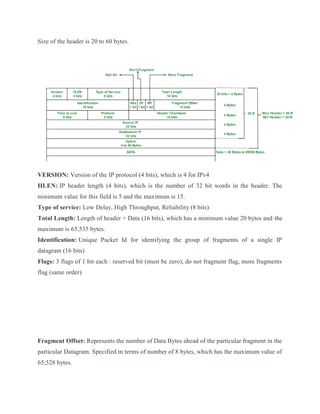
Size of the header is 20 to 60 bytes.
VERSION: Version of the IP protocol (4 bits), which is 4 for IPv4
HLEN: IP header length (4 bits), which is the number of 32 bit words in the header. The
minimum value for this field is 5 and the maximum is 15.
Type of service: Low Delay, High Throughput, Reliability (8 bits)
Total Length: Length of header + Data (16 bits), which has a minimum value 20 bytes and the
maximum is 65,535 bytes.
Identification: Unique Packet Id for identifying the group of fragments of a single IP
datagram (16 bits)
Flags: 3 flags of 1 bit each : reserved bit (must be zero), do not fragment flag, more fragments
flag (same order)
Fragment Offset: Represents the number of Data Bytes ahead of the particular fragment in the
particular Datagram. Specified in terms of number of 8 bytes, which has the maximum value of
65,528 bytes.
Time to live: Datagram’s lifetime (8 bits), It prevents the datagram to loop through the
network by restricting the number of Hops taken by a Packet before delivering to the
Destination.
Protocol: Name of the protocol to which the data is to be passed (8 bits)
Header Checksum: 16 bits header checksum for checking errors in the datagram header
Source IP address: 32 bits IP address of the sender
Destination IP address: 32 bits IP address of the receiver
Option: Optional information such as source route, record route. Used by the Network
administrator to check whether a path is working or not.
Ipv6
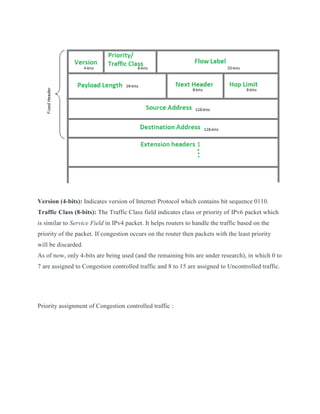
IP version 6 Header Format :
Version (4-bits): Indicates version of Internet Protocol which contains bit sequence 0110.
Traffic Class (8-bits): The Traffic Class field indicates class or priority of IPv6 packet which
is similar to Service Field in IPv4 packet. It helps routers to handle the traffic based on the
priority of the packet. If congestion occurs on the router then packets with the least priority
will be discarded.
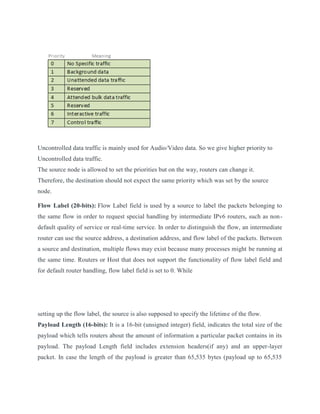
As of now, only 4-bits are being used (and the remaining bits are under research), in which 0 to
7 are assigned to Congestion controlled traffic and 8 to 15 are assigned to Uncontrolled traffic.
Priority assignment of Congestion controlled traffic :
Uncontrolled data traffic is mainly used for Audio/Video data. So we give higher priority to
Uncontrolled data traffic.
The source node is allowed to set the priorities but on the way, routers can change it.
Therefore, the destination should not expect the same priority which was set by the source
node.
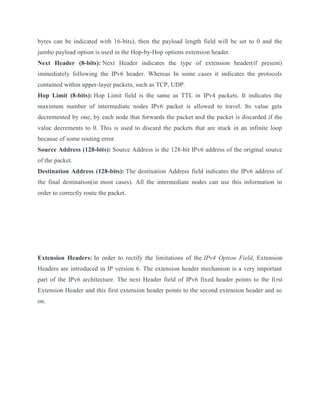
Flow Label (20-bits): Flow Label field is used by a source to label the packets belonging to
the same flow in order to request special handling by intermediate IPv6 routers, such as non-
default quality of service or real-time service. In order to distinguish the flow, an intermediate
router can use the source address, a destination address, and flow label of the packets. Between
a source and destination, multiple flows may exist because many processes might be running at
the same time. Routers or Host that does not support the functionality of flow label field and
for default router handling, flow label field is set to 0. While
setting up the flow label, the source is also supposed to specify the lifetime of the flow.
Payload Length (16-bits): It is a 16-bit (unsigned integer) field, indicates the total size of the
payload which tells routers about the amount of information a particular packet contains in its
payload. The payload Length field includes extension headers(if any) and an upper-layer
packet. In case the length of the payload is greater than 65,535 bytes (payload up to 65,535
bytes can be indicated with 16-bits), then the payload length field will be set to 0 and the
jumbo payload option is used in the Hop-by-Hop options extension header.
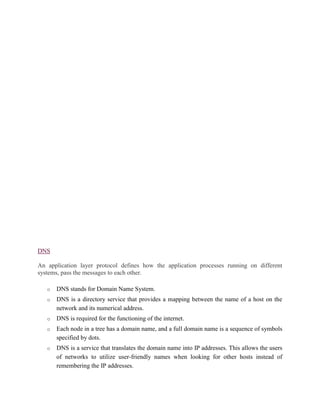
Next Header (8-bits): Next Header indicates the type of extension header(if present)
immediately following the IPv6 header. Whereas In some cases it indicates the protocols
contained within upper-layer packets, such as TCP, UDP.
Hop Limit (8-bits): Hop Limit field is the same as TTL in IPv4 packets. It indicates the
maximum number of intermediate nodes IPv6 packet is allowed to travel. Its value gets
decremented by one, by each node that forwards the packet and the packet is discarded if the
value decrements to 0. This is used to discard the packets that are stuck in an infinite loop
because of some routing error.
Source Address (128-bits): Source Address is the 128-bit IPv6 address of the original source
of the packet.
Destination Address (128-bits): The destination Address field indicates the IPv6 address of
the final destination(in most cases). All the intermediate nodes can use this information in
order to correctly route the packet.
Extension Headers: In order to rectify the limitations of the IPv4 Option Field, Extension
Headers are introduced in IP version 6. The extension header mechanism is a very important
part of the IPv6 architecture. The next Header field of IPv6 fixed header points to the first
Extension Header and this first extension header points to the second extension header and so
on.
DNS
An application layer protocol defines how the application processes running on different
systems, pass the messages to each other.
o DNS stands for Domain Name System.
o DNS is a directory service that provides a mapping between the name of a host on the
network and its numerical address.
o DNS is required for the functioning of the internet.
o Each node in a tree has a domain name, and a full domain name is a sequence of symbols
specified by dots.
o DNS is a service that translates the domain name into IP addresses. This allows the users
of networks to utilize user-friendly names when looking for other hosts instead of
remembering the IP addresses.
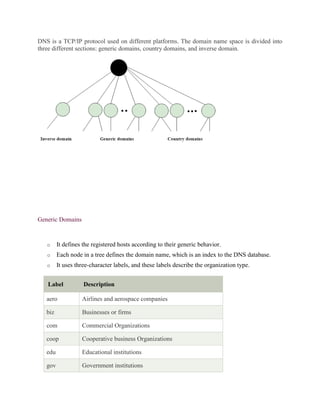
DNS is a TCP/IP protocol used on different platforms. The domain name space is divided into
three different sections: generic domains, country domains, and inverse domain.
Generic Domains
o It defines the registered hosts according to their generic behavior.
o Each node in a tree defines the domain name, which is an index to the DNS database.
o It uses three-character labels, and these labels describe the organization type.
Label Description
aero Airlines and aerospace companies
biz Businesses or firms
com Commercial Organizations
coop Cooperative business Organizations
edu Educational institutions
gov Government institutions
info Information service providers
int International Organizations
mil Military groups
museum Museum & other nonprofit organizations
name Personal names
net Network Support centers
org Nonprofit Organizations
pro Professional individual Organizations
Country Domain
The format of country domain is same as a generic domain, but it uses two-character country
abbreviations (e.g., us for the United States) in place of three character organizational
abbreviations.
Inverse Domain
The inverse domain is used for mapping an address to a name. When the server has received a
request from the client, and the server contains the files of only authorized clients. To determine
whether the client is on the authorized list or not, it sends a query to the DNS server and ask for
mapping an address to the name.
Working of DNS
o DNS is a client/server network communication protocol. DNS clients send requests to
the. server while DNS servers send responses to the client.
o Client requests contain a name which is converted into an IP address known as a forward
DNS lookups while requests containing an IP address which is converted into a name
known as reverse DNS lookups.
o DNS implements a distributed database to store the name of all the hosts available on the
internet.
o If a client like a web browser sends a request containing a hostname, then a piece of
software such as DNS resolver sends a request to the DNS server to obtain the IP address
of a hostname. If DNS server does not contain the IP address associated with a hostname,
then it forwards the request to another DNS server. If IP address has arrived at the
resolver, which in turn completes the request over the internet protocol.
Remote Login
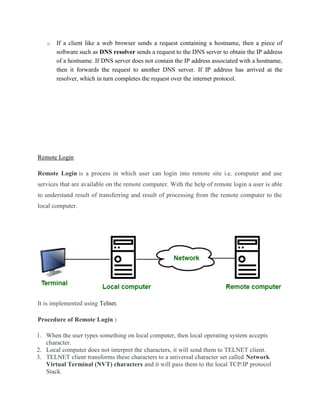
Remote Login is a process in which user can login into remote site i.e. computer and use
services that are available on the remote computer. With the help of remote login a user is able
to understand result of transferring and result of processing from the remote computer to the
local computer.
It is implemented using Telnet.
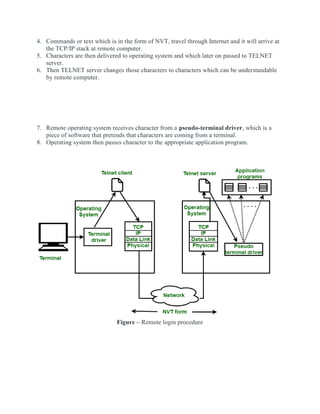
Procedure of Remote Login :
1. When the user types something on local computer, then local operating system accepts
character.
2. Local computer does not interpret the characters, it will send them to TELNET client.
3. TELNET client transforms these characters to a universal character set called Network
Virtual Terminal (NVT) characters and it will pass them to the local TCP/IP protocol
Stack.
4. Commands or text which is in the form of NVT, travel through Internet and it will arrive at
the TCP/IP stack at remote computer.
5. Characters are then delivered to operating system and which later on passed to TELNET
server.
6. Then TELNET server changes those characters to characters which can be understandable
by remote computer.
7. Remote operating system receives character from a pseudo-terminal driver, which is a
piece of software that pretends that characters are coming from a terminal.
8. Operating system then passes character to the appropriate application program.
Figure – Remote login procedure
MIME Protocol
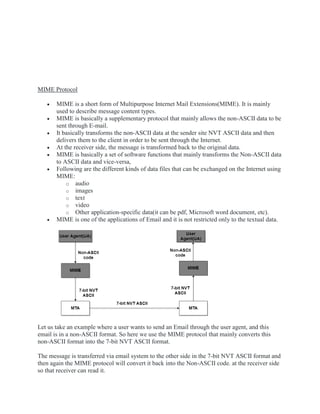
 MIME is a short form of Multipurpose Internet Mail Extensions(MIME). It is mainly
used to describe message content types.
 MIME is basically a supplementary protocol that mainly allows the non-ASCII data to be
sent through E-mail.
 It basically transforms the non-ASCII data at the sender site NVT ASCII data and then
delivers them to the client in order to be sent through the Internet.
 At the receiver side, the message is transformed back to the original data.
 MIME is basically a set of software functions that mainly transforms the Non-ASCII data
to ASCII data and vice-versa,
 Following are the different kinds of data files that can be exchanged on the Internet using
MIME:
o audio
o images
o text
o video
o Other application-specific data(it can be pdf, Microsoft word document, etc).
 MIME is one of the applications of Email and it is not restricted only to the textual data.
Let us take an example where a user wants to send an Email through the user agent, and this
email is in a non-ASCII format. So here we use the MIME protocol that mainly converts this
non-ASCII format into the 7-bit NVT ASCII format.
The message is transferred via email system to the other side in the 7-bit NVT ASCII format and
then again the MIME protocol will convert it back into the Non-ASCII code. at the receiver side
so that receiver can read it.
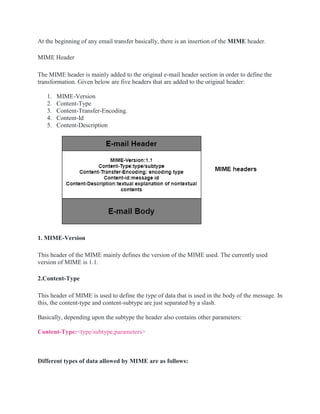
At the beginning of any email transfer basically, there is an insertion of the MIME header.
MIME Header
The MIME header is mainly added to the original e-mail header section in order to define the
transformation. Given below are five headers that are added to the original header:
1. MIME-Version
2. Content-Type
3. Content-Transfer-Encoding.
4. Content-Id
5. Content-Description
1. MIME-Version
This header of the MIME mainly defines the version of the MIME used. The currently used
version of MIME is 1.1.
2.Content-Type
This header of MIME is used to define the type of data that is used in the body of the message. In
this, the content-type and content-subtype are just separated by a slash.
Basically, depending upon the subtype the header also contains other parameters:
Content-Type:<type/subtype;parameters>
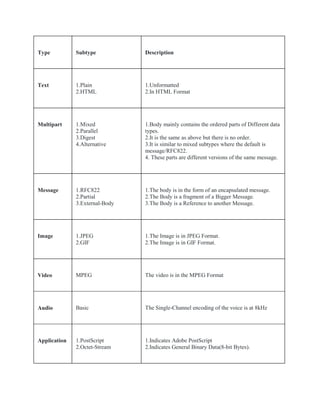
Different types of data allowed by MIME are as follows:
Type Subtype Description
Text 1.Plain
2.HTML
1.Unformatted
2.In HTML Format
Multipart 1.Mixed
2.Parallel
3.Digest
4.Alternative
1.Body mainly contains the ordered parts of Different data
types.
2.It is the same as above but there is no order.
3.It is similar to mixed subtypes where the default is
message/RFC822.
4. These parts are different versions of the same message.
Message 1.RFC822
2.Partial
3.External-Body
1.The body is in the form of an encapsulated message.
2.The Body is a fragment of a Bigger Message.
3.The Body is a Reference to another Message.
Image 1.JPEG
2.GIF
1.The Image is in JPEG Format.
2.The Image is in GIF Format.
Video MPEG The video is in the MPEG Format
Audio Basic The Single-Channel encoding of the voice is at 8kHz
Application 1.PostScript
2.Octet-Stream
1.Indicates Adobe PostScript
2.Indicates General Binary Data(8-bit Bytes).
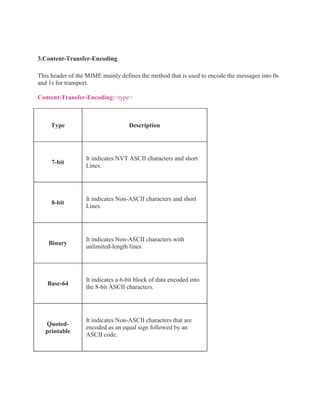
3.Content-Transfer-Encoding
This header of the MIME mainly defines the method that is used to encode the messages into 0s
and 1s for transport.
Content-Transfer-Encoding:<type>
Type Description
7-bit
It indicates NVT ASCII characters and short
Lines.
8-bit
It indicates Non-ASCII characters and short
Lines.
Binary
It indicates Non-ASCII characters with
unlimited-length lines.
Base-64
It indicates a 6-bit block of data encoded into
the 8-bit ASCII characters.
Quoted-
printable
It indicates Non-ASCII characters that are
encoded as an equal sign followed by an
ASCII code.
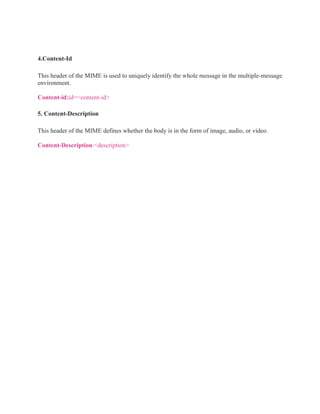
4.Content-Id
This header of the MIME is used to uniquely identify the whole message in the multiple-message
environment.
Content-id:id=<content-id>
5. Content-Description
This header of the MIME defines whether the body is in the form of image, audio, or video.
Content-Description:<description>
World Wide Web
 The World Wide Web (WWW) is a collection of documents and other web resources which are
identified by URLs, interlinked by hypertext links, and can be accessed and searched by
browsers via the Internet.
 World Wide Web is also called the Web and it was invented by Tim Berners-Lee in 1989.
 Website is a collection of web pages belonging to a particular organization.
 The pages can be retrieved and viewed by using browser.
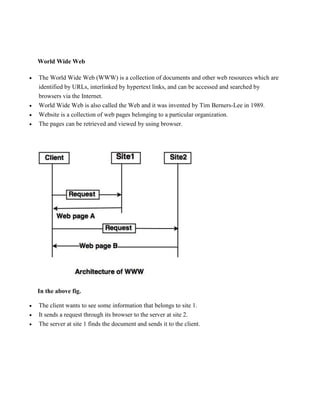
In the above fig.
 The client wants to see some information that belongs to site 1.
 It sends a request through its browser to the server at site 2.
 The server at site 1 finds the document and sends it to the client.
Client (Browser):
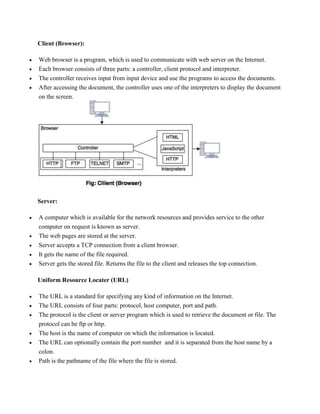
 Web browser is a program, which is used to communicate with web server on the Internet.
 Each browser consists of three parts: a controller, client protocol and interpreter.
 The controller receives input from input device and use the programs to access the documents.
 After accessing the document, the controller uses one of the interpreters to display the document
on the screen.
Server:
 A computer which is available for the network resources and provides service to the other
computer on request is known as server.
 The web pages are stored at the server.
 Server accepts a TCP connection from a client browser.
 It gets the name of the file required.
 Server gets the stored file. Returns the file to the client and releases the top connection.
Uniform Resource Locater (URL)
 The URL is a standard for specifying any kind of information on the Internet.
 The URL consists of four parts: protocol, host computer, port and path.
 The protocol is the client or server program which is used to retrieve the document or file. The
protocol can be ftp or http.
 The host is the name of computer on which the information is located.
 The URL can optionally contain the port number and it is separated from the host name by a
colon.
 Path is the pathname of the file where the file is stored.

Complete notes of computer networks. Bca or bsc students

  • 1.
    IP Address An IPstands for internet protocol. An IP address is assigned to each device connected to a network. Each device uses an IP address for communication. It also behaves as an identifier as this address is used to identify the device on a network. There are two types of IP addresses: o IPv4 o IPv6 IPv4 Datagram Header
  • 2.
    Size of theheader is 20 to 60 bytes. VERSION: Version of the IP protocol (4 bits), which is 4 for IPv4 HLEN: IP header length (4 bits), which is the number of 32 bit words in the header. The minimum value for this field is 5 and the maximum is 15. Type of service: Low Delay, High Throughput, Reliability (8 bits) Total Length: Length of header + Data (16 bits), which has a minimum value 20 bytes and the maximum is 65,535 bytes. Identification: Unique Packet Id for identifying the group of fragments of a single IP datagram (16 bits) Flags: 3 flags of 1 bit each : reserved bit (must be zero), do not fragment flag, more fragments flag (same order) Fragment Offset: Represents the number of Data Bytes ahead of the particular fragment in the particular Datagram. Specified in terms of number of 8 bytes, which has the maximum value of 65,528 bytes.
  • 3.
    Time to live:Datagram’s lifetime (8 bits), It prevents the datagram to loop through the network by restricting the number of Hops taken by a Packet before delivering to the Destination. Protocol: Name of the protocol to which the data is to be passed (8 bits) Header Checksum: 16 bits header checksum for checking errors in the datagram header Source IP address: 32 bits IP address of the sender Destination IP address: 32 bits IP address of the receiver Option: Optional information such as source route, record route. Used by the Network administrator to check whether a path is working or not. Ipv6 IP version 6 Header Format :
  • 4.
    Version (4-bits): Indicatesversion of Internet Protocol which contains bit sequence 0110. Traffic Class (8-bits): The Traffic Class field indicates class or priority of IPv6 packet which is similar to Service Field in IPv4 packet. It helps routers to handle the traffic based on the priority of the packet. If congestion occurs on the router then packets with the least priority will be discarded. As of now, only 4-bits are being used (and the remaining bits are under research), in which 0 to 7 are assigned to Congestion controlled traffic and 8 to 15 are assigned to Uncontrolled traffic. Priority assignment of Congestion controlled traffic :
  • 5.
    Uncontrolled data trafficis mainly used for Audio/Video data. So we give higher priority to Uncontrolled data traffic. The source node is allowed to set the priorities but on the way, routers can change it. Therefore, the destination should not expect the same priority which was set by the source node. Flow Label (20-bits): Flow Label field is used by a source to label the packets belonging to the same flow in order to request special handling by intermediate IPv6 routers, such as non- default quality of service or real-time service. In order to distinguish the flow, an intermediate router can use the source address, a destination address, and flow label of the packets. Between a source and destination, multiple flows may exist because many processes might be running at the same time. Routers or Host that does not support the functionality of flow label field and for default router handling, flow label field is set to 0. While setting up the flow label, the source is also supposed to specify the lifetime of the flow. Payload Length (16-bits): It is a 16-bit (unsigned integer) field, indicates the total size of the payload which tells routers about the amount of information a particular packet contains in its payload. The payload Length field includes extension headers(if any) and an upper-layer packet. In case the length of the payload is greater than 65,535 bytes (payload up to 65,535
  • 6.
    bytes can beindicated with 16-bits), then the payload length field will be set to 0 and the jumbo payload option is used in the Hop-by-Hop options extension header. Next Header (8-bits): Next Header indicates the type of extension header(if present) immediately following the IPv6 header. Whereas In some cases it indicates the protocols contained within upper-layer packets, such as TCP, UDP. Hop Limit (8-bits): Hop Limit field is the same as TTL in IPv4 packets. It indicates the maximum number of intermediate nodes IPv6 packet is allowed to travel. Its value gets decremented by one, by each node that forwards the packet and the packet is discarded if the value decrements to 0. This is used to discard the packets that are stuck in an infinite loop because of some routing error. Source Address (128-bits): Source Address is the 128-bit IPv6 address of the original source of the packet. Destination Address (128-bits): The destination Address field indicates the IPv6 address of the final destination(in most cases). All the intermediate nodes can use this information in order to correctly route the packet. Extension Headers: In order to rectify the limitations of the IPv4 Option Field, Extension Headers are introduced in IP version 6. The extension header mechanism is a very important part of the IPv6 architecture. The next Header field of IPv6 fixed header points to the first Extension Header and this first extension header points to the second extension header and so on.
  • 7.
    DNS An application layerprotocol defines how the application processes running on different systems, pass the messages to each other. o DNS stands for Domain Name System. o DNS is a directory service that provides a mapping between the name of a host on the network and its numerical address. o DNS is required for the functioning of the internet. o Each node in a tree has a domain name, and a full domain name is a sequence of symbols specified by dots. o DNS is a service that translates the domain name into IP addresses. This allows the users of networks to utilize user-friendly names when looking for other hosts instead of remembering the IP addresses.
  • 8.
    DNS is aTCP/IP protocol used on different platforms. The domain name space is divided into three different sections: generic domains, country domains, and inverse domain. Generic Domains o It defines the registered hosts according to their generic behavior. o Each node in a tree defines the domain name, which is an index to the DNS database. o It uses three-character labels, and these labels describe the organization type. Label Description aero Airlines and aerospace companies biz Businesses or firms com Commercial Organizations coop Cooperative business Organizations edu Educational institutions gov Government institutions
  • 9.
    info Information serviceproviders int International Organizations mil Military groups museum Museum & other nonprofit organizations name Personal names net Network Support centers org Nonprofit Organizations pro Professional individual Organizations Country Domain The format of country domain is same as a generic domain, but it uses two-character country abbreviations (e.g., us for the United States) in place of three character organizational abbreviations. Inverse Domain The inverse domain is used for mapping an address to a name. When the server has received a request from the client, and the server contains the files of only authorized clients. To determine whether the client is on the authorized list or not, it sends a query to the DNS server and ask for mapping an address to the name. Working of DNS o DNS is a client/server network communication protocol. DNS clients send requests to the. server while DNS servers send responses to the client. o Client requests contain a name which is converted into an IP address known as a forward DNS lookups while requests containing an IP address which is converted into a name known as reverse DNS lookups. o DNS implements a distributed database to store the name of all the hosts available on the internet.
  • 10.
    o If aclient like a web browser sends a request containing a hostname, then a piece of software such as DNS resolver sends a request to the DNS server to obtain the IP address of a hostname. If DNS server does not contain the IP address associated with a hostname, then it forwards the request to another DNS server. If IP address has arrived at the resolver, which in turn completes the request over the internet protocol. Remote Login Remote Login is a process in which user can login into remote site i.e. computer and use services that are available on the remote computer. With the help of remote login a user is able to understand result of transferring and result of processing from the remote computer to the local computer. It is implemented using Telnet. Procedure of Remote Login : 1. When the user types something on local computer, then local operating system accepts character. 2. Local computer does not interpret the characters, it will send them to TELNET client. 3. TELNET client transforms these characters to a universal character set called Network Virtual Terminal (NVT) characters and it will pass them to the local TCP/IP protocol Stack.
  • 11.
    4. Commands ortext which is in the form of NVT, travel through Internet and it will arrive at the TCP/IP stack at remote computer. 5. Characters are then delivered to operating system and which later on passed to TELNET server. 6. Then TELNET server changes those characters to characters which can be understandable by remote computer. 7. Remote operating system receives character from a pseudo-terminal driver, which is a piece of software that pretends that characters are coming from a terminal. 8. Operating system then passes character to the appropriate application program. Figure – Remote login procedure
  • 12.
    MIME Protocol  MIMEis a short form of Multipurpose Internet Mail Extensions(MIME). It is mainly used to describe message content types.  MIME is basically a supplementary protocol that mainly allows the non-ASCII data to be sent through E-mail.  It basically transforms the non-ASCII data at the sender site NVT ASCII data and then delivers them to the client in order to be sent through the Internet.  At the receiver side, the message is transformed back to the original data.  MIME is basically a set of software functions that mainly transforms the Non-ASCII data to ASCII data and vice-versa,  Following are the different kinds of data files that can be exchanged on the Internet using MIME: o audio o images o text o video o Other application-specific data(it can be pdf, Microsoft word document, etc).  MIME is one of the applications of Email and it is not restricted only to the textual data. Let us take an example where a user wants to send an Email through the user agent, and this email is in a non-ASCII format. So here we use the MIME protocol that mainly converts this non-ASCII format into the 7-bit NVT ASCII format. The message is transferred via email system to the other side in the 7-bit NVT ASCII format and then again the MIME protocol will convert it back into the Non-ASCII code. at the receiver side so that receiver can read it.
  • 13.
    At the beginningof any email transfer basically, there is an insertion of the MIME header. MIME Header The MIME header is mainly added to the original e-mail header section in order to define the transformation. Given below are five headers that are added to the original header: 1. MIME-Version 2. Content-Type 3. Content-Transfer-Encoding. 4. Content-Id 5. Content-Description 1. MIME-Version This header of the MIME mainly defines the version of the MIME used. The currently used version of MIME is 1.1. 2.Content-Type This header of MIME is used to define the type of data that is used in the body of the message. In this, the content-type and content-subtype are just separated by a slash. Basically, depending upon the subtype the header also contains other parameters: Content-Type:<type/subtype;parameters> Different types of data allowed by MIME are as follows:
  • 15.
    Type Subtype Description Text1.Plain 2.HTML 1.Unformatted 2.In HTML Format Multipart 1.Mixed 2.Parallel 3.Digest 4.Alternative 1.Body mainly contains the ordered parts of Different data types. 2.It is the same as above but there is no order. 3.It is similar to mixed subtypes where the default is message/RFC822. 4. These parts are different versions of the same message. Message 1.RFC822 2.Partial 3.External-Body 1.The body is in the form of an encapsulated message. 2.The Body is a fragment of a Bigger Message. 3.The Body is a Reference to another Message. Image 1.JPEG 2.GIF 1.The Image is in JPEG Format. 2.The Image is in GIF Format. Video MPEG The video is in the MPEG Format Audio Basic The Single-Channel encoding of the voice is at 8kHz Application 1.PostScript 2.Octet-Stream 1.Indicates Adobe PostScript 2.Indicates General Binary Data(8-bit Bytes).
  • 16.
    3.Content-Transfer-Encoding This header ofthe MIME mainly defines the method that is used to encode the messages into 0s and 1s for transport. Content-Transfer-Encoding:<type> Type Description 7-bit It indicates NVT ASCII characters and short Lines. 8-bit It indicates Non-ASCII characters and short Lines. Binary It indicates Non-ASCII characters with unlimited-length lines. Base-64 It indicates a 6-bit block of data encoded into the 8-bit ASCII characters. Quoted- printable It indicates Non-ASCII characters that are encoded as an equal sign followed by an ASCII code.
  • 17.
    4.Content-Id This header ofthe MIME is used to uniquely identify the whole message in the multiple-message environment. Content-id:id=<content-id> 5. Content-Description This header of the MIME defines whether the body is in the form of image, audio, or video. Content-Description:<description>
  • 18.
    World Wide Web The World Wide Web (WWW) is a collection of documents and other web resources which are identified by URLs, interlinked by hypertext links, and can be accessed and searched by browsers via the Internet.  World Wide Web is also called the Web and it was invented by Tim Berners-Lee in 1989.  Website is a collection of web pages belonging to a particular organization.  The pages can be retrieved and viewed by using browser. In the above fig.  The client wants to see some information that belongs to site 1.  It sends a request through its browser to the server at site 2.  The server at site 1 finds the document and sends it to the client.
  • 19.
    Client (Browser):  Webbrowser is a program, which is used to communicate with web server on the Internet.  Each browser consists of three parts: a controller, client protocol and interpreter.  The controller receives input from input device and use the programs to access the documents.  After accessing the document, the controller uses one of the interpreters to display the document on the screen. Server:  A computer which is available for the network resources and provides service to the other computer on request is known as server.  The web pages are stored at the server.  Server accepts a TCP connection from a client browser.  It gets the name of the file required.  Server gets the stored file. Returns the file to the client and releases the top connection. Uniform Resource Locater (URL)  The URL is a standard for specifying any kind of information on the Internet.  The URL consists of four parts: protocol, host computer, port and path.  The protocol is the client or server program which is used to retrieve the document or file. The protocol can be ftp or http.  The host is the name of computer on which the information is located.  The URL can optionally contain the port number and it is separated from the host name by a colon.  Path is the pathname of the file where the file is stored.