The Picture Guide To Using Keyword Planner To 
Create Fantabulous Content 
compellingadverts.com /2014/09/the-picture-guide-to-using-keyword.html 
Am sure you’ve heard that for you 
to become a successful blogger 
you need to publish quality 
content. The following question 
then is: how can I go about 
publishing quality content? 
Or perhaps another question 
diving through your mind is: How 
do I write awesome content in a 
niche that is boring? 
In this guide I’ll share with you 
strategies you can use to achieve 
this goal. 
By so doing you will be able to 
produce content that can take you 
to top of Google first page. 
The strategies I will be sharing will 
make you smile at the end of the 
day; however there is a caveat. 
Caveat: You must be ready to 
work your ass off to produce 
outstanding content. 
Am sure you’ve heard of this 
before, but today I’ll beam a new 
light to what can be referred to as 
outstanding content. 
The Lie 
Great content can be published every day. Am sure you must have heard that before. 
The Truth 
This is virtually impossible to achieve, that’s why the most popular blog in the blogosphere aim at 
publishing articles at most twice a week. Even at that not every of this content can be termed 
outstanding. 
If you doubt what I am saying, look at sites that you know publish articles every day, except perhaps for 
news sites where there are more than one author-check out the sites and see if those article rank high 
on the search engine for competing keywords. For example you can check out sites like Ezinne article
which publish articles every day. 
So what is the one of the Best Strategies you can deploy? 
One of the best strategies for you to deploy is to create monster content that people will go all out to link 
to. And not only that, you will have to go out of your way to promote the hell out of that content. 
The question remains: What Steps would you take to create and promote content that will drive you link 
and authority within a short time? 
Not to worry that’s what am here to show you. 
The Step by Step Guide to Getting Post Ideas that Will Place You on Google’s First Page 
I want you to understand that for you to succeed there is need for you to search for low competition 
keywords, and high converting keywords. 
Not only that, you must also strive to create awesome content around that keyword. And finally you 
must go your way to promote that content so that people can easily find it and link to it. 
Don’t Do This 
You see some time ago, a friend of mine of mine named Brian did set up a weight loss niche site. He 
created the best of content you can find online in that niche. He did all of this but discovered nobody 
was linking to his content (links signifies authority). 
But you said I should publish great content? 
Yes, I said publish great content, but I also said promote great content. 
I am sure you will say that this guy is over flogging a dead horse. But you see- I am over flogging this 
dead horse because it is this same dead horse that people still return to. 
And I decided to over flog it so that you won’t forget the principle and say I followed his tips but I am 
not successful. 
You see despite the fact he created fabulous content and shared it on social media, he still wasn’t 
successful. 
So if This Strategy Doesn’t Work: What Works? 
As I emphasized earlier: 
1. Find low competitive keyword- Medium Competitive Keywords 
2. Create awesome content and 
3. Promote the hell out of it 
How To Create Linkable Content With Google Keyword Planner 
Before creating linkable content, you need to find those Keywords that is sure to drive you traffic that 
Converts. And this can be achieved through the use of Google Keyword Planner. To make use of the 
planner tool there is need for you to have a Google account. Below is a step by step process of 
creating awesome content with the Keyword Planner Tool.. 
Step One: Sign Up For A Google Account
I won’t be explaining this step in this guide as I expect that you should be able to open a Gmail 
account. 
N/B: If you already have a Gmail account there is no need for you to set up another Google account as 
your Gmail already come with one. 
Step Two: Log into Keyword Planner 
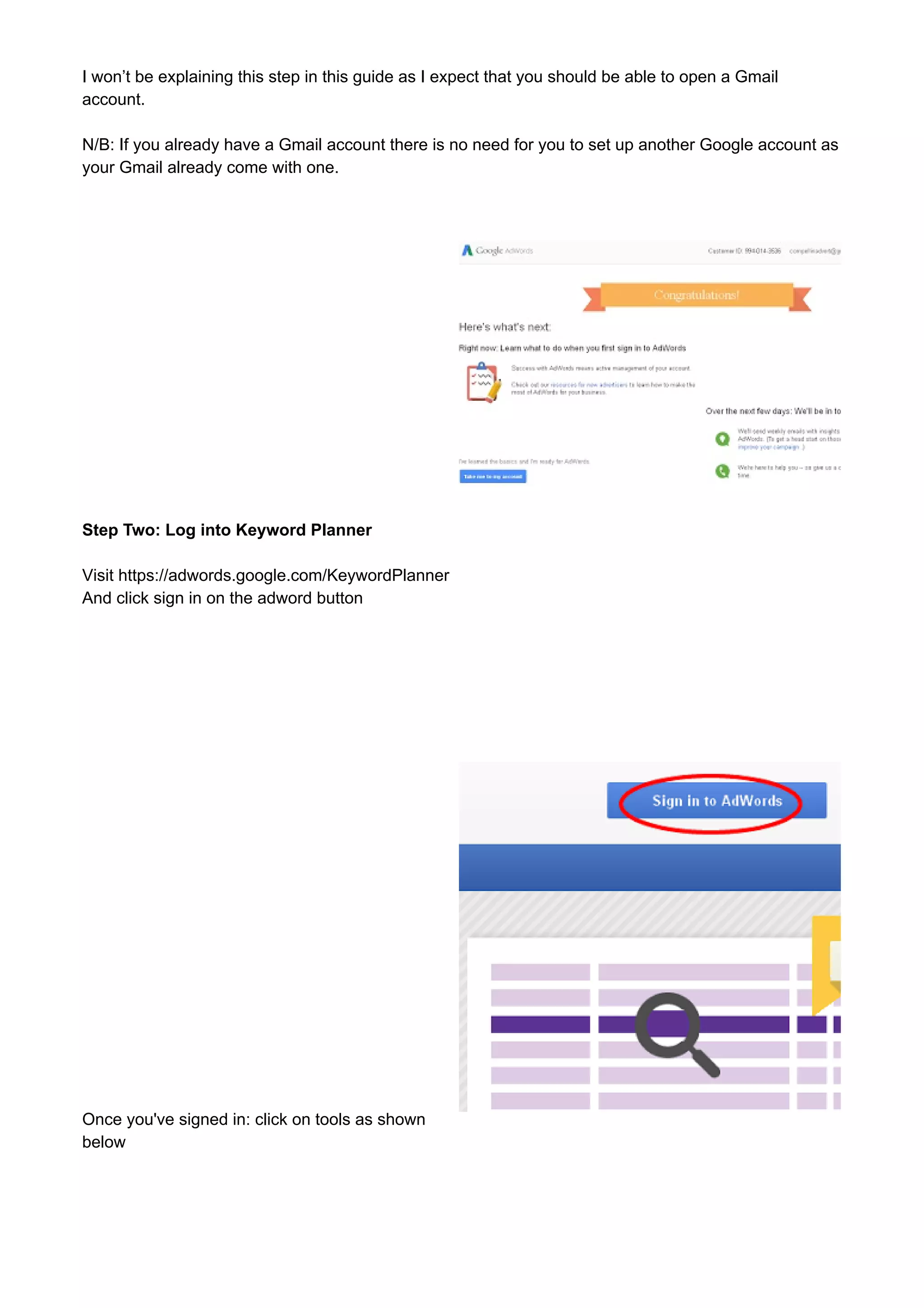
Visit https://adwords.google.com/KeywordPlanner 
And click sign in on the adword button 
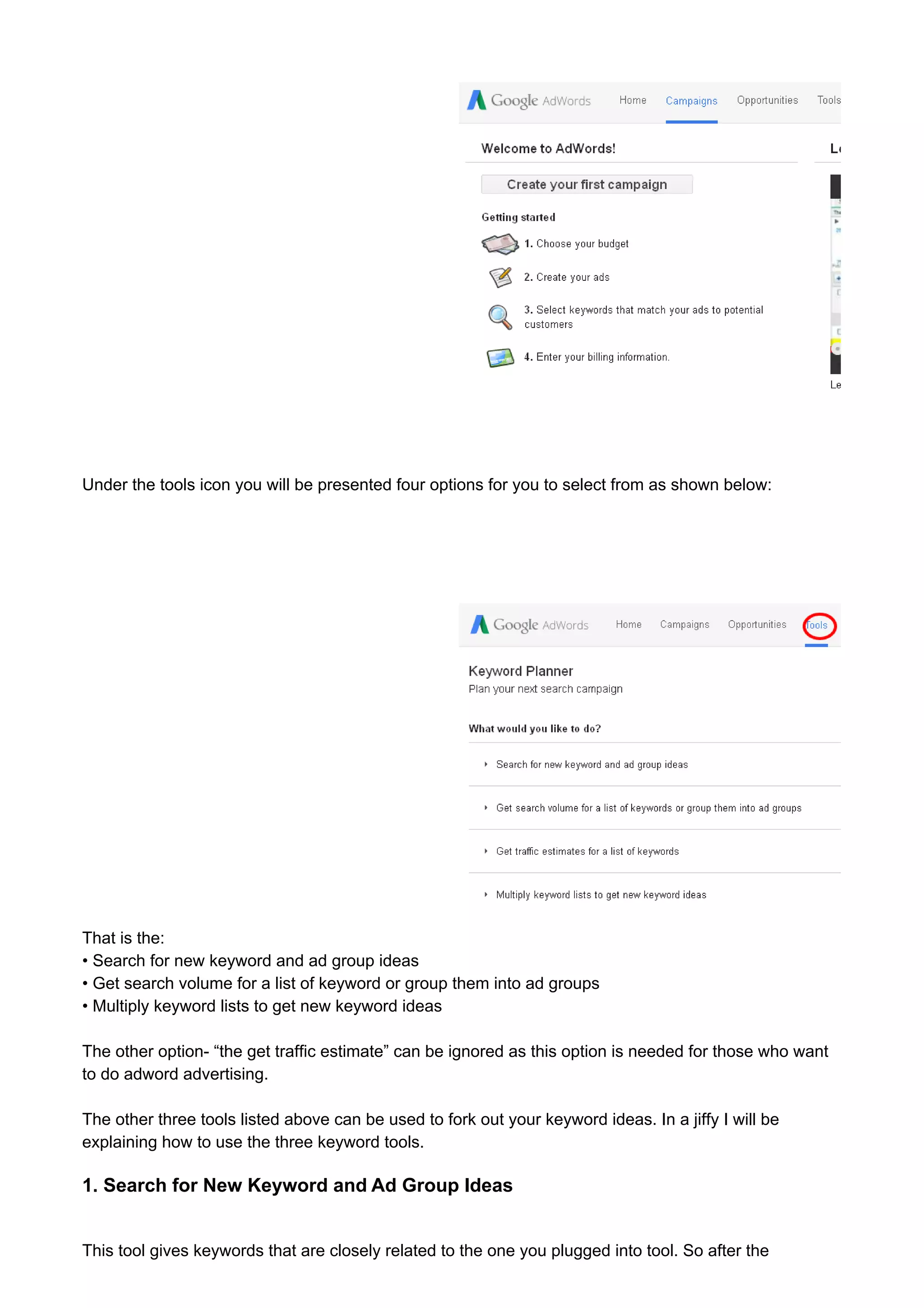
Once you've signed in: click on tools as shown 
below
Under the tools icon you will be presented four options for you to select from as shown below: 
That is the: 
• Search for new keyword and ad group ideas 
• Get search volume for a list of keyword or group them into ad groups 
• Multiply keyword lists to get new keyword ideas 
The other option- “the get traffic estimate” can be ignored as this option is needed for those who want 
to do adword advertising. 
The other three tools listed above can be used to fork out your keyword ideas. In a jiffy I will be 
explaining how to use the three keyword tools. 
1. Search for New Keyword and Ad Group Ideas 
This tool gives keywords that are closely related to the one you plugged into tool. So after the
introductory section I will explain one hack you can use to make the tool pump out the keyword that is 
relevant to your niche. 
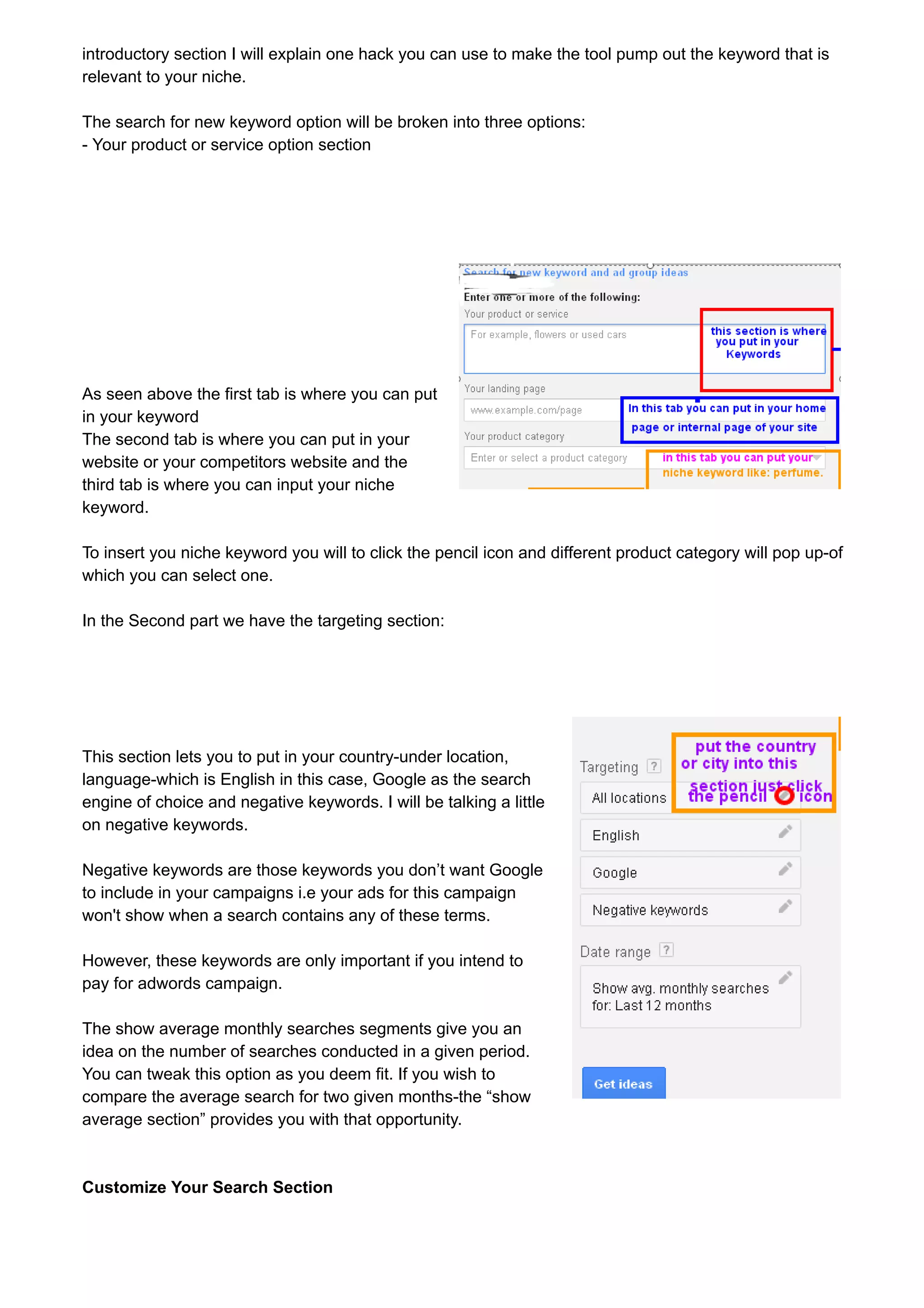
The search for new keyword option will be broken into three options: 
- Your product or service option section 
As seen above the first tab is where you can put 
in your keyword 
The second tab is where you can put in your 
website or your competitors website and the 
third tab is where you can input your niche 
keyword. 
To insert you niche keyword you will to click the pencil icon and different product category will pop up-of 
which you can select one. 
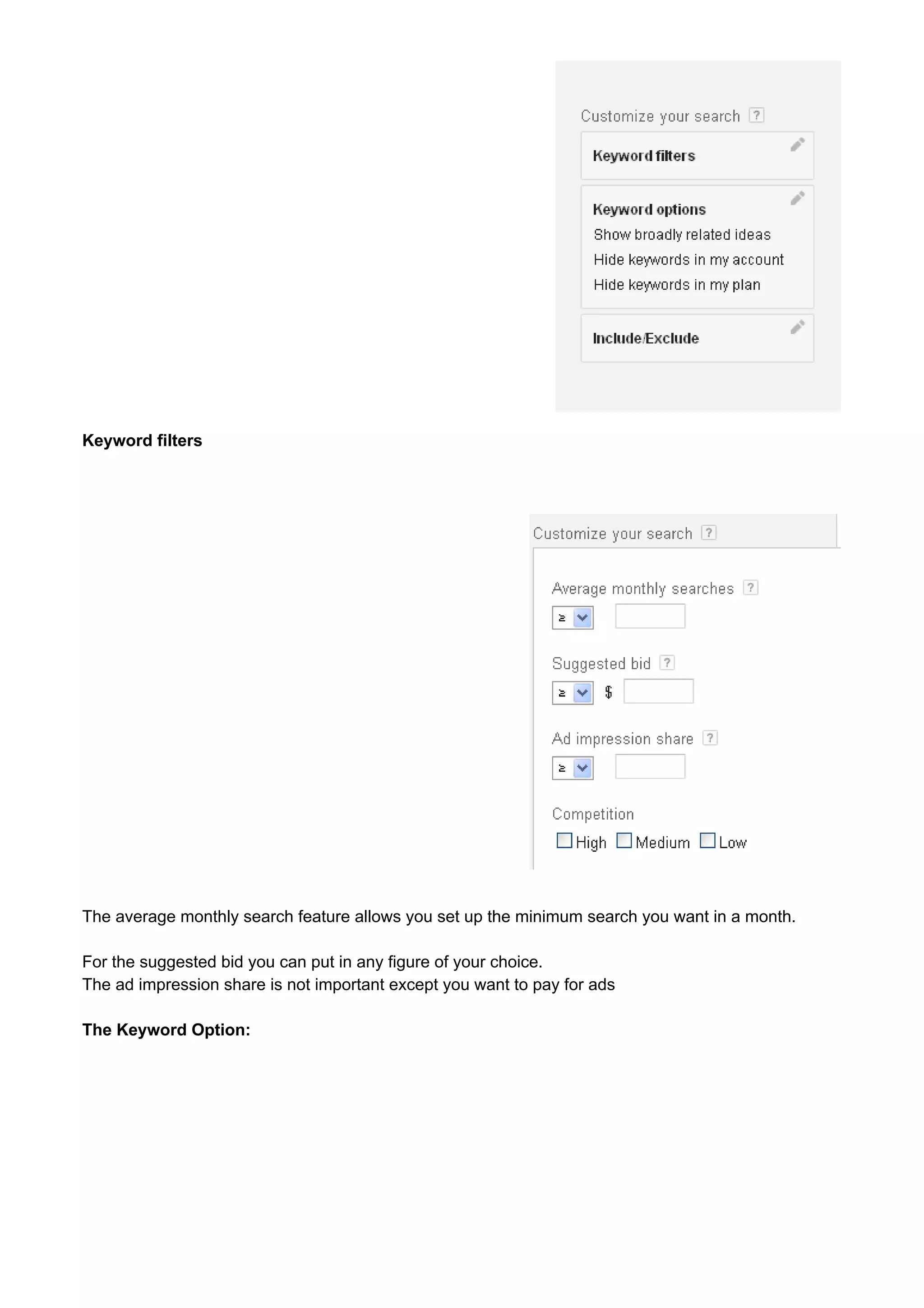
In the Second part we have the targeting section: 
This section lets you to put in your country-under location, 
language-which is English in this case, Google as the search 
engine of choice and negative keywords. I will be talking a little 
on negative keywords. 
Negative keywords are those keywords you don’t want Google 
to include in your campaigns i.e your ads for this campaign 
won't show when a search contains any of these terms. 
However, these keywords are only important if you intend to 
pay for adwords campaign. 
The show average monthly searches segments give you an 
idea on the number of searches conducted in a given period. 
You can tweak this option as you deem fit. If you wish to 
compare the average search for two given months-the “show 
average section” provides you with that opportunity. 
Customize Your Search Section
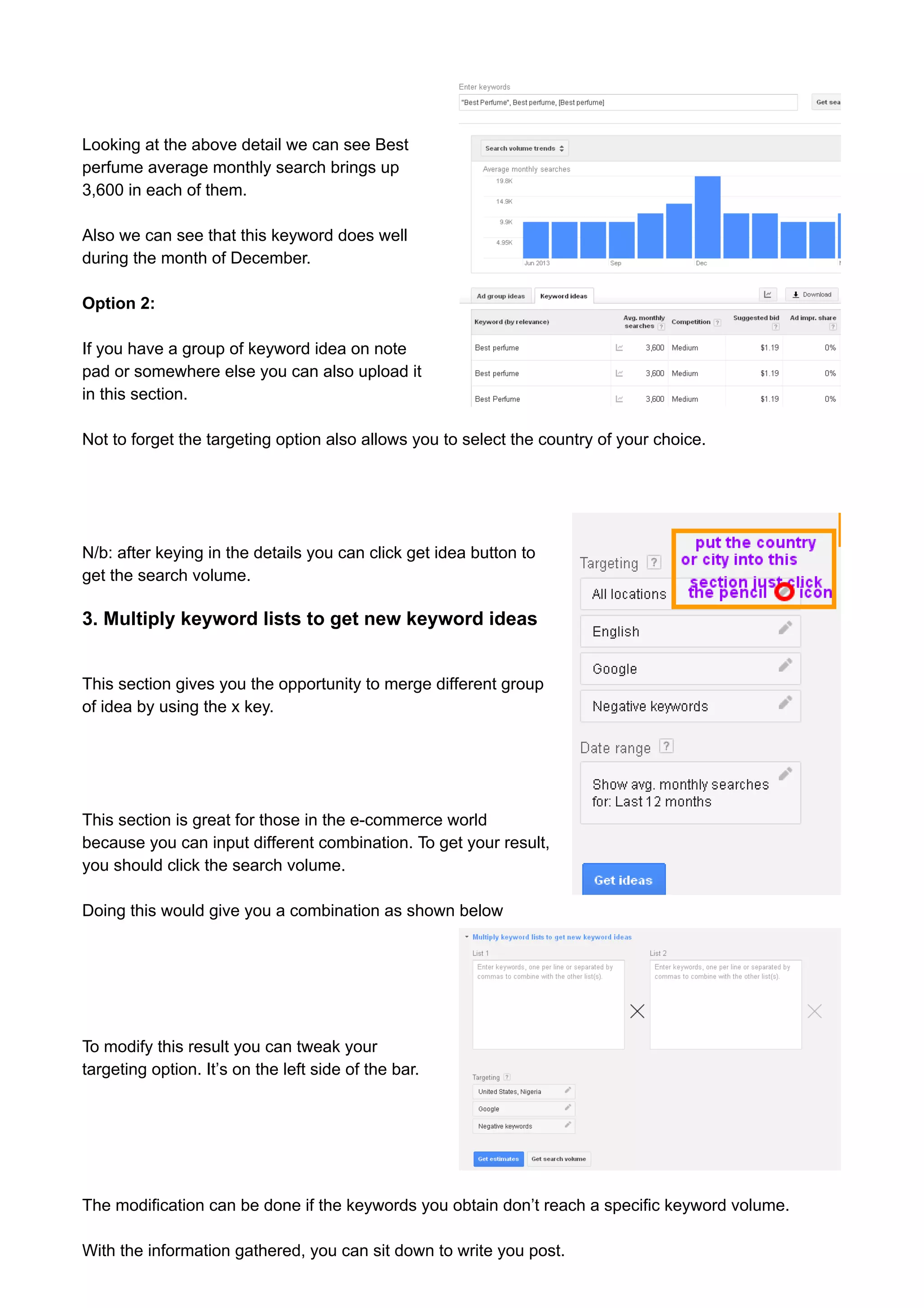
Keyword filters 
The average monthly search feature allows you set up the minimum search you want in a month. 
For the suggested bid you can put in any figure of your choice. 
The ad impression share is not important except you want to pay for ads 
The Keyword Option:
The broad related option allows you to restrict 
the keywords you want to be seen. For me I prefer the “Only show idea closely related to my search 
terms”-reason being that it gives a better idea of the exact number of people searching for that 
keyword. 
Include Exclude Option 
This option allows you to put keywords you want to see or to remove keywords that you don’t want to 
see in the search idea. 
If you have finished filling the details talked about in the section above, you can then click the “get idea” 
button. 
2. Search For New Keyword and ad group idea 
The above option allows you to place selected 
keywords either in broad phrase or exact 
phrase depending on if you are using * or “” or 
[]. 
However, I discovered that the broad phrase 
wasn’t working as it appears google has 
removed this feature from the New Keyword 
planner. 
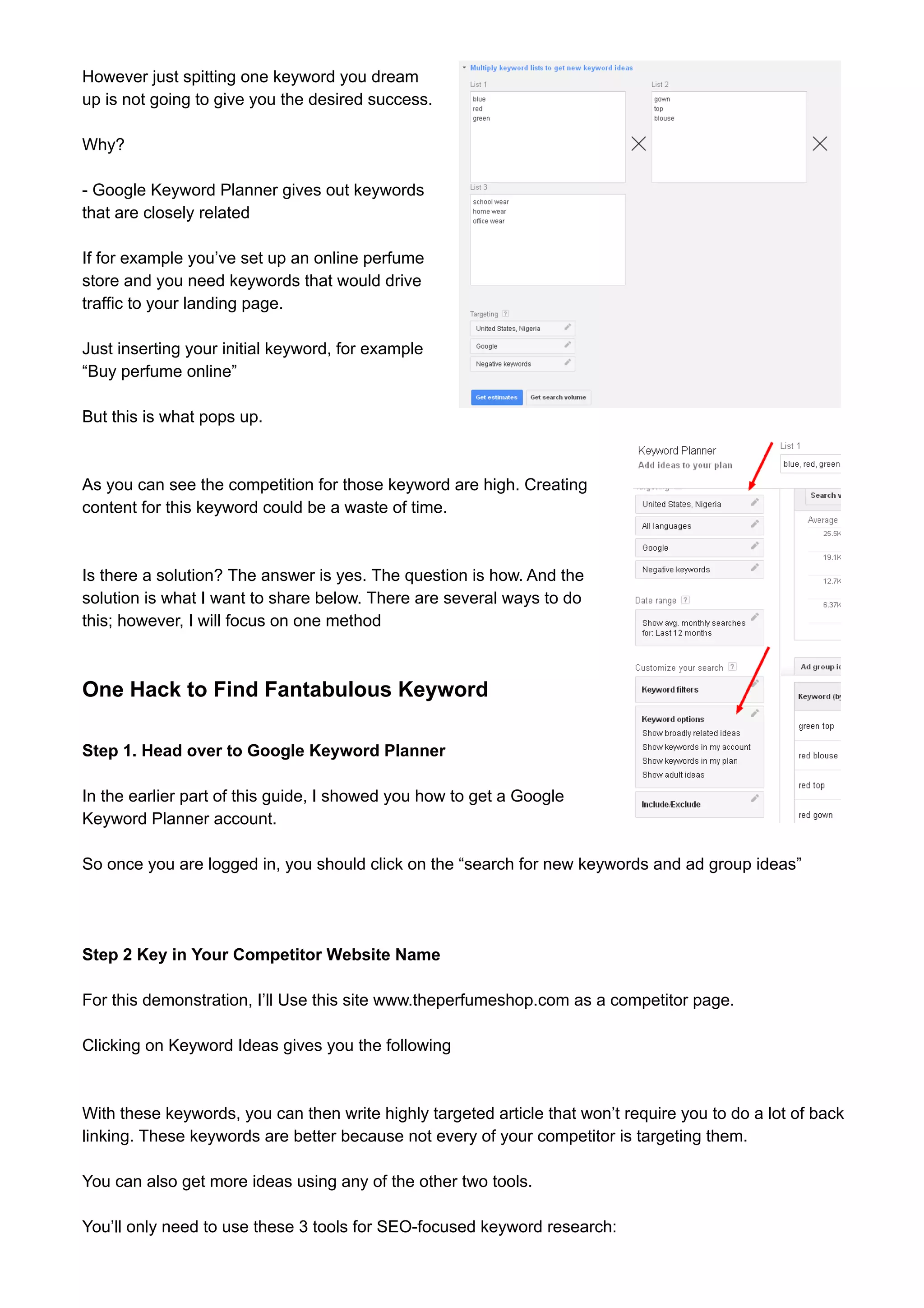
For example my search for Best perfume brings up the following data
Looking at the above detail we can see Best 
perfume average monthly search brings up 
3,600 in each of them. 
Also we can see that this keyword does well 
during the month of December. 
Option 2: 
If you have a group of keyword idea on note 
pad or somewhere else you can also upload it 
in this section. 
Not to forget the targeting option also allows you to select the country of your choice. 
N/b: after keying in the details you can click get idea button to 
get the search volume. 
3. Multiply keyword lists to get new keyword ideas 
This section gives you the opportunity to merge different group 
of idea by using the x key. 
This section is great for those in the e-commerce world 
because you can input different combination. To get your result, 
you should click the search volume. 
Doing this would give you a combination as shown below 
To modify this result you can tweak your 
targeting option. It’s on the left side of the bar. 
The modification can be done if the keywords you obtain don’t reach a specific keyword volume. 
With the information gathered, you can sit down to write you post.
However just spitting one keyword you dream 
up is not going to give you the desired success. 
Why? 
- Google Keyword Planner gives out keywords 
that are closely related 
If for example you’ve set up an online perfume 
store and you need keywords that would drive 
traffic to your landing page. 
Just inserting your initial keyword, for example 
“Buy perfume online” 
But this is what pops up. 
As you can see the competition for those keyword are high. Creating 
content for this keyword could be a waste of time. 
Is there a solution? The answer is yes. The question is how. And the 
solution is what I want to share below. There are several ways to do 
this; however, I will focus on one method 
One Hack to Find Fantabulous Keyword 
Step 1. Head over to Google Keyword Planner 
In the earlier part of this guide, I showed you how to get a Google 
Keyword Planner account. 
So once you are logged in, you should click on the “search for new keywords and ad group ideas” 
Step 2 Key in Your Competitor Website Name 
For this demonstration, I’ll Use this site www.theperfumeshop.com as a competitor page. 
Clicking on Keyword Ideas gives you the following 
With these keywords, you can then write highly targeted article that won’t require you to do a lot of back 
linking. These keywords are better because not every of your competitor is targeting them. 
You can also get more ideas using any of the other two tools. 
You’ll only need to use these 3 tools for SEO-focused keyword research:
• Get search volume for a list of keyword or group them into ad groups 
• Multiply keyword lists to get new keyword ideas 
(In other words, you won’t ever need to use “Get traffic estimates for a list of keywords”. It’s a feature 
that only applies to Adwords advertisers.) 
Another example: 
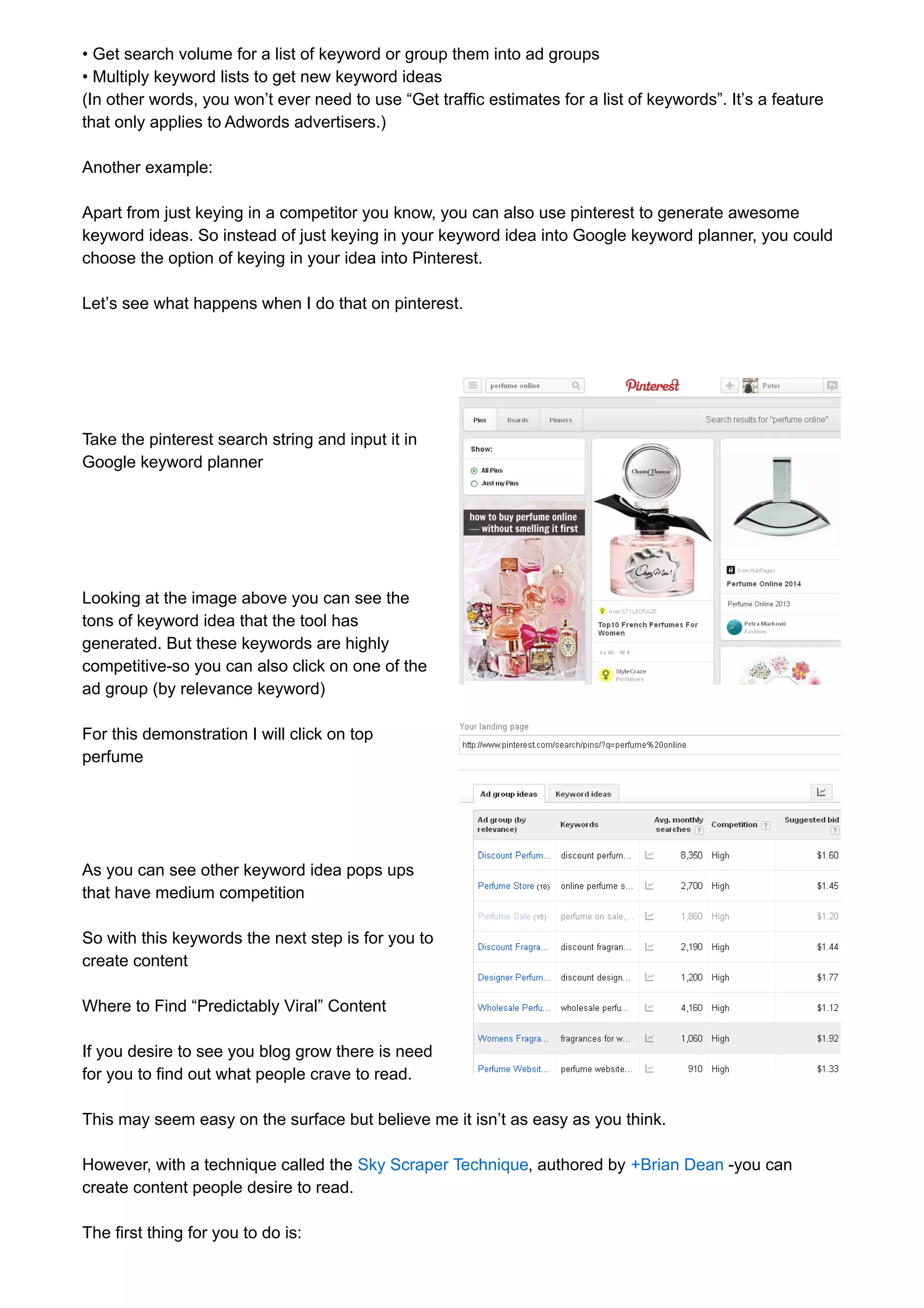
Apart from just keying in a competitor you know, you can also use pinterest to generate awesome 
keyword ideas. So instead of just keying in your keyword idea into Google keyword planner, you could 
choose the option of keying in your idea into Pinterest. 
Let’s see what happens when I do that on pinterest. 
Take the pinterest search string and input it in 
Google keyword planner 
Looking at the image above you can see the 
tons of keyword idea that the tool has 
generated. But these keywords are highly 
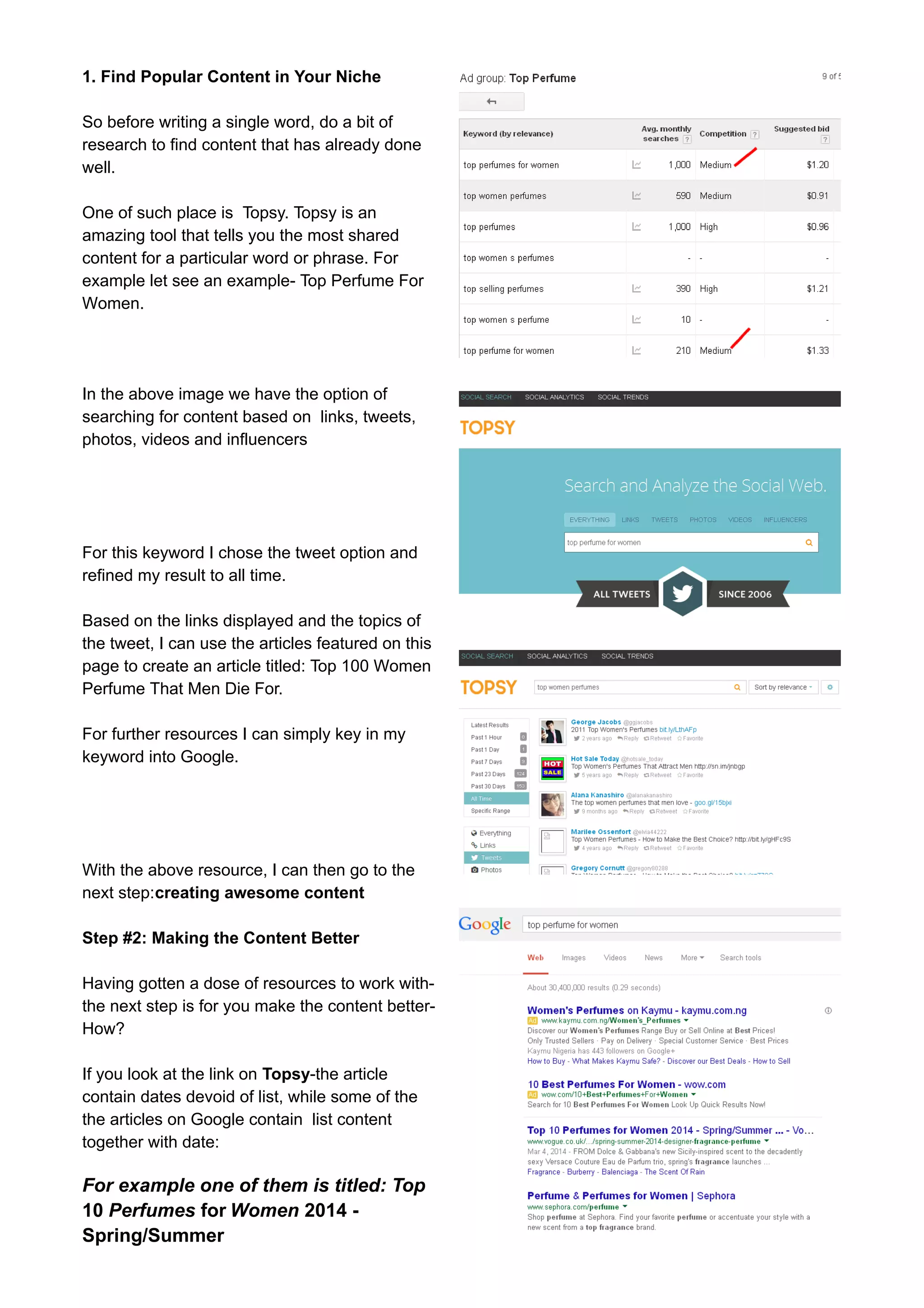
competitive-so you can also click on one of the 
ad group (by relevance keyword) 
For this demonstration I will click on top 
perfume 
As you can see other keyword idea pops ups 
that have medium competition 
So with this keywords the next step is for you to 
create content 
Where to Find “Predictably Viral” Content 
If you desire to see you blog grow there is need 
for you to find out what people crave to read. 
This may seem easy on the surface but believe me it isn’t as easy as you think. 
However, with a technique called the Sky Scraper Technique, authored by +Brian Dean -you can 
create content people desire to read. 
The first thing for you to do is:
1. Find Popular Content in Your Niche 
So before writing a single word, do a bit of 
research to find content that has already done 
well. 
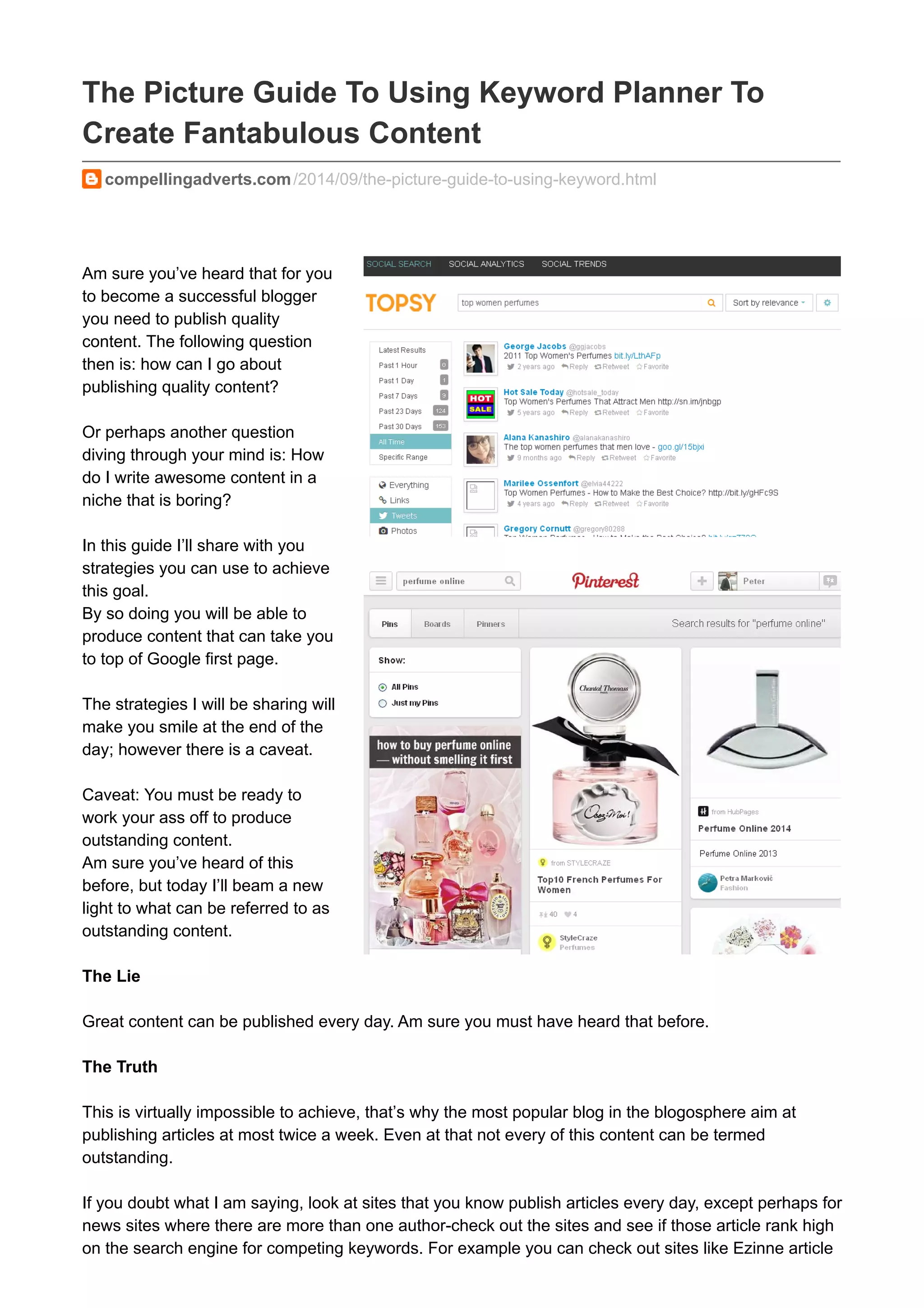
One of such place is Topsy. Topsy is an 
amazing tool that tells you the most shared 
content for a particular word or phrase. For 
example let see an example- Top Perfume For 
Women. 
In the above image we have the option of 
searching for content based on links, tweets, 
photos, videos and influencers 
For this keyword I chose the tweet option and 
refined my result to all time. 
Based on the links displayed and the topics of 
the tweet, I can use the articles featured on this 
page to create an article titled: Top 100 Women 
Perfume That Men Die For. 
For further resources I can simply key in my 
keyword into Google. 
With the above resource, I can then go to the 
next step:creating awesome content 
Step #2: Making the Content Better 
Having gotten a dose of resources to work with-the 
next step is for you make the content better- 
How? 
If you look at the link on Topsy-the article 
contain dates devoid of list, while some of the 
the articles on Google contain list content 
together with date: 
For example one of them is titled: Top 
10 Perfumes for Women 2014 - 
Spring/Summer
With this information you can tweak your headline to read: Top 100 Women Perfume That Men Die 
For in 2014. The next thing is the for you to write the article. 
Now you’ve produced superior information, the next step is for you to promote the content. 
How to Promote Your Content in A Way That Would Drive You Tremendous Traffic. 
The usual way people promote content online is for you just create the content and share it via social 
media. That in itself is Good. 
But that strategy is not good enough. 
You know why? It is because Google consider backlinks-(links pointing to your site) as a stronger 
ranking factor than number of social shares. 
What You Need to Do? 
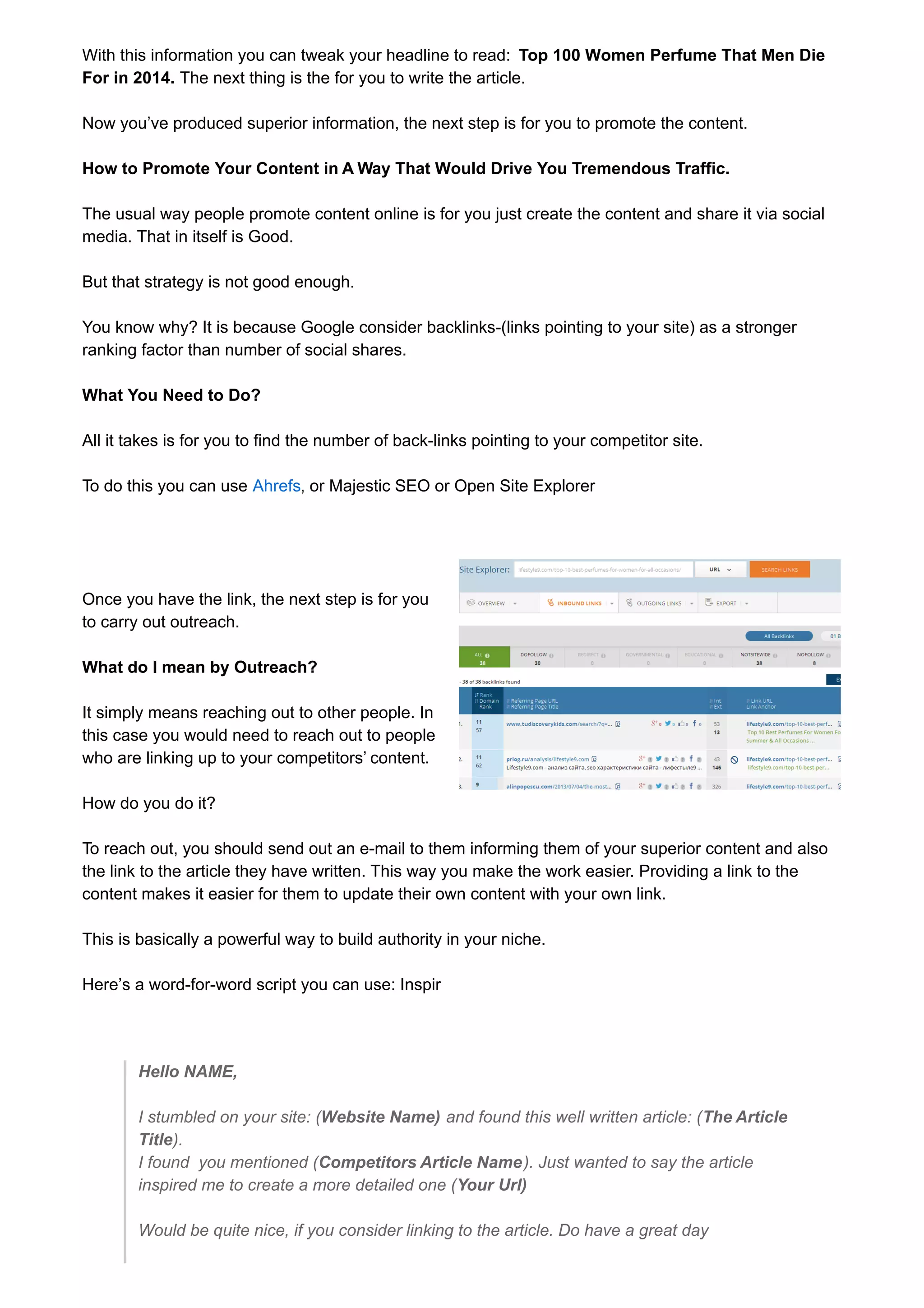
All it takes is for you to find the number of back-links pointing to your competitor site. 
To do this you can use Ahrefs, or Majestic SEO or Open Site Explorer 
Once you have the link, the next step is for you 
to carry out outreach. 
What do I mean by Outreach? 
It simply means reaching out to other people. In 
this case you would need to reach out to people 
who are linking up to your competitors’ content. 
How do you do it? 
To reach out, you should send out an e-mail to them informing them of your superior content and also 
the link to the article they have written. This way you make the work easier. Providing a link to the 
content makes it easier for them to update their own content with your own link. 
This is basically a powerful way to build authority in your niche. 
Here’s a word-for-word script you can use: Inspir 
Hello NAME, 
I stumbled on your site: (Website Name) and found this well written article: (The Article 
Title). 
I found you mentioned (Competitors Article Name). Just wanted to say the article 
inspired me to create a more detailed one (Your Url) 
Would be quite nice, if you consider linking to the article. Do have a great day
Yours sincerely 
Your Name 
In order to increase your chance of success, you could also find time to drop off a comment that adds 
value to the content. This way the owner of the site would be more inclined to link to your content. 
So why not go out and try this and see the end result. 
Yes! the work may be hard. But End result is fantastic

The Picture Guide To Using Google Keyword Planner To Create Fanatabulous Content

  • 1.
    The Picture GuideTo Using Keyword Planner To Create Fantabulous Content compellingadverts.com /2014/09/the-picture-guide-to-using-keyword.html Am sure you’ve heard that for you to become a successful blogger you need to publish quality content. The following question then is: how can I go about publishing quality content? Or perhaps another question diving through your mind is: How do I write awesome content in a niche that is boring? In this guide I’ll share with you strategies you can use to achieve this goal. By so doing you will be able to produce content that can take you to top of Google first page. The strategies I will be sharing will make you smile at the end of the day; however there is a caveat. Caveat: You must be ready to work your ass off to produce outstanding content. Am sure you’ve heard of this before, but today I’ll beam a new light to what can be referred to as outstanding content. The Lie Great content can be published every day. Am sure you must have heard that before. The Truth This is virtually impossible to achieve, that’s why the most popular blog in the blogosphere aim at publishing articles at most twice a week. Even at that not every of this content can be termed outstanding. If you doubt what I am saying, look at sites that you know publish articles every day, except perhaps for news sites where there are more than one author-check out the sites and see if those article rank high on the search engine for competing keywords. For example you can check out sites like Ezinne article
  • 2.
    which publish articlesevery day. So what is the one of the Best Strategies you can deploy? One of the best strategies for you to deploy is to create monster content that people will go all out to link to. And not only that, you will have to go out of your way to promote the hell out of that content. The question remains: What Steps would you take to create and promote content that will drive you link and authority within a short time? Not to worry that’s what am here to show you. The Step by Step Guide to Getting Post Ideas that Will Place You on Google’s First Page I want you to understand that for you to succeed there is need for you to search for low competition keywords, and high converting keywords. Not only that, you must also strive to create awesome content around that keyword. And finally you must go your way to promote that content so that people can easily find it and link to it. Don’t Do This You see some time ago, a friend of mine of mine named Brian did set up a weight loss niche site. He created the best of content you can find online in that niche. He did all of this but discovered nobody was linking to his content (links signifies authority). But you said I should publish great content? Yes, I said publish great content, but I also said promote great content. I am sure you will say that this guy is over flogging a dead horse. But you see- I am over flogging this dead horse because it is this same dead horse that people still return to. And I decided to over flog it so that you won’t forget the principle and say I followed his tips but I am not successful. You see despite the fact he created fabulous content and shared it on social media, he still wasn’t successful. So if This Strategy Doesn’t Work: What Works? As I emphasized earlier: 1. Find low competitive keyword- Medium Competitive Keywords 2. Create awesome content and 3. Promote the hell out of it How To Create Linkable Content With Google Keyword Planner Before creating linkable content, you need to find those Keywords that is sure to drive you traffic that Converts. And this can be achieved through the use of Google Keyword Planner. To make use of the planner tool there is need for you to have a Google account. Below is a step by step process of creating awesome content with the Keyword Planner Tool.. Step One: Sign Up For A Google Account
  • 3.
    I won’t beexplaining this step in this guide as I expect that you should be able to open a Gmail account. N/B: If you already have a Gmail account there is no need for you to set up another Google account as your Gmail already come with one. Step Two: Log into Keyword Planner Visit https://adwords.google.com/KeywordPlanner And click sign in on the adword button Once you've signed in: click on tools as shown below
  • 4.
    Under the toolsicon you will be presented four options for you to select from as shown below: That is the: • Search for new keyword and ad group ideas • Get search volume for a list of keyword or group them into ad groups • Multiply keyword lists to get new keyword ideas The other option- “the get traffic estimate” can be ignored as this option is needed for those who want to do adword advertising. The other three tools listed above can be used to fork out your keyword ideas. In a jiffy I will be explaining how to use the three keyword tools. 1. Search for New Keyword and Ad Group Ideas This tool gives keywords that are closely related to the one you plugged into tool. So after the
  • 5.
    introductory section Iwill explain one hack you can use to make the tool pump out the keyword that is relevant to your niche. The search for new keyword option will be broken into three options: - Your product or service option section As seen above the first tab is where you can put in your keyword The second tab is where you can put in your website or your competitors website and the third tab is where you can input your niche keyword. To insert you niche keyword you will to click the pencil icon and different product category will pop up-of which you can select one. In the Second part we have the targeting section: This section lets you to put in your country-under location, language-which is English in this case, Google as the search engine of choice and negative keywords. I will be talking a little on negative keywords. Negative keywords are those keywords you don’t want Google to include in your campaigns i.e your ads for this campaign won't show when a search contains any of these terms. However, these keywords are only important if you intend to pay for adwords campaign. The show average monthly searches segments give you an idea on the number of searches conducted in a given period. You can tweak this option as you deem fit. If you wish to compare the average search for two given months-the “show average section” provides you with that opportunity. Customize Your Search Section
  • 6.
    Keyword filters Theaverage monthly search feature allows you set up the minimum search you want in a month. For the suggested bid you can put in any figure of your choice. The ad impression share is not important except you want to pay for ads The Keyword Option:
  • 7.
    The broad relatedoption allows you to restrict the keywords you want to be seen. For me I prefer the “Only show idea closely related to my search terms”-reason being that it gives a better idea of the exact number of people searching for that keyword. Include Exclude Option This option allows you to put keywords you want to see or to remove keywords that you don’t want to see in the search idea. If you have finished filling the details talked about in the section above, you can then click the “get idea” button. 2. Search For New Keyword and ad group idea The above option allows you to place selected keywords either in broad phrase or exact phrase depending on if you are using * or “” or []. However, I discovered that the broad phrase wasn’t working as it appears google has removed this feature from the New Keyword planner. For example my search for Best perfume brings up the following data
  • 8.
    Looking at theabove detail we can see Best perfume average monthly search brings up 3,600 in each of them. Also we can see that this keyword does well during the month of December. Option 2: If you have a group of keyword idea on note pad or somewhere else you can also upload it in this section. Not to forget the targeting option also allows you to select the country of your choice. N/b: after keying in the details you can click get idea button to get the search volume. 3. Multiply keyword lists to get new keyword ideas This section gives you the opportunity to merge different group of idea by using the x key. This section is great for those in the e-commerce world because you can input different combination. To get your result, you should click the search volume. Doing this would give you a combination as shown below To modify this result you can tweak your targeting option. It’s on the left side of the bar. The modification can be done if the keywords you obtain don’t reach a specific keyword volume. With the information gathered, you can sit down to write you post.
  • 9.
    However just spittingone keyword you dream up is not going to give you the desired success. Why? - Google Keyword Planner gives out keywords that are closely related If for example you’ve set up an online perfume store and you need keywords that would drive traffic to your landing page. Just inserting your initial keyword, for example “Buy perfume online” But this is what pops up. As you can see the competition for those keyword are high. Creating content for this keyword could be a waste of time. Is there a solution? The answer is yes. The question is how. And the solution is what I want to share below. There are several ways to do this; however, I will focus on one method One Hack to Find Fantabulous Keyword Step 1. Head over to Google Keyword Planner In the earlier part of this guide, I showed you how to get a Google Keyword Planner account. So once you are logged in, you should click on the “search for new keywords and ad group ideas” Step 2 Key in Your Competitor Website Name For this demonstration, I’ll Use this site www.theperfumeshop.com as a competitor page. Clicking on Keyword Ideas gives you the following With these keywords, you can then write highly targeted article that won’t require you to do a lot of back linking. These keywords are better because not every of your competitor is targeting them. You can also get more ideas using any of the other two tools. You’ll only need to use these 3 tools for SEO-focused keyword research:
  • 10.
    • Get searchvolume for a list of keyword or group them into ad groups • Multiply keyword lists to get new keyword ideas (In other words, you won’t ever need to use “Get traffic estimates for a list of keywords”. It’s a feature that only applies to Adwords advertisers.) Another example: Apart from just keying in a competitor you know, you can also use pinterest to generate awesome keyword ideas. So instead of just keying in your keyword idea into Google keyword planner, you could choose the option of keying in your idea into Pinterest. Let’s see what happens when I do that on pinterest. Take the pinterest search string and input it in Google keyword planner Looking at the image above you can see the tons of keyword idea that the tool has generated. But these keywords are highly competitive-so you can also click on one of the ad group (by relevance keyword) For this demonstration I will click on top perfume As you can see other keyword idea pops ups that have medium competition So with this keywords the next step is for you to create content Where to Find “Predictably Viral” Content If you desire to see you blog grow there is need for you to find out what people crave to read. This may seem easy on the surface but believe me it isn’t as easy as you think. However, with a technique called the Sky Scraper Technique, authored by +Brian Dean -you can create content people desire to read. The first thing for you to do is:
  • 11.
    1. Find PopularContent in Your Niche So before writing a single word, do a bit of research to find content that has already done well. One of such place is Topsy. Topsy is an amazing tool that tells you the most shared content for a particular word or phrase. For example let see an example- Top Perfume For Women. In the above image we have the option of searching for content based on links, tweets, photos, videos and influencers For this keyword I chose the tweet option and refined my result to all time. Based on the links displayed and the topics of the tweet, I can use the articles featured on this page to create an article titled: Top 100 Women Perfume That Men Die For. For further resources I can simply key in my keyword into Google. With the above resource, I can then go to the next step:creating awesome content Step #2: Making the Content Better Having gotten a dose of resources to work with-the next step is for you make the content better- How? If you look at the link on Topsy-the article contain dates devoid of list, while some of the the articles on Google contain list content together with date: For example one of them is titled: Top 10 Perfumes for Women 2014 - Spring/Summer
  • 12.
    With this informationyou can tweak your headline to read: Top 100 Women Perfume That Men Die For in 2014. The next thing is the for you to write the article. Now you’ve produced superior information, the next step is for you to promote the content. How to Promote Your Content in A Way That Would Drive You Tremendous Traffic. The usual way people promote content online is for you just create the content and share it via social media. That in itself is Good. But that strategy is not good enough. You know why? It is because Google consider backlinks-(links pointing to your site) as a stronger ranking factor than number of social shares. What You Need to Do? All it takes is for you to find the number of back-links pointing to your competitor site. To do this you can use Ahrefs, or Majestic SEO or Open Site Explorer Once you have the link, the next step is for you to carry out outreach. What do I mean by Outreach? It simply means reaching out to other people. In this case you would need to reach out to people who are linking up to your competitors’ content. How do you do it? To reach out, you should send out an e-mail to them informing them of your superior content and also the link to the article they have written. This way you make the work easier. Providing a link to the content makes it easier for them to update their own content with your own link. This is basically a powerful way to build authority in your niche. Here’s a word-for-word script you can use: Inspir Hello NAME, I stumbled on your site: (Website Name) and found this well written article: (The Article Title). I found you mentioned (Competitors Article Name). Just wanted to say the article inspired me to create a more detailed one (Your Url) Would be quite nice, if you consider linking to the article. Do have a great day
  • 13.
    Yours sincerely YourName In order to increase your chance of success, you could also find time to drop off a comment that adds value to the content. This way the owner of the site would be more inclined to link to your content. So why not go out and try this and see the end result. Yes! the work may be hard. But End result is fantastic