WhatYou’ll Learn...
• How Search Engines Work	

• 5 Key Ranking Factors	

• How To “Optimize”Your Site (but
not too much...)	

• How to GetYour Site to Rise In
The Rankings	

• How To Evaluate a SEO Company
How People Think Search Engines Work
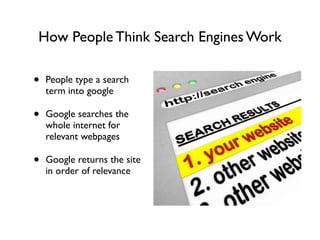
• People type a search
term into google	

• Google searches the
whole internet for
relevant webpages	

• Google returns the site
in order of relevance
How Google Really Works
• Google does not wait
for people to enter
search terms, and then
scour the internet	

• Google “spiders” crawl
the web all the time,
searching for pages to
store in its database	

• When a spider finds a
new piece of content it
does the following:
How Google Works Con’t
• The spiders strip away all of the
graphics leaving text, links and a few
meaning full tags. 	

• Google creates an “index card” for
each page that is spidered and places
it in its huge database along with the
other sites that are are indexed
under the same words. 	

• When someone searches, Google
searches the “index cards”in the
database and Google chooses the
order of the results based on
over 200+ factors.
Once Upon A Time...
The Game Has Changed...
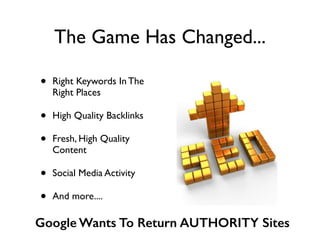
• Right Keywords In The
Right Places	

• High Quality Backlinks	

• Fresh, High Quality
Content	

• Social Media Activity	

• And more....
Google Wants To Return AUTHORITY Sites
Good News, Bad News
• Bad News - SEO is more time
consuming because you have to
create content and interact
online.	

• Good News - Getting search
engine traffic doesn’t have to
cost a lot of money. 	

• Good News - If you do the
things you would normally do
to promote your business
online, you will get visitors
from those channels AND it
will help your search engine
rankings.
More Good News & Bad News
• Bad News - It’s harder
to get your website to
page one of google.	

• Good News - Getting
your website to page
one of google is not the
ONLY way to get search
engine traffic. Focus on
the other ways, and you
will also get search
engine traffic.
Good News, Bad News:
There are many ways to get to page one
!
• The search results are getting
more personalized based on
your search history
• Social signals change the
search results based on your
friends search behavior
• Your computer’s location
affects local search results
• Videos, images, news and
products can reorganize the
search results.
The Best Advice?
ACT NATURAL!
How To “Optimize”Your Site*
• The Right Keywords	

• In The Right Places
*This gets your website indexed under the right words. (Critical!) But it
does not make the site rise in the search engine results/rankings.
SEO Starts Here!
• Keyword research is the process of
determining the words and phrases
that your target customer will use
when looking for your product or
service, then compiling them into a
list for use on your website and in
your internet marketing campaigns.	

• The Goal - TARGETED Traffic 	

• IdeallyYour Keywords Should have:
Significant Traffic, Commercial
Value, Low Competition
Keyword Research:
Step 1 - Brainstorm
• Brainstorm a list of about 10 words & phrases that
you think people will use to find what you have to
offer.	

• Ask your friends, families and customers what they
would use.	

• Look at the traffic data from your current website.	

• Also brainstorm local search terms
Keyword Research Continued
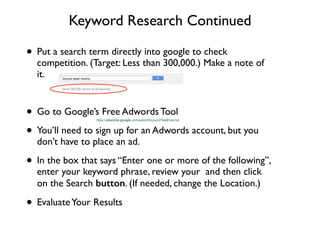
• Put a search term directly into google to check
competition. (Target: Less than 300,000.) Make a note of
it.	

!
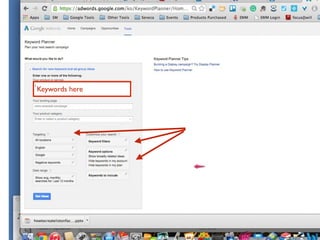
• Go to Google’s Free Adwords Tool 	

• You’ll need to sign up for an Adwords account, but you
don’t have to place an ad.	

• In the box that says “Enter one or more of the following”,
enter your keyword phrase, review your and then click
on the Search button. (If needed, change the Location.)	

• EvaluateYour Results
Keywords here
How To Evaluate Keyword & Phrases
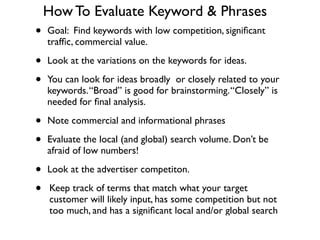
• Goal: Find keywords with low competition, significant
traffic, commercial value.	

• Look at the variations on the keywords for ideas.	

• You can look for ideas broadly or closely related to your
keywords.“Broad” is good for brainstorming.“Closely” is
needed for final analysis.	

• Note commercial and informational phrases	

• Evaluate the local (and global) search volume. Don’t be
afraid of low numbers!	

• Look at the advertiser competiton.	

• Keep track of terms that match what your target
customer will likely input, has some competition but not
too much, and has a significant local and/or global search
Targeting Options
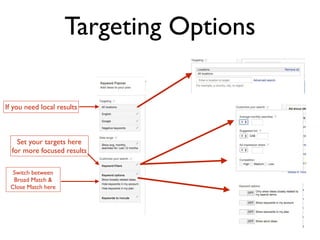
If you need local results
Set your targets here 	

for more focused results
Switch between
Broad Match & 	

Close Match here
Ad Group Ideas
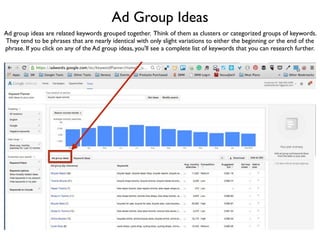
Ad group ideas are related keywords grouped together. Think of them as clusters or categorized groups of keywords.
They tend to be phrases that are nearly identical with only slight variations to either the beginning or the end of the
phrase. If you click on any of the Ad group ideas, you'll see a complete list of keywords that you can research further.
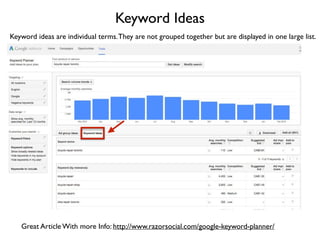
Keyword Ideas
Keyword ideas are individual terms.They are not grouped together but are displayed in one large list.
Great Article With more Info: http://www.razorsocial.com/google-keyword-planner/
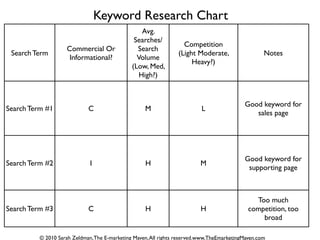
Search Term
Commercial Or
Informational?
Avg.
Searches/
Search
Volume	

(Low, Med,
High?)
Competition	

(Light Moderate,
Heavy?)
Notes
Search Term #1 C M L
Good keyword for
sales page
Search Term #2 I H M
Good keyword for
supporting page
Search Term #3 C H H
Too much
competition, too
broad
Keyword Research Chart
© 2010 Sarah Zeldman,The E-marketing Maven,All rights reserved.www.TheEmarketingMaven.com
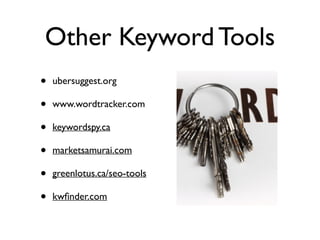
Other Keyword Tools
• ubersuggest.org	

• www.wordtracker.com	

• keywordspy.ca	

• marketsamurai.com	

• greenlotus.ca/seo-tools	

• kwfinder.com
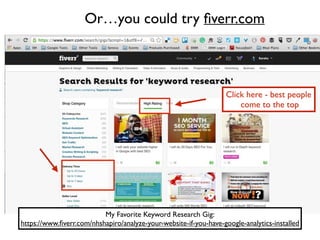
Or…you could try fiverr.com
Click here - best people	

come to the top
My Favorite Keyword Research Gig:	

https://www.fiverr.com/nhshapiro/analyze-your-website-if-you-have-google-analytics-installed
Keyword Placement
• Title Tag	

• Meta Description* and
keywords tag	

• Header Tags: H1, H2, H3	

• Image File Names and
Alt tags	

• Diverse Keywords	

• Relevant Content	

• Be Linkworthy
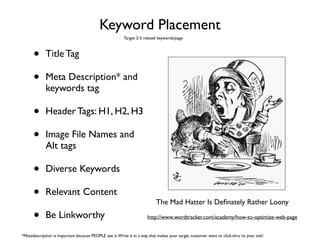
The Mad Hatter Is Definately Rather Loony
http://www.wordtracker.com/academy/how-to-optimize-web-page
Target 2-5 related keywords/page
*Metadescription is important because PEOPLE see it.Write it in a way that makes your target customer want to click-thru to your site!
Do NOT:
• “Stuff” Keywords in	

• Have your title tag match your
headlines	

• Hyperlink your keywords.
Instead, hyperlink actions words
like “Click here to learn more”	

• Have a lot of ads - even google
ads.	

• Do any kind of link scheme.	

• Try to trick Google!
Review
!
• How Search Engines Work	

• How to OptimizeYour Site	

• Right Keywords (Research)	

• In the right places (but don’t
overdo it!)
The Best Advice?
ACT NATURAL!
What Does Google Want?
(How To MakeYour Site Rise in The Rankings)
• Fresh, High Quality Content
on your website	

• Links toYour Site from
“Authority” Sites	

• Social (Media) Signals & Shares	

• *Local Directory & Review
Listings (Google Local?)
Content Is King
Blogs HelpYou:
• Easily update your website	

• Get found in the search
engines results.	

• Bring you more targeted
visitors and leads. 	

• Manage your social media
accounts. 	

• Establish you as an expert and
can lead to media attention.
© Sarah Zeldman.All Rights Reserved
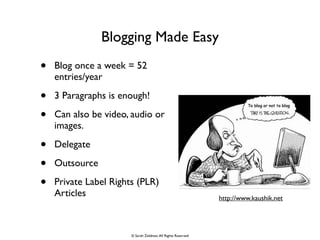
Blogging Made Easy
• Blog once a week = 52
entries/year	

• 3 Paragraphs is enough!	

• Can also be video, audio or
images. 	

• Delegate 	

• Outsource	

• Private Label Rights (PLR)
Articles http://www.kaushik.net
© Sarah Zeldman.All Rights Reserved
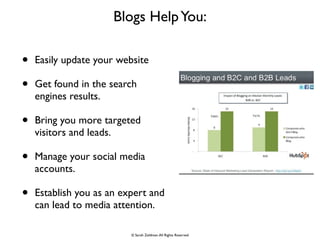
Blog Post
Impact of Blog Post when 	

posted to Social Media
Co-Schedule.com is a 	

Great Tool to Automate The Process!
Content Cruise Control
• Get Clear AboutYour Goals,Your
Buisness,Your Target Cutomer	

• Brainstorm & Capture Topic Ideas,
Style Ideas, Sources & Content To
Recycle	

• Do “Stealth Research” For More
Ideas & Resources	

• ScheduleYour Posts.	

• Schedule Chunks of Time To Create
The Posts (or decide how to
delegate this task)	

• Rinse and Repeat
Links From Authority Sites Back ToYour Site
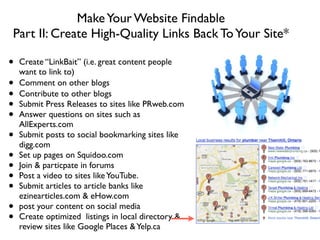
MakeYour Website Findable
Part II: Create High-Quality Links Back ToYour Site*
!
• Create “LinkBait” (i.e. great content people
want to link to)	

• Comment on other blogs	

• Contribute to other blogs	

• Submit Press Releases to sites like PRweb.com	

• Answer questions on sites such as
AllExperts.com	

• Submit posts to social bookmarking sites like
digg.com	

• Set up pages on Squidoo.com	

• Join & particpate in forums	

• Post a video to sites likeYouTube.	

• Submit articles to article banks like
ezinearticles.com & eHow.com	

• post your content on social media	

• Create optimized listings in local directory &
review sites like Google Places &Yelp.ca
Social (Media) Signals
• PostYour blog post through your
social media accounts Increase
Social Shares (FB “Like” button,
Retweeting, Googe +1)	

• GrowYour Audience	

• Engage with Authority Users	

• Use Google+
How to Evaluate An SEO Company
• Ask what keyword they are ranked
for and look for them in the search
engines.	

• Check out their blog and social
media presence.	

• Ask how they build links and use
content. (If they talk about “link
farms” - RUN!)	

• If they offer a guarantee, ask how
they can “guarantee” placement if
they don’t control google.	

• Get everything in writing & read
your contract! 	

• Get and review monthly ranking
WouldYou TrustYour	

SEO To This Guy?
WhatYou’ll Learn...
• How Search Engines Work	

• How To “Optimize”Your Site (but
not too much...)	

• How to GetYour Site to Rise In
The Rankings	

• How To Evaluate a SEO Company
But Wait…	

There’s more
The Names of Google Changes PLUS….
Let’s Go To Pinterest!
Go To:	

https://www.pinterest.com/eMarketingMaven/seo/
• Infographics are a great way to do
research & learn a new topic	

• Go to Google images	

• Search “topic” and add the word
“infographic” 	

• Pin them to a pinboard to store
for later reference
Maven Tip
Final Thought:
• Using online marketing
techniques to grow your
offline business is like

buying a piece of
exercise equipment...	

• Most of the time, it will
work...if you use it!
© Sarah Zeldman.All Rights Reserved
www.Facebook.com/TheEmarketingMaven	

www.Linkedin.com/in/SarahZeldman	

www.Twitter.com/TheEmaven

Class 6 seo class

  • 2.
    WhatYou’ll Learn... • HowSearch Engines Work • 5 Key Ranking Factors • How To “Optimize”Your Site (but not too much...) • How to GetYour Site to Rise In The Rankings • How To Evaluate a SEO Company
  • 3.
    How People ThinkSearch Engines Work • People type a search term into google • Google searches the whole internet for relevant webpages • Google returns the site in order of relevance
  • 4.
    How Google ReallyWorks • Google does not wait for people to enter search terms, and then scour the internet • Google “spiders” crawl the web all the time, searching for pages to store in its database • When a spider finds a new piece of content it does the following:
  • 5.
    How Google WorksCon’t • The spiders strip away all of the graphics leaving text, links and a few meaning full tags. • Google creates an “index card” for each page that is spidered and places it in its huge database along with the other sites that are are indexed under the same words. • When someone searches, Google searches the “index cards”in the database and Google chooses the order of the results based on over 200+ factors.
  • 6.
    Once Upon ATime...
  • 7.
    The Game HasChanged... • Right Keywords In The Right Places • High Quality Backlinks • Fresh, High Quality Content • Social Media Activity • And more.... Google Wants To Return AUTHORITY Sites
  • 8.
    Good News, BadNews • Bad News - SEO is more time consuming because you have to create content and interact online. • Good News - Getting search engine traffic doesn’t have to cost a lot of money. • Good News - If you do the things you would normally do to promote your business online, you will get visitors from those channels AND it will help your search engine rankings.
  • 9.
    More Good News& Bad News • Bad News - It’s harder to get your website to page one of google. • Good News - Getting your website to page one of google is not the ONLY way to get search engine traffic. Focus on the other ways, and you will also get search engine traffic.
  • 10.
    Good News, BadNews: There are many ways to get to page one ! • The search results are getting more personalized based on your search history • Social signals change the search results based on your friends search behavior • Your computer’s location affects local search results • Videos, images, news and products can reorganize the search results.
  • 11.
  • 12.
    How To “Optimize”YourSite* • The Right Keywords • In The Right Places *This gets your website indexed under the right words. (Critical!) But it does not make the site rise in the search engine results/rankings.
  • 13.
    SEO Starts Here! •Keyword research is the process of determining the words and phrases that your target customer will use when looking for your product or service, then compiling them into a list for use on your website and in your internet marketing campaigns. • The Goal - TARGETED Traffic • IdeallyYour Keywords Should have: Significant Traffic, Commercial Value, Low Competition
  • 14.
    Keyword Research: Step 1- Brainstorm • Brainstorm a list of about 10 words & phrases that you think people will use to find what you have to offer. • Ask your friends, families and customers what they would use. • Look at the traffic data from your current website. • Also brainstorm local search terms
  • 15.
    Keyword Research Continued •Put a search term directly into google to check competition. (Target: Less than 300,000.) Make a note of it. ! • Go to Google’s Free Adwords Tool • You’ll need to sign up for an Adwords account, but you don’t have to place an ad. • In the box that says “Enter one or more of the following”, enter your keyword phrase, review your and then click on the Search button. (If needed, change the Location.) • EvaluateYour Results
  • 16.
  • 17.
    How To EvaluateKeyword & Phrases • Goal: Find keywords with low competition, significant traffic, commercial value. • Look at the variations on the keywords for ideas. • You can look for ideas broadly or closely related to your keywords.“Broad” is good for brainstorming.“Closely” is needed for final analysis. • Note commercial and informational phrases • Evaluate the local (and global) search volume. Don’t be afraid of low numbers! • Look at the advertiser competiton. • Keep track of terms that match what your target customer will likely input, has some competition but not too much, and has a significant local and/or global search
  • 18.
    Targeting Options If youneed local results Set your targets here for more focused results Switch between Broad Match & Close Match here
  • 19.
    Ad Group Ideas Adgroup ideas are related keywords grouped together. Think of them as clusters or categorized groups of keywords. They tend to be phrases that are nearly identical with only slight variations to either the beginning or the end of the phrase. If you click on any of the Ad group ideas, you'll see a complete list of keywords that you can research further.
  • 20.
    Keyword Ideas Keyword ideasare individual terms.They are not grouped together but are displayed in one large list. Great Article With more Info: http://www.razorsocial.com/google-keyword-planner/
  • 21.
    Search Term Commercial Or Informational? Avg. Searches/ Search Volume (Low,Med, High?) Competition (Light Moderate, Heavy?) Notes Search Term #1 C M L Good keyword for sales page Search Term #2 I H M Good keyword for supporting page Search Term #3 C H H Too much competition, too broad Keyword Research Chart © 2010 Sarah Zeldman,The E-marketing Maven,All rights reserved.www.TheEmarketingMaven.com
  • 22.
    Other Keyword Tools •ubersuggest.org • www.wordtracker.com • keywordspy.ca • marketsamurai.com • greenlotus.ca/seo-tools • kwfinder.com
  • 23.
    Or…you could tryfiverr.com Click here - best people come to the top My Favorite Keyword Research Gig: https://www.fiverr.com/nhshapiro/analyze-your-website-if-you-have-google-analytics-installed
  • 24.
    Keyword Placement • TitleTag • Meta Description* and keywords tag • Header Tags: H1, H2, H3 • Image File Names and Alt tags • Diverse Keywords • Relevant Content • Be Linkworthy The Mad Hatter Is Definately Rather Loony http://www.wordtracker.com/academy/how-to-optimize-web-page Target 2-5 related keywords/page *Metadescription is important because PEOPLE see it.Write it in a way that makes your target customer want to click-thru to your site!
  • 25.
    Do NOT: • “Stuff”Keywords in • Have your title tag match your headlines • Hyperlink your keywords. Instead, hyperlink actions words like “Click here to learn more” • Have a lot of ads - even google ads. • Do any kind of link scheme. • Try to trick Google!
  • 26.
    Review ! • How SearchEngines Work • How to OptimizeYour Site • Right Keywords (Research) • In the right places (but don’t overdo it!)
  • 27.
  • 28.
    What Does GoogleWant? (How To MakeYour Site Rise in The Rankings) • Fresh, High Quality Content on your website • Links toYour Site from “Authority” Sites • Social (Media) Signals & Shares • *Local Directory & Review Listings (Google Local?)
  • 29.
  • 30.
    Blogs HelpYou: • Easilyupdate your website • Get found in the search engines results. • Bring you more targeted visitors and leads. • Manage your social media accounts. • Establish you as an expert and can lead to media attention. © Sarah Zeldman.All Rights Reserved
  • 31.
    Blogging Made Easy •Blog once a week = 52 entries/year • 3 Paragraphs is enough! • Can also be video, audio or images. • Delegate • Outsource • Private Label Rights (PLR) Articles http://www.kaushik.net © Sarah Zeldman.All Rights Reserved
  • 32.
    Blog Post Impact ofBlog Post when posted to Social Media Co-Schedule.com is a Great Tool to Automate The Process!
  • 33.
    Content Cruise Control •Get Clear AboutYour Goals,Your Buisness,Your Target Cutomer • Brainstorm & Capture Topic Ideas, Style Ideas, Sources & Content To Recycle • Do “Stealth Research” For More Ideas & Resources • ScheduleYour Posts. • Schedule Chunks of Time To Create The Posts (or decide how to delegate this task) • Rinse and Repeat
  • 34.
    Links From AuthoritySites Back ToYour Site
  • 35.
    MakeYour Website Findable PartII: Create High-Quality Links Back ToYour Site* ! • Create “LinkBait” (i.e. great content people want to link to) • Comment on other blogs • Contribute to other blogs • Submit Press Releases to sites like PRweb.com • Answer questions on sites such as AllExperts.com • Submit posts to social bookmarking sites like digg.com • Set up pages on Squidoo.com • Join & particpate in forums • Post a video to sites likeYouTube. • Submit articles to article banks like ezinearticles.com & eHow.com • post your content on social media • Create optimized listings in local directory & review sites like Google Places &Yelp.ca
  • 36.
    Social (Media) Signals •PostYour blog post through your social media accounts Increase Social Shares (FB “Like” button, Retweeting, Googe +1) • GrowYour Audience • Engage with Authority Users • Use Google+
  • 37.
    How to EvaluateAn SEO Company • Ask what keyword they are ranked for and look for them in the search engines. • Check out their blog and social media presence. • Ask how they build links and use content. (If they talk about “link farms” - RUN!) • If they offer a guarantee, ask how they can “guarantee” placement if they don’t control google. • Get everything in writing & read your contract! • Get and review monthly ranking WouldYou TrustYour SEO To This Guy?
  • 38.
    WhatYou’ll Learn... • HowSearch Engines Work • How To “Optimize”Your Site (but not too much...) • How to GetYour Site to Rise In The Rankings • How To Evaluate a SEO Company
  • 39.
  • 40.
    The Names ofGoogle Changes PLUS…. Let’s Go To Pinterest!
  • 41.
    Go To: https://www.pinterest.com/eMarketingMaven/seo/ • Infographicsare a great way to do research & learn a new topic • Go to Google images • Search “topic” and add the word “infographic” • Pin them to a pinboard to store for later reference Maven Tip
  • 42.
    Final Thought: • Usingonline marketing techniques to grow your offline business is like buying a piece of exercise equipment... • Most of the time, it will work...if you use it!

  • 43.
    © Sarah Zeldman.AllRights Reserved www.Facebook.com/TheEmarketingMaven www.Linkedin.com/in/SarahZeldman www.Twitter.com/TheEmaven