Compatibility in Mobile App Testing
Septeni Technology-12/3/2014
1
Agenda
 What tests should be run?
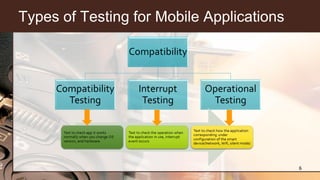
 Types of Testing for Mobile Applications
 Compatibility in Mobile App Testing
 Test points
 Operational Testing
 Interrupt Testing
 Compatibility Testing
 Discussion
2
What tests should be run?
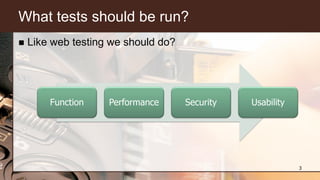
 Like web testing we should do?
3
Function Performance Security Usability
What tests should be run?
 But let’s think about : “ What’s happen when …?”
 … battery runs low?
 … battery is charging from a dead battery?
 … device memory is full?
 … I receive a notification while using the phone or another
application?
 … can our application run right when we update mobile OS?
 … can our application run well with network connection :
wifi,3G/4G?
4
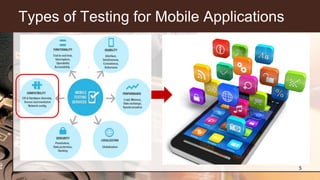
Types of Testing for Mobile Applications
5
Types of Testing for Mobile Applications
6
Compatibility in Mobile App Testing
 Purpose :
 Verify that the application works normally under the external
factors
 Verify that the application does not interfere with the basic
functions of mobile
 Check and study, the response of the application when updating
the Version of OS or OS-specific.
7
Compatibility in Mobile App Testing
 Purpose :
 Verify whether the application is normally manipulated in the
background.
 In addition, we see how the app corresponds under the setting of
(smartphone or tablet) devices
8
External factors
 Network : Wifi, 3G/4G
 VPN : On/Off
 Manual mode : On/Off
 Bluetooth : On/Off
 Airplane mode
 GPS : On/Off
 Portrait Orientation : On/Off
 Notification : text, sound
 Carrier
 Location
9
Test points for Operational Testing
 Network connection
 3G/4G
 VPN setting
 Wifi setting
 Bluetooth
 Device setting
 Airplane mode
 Manual mode
 Silent mode
10
Test points for Operational Testing
 Location
 Wifi
 GPS
 3G, 4G, GPRS
 UI
 Portrait Orientation Lock
 Display : Landscape , Portrait
 Automation Orientation
11
Test points for Operational Testing
 Multi tasks
 Sound of others App
 Downloading of others App
 Battery
 Normal user
 Idle status
12
Test points for Interrupt Testing
 Phone calls
 Call Except
 Call reject
 Call Establish
 Power off
 Low Battery
 Charge Effect
 Notification
 SMS notification
 SMS resuming
 Mail notification 13
Test points for Interrupt Testing
 Lock/unlock
 Memory leak
 Call others App ( Facebook, Twitter…)
 Network connection loss
 Alarm, Reminder
14
Test points for Compatibility Testing
 Install/Uninstall
 Local device memory
 Memory Card
 Close Application
 Version up
 Change hardware
 Change OS version
 Keyboard type
 Display direction 15
Test points for Compatibility Testing
 Display (small, large, normal)
 Carrier
 Push Notification/Local notification
 Call App from Multi-task bar
 Move to background
 Delete from background
16
Test points for Compatibility Testing
 Hard key
 Home
 Camera
 Back
 Volume
 On/off
 Application logo
 Splash
 Data backup
17
Test points for Compatibility Testing
 Device – PC synchronize
 Device input entry
 Virtual keyboard
 Hard keyboard
18
Discussion
 Should we use testing checklist for this test types?
19
Thank you !
20

Compatibility in mobile testing

  • 1.
    Compatibility in MobileApp Testing Septeni Technology-12/3/2014 1
  • 2.
    Agenda  What testsshould be run?  Types of Testing for Mobile Applications  Compatibility in Mobile App Testing  Test points  Operational Testing  Interrupt Testing  Compatibility Testing  Discussion 2
  • 3.
    What tests shouldbe run?  Like web testing we should do? 3 Function Performance Security Usability
  • 4.
    What tests shouldbe run?  But let’s think about : “ What’s happen when …?”  … battery runs low?  … battery is charging from a dead battery?  … device memory is full?  … I receive a notification while using the phone or another application?  … can our application run right when we update mobile OS?  … can our application run well with network connection : wifi,3G/4G? 4
  • 5.
    Types of Testingfor Mobile Applications 5
  • 6.
    Types of Testingfor Mobile Applications 6
  • 7.
    Compatibility in MobileApp Testing  Purpose :  Verify that the application works normally under the external factors  Verify that the application does not interfere with the basic functions of mobile  Check and study, the response of the application when updating the Version of OS or OS-specific. 7
  • 8.
    Compatibility in MobileApp Testing  Purpose :  Verify whether the application is normally manipulated in the background.  In addition, we see how the app corresponds under the setting of (smartphone or tablet) devices 8
  • 9.
    External factors  Network: Wifi, 3G/4G  VPN : On/Off  Manual mode : On/Off  Bluetooth : On/Off  Airplane mode  GPS : On/Off  Portrait Orientation : On/Off  Notification : text, sound  Carrier  Location 9
  • 10.
    Test points forOperational Testing  Network connection  3G/4G  VPN setting  Wifi setting  Bluetooth  Device setting  Airplane mode  Manual mode  Silent mode 10
  • 11.
    Test points forOperational Testing  Location  Wifi  GPS  3G, 4G, GPRS  UI  Portrait Orientation Lock  Display : Landscape , Portrait  Automation Orientation 11
  • 12.
    Test points forOperational Testing  Multi tasks  Sound of others App  Downloading of others App  Battery  Normal user  Idle status 12
  • 13.
    Test points forInterrupt Testing  Phone calls  Call Except  Call reject  Call Establish  Power off  Low Battery  Charge Effect  Notification  SMS notification  SMS resuming  Mail notification 13
  • 14.
    Test points forInterrupt Testing  Lock/unlock  Memory leak  Call others App ( Facebook, Twitter…)  Network connection loss  Alarm, Reminder 14
  • 15.
    Test points forCompatibility Testing  Install/Uninstall  Local device memory  Memory Card  Close Application  Version up  Change hardware  Change OS version  Keyboard type  Display direction 15
  • 16.
    Test points forCompatibility Testing  Display (small, large, normal)  Carrier  Push Notification/Local notification  Call App from Multi-task bar  Move to background  Delete from background 16
  • 17.
    Test points forCompatibility Testing  Hard key  Home  Camera  Back  Volume  On/off  Application logo  Splash  Data backup 17
  • 18.
    Test points forCompatibility Testing  Device – PC synchronize  Device input entry  Virtual keyboard  Hard keyboard 18
  • 19.
    Discussion  Should weuse testing checklist for this test types? 19
  • 20.