SCHOOL OF COMPUTING SCIENCE & ENGINEERING
CAT-3 Case Study Report File Submission
GALGOTIAS UNIVERSITY
Plot No.2, Sector -17 A, Yamuna Expressway,
Greater Noida, Gautam Buddha Nagar, U.P., India
Course Name: COMPUTER WORKSHOP
Course Code: BCS01T1004
School: SCSE Year: 1st Semester: 1
Program: B. TECH Session: 2021-2022
Submitted To: Submitted By:
Mrs. Indravati AVIRAL GAURAV(21SCSE1300029)
ABHINAV KUMAR CHOUDHARY(21SCSE1011615)
AMIT SINGH(21SCSE1410106)
Steps how chats
And mails are sent
WHAT IS EMAILS
 The term “email” stands for “electronic mail”. The electronic mail is introduced first
in the 1960s .
 However, it became available in the current structure in the 1970s.
 It is a method of exchanging messages between two peoples using electronic
devices.
 Protocols used in email systems :
o IMAP (Internet Mail Access Protocol)
o POP (Post Office Protocol)
o SMTP (Simple Mail Transfer Protocol)
MAIL SERVER
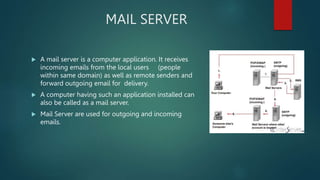
 A mail server is a computer application. It receives
incoming emails from the local users (people
within same domain) as well as remote senders and
forward outgoing email for delivery.
 A computer having such an application installed can
also be called as a mail server.
 Mail Server are used for outgoing and incoming
emails.
DNS
 The DNS stands for Domain Name System.
 The purpose of the DNS is to translate the domain names to the IP
addresses and vise-versa.
 The DNS is used here to find out the mail server of the other side.
 The information is retrieved from the DNS and the email message is sent
to the particular email address.
HOW EMAILS WORK
 First the sender needs to enter the email address of the recipient along
with the message using an email application, click the “Send” button.
 In the DNS zone, for the receiver address’ domain, there will be an MX
record (stands for Mail Exchanger record). This is a DNS resource record
which specifies the mail server of a domain, after DNS lookup, a response
is given to the requested mail server. This way the ‘to’ mail server is
identified.
 The next step is transferring the message between the mail servers. The
SMTP protocol is used for this communication.
 This message is transferred to the Mail Delivery Agent and then it is
transferred to the recipient’s local computer.
THANKING YOU!!

comp workshop ppt.ppt to our compter science student

  • 1.
    SCHOOL OF COMPUTINGSCIENCE & ENGINEERING CAT-3 Case Study Report File Submission GALGOTIAS UNIVERSITY Plot No.2, Sector -17 A, Yamuna Expressway, Greater Noida, Gautam Buddha Nagar, U.P., India Course Name: COMPUTER WORKSHOP Course Code: BCS01T1004 School: SCSE Year: 1st Semester: 1 Program: B. TECH Session: 2021-2022 Submitted To: Submitted By: Mrs. Indravati AVIRAL GAURAV(21SCSE1300029) ABHINAV KUMAR CHOUDHARY(21SCSE1011615) AMIT SINGH(21SCSE1410106)
  • 2.
    Steps how chats Andmails are sent
  • 3.
    WHAT IS EMAILS The term “email” stands for “electronic mail”. The electronic mail is introduced first in the 1960s .  However, it became available in the current structure in the 1970s.  It is a method of exchanging messages between two peoples using electronic devices.  Protocols used in email systems : o IMAP (Internet Mail Access Protocol) o POP (Post Office Protocol) o SMTP (Simple Mail Transfer Protocol)
  • 4.
    MAIL SERVER  Amail server is a computer application. It receives incoming emails from the local users (people within same domain) as well as remote senders and forward outgoing email for delivery.  A computer having such an application installed can also be called as a mail server.  Mail Server are used for outgoing and incoming emails.
  • 5.
    DNS  The DNSstands for Domain Name System.  The purpose of the DNS is to translate the domain names to the IP addresses and vise-versa.  The DNS is used here to find out the mail server of the other side.  The information is retrieved from the DNS and the email message is sent to the particular email address.
  • 6.
    HOW EMAILS WORK First the sender needs to enter the email address of the recipient along with the message using an email application, click the “Send” button.  In the DNS zone, for the receiver address’ domain, there will be an MX record (stands for Mail Exchanger record). This is a DNS resource record which specifies the mail server of a domain, after DNS lookup, a response is given to the requested mail server. This way the ‘to’ mail server is identified.  The next step is transferring the message between the mail servers. The SMTP protocol is used for this communication.  This message is transferred to the Mail Delivery Agent and then it is transferred to the recipient’s local computer.
  • 7.