Communication –  E-mail & E-diary Intermediate 2  Administration
E-Diary What is an e-dairy? An e-diary is a electronic form of diary which Allows users to check, enter and store  Information on future appointments.
Advantages of an e-diary Routine appointments can be set up Reminders can be set before an appointment or event Double booking can be prevented as the computer will flag this up Diaries can be shared with others Meetings can be schedules There is a facility there to do a to-do list.
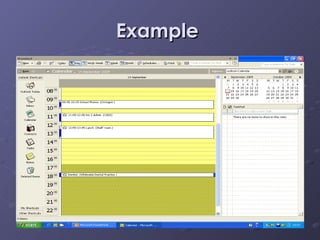
Example
How to access your e-diary Open Microsoft Outlook  Click on the Calendar icon at the left hand side to open up your diary.  Click on the time to open up your appointment box – begin typing information. Now watch the teachers demonstration on the whiteboard.
Task 1 Create an e-diary with your classes and appointments after school for today.  Include the following: All of your classes, include as much information as possible –  subject, classroom, teacher, topic of lesson (if known) Interval and lunch time arrangements After school appointments or plans When you finish today’s appointment continue for the rest of the week.
Disadvantages of e-mail E-mails are NOT confidential  A persons tone cannot be measured in an e-mail E-mails from unknown senders can contain certain viruses If a computer system crashes or a computer has not been turned off properly then e-mails can be lost.
Advantages of e-mail The same messages can be sent to a number of recipients It is a inexpensive way of worldwide communication An address book of contacts can be created Documents and photos can be attached to an e-mail Copies (CC) and blind copies (BCC) can be made Messages can be forwarded to other people.
E-mail etiquette Always use spellcheck before sending ANY e-mail Check your e-mail regularly and respond to e-mails in good time Be precise and concise, remember e-mails are short and too the point.  You are NOT writing a letter.  Take care when sending your e-mail, that it is going to the correct person or group of people.
Always include a subject heading Save and store your e-mails so they can be found easily when you need them Always delete unnecessary e-mails to save space on your computer system.
DO NOT write in capital letters as some people see this as shouting.  There are other ways to emphasise words in e-mail like “this”. Avoid misrepresentation –  Always send e-mails from your own account, never use someone else’s account.  Do not make changes to other people e-mails and forward them on.  Always remember copyright , defamation, obscenity and fraudulent  legislation applies to e-mail too.

Communication – E Mail

  • 1.
    Communication – E-mail & E-diary Intermediate 2 Administration
  • 2.
    E-Diary What isan e-dairy? An e-diary is a electronic form of diary which Allows users to check, enter and store Information on future appointments.
  • 3.
    Advantages of ane-diary Routine appointments can be set up Reminders can be set before an appointment or event Double booking can be prevented as the computer will flag this up Diaries can be shared with others Meetings can be schedules There is a facility there to do a to-do list.
  • 4.
  • 5.
    How to accessyour e-diary Open Microsoft Outlook Click on the Calendar icon at the left hand side to open up your diary. Click on the time to open up your appointment box – begin typing information. Now watch the teachers demonstration on the whiteboard.
  • 6.
    Task 1 Createan e-diary with your classes and appointments after school for today. Include the following: All of your classes, include as much information as possible – subject, classroom, teacher, topic of lesson (if known) Interval and lunch time arrangements After school appointments or plans When you finish today’s appointment continue for the rest of the week.
  • 7.
    Disadvantages of e-mailE-mails are NOT confidential A persons tone cannot be measured in an e-mail E-mails from unknown senders can contain certain viruses If a computer system crashes or a computer has not been turned off properly then e-mails can be lost.
  • 8.
    Advantages of e-mailThe same messages can be sent to a number of recipients It is a inexpensive way of worldwide communication An address book of contacts can be created Documents and photos can be attached to an e-mail Copies (CC) and blind copies (BCC) can be made Messages can be forwarded to other people.
  • 9.
    E-mail etiquette Alwaysuse spellcheck before sending ANY e-mail Check your e-mail regularly and respond to e-mails in good time Be precise and concise, remember e-mails are short and too the point. You are NOT writing a letter. Take care when sending your e-mail, that it is going to the correct person or group of people.
  • 10.
    Always include asubject heading Save and store your e-mails so they can be found easily when you need them Always delete unnecessary e-mails to save space on your computer system.
  • 11.
    DO NOT writein capital letters as some people see this as shouting. There are other ways to emphasise words in e-mail like “this”. Avoid misrepresentation – Always send e-mails from your own account, never use someone else’s account. Do not make changes to other people e-mails and forward them on. Always remember copyright , defamation, obscenity and fraudulent legislation applies to e-mail too.