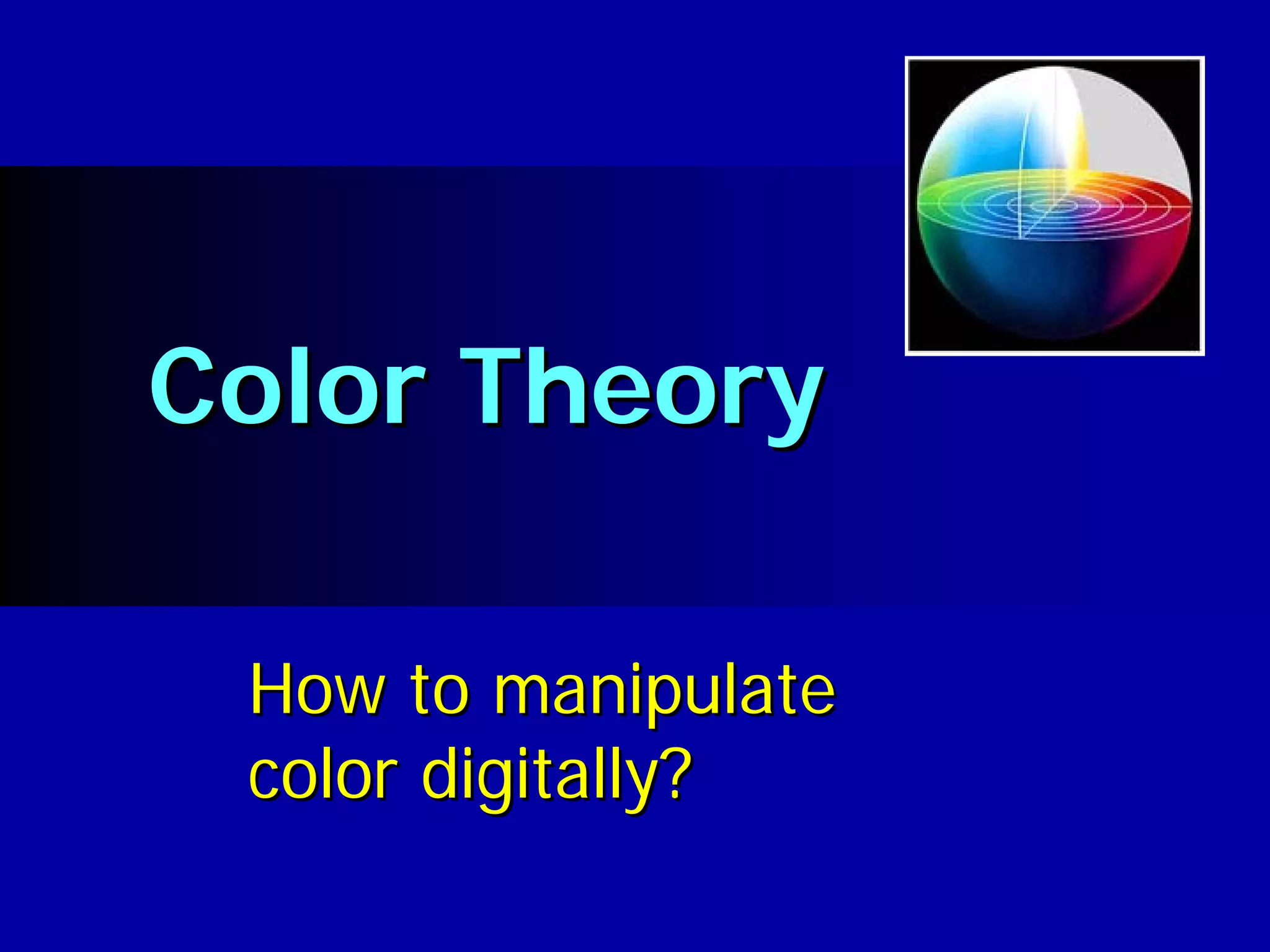

Color Theory

 How to manipulate
 color digitally?
What is color?
                                                      2


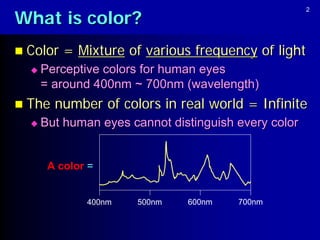
 Color   = Mixture of various frequency of light
     Perceptive colors for human eyes
      = around 400nm ~ 700nm (wavelength)
 The   number of colors in real world = Infinite
     But human eyes cannot distinguish every color


       A color =


              400nm   500nm    600nm    700nm
Visible spectrum
                                                                                  3


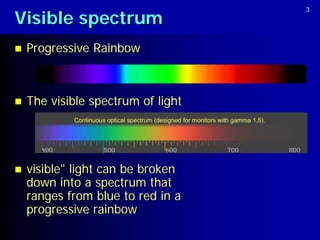
   Progressive Rainbow


   The visible spectrum of light
            Continuous optical spectrum (designed for monitors with gamma 1.5).


   visible" light can be broken
    down into a spectrum that
    ranges from blue to red in a
    progressive rainbow
Visible spectrum
                                                                                   4


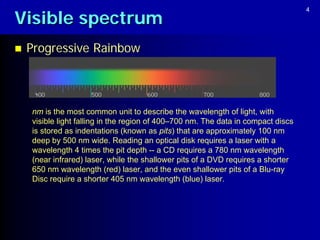
   Progressive Rainbow


    nm is the most common unit to describe the wavelength of light, with
    visible light falling in the region of 400–700 nm. The data in compact discs
    is stored as indentations (known as pits) that are approximately 100 nm
    deep by 500 nm wide. Reading an optical disk requires a laser with a
    wavelength 4 times the pit depth -- a CD requires a 780 nm wavelength
    (near infrared) laser, while the shallower pits of a DVD requires a shorter
    650 nm wavelength (red) laser, and the even shallower pits of a Blu-ray
    Disc require a shorter 405 nm wavelength (blue) laser.
5

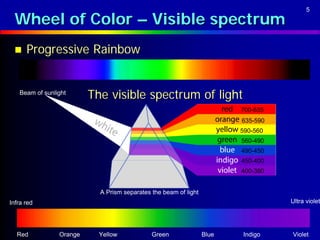
 Wheel of Color – Visible spectrum
     Progressive Rainbow


   Beam of sunlight
                         The visible spectrum of light
                                                                        700-635
                                                                        635-590
                                                                        590-560
                                                                        560-490
                                                                        490-450
                                                                        450-400
                                                                        400-380


                           A Prism separates the beam of light
Infra red                                                                         Ultra violet


  Red           Orange     Yellow            Green               Blue   Indigo    Violet
Color in the eye
                                                                6


   Progressive Rainbow


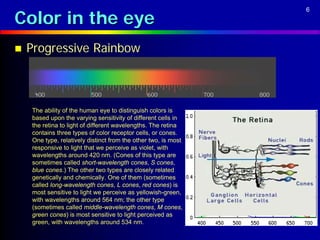
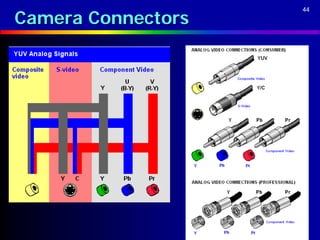
    The ability of the human eye to distinguish colors is
    based upon the varying sensitivity of different cells in
    the retina to light of different wavelengths. The retina
    contains three types of color receptor cells, or cones.
    One type, relatively distinct from the other two, is most
    responsive to light that we perceive as violet, with
    wavelengths around 420 nm. (Cones of this type are
    sometimes called short-wavelength cones, S cones,
    blue cones.) The other two types are closely related
    genetically and chemically. One of them (sometimes
    called long-wavelength cones, L cones, red cones) is
    most sensitive to light we perceive as yellowish-green,
    with wavelengths around 564 nm; the other type
    (sometimes called middle-wavelength cones, M cones,
    green cones) is most sensitive to light perceived as
    green, with wavelengths around 534 nm.
Visible spectrum
                                      7


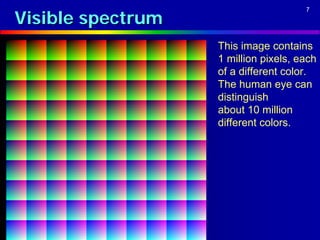
                   This image contains
                   1 million pixels, each
                   of a different color.
                   The human eye can
                   distinguish
                   about 10 million
                   different colors.
Color Model
                                                      8


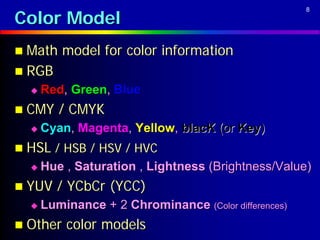
 Math   model for color information
 RGB
     Red, Green, Blue
 CMY    / CMYK
     Cyan, Magenta, Yellow, blacK (or Key)
 HSL / HSB / HSV / HVC
     Hue , Saturation , Lightness (Brightness/Value)
 YUV    / YCbCr (YCC)
     Luminance + 2 Chrominance (Color differences)
 Other   color models
Wheel of Color
                                                 9


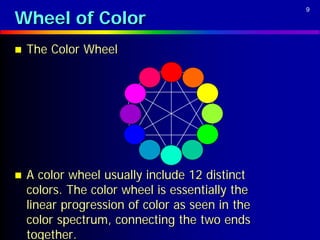
   The Color Wheel


   A color wheel usually include 12 distinct
    colors. The color wheel is essentially the
    linear progression of color as seen in the
    color spectrum, connecting the two ends
    together.
10

Wheel of Color (RGB Color Model)
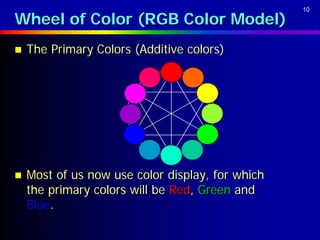
   The Primary Colors (Additive colors)


   Most of us now use color display, for which
    the primary colors will be Red, Green and
    Blue.
11

Wheel of Color (RGB Color Model)
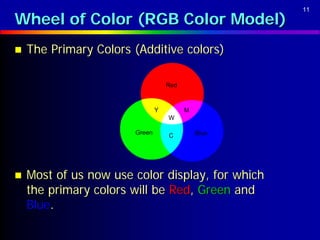
   The Primary Colors (Additive colors)

                                   Red


                               Y         M
                                   W

                       Green       C         Blue


   Most of us now use color display, for which
    the primary colors will be Red, Green and
    Blue.
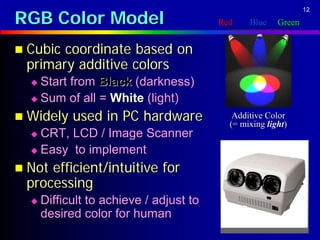
RGB Color Model
                                                                   12

                                         Red       Blue    Green


 Cubiccoordinate based on
 primary additive colors
   Start from Black (darkness)
   Sum of all = White (light)

 Widely    used in PC hardware             Additive Color
                                           (= mixing light)
   CRT, LCD / Image Scanner
   Easy to implement                                  B

 Notefficient/intuitive for
 processing                                    Black
                                                           White

     Difficult to achieve / adjust to                         G
      desired color for human              R
13

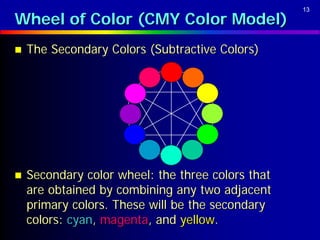
Wheel of Color (CMY Color Model)
   The Secondary Colors (Subtractive Colors)


   Secondary color wheel: the three colors that
    are obtained by combining any two adjacent
    primary colors. These will be the secondary
    colors: cyan, magenta, and yellow.
14

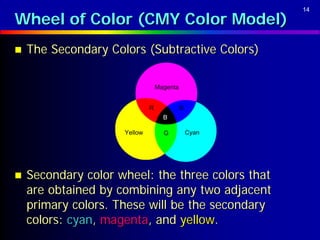
Wheel of Color (CMY Color Model)
   The Secondary Colors (Subtractive Colors)

                                  Magenta


                              R             B
                                    B

                     Yellow         G           Cyan


   Secondary color wheel: the three colors that
    are obtained by combining any two adjacent
    primary colors. These will be the secondary
    colors: cyan, magenta, and yellow.
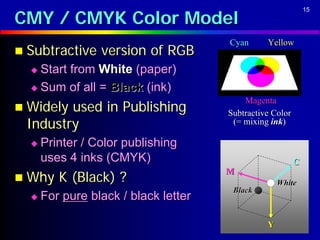
CMY / CMYK Color Model
                                                              15


                                      Cyan      Yellow
 Subtractive    version of RGB
   Start from White (paper)
   Sum of all = Black (ink)
                                          Magenta
 Widelyused in Publishing            Subtractive Color
 Industry                              (= mixing ink)

     Printer / Color publishing
      uses 4 inks (CMYK)                                  C
 Why    K (Black) ?
                                      M
                                                    White
                                       Black
     For pure black / black letter

                                                Y
Wheel of Color
                                                16


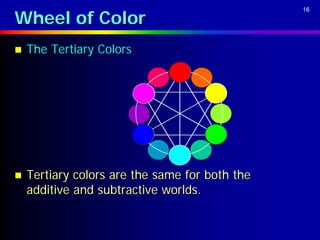
   The Tertiary Colors


   Tertiary colors are the same for both the
    additive and subtractive worlds.
Wheel of Color
                                                   17


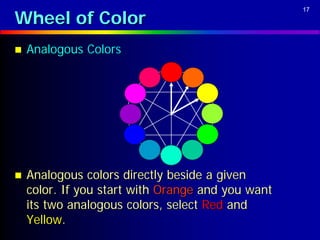
   Analogous Colors


   Analogous colors directly beside a given
    color. If you start with Orange and you want
    its two analogous colors, select Red and
    Yellow.
Wheel of Color
                                                    18


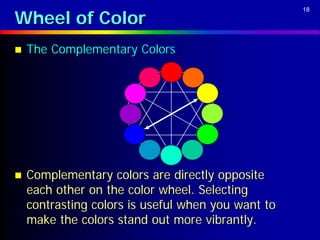
   The Complementary Colors


   Complementary colors are directly opposite
    each other on the color wheel. Selecting
    contrasting colors is useful when you want to
    make the colors stand out more vibrantly.
Wheel of Color
                                                    19


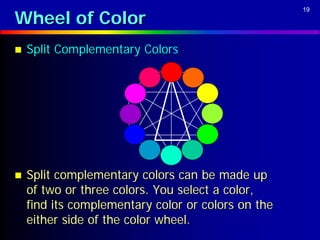
   Split Complementary Colors


   Split complementary colors can be made up
    of two or three colors. You select a color,
    find its complementary color or colors on the
    either side of the color wheel.
Wheel of Color
                                                  20


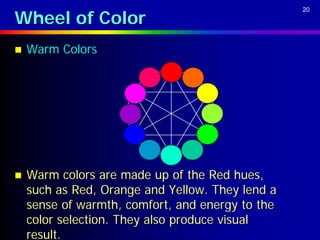
   Warm Colors


   Warm colors are made up of the Red hues,
    such as Red, Orange and Yellow. They lend a
    sense of warmth, comfort, and energy to the
    color selection. They also produce visual
    result.
Wheel of Color
                                                   21


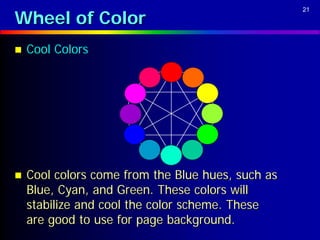
   Cool Colors


   Cool colors come from the Blue hues, such as
    Blue, Cyan, and Green. These colors will
    stabilize and cool the color scheme. These
    are good to use for page background.
22

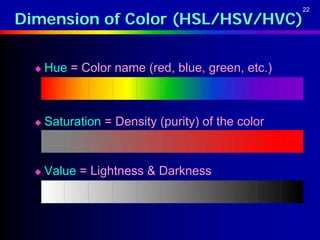
Dimension of Color (HSL/HSV/HVC)

     Hue = Color name (red, blue, green, etc.)


     Saturation = Density (purity) of the color


     Value = Lightness & Darkness
HSL / HSV / HVC Color Model
                                                 23


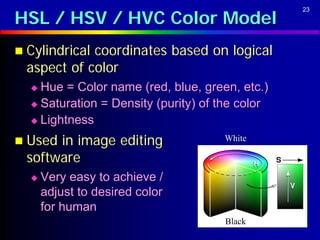
 Cylindricalcoordinates based on logical
  aspect of color
   Hue = Color name (red, blue, green, etc.)
   Saturation = Density (purity) of the color

   Lightness

 Used in image editing              White

  software
     Very easy to achieve /
      adjust to desired color
      for human
                                     Black
Color Matching
                                                        24


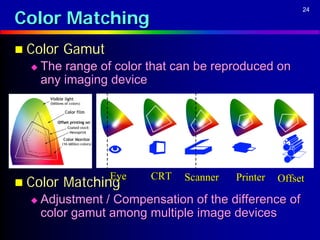
 Color   Gamut
     The range of color that can be reproduced on
      any imaging device


                  Eye    CRT
 Color   Matching             Scanner   Printer   Offset

     Adjustment / Compensation of the difference of
      color gamut among multiple image devices
Color Percentage
                   25


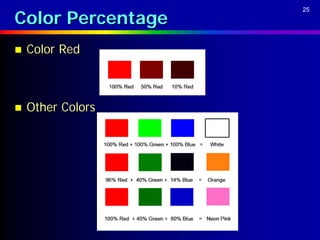
   Color Red


   Other Colors
Color Bit Depth
                                                                    26


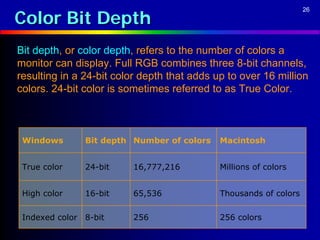
Bit depth, or color depth, refers to the number of colors a
monitor can display. Full RGB combines three 8-bit channels,
resulting in a 24-bit color depth that adds up to over 16 million
colors. 24-bit color is sometimes referred to as True Color.


 Windows         Bit depth Number of colors   Macintosh


 True color      24-bit   16,777,216          Millions of colors


 High color      16-bit   65,536              Thousands of colors

 Indexed color   8-bit    256                 256 colors
Color Depth
                           27


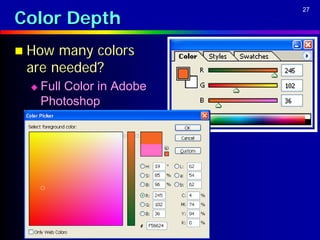
 How many colors
 are needed?
    Full Color in Adobe
     Photoshop
Color Depth
                                               28


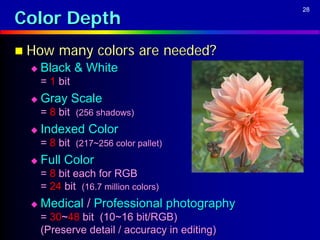
 How    many colors are needed?
    Black & White
     = 1 bit
    Gray Scale
     = 8 bit (256 shadows)
    Indexed Color
     = 8 bit (217~256 color pallet)
    Full Color
     = 8 bit each for RGB
     = 24 bit (16.7 million colors)
    Medical / Professional photography
     = 30~48 bit (10~16 bit/RGB)
     (Preserve detail / accuracy in editing)
Color Depth
                                   29


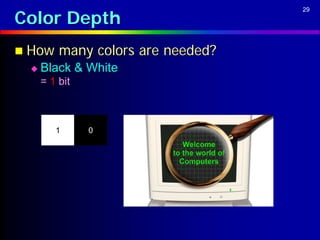
 How    many colors are needed?
    Black & White
     = 1 bit


        1      0
Color Depth
                                   30


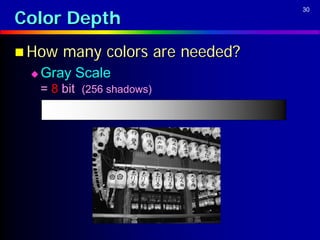
 How    many colors are needed?
    Gray Scale
     = 8 bit (256 shadows)
Palette and Dithering
                                                                   31


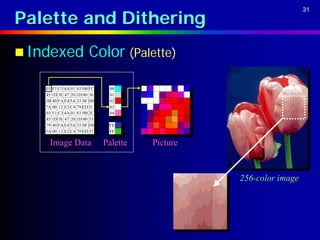
 Indexed              Color (Palette)

   03 F1 C3 4A 01 83 9B FC    00
   45 1D 3E 47 20 1D 80 56    01
   5B 40 FA E4 5A 33 0F D0    02
   7A 00 12 E2 C4 79 ED 1C    03
   03 F1 C3 4A 01 83 9B 2C    04
   45 1D 3E 47 20 1D 80 53
   79 40 FA E4 5A 33 0F D8    FE
   5A 00 12 E2 C4 79 ED 32    FF

     Image Data              Palette   Picture


                                                 256-color image
Color Depth
                                                                                   32


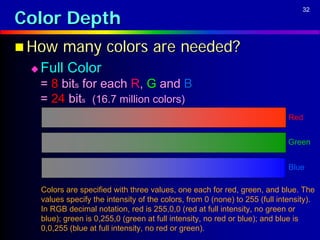
 How      many colors are needed?
    Full Color
     = 8 bits for each R, G and B
     = 24 bits (16.7 million colors)
                                                                               Red


                                                                               Green


                                                                               Blue

     Colors are specified with three values, one each for red, green, and blue. The
     values specify the intensity of the colors, from 0 (none) to 255 (full intensity).
     In RGB decimal notation, red is 255,0,0 (red at full intensity, no green or
     blue); green is 0,255,0 (green at full intensity, no red or blue); and blue is
     0,0,255 (blue at full intensity, no red or green).
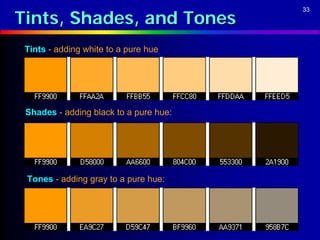
Tints, Shades, and Tones
                                        33


 Tints - adding white to a pure hue


 Shades - adding black to a pure hue:


 Tones - adding gray to a pure hue:
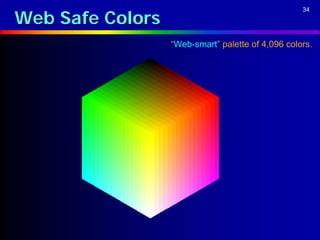
Web Safe Colors
                                                   34


                  “Web-smart” palette of 4,096 colors.
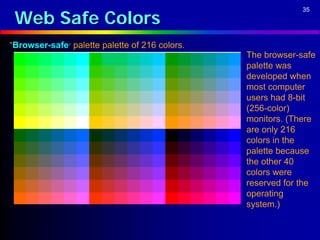
Web Safe Colors
                                                             35


“Browser-safe” palette palette of 216 colors.
                                                The browser-safe
                                                palette was
                                                developed when
                                                most computer
                                                users had 8-bit
                                                (256-color)
                                                monitors. (There
                                                are only 216
                                                colors in the
                                                palette because
                                                the other 40
                                                colors were
                                                reserved for the
                                                operating
                                                system.)
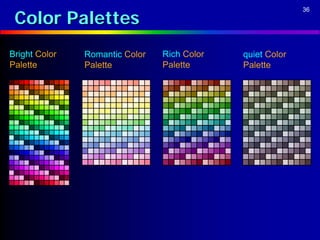
Color Palettes
                                                           36


Bright Color   Romantic Color   Rich Color   quiet Color
Palette        Palette          Palette      Palette
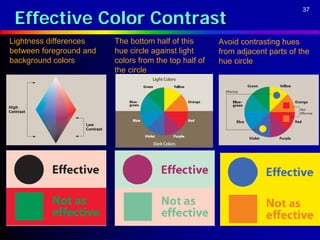
Effective Color Contrast
                                                                               37


Lightness differences    The bottom half of this       Avoid contrasting hues
between foreground and   hue circle against light      from adjacent parts of the
background colors        colors from the top half of   hue circle
                         the circle
Color Depth
                                              38


   Graphic/Image Data Structure
     Pixels: picture elements in digital
      images
     Image resolution: number of pixels in
      a digital image
     Bit-map: a representation of the
      graphic/image data in the same
      manner as they are stored in video
      memory
Color Depth
                                                                 39


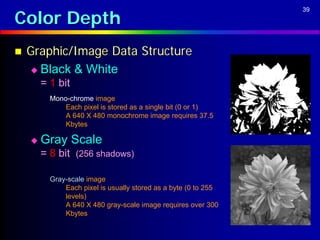
   Graphic/Image Data Structure
     Black & White
        = 1 bit
          Mono-chrome image
              Each pixel is stored as a single bit (0 or 1)
              A 640 X 480 monochrome image requires 37.5
              Kbytes

       Gray Scale
        = 8 bit (256 shadows)

          Gray-scale image
              Each pixel is usually stored as a byte (0 to 255
              levels)
              A 640 X 480 gray-scale image requires over 300
              Kbytes
Color Depth
                                                              40


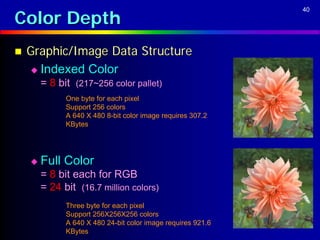
   Graphic/Image Data Structure
     Indexed Color
        = 8 bit (217~256 color pallet)
              One byte for each pixel
              Support 256 colors
              A 640 X 480 8-bit color image requires 307.2
              KBytes


       Full Color
        = 8 bit each for RGB
        = 24 bit (16.7 million colors)
              Three byte for each pixel
              Support 256X256X256 colors
              A 640 X 480 24-bit color image requires 921.6
              KBytes
Creations with Color
                       41
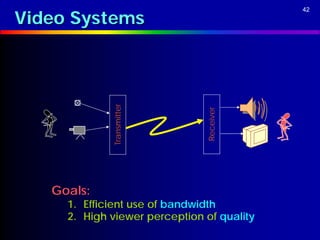
Video Systems
                                            42


             Transmitter


                               Receiver
   Goals:
     1. Efficient use of bandwidth
     2. High viewer perception of quality
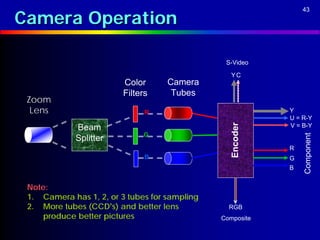
Camera Operation
                                                                43


                                                S-Video

                                                  YC
                         Color      Camera
                         Filters     Tubes
 Zoom
  Lens                         R                            Y
                                                            U = R-Y


                                                  Encoder
             Beam                                           V = B-Y
                              G


                                                                Component
             Splitter
                                                            R
                               B                            G
                                                            B


 Note:
 1. Camera has 1, 2, or 3 tubes for sampling
 2. More tubes (CCD’s) and better lens           RGB
     produce better pictures                   Composite
Camera Connectors
                    44
Color Perception
                                                    45


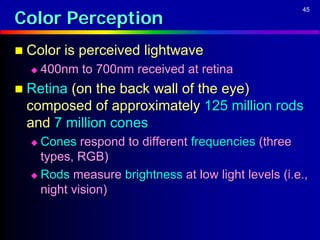
 Color is perceived lightwave
     400nm to 700nm received at retina
 Retina (on the back wall of the eye)
 composed of approximately 125 million rods
 and 7 million cones
   Cones respond to different frequencies (three
    types, RGB)
   Rods measure brightness at low light levels (i.e.,
    night vision)
Color Perception (Cont…)
                                        46


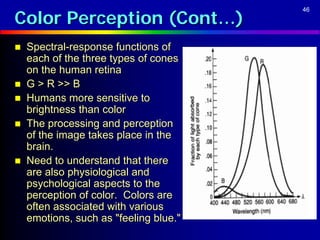
   Spectral-response functions of
    each of the three types of cones
    on the human retina
   G > R >> B
   Humans more sensitive to
    brightness than color
   The processing and perception
    of the image takes place in the
    brain.
   Need to understand that there
    are also physiological and
    psychological aspects to the
    perception of color. Colors are
    often associated with various
    emotions, such as "feeling blue."
Color Models in Video
                                                             47


   YIQ color model: used in NTSC color TV
   Y is luminance containing brightness and the detail
    (monochrome TV)
   To create the Y signal, the red, green and blue
    inputs to the Y signal must be balanced to
    compensate for the color perception misbalance of
    the eye.
       Y = 0.3R + 0.59G + 0.11B
   Chrominance
       I = 0.6R – 0.28G - 0.32B (cyan-orange axis)
       Q = 0.21R – 0.52G + 0.31B (purple-green axis)
   Human eyes are most sensitive to Y, next to I, next
    to Q.
       In a channel (6 MHz) of NTSC TV, 4 MHz is allocated to
        Y, 1.5 MHz to I, and 0.5 MHz to Q.
Color Models in Video (Cont…)
                                                          48


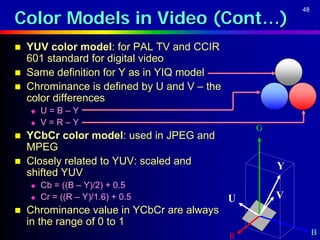
   YUV color model: for PAL TV and CCIR
    601 standard for digital video
   Same definition for Y as in YIQ model
   Chrominance is defined by U and V – the
    color differences
       U=B–Y
       V=R–Y
                                                  G
   YCbCr color model: used in JPEG and
    MPEG
   Closely related to YUV: scaled and                Y
    shifted YUV
       Cb = ((B – Y)/2) + 0.5
       Cr = ((R – Y)/1.6) + 0.5              U       V
   Chrominance value in YCbCr are always
    in the range of 0 to 1
                                              R                B
Color Models in Video (Cont…)
                                             49


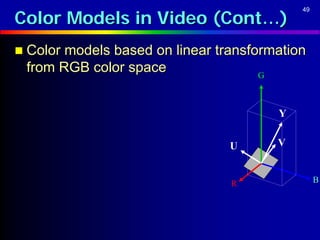
 Color models based on linear transformation
 from RGB color space                G


                                         Y


                                 U       V


                                 R                B
Types of Color Video Signals
                                                                        50


   Component video -- each primary is sent as a separate
    video signal.
       The primaries can either be RGB or a luminance-chrominance
        transformation of them (e.g., YIQ, YUV).
       Best color reproduction
       Requires more bandwidth and good synchronization of the three
        components
   Composite video -- color (chrominance) and luminance
    signals are mixed into a single carrier wave. Some
    interference between the two signals is inevitable.
   S-Video (Separated video, e.g., in S-VHS) -- a compromise
    between component analog video and the composite video.
    It uses two lines, one for luminance and another for
    composite chrominance signal.
Analog Video
                                                             51


   NTSC Video: 525 scan lines per frame, 30 frames
    per second (or be exact, 29.97 fps, 33.37
    msec/frame)
   Interlaced, each frame is divided into 2 fields,
    262.5 lines/field
   20 lines reserved for control information at the
    beginning of each field
   So a maximum of 485 lines of visible data
       Laserdisc and S-VHS have actual resolution of ~420
        lines
       Ordinary TV -- ~320 lines
   Each line takes 63.5 microseconds to scan.
    Horizontal retrace takes 10 microseconds (with 5
    microseconds horizontal synch pulse embedded),
    so the active line time is 53.5 microseconds.
Scanning Video
                                               52


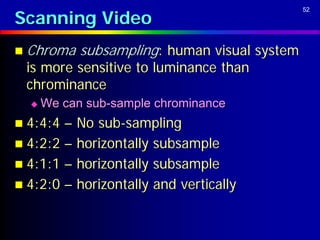
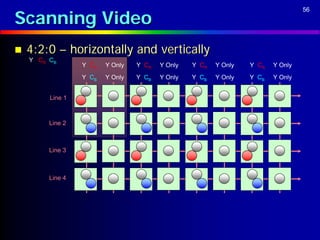
 Chroma    subsampling: human visual system
 is more sensitive to luminance than
 chrominance
     We can sub-sample chrominance
 4:4:4 – No sub-sampling
 4:2:2 – horizontally subsample
 4:1:1 – horizontally subsample
 4:2:0 – horizontally and vertically
Scanning Video
                                  53


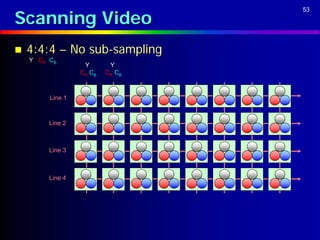
   4:4:4 – No sub-sampling
    Y CR CB
                   Y       Y
                  CR CB   CR CB


         Line 1


         Line 2


         Line 3


         Line 4
Scanning Video
                                                                              54


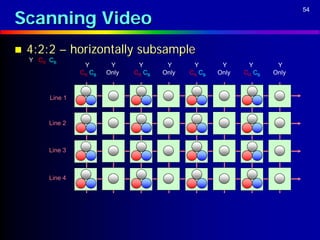
   4:2:2 – horizontally subsample
    Y CR CB
                   Y       Y      Y       Y      Y       Y      Y       Y
                  CR CB   Only   CR CB   Only   CR CB   Only   CR CB   Only


         Line 1


         Line 2


         Line 3


         Line 4
Scanning Video
                                                                            55


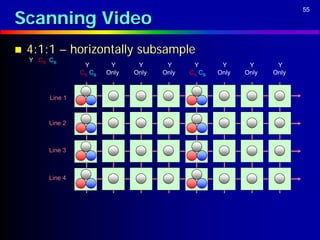
   4:1:1 – horizontally subsample
    Y CR CB
                   Y       Y      Y      Y      Y       Y      Y      Y
                  CR CB   Only   Only   Only   CR CB   Only   Only   Only


         Line 1


         Line 2


         Line 3


         Line 4
Scanning Video
                                                                                  56


   4:2:0 – horizontally and vertically
    Y CR CB
                  Y CR   Y Only   Y CR   Y Only   Y CR   Y Only   Y CR   Y Only
                  Y CB   Y Only   Y CB   Y Only   Y CB   Y Only   Y CB   Y Only


         Line 1


         Line 2


         Line 3


         Line 4
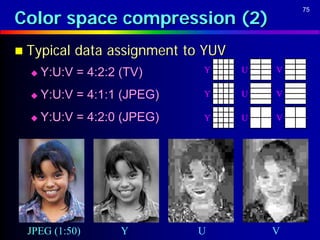
Color space compression
                                             57


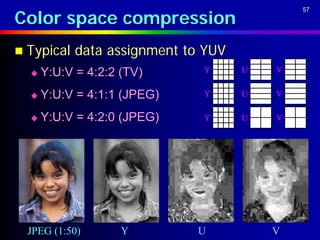
 Typical   data assignment to YUV
     Y:U:V = 4:2:2 (TV)      Y      U   V

     Y:U:V = 4:1:1 (JPEG)    Y      U   V

     Y:U:V = 4:2:0 (JPEG)    Y      U   V


  JPEG (1:50)       Y        U           V
Standards for Video
                                                                                 58


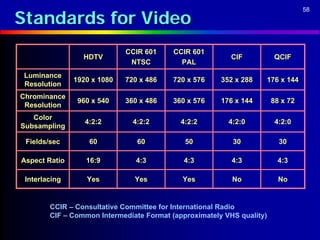
                             CCIR 601     CCIR 601
                 HDTV                                     CIF          QCIF
                              NTSC          PAL
 Luminance
               1920 x 1080   720 x 486    720 x 576    352 x 288   176 x 144
 Resolution
Chrominance
                960 x 540    360 x 486    360 x 576    176 x 144       88 x 72
 Resolution
   Color
                  4:2:2        4:2:2        4:2:2        4:2:0          4:2:0
Subsampling

 Fields/sec        60           60           50           30             30

Aspect Ratio      16:9          4:3          4:3          4:3           4:3

 Interlacing      Yes          Yes          Yes           No             No


        CCIR – Consultative Committee for International Radio
        CIF – Common Intermediate Format (approximately VHS quality)
Sampling
                                                         59


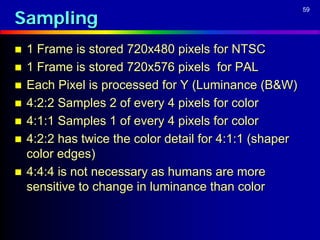
   1 Frame is stored 720x480 pixels for NTSC
   1 Frame is stored 720x576 pixels for PAL
   Each Pixel is processed for Y (Luminance (B&W)
   4:2:2 Samples 2 of every 4 pixels for color
   4:1:1 Samples 1 of every 4 pixels for color
   4:2:2 has twice the color detail for 4:1:1 (shaper
    color edges)
   4:4:4 is not necessary as humans are more
    sensitive to change in luminance than color
Sampling
                                             60


 The  first number refers to the 13.5 MHz
  sampling rate of the luminance
 The other two numbers refer to the
  sampling rates of the color difference
  signals R-Y and B-Y (or,more properly in
  the digital domain, Cr and Cb)
Sampling
                                                      61


   4:2:2 systems (D-1, D-5, DigiBeta, BetaSX,
    Digital-S,DVCPRO50) color sampled at half the
    rate of luminance,
   Y is 13.5 MHz R-Y and B-Y is each 6.75 MHz
   360 color samples (in each of Cr and Cb) per
    scanline.
   4:1:1 systems (NTSC DV & DVCAM, DVCPRO
    Color data are sampled half as frequently as in
    4:2:2
   Y is 13.5 MHz R-Y and B-Y is each 3.375 MHz .
   180 color samples per scanline.
Sampling
                           62


   4:2:2 Better for
      Computer Graphics

      Special Effects

      Chroma Keying

      Compositing

      Matting
Uncompressed Sizes (NTSC)
                                                        63


 For      the 525 line TV standard the line data
 is:
   720(Y) + 360(Cr) + 360(Cb) = 1,440
    pixels/line
   487 active lines/picture there are 1,440 x
    487 = 701,280 pixels/picture
          (sampling at 8-bits, a picture takes 701.3
           kbytes)
   1 sec takes 701.3 x 30 = 21,039 kbytes, or
    21 Mbytes
   1 min takes 21,039 x 60 = 1,262,340 kbytes,
    or 1.26 gigs
Uncompressed Sizes (NTSC)
                                               64


 BOTTOM   LINE
  1 Gbyte will hold ~47 seconds
  1 hour takes ~76 Gbytes

  Of Active Picture (Does not include sync
   Blanking etc as these can be regenerated)
Uncompressed Sizes (NTSC)
                               65


1   hour takes ~
  Uncompressed 76 Gbytes
  2:1 Compression 38 Gbytes

  5:1 Compression 15 Gbytes
Palette and Dithering
                                                                        66


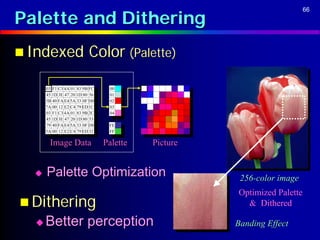
 Indexed                 Color (Palette)

      03 F1 C3 4A 01 83 9B FC    00
      45 1D 3E 47 20 1D 80 56    01
      5B 40 FA E4 5A 33 0F D0    02
      7A 00 12 E2 C4 79 ED 1C    03
      03 F1 C3 4A 01 83 9B 2C    04
      45 1D 3E 47 20 1D 80 53
      79 40 FA E4 5A 33 0F D8    FE
      5A 00 12 E2 C4 79 ED 32    FF

        Image Data              Palette   Picture


     Palette Optimization                           256-color image
                                                    Optimized Palette
 Dithering                                           & Dithered

     Better perception                             Banding Effect
Gamma Correction
                                                                67


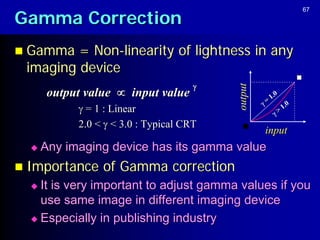
 Gamma  = Non-linearity of lightness in any
 imaging device
                                      


                                          output
       output value  input value                     1.0
                                                   =     1.0
             = 1 : Linear                             >
            2.0 <  < 3.0 : Typical CRT
                                                   input
     Any imaging device has its gamma value
 Importance     of Gamma correction
   It is very important to adjust gamma values if you
    use same image in different imaging device
   Especially in publishing industry
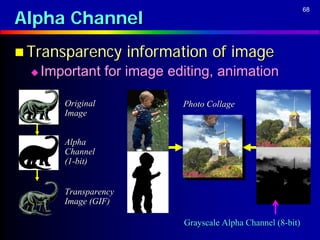
Alpha Channel
                                                                 68


 Transparency          information of image
     Important for image editing, animation

         Original              Photo Collage
         Image


         Alpha
         Channel
         (1-bit)


         Transparency
         Image (GIF)

                               Grayscale Alpha Channel (8-bit)
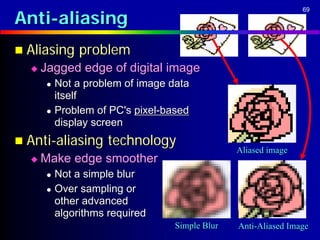
Anti-aliasing
                                                               69


 Aliasing   problem
     Jagged edge of digital image
        Not a problem of image data
         itself
        Problem of PC's pixel-based
         display screen
 Anti-aliasing    technology
                                               Aliased image
     Make edge smoother
        Not a simple blur
        Over sampling or
         other advanced
         algorithms required
                                 Simple Blur   Anti-Aliased Image
2D Bitmap Image
Theory
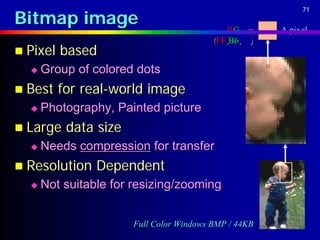
Bitmap image
                                                            71


                                              R GB =   A pixel
                                          (FF,B6,98)
 Pixel   based
     Group of colored dots
 Best    for real-world image
     Photography, Painted picture
 Large    data size
     Needs compression for transfer
 Resolution    Dependent
     Not suitable for resizing/zooming


                       Full Color Windows BMP / 44KB
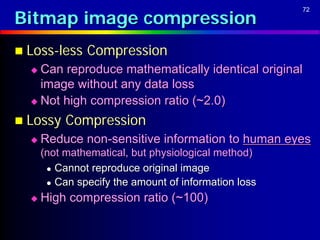
Bitmap image compression
                                                      72


 Loss-less    Compression
   Can reproduce mathematically identical original
    image without any data loss
   Not high compression ratio (~2.0)

 Lossy    Compression
     Reduce non-sensitive information to human eyes
      (not mathematical, but physiological method)
        Cannot reproduce original image

        Can specify the amount of information loss

     High compression ratio (~100)
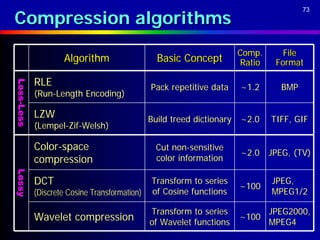
Compression algorithms
                                                                                        73


                                                                        Comp.      File
                    Algorithm                    Basic Concept          Ratio    Format

            RLE
Loss-Less
Loss-Less


                                               Pack repetitive data     ~1.2      BMP
            (Run-Length Encoding)

            LZW                                Build treed dictionary   ~2.0    TIFF, GIF
            (Lempel-Zif-Welsh)

            Color-space                          Cut non-sensitive
                                                                        ~2.0 JPEG, (TV)
            compression                          color information
Lossy
Lossy


            DCT                                Transform to series
                                                                        ~100
                                                                                JPEG,
            (Discrete Cosine Transformation)   of Cosine functions              MPEG1/2

                                               Transform to series              JPEG2000,
            Wavelet compression                of Wavelet functions
                                                                        ~100
                                                                                MPEG4
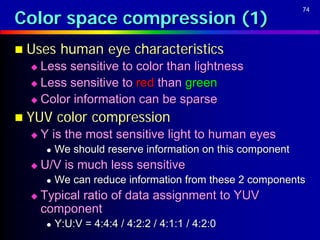
Color space compression (1)
                                                             74


 Uses      human eye characteristics
   Less sensitive to color than lightness
   Less sensitive to red than green

   Color information can be sparse

 YUV      color compression
     Y is the most sensitive light to human eyes
          We should reserve information on this component
     U/V is much less sensitive
          We can reduce information from these 2 components
     Typical ratio of data assignment to YUV
      component
          Y:U:V = 4:4:4 / 4:2:2 / 4:1:1 / 4:2:0
Color space compression (2)
                                             75


 Typical   data assignment to YUV
     Y:U:V = 4:2:2 (TV)      Y      U   V

     Y:U:V = 4:1:1 (JPEG)    Y      U   V

     Y:U:V = 4:2:0 (JPEG)    Y      U   V


  JPEG (1:50)       Y        U           V
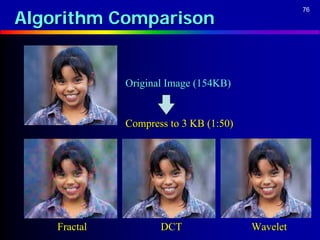
Algorithm Comparison
                                                  76


              Original Image (154KB)


              Compress to 3 KB (1:50)


    Fractal          DCT                Wavelet
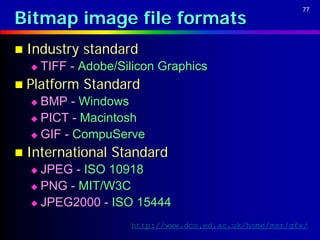
Bitmap image file formats
                                                        77


 Industry   standard
     TIFF - Adobe/Silicon Graphics
 Platform   Standard
   BMP - Windows
   PICT - Macintosh

   GIF - CompuServe

 International   Standard
   JPEG - ISO 10918
   PNG - MIT/W3C

   JPEG2000 - ISO 15444

                     http://www.dcs.ed.ac.uk/home/mxr/gfx/
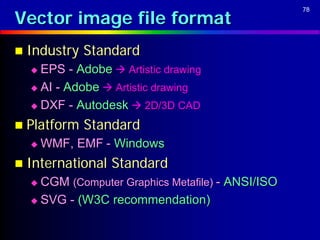
Vector image file format
                                                  78


 Industry   Standard
   EPS - Adobe  Artistic drawing
   AI - Adobe  Artistic drawing

   DXF - Autodesk  2D/3D CAD

 Platform   Standard
     WMF, EMF - Windows
 International   Standard
   CGM (Computer Graphics Metafile) - ANSI/ISO
   SVG - (W3C recommendation)
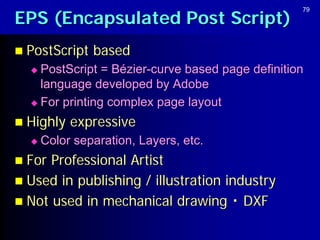
EPS (Encapsulated Post Script)
                                                  79


 PostScript   based
   PostScript = Bézier-curve based page definition
    language developed by Adobe
   For printing complex page layout

 Highly   expressive
     Color separation, Layers, etc.
 For Professional Artist
 Used in publishing / illustration industry
 Not used in mechanical drawing ・ DXF
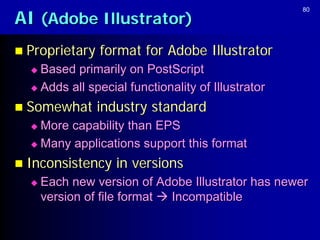
AI (Adobe Illustrator)
                                                    80


 Proprietary   format for Adobe Illustrator
   Based primarily on PostScript
   Adds all special functionality of Illustrator

 Somewhat      industry standard
   More capability than EPS
   Many applications support this format

 Inconsistency    in versions
     Each new version of Adobe Illustrator has newer
      version of file format  Incompatible
WMF & EMF
                                                    81


 WMF   (Windows Meta File)
   Straight line-based (No curve!)
   Designed for Microsoft Windows 3.1

   Limited feature, but widely used in office market


 EMF   (Enhanced Meta File)
   Bézier curve-based
   Designed for Microsoft Windows 95

   Used for exchange of vector data internally
    between Windows applications

Color theory and 2D graphics

  • 1.
    Color Theory Howto manipulate color digitally?
  • 2.
    What is color? 2  Color = Mixture of various frequency of light  Perceptive colors for human eyes = around 400nm ~ 700nm (wavelength)  The number of colors in real world = Infinite  But human eyes cannot distinguish every color A color = 400nm 500nm 600nm 700nm
  • 3.
    Visible spectrum 3  Progressive Rainbow  The visible spectrum of light Continuous optical spectrum (designed for monitors with gamma 1.5).  visible" light can be broken down into a spectrum that ranges from blue to red in a progressive rainbow
  • 4.
    Visible spectrum 4  Progressive Rainbow nm is the most common unit to describe the wavelength of light, with visible light falling in the region of 400–700 nm. The data in compact discs is stored as indentations (known as pits) that are approximately 100 nm deep by 500 nm wide. Reading an optical disk requires a laser with a wavelength 4 times the pit depth -- a CD requires a 780 nm wavelength (near infrared) laser, while the shallower pits of a DVD requires a shorter 650 nm wavelength (red) laser, and the even shallower pits of a Blu-ray Disc require a shorter 405 nm wavelength (blue) laser.
  • 5.
    5 Wheel ofColor – Visible spectrum  Progressive Rainbow Beam of sunlight The visible spectrum of light 700-635 635-590 590-560 560-490 490-450 450-400 400-380 A Prism separates the beam of light Infra red Ultra violet Red Orange Yellow Green Blue Indigo Violet
  • 6.
    Color in theeye 6  Progressive Rainbow The ability of the human eye to distinguish colors is based upon the varying sensitivity of different cells in the retina to light of different wavelengths. The retina contains three types of color receptor cells, or cones. One type, relatively distinct from the other two, is most responsive to light that we perceive as violet, with wavelengths around 420 nm. (Cones of this type are sometimes called short-wavelength cones, S cones, blue cones.) The other two types are closely related genetically and chemically. One of them (sometimes called long-wavelength cones, L cones, red cones) is most sensitive to light we perceive as yellowish-green, with wavelengths around 564 nm; the other type (sometimes called middle-wavelength cones, M cones, green cones) is most sensitive to light perceived as green, with wavelengths around 534 nm.
  • 7.
    Visible spectrum 7 This image contains 1 million pixels, each of a different color. The human eye can distinguish about 10 million different colors.
  • 8.
    Color Model 8  Math model for color information  RGB  Red, Green, Blue  CMY / CMYK  Cyan, Magenta, Yellow, blacK (or Key)  HSL / HSB / HSV / HVC  Hue , Saturation , Lightness (Brightness/Value)  YUV / YCbCr (YCC)  Luminance + 2 Chrominance (Color differences)  Other color models
  • 9.
    Wheel of Color 9  The Color Wheel  A color wheel usually include 12 distinct colors. The color wheel is essentially the linear progression of color as seen in the color spectrum, connecting the two ends together.
  • 10.
    10 Wheel of Color(RGB Color Model)  The Primary Colors (Additive colors)  Most of us now use color display, for which the primary colors will be Red, Green and Blue.
  • 11.
    11 Wheel of Color(RGB Color Model)  The Primary Colors (Additive colors) Red Y M W Green C Blue  Most of us now use color display, for which the primary colors will be Red, Green and Blue.
  • 12.
    RGB Color Model 12 Red Blue Green  Cubiccoordinate based on primary additive colors  Start from Black (darkness)  Sum of all = White (light)  Widely used in PC hardware Additive Color (= mixing light)  CRT, LCD / Image Scanner  Easy to implement B  Notefficient/intuitive for processing Black White  Difficult to achieve / adjust to G desired color for human R
  • 13.
    13 Wheel of Color(CMY Color Model)  The Secondary Colors (Subtractive Colors)  Secondary color wheel: the three colors that are obtained by combining any two adjacent primary colors. These will be the secondary colors: cyan, magenta, and yellow.
  • 14.
    14 Wheel of Color(CMY Color Model)  The Secondary Colors (Subtractive Colors) Magenta R B B Yellow G Cyan  Secondary color wheel: the three colors that are obtained by combining any two adjacent primary colors. These will be the secondary colors: cyan, magenta, and yellow.
  • 15.
    CMY / CMYKColor Model 15 Cyan Yellow  Subtractive version of RGB  Start from White (paper)  Sum of all = Black (ink) Magenta  Widelyused in Publishing Subtractive Color Industry (= mixing ink)  Printer / Color publishing uses 4 inks (CMYK) C  Why K (Black) ? M White Black  For pure black / black letter Y
  • 16.
    Wheel of Color 16  The Tertiary Colors  Tertiary colors are the same for both the additive and subtractive worlds.
  • 17.
    Wheel of Color 17  Analogous Colors  Analogous colors directly beside a given color. If you start with Orange and you want its two analogous colors, select Red and Yellow.
  • 18.
    Wheel of Color 18  The Complementary Colors  Complementary colors are directly opposite each other on the color wheel. Selecting contrasting colors is useful when you want to make the colors stand out more vibrantly.
  • 19.
    Wheel of Color 19  Split Complementary Colors  Split complementary colors can be made up of two or three colors. You select a color, find its complementary color or colors on the either side of the color wheel.
  • 20.
    Wheel of Color 20  Warm Colors  Warm colors are made up of the Red hues, such as Red, Orange and Yellow. They lend a sense of warmth, comfort, and energy to the color selection. They also produce visual result.
  • 21.
    Wheel of Color 21  Cool Colors  Cool colors come from the Blue hues, such as Blue, Cyan, and Green. These colors will stabilize and cool the color scheme. These are good to use for page background.
  • 22.
    22 Dimension of Color(HSL/HSV/HVC)  Hue = Color name (red, blue, green, etc.)  Saturation = Density (purity) of the color  Value = Lightness & Darkness
  • 23.
    HSL / HSV/ HVC Color Model 23  Cylindricalcoordinates based on logical aspect of color  Hue = Color name (red, blue, green, etc.)  Saturation = Density (purity) of the color  Lightness  Used in image editing White software  Very easy to achieve / adjust to desired color for human Black
  • 24.
    Color Matching 24  Color Gamut  The range of color that can be reproduced on any imaging device Eye CRT  Color Matching Scanner Printer Offset  Adjustment / Compensation of the difference of color gamut among multiple image devices
  • 25.
    Color Percentage 25  Color Red  Other Colors
  • 26.
    Color Bit Depth 26 Bit depth, or color depth, refers to the number of colors a monitor can display. Full RGB combines three 8-bit channels, resulting in a 24-bit color depth that adds up to over 16 million colors. 24-bit color is sometimes referred to as True Color. Windows Bit depth Number of colors Macintosh True color 24-bit 16,777,216 Millions of colors High color 16-bit 65,536 Thousands of colors Indexed color 8-bit 256 256 colors
  • 27.
    Color Depth 27  How many colors are needed?  Full Color in Adobe Photoshop
  • 28.
    Color Depth 28  How many colors are needed?  Black & White = 1 bit  Gray Scale = 8 bit (256 shadows)  Indexed Color = 8 bit (217~256 color pallet)  Full Color = 8 bit each for RGB = 24 bit (16.7 million colors)  Medical / Professional photography = 30~48 bit (10~16 bit/RGB) (Preserve detail / accuracy in editing)
  • 29.
    Color Depth 29  How many colors are needed?  Black & White = 1 bit 1 0
  • 30.
    Color Depth 30  How many colors are needed?  Gray Scale = 8 bit (256 shadows)
  • 31.
    Palette and Dithering 31  Indexed Color (Palette) 03 F1 C3 4A 01 83 9B FC 00 45 1D 3E 47 20 1D 80 56 01 5B 40 FA E4 5A 33 0F D0 02 7A 00 12 E2 C4 79 ED 1C 03 03 F1 C3 4A 01 83 9B 2C 04 45 1D 3E 47 20 1D 80 53 79 40 FA E4 5A 33 0F D8 FE 5A 00 12 E2 C4 79 ED 32 FF Image Data Palette Picture 256-color image
  • 32.
    Color Depth 32  How many colors are needed?  Full Color = 8 bits for each R, G and B = 24 bits (16.7 million colors) Red Green Blue Colors are specified with three values, one each for red, green, and blue. The values specify the intensity of the colors, from 0 (none) to 255 (full intensity). In RGB decimal notation, red is 255,0,0 (red at full intensity, no green or blue); green is 0,255,0 (green at full intensity, no red or blue); and blue is 0,0,255 (blue at full intensity, no red or green).
  • 33.
    Tints, Shades, andTones 33 Tints - adding white to a pure hue Shades - adding black to a pure hue: Tones - adding gray to a pure hue:
  • 34.
    Web Safe Colors 34 “Web-smart” palette of 4,096 colors.
  • 35.
    Web Safe Colors 35 “Browser-safe” palette palette of 216 colors. The browser-safe palette was developed when most computer users had 8-bit (256-color) monitors. (There are only 216 colors in the palette because the other 40 colors were reserved for the operating system.)
  • 36.
    Color Palettes 36 Bright Color Romantic Color Rich Color quiet Color Palette Palette Palette Palette
  • 37.
    Effective Color Contrast 37 Lightness differences The bottom half of this Avoid contrasting hues between foreground and hue circle against light from adjacent parts of the background colors colors from the top half of hue circle the circle
  • 38.
    Color Depth 38  Graphic/Image Data Structure  Pixels: picture elements in digital images  Image resolution: number of pixels in a digital image  Bit-map: a representation of the graphic/image data in the same manner as they are stored in video memory
  • 39.
    Color Depth 39  Graphic/Image Data Structure  Black & White = 1 bit Mono-chrome image Each pixel is stored as a single bit (0 or 1) A 640 X 480 monochrome image requires 37.5 Kbytes  Gray Scale = 8 bit (256 shadows) Gray-scale image Each pixel is usually stored as a byte (0 to 255 levels) A 640 X 480 gray-scale image requires over 300 Kbytes
  • 40.
    Color Depth 40  Graphic/Image Data Structure  Indexed Color = 8 bit (217~256 color pallet) One byte for each pixel Support 256 colors A 640 X 480 8-bit color image requires 307.2 KBytes  Full Color = 8 bit each for RGB = 24 bit (16.7 million colors) Three byte for each pixel Support 256X256X256 colors A 640 X 480 24-bit color image requires 921.6 KBytes
  • 41.
  • 42.
    Video Systems 42 Transmitter Receiver Goals: 1. Efficient use of bandwidth 2. High viewer perception of quality
  • 43.
    Camera Operation 43 S-Video YC Color Camera Filters Tubes Zoom Lens R Y U = R-Y Encoder Beam V = B-Y G Component Splitter R B G B Note: 1. Camera has 1, 2, or 3 tubes for sampling 2. More tubes (CCD’s) and better lens RGB produce better pictures Composite
  • 44.
  • 45.
    Color Perception 45  Color is perceived lightwave  400nm to 700nm received at retina  Retina (on the back wall of the eye) composed of approximately 125 million rods and 7 million cones  Cones respond to different frequencies (three types, RGB)  Rods measure brightness at low light levels (i.e., night vision)
  • 46.
    Color Perception (Cont…) 46  Spectral-response functions of each of the three types of cones on the human retina  G > R >> B  Humans more sensitive to brightness than color  The processing and perception of the image takes place in the brain.  Need to understand that there are also physiological and psychological aspects to the perception of color. Colors are often associated with various emotions, such as "feeling blue."
  • 47.
    Color Models inVideo 47  YIQ color model: used in NTSC color TV  Y is luminance containing brightness and the detail (monochrome TV)  To create the Y signal, the red, green and blue inputs to the Y signal must be balanced to compensate for the color perception misbalance of the eye.  Y = 0.3R + 0.59G + 0.11B  Chrominance  I = 0.6R – 0.28G - 0.32B (cyan-orange axis)  Q = 0.21R – 0.52G + 0.31B (purple-green axis)  Human eyes are most sensitive to Y, next to I, next to Q.  In a channel (6 MHz) of NTSC TV, 4 MHz is allocated to Y, 1.5 MHz to I, and 0.5 MHz to Q.
  • 48.
    Color Models inVideo (Cont…) 48  YUV color model: for PAL TV and CCIR 601 standard for digital video  Same definition for Y as in YIQ model  Chrominance is defined by U and V – the color differences  U=B–Y  V=R–Y G  YCbCr color model: used in JPEG and MPEG  Closely related to YUV: scaled and Y shifted YUV  Cb = ((B – Y)/2) + 0.5  Cr = ((R – Y)/1.6) + 0.5 U V  Chrominance value in YCbCr are always in the range of 0 to 1 R B
  • 49.
    Color Models inVideo (Cont…) 49  Color models based on linear transformation from RGB color space G Y U V R B
  • 50.
    Types of ColorVideo Signals 50  Component video -- each primary is sent as a separate video signal.  The primaries can either be RGB or a luminance-chrominance transformation of them (e.g., YIQ, YUV).  Best color reproduction  Requires more bandwidth and good synchronization of the three components  Composite video -- color (chrominance) and luminance signals are mixed into a single carrier wave. Some interference between the two signals is inevitable.  S-Video (Separated video, e.g., in S-VHS) -- a compromise between component analog video and the composite video. It uses two lines, one for luminance and another for composite chrominance signal.
  • 51.
    Analog Video 51  NTSC Video: 525 scan lines per frame, 30 frames per second (or be exact, 29.97 fps, 33.37 msec/frame)  Interlaced, each frame is divided into 2 fields, 262.5 lines/field  20 lines reserved for control information at the beginning of each field  So a maximum of 485 lines of visible data  Laserdisc and S-VHS have actual resolution of ~420 lines  Ordinary TV -- ~320 lines  Each line takes 63.5 microseconds to scan. Horizontal retrace takes 10 microseconds (with 5 microseconds horizontal synch pulse embedded), so the active line time is 53.5 microseconds.
  • 52.
    Scanning Video 52  Chroma subsampling: human visual system is more sensitive to luminance than chrominance  We can sub-sample chrominance  4:4:4 – No sub-sampling  4:2:2 – horizontally subsample  4:1:1 – horizontally subsample  4:2:0 – horizontally and vertically
  • 53.
    Scanning Video 53  4:4:4 – No sub-sampling Y CR CB Y Y CR CB CR CB Line 1 Line 2 Line 3 Line 4
  • 54.
    Scanning Video 54  4:2:2 – horizontally subsample Y CR CB Y Y Y Y Y Y Y Y CR CB Only CR CB Only CR CB Only CR CB Only Line 1 Line 2 Line 3 Line 4
  • 55.
    Scanning Video 55  4:1:1 – horizontally subsample Y CR CB Y Y Y Y Y Y Y Y CR CB Only Only Only CR CB Only Only Only Line 1 Line 2 Line 3 Line 4
  • 56.
    Scanning Video 56  4:2:0 – horizontally and vertically Y CR CB Y CR Y Only Y CR Y Only Y CR Y Only Y CR Y Only Y CB Y Only Y CB Y Only Y CB Y Only Y CB Y Only Line 1 Line 2 Line 3 Line 4
  • 57.
    Color space compression 57  Typical data assignment to YUV  Y:U:V = 4:2:2 (TV) Y U V  Y:U:V = 4:1:1 (JPEG) Y U V  Y:U:V = 4:2:0 (JPEG) Y U V JPEG (1:50) Y U V
  • 58.
    Standards for Video 58 CCIR 601 CCIR 601 HDTV CIF QCIF NTSC PAL Luminance 1920 x 1080 720 x 486 720 x 576 352 x 288 176 x 144 Resolution Chrominance 960 x 540 360 x 486 360 x 576 176 x 144 88 x 72 Resolution Color 4:2:2 4:2:2 4:2:2 4:2:0 4:2:0 Subsampling Fields/sec 60 60 50 30 30 Aspect Ratio 16:9 4:3 4:3 4:3 4:3 Interlacing Yes Yes Yes No No CCIR – Consultative Committee for International Radio CIF – Common Intermediate Format (approximately VHS quality)
  • 59.
    Sampling 59  1 Frame is stored 720x480 pixels for NTSC  1 Frame is stored 720x576 pixels for PAL  Each Pixel is processed for Y (Luminance (B&W)  4:2:2 Samples 2 of every 4 pixels for color  4:1:1 Samples 1 of every 4 pixels for color  4:2:2 has twice the color detail for 4:1:1 (shaper color edges)  4:4:4 is not necessary as humans are more sensitive to change in luminance than color
  • 60.
    Sampling 60  The first number refers to the 13.5 MHz sampling rate of the luminance  The other two numbers refer to the sampling rates of the color difference signals R-Y and B-Y (or,more properly in the digital domain, Cr and Cb)
  • 61.
    Sampling 61  4:2:2 systems (D-1, D-5, DigiBeta, BetaSX, Digital-S,DVCPRO50) color sampled at half the rate of luminance,  Y is 13.5 MHz R-Y and B-Y is each 6.75 MHz  360 color samples (in each of Cr and Cb) per scanline.  4:1:1 systems (NTSC DV & DVCAM, DVCPRO Color data are sampled half as frequently as in 4:2:2  Y is 13.5 MHz R-Y and B-Y is each 3.375 MHz .  180 color samples per scanline.
  • 62.
    Sampling 62  4:2:2 Better for  Computer Graphics  Special Effects  Chroma Keying  Compositing  Matting
  • 63.
    Uncompressed Sizes (NTSC) 63  For the 525 line TV standard the line data is:  720(Y) + 360(Cr) + 360(Cb) = 1,440 pixels/line  487 active lines/picture there are 1,440 x 487 = 701,280 pixels/picture  (sampling at 8-bits, a picture takes 701.3 kbytes)  1 sec takes 701.3 x 30 = 21,039 kbytes, or 21 Mbytes  1 min takes 21,039 x 60 = 1,262,340 kbytes, or 1.26 gigs
  • 64.
    Uncompressed Sizes (NTSC) 64  BOTTOM LINE  1 Gbyte will hold ~47 seconds  1 hour takes ~76 Gbytes  Of Active Picture (Does not include sync Blanking etc as these can be regenerated)
  • 65.
    Uncompressed Sizes (NTSC) 65 1 hour takes ~  Uncompressed 76 Gbytes  2:1 Compression 38 Gbytes  5:1 Compression 15 Gbytes
  • 66.
    Palette and Dithering 66  Indexed Color (Palette) 03 F1 C3 4A 01 83 9B FC 00 45 1D 3E 47 20 1D 80 56 01 5B 40 FA E4 5A 33 0F D0 02 7A 00 12 E2 C4 79 ED 1C 03 03 F1 C3 4A 01 83 9B 2C 04 45 1D 3E 47 20 1D 80 53 79 40 FA E4 5A 33 0F D8 FE 5A 00 12 E2 C4 79 ED 32 FF Image Data Palette Picture  Palette Optimization 256-color image Optimized Palette  Dithering & Dithered  Better perception Banding Effect
  • 67.
    Gamma Correction 67  Gamma = Non-linearity of lightness in any imaging device  output output value  input value 1.0 = 1.0  = 1 : Linear > 2.0 <  < 3.0 : Typical CRT input  Any imaging device has its gamma value  Importance of Gamma correction  It is very important to adjust gamma values if you use same image in different imaging device  Especially in publishing industry
  • 68.
    Alpha Channel 68  Transparency information of image  Important for image editing, animation Original Photo Collage Image Alpha Channel (1-bit) Transparency Image (GIF) Grayscale Alpha Channel (8-bit)
  • 69.
    Anti-aliasing 69  Aliasing problem  Jagged edge of digital image  Not a problem of image data itself  Problem of PC's pixel-based display screen  Anti-aliasing technology Aliased image  Make edge smoother  Not a simple blur  Over sampling or other advanced algorithms required Simple Blur Anti-Aliased Image
  • 70.
  • 71.
    Bitmap image 71 R GB = A pixel (FF,B6,98)  Pixel based  Group of colored dots  Best for real-world image  Photography, Painted picture  Large data size  Needs compression for transfer  Resolution Dependent  Not suitable for resizing/zooming Full Color Windows BMP / 44KB
  • 72.
    Bitmap image compression 72  Loss-less Compression  Can reproduce mathematically identical original image without any data loss  Not high compression ratio (~2.0)  Lossy Compression  Reduce non-sensitive information to human eyes (not mathematical, but physiological method)  Cannot reproduce original image  Can specify the amount of information loss  High compression ratio (~100)
  • 73.
    Compression algorithms 73 Comp. File Algorithm Basic Concept Ratio Format RLE Loss-Less Loss-Less Pack repetitive data ~1.2 BMP (Run-Length Encoding) LZW Build treed dictionary ~2.0 TIFF, GIF (Lempel-Zif-Welsh) Color-space Cut non-sensitive ~2.0 JPEG, (TV) compression color information Lossy Lossy DCT Transform to series ~100 JPEG, (Discrete Cosine Transformation) of Cosine functions MPEG1/2 Transform to series JPEG2000, Wavelet compression of Wavelet functions ~100 MPEG4
  • 74.
    Color space compression(1) 74  Uses human eye characteristics  Less sensitive to color than lightness  Less sensitive to red than green  Color information can be sparse  YUV color compression  Y is the most sensitive light to human eyes  We should reserve information on this component  U/V is much less sensitive  We can reduce information from these 2 components  Typical ratio of data assignment to YUV component  Y:U:V = 4:4:4 / 4:2:2 / 4:1:1 / 4:2:0
  • 75.
    Color space compression(2) 75  Typical data assignment to YUV  Y:U:V = 4:2:2 (TV) Y U V  Y:U:V = 4:1:1 (JPEG) Y U V  Y:U:V = 4:2:0 (JPEG) Y U V JPEG (1:50) Y U V
  • 76.
    Algorithm Comparison 76 Original Image (154KB) Compress to 3 KB (1:50) Fractal DCT Wavelet
  • 77.
    Bitmap image fileformats 77  Industry standard  TIFF - Adobe/Silicon Graphics  Platform Standard  BMP - Windows  PICT - Macintosh  GIF - CompuServe  International Standard  JPEG - ISO 10918  PNG - MIT/W3C  JPEG2000 - ISO 15444 http://www.dcs.ed.ac.uk/home/mxr/gfx/
  • 78.
    Vector image fileformat 78  Industry Standard  EPS - Adobe  Artistic drawing  AI - Adobe  Artistic drawing  DXF - Autodesk  2D/3D CAD  Platform Standard  WMF, EMF - Windows  International Standard  CGM (Computer Graphics Metafile) - ANSI/ISO  SVG - (W3C recommendation)
  • 79.
    EPS (Encapsulated PostScript) 79  PostScript based  PostScript = Bézier-curve based page definition language developed by Adobe  For printing complex page layout  Highly expressive  Color separation, Layers, etc.  For Professional Artist  Used in publishing / illustration industry  Not used in mechanical drawing ・ DXF
  • 80.
    AI (Adobe Illustrator) 80  Proprietary format for Adobe Illustrator  Based primarily on PostScript  Adds all special functionality of Illustrator  Somewhat industry standard  More capability than EPS  Many applications support this format  Inconsistency in versions  Each new version of Adobe Illustrator has newer version of file format  Incompatible
  • 81.
    WMF & EMF 81  WMF (Windows Meta File)  Straight line-based (No curve!)  Designed for Microsoft Windows 3.1  Limited feature, but widely used in office market  EMF (Enhanced Meta File)  Bézier curve-based  Designed for Microsoft Windows 95  Used for exchange of vector data internally between Windows applications