Collection Framework in
Java
Collections in Java
• The Collection in Java is a framework that provides an
architecture to store and manipulate the group of objects.
• Java Collections can achieve all the operations that you perform
on a data such as searching, sorting, insertion, manipulation,
and deletion.
• Java Collection means a single unit of objects. Java Collection
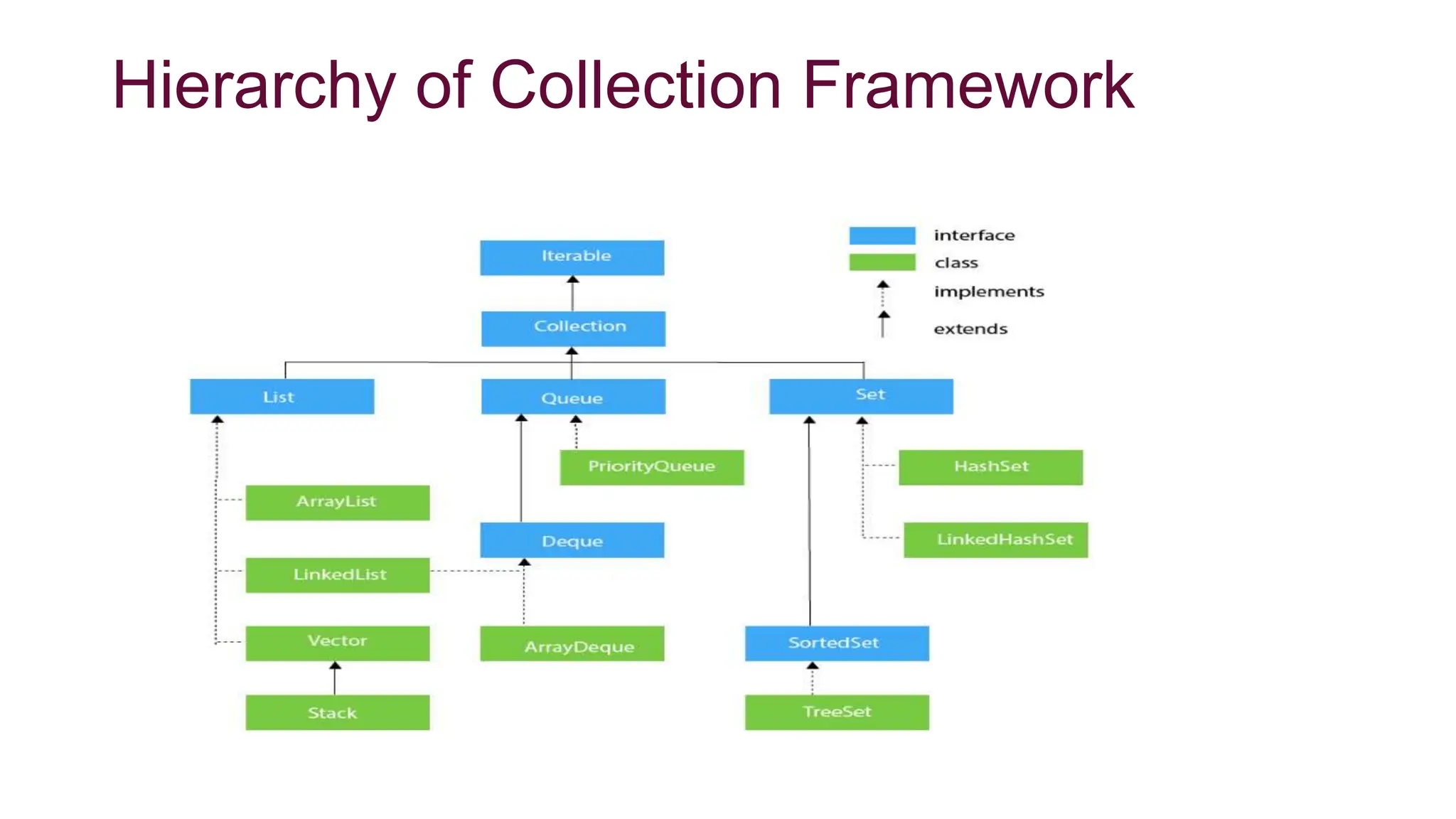
framework provides many interfaces (Set, List, Queue, Deque)
and classes (ArrayList, Vector, LinkedList, PriorityQueue,
HashSet, LinkedHashSet, TreeSet).
• A Collection represents a single unit of objects, i.e., a group.
What is a framework in Java
• It provides readymade architecture.
• It represents a set of classes and interfaces.
• It is optional.
What is Collection framework
The Collection framework represents a unified architecture for
storing and manipulating a group of objects. It has:
1.Interfaces and its implementations, i.e., classes
2.Algorithm
Hierarchy of Collection Framework
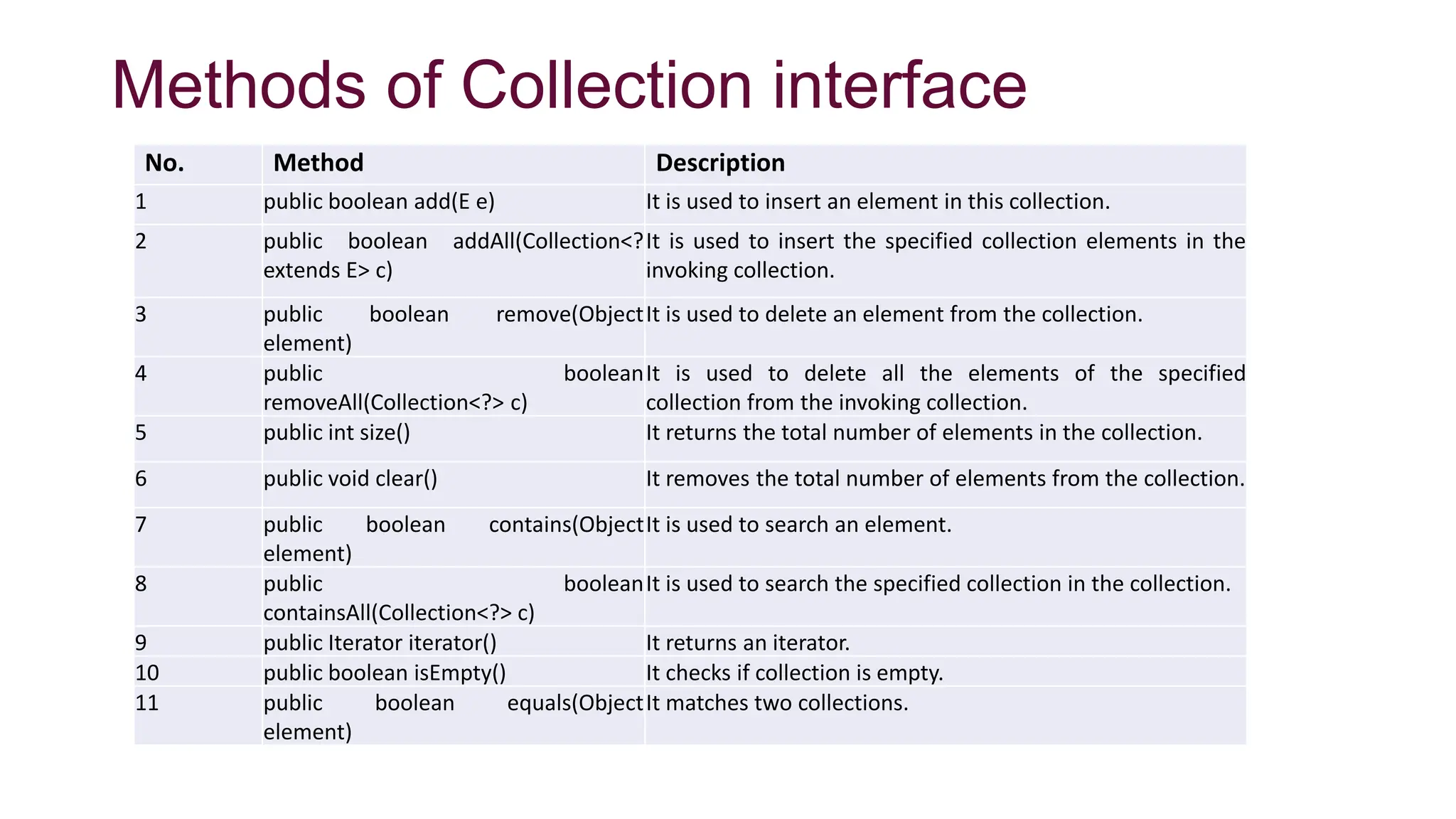
Methods of Collection interface
No. Method Description
1 public boolean add(E e) It is used to insert an element in this collection.
2 public boolean addAll(Collection<?
extends E> c)
It is used to insert the specified collection elements in the
invoking collection.
3 public boolean remove(Object
element)
It is used to delete an element from the collection.
4 public boolean
removeAll(Collection<?> c)
It is used to delete all the elements of the specified
collection from the invoking collection.
5 public int size() It returns the total number of elements in the collection.
6 public void clear() It removes the total number of elements from the collection.
7 public boolean contains(Object
element)
It is used to search an element.
8 public boolean
containsAll(Collection<?> c)
It is used to search the specified collection in the collection.
9 public Iterator iterator() It returns an iterator.
10 public boolean isEmpty() It checks if collection is empty.
11 public boolean equals(Object
element)
It matches two collections.
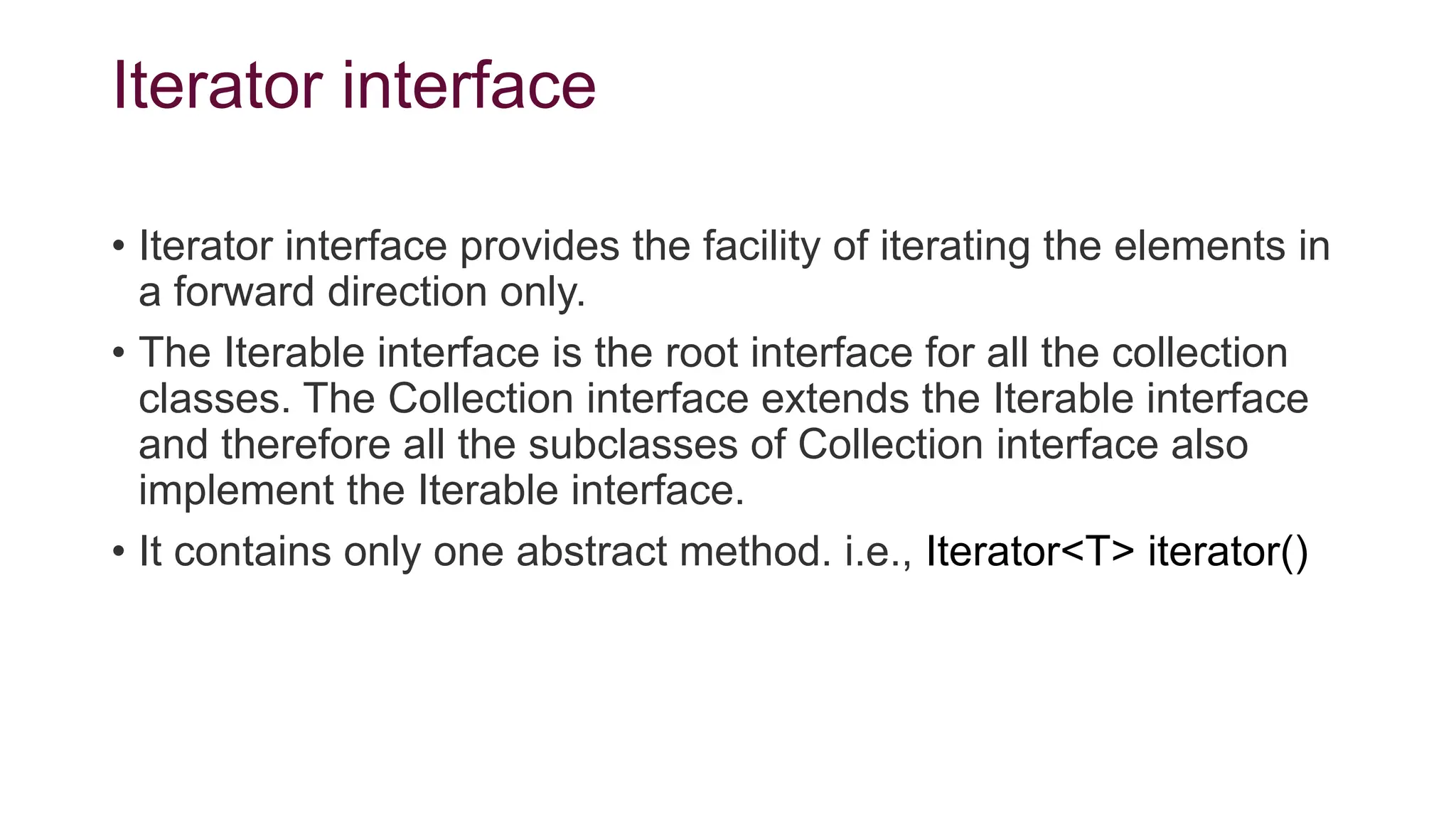
Iterator interface
• Iterator interface provides the facility of iterating the elements in
a forward direction only.
• The Iterable interface is the root interface for all the collection
classes. The Collection interface extends the Iterable interface
and therefore all the subclasses of Collection interface also
implement the Iterable interface.
• It contains only one abstract method. i.e., Iterator<T> iterator()
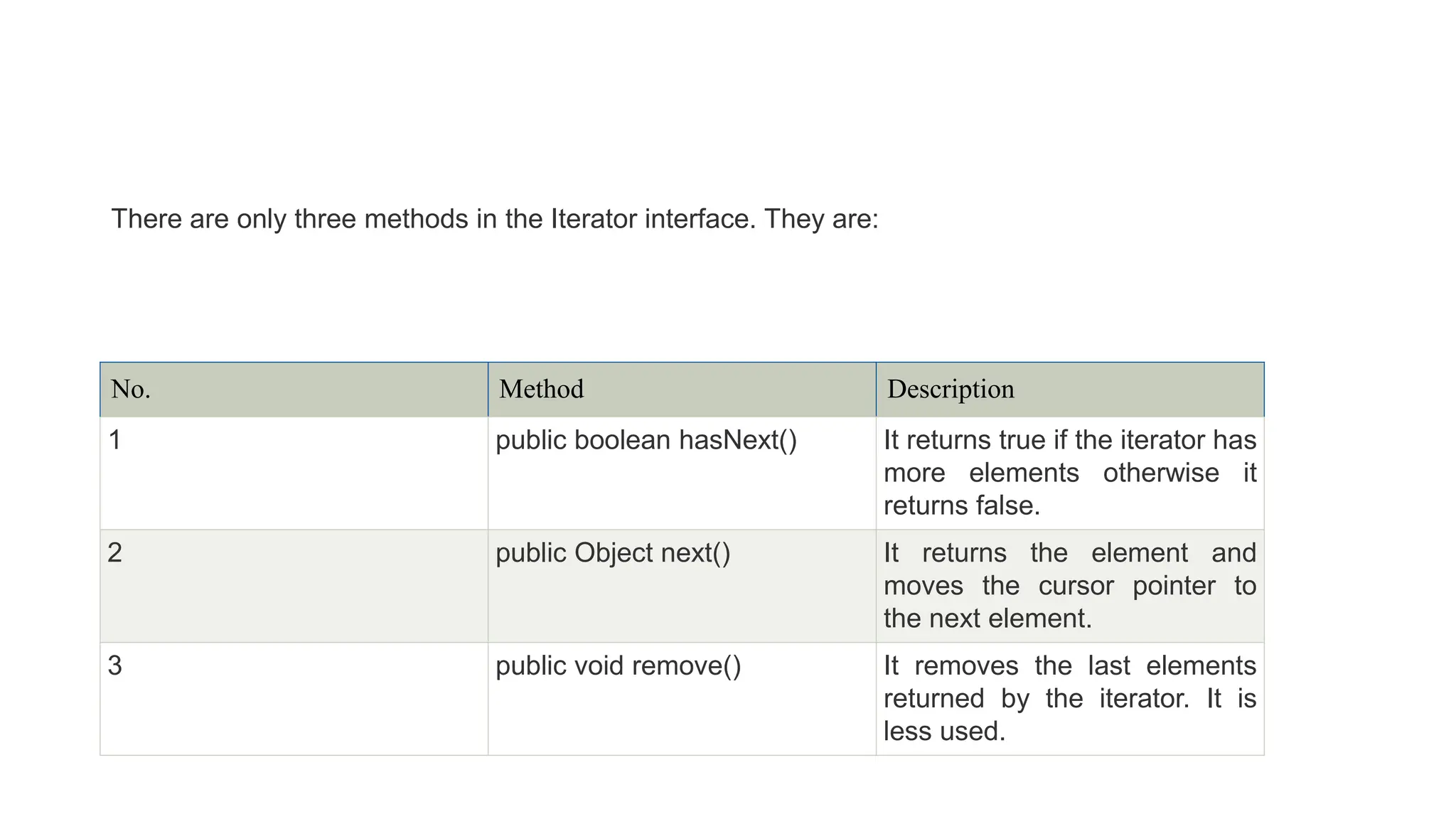
No. Method Description
1 public boolean hasNext() It returns true if the iterator has
more elements otherwise it
returns false.
2 public Object next() It returns the element and
moves the cursor pointer to
the next element.
3 public void remove() It removes the last elements
returned by the iterator. It is
less used.
There are only three methods in the Iterator interface. They are:
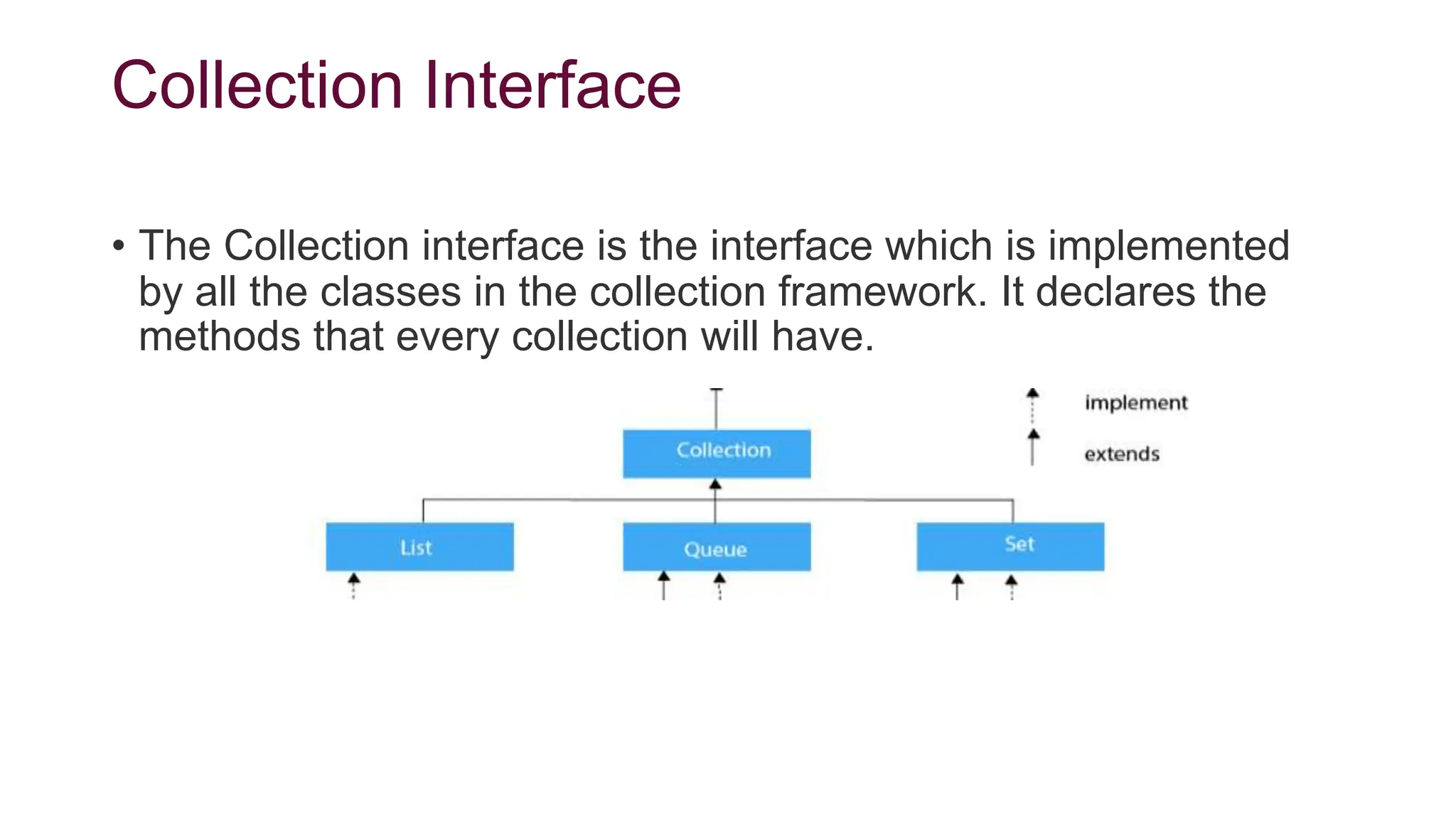
Collection Interface
• The Collection interface is the interface which is implemented
by all the classes in the collection framework. It declares the
methods that every collection will have.
List Interface
• List interface is a child interface of the Collection interface.
• It can store duplicate elements.
• It can store any number of Null values.
• It follows the insertion order.(By default; first element will be stored
at first position)
• The user of this interface has precise control over where in the
list each element is inserted.
• we can differentiate duplicate objects by using Index hence
index will play a very important role in List.
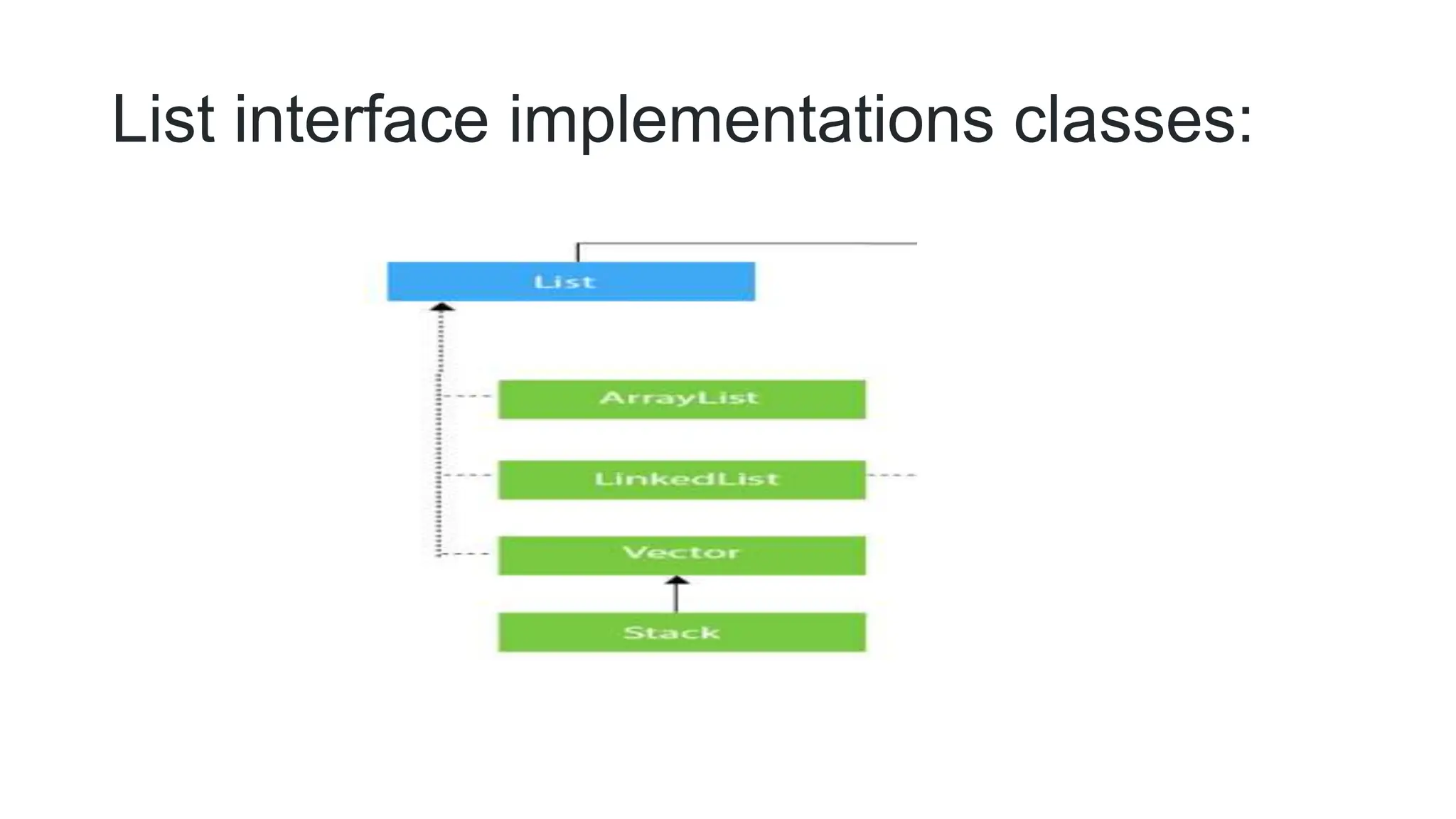
List interface implementations classes:
ArrayList class overview
• Java ArrayList class uses a dynamic array for storing the
elements. It inherits AbstractList class and
implements List interface.
The important points about Java ArrayList class are:
• Java ArrayList class can contain duplicate elements.
• Java ArrayList class maintains insertion order.
• Java ArrayList allows random access because array works at
the index basis.
• In Java ArrayList class, manipulation is slow because a lot of
shifting needs to have occurred if any element is removed from
the array list.
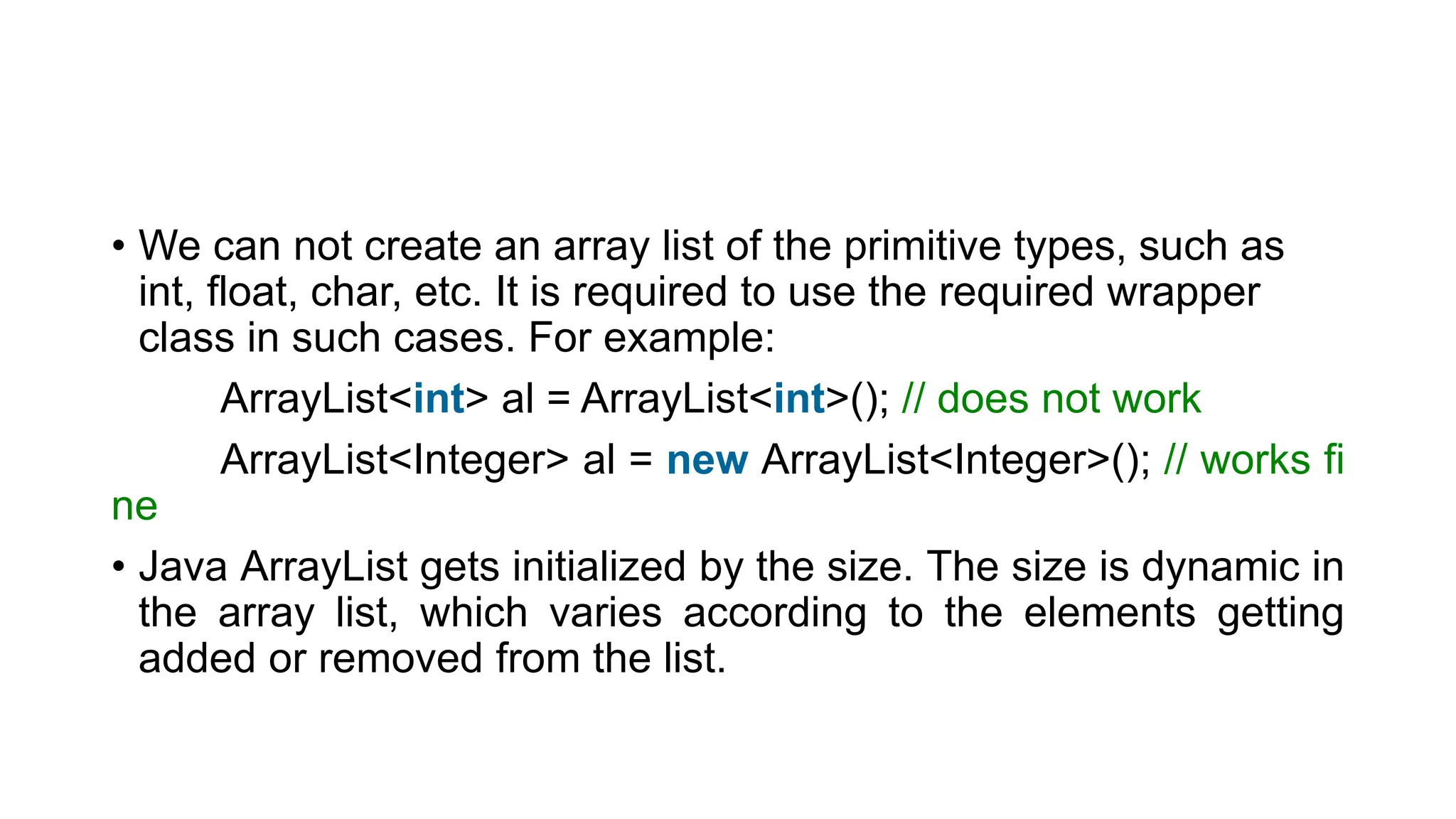
• We can not create an array list of the primitive types, such as
int, float, char, etc. It is required to use the required wrapper
class in such cases. For example:
ArrayList<int> al = ArrayList<int>(); // does not work
ArrayList<Integer> al = new ArrayList<Integer>(); // works fi
ne
• Java ArrayList gets initialized by the size. The size is dynamic in
the array list, which varies according to the elements getting
added or removed from the list.
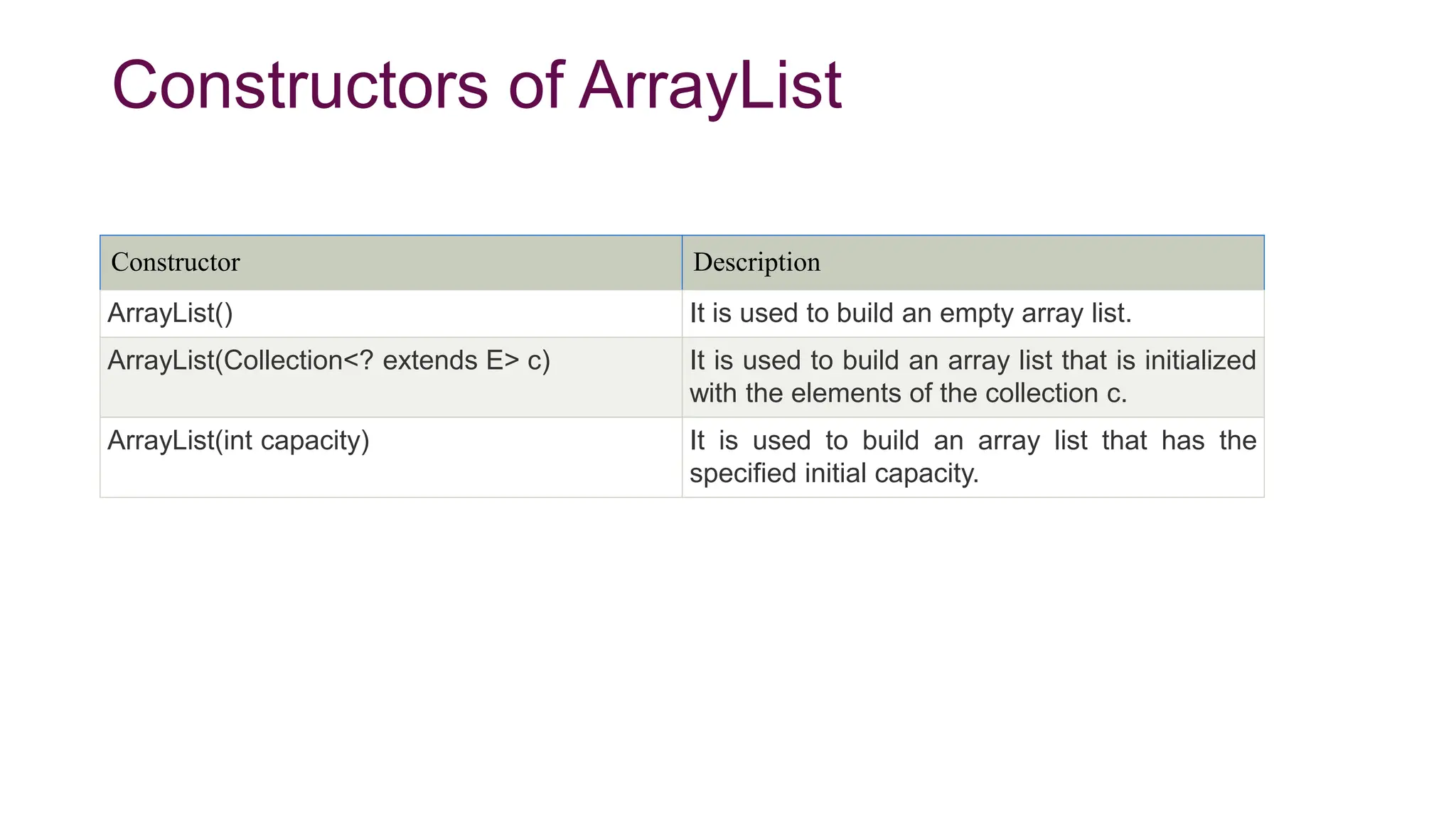
Constructors of ArrayList
Constructor Description
ArrayList() It is used to build an empty array list.
ArrayList(Collection<? extends E> c) It is used to build an array list that is initialized
with the elements of the collection c.
ArrayList(int capacity) It is used to build an array list that has the
specified initial capacity.
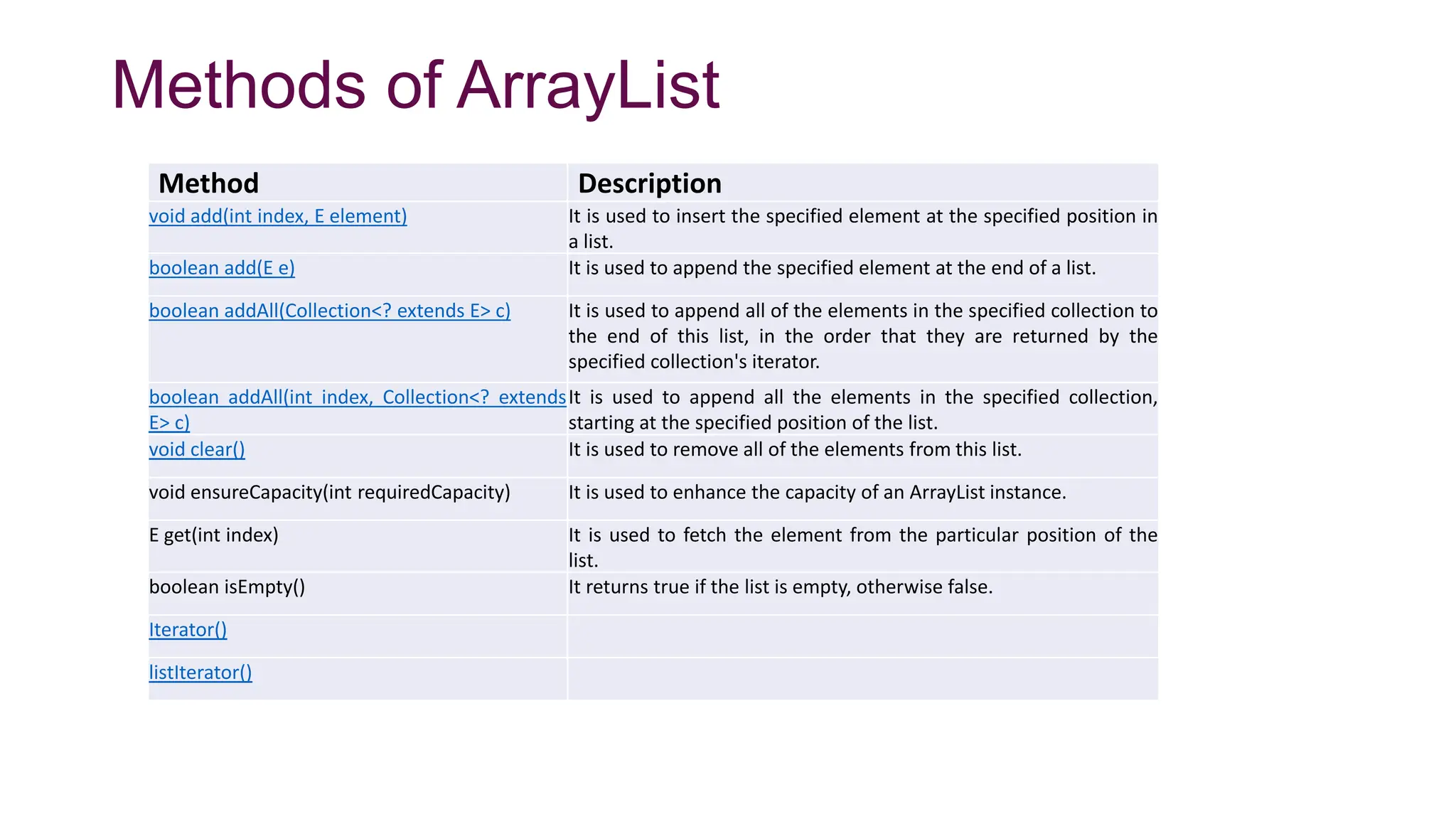
Methods of ArrayList
Method Description
void add(int index, E element) It is used to insert the specified element at the specified position in
a list.
boolean add(E e) It is used to append the specified element at the end of a list.
boolean addAll(Collection<? extends E> c) It is used to append all of the elements in the specified collection to
the end of this list, in the order that they are returned by the
specified collection's iterator.
boolean addAll(int index, Collection<? extends
E> c)
It is used to append all the elements in the specified collection,
starting at the specified position of the list.
void clear() It is used to remove all of the elements from this list.
void ensureCapacity(int requiredCapacity) It is used to enhance the capacity of an ArrayList instance.
E get(int index) It is used to fetch the element from the particular position of the
list.
boolean isEmpty() It returns true if the list is empty, otherwise false.
Iterator()
listIterator()
Java ArrayList Example
1. Import java.util.*;
2. public class ArrayListExample1{
3. public static void main(String args[]){
4. ArrayList<String> list=new ArrayList<String>();//Creating arraylist
5. list.add("Mango");//Adding object in arraylist
6. list.add("Apple");
7. list.add("Banana");
8. list.add("Grapes");
9. //Printing the arraylist object
10. System.out.println(list);
11. }
12. }
1. public static void main(String [] args)
2. {
3. ArrayList<String> al=new ArrayList<String>();
4. al.add("Ravi");
5. al.add("Vijay");
6. al.add("Ajay");
7. al.add("Anuj");
8. al.add("Gaurav");
9. System.out.println("An initial list of elements: "+al);
10. //Removing specific element from arraylist
11. al.remove("Vijay");
12. System.out.println("After invoking remove(object) method: "+al);
13. //Removing element on the basis of specific position
14. al.remove(0);
15. System.out.println("After invoking remove(index) method: "+al);
}
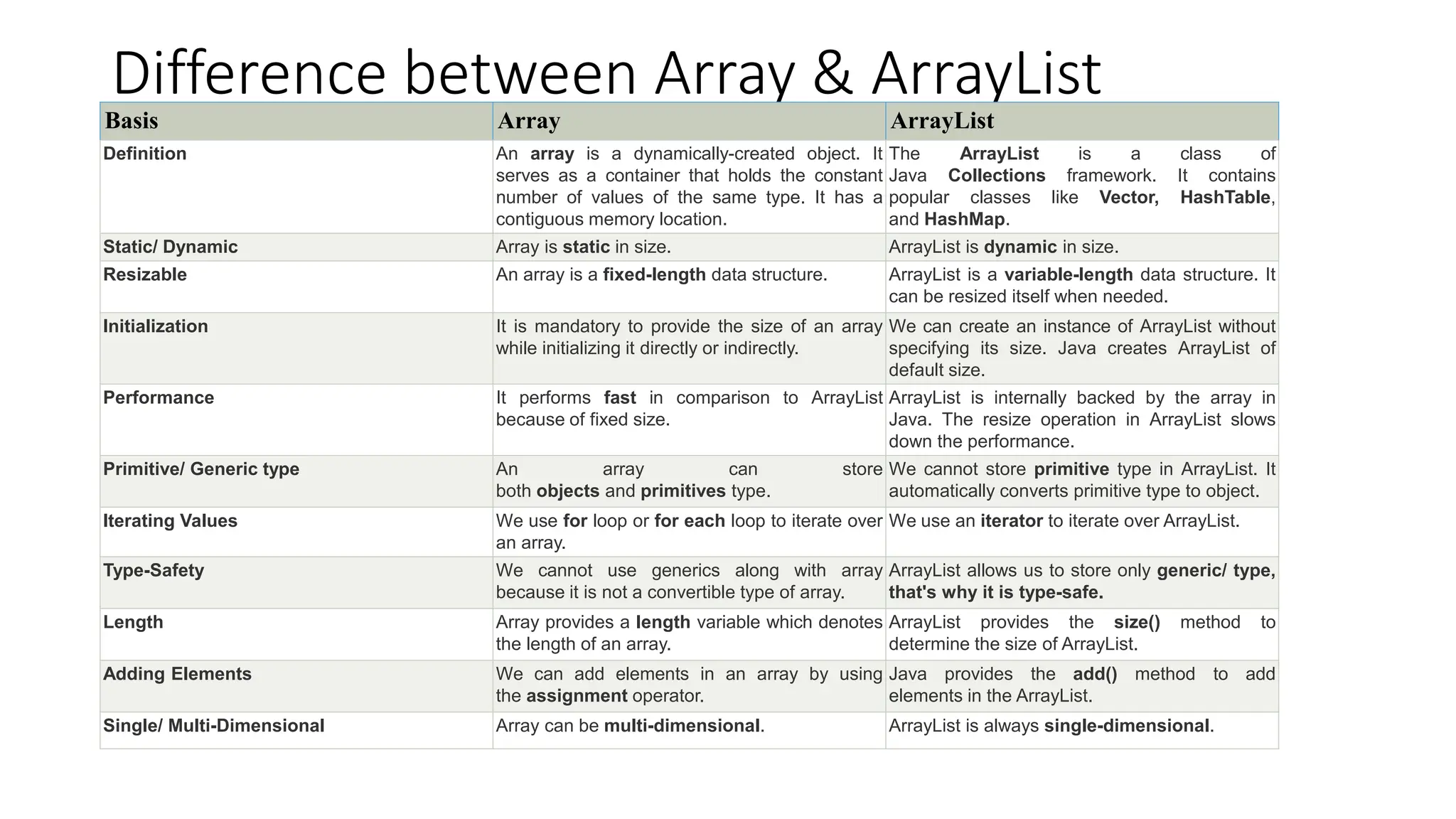
Difference between Array & ArrayList
Basis Array ArrayList
Definition An array is a dynamically-created object. It
serves as a container that holds the constant
number of values of the same type. It has a
contiguous memory location.
The ArrayList is a class of
Java Collections framework. It contains
popular classes like Vector, HashTable,
and HashMap.
Static/ Dynamic Array is static in size. ArrayList is dynamic in size.
Resizable An array is a fixed-length data structure. ArrayList is a variable-length data structure. It
can be resized itself when needed.
Initialization It is mandatory to provide the size of an array
while initializing it directly or indirectly.
We can create an instance of ArrayList without
specifying its size. Java creates ArrayList of
default size.
Performance It performs fast in comparison to ArrayList
because of fixed size.
ArrayList is internally backed by the array in
Java. The resize operation in ArrayList slows
down the performance.
Primitive/ Generic type An array can store
both objects and primitives type.
We cannot store primitive type in ArrayList. It
automatically converts primitive type to object.
Iterating Values We use for loop or for each loop to iterate over
an array.
We use an iterator to iterate over ArrayList.
Type-Safety We cannot use generics along with array
because it is not a convertible type of array.
ArrayList allows us to store only generic/ type,
that's why it is type-safe.
Length Array provides a length variable which denotes
the length of an array.
ArrayList provides the size() method to
determine the size of ArrayList.
Adding Elements We can add elements in an array by using
the assignment operator.
Java provides the add() method to add
elements in the ArrayList.
Single/ Multi-Dimensional Array can be multi-dimensional. ArrayList is always single-dimensional.
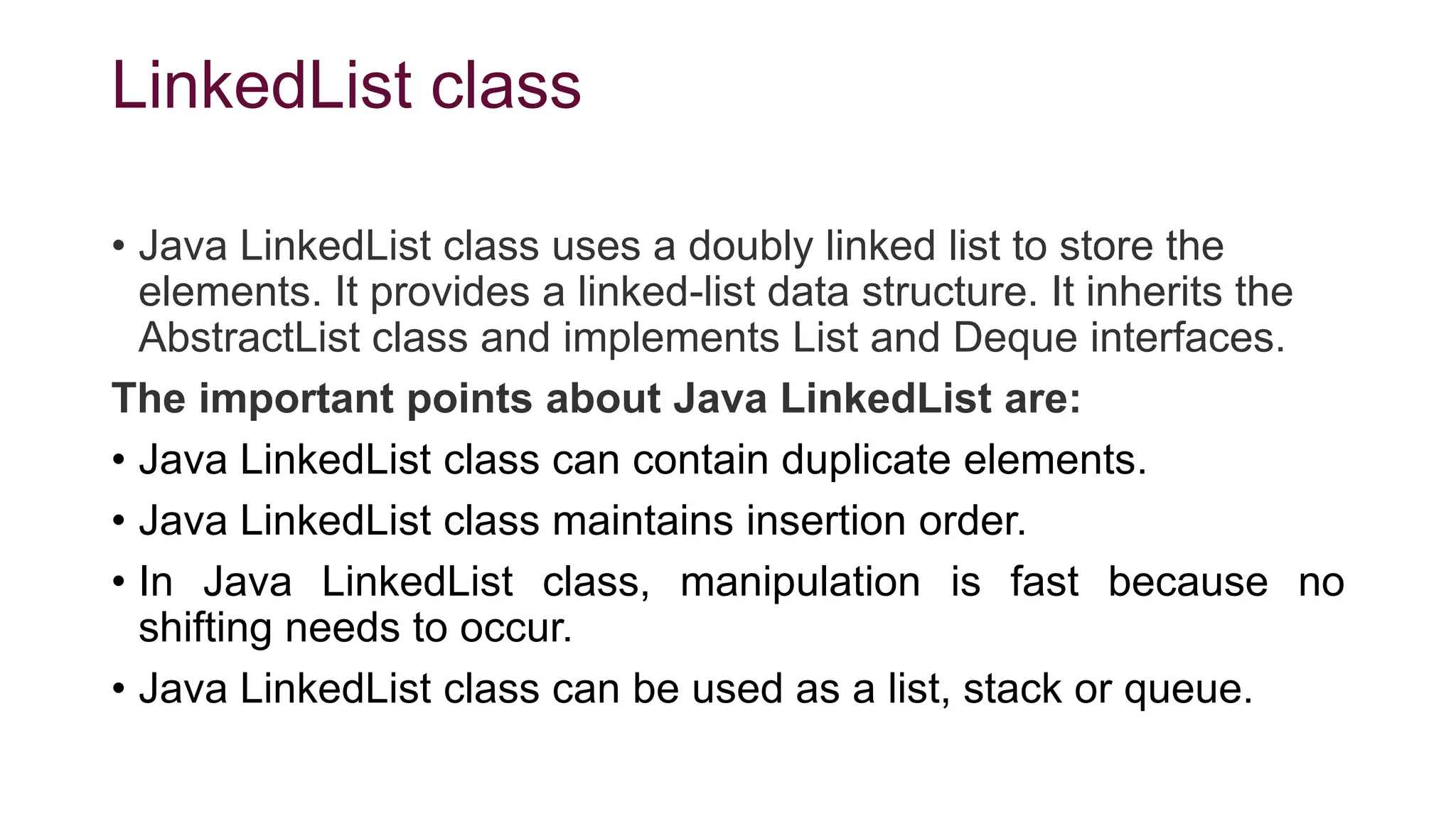
LinkedList class
• Java LinkedList class uses a doubly linked list to store the
elements. It provides a linked-list data structure. It inherits the
AbstractList class and implements List and Deque interfaces.
The important points about Java LinkedList are:
• Java LinkedList class can contain duplicate elements.
• Java LinkedList class maintains insertion order.
• In Java LinkedList class, manipulation is fast because no
shifting needs to occur.
• Java LinkedList class can be used as a list, stack or queue.
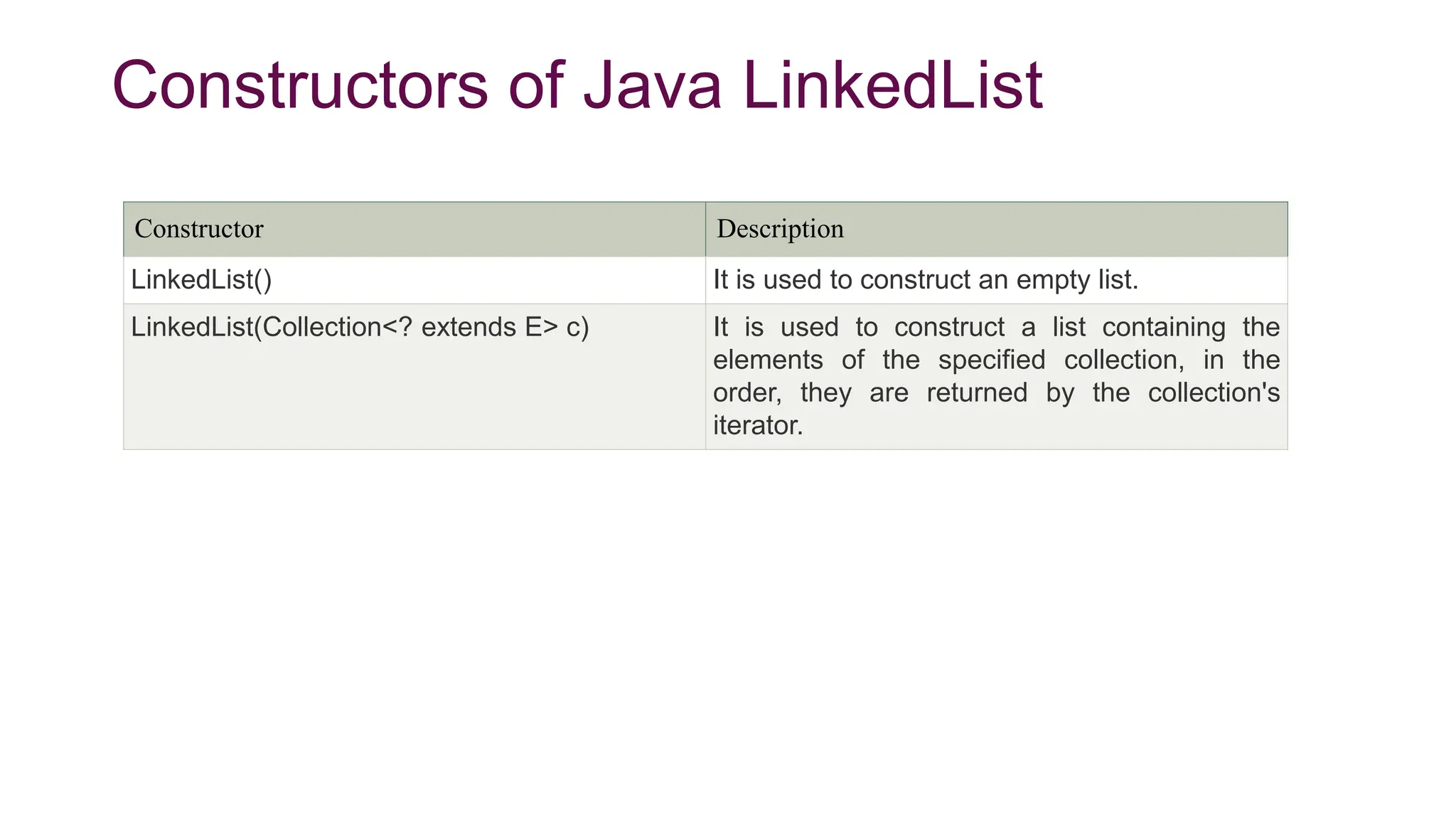
Constructors of Java LinkedList
Constructor Description
LinkedList() It is used to construct an empty list.
LinkedList(Collection<? extends E> c) It is used to construct a list containing the
elements of the specified collection, in the
order, they are returned by the collection's
iterator.
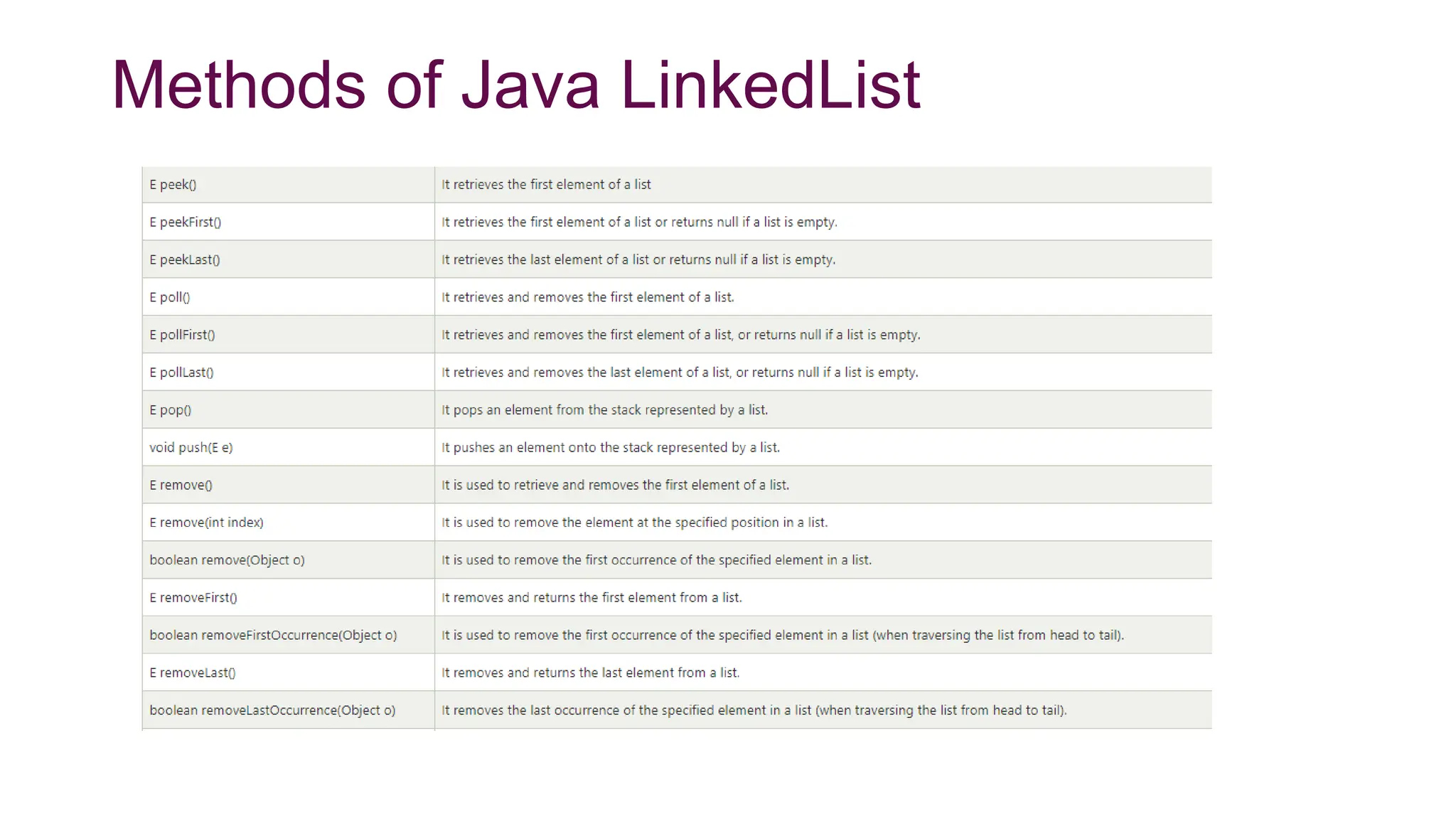
Methods of Java LinkedList
Java LinkedList Example
1. // Insertion operation
2. import java.util.*;
3. public class LinkedList1{
4. public static void main(String args[]){
5.
6. LinkedList<String> al=new LinkedList<String>();
7. al.add("Ravi");
8. al.add("Vijay");
9. al.add("Ravi");
10. al.add("Ajay");
11.
12. Iterator<String> itr=al.iterator();
13. while(itr.hasNext()){
14. System.out.println(itr.next());
15. }
16. }
17.}
1. // Deletion operation
2. import java.util.*;
3. public class LinkedList3 {
4.
5. public static void main(String [] args)
6. {
7. LinkedList<String> ll=new LinkedList<String>();
8. ll.add("Ravi");
9. ll.add("Vijay");
10. ll.add("Ajay");
11. ll.add("Anuj");
12. ll.add("Gaurav");
13. ll.add("Harsh");
14. ll.add("Virat");
15. ll.add("Gaurav");
16. ll.add("Harsh");
17. ll.add("Amit");
18. System.out.println("Initial list of elements: "+ll);
19. //Removing specific element from arraylist
20. ll.remove("Vijay");
21. System.out.println("After invoking remove(object) method: "+ll
);
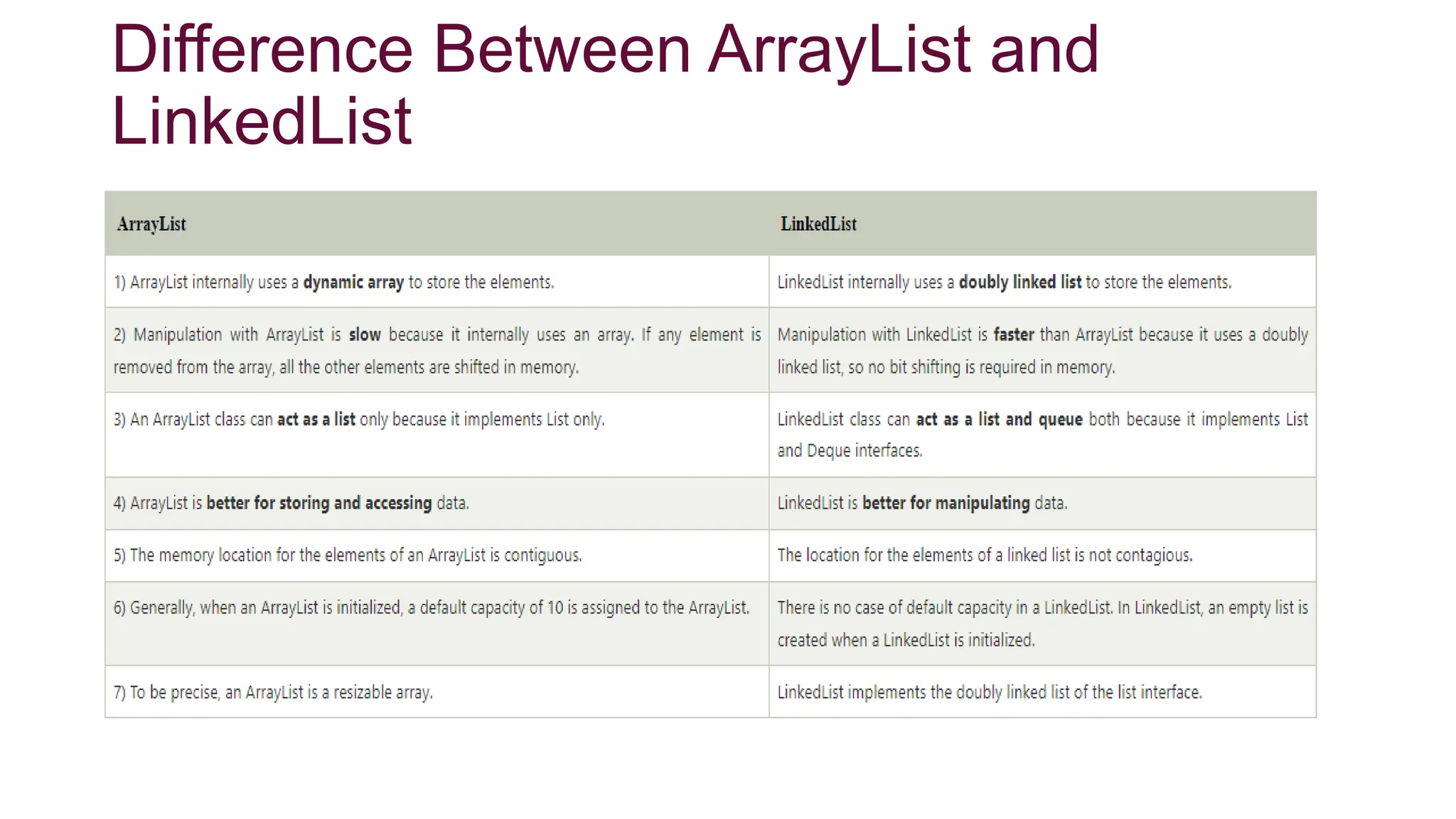
Difference Between ArrayList and
LinkedList
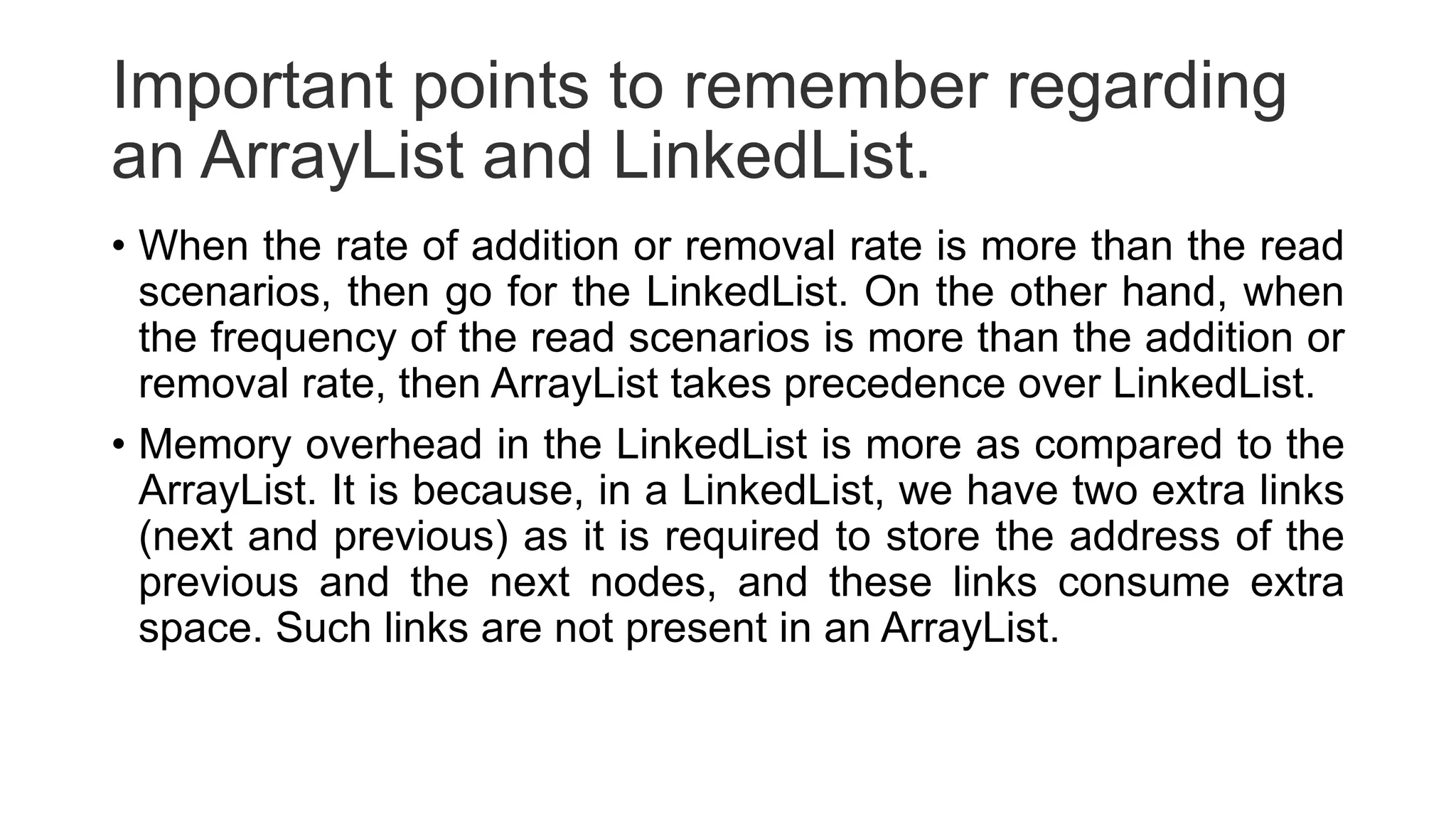
Important points to remember regarding
an ArrayList and LinkedList.
• When the rate of addition or removal rate is more than the read
scenarios, then go for the LinkedList. On the other hand, when
the frequency of the read scenarios is more than the addition or
removal rate, then ArrayList takes precedence over LinkedList.
• Memory overhead in the LinkedList is more as compared to the
ArrayList. It is because, in a LinkedList, we have two extra links
(next and previous) as it is required to store the address of the
previous and the next nodes, and these links consume extra
space. Such links are not present in an ArrayList.
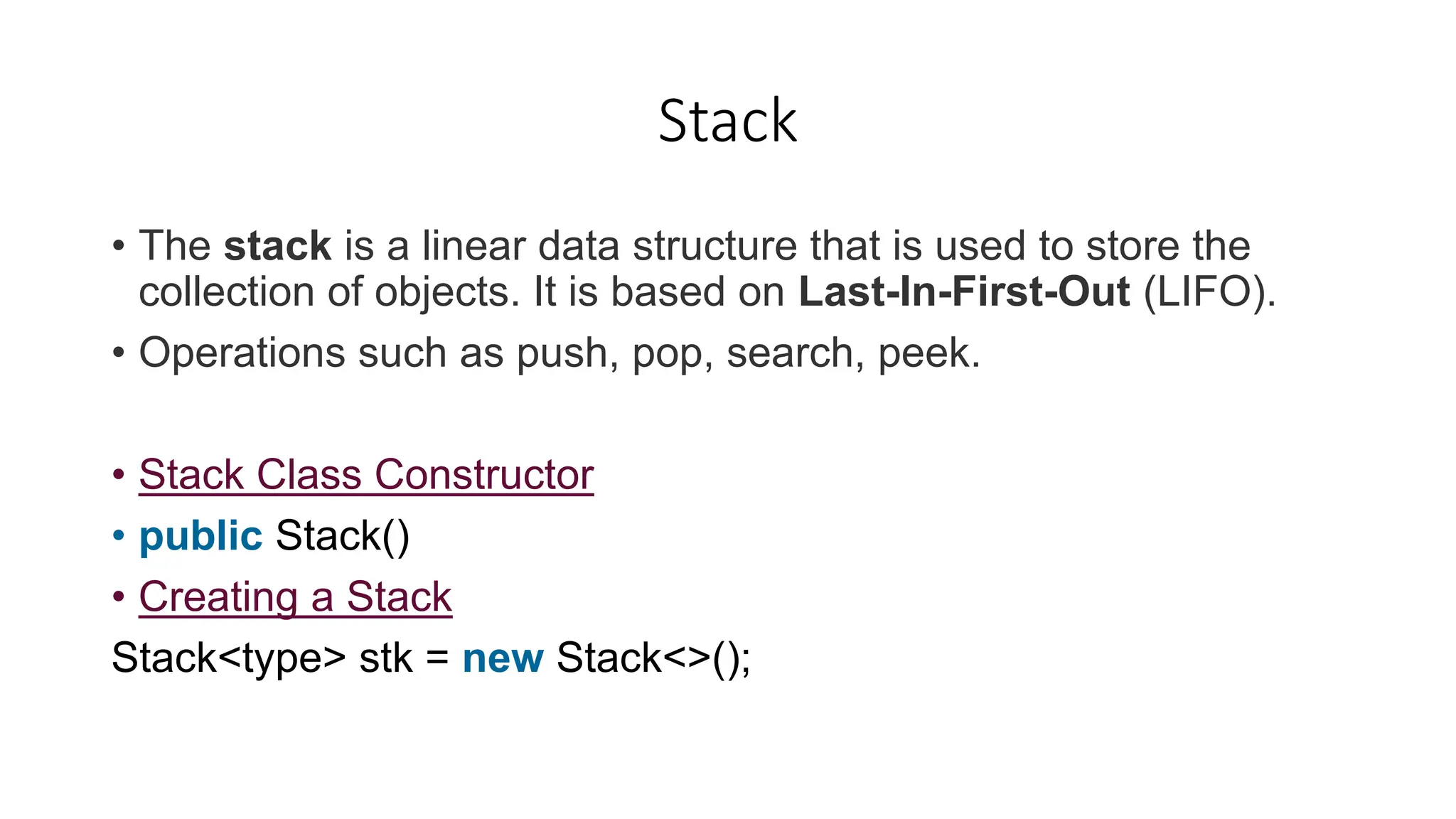
Stack
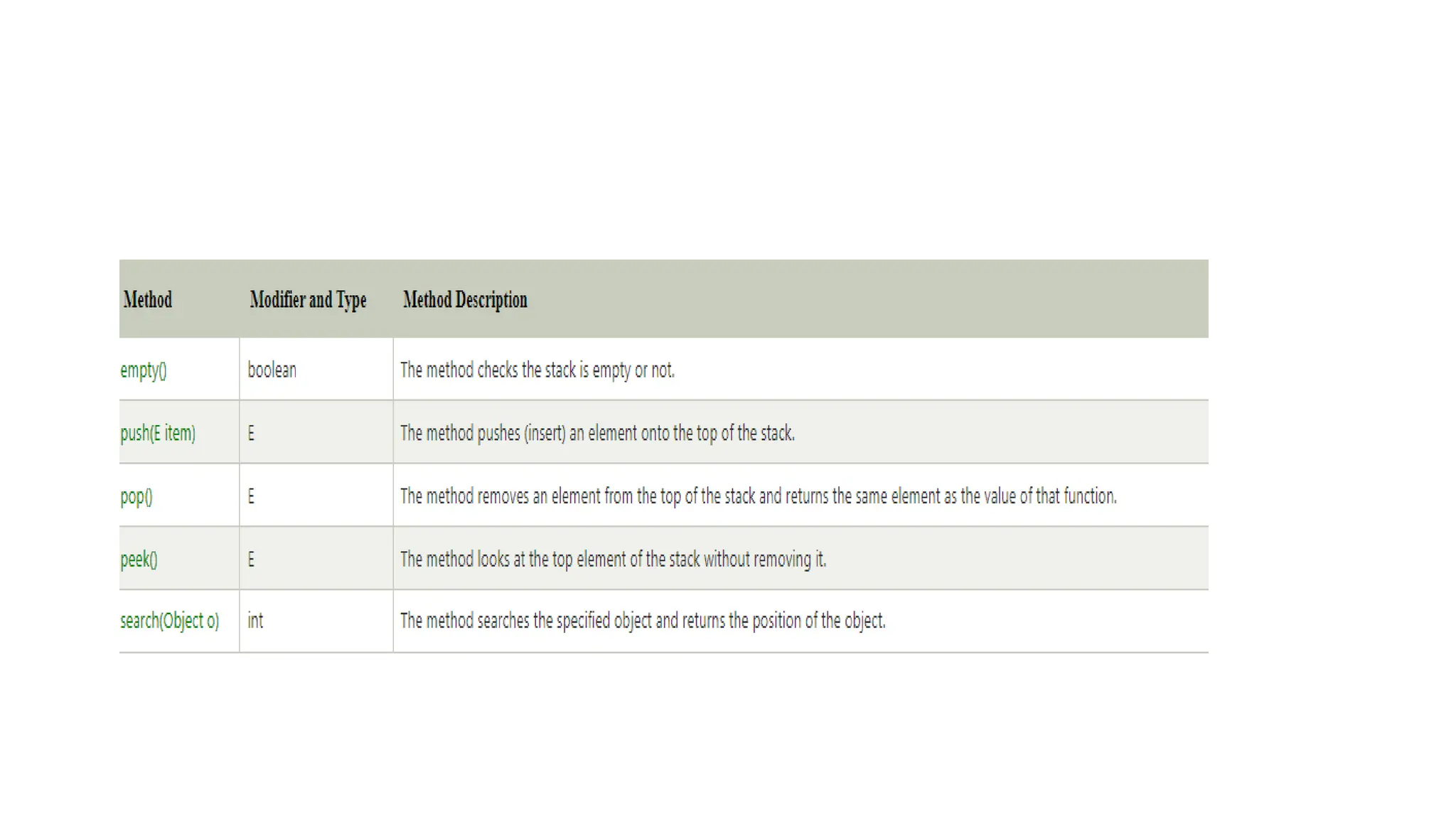
• The stack is a linear data structure that is used to store the
collection of objects. It is based on Last-In-First-Out (LIFO).
• Operations such as push, pop, search, peek.
• Stack Class Constructor
• public Stack()
• Creating a Stack
Stack<type> stk = new Stack<>();
Example
import java.util.Stack;
public class StackEmptyMethodExample
{
public static void main(String[] args)
{
Stack<Integer> stk= new Stack<>();
stk.push(78);
stk.push(113);
stk.push(90);
stk.push(120);
System.out.println("Elements in Stack: " + stk);
}
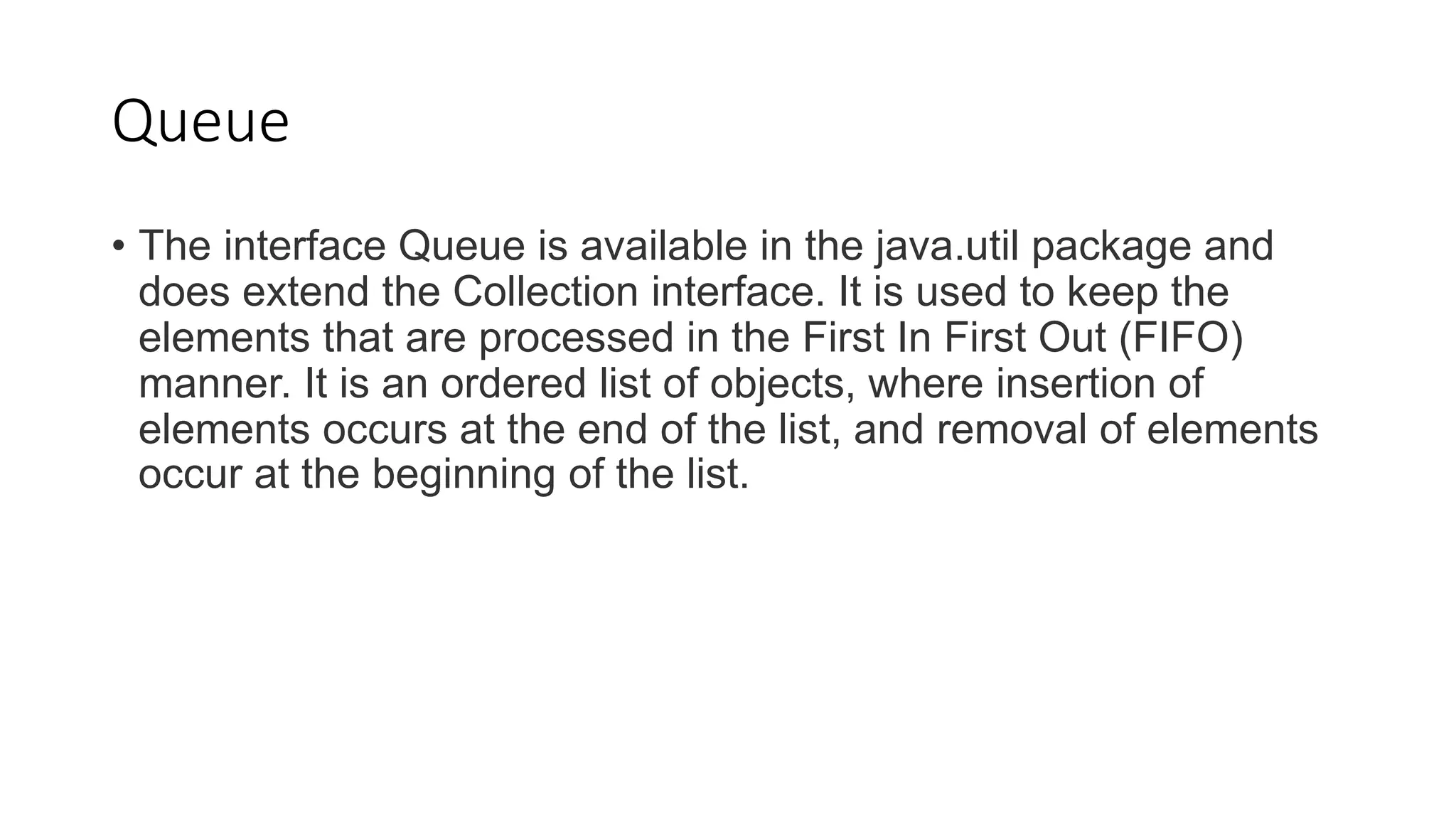
Queue
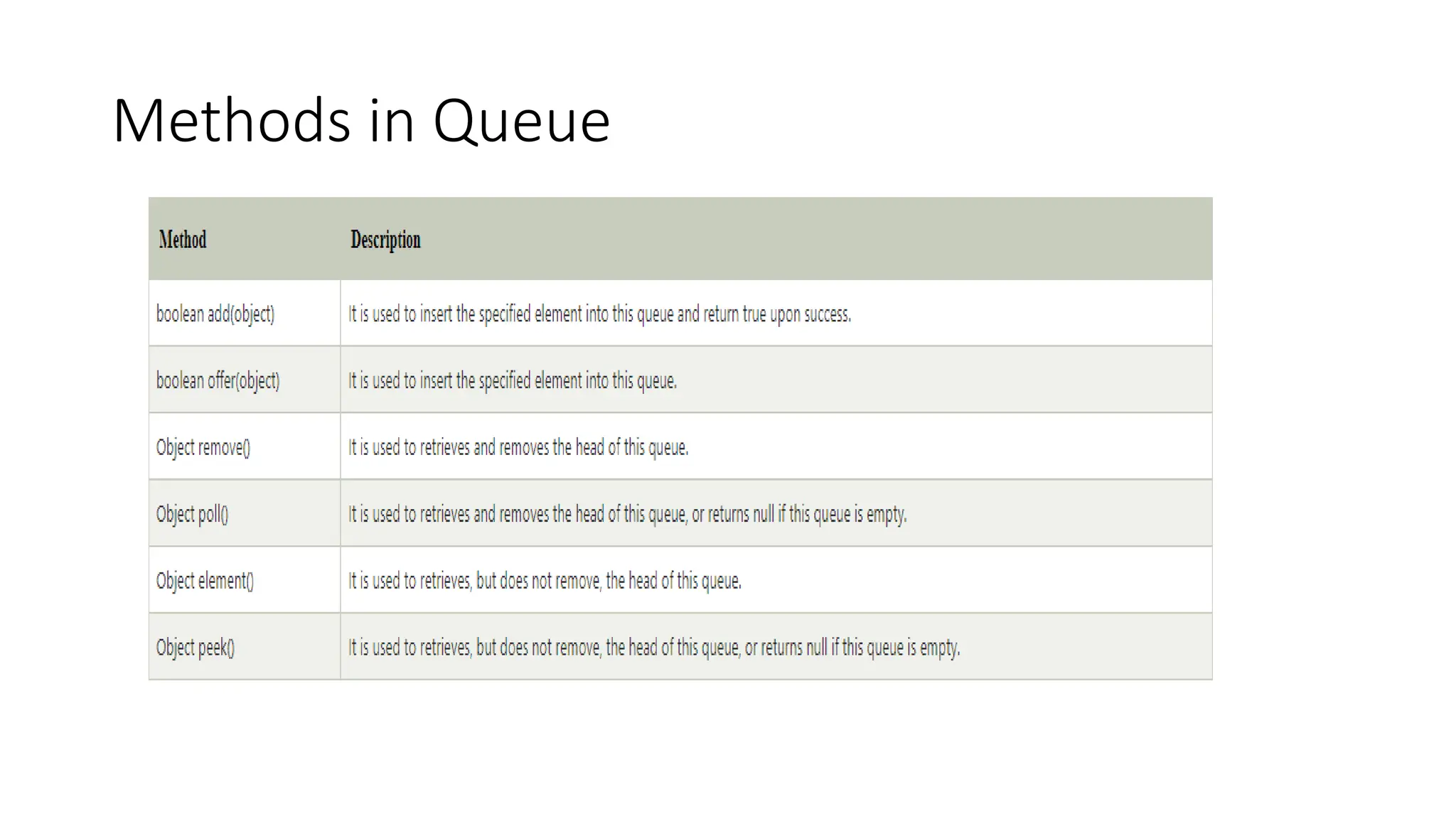
• The interface Queue is available in the java.util package and
does extend the Collection interface. It is used to keep the
elements that are processed in the First In First Out (FIFO)
manner. It is an ordered list of objects, where insertion of
elements occurs at the end of the list, and removal of elements
occur at the beginning of the list.
Methods in Queue
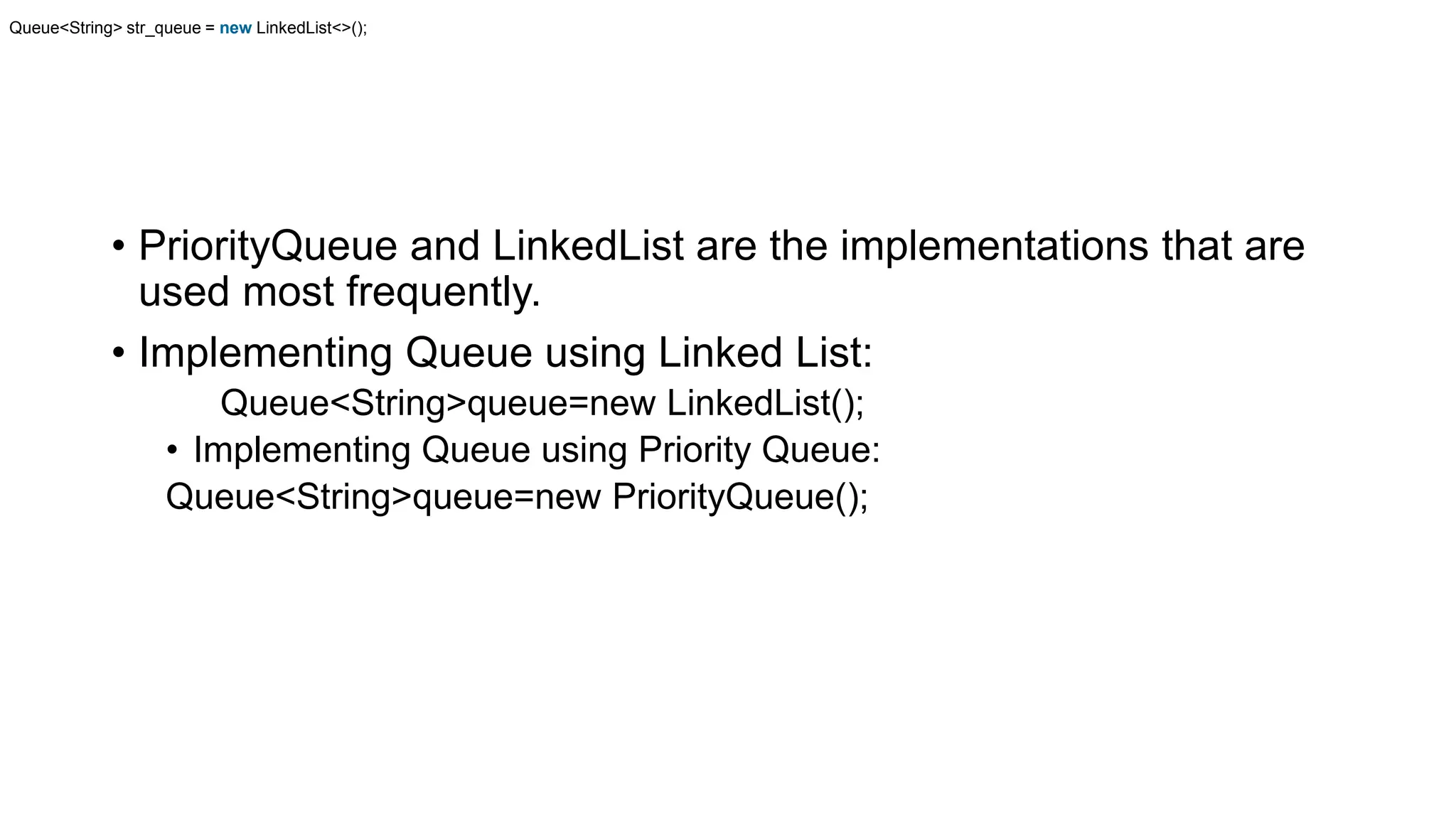
• PriorityQueue and LinkedList are the implementations that are
used most frequently.
• Implementing Queue using Linked List:
Queue<String>queue=new LinkedList();
• Implementing Queue using Priority Queue:
Queue<String>queue=new PriorityQueue();
Queue<String> str_queue = new LinkedList<>();
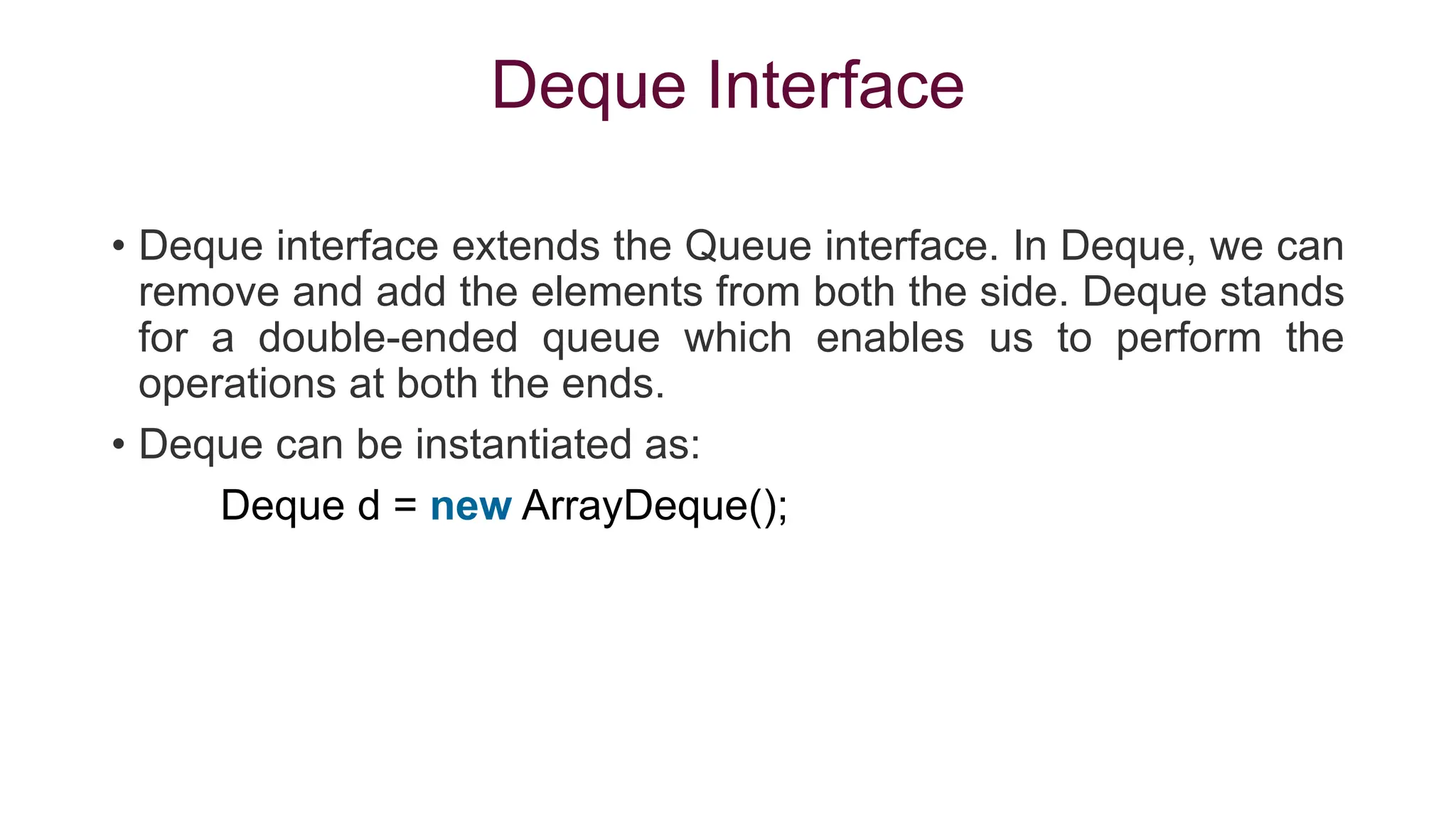
Deque Interface
• Deque interface extends the Queue interface. In Deque, we can
remove and add the elements from both the side. Deque stands
for a double-ended queue which enables us to perform the
operations at both the ends.
• Deque can be instantiated as:
Deque d = new ArrayDeque();
ArrayDeque
• ArrayDeque class implements the
Deque interface. It facilitates us to use
the Deque. Unlike queue, we can add
or delete the elements from both the
ends.
EXAMPLE
1. import java.util.*;
2. public class TestJavaCollection6{
3. public static void main(String[] args) {
4. //Creating Deque and adding elements
5. Deque<String> deque = new ArrayDeque<String>();
6. deque.add("Gautam");
7. deque.add("Karan");
8. deque.add("Ajay");
9. //Traversing elements
10.for (String str : deque) {
11.System.out.println(str);
12.}
13.}
14.}
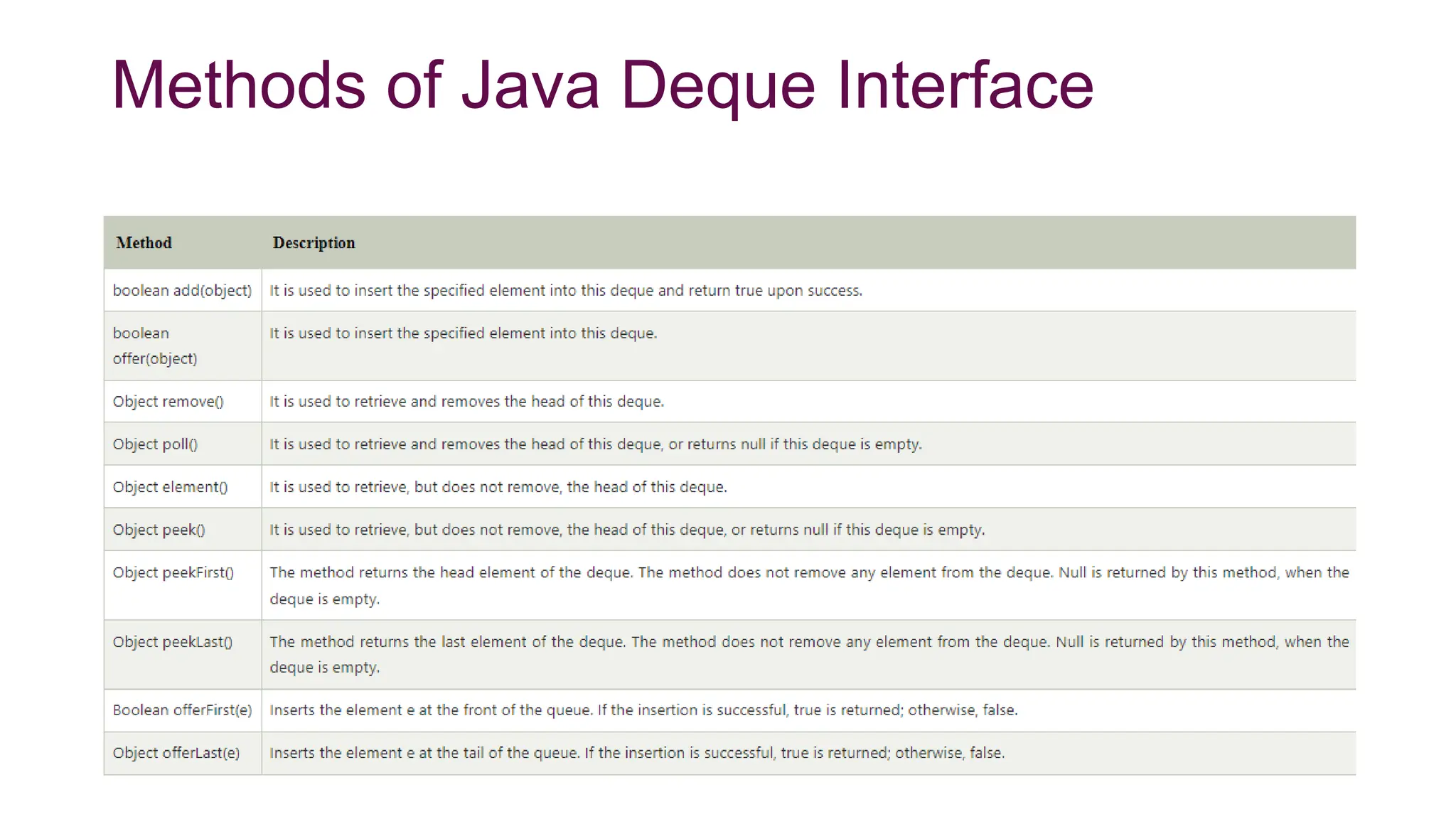
Methods of Java Deque Interface
Accessing a Java Collection using
Iterators
There are three possible ways to traverse through the elements
of any collection.
1.Using Iterator interface
2.Using ListIterator interface
3.Using for-each loop
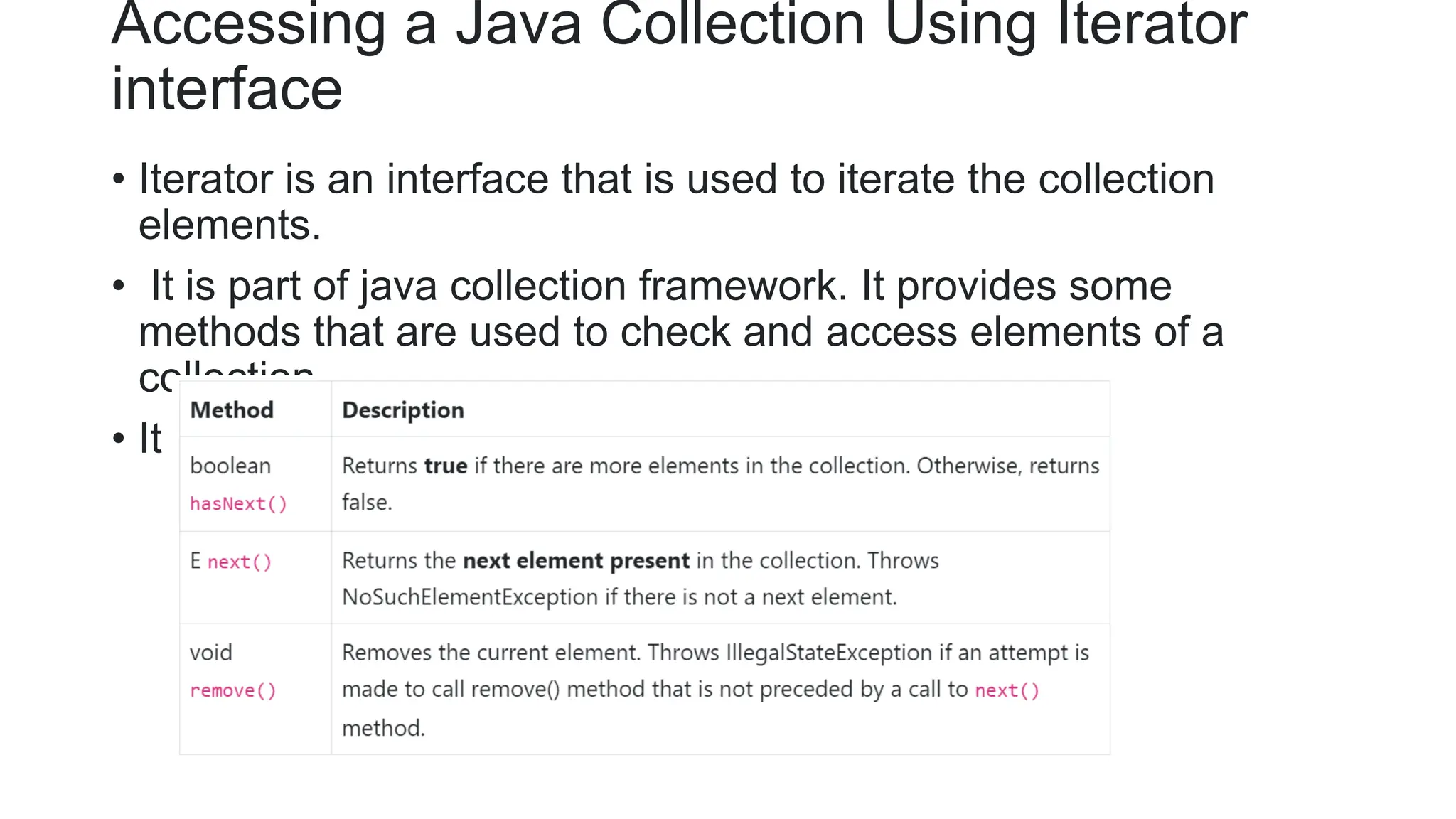
Accessing a Java Collection Using Iterator
interface
• Iterator is an interface that is used to iterate the collection
elements.
• It is part of java collection framework. It provides some
methods that are used to check and access elements of a
collection.
• It is use to traverse a list in forward direction only.
Iterator Example
import java.util.*;
class Demo
{
public static void main(String[] args)
{
ArrayList< String> ar = new ArrayList< String>();
ar.add("ab");
ar.add("bc");
ar.add("cd");
ar.add("de");
Iterator it = ar.iterator(); //Declaring Iterator
while(it.hasNext())
{
System.out.print(it.next()+" ");
}
}
}
Accessing elements using listIterator
• List Iterator Interface is used to traverse a list in
both forward and backward direction.
• It is available to only those collections that implements
the List Interface.
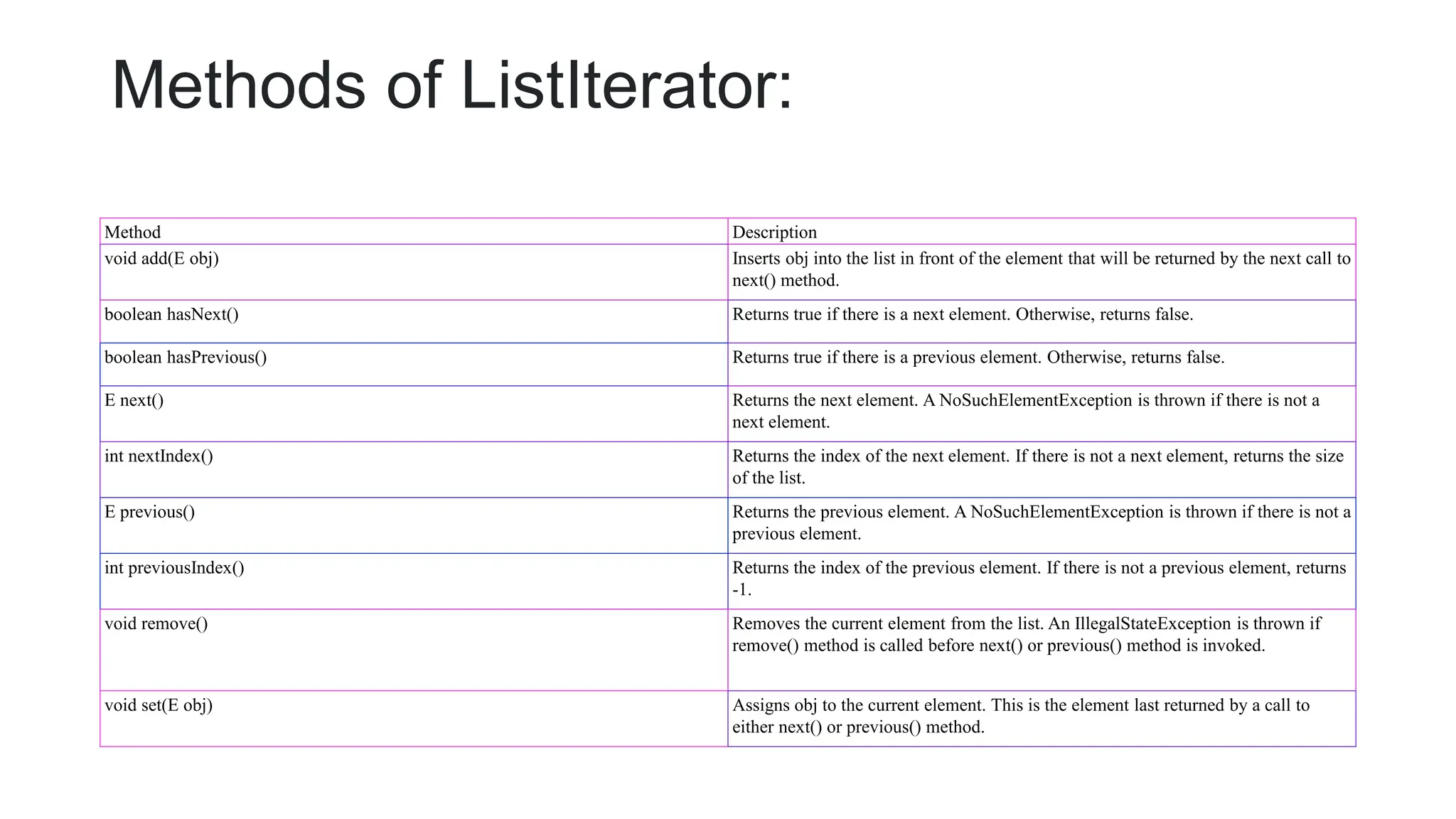
Methods of ListIterator:
Method Description
void add(E obj) Inserts obj into the list in front of the element that will be returned by the next call to
next() method.
boolean hasNext() Returns true if there is a next element. Otherwise, returns false.
boolean hasPrevious() Returns true if there is a previous element. Otherwise, returns false.
E next() Returns the next element. A NoSuchElementException is thrown if there is not a
next element.
int nextIndex() Returns the index of the next element. If there is not a next element, returns the size
of the list.
E previous() Returns the previous element. A NoSuchElementException is thrown if there is not a
previous element.
int previousIndex() Returns the index of the previous element. If there is not a previous element, returns
-1.
void remove() Removes the current element from the list. An IllegalStateException is thrown if
remove() method is called before next() or previous() method is invoked.
void set(E obj) Assigns obj to the current element. This is the element last returned by a call to
either next() or previous() method.
Example of Listiterator
import java.util.*;
class Demo
{
public static void main(String[] args)
{
ArrayList< String> ar = new ArrayList< String>();
ar.add("ab");
ar.add("bc");
ar.add("cd");
ar.add("de");
ListIterator litr = ar.listIterator();
while(litr.hasNext()) //In forward direction
{
System.out.print(litr.next()+" ");
}
while(litr.hasPrevious()) //In backward direction
{
System.out.print(litr.previous()+" ");
}
}
}
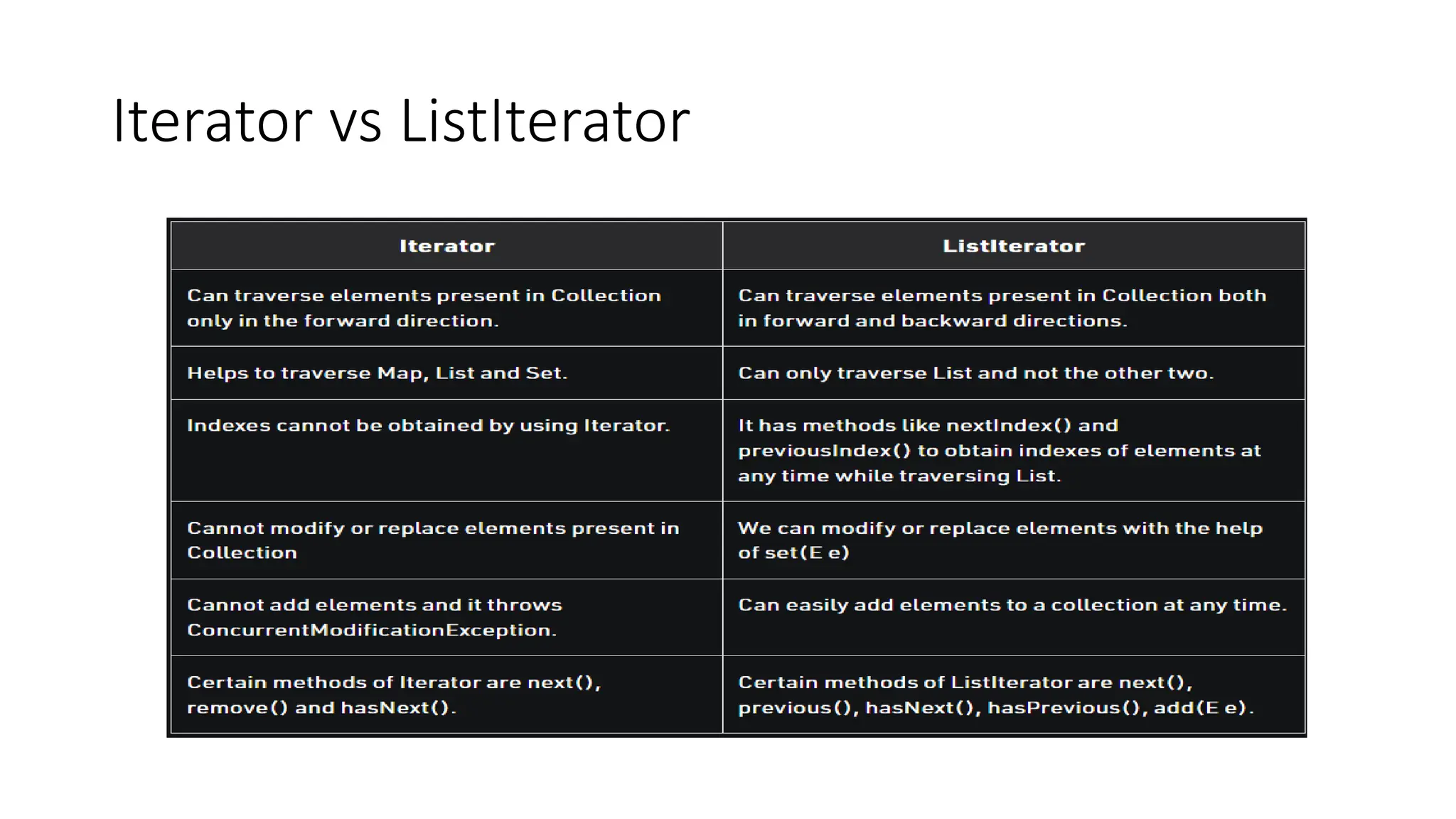
Iterator vs ListIterator

collection framework.pptx

  • 1.
  • 2.
    Collections in Java •The Collection in Java is a framework that provides an architecture to store and manipulate the group of objects. • Java Collections can achieve all the operations that you perform on a data such as searching, sorting, insertion, manipulation, and deletion. • Java Collection means a single unit of objects. Java Collection framework provides many interfaces (Set, List, Queue, Deque) and classes (ArrayList, Vector, LinkedList, PriorityQueue, HashSet, LinkedHashSet, TreeSet). • A Collection represents a single unit of objects, i.e., a group.
  • 3.
    What is aframework in Java • It provides readymade architecture. • It represents a set of classes and interfaces. • It is optional.
  • 4.
    What is Collectionframework The Collection framework represents a unified architecture for storing and manipulating a group of objects. It has: 1.Interfaces and its implementations, i.e., classes 2.Algorithm
  • 5.
  • 6.
    Methods of Collectioninterface No. Method Description 1 public boolean add(E e) It is used to insert an element in this collection. 2 public boolean addAll(Collection<? extends E> c) It is used to insert the specified collection elements in the invoking collection. 3 public boolean remove(Object element) It is used to delete an element from the collection. 4 public boolean removeAll(Collection<?> c) It is used to delete all the elements of the specified collection from the invoking collection. 5 public int size() It returns the total number of elements in the collection. 6 public void clear() It removes the total number of elements from the collection. 7 public boolean contains(Object element) It is used to search an element. 8 public boolean containsAll(Collection<?> c) It is used to search the specified collection in the collection. 9 public Iterator iterator() It returns an iterator. 10 public boolean isEmpty() It checks if collection is empty. 11 public boolean equals(Object element) It matches two collections.
  • 7.
    Iterator interface • Iteratorinterface provides the facility of iterating the elements in a forward direction only. • The Iterable interface is the root interface for all the collection classes. The Collection interface extends the Iterable interface and therefore all the subclasses of Collection interface also implement the Iterable interface. • It contains only one abstract method. i.e., Iterator<T> iterator()
  • 8.
    No. Method Description 1public boolean hasNext() It returns true if the iterator has more elements otherwise it returns false. 2 public Object next() It returns the element and moves the cursor pointer to the next element. 3 public void remove() It removes the last elements returned by the iterator. It is less used. There are only three methods in the Iterator interface. They are:
  • 9.
    Collection Interface • TheCollection interface is the interface which is implemented by all the classes in the collection framework. It declares the methods that every collection will have.
  • 10.
    List Interface • Listinterface is a child interface of the Collection interface. • It can store duplicate elements. • It can store any number of Null values. • It follows the insertion order.(By default; first element will be stored at first position) • The user of this interface has precise control over where in the list each element is inserted. • we can differentiate duplicate objects by using Index hence index will play a very important role in List.
  • 11.
  • 12.
    ArrayList class overview •Java ArrayList class uses a dynamic array for storing the elements. It inherits AbstractList class and implements List interface. The important points about Java ArrayList class are: • Java ArrayList class can contain duplicate elements. • Java ArrayList class maintains insertion order. • Java ArrayList allows random access because array works at the index basis. • In Java ArrayList class, manipulation is slow because a lot of shifting needs to have occurred if any element is removed from the array list.
  • 13.
    • We cannot create an array list of the primitive types, such as int, float, char, etc. It is required to use the required wrapper class in such cases. For example: ArrayList<int> al = ArrayList<int>(); // does not work ArrayList<Integer> al = new ArrayList<Integer>(); // works fi ne • Java ArrayList gets initialized by the size. The size is dynamic in the array list, which varies according to the elements getting added or removed from the list.
  • 14.
    Constructors of ArrayList ConstructorDescription ArrayList() It is used to build an empty array list. ArrayList(Collection<? extends E> c) It is used to build an array list that is initialized with the elements of the collection c. ArrayList(int capacity) It is used to build an array list that has the specified initial capacity.
  • 15.
    Methods of ArrayList MethodDescription void add(int index, E element) It is used to insert the specified element at the specified position in a list. boolean add(E e) It is used to append the specified element at the end of a list. boolean addAll(Collection<? extends E> c) It is used to append all of the elements in the specified collection to the end of this list, in the order that they are returned by the specified collection's iterator. boolean addAll(int index, Collection<? extends E> c) It is used to append all the elements in the specified collection, starting at the specified position of the list. void clear() It is used to remove all of the elements from this list. void ensureCapacity(int requiredCapacity) It is used to enhance the capacity of an ArrayList instance. E get(int index) It is used to fetch the element from the particular position of the list. boolean isEmpty() It returns true if the list is empty, otherwise false. Iterator() listIterator()
  • 16.
    Java ArrayList Example 1.Import java.util.*; 2. public class ArrayListExample1{ 3. public static void main(String args[]){ 4. ArrayList<String> list=new ArrayList<String>();//Creating arraylist 5. list.add("Mango");//Adding object in arraylist 6. list.add("Apple"); 7. list.add("Banana"); 8. list.add("Grapes"); 9. //Printing the arraylist object 10. System.out.println(list); 11. } 12. } 1. public static void main(String [] args) 2. { 3. ArrayList<String> al=new ArrayList<String>(); 4. al.add("Ravi"); 5. al.add("Vijay"); 6. al.add("Ajay"); 7. al.add("Anuj"); 8. al.add("Gaurav"); 9. System.out.println("An initial list of elements: "+al); 10. //Removing specific element from arraylist 11. al.remove("Vijay"); 12. System.out.println("After invoking remove(object) method: "+al); 13. //Removing element on the basis of specific position 14. al.remove(0); 15. System.out.println("After invoking remove(index) method: "+al); }
  • 17.
    Difference between Array& ArrayList Basis Array ArrayList Definition An array is a dynamically-created object. It serves as a container that holds the constant number of values of the same type. It has a contiguous memory location. The ArrayList is a class of Java Collections framework. It contains popular classes like Vector, HashTable, and HashMap. Static/ Dynamic Array is static in size. ArrayList is dynamic in size. Resizable An array is a fixed-length data structure. ArrayList is a variable-length data structure. It can be resized itself when needed. Initialization It is mandatory to provide the size of an array while initializing it directly or indirectly. We can create an instance of ArrayList without specifying its size. Java creates ArrayList of default size. Performance It performs fast in comparison to ArrayList because of fixed size. ArrayList is internally backed by the array in Java. The resize operation in ArrayList slows down the performance. Primitive/ Generic type An array can store both objects and primitives type. We cannot store primitive type in ArrayList. It automatically converts primitive type to object. Iterating Values We use for loop or for each loop to iterate over an array. We use an iterator to iterate over ArrayList. Type-Safety We cannot use generics along with array because it is not a convertible type of array. ArrayList allows us to store only generic/ type, that's why it is type-safe. Length Array provides a length variable which denotes the length of an array. ArrayList provides the size() method to determine the size of ArrayList. Adding Elements We can add elements in an array by using the assignment operator. Java provides the add() method to add elements in the ArrayList. Single/ Multi-Dimensional Array can be multi-dimensional. ArrayList is always single-dimensional.
  • 18.
    LinkedList class • JavaLinkedList class uses a doubly linked list to store the elements. It provides a linked-list data structure. It inherits the AbstractList class and implements List and Deque interfaces. The important points about Java LinkedList are: • Java LinkedList class can contain duplicate elements. • Java LinkedList class maintains insertion order. • In Java LinkedList class, manipulation is fast because no shifting needs to occur. • Java LinkedList class can be used as a list, stack or queue.
  • 19.
    Constructors of JavaLinkedList Constructor Description LinkedList() It is used to construct an empty list. LinkedList(Collection<? extends E> c) It is used to construct a list containing the elements of the specified collection, in the order, they are returned by the collection's iterator.
  • 20.
    Methods of JavaLinkedList
  • 21.
    Java LinkedList Example 1.// Insertion operation 2. import java.util.*; 3. public class LinkedList1{ 4. public static void main(String args[]){ 5. 6. LinkedList<String> al=new LinkedList<String>(); 7. al.add("Ravi"); 8. al.add("Vijay"); 9. al.add("Ravi"); 10. al.add("Ajay"); 11. 12. Iterator<String> itr=al.iterator(); 13. while(itr.hasNext()){ 14. System.out.println(itr.next()); 15. } 16. } 17.} 1. // Deletion operation 2. import java.util.*; 3. public class LinkedList3 { 4. 5. public static void main(String [] args) 6. { 7. LinkedList<String> ll=new LinkedList<String>(); 8. ll.add("Ravi"); 9. ll.add("Vijay"); 10. ll.add("Ajay"); 11. ll.add("Anuj"); 12. ll.add("Gaurav"); 13. ll.add("Harsh"); 14. ll.add("Virat"); 15. ll.add("Gaurav"); 16. ll.add("Harsh"); 17. ll.add("Amit"); 18. System.out.println("Initial list of elements: "+ll); 19. //Removing specific element from arraylist 20. ll.remove("Vijay"); 21. System.out.println("After invoking remove(object) method: "+ll );
  • 22.
  • 23.
    Important points toremember regarding an ArrayList and LinkedList. • When the rate of addition or removal rate is more than the read scenarios, then go for the LinkedList. On the other hand, when the frequency of the read scenarios is more than the addition or removal rate, then ArrayList takes precedence over LinkedList. • Memory overhead in the LinkedList is more as compared to the ArrayList. It is because, in a LinkedList, we have two extra links (next and previous) as it is required to store the address of the previous and the next nodes, and these links consume extra space. Such links are not present in an ArrayList.
  • 24.
    Stack • The stackis a linear data structure that is used to store the collection of objects. It is based on Last-In-First-Out (LIFO). • Operations such as push, pop, search, peek. • Stack Class Constructor • public Stack() • Creating a Stack Stack<type> stk = new Stack<>();
  • 26.
    Example import java.util.Stack; public classStackEmptyMethodExample { public static void main(String[] args) { Stack<Integer> stk= new Stack<>(); stk.push(78); stk.push(113); stk.push(90); stk.push(120); System.out.println("Elements in Stack: " + stk); }
  • 27.
    Queue • The interfaceQueue is available in the java.util package and does extend the Collection interface. It is used to keep the elements that are processed in the First In First Out (FIFO) manner. It is an ordered list of objects, where insertion of elements occurs at the end of the list, and removal of elements occur at the beginning of the list.
  • 28.
  • 29.
    • PriorityQueue andLinkedList are the implementations that are used most frequently. • Implementing Queue using Linked List: Queue<String>queue=new LinkedList(); • Implementing Queue using Priority Queue: Queue<String>queue=new PriorityQueue(); Queue<String> str_queue = new LinkedList<>();
  • 30.
    Deque Interface • Dequeinterface extends the Queue interface. In Deque, we can remove and add the elements from both the side. Deque stands for a double-ended queue which enables us to perform the operations at both the ends. • Deque can be instantiated as: Deque d = new ArrayDeque();
  • 31.
    ArrayDeque • ArrayDeque classimplements the Deque interface. It facilitates us to use the Deque. Unlike queue, we can add or delete the elements from both the ends. EXAMPLE 1. import java.util.*; 2. public class TestJavaCollection6{ 3. public static void main(String[] args) { 4. //Creating Deque and adding elements 5. Deque<String> deque = new ArrayDeque<String>(); 6. deque.add("Gautam"); 7. deque.add("Karan"); 8. deque.add("Ajay"); 9. //Traversing elements 10.for (String str : deque) { 11.System.out.println(str); 12.} 13.} 14.}
  • 32.
    Methods of JavaDeque Interface
  • 33.
    Accessing a JavaCollection using Iterators There are three possible ways to traverse through the elements of any collection. 1.Using Iterator interface 2.Using ListIterator interface 3.Using for-each loop
  • 34.
    Accessing a JavaCollection Using Iterator interface • Iterator is an interface that is used to iterate the collection elements. • It is part of java collection framework. It provides some methods that are used to check and access elements of a collection. • It is use to traverse a list in forward direction only.
  • 35.
    Iterator Example import java.util.*; classDemo { public static void main(String[] args) { ArrayList< String> ar = new ArrayList< String>(); ar.add("ab"); ar.add("bc"); ar.add("cd"); ar.add("de"); Iterator it = ar.iterator(); //Declaring Iterator while(it.hasNext()) { System.out.print(it.next()+" "); } } }
  • 36.
    Accessing elements usinglistIterator • List Iterator Interface is used to traverse a list in both forward and backward direction. • It is available to only those collections that implements the List Interface.
  • 37.
    Methods of ListIterator: MethodDescription void add(E obj) Inserts obj into the list in front of the element that will be returned by the next call to next() method. boolean hasNext() Returns true if there is a next element. Otherwise, returns false. boolean hasPrevious() Returns true if there is a previous element. Otherwise, returns false. E next() Returns the next element. A NoSuchElementException is thrown if there is not a next element. int nextIndex() Returns the index of the next element. If there is not a next element, returns the size of the list. E previous() Returns the previous element. A NoSuchElementException is thrown if there is not a previous element. int previousIndex() Returns the index of the previous element. If there is not a previous element, returns -1. void remove() Removes the current element from the list. An IllegalStateException is thrown if remove() method is called before next() or previous() method is invoked. void set(E obj) Assigns obj to the current element. This is the element last returned by a call to either next() or previous() method.
  • 38.
    Example of Listiterator importjava.util.*; class Demo { public static void main(String[] args) { ArrayList< String> ar = new ArrayList< String>(); ar.add("ab"); ar.add("bc"); ar.add("cd"); ar.add("de"); ListIterator litr = ar.listIterator(); while(litr.hasNext()) //In forward direction { System.out.print(litr.next()+" "); } while(litr.hasPrevious()) //In backward direction { System.out.print(litr.previous()+" "); } } }
  • 39.