Collection and Framework
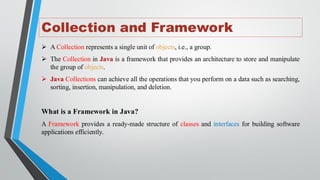
➢A Collection represents a single unit of objects, i.e., a group.
➢ The Collection in Java is a framework that provides an architecture to store and manipulate
the group of objects.
➢ Java Collections can achieve all the operations that you perform on a data such as searching,
sorting, insertion, manipulation, and deletion.
What is a Framework in Java?
A Framework provides a ready-made structure of classes and interfaces for building software
applications efficiently.
5.
Java Collection Framework
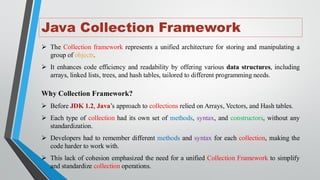
➢The Collection framework represents a unified architecture for storing and manipulating a
group of objects.
➢ It enhances code efficiency and readability by offering various data structures, including
arrays, linked lists, trees, and hash tables, tailored to different programming needs.
Why Collection Framework?
➢ Before JDK 1.2, Java’s approach to collections relied on Arrays, Vectors, and Hash tables.
➢ Each type of collection had its own set of methods, syntax, and constructors, without any
standardization.
➢ Developers had to remember different methods and syntax for each collection, making the
code harder to work with.
➢ This lack of cohesion emphasized the need for a unified Collection Framework to simplify
and standardize collection operations.
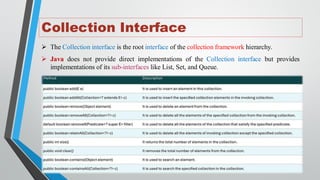
Collection Interface
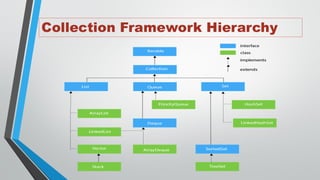
➢ TheCollection interface is the root interface of the collection framework hierarchy.
➢ Java does not provide direct implementations of the Collection interface but provides
implementations of its sub-interfaces like List, Set, and Queue.
8.
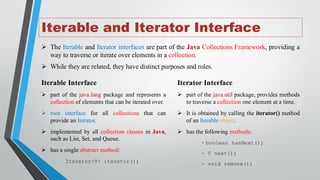
Iterable and IteratorInterface
➢ The Iterable and Iterator interfaces are part of the Java Collections Framework, providing a
way to traverse or iterate over elements in a collection.
➢ While they are related, they have distinct purposes and roles.
Iterable Interface
➢ part of the java.lang package and represents a
collection of elements that can be iterated over.
➢ root interface for all collections that can
provide an Iterator.
➢ implemented by all collection classes in Java,
such as List, Set, and Queue.
➢ has a single abstract method:
Iterator<T> iterator();
Iterator Interface
➢ part of the java.util package, provides methods
to traverse a collection one element at a time.
➢ It is obtained by calling the iterator() method
of an Iterable object.
➢ has the following methods:
- boolean hasNext();
- T next();
- void remove();
9.
Iterable and Iterator(Example)
import java.util.ArrayList;
import java.util.List;
class MainClass {
public static void main(String[] args) {
List<String> list = new ArrayList<>();
list.add("A");
list.add("B");
list.add("C");
//Using for-each loop(Iterable feature)
for(String item : list){
System.out.print(item + " ");
}
}
}
Output:
A B C
import java.util.ArrayList;
import java.util.Iterator;
import java.util.List;
class MainClass {
public static void main(String[] args) {
List<String> list = new ArrayList<>();
list.add("A"); list.add("B"); list.add("C");
//Using Iterator
Iterator<String> iterator = list.iterator();
while(iterator.hasNext()){
String item = iterator.next();
System.out.print(item + " ");
//Remove an element
if("B".equals(item)){ iterator.remove(); }
}
System.out.println("nUpdated List: " + list);
}
}
Output:
A B C
Updated List: [A, C]
10.
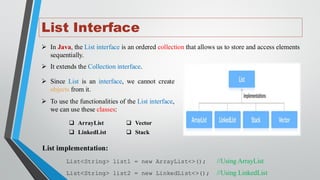
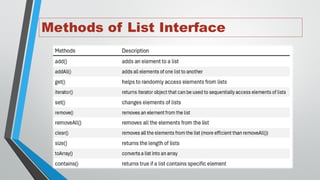
List Interface
➢ InJava, the List interface is an ordered collection that allows us to store and access elements
sequentially.
➢ It extends the Collection interface.
➢ Since List is an interface, we cannot create
objects from it.
➢ To use the functionalities of the List interface,
we can use these classes:
❑ ArrayList
❑ LinkedList
❑ Vector
❑ Stack
List implementation:
List<String> list1 = new ArrayList<>(); //Using ArrayList
List<String> list2 = new LinkedList<>(); //Using LinkedList
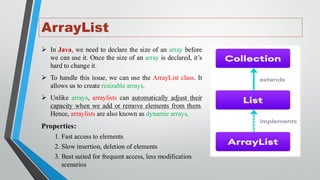
ArrayList
➢ In Java,we need to declare the size of an array before
we can use it. Once the size of an array is declared, it’s
hard to change it.
➢ To handle this issue, we can use the ArrayList class. It
allows us to create resizable arrays.
➢ Unlike arrays, arraylists can automatically adjust their
capacity when we add or remove elements from them.
Hence, arraylists are also known as dynamic arrays.
Properties:
1. Fast access to elements
2. Slow insertion, deletion of elements
3. Best suited for frequent access, less modification
scenarios
13.
ArrayList (Example)
import java.util.List;
importjava.util.ArrayList;
class ArrayListDemo {
public static void main(String[] args) {
//Creating an ArrayList of Strings
ArrayList<String> ltrs = new ArrayList<>();
//Adding elements
ltrs.add("A"); ltrs.add("B");
List<String> list = new ArrayList<>();
list.add("C"); list.add("D");
ltrs.addAll(2, list);
System.out.println("letters: "+ ltrs);
//Access elements
System.out.println("Element-2: "+ ltrs.get(1));
//Changing element
ltrs.set(2, "X");
System.out.println("letters: "+ ltrs);
//Removing element
ltrs.remove(2);
System.out.println("letters: "+ ltrs);
}
}
Output:
letters: [A, B, C, D]
Element-2: B
letters: [A, B, X, D]
letters: [A, B, D]
14.
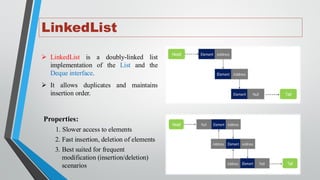
LinkedList
➢ LinkedList isa doubly-linked list
implementation of the List and the
Deque interface.
➢ It allows duplicates and maintains
insertion order.
Properties:
1. Slower access to elements
2. Fast insertion, deletion of elements
3. Best suited for frequent
modification (insertion/deletion)
scenarios
15.
LinkedList (Example)
import java.util.List;
importjava.util.LinkedList;
class LinkedListDemo {
public static void main(String[] args) {
//Creating an LinkedList of Strings
LinkedList<String> ltrs = new LinkedList<>();
//Adding elements
ltrs.add("A"); ltrs.add("B");
List<String> list = new LinkedList<>();
list.add("C"); list.add("D");
ltrs.addAll(2, list);
System.out.println("letters: "+ ltrs);
//Access elements
System.out.println("Element-2: "+ ltrs.get(1));
//Changing element
ltrs.set(2, "X");
System.out.println("letters: "+ ltrs);
//Removing element
ltrs.remove(2);
System.out.println("letters: "+ ltrs);
}
}
Output:
letters: [A, B, C, D]
Element-2: B
letters: [A, B, X, D]
letters: [A, B, D]
16.
Vector
➢ A Vectoris a dynamic array that can
grow or shrink in size as needed.
➢ It is part of java.util and implements
the List interface, making it
compatible with most collection
operations.
➢ Unlike an ArrayList, Vector is
synchronized, meaning it is thread-
safe and can be used in multi-
threaded environments.
import java.util.Vector;
class VectorDemo {
public static void main(String[] args) {
//Creating a Vector of Strings
Vector<String> ltrs = new Vector<>();
//Adding and Accessing elements
ltrs.add("A"); ltrs.add("B"); ltrs.add("C");
System.out.println("letters: "+ ltrs);
System.out.println("Element-2: "+ ltrs.get(1));
ltrs.set(2, "X"); //Changing element
System.out.println("letters: "+ ltrs);
ltrs.remove(2); //Removing element
System.out.println("letters: "+ ltrs);
//Capacity of the vector
System.out.println("Capacity: " + ltrs.capacity());
}
}
Output: letters: [A, B, C]
Element-2: B
letters: [A, B, X]
letters: [A, B]
Capacity: 10
17.
Stack
➢ A Stackis a last-in, first-out (LIFO)
data structure.
➢ It is part of java.util and extends the
Vector class.
Stack-Specific Methods:
• push(E element): Adds an element
to the top of the stack.
• pop(): Removes and returns the top
element.
• peek(): Returns the top element
without removing it.
• empty(): Checks if the stack is
empty.
• search(Object o): Returns the 1-
based position of an element.
import java.util.Stack;
class StackDemo {
public static void main(String[] args) {
//Creating a Stack of Integers
Stack<Integer> stack = new Stack<>();
//Pushing elements onto the stack
stack.push(10); stack.push(20); stack.push(30);
System.out.println("Stack: "+stack);
//Peek at the top element
System.out.println("Top element: "+stack.peek());
//Pop elements from the stack
System.out.println("Popped Element: "+stack.pop());
System.out.println("Stack: "+ stack);
//Searching for an element
System.out.println("Position of 10: " +
stack.search(10));
}
}
Output: Stack: [10, 20, 30]
Top element: 30
Popped Element: 30
Stack: [10, 20]
Position of 10: 2
18.
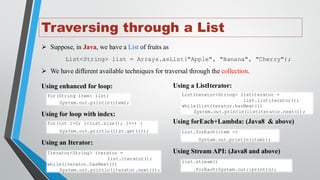
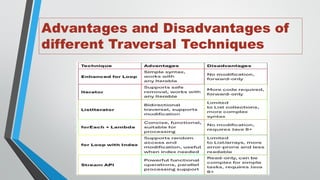
Traversing through aList
➢ Suppose, in Java, we have a List of fruits as
List<String> list = Arrays.asList("Apple", "Banana", "Cherry");
➢ We have different available techniques for traversal through the collection.
for(String item: list)
System.out.println(item);
Using enhanced for loop:
Iterator<String> iterator =
list.iterator();
while(iterator.hasNext())
System.out.println(iterator.next());
Using an Iterator:
ListIterator<String> listiterator =
list.listiterator();
while(listiterator.hasNext())
System.out.println(listiterator.next());
Using a ListIterator:
List.forEach(item ->
System.out.println(item));
Using forEach+Lambda: (Java8 & above)
for(int i=0; i<list.size(); i++) {
System.out.println(list.get(i));
Using for loop with index:
list.stream()
.forEach(System.out::println);
Using Stream API: (Java8 and above)
Summary
Today, we learnedabout
• Introduction to Java Collections
• Collection Framework Hierarchy
• Collection interface
• Iterable and Iterator interface
• List interface (ArrayList, LinkedList, Vector, and Stack)
• Different List Traversal techniques

![Iterable and Iterator (Example)
import java.util.ArrayList;
import java.util.List;
class MainClass {
public static void main(String[] args) {
List<String> list = new ArrayList<>();
list.add("A");
list.add("B");
list.add("C");
//Using for-each loop(Iterable feature)
for(String item : list){
System.out.print(item + " ");
}
}
}
Output:
A B C
import java.util.ArrayList;
import java.util.Iterator;
import java.util.List;
class MainClass {
public static void main(String[] args) {
List<String> list = new ArrayList<>();
list.add("A"); list.add("B"); list.add("C");
//Using Iterator
Iterator<String> iterator = list.iterator();
while(iterator.hasNext()){
String item = iterator.next();
System.out.print(item + " ");
//Remove an element
if("B".equals(item)){ iterator.remove(); }
}
System.out.println("nUpdated List: " + list);
}
}
Output:
A B C
Updated List: [A, C]](https://image.slidesharecdn.com/collectionframework-i-251127073013-b5f2ac8f/85/Collection-Framework-part-1-introduction-9-320.jpg)
![ArrayList (Example)
import java.util.List;
import java.util.ArrayList;
class ArrayListDemo {
public static void main(String[] args) {
//Creating an ArrayList of Strings
ArrayList<String> ltrs = new ArrayList<>();
//Adding elements
ltrs.add("A"); ltrs.add("B");
List<String> list = new ArrayList<>();
list.add("C"); list.add("D");
ltrs.addAll(2, list);
System.out.println("letters: "+ ltrs);
//Access elements
System.out.println("Element-2: "+ ltrs.get(1));
//Changing element
ltrs.set(2, "X");
System.out.println("letters: "+ ltrs);
//Removing element
ltrs.remove(2);
System.out.println("letters: "+ ltrs);
}
}
Output:
letters: [A, B, C, D]
Element-2: B
letters: [A, B, X, D]
letters: [A, B, D]](https://image.slidesharecdn.com/collectionframework-i-251127073013-b5f2ac8f/85/Collection-Framework-part-1-introduction-13-320.jpg)
![LinkedList (Example)
import java.util.List;
import java.util.LinkedList;
class LinkedListDemo {
public static void main(String[] args) {
//Creating an LinkedList of Strings
LinkedList<String> ltrs = new LinkedList<>();
//Adding elements
ltrs.add("A"); ltrs.add("B");
List<String> list = new LinkedList<>();
list.add("C"); list.add("D");
ltrs.addAll(2, list);
System.out.println("letters: "+ ltrs);
//Access elements
System.out.println("Element-2: "+ ltrs.get(1));
//Changing element
ltrs.set(2, "X");
System.out.println("letters: "+ ltrs);
//Removing element
ltrs.remove(2);
System.out.println("letters: "+ ltrs);
}
}
Output:
letters: [A, B, C, D]
Element-2: B
letters: [A, B, X, D]
letters: [A, B, D]](https://image.slidesharecdn.com/collectionframework-i-251127073013-b5f2ac8f/85/Collection-Framework-part-1-introduction-15-320.jpg)
![Vector
➢ A Vector is a dynamic array that can
grow or shrink in size as needed.
➢ It is part of java.util and implements
the List interface, making it
compatible with most collection
operations.
➢ Unlike an ArrayList, Vector is
synchronized, meaning it is thread-
safe and can be used in multi-
threaded environments.
import java.util.Vector;
class VectorDemo {
public static void main(String[] args) {
//Creating a Vector of Strings
Vector<String> ltrs = new Vector<>();
//Adding and Accessing elements
ltrs.add("A"); ltrs.add("B"); ltrs.add("C");
System.out.println("letters: "+ ltrs);
System.out.println("Element-2: "+ ltrs.get(1));
ltrs.set(2, "X"); //Changing element
System.out.println("letters: "+ ltrs);
ltrs.remove(2); //Removing element
System.out.println("letters: "+ ltrs);
//Capacity of the vector
System.out.println("Capacity: " + ltrs.capacity());
}
}
Output: letters: [A, B, C]
Element-2: B
letters: [A, B, X]
letters: [A, B]
Capacity: 10](https://image.slidesharecdn.com/collectionframework-i-251127073013-b5f2ac8f/85/Collection-Framework-part-1-introduction-16-320.jpg)
![Stack
➢ A Stack is a last-in, first-out (LIFO)
data structure.
➢ It is part of java.util and extends the
Vector class.
Stack-Specific Methods:
• push(E element): Adds an element
to the top of the stack.
• pop(): Removes and returns the top
element.
• peek(): Returns the top element
without removing it.
• empty(): Checks if the stack is
empty.
• search(Object o): Returns the 1-
based position of an element.
import java.util.Stack;
class StackDemo {
public static void main(String[] args) {
//Creating a Stack of Integers
Stack<Integer> stack = new Stack<>();
//Pushing elements onto the stack
stack.push(10); stack.push(20); stack.push(30);
System.out.println("Stack: "+stack);
//Peek at the top element
System.out.println("Top element: "+stack.peek());
//Pop elements from the stack
System.out.println("Popped Element: "+stack.pop());
System.out.println("Stack: "+ stack);
//Searching for an element
System.out.println("Position of 10: " +
stack.search(10));
}
}
Output: Stack: [10, 20, 30]
Top element: 30
Popped Element: 30
Stack: [10, 20]
Position of 10: 2](https://image.slidesharecdn.com/collectionframework-i-251127073013-b5f2ac8f/85/Collection-Framework-part-1-introduction-17-320.jpg)