MODULE 5
Collaboration and Team Content Development
Preview
• In Module 4, different online tolls were
discussed. The said tools are capable of
remote access and online storage. This is
possible due to API categories include
access API, plug-in API, and runtime
environment. Also, design elements were
discussed in the previous module such as
purpose, communication, typefaces, colors,
images, navigation, layout, and load time.
• The tool called WYSIWYG was
introduced in the previous module.
This is a user-friendly application that
provides a drag-and-drop function for
Web development. Online productivity
applications were also presented.
These discussions will be an essential
part of will be presented. Collaborative
development system and their roles
will also be discussed.
• The functions and responsibilities of
these individuals will be specifically
defined. Moreover, the interaction
between these individuals will be
described, Last, additional tools for ease
in communication in collaborative work
will be presented.
Collaborative Development
From Business focused on online development
and software development are using different
teams in developing different kinds of software
and applications. Splitting the work into different
individuals in a team introduces different
advantages in software and online development.
By using this, an individual will work on a specific
part of the development and can focus on one
task . Furthermore, highly qualified individuals for
a certain task can be hired and will not need to
worry on other aspects of development.
Another advantage is that this system introduces
parallelism, or developing all of the aspects of the Web site
at the same time, which will be integrated later. However,
doing this system also has certain disadvantage. Because
individuals are doing tasks independently with other
individuals, the output of an individual tends to overlap with
the output of other individuals. Another disadvantage is that
the direction of development tends to go different ways
because of the nature of independence of the team
members and workers. The output of each individual may
fail to integrate in the end.
This problem is solved by including another member
focused on management alone. Presented here are the roles
that a Web development team essentially requires.
-Leader of the group.
-A person who synchronized and
supervised.
-Sets the goals and expectations for
each individual.
-Sets the realistic deadlines.
-Checks the hurdles and issues.
Project
Manager
Web
strategist
Upon the start of development, the Web
strategist plans the approach or method to
be done. He or she plans every step that
the team should do in phases or stages of
development. The goals that the project
manager sets are determined by the Web
strategist. The structure and arrangement
of the Web site is defined and planned
carefully by the Web strategist. Upon
completion of the plan, the execution is left
to the remaining members of the team.
Most of the time, the developers
are not inclined in the field of the
Web site’s topic. The team
therefore needs and individual with
expertise to write the content of
the Web site. Sometimes, the
content specialist is an experienced
writer and has knowledge on how
to catch the attention of readers.
Content
Specialist
The Web designer is the one in
charge of the visual presentation of
the Web site. The goal of the Web
designer is to catch the attention of
the target audience using attractive
visual design and layout. The Web
designer is a specialist in stringing
colors and shapes that can bring the
imagination of the viewers to life.
Web
designer
-The developer take into account all of
the outputs of the content specialist
and web designer.
-The developer will make the website
come to life with the pointer given by
the web designer and content specialist.
Developer
-The success of the Web site or the
popularity will be the responsibility of
the inbound marketer. Most of the time,
the marketer uses different strategies
such as blogs, social media, and
advertisements to promote the Web
site. The collaboration between the
content specialist and the inbound
marketer is important to promote the
Web site.
Inbound
Marketer
Project manager
Web strategist
Content specialist
Web designer
Developer
Inbound Marketer
Project Management
• The project manager is the individual who carries out the
methods of project management.
• By definition, project management for ICT is the set of skills
or abilities to complete an ICT project and produce an
output. The basic skills to learn in project management
include project planning, team organization, team
motivating, resources control, and administration.
Web analytics
• Upon creation of a Web site, there are factors that the
designer would want to study to fully evaluate its
effectiveness. Web analytics is the process of collecting
data or measuring the activity of the Web site.
• Web site data includes Web traffic.
• The measure of the number of downloads, uploads, and
transactions can be measured, and may thus help
to further improve the Web site.
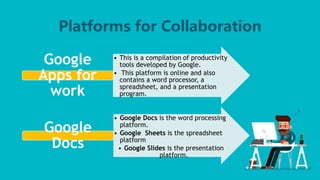
Platforms for Collaboration
• This is a compilation of productivity
tools developed by Google.
• This platform is online and also
contains a word processor, a
spreadsheet, and a presentation
program.
Google
Apps for
work
• Google Docs is the word processing
platform.
• Google Sheets is the spreadsheet
platform
• Google Slides is the presentation
platform.
Google
Docs
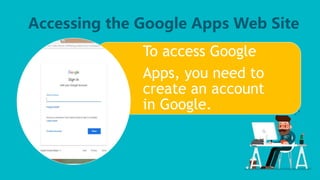
Accessing the Google Apps Web Site
To access Google
Apps, you need to
create an account
in Google.
Open your Google account. On the
upper right corner, there is a grid
icon. After clicking the said icon,
options will appear. Click Docs if you
are going to process a word file. If you
are going to process a spreadsheet,
click Sheets. Finally, if you are going
to create a presentation file, click
Slides.
In the previous module, you have already
learned about some of the Applications
developed by Google and Web editors. . Now,
you will be shown how to use the
applications.
The following applications are:
Google Sheets Prezi
Google Slides Slideshare
Google Docs Mind Meister
Google Drive Dropbox
Amaya Evernote
IM Creator Wikimapia
Wix
THANK YOU FOR
LISTENING

Collaboration and team content development

  • 1.
    MODULE 5 Collaboration andTeam Content Development
  • 2.
    Preview • In Module4, different online tolls were discussed. The said tools are capable of remote access and online storage. This is possible due to API categories include access API, plug-in API, and runtime environment. Also, design elements were discussed in the previous module such as purpose, communication, typefaces, colors, images, navigation, layout, and load time.
  • 3.
    • The toolcalled WYSIWYG was introduced in the previous module. This is a user-friendly application that provides a drag-and-drop function for Web development. Online productivity applications were also presented. These discussions will be an essential part of will be presented. Collaborative development system and their roles will also be discussed.
  • 4.
    • The functionsand responsibilities of these individuals will be specifically defined. Moreover, the interaction between these individuals will be described, Last, additional tools for ease in communication in collaborative work will be presented.
  • 6.
    Collaborative Development From Businessfocused on online development and software development are using different teams in developing different kinds of software and applications. Splitting the work into different individuals in a team introduces different advantages in software and online development. By using this, an individual will work on a specific part of the development and can focus on one task . Furthermore, highly qualified individuals for a certain task can be hired and will not need to worry on other aspects of development.
  • 7.
    Another advantage isthat this system introduces parallelism, or developing all of the aspects of the Web site at the same time, which will be integrated later. However, doing this system also has certain disadvantage. Because individuals are doing tasks independently with other individuals, the output of an individual tends to overlap with the output of other individuals. Another disadvantage is that the direction of development tends to go different ways because of the nature of independence of the team members and workers. The output of each individual may fail to integrate in the end.
  • 8.
    This problem issolved by including another member focused on management alone. Presented here are the roles that a Web development team essentially requires.
  • 9.
    -Leader of thegroup. -A person who synchronized and supervised. -Sets the goals and expectations for each individual. -Sets the realistic deadlines. -Checks the hurdles and issues. Project Manager
  • 10.
    Web strategist Upon the startof development, the Web strategist plans the approach or method to be done. He or she plans every step that the team should do in phases or stages of development. The goals that the project manager sets are determined by the Web strategist. The structure and arrangement of the Web site is defined and planned carefully by the Web strategist. Upon completion of the plan, the execution is left to the remaining members of the team.
  • 11.
    Most of thetime, the developers are not inclined in the field of the Web site’s topic. The team therefore needs and individual with expertise to write the content of the Web site. Sometimes, the content specialist is an experienced writer and has knowledge on how to catch the attention of readers. Content Specialist
  • 12.
    The Web designeris the one in charge of the visual presentation of the Web site. The goal of the Web designer is to catch the attention of the target audience using attractive visual design and layout. The Web designer is a specialist in stringing colors and shapes that can bring the imagination of the viewers to life. Web designer
  • 13.
    -The developer takeinto account all of the outputs of the content specialist and web designer. -The developer will make the website come to life with the pointer given by the web designer and content specialist. Developer
  • 14.
    -The success ofthe Web site or the popularity will be the responsibility of the inbound marketer. Most of the time, the marketer uses different strategies such as blogs, social media, and advertisements to promote the Web site. The collaboration between the content specialist and the inbound marketer is important to promote the Web site. Inbound Marketer
  • 15.
    Project manager Web strategist Contentspecialist Web designer Developer Inbound Marketer
  • 16.
    Project Management • Theproject manager is the individual who carries out the methods of project management. • By definition, project management for ICT is the set of skills or abilities to complete an ICT project and produce an output. The basic skills to learn in project management include project planning, team organization, team motivating, resources control, and administration.
  • 17.
    Web analytics • Uponcreation of a Web site, there are factors that the designer would want to study to fully evaluate its effectiveness. Web analytics is the process of collecting data or measuring the activity of the Web site. • Web site data includes Web traffic. • The measure of the number of downloads, uploads, and transactions can be measured, and may thus help to further improve the Web site.
  • 18.
    Platforms for Collaboration •This is a compilation of productivity tools developed by Google. • This platform is online and also contains a word processor, a spreadsheet, and a presentation program. Google Apps for work • Google Docs is the word processing platform. • Google Sheets is the spreadsheet platform • Google Slides is the presentation platform. Google Docs
  • 19.
    Accessing the GoogleApps Web Site To access Google Apps, you need to create an account in Google.
  • 20.
    Open your Googleaccount. On the upper right corner, there is a grid icon. After clicking the said icon, options will appear. Click Docs if you are going to process a word file. If you are going to process a spreadsheet, click Sheets. Finally, if you are going to create a presentation file, click Slides.
  • 21.
    In the previousmodule, you have already learned about some of the Applications developed by Google and Web editors. . Now, you will be shown how to use the applications.
  • 22.
    The following applicationsare: Google Sheets Prezi Google Slides Slideshare Google Docs Mind Meister Google Drive Dropbox Amaya Evernote IM Creator Wikimapia Wix
  • 23.