Welcome to the Amazon Sellers Australia Meetup…
• Software company based in Sydney
• Specialise in Amazon & eBay integration software
• Full, real-time integration for Shopify, Magento & WooCommerce
• Support all Amazon & eBay marketplaces globally
• Create & edit listings in bulk
• Real-time inventory sync across all channels
• Marketplaces orders automatically sent to Shopify/Magento/WooCommerce
Amazon Australia:
What We Know So Far
• No official release date but launching soon!
• Some sellers have been invited to sign up
• FBM first, then FBA
• Some categories will be delayed
• ‘Amazon Fresh’ may be part of the launch
• 24,000 square metre fulfilment centre in Melbourne
• FBA will now require battery info for listings
All About ASINs, Amazon’s
Product Identifiers
• Amazon Standard Identification Number
• Unlike eBay, there is only ONE unique listing and ONE unique
ASIN for each individual product / UPC / EAN / ISBN
• Amazon Australia is asking sellers to create new listings and they
will merge duplicates themselves
Parent & Child ASINS
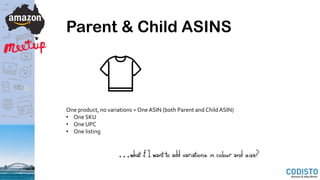
One product, no variations = One ASIN (both Parent and Child ASIN)
• One SKU
• One UPC
• One listing
…what if I want to add variations in colour and size?
Parent & Child ASINS
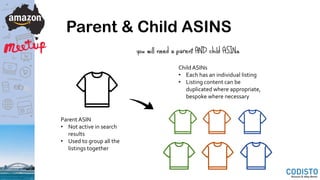
Parent ASIN
• Not active in search
results
• Used to group all the
listings together
Child ASINs
• Each has an individual listing
• Listing content can be
duplicated where appropriate,
bespoke where necessary
you will need a parent AND child ASINs
Anatomy of an Amazon Listing
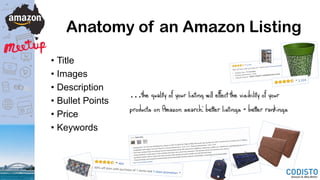
• Title
• Images
• Description
• Bullet Points
• Price
• Keywords
…the quality of your listing will effect the visibility of your
products on Amazon search: better listings = better rankings
Title
Your title is important as it is:
• The main source of keywords for Amazon’s product search
• The first thing people read when they see your listing
To balance these priorities, you’re title should:
• Include relevant keywords whilst still being engaging(avoid ‘keyword stuffing’ and ‘spammy’
titles)
• Include keywords that customers are likely to search, but only if they are relevant to your
product
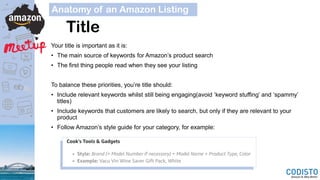
• Follow Amazon’s style guide for your category, for example:
Anatomy of an Amazon Listing
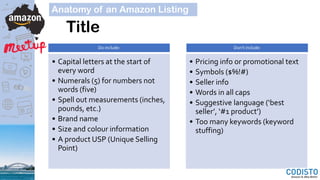
Title
Do include:
• Capital letters at the start of
every word
• Numerals (5) for numbers not
words (five)
• Spell out measurements (inches,
pounds, etc.)
• Brand name
• Size and colour information
• A product USP (Unique Selling
Point)
Don’t include:
• Pricing info or promotional text
• Symbols ($%!#)
• Seller info
• Words in all caps
• Suggestive language (‘best
seller’, ‘#1 product’)
• Too many keywords (keyword
stuffing)
Anatomy of an Amazon Listing
Images
Anatomy of an Amazon Listing
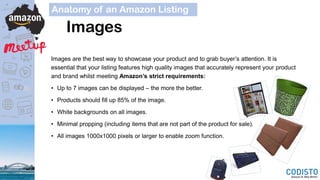
Images are the best way to showcase your product and to grab buyer’s attention. It is
essential that your listing features high quality images that accurately represent your product
and brand whilst meeting Amazon’s strict requirements:
• Up to 7 images can be displayed – the more the better.
• Products should fill up 85% of the image.
• White backgrounds on all images.
• Minimal propping (including items that are not part of the product for sale).
• All images 1000x1000 pixels or larger to enable zoom function.
Images – Main Image
Anatomy of an Amazon Listing
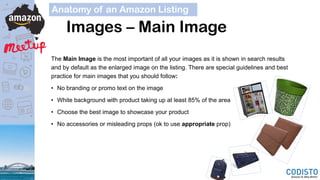
The Main Image is the most important of all your images as it is shown in search results
and by default as the enlarged image on the listing. There are special guidelines and best
practice for main images that you should follow:
• No branding or promo text on the image
• White background with product taking up at least 85% of the area
• Choose the best image to showcase your product
• No accessories or misleading props (ok to use appropriate prop)
Description & Bullet Points
Your description is where you can sell the customer on the finer details of your product. A few
considerations for your description and bullet points:
• Description fields & bullet points are not indexed for keywords.
• Try to write engaging copy that highlights your products USPs and provides all the necessary
information for a prospective customer.
• Bullet points should list your main USPs and product features in a clear and concise way – sometimes
less is more.
• Consider your ‘Buyer Persona’ – what type of customer are you targeting? This will help define your
‘Tone of Voice’, a consistent and strategic style of writing which should appeal to your customers.
• Use formatting (such as bold and italics) and ‘white space’ to make sure your descriptions are set out
in a logical and easy to read way.
• If you aren’t confident in your writing abilities, consider enlisting the help of a copywriter. There are
many specialist providers of copywriting services for product listings to meet all budgets.
Anatomy of an Amazon Listing
Backend & Keywords
So far we’ve looked at the parts of the listing that the customer will see, but equally as important
are those that they won’t. The ‘backend’ of a listing is where the information lives that Amazon
uses to index your product for their A9 search algorithm.
• Keywords: Products listed on Seller Central have five keyword fields where you can add the
terms you want Amazon to index your product for so that customers can find it when they
search. Keyword optimisation is a strategic process all of its own, but some basic best
practice includes:
• Don’t repeat words within the keyword fields or title – you only need to include a word once.
• No need to include common misspellings and plurals.
• Use a tool like AdWords Keyword Planner or MerchantWords to help find keyword ideas.
• Platinum Keywords: A widely misunderstood area, these are used to manage sellers’
storefronts and aren’t useful for most sellers.
Anatomy of an Amazon Listing
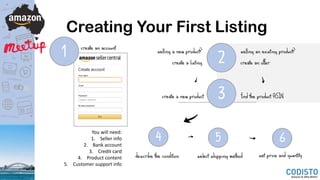
Creating Your First Listing
1
You will need:
1. Seller info
2. Bank account
3. Credit card
4. Product content
5. Customer support info
2
create an account selling an existing product?
create an offer
selling a new product?
create a listing
4
find the product ASIN
select shipping methoddescribe the condition
5
set price and quantity
6
create a new product 3
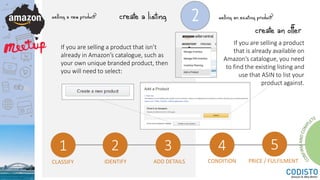
2selling a new product?
If you are selling a product that isn’t
already in Amazon’s catalogue, such as
your own unique branded product, then
you will need to select:
create a listing
1 2 3 4 5
CLASSIFY IDENTIFY ADD DETAILS CONDITION PRICE / FULFILMENT
selling an existing product?
create an offer
If you are selling a product
that is already available on
Amazon’s catalogue, you need
to find the existing listing and
use that ASIN to list your
product against.
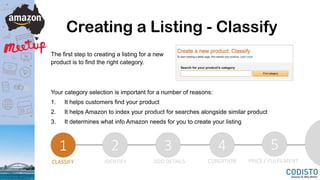
Creating a Listing - Classify
The first step to creating a listing for a new
product is to find the right category.
Your category selection is important for a number of reasons:
1. It helps customers find your product
2. It helps Amazon to index your product for searches alongside similar product
3. It determines what info Amazon needs for you to create your listing
1 2 3 4 5
CLASSIFY IDENTIFY ADD DETAILS CONDITION PRICE / FULFILMENT
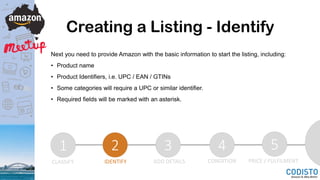
Creating a Listing - Identify
Next you need to provide Amazon with the basic information to start the listing, including:
• Product name
• Product Identifiers, i.e. UPC / EAN / GTINs
• Some categories will require a UPC or similar identifier.
• Required fields will be marked with an asterisk.
1 2 3 4 5
CLASSIFY IDENTIFY ADD DETAILS CONDITION PRICE / FULFILMENT
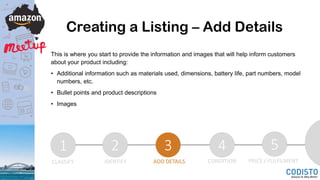
Creating a Listing – Add Details
This is where you start to provide the information and images that will help inform customers
about your product including:
• Additional information such as materials used, dimensions, battery life, part numbers, model
numbers, etc.
• Bullet points and product descriptions
• Images
1 2 3 4 5
CLASSIFY IDENTIFY ADD DETAILS CONDITION PRICE / FULFILMENT
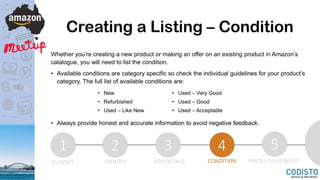
Creating a Listing – Condition
Whether you’re creating a new product or making an offer on an existing product in Amazon’s
catalogue, you will need to list the condition.
• Available conditions are category specific so check the individual guidelines for your product’s
category. The full list of available conditions are:
• Always provide honest and accurate information to avoid negative feedback.
1 2 3 4 5
CLASSIFY IDENTIFY ADD DETAILS CONDITION PRICE / FULFILMENT
• New
• Refurbished
• Used – Like New
• Used – Very Good
• Used – Good
• Used – Acceptable
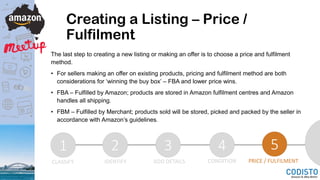
Creating a Listing – Price /
Fulfilment
The last step to creating a new listing or making an offer is to choose a price and fulfilment
method.
• For sellers making an offer on existing products, pricing and fulfilment method are both
considerations for ‘winning the buy box’ – FBA and lower price wins.
• FBA – Fulfilled by Amazon; products are stored in Amazon fulfilment centres and Amazon
handles all shipping.
• FBM – Fulfilled by Merchant; products sold will be stored, picked and packed by the seller in
accordance with Amazon’s guidelines.
1 2 3 4 5
CLASSIFY IDENTIFY ADD DETAILS CONDITION PRICE / FULFILMENT
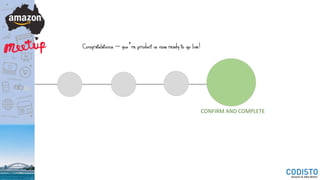
CONFIRM AND COMPLETE
Congratulations – you’re product is now ready to go live!
Selling Globally with Amazon
Don’t wait for Amazon Australia – you can start exploring international opportunities today!
• Use FBA to access markets such as USA, UK and Europe without the need to invest in
international logistics infrastructure.
• Amazon USA alone is a $100 billion market – cut yourself off a small slice of a very large pie!
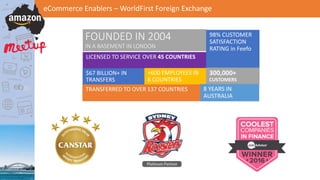
FOUNDED IN 2004
IN A BASEMENT IN LONDON
eCommerce Enablers – WorldFirst Foreign Exchange
LICENSED TO SERVICE OVER 45 COUNTRIES
98% CUSTOMER
SATISFACTION
RATING in Feefo
+600 EMPLOYEES IN
6 COUNTRIES
$67 BILLION+ IN
TRANSFERS
300,000+
CUSTOMERS
TRANSFERRED TO OVER 137 COUNTRIES 8 YEARS IN
AUSTRALIA
eCommerce Enablers – WorldFirst Foreign Exchange
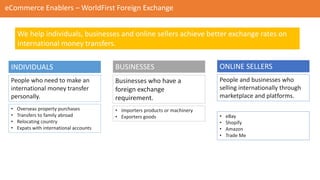
INDIVIDUALS ONLINE SELLERSBUSINESSES
• Overseas property purchases
• Transfers to family abroad
• Relocating country
• Expats with international accounts
• Importers products or machinery
• Exporters goods • eBay
• Shopify
• Amazon
• Trade Me
People who need to make an
international money transfer
personally.
Businesses who have a
foreign exchange
requirement.
People and businesses who
selling internationally through
marketplace and platforms.
We help individuals, businesses and online sellers achieve better exchange rates on
international money transfers.
eCommerce Enablers – WorldFirst Foreign Exchange
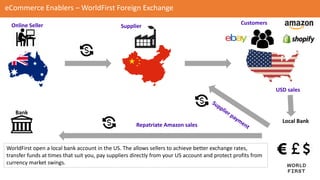
Online Seller Supplier
Customers
Local Bank
USD sales
Bank
Repatriate Amazon sales
WorldFirst open a local bank account in the US. The allows sellers to achieve better exchange rates,
transfer funds at times that suit you, pay suppliers directly from your US account and protect profits from
currency market swings.
eCommerce Enablers – WorldFirst Foreign Exchange
New registrations mention ‘Codisto Meetup’ for $100 credit
after completing your first transfer!
www.worldfirst.com/au/online-sellers
Interested in better exchange rates for online marketplace sales?
100% Free
Open Invitation to All Sellers
Mastermind Community
Support and Advice for Sellers
Share Your Experiences
Online Marketplace News
Networking
Guides and How To Documents
Resources
Useful Content
Special offers from our partners
Meetup Notes & Slides
Keep an eye on the Meetup Page tomorrow for your invite!

How To Create Amazon Listings - Codisto Super Sellers Meetup Slides

  • 1.
    Welcome to theAmazon Sellers Australia Meetup…
  • 2.
    • Software companybased in Sydney • Specialise in Amazon & eBay integration software • Full, real-time integration for Shopify, Magento & WooCommerce • Support all Amazon & eBay marketplaces globally • Create & edit listings in bulk • Real-time inventory sync across all channels • Marketplaces orders automatically sent to Shopify/Magento/WooCommerce
  • 3.
    Amazon Australia: What WeKnow So Far • No official release date but launching soon! • Some sellers have been invited to sign up • FBM first, then FBA • Some categories will be delayed • ‘Amazon Fresh’ may be part of the launch • 24,000 square metre fulfilment centre in Melbourne • FBA will now require battery info for listings
  • 4.
    All About ASINs,Amazon’s Product Identifiers • Amazon Standard Identification Number • Unlike eBay, there is only ONE unique listing and ONE unique ASIN for each individual product / UPC / EAN / ISBN • Amazon Australia is asking sellers to create new listings and they will merge duplicates themselves
  • 5.
    Parent & ChildASINS One product, no variations = One ASIN (both Parent and Child ASIN) • One SKU • One UPC • One listing …what if I want to add variations in colour and size?
  • 6.
    Parent & ChildASINS Parent ASIN • Not active in search results • Used to group all the listings together Child ASINs • Each has an individual listing • Listing content can be duplicated where appropriate, bespoke where necessary you will need a parent AND child ASINs
  • 7.
    Anatomy of anAmazon Listing • Title • Images • Description • Bullet Points • Price • Keywords …the quality of your listing will effect the visibility of your products on Amazon search: better listings = better rankings
  • 8.
    Title Your title isimportant as it is: • The main source of keywords for Amazon’s product search • The first thing people read when they see your listing To balance these priorities, you’re title should: • Include relevant keywords whilst still being engaging(avoid ‘keyword stuffing’ and ‘spammy’ titles) • Include keywords that customers are likely to search, but only if they are relevant to your product • Follow Amazon’s style guide for your category, for example: Anatomy of an Amazon Listing
  • 9.
    Title Do include: • Capitalletters at the start of every word • Numerals (5) for numbers not words (five) • Spell out measurements (inches, pounds, etc.) • Brand name • Size and colour information • A product USP (Unique Selling Point) Don’t include: • Pricing info or promotional text • Symbols ($%!#) • Seller info • Words in all caps • Suggestive language (‘best seller’, ‘#1 product’) • Too many keywords (keyword stuffing) Anatomy of an Amazon Listing
  • 10.
    Images Anatomy of anAmazon Listing Images are the best way to showcase your product and to grab buyer’s attention. It is essential that your listing features high quality images that accurately represent your product and brand whilst meeting Amazon’s strict requirements: • Up to 7 images can be displayed – the more the better. • Products should fill up 85% of the image. • White backgrounds on all images. • Minimal propping (including items that are not part of the product for sale). • All images 1000x1000 pixels or larger to enable zoom function.
  • 11.
    Images – MainImage Anatomy of an Amazon Listing The Main Image is the most important of all your images as it is shown in search results and by default as the enlarged image on the listing. There are special guidelines and best practice for main images that you should follow: • No branding or promo text on the image • White background with product taking up at least 85% of the area • Choose the best image to showcase your product • No accessories or misleading props (ok to use appropriate prop)
  • 12.
    Description & BulletPoints Your description is where you can sell the customer on the finer details of your product. A few considerations for your description and bullet points: • Description fields & bullet points are not indexed for keywords. • Try to write engaging copy that highlights your products USPs and provides all the necessary information for a prospective customer. • Bullet points should list your main USPs and product features in a clear and concise way – sometimes less is more. • Consider your ‘Buyer Persona’ – what type of customer are you targeting? This will help define your ‘Tone of Voice’, a consistent and strategic style of writing which should appeal to your customers. • Use formatting (such as bold and italics) and ‘white space’ to make sure your descriptions are set out in a logical and easy to read way. • If you aren’t confident in your writing abilities, consider enlisting the help of a copywriter. There are many specialist providers of copywriting services for product listings to meet all budgets. Anatomy of an Amazon Listing
  • 13.
    Backend & Keywords Sofar we’ve looked at the parts of the listing that the customer will see, but equally as important are those that they won’t. The ‘backend’ of a listing is where the information lives that Amazon uses to index your product for their A9 search algorithm. • Keywords: Products listed on Seller Central have five keyword fields where you can add the terms you want Amazon to index your product for so that customers can find it when they search. Keyword optimisation is a strategic process all of its own, but some basic best practice includes: • Don’t repeat words within the keyword fields or title – you only need to include a word once. • No need to include common misspellings and plurals. • Use a tool like AdWords Keyword Planner or MerchantWords to help find keyword ideas. • Platinum Keywords: A widely misunderstood area, these are used to manage sellers’ storefronts and aren’t useful for most sellers. Anatomy of an Amazon Listing
  • 14.
    Creating Your FirstListing 1 You will need: 1. Seller info 2. Bank account 3. Credit card 4. Product content 5. Customer support info 2 create an account selling an existing product? create an offer selling a new product? create a listing 4 find the product ASIN select shipping methoddescribe the condition 5 set price and quantity 6 create a new product 3
  • 15.
    2selling a newproduct? If you are selling a product that isn’t already in Amazon’s catalogue, such as your own unique branded product, then you will need to select: create a listing 1 2 3 4 5 CLASSIFY IDENTIFY ADD DETAILS CONDITION PRICE / FULFILMENT selling an existing product? create an offer If you are selling a product that is already available on Amazon’s catalogue, you need to find the existing listing and use that ASIN to list your product against.
  • 16.
    Creating a Listing- Classify The first step to creating a listing for a new product is to find the right category. Your category selection is important for a number of reasons: 1. It helps customers find your product 2. It helps Amazon to index your product for searches alongside similar product 3. It determines what info Amazon needs for you to create your listing 1 2 3 4 5 CLASSIFY IDENTIFY ADD DETAILS CONDITION PRICE / FULFILMENT
  • 17.
    Creating a Listing- Identify Next you need to provide Amazon with the basic information to start the listing, including: • Product name • Product Identifiers, i.e. UPC / EAN / GTINs • Some categories will require a UPC or similar identifier. • Required fields will be marked with an asterisk. 1 2 3 4 5 CLASSIFY IDENTIFY ADD DETAILS CONDITION PRICE / FULFILMENT
  • 18.
    Creating a Listing– Add Details This is where you start to provide the information and images that will help inform customers about your product including: • Additional information such as materials used, dimensions, battery life, part numbers, model numbers, etc. • Bullet points and product descriptions • Images 1 2 3 4 5 CLASSIFY IDENTIFY ADD DETAILS CONDITION PRICE / FULFILMENT
  • 19.
    Creating a Listing– Condition Whether you’re creating a new product or making an offer on an existing product in Amazon’s catalogue, you will need to list the condition. • Available conditions are category specific so check the individual guidelines for your product’s category. The full list of available conditions are: • Always provide honest and accurate information to avoid negative feedback. 1 2 3 4 5 CLASSIFY IDENTIFY ADD DETAILS CONDITION PRICE / FULFILMENT • New • Refurbished • Used – Like New • Used – Very Good • Used – Good • Used – Acceptable
  • 20.
    Creating a Listing– Price / Fulfilment The last step to creating a new listing or making an offer is to choose a price and fulfilment method. • For sellers making an offer on existing products, pricing and fulfilment method are both considerations for ‘winning the buy box’ – FBA and lower price wins. • FBA – Fulfilled by Amazon; products are stored in Amazon fulfilment centres and Amazon handles all shipping. • FBM – Fulfilled by Merchant; products sold will be stored, picked and packed by the seller in accordance with Amazon’s guidelines. 1 2 3 4 5 CLASSIFY IDENTIFY ADD DETAILS CONDITION PRICE / FULFILMENT
  • 21.
    CONFIRM AND COMPLETE Congratulations– you’re product is now ready to go live!
  • 22.
    Selling Globally withAmazon Don’t wait for Amazon Australia – you can start exploring international opportunities today! • Use FBA to access markets such as USA, UK and Europe without the need to invest in international logistics infrastructure. • Amazon USA alone is a $100 billion market – cut yourself off a small slice of a very large pie!
  • 23.
    FOUNDED IN 2004 INA BASEMENT IN LONDON eCommerce Enablers – WorldFirst Foreign Exchange LICENSED TO SERVICE OVER 45 COUNTRIES 98% CUSTOMER SATISFACTION RATING in Feefo +600 EMPLOYEES IN 6 COUNTRIES $67 BILLION+ IN TRANSFERS 300,000+ CUSTOMERS TRANSFERRED TO OVER 137 COUNTRIES 8 YEARS IN AUSTRALIA
  • 24.
    eCommerce Enablers –WorldFirst Foreign Exchange INDIVIDUALS ONLINE SELLERSBUSINESSES • Overseas property purchases • Transfers to family abroad • Relocating country • Expats with international accounts • Importers products or machinery • Exporters goods • eBay • Shopify • Amazon • Trade Me People who need to make an international money transfer personally. Businesses who have a foreign exchange requirement. People and businesses who selling internationally through marketplace and platforms. We help individuals, businesses and online sellers achieve better exchange rates on international money transfers.
  • 25.
    eCommerce Enablers –WorldFirst Foreign Exchange Online Seller Supplier Customers Local Bank USD sales Bank Repatriate Amazon sales WorldFirst open a local bank account in the US. The allows sellers to achieve better exchange rates, transfer funds at times that suit you, pay suppliers directly from your US account and protect profits from currency market swings.
  • 26.
    eCommerce Enablers –WorldFirst Foreign Exchange New registrations mention ‘Codisto Meetup’ for $100 credit after completing your first transfer! www.worldfirst.com/au/online-sellers Interested in better exchange rates for online marketplace sales?
  • 27.
    100% Free Open Invitationto All Sellers Mastermind Community Support and Advice for Sellers Share Your Experiences Online Marketplace News Networking Guides and How To Documents Resources Useful Content Special offers from our partners Meetup Notes & Slides Keep an eye on the Meetup Page tomorrow for your invite!