Coding	
  for	
  Different	
  Android	
  
  Screen	
  sizes	
  and	
  Density	
  
         By	
  Robin	
  Srivastava	
  
Intended	
  Audience	
  
•  Developers	
  of	
  Android	
  apps	
  
•  Any	
  technological	
  enthusiast	
  
•  Any	
  enthusiast	
  
Ques?ons	
  Answered	
  	
  
•  What	
  to	
  ask	
  from	
  a	
  graphic	
  designer?	
  
•  What	
  to	
  do	
  once	
  the	
  graphic	
  designer	
  gives	
  
   the	
  assets?	
  
•  How	
  to	
  create	
  screen	
  layouts	
  which	
  are	
  
   independent	
  of	
  screen-­‐size	
  and	
  screen-­‐
   density?	
  
•  What	
  screen-­‐sizes	
  and	
  densi?es	
  are	
  available?	
  
•  Your	
  ques?ons	
  
Why	
  is	
  this	
  so	
  important?	


           Some	
  stats	
  first	
  
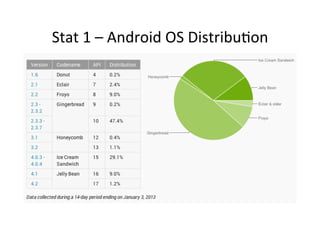
Stat	
  1	
  –	
  Android	
  OS	
  Distribu?on	
  
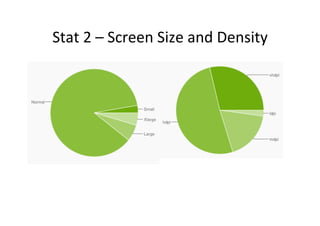
Stat	
  2	
  –	
  Screen	
  Size	
  and	
  Density	
  
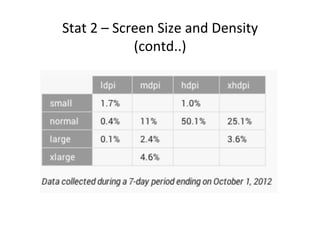
Stat	
  2	
  –	
  Screen	
  Size	
  and	
  Density	
  
                     (contd..)	
  
Back	
  to	
  the	
  previous	
  ques?on	
  
Why	
  is	
  it	
  so	
  important?	
  

•  Simple	
  mathema?cs	
  would	
  suggest	
  that	
  we	
  have	
  4	
  *	
  4	
  =	
  16	
  
   different	
  varia?ons	
  of	
  android	
  screen	
  size	
  and	
  density.	
  	
  
•  Each	
  of	
  these	
  sizes	
  and	
  density	
  comes	
  in	
  a	
  range,	
  so	
  
   theore?cally	
  speaking	
  its	
  infinite	
  
•  Prac?cally,	
  out	
  of	
  16	
  there	
  are	
  only	
  12	
  varia?ons	
  to	
  consider	
  
   with	
  a	
  very	
  reasonable	
  devia?on	
  
12	
  screen	
  varia?ons?	
  
•  Is	
  it	
  low	
  or	
  high?	
  
•  Android	
  gives	
  an	
  op?on	
  to	
  have	
  different	
  
   folders	
  for	
  different	
  varia?ons.	
  
•  If	
  we	
  s?ck	
  to	
  it	
  religiously,	
  we	
  are	
  talking	
  
   about	
  having	
  12	
  set	
  of	
  graphics,	
  each	
  with	
  
   different	
  specs	
  
12	
  screen	
  varia?ons?	
  
•  Is	
  it	
  low	
  or	
  high?	
  
•  Android	
  gives	
  an	
  op?on	
  to	
  have	
  different	
  
   folders	
  for	
  different	
  varia?ons.	
  
•  If	
  we	
  s?ck	
  to	
  it	
  religiously,	
  we	
  are	
  talking	
  
   about	
  having	
  12	
  set	
  of	
  graphics,	
  each	
  with	
  
   different	
  specs	
  
            A	
  small	
  change	
  of	
  direc?on	
  or	
  shadow	
  in	
  an	
  
            arrow	
  icon	
  will	
  require	
  changing/crea?ng	
  11	
  
            more	
  assets	
  
What	
  we	
  didn’t	
  consider	
  in	
  the	
  
               previous	
  slides	
  
•  Large	
  TVs	
  
•  Small	
  watches	
  
What	
  to	
  ask	
  from	
  a	
  graphic	
  designer?	
  
•  One	
  word	
  answer	
  –	
  graphical	
  assets	
  J	
  
What	
  to	
  ask	
  from	
  a	
  graphic	
  designer?	
  
•  One	
  word	
  answer	
  –	
  graphical	
  assets	
  J	
  
•  But	
  the	
  real	
  ques?on	
  is,	
  do	
  we	
  really	
  need	
  
   that	
  asset	
  we	
  are	
  asking	
  for?	
  
Some	
  ques?ons	
  to	
  ask	
  yourself	
  before	
  
            asking	
  for	
  assets	
  
•  Do	
  I	
  really	
  need	
  the	
  assets	
  to	
  display	
  a	
  kind	
  
   dialog	
  box?	
  
•  Those	
  fancy	
  texts,	
  do	
  I	
  really	
  need	
  an	
  image	
  
   for	
  it?	
  
•  Those	
  colored	
  lines	
  being	
  used,	
  do	
  I	
  really	
  
   need	
  them	
  as	
  a	
  separate	
  image?	
  
•  So	
  on	
  and	
  so	
  forth	
  
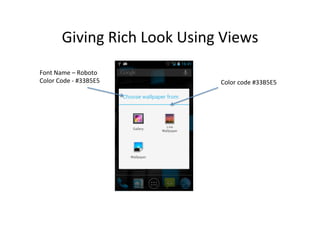
Giving	
  Rich	
  Look	
  Using	
  Views	
  
Font	
  Name	
  –	
  Roboto	
  
Color	
  Code	
  -­‐	
  #33B5E5	
             Color	
  code	
  #33B5E5	
  
If	
  you	
  really	
  need	
  an	
  asset	
  
•  Is	
  it	
  some	
  basic	
  shape	
  or	
  intricate	
  image?	
  
    –  If	
  its	
  shape	
  try	
  to	
  use	
  ShapeDrawable	
  (demo),	
  else	
  
•  Take	
  the	
  PNG	
  
•  Convert	
  it	
  into	
  9-­‐patch	


• hfp://goo.gl/hVr6	
  
9-­‐patch	
  Image	
  
•  Stretchable	
  bitmap	
  
•  Define	
  the	
  area	
  in	
  which	
  the	
  text	
  appears	
  
9-­‐patch	
  
•  How	
  to	
  use	
  
    –  Tool	
  demo	
  
    –  App	
  demo	
  
When	
  9-­‐patch	
  might	
  not	
  work	
  
•  Images	
  with	
  text	
  in	
  it	
  and	
  the	
  requirement	
  is	
  
   stretching	
  of	
  text	
  too	
  (without	
  making	
  it	
  look	
  
   bad)	
  
•  Images	
  which	
  requires	
  very	
  fine	
  shadowing	
  
   and	
  gradients	
  
•  Characters	
  and	
  cartoons	
  with	
  intricate	
  designs	
  
When	
  9-­‐patch	
  might	
  not	
  work	
  
                     (contd…)	
  
•  Need	
  different	
  images	
  for	
  different	
  resolu?on	
  
Providing	
  Alternate	
  Resources	
  
•  <resource-­‐name>	
  -­‐	
  <qualifier>	
  

•  Famous	
  ones	
  
     –  drawable-­‐hdpi	
  
     –  drawable-­‐mdpi	
  
•  Some	
  more	
  	
  
     –    drawable-­‐fr-­‐hdpi	
  
     –    drawable-­‐sw600dp-­‐hdpi	
  
     –    drawable-­‐land	
  
     –    drawable-­‐long	
  
     –    drawable-­‐land-­‐v8	
  
     –    etc	
  
For	
  the	
  en?re	
  list	


Open	
  developers’	
  manual	
  for	
  providing	
  resources	
  
How	
  to	
  create	
  screen	
  size	
  and	
  density	
  
               independent	
  layout?	
  
•  First,	
  let’s	
  check	
  out	
  various	
  common	
  screen	
  
   sizes	
  and	
  densi?es	
  
Some	
  terminologies	
  we	
  will	
  use	
  
•  Screen	
  density	
  
    –  Number	
  of	
  dots	
  per	
  inch	
  of	
  the	
  screen.	
  A	
  medium	
  
       density	
  device	
  has	
  an	
  average	
  of	
  160	
  dots-­‐per-­‐inch	
  
•  Resolu?on	
  
    –  Total	
  number	
  of	
  physical	
  pixels	
  
•  Density	
  independent	
  pixel	
  (dp	
  or	
  dip)	
  
    –  The	
  density-­‐independent	
  pixel	
  is	
  equivalent	
  to	
  one	
  
       physical	
  pixel	
  on	
  a	
  160	
  dpi	
  screen,	
  which	
  is	
  the	
  
       baseline	
  density	
  assumed	
  by	
  the	
  system	
  for	
  a	
  
       “medium”	
  density	
  screen	
  
    –  px	
  =	
  dp	
  *	
  (dpi	
  /	
  160)	
  
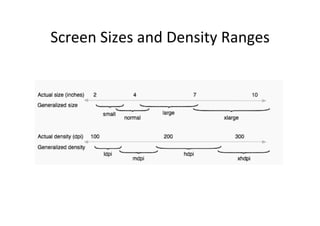
Screen	
  Sizes	
  and	
  Density	
  Ranges	
  
Resolu?ons	
  in	
  the	
  form	
  of	
  DP	
  
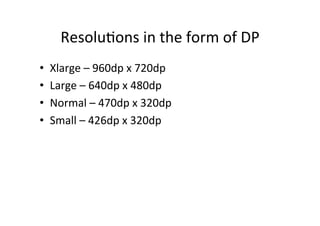
•    Xlarge	
  –	
  960dp	
  x	
  720dp	
  
•    Large	
  –	
  640dp	
  x	
  480dp	
  
•    Normal	
  –	
  470dp	
  x	
  320dp	
  
•    Small	
  –	
  426dp	
  x	
  320dp	
  
Back	
  to	
  the	
  ques?on	
  
•  How	
  to	
  create	
  layouts	
  which	
  are	
  independent	
  
     of	
  screen	
  sizes	
  and	
  densi?es?	


                           DEMO	
  
Some	
  Quick	
  Tips	
  
•  DO	
  NOT	
  use	
  px	
  as	
  the	
  unit	
  of	
  text	
  sizes	
  and	
  
   views	
  
•  Use	
  dp	
  while	
  giving	
  the	
  margins,	
  padding	
  or	
  
   the	
  dimension	
  of	
  a	
  view	
  
•  Give	
  the	
  text	
  size	
  is	
  sp	
  
Some	
  Quick	
  Tips	
  
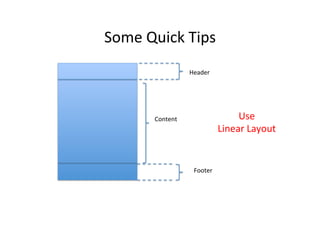
                        Header	


          Content	
                         Use	
  	
  
                                       Linear	
  Layout	


                          Footer	
  
Some	
  Quick	
  Tips	
  
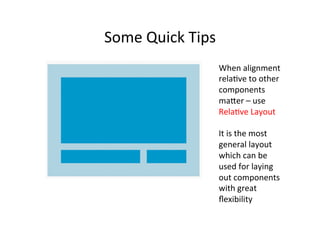
                        When	
  alignment	
  
                        rela?ve	
  to	
  other	
  
                        components	
  
                        mafer	
  –	
  use	
  
                        Rela?ve	
  Layout	


                        It	
  is	
  the	
  most	
  
                        general	
  layout	
  
                        which	
  can	
  be	
  
                        used	
  for	
  laying	
  
                        out	
  components	
  
                        with	
  great	
  
                        flexibility	
  
Some	
  Quick	
  Tips	
  
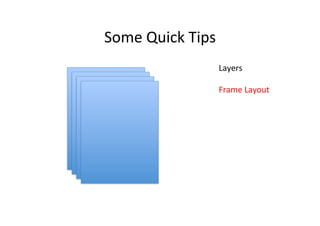
                        Layers	


                        Frame	
  Layout	


E-­‐mail	
  –	
  robin@paradigmcrea?ves.com	
  

Coding for different resolutions

  • 1.
    Coding  for  Different  Android   Screen  sizes  and  Density   By  Robin  Srivastava  
  • 2.
    Intended  Audience   • Developers  of  Android  apps   •  Any  technological  enthusiast   •  Any  enthusiast  
  • 3.
    Ques?ons  Answered     •  What  to  ask  from  a  graphic  designer?   •  What  to  do  once  the  graphic  designer  gives   the  assets?   •  How  to  create  screen  layouts  which  are   independent  of  screen-­‐size  and  screen-­‐ density?   •  What  screen-­‐sizes  and  densi?es  are  available?   •  Your  ques?ons  
  • 4.
    Why  is  this  so  important?   Some  stats  first  
  • 5.
    Stat  1  –  Android  OS  Distribu?on  
  • 6.
    Stat  2  –  Screen  Size  and  Density  
  • 7.
    Stat  2  –  Screen  Size  and  Density   (contd..)  
  • 8.
    Back  to  the  previous  ques?on   Why  is  it  so  important?   •  Simple  mathema?cs  would  suggest  that  we  have  4  *  4  =  16   different  varia?ons  of  android  screen  size  and  density.     •  Each  of  these  sizes  and  density  comes  in  a  range,  so   theore?cally  speaking  its  infinite   •  Prac?cally,  out  of  16  there  are  only  12  varia?ons  to  consider   with  a  very  reasonable  devia?on  
  • 9.
    12  screen  varia?ons?   •  Is  it  low  or  high?   •  Android  gives  an  op?on  to  have  different   folders  for  different  varia?ons.   •  If  we  s?ck  to  it  religiously,  we  are  talking   about  having  12  set  of  graphics,  each  with   different  specs  
  • 10.
    12  screen  varia?ons?   •  Is  it  low  or  high?   •  Android  gives  an  op?on  to  have  different   folders  for  different  varia?ons.   •  If  we  s?ck  to  it  religiously,  we  are  talking   about  having  12  set  of  graphics,  each  with   different  specs   A  small  change  of  direc?on  or  shadow  in  an   arrow  icon  will  require  changing/crea?ng  11   more  assets  
  • 11.
    What  we  didn’t  consider  in  the   previous  slides   •  Large  TVs   •  Small  watches  
  • 12.
    What  to  ask  from  a  graphic  designer?   •  One  word  answer  –  graphical  assets  J  
  • 13.
    What  to  ask  from  a  graphic  designer?   •  One  word  answer  –  graphical  assets  J   •  But  the  real  ques?on  is,  do  we  really  need   that  asset  we  are  asking  for?  
  • 14.
    Some  ques?ons  to  ask  yourself  before   asking  for  assets   •  Do  I  really  need  the  assets  to  display  a  kind   dialog  box?   •  Those  fancy  texts,  do  I  really  need  an  image   for  it?   •  Those  colored  lines  being  used,  do  I  really   need  them  as  a  separate  image?   •  So  on  and  so  forth  
  • 15.
    Giving  Rich  Look  Using  Views   Font  Name  –  Roboto   Color  Code  -­‐  #33B5E5   Color  code  #33B5E5  
  • 16.
    If  you  really  need  an  asset   •  Is  it  some  basic  shape  or  intricate  image?   –  If  its  shape  try  to  use  ShapeDrawable  (demo),  else   •  Take  the  PNG   •  Convert  it  into  9-­‐patch   • hfp://goo.gl/hVr6  
  • 17.
    9-­‐patch  Image   • Stretchable  bitmap   •  Define  the  area  in  which  the  text  appears  
  • 18.
    9-­‐patch   •  How  to  use   –  Tool  demo   –  App  demo  
  • 19.
    When  9-­‐patch  might  not  work   •  Images  with  text  in  it  and  the  requirement  is   stretching  of  text  too  (without  making  it  look   bad)   •  Images  which  requires  very  fine  shadowing   and  gradients   •  Characters  and  cartoons  with  intricate  designs  
  • 20.
    When  9-­‐patch  might  not  work   (contd…)   •  Need  different  images  for  different  resolu?on  
  • 21.
    Providing  Alternate  Resources   •  <resource-­‐name>  -­‐  <qualifier>   •  Famous  ones   –  drawable-­‐hdpi   –  drawable-­‐mdpi   •  Some  more     –  drawable-­‐fr-­‐hdpi   –  drawable-­‐sw600dp-­‐hdpi   –  drawable-­‐land   –  drawable-­‐long   –  drawable-­‐land-­‐v8   –  etc  
  • 22.
    For  the  en?re  list   Open  developers’  manual  for  providing  resources  
  • 23.
    How  to  create  screen  size  and  density   independent  layout?   •  First,  let’s  check  out  various  common  screen   sizes  and  densi?es  
  • 24.
    Some  terminologies  we  will  use   •  Screen  density   –  Number  of  dots  per  inch  of  the  screen.  A  medium   density  device  has  an  average  of  160  dots-­‐per-­‐inch   •  Resolu?on   –  Total  number  of  physical  pixels   •  Density  independent  pixel  (dp  or  dip)   –  The  density-­‐independent  pixel  is  equivalent  to  one   physical  pixel  on  a  160  dpi  screen,  which  is  the   baseline  density  assumed  by  the  system  for  a   “medium”  density  screen   –  px  =  dp  *  (dpi  /  160)  
  • 25.
    Screen  Sizes  and  Density  Ranges  
  • 26.
    Resolu?ons  in  the  form  of  DP   •  Xlarge  –  960dp  x  720dp   •  Large  –  640dp  x  480dp   •  Normal  –  470dp  x  320dp   •  Small  –  426dp  x  320dp  
  • 27.
    Back  to  the  ques?on   •  How  to  create  layouts  which  are  independent   of  screen  sizes  and  densi?es?     DEMO  
  • 28.
    Some  Quick  Tips   •  DO  NOT  use  px  as  the  unit  of  text  sizes  and   views   •  Use  dp  while  giving  the  margins,  padding  or   the  dimension  of  a  view   •  Give  the  text  size  is  sp  
  • 29.
    Some  Quick  Tips   Header   Content   Use     Linear  Layout   Footer  
  • 30.
    Some  Quick  Tips   When  alignment   rela?ve  to  other   components   mafer  –  use   Rela?ve  Layout     It  is  the  most   general  layout   which  can  be   used  for  laying   out  components   with  great   flexibility  
  • 31.
    Some  Quick  Tips   Layers     Frame  Layout    
  • 33.