® 
IBM Software Group –Enterprise Networking Solutions 
z/OS®Communications Server 
z/OS Communications Server Development, Raleigh, North Carolina 
Sysplex In a Nutshell 
Andrew Arrowood -arrowood@us.ibm.com
IBM Software Group –Enterprise Networking Solutions 
Page 2 
Interface 21: 
IP Addr 2234::2 
Interface 22: 
IP Addr 2235::2 
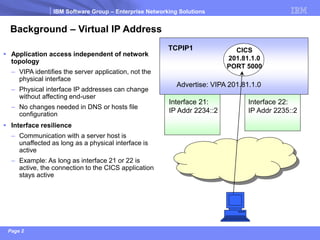
Background –Virtual IP Address 
Application access independent of network topology 
–VIPA identifies the server application, not the physical interface 
–Physical interface IP addresses can change without affecting end-user 
–No changes needed in DNS or hosts file configuration 
Interface resilience 
–Communication with a server host is unaffected as long as a physical interface is active 
–Example: As long as interface 21 or 22 is active, the connection to the CICS application stays active 
TCPIP1 
CICS 
201.81.1.0 
PORT 5000 
Advertise: VIPA 201.81.1.0
IBM Software Group –Enterprise Networking Solutions 
Page 3 
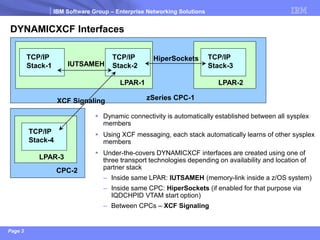
DYNAMICXCF Interfaces 
TCP/IP 
Stack-1 
TCP/IP 
Stack-2 
LPAR-1 
TCP/IP 
Stack-3 
LPAR-2 
zSeries CPC-1 
HiperSockets 
IUTSAMEH 
TCP/IP 
Stack-4 
LPAR-3 
CPC-2 
XCF Signaling 
Dynamic connectivity is automatically established between all sysplexmembers 
Using XCF messaging, each stack automatically learns of other sysplexmembers 
Under-the-covers DYNAMICXCF interfaces are created using one of three transport technologies depending on availability and location of partner stack 
–Inside same LPAR: IUTSAMEH(memory-link inside a z/OS system) 
–Inside same CPC: HiperSockets(if enabled for that purpose via IQDCHPID VTAM start option) 
–Between CPCs –XCF Signaling
IBM Software Group –Enterprise Networking Solutions 
Page 4 
Coupling 
Facility 
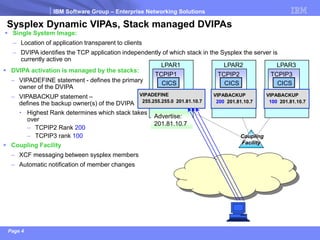
Sysplex Dynamic VIPAs, Stack managed DVIPAs 
LPAR1 
CICS 
TCPIP1 
Advertise: 
201.81.10.7 
VIPADEFINE 
255.255.255.0 201.81.10.7 
Single System Image: 
–Location of application transparent to clients 
–DVIPA identifies the TCP application independently of which stack in the Sysplex the server is currently active on 
LPAR2 
CICS 
TCPIP2 
VIPABACKUP 
200201.81.10.7 
LPAR3 
CICS 
TCPIP3 
VIPABACKUP 
100201.81.10.7 
DVIPA activation is managed by the stacks: 
–VIPADEFINE statement -defines the primary owner of the DVIPA 
–VIPABACKUP statement – defines the backup owner(s) of the DVIPA 
•Highest Rank determines which stack takes over 
–TCPIP2 Rank 200 
–TCPIP3 rank 100 
Coupling Facility 
–XCF messaging between sysplex members 
–Automatic notification of member changes
IBM Software Group –Enterprise Networking Solutions 
Page 5 
Coupling 
Facility 
Sysplex Dynamic VIPAs, Stack managed DVIPAs 
LPAR1 
CICS 
TCPIP1 
VIPADEFINE 
255.255.255.0 201.81.10.7 
LPAR2 
CICS 
TCPIP2 
VIPABACKUP 
200 201.81.10.7 
LPAR3 
CICS 
TCPIP3 
VIPABACKUP 
100 201.81.10.7 
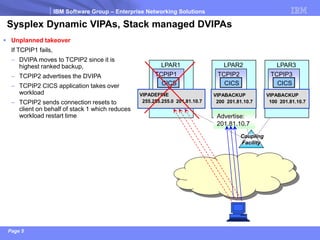
Unplanned takeover 
If TCPIP1 fails, 
–DVIPA moves to TCPIP2 since it is highest ranked backup, 
–TCPIP2 advertises the DVIPA 
–TCPIP2 CICS application takes over workload 
–TCPIP2 sends connection resets to client on behalf of stack 1 which reduces workload restart time 
Advertise: 
201.81.10.7
IBM Software Group –Enterprise Networking Solutions 
Page 6 
Coupling 
Facility 
Sysplex Dynamic VIPAs, Stack managed DVIPAs 
LPAR1 
CICS 
TCPIP1 
VIPADEFINE 
255.255.255.0 201.81.10.7 
LPAR2 
CICS 
TCPIP2 
VIPABACKUP 
200 201.81.10.7 
LPAR3 
CICS 
TCPIP3 
VIPABACKUP 
100 201.81.10.7 
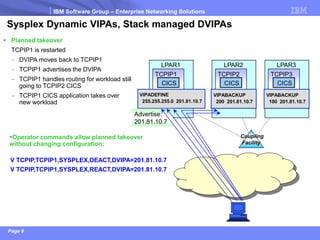
Planned takeover 
TCPIP1 is restarted 
–DVIPA moves back to TCPIP1 
–TCPIP1 advertises the DVIPA 
–TCPIP1 handles routing for workload still going to TCPIP2 CICS 
–TCPIP1 CICS application takes over new workload 
Advertise: 
201.81.10.7 
V TCPIP,TCPIP1,SYSPLEX,DEACT,DVIPA=201.81.10.7 
V TCPIP,TCPIP1,SYSPLEX,REACT,DVIPA=201.81.10.7 
Operator commands allow planned takeover without changing configuration:
IBM Software Group –Enterprise Networking Solutions 
Page 7 
Application-specific DVIPAs 
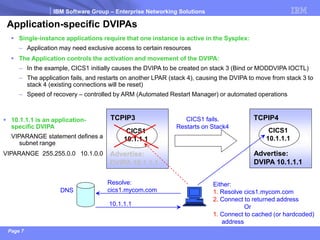
Single-instance applications require that one instance is active in the Sysplex: 
–Application may need exclusive access to certain resources 
The Application controls the activation and movement of the DVIPA: 
–In the example, CICS1 initially causes the DVIPA to be created on stack 3 (Bind or MODDVIPA IOCTL) 
–The application fails, and restarts on another LPAR (stack 4), causing the DVIPA to move from stack 3 to stack 4 (existing connections will be reset) 
–Speed of recovery –controlled by ARM (Automated Restart Manager) or automated operations 
TCPIP3 
CICS1 
10.1.1.1 
Advertise: 
DVIPA 10.1.1.1 
TCPIP4 
CICS1 
10.1.1.1 
Advertise: 
DVIPA 10.1.1.1 
CICS1 fails. 
Restarts on Stack4 
DNS 
Resolve: 
cics1.mycom.com 
Either: 
1.Resolve cics1.mycom.com 
2.Connect to returned address 
Or 
1.Connect to cached (or hardcoded) 
address 
10.1.1.1 is an application- specific DVIPA 
VIPARANGE statement defines a subnet range 
VIPARANGE 255.255.0.0 10.1.0.0 
10.1.1.1
IBM Software Group –Enterprise Networking Solutions 
Page 8 
Advertise: 
201.81.10.7 
VIPADEFINE 
255.255.255.0 201.81.10.7 
VIPADISTRIBUTE 
DISTMETHOD SERVERWLM 
201.81.10.7 PORT 5000 
DESTIP ALL 
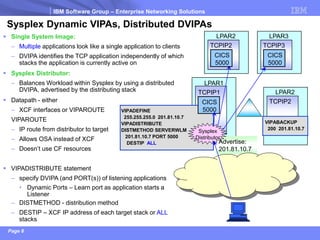
SysplexDynamic VIPAs, Distributed DVIPAs 
LPAR1 
CICS 
5000 
TCPIP1 
LPAR2 
TCPIP2 
LPAR3 
TCPIP3 
LPAR2 
TCPIP2 
VIPABACKUP 
200 201.81.10.7 
Single System Image: 
–Multipleapplications look like a single application to clients 
–DVIPA identifies the TCP application independently of which stacks the application is currently active on 
SysplexDistributor: 
–Balances Workload within Sysplexby using a distributed DVIPA, advertised by the distributing stack 
Datapath-either 
–XCF interfaces or VIPAROUTE 
VIPAROUTE 
–IP route from distributor to target 
–Allows OSA instead of XCF 
–Doesn’t use CF resources 
Sysplex 
Distributor 
CICS 
5000 
CICS 
5000 
VIPADISTRIBUTE statement 
–specify DVIPA (and PORT(s)) of listening applications 
•Dynamic Ports –Learn port as application starts a Listener 
–DISTMETHOD -distribution method 
–DESTIP –XCF IP address of each target stack or ALLstacks
IBM Software Group –Enterprise Networking Solutions 
Page 9 
Sysplex Distribution methods 
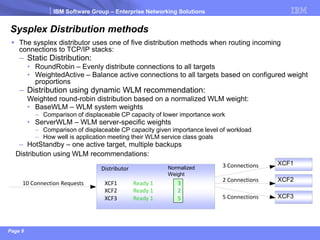
The sysplex distributor uses one of five distribution methods when routing incoming connections to TCP/IP stacks: 
–Static Distribution: 
•RoundRobin –Evenly distribute connections to all targets 
•WeightedActive –Balance active connections to all targets based on configured weight proportions 
–Distribution using dynamic WLM recommendation: 
Weighted round-robin distribution based on a normalized WLM weight: 
•BaseWLM –WLM system weights 
–Comparison of displaceable CP capacity of lower importance work 
•ServerWLM –WLM server-specific weights 
–Comparison of displaceable CP capacity given importance level of workload 
–How well is application meeting their WLM service class goals 
–HotStandby –one active target, multiple backups 
10 Connection Requests 
3 Connections 
2 Connections 
XCF1 
XCF2 
Distributor 
XCF3 
5 Connections 
XCF2 
XCF3 
XCF1 
Normalized 
Weight 
2 
5 
3 
Ready 1 
Ready 1 
Ready 1 
Distribution using WLM recommendations:
IBM Software Group –Enterprise Networking Solutions 
Page 10 
Sysplex Distribution using WLM –additional monitoring 
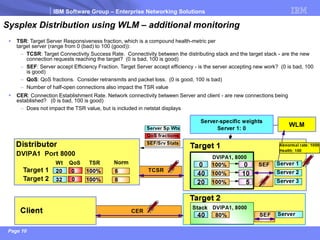
TSR: Target Server Responsiveness fraction, which is a compound health-metric per target server (range from 0 (bad) to 100 (good)): 
–TCSR: Target Connectivity Success Rate. Connectivity between the distributing stack and the target stack -are the new connection requests reaching the target? (0 is bad, 100 is good) 
–SEF: Server accept Efficiency Fraction. Target Server accept efficiency -is the server accepting new work? (0 is bad, 100 is good) 
–QoS: QoS fractions. Consider retransmits and packet loss. (0 is good, 100 is bad) 
–Number of half-open connections also impact the TSR value 
CER: Connection Establishment Rate. Network connectivity between Server and client -are new connections being established? (0 is bad, 100 is good) 
–Does not impact the TSR value, but is included in netstat displays
IBM Software Group – Enterprise Networking Solutions 
Page 11 
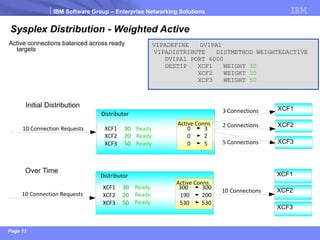
Sysplex Distribution - Weighted Active 
10 Connection Requests 
3 Connections 
2 Connections 
XCF1 
XCF2 
Distributor 
5 Connections XCF3 
Initial Distribution 
Active Conns 
XCF2 20 0 2 
XCF3 50 0 5 
XCF1 30 0 3 
VIPADEFINE DVIPA1 
VIPADISTRIBUTE DISTMETHOD WEIGHTEDACTIVE 
DVIPA1 PORT 6000 
DESTIP XCF1 WEIGHT 30 
XCF2 WEIGHT 20 
XCF3 WEIGHT 50 
Active connections balanced across ready 
targets 
10 Connection Requests 
10 Connections 
XCF1 
XCF2 
Distributor 
XCF3 
Over Time 
Active Conns 
XCF2 20 190 200 
XCF3 50 530 530 
XCF1 30 300 300 
Ready 
Ready 
Ready 
Ready 
Ready 
Ready
IBM Software Group – Enterprise Networking Solutions 
Page 12 
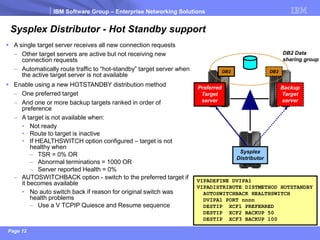
Sysplex Distributor - Hot Standby support 
 A single target server receives all new connection requests 
– Other target servers are active but not receiving new 
connection requests 
– Automatically route traffic to “hot-standby” target server when 
the active target server is not available 
 Enable using a new HOTSTANDBY distribution method 
– One preferred target 
– And one or more backup targets ranked in order of 
preference 
– A target is not available when: 
• Not ready 
• Route to target is inactive 
• If HEALTHSWITCH option configured – target is not 
healthy when 
– TSR = 0% OR 
– Abnormal terminations = 1000 OR 
– Server reported Health = 0% 
– AUTOSWITCHBACK option - switch to the preferred target if 
it becomes available 
• No auto switch back if reason for original switch was 
health problems 
– Use a V TCPIP Quiesce and Resume sequence 
Sysplex 
Distributor 
Preferred 
Target 
server 
Backup 
Target 
server 
DB2 DB2 
DB2 Data 
sharing group 
VIPADEFINE DVIPA1 
VIPADISTRIBUTE DISTMETHOD HOTSTANDBY 
AUTOSWITCHBACK HEALTHSWITCH 
DVIPA1 PORT nnnn 
DESTIP XCF1 PREFERRED 
DESTIP XCF2 BACKUP 50 
DESTIP XCF3 BACKUP 100
IBM Software Group –Enterprise Networking Solutions 
Page 13 
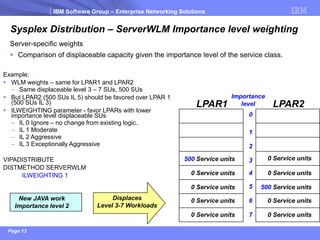
Sysplex Distribution –ServerWLM Importance level weighting 
Server-specific weights 
Comparison of displaceable capacity given the importance level of the service class. 
Importance 
level 
0 
1 
2 
3 
5 
4 
6 
7 
LPAR2 
0 Service units 
0 Service units 
0 Service units 
0 Service units 
500Service units 
LPAR1 
0 Service units 
0 Service units 
0 Service units 
0 Service units 
500Service units 
New JAVA work 
Importance level 2 
Displaces 
Level 3-7 Workloads 
Example: 
WLM weights –same for LPAR1 and LPAR2 
–Same displaceable level 3 –7 SUs, 500 SUs 
But LPAR2 (500 SUs IL 5) should be favored over LPAR 1 (500 SUs IL 3) 
ILWEIGHTING parameter -favor LPARs with lower importance level displaceable SUs 
–IL 0 Ignore –no change from existing logic. 
–IL 1 Moderate 
–IL 2 Aggressive 
–IL 3 Exceptionally Aggressive 
VIPADISTRIBUTE 
DISTMETHOD SERVERWLM 
ILWEIGHTING 1
IBM Software Group –Enterprise Networking Solutions 
Page 14 
WLM weights and specialty processors 
Distribution also considers specialty processors: 
Specialty processors are deployed and exploited by targeted workloads on z/OS: 
zAAP (zSeries Application Assist Processor) –JAVA workloads such as WAS 
zIIP (System z Integrated Information Processor) 
–DB2 related workloads 
–z/OS IPSEC workloads
IBM Software Group –Enterprise Networking Solutions 
Page 15 
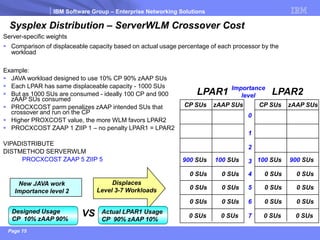
Sysplex Distribution –ServerWLM Crossover Cost 
Server-specific weights 
Comparison of displaceable capacity based on actual usage percentage of each processor by the workload 
Example: 
JAVA workload designed to use 10% CP 90% zAAP SUs 
Each LPAR has same displaceable capacity -1000 SUs 
But as 1000 SUs are consumed -ideally 100 CP and 900 zAAP SUs consumed 
PROCXCOST parm penalizes zAAP intended SUs that crossover and run on the CP 
Higher PROXCOST value, the more WLM favors LPAR2 
PROCXCOST ZAAP 1 ZIIP 1 –no penalty LPAR1 = LPAR2 
VIPADISTRIBUTE 
DISTMETHOD SERVERWLM 
PROCXCOST ZAAP 5 ZIIP 5 
Displaces 
Level 3-7 Workloads 
New JAVA work 
Importance level 2 
Designed Usage 
CP 10% zAAP 90% 
Actual LPAR1 Usage 
CP 90% zAAP 10% 
VS 
LPAR2 
CP SUs 
zAAP SUs 
0 
1 
2 
3 
5 
4 
6 
7 
100 SUs 
900 SUs 
0 SUs 
0 SUs 
0 SUs 
0 SUs 
0 SUs 
0 SUs 
0 SUs 
0 SUs 
Importance 
level 
CP SUs 
zAAP SUs 
900 SUs 
100 SUs 
0 SUs 
0 SUs 
0 SUs 
0 SUs 
0 SUs 
0 SUs 
LPAR1 
0 SUs 
0 SUs
IBM Software Group –Enterprise Networking Solutions 
Page 16 
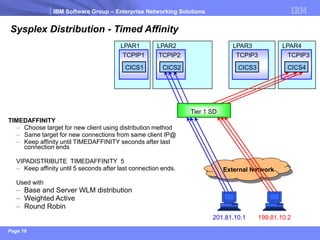
Sysplex Distribution -Timed Affinity 
LPAR1 
LPAR2 
LPAR4 
LPAR3 
CICS1 
CICS2 
CICS4 
CICS3 
TCPIP2 
TCPIP3 
TCPIP3 
TCPIP1 
External Network 
TIMEDAFFINITY 
–Choose target for new client using distribution method 
–Same target for new connections from same client IP@ 
–Keep affinity until TIMEDAFFINITY seconds after last connection ends 
VIPADISTRIBUTE TIMEDAFFINITY 5 
–Keep affinity until 5 seconds after last connection ends. 
Used with 
–Base and Server WLM distribution 
–Weighted Active 
–Round Robin 
201.81.10.1 
Tier 1 SD 
199.81.10.2
IBM Software Group –Enterprise Networking Solutions 
Page 17 
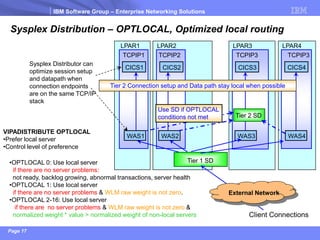
Sysplex Distribution –OPTLOCAL, Optimized local routing 
LPAR1 
LPAR2 
LPAR4 
LPAR3 
CICS1 
CICS2 
Tier 1 SD 
CICS4 
CICS3 
Tier 2 Connection setup and Data path stay local when possible 
Tier 2 SD 
WAS1 
WAS2 
WAS4 
WAS3 
Client Connections 
VIPADISTRIBUTE OPTLOCAL 
•Prefer local server 
•Control level of preference 
Sysplex Distributor can optimize session setup and datapath when connection endpoints are on the same TCP/IP stack 
•OPTLOCAL 0: Use local server 
if there are no server problems: 
not ready, backlog growing, abnormal transactions, server health 
•OPTLOCAL 1: Use local server 
if there are no server problems& WLM raw weight is not zero. 
•OPTLOCAL 2-16: Use local server 
if there are no server problems& WLM raw weight is not zero& 
normalized weight * value > normalized weight of non-local servers 
TCPIP2 
TCPIP3 
TCPIP3 
TCPIP1 
Use SD if OPTLOCAL conditions not met 
External Network
IBM Software Group –Enterprise Networking Solutions 
Page 18 
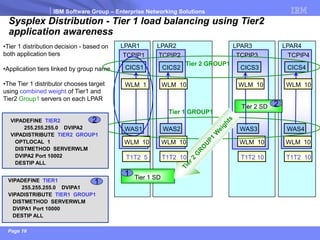
Sysplex Distribution -Tier 1 load balancing using Tier2 application awareness 
LPAR1 
LPAR2 
LPAR4 
LPAR3 
CICS1 
CICS2 
Tier 1 SD 
CICS4 
CICS3 
WAS1 
WAS2 
WAS4 
WAS3 
TCPIP2 
TCPIP3 
TCPIP4 
TCPIP1 
WLM 10 
WLM 10 
WLM 10 
WLM 10 
•Tier 1 distribution decision -based on both application tiers 
•Application tiers linked by group name 
•The Tier 1 distributor chooses target using combined weight of Tier1 and Tier2 Group1servers on each LPAR 
Tier 1GROUP1 
Tier 2 GROUP1 
T1T2 5 
T1T2 10 
T1T2 10 
T1T2 10 
Tier 2 SD 
WLM 1 
WLM 10 
WLM 10 
WLM 10 
VIPADEFINE TIER1 
255.255.255.0 DVIPA1 
VIPADISTRIBUTE TIER1 GROUP1 
DISTMETHOD SERVERWLM 
DVIPA1 Port 10000 
DESTIP ALL 
1 
VIPADEFINE TIER2 
255.255.255.0 DVIPA2 
VIPADISTRIBUTE TIER2 GROUP1 
OPTLOCAL 1 
DISTMETHOD SERVERWLM 
DVIPA2 Port 10002 
DESTIP ALL 
2 
2 
1
IBM Software Group –Enterprise Networking Solutions 
Page 19 
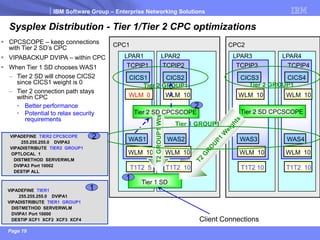
Sysplex Distribution -Tier 1/Tier 2 CPC optimizations 
CPC2 
LPAR1 
LPAR4 
LPAR3 
Tier 1 SD 
Tier 2 SD CPCSCOPE 
WAS4 
WAS3 
TCPIP3 
TCPIP4 
TCPIP1 
WLM 0 
WLM 10 
WLM 10 
WLM 10 
WLM 10 
T1T2 5 
T1T2 10 
T1T2 10 
CPC1 
WAS1 
CICS1 
CICS4 
CICS3 
Tier 2 GROUP1 
LPAR2 
TCPIP2 
T1T2 10 
CICS2 
Tier 2 SD CPCSCOPE 
WLM 10 
WLM 10 
Tier 1 GROUP1 
T2 GROUP1 Wts 
Client Connections 
WAS2 
WLM 10 
Tier 2 GROUP1 
VIPADEFINE TIER1 
255.255.255.0 DVIPA1 
VIPADISTRIBUTE TIER1 GROUP1 
DISTMETHOD SERVERWLM 
DVIPA1 Port 10000 
DESTIP XCF1 XCF2 XCF3 XCF4 
1 
VIPADEFINE TIER2 CPCSCOPE 
255.255.255.0 DVIPA3 
VIPADISTRIBUTE TIER2 GROUP1 
OPTLOCAL 1 
DISTMETHOD SERVERWLM 
DVIPA3 Port 10002 
DESTIP ALL 
2 
CPCSCOPE –keep connections with Tier 2 SD’s CPC 
VIPABACKUP DVIPA –within CPC 
When Tier 1 SD chooses WAS1 
–Tier 2 SD will choose CICS2 since CICS1 weight is 0 
–Tier 2 connection path stays within CPC 
•Better performance 
•Potential to relax security requirements 
2 
1
IBM Software Group – Enterprise Networking Solutions 
Page 20 
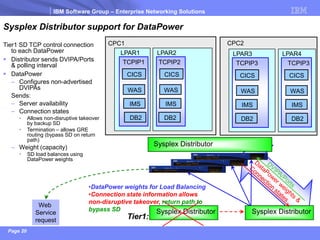
Sysplex Distributor support for DataPower 
CPC1 
LPAR1 LPAR2 LPAR3 LPAR4 
CICS CICS CICS CICS 
WAS WAS WAS WAS 
TCPIP1 TCPIP2 TCPIP3 TCPIP3 
IMS IMS IMS IMS 
DB2 DB2 DB2 DB2 
Tier1: 
CPC2 
Sysplex Distributor Sysplex Distributor 
Web 
Service 
request 
Sysplex Distributor 
•DataPower weights for Load Balancing 
•Connection state information allows 
non-disruptive takeover, return path to 
bypass SD 
Tier1 SD TCP control connection 
to each DataPower 
 Distributor sends DVIPA/Ports 
& polling interval 
 DataPower 
– Configures non-advertised 
DVIPAs 
Sends: 
– Server availability 
– Connection states 
• Allows non-disruptive takeover 
by backup SD 
• Termination – allows GRE 
routing (bypass SD on return 
path) 
– Weight (capacity) 
• SD load balances using 
DataPower weights
IBM Software Group –Enterprise Networking Solutions 
Page 21 
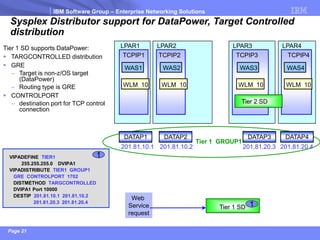
Sysplex Distributor support for DataPower, Target Controlled distribution 
LPAR1 
LPAR2 
LPAR4 
LPAR3 
Tier 1 SD 
WAS1 
WAS2 
WAS4 
WAS3 
TCPIP2 
TCPIP3 
TCPIP4 
TCPIP1 
Tier 1 GROUP1 
Tier 2 SD 
WLM 10 
WLM 10 
WLM 10 
WLM 10 
201.81.10.1 
1 
VIPADEFINE TIER1 
255.255.255.0 DVIPA1 
VIPADISTRIBUTE TIER1 GROUP1 
GRE CONTROLPORT 1702 
DISTMETHOD TARGCONTROLLED 
DVIPA1 Port 10000 
DESTIP 201.81.10.1 201.81.10.2 
201.81.20.3 201.81.20.4 
Web 
Service 
request 
1 
201.81.10.2 
DATAP1 
DATAP2 
DATAP3 
DATAP4 
201.81.20.3 
201.81.20.4 
Tier 1 SD supports DataPower: 
TARGCONTROLLED distribution 
GRE 
–Target is non-z/OS target (DataPower) 
–Routing type is GRE 
CONTROLPORT 
–destination port for TCP control connection
IBM Software Group –Enterprise Networking Solutions 
Page 22 
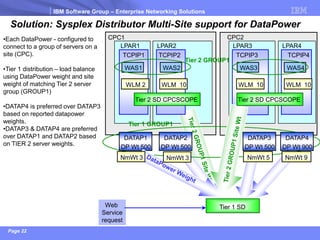
Solution: Sysplex Distributor Multi-Site support for DataPower 
CPC1 
CPC2 
LPAR1 
LPAR2 
LPAR4 
LPAR3 
Tier 1 SD 
WAS1 
WAS2 
WAS4 
WAS3 
TCPIP2 
TCPIP3 
TCPIP4 
TCPIP1 
•Each DataPower -configured to connect to a group of servers on a site (CPC). 
•Tier 1 distribution –load balance using DataPower weight and site weight of matching Tier 2 server group (GROUP1) 
•DATAP4 is preferred over DATAP3 based on reported datapower weights. 
•DATAP3 & DATAP4 are preferred over DATAP1 and DATAP2 based on TIER 2 server weights. 
Tier 1GROUP1 
Tier 2 GROUP1 
WLM 2 
WLM 10 
WLM 10 
WLM 10 
Web 
Service 
request 
DATAP1 
DP Wt 500 
Tier 2 SD CPCSCOPE 
Tier 2 SD CPCSCOPE 
DATAP2 
DP Wt 500 
DATAP3 
DP Wt 500 
DATAP4 
DP Wt 900 
NmWt 3 
NmWt 3 
NmWt 5 
NmWt 9
IBM Software Group –Enterprise Networking Solutions 
Page 23 
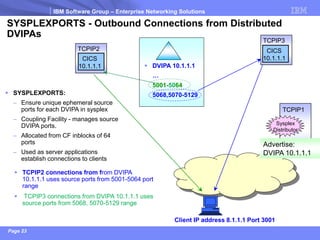
SYSPLEXPORTS -Outbound Connections from Distributed DVIPAs 
SYSPLEXPORTS: 
–Ensure unique ephemeral source ports for each DVIPA in sysplex 
–Coupling Facility -manages source DVIPA ports. 
–Allocated from CF inblocks of 64 ports 
–Used as server applications establish connections to clients 
Client IP address 8.1.1.1 Port 3001 
TCPIP2 connections from from DVIPA 10.1.1.1 uses source ports from 5001-5064 port range 
TCPIP3 connections from DVIPA 10.1.1.1 uses source ports from 5068, 5070-5129 range 
TCPIP1 
TCPIP2 
TCPIP3 
Sysplex 
Distributor 
CICS 
10.1.1.1 
CICS 
10.1.1.1 
Advertise: 
DVIPA 10.1.1.1 
DVIPA 10.1.1.1 
… 
5001-5064 
5068,5070-5129
IBM Software Group –Enterprise Networking Solutions 
Page 24 
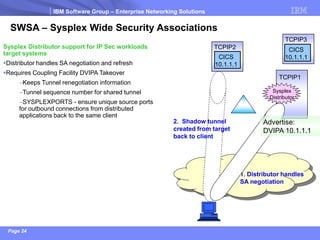
SWSA –Sysplex Wide Security Associations 
2. Shadow tunnel created from target back to client 
1. Distributor handles SA negotiation 
Sysplex Distributor support for IP Sec workloads target systems 
Distributor handles SA negotiation and refresh 
Requires Coupling Facility DVIPA Takeover 
–Keeps Tunnel renegotiation information 
–Tunnel sequence number for shared tunnel 
–SYSPLEXPORTS -ensure unique source ports for outbound connections from distributed applications back to the same client 
TCPIP2 
CICS 
10.1.1.1 
TCPIP3 
CICS 
10.1.1.1 
TCPIP1 
Sysplex 
Distributor 
Advertise: 
DVIPA 10.1.1.1
IBM Software Group –Enterprise Networking Solutions 
Page 25 
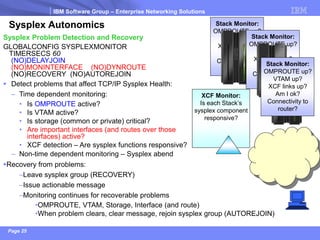
XCF Monitor: 
Is each Stack’s sysplex component responsive? 
Sysplex Autonomics 
Stack Monitor: 
OMPROUTE up? 
VTAM up? 
XCF links up? 
Am I ok? 
Connectivity to router? 
Stack Monitor: 
OMPROUTE up? 
VTAM up? 
XCF links up? 
Am I ok? 
Connectivity to router? 
Stack Monitor: 
OMPROUTE up? 
VTAM up? 
XCF links up? 
Am I ok? 
Connectivity to router? 
Sysplex Problem Detection and Recovery 
GLOBALCONFIG SYSPLEXMONITOR 
TIMERSECS 60 
(NO)DELAYJOIN 
(NO)MONINTERFACE (NO)DYNROUTE 
(NO)RECOVERY (NO)AUTOREJOIN 
Detect problems that affect TCP/IP Sysplex Health: 
–Time dependent monitoring: 
•Is OMPROUTEactive? 
•Is VTAM active? 
•Is storage (common or private) critical? 
•Are important interfaces (and routes over those interfaces) active? 
•XCF detection –Are sysplex functions responsive? 
–Non-time dependent monitoring –Sysplex abend 
Recovery from problems: 
–Leave sysplex group (RECOVERY) 
–Issue actionable message 
–Monitoring continues for recoverable problems 
•OMPROUTE, VTAM, Storage, Interface (and route) 
•When problem clears, clear message, rejoin sysplex group (AUTOREJOIN)
IBM Software Group –Enterprise Networking Solutions 
Page 26 
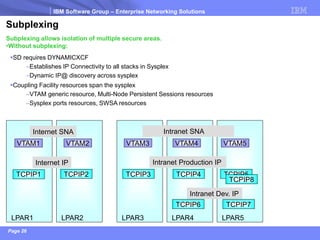
Subplexing 
Subplexing allows isolation of multiple secure areas. 
•Without subplexing: 
SD requires DYNAMICXCF 
–Establishes IP Connectivity to all stacks in Sysplex 
–Dynamic IP@ discovery across sysplex 
Coupling Facility resources span the sysplex 
–VTAM generic resource, Multi-Node Persistent Sessions resources 
–Sysplex ports resources, SWSA resources 
LPAR2 
LPAR1 
LPAR3 
LPAR4 
LPAR5 
VTAM1 
Internet SNA 
TCPIP1 
Intranet Production IP 
Intranet Dev. IP 
TCPIP2 
TCPIP3 
TCPIP4 
TCPIP5 
TCPIP8 
VTAM3 
VTAM4 
VTAM5 
VTAM2 
TCPIP6 
TCPIP7 
Internet IP 
Intranet SNA
IBM Software Group –Enterprise Networking Solutions 
Page 27 
LPAR2 
Internet SNA subplex 
VTAM XCFGRPID:Default (01) 
LPAR1 
LPAR3 
LPAR4 
LPAR5 
VTAM2 
VTAM1 
Internet IP subplex 
TCP/IP XCFGRPID:Default (01) 
TCPIP2 
TCPIP1 
Intranet SNA subplex 
VTAM XCFGRPID: 21 
VTAM3 
VTAM4 
VTAM5 
Intranet Production IP subplex 
TCP/IP XCFGRPID: 02 
TCPIP3 
TCPIP4 
TCPIP5 
TCPIP8 
Intranet Dev. IP subplex 
TCP/IP XCFGRPID: 04 
TCPIP7 
TCPIP6 
Sysplex Group: EZBTCPCS 
Sysplex Group: EZBT2102 
Sysplex Group: EZBT2104 
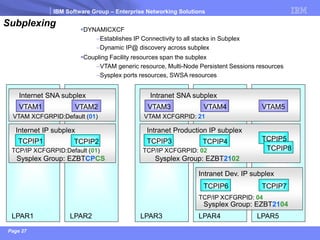
Subplexing 
DYNAMICXCF 
–Establishes IP Connectivity to all stacks in Subplex 
–Dynamic IP@ discovery across subplex 
Coupling Facility resources span the subplex 
–VTAM generic resource, Multi-Node Persistent Sessions resources 
–Sysplex ports resources, SWSA resources

Sysplex in a Nutshell

  • 1.
    ® IBM SoftwareGroup –Enterprise Networking Solutions z/OS®Communications Server z/OS Communications Server Development, Raleigh, North Carolina Sysplex In a Nutshell Andrew Arrowood -arrowood@us.ibm.com
  • 2.
    IBM Software Group–Enterprise Networking Solutions Page 2 Interface 21: IP Addr 2234::2 Interface 22: IP Addr 2235::2 Background –Virtual IP Address Application access independent of network topology –VIPA identifies the server application, not the physical interface –Physical interface IP addresses can change without affecting end-user –No changes needed in DNS or hosts file configuration Interface resilience –Communication with a server host is unaffected as long as a physical interface is active –Example: As long as interface 21 or 22 is active, the connection to the CICS application stays active TCPIP1 CICS 201.81.1.0 PORT 5000 Advertise: VIPA 201.81.1.0
  • 3.
    IBM Software Group–Enterprise Networking Solutions Page 3 DYNAMICXCF Interfaces TCP/IP Stack-1 TCP/IP Stack-2 LPAR-1 TCP/IP Stack-3 LPAR-2 zSeries CPC-1 HiperSockets IUTSAMEH TCP/IP Stack-4 LPAR-3 CPC-2 XCF Signaling Dynamic connectivity is automatically established between all sysplexmembers Using XCF messaging, each stack automatically learns of other sysplexmembers Under-the-covers DYNAMICXCF interfaces are created using one of three transport technologies depending on availability and location of partner stack –Inside same LPAR: IUTSAMEH(memory-link inside a z/OS system) –Inside same CPC: HiperSockets(if enabled for that purpose via IQDCHPID VTAM start option) –Between CPCs –XCF Signaling
  • 4.
    IBM Software Group–Enterprise Networking Solutions Page 4 Coupling Facility Sysplex Dynamic VIPAs, Stack managed DVIPAs LPAR1 CICS TCPIP1 Advertise: 201.81.10.7 VIPADEFINE 255.255.255.0 201.81.10.7 Single System Image: –Location of application transparent to clients –DVIPA identifies the TCP application independently of which stack in the Sysplex the server is currently active on LPAR2 CICS TCPIP2 VIPABACKUP 200201.81.10.7 LPAR3 CICS TCPIP3 VIPABACKUP 100201.81.10.7 DVIPA activation is managed by the stacks: –VIPADEFINE statement -defines the primary owner of the DVIPA –VIPABACKUP statement – defines the backup owner(s) of the DVIPA •Highest Rank determines which stack takes over –TCPIP2 Rank 200 –TCPIP3 rank 100 Coupling Facility –XCF messaging between sysplex members –Automatic notification of member changes
  • 5.
    IBM Software Group–Enterprise Networking Solutions Page 5 Coupling Facility Sysplex Dynamic VIPAs, Stack managed DVIPAs LPAR1 CICS TCPIP1 VIPADEFINE 255.255.255.0 201.81.10.7 LPAR2 CICS TCPIP2 VIPABACKUP 200 201.81.10.7 LPAR3 CICS TCPIP3 VIPABACKUP 100 201.81.10.7 Unplanned takeover If TCPIP1 fails, –DVIPA moves to TCPIP2 since it is highest ranked backup, –TCPIP2 advertises the DVIPA –TCPIP2 CICS application takes over workload –TCPIP2 sends connection resets to client on behalf of stack 1 which reduces workload restart time Advertise: 201.81.10.7
  • 6.
    IBM Software Group–Enterprise Networking Solutions Page 6 Coupling Facility Sysplex Dynamic VIPAs, Stack managed DVIPAs LPAR1 CICS TCPIP1 VIPADEFINE 255.255.255.0 201.81.10.7 LPAR2 CICS TCPIP2 VIPABACKUP 200 201.81.10.7 LPAR3 CICS TCPIP3 VIPABACKUP 100 201.81.10.7 Planned takeover TCPIP1 is restarted –DVIPA moves back to TCPIP1 –TCPIP1 advertises the DVIPA –TCPIP1 handles routing for workload still going to TCPIP2 CICS –TCPIP1 CICS application takes over new workload Advertise: 201.81.10.7 V TCPIP,TCPIP1,SYSPLEX,DEACT,DVIPA=201.81.10.7 V TCPIP,TCPIP1,SYSPLEX,REACT,DVIPA=201.81.10.7 Operator commands allow planned takeover without changing configuration:
  • 7.
    IBM Software Group–Enterprise Networking Solutions Page 7 Application-specific DVIPAs Single-instance applications require that one instance is active in the Sysplex: –Application may need exclusive access to certain resources The Application controls the activation and movement of the DVIPA: –In the example, CICS1 initially causes the DVIPA to be created on stack 3 (Bind or MODDVIPA IOCTL) –The application fails, and restarts on another LPAR (stack 4), causing the DVIPA to move from stack 3 to stack 4 (existing connections will be reset) –Speed of recovery –controlled by ARM (Automated Restart Manager) or automated operations TCPIP3 CICS1 10.1.1.1 Advertise: DVIPA 10.1.1.1 TCPIP4 CICS1 10.1.1.1 Advertise: DVIPA 10.1.1.1 CICS1 fails. Restarts on Stack4 DNS Resolve: cics1.mycom.com Either: 1.Resolve cics1.mycom.com 2.Connect to returned address Or 1.Connect to cached (or hardcoded) address 10.1.1.1 is an application- specific DVIPA VIPARANGE statement defines a subnet range VIPARANGE 255.255.0.0 10.1.0.0 10.1.1.1
  • 8.
    IBM Software Group–Enterprise Networking Solutions Page 8 Advertise: 201.81.10.7 VIPADEFINE 255.255.255.0 201.81.10.7 VIPADISTRIBUTE DISTMETHOD SERVERWLM 201.81.10.7 PORT 5000 DESTIP ALL SysplexDynamic VIPAs, Distributed DVIPAs LPAR1 CICS 5000 TCPIP1 LPAR2 TCPIP2 LPAR3 TCPIP3 LPAR2 TCPIP2 VIPABACKUP 200 201.81.10.7 Single System Image: –Multipleapplications look like a single application to clients –DVIPA identifies the TCP application independently of which stacks the application is currently active on SysplexDistributor: –Balances Workload within Sysplexby using a distributed DVIPA, advertised by the distributing stack Datapath-either –XCF interfaces or VIPAROUTE VIPAROUTE –IP route from distributor to target –Allows OSA instead of XCF –Doesn’t use CF resources Sysplex Distributor CICS 5000 CICS 5000 VIPADISTRIBUTE statement –specify DVIPA (and PORT(s)) of listening applications •Dynamic Ports –Learn port as application starts a Listener –DISTMETHOD -distribution method –DESTIP –XCF IP address of each target stack or ALLstacks
  • 9.
    IBM Software Group–Enterprise Networking Solutions Page 9 Sysplex Distribution methods The sysplex distributor uses one of five distribution methods when routing incoming connections to TCP/IP stacks: –Static Distribution: •RoundRobin –Evenly distribute connections to all targets •WeightedActive –Balance active connections to all targets based on configured weight proportions –Distribution using dynamic WLM recommendation: Weighted round-robin distribution based on a normalized WLM weight: •BaseWLM –WLM system weights –Comparison of displaceable CP capacity of lower importance work •ServerWLM –WLM server-specific weights –Comparison of displaceable CP capacity given importance level of workload –How well is application meeting their WLM service class goals –HotStandby –one active target, multiple backups 10 Connection Requests 3 Connections 2 Connections XCF1 XCF2 Distributor XCF3 5 Connections XCF2 XCF3 XCF1 Normalized Weight 2 5 3 Ready 1 Ready 1 Ready 1 Distribution using WLM recommendations:
  • 10.
    IBM Software Group–Enterprise Networking Solutions Page 10 Sysplex Distribution using WLM –additional monitoring TSR: Target Server Responsiveness fraction, which is a compound health-metric per target server (range from 0 (bad) to 100 (good)): –TCSR: Target Connectivity Success Rate. Connectivity between the distributing stack and the target stack -are the new connection requests reaching the target? (0 is bad, 100 is good) –SEF: Server accept Efficiency Fraction. Target Server accept efficiency -is the server accepting new work? (0 is bad, 100 is good) –QoS: QoS fractions. Consider retransmits and packet loss. (0 is good, 100 is bad) –Number of half-open connections also impact the TSR value CER: Connection Establishment Rate. Network connectivity between Server and client -are new connections being established? (0 is bad, 100 is good) –Does not impact the TSR value, but is included in netstat displays
  • 11.
    IBM Software Group– Enterprise Networking Solutions Page 11 Sysplex Distribution - Weighted Active 10 Connection Requests 3 Connections 2 Connections XCF1 XCF2 Distributor 5 Connections XCF3 Initial Distribution Active Conns XCF2 20 0 2 XCF3 50 0 5 XCF1 30 0 3 VIPADEFINE DVIPA1 VIPADISTRIBUTE DISTMETHOD WEIGHTEDACTIVE DVIPA1 PORT 6000 DESTIP XCF1 WEIGHT 30 XCF2 WEIGHT 20 XCF3 WEIGHT 50 Active connections balanced across ready targets 10 Connection Requests 10 Connections XCF1 XCF2 Distributor XCF3 Over Time Active Conns XCF2 20 190 200 XCF3 50 530 530 XCF1 30 300 300 Ready Ready Ready Ready Ready Ready
  • 12.
    IBM Software Group– Enterprise Networking Solutions Page 12 Sysplex Distributor - Hot Standby support  A single target server receives all new connection requests – Other target servers are active but not receiving new connection requests – Automatically route traffic to “hot-standby” target server when the active target server is not available  Enable using a new HOTSTANDBY distribution method – One preferred target – And one or more backup targets ranked in order of preference – A target is not available when: • Not ready • Route to target is inactive • If HEALTHSWITCH option configured – target is not healthy when – TSR = 0% OR – Abnormal terminations = 1000 OR – Server reported Health = 0% – AUTOSWITCHBACK option - switch to the preferred target if it becomes available • No auto switch back if reason for original switch was health problems – Use a V TCPIP Quiesce and Resume sequence Sysplex Distributor Preferred Target server Backup Target server DB2 DB2 DB2 Data sharing group VIPADEFINE DVIPA1 VIPADISTRIBUTE DISTMETHOD HOTSTANDBY AUTOSWITCHBACK HEALTHSWITCH DVIPA1 PORT nnnn DESTIP XCF1 PREFERRED DESTIP XCF2 BACKUP 50 DESTIP XCF3 BACKUP 100
  • 13.
    IBM Software Group–Enterprise Networking Solutions Page 13 Sysplex Distribution –ServerWLM Importance level weighting Server-specific weights Comparison of displaceable capacity given the importance level of the service class. Importance level 0 1 2 3 5 4 6 7 LPAR2 0 Service units 0 Service units 0 Service units 0 Service units 500Service units LPAR1 0 Service units 0 Service units 0 Service units 0 Service units 500Service units New JAVA work Importance level 2 Displaces Level 3-7 Workloads Example: WLM weights –same for LPAR1 and LPAR2 –Same displaceable level 3 –7 SUs, 500 SUs But LPAR2 (500 SUs IL 5) should be favored over LPAR 1 (500 SUs IL 3) ILWEIGHTING parameter -favor LPARs with lower importance level displaceable SUs –IL 0 Ignore –no change from existing logic. –IL 1 Moderate –IL 2 Aggressive –IL 3 Exceptionally Aggressive VIPADISTRIBUTE DISTMETHOD SERVERWLM ILWEIGHTING 1
  • 14.
    IBM Software Group–Enterprise Networking Solutions Page 14 WLM weights and specialty processors Distribution also considers specialty processors: Specialty processors are deployed and exploited by targeted workloads on z/OS: zAAP (zSeries Application Assist Processor) –JAVA workloads such as WAS zIIP (System z Integrated Information Processor) –DB2 related workloads –z/OS IPSEC workloads
  • 15.
    IBM Software Group–Enterprise Networking Solutions Page 15 Sysplex Distribution –ServerWLM Crossover Cost Server-specific weights Comparison of displaceable capacity based on actual usage percentage of each processor by the workload Example: JAVA workload designed to use 10% CP 90% zAAP SUs Each LPAR has same displaceable capacity -1000 SUs But as 1000 SUs are consumed -ideally 100 CP and 900 zAAP SUs consumed PROCXCOST parm penalizes zAAP intended SUs that crossover and run on the CP Higher PROXCOST value, the more WLM favors LPAR2 PROCXCOST ZAAP 1 ZIIP 1 –no penalty LPAR1 = LPAR2 VIPADISTRIBUTE DISTMETHOD SERVERWLM PROCXCOST ZAAP 5 ZIIP 5 Displaces Level 3-7 Workloads New JAVA work Importance level 2 Designed Usage CP 10% zAAP 90% Actual LPAR1 Usage CP 90% zAAP 10% VS LPAR2 CP SUs zAAP SUs 0 1 2 3 5 4 6 7 100 SUs 900 SUs 0 SUs 0 SUs 0 SUs 0 SUs 0 SUs 0 SUs 0 SUs 0 SUs Importance level CP SUs zAAP SUs 900 SUs 100 SUs 0 SUs 0 SUs 0 SUs 0 SUs 0 SUs 0 SUs LPAR1 0 SUs 0 SUs
  • 16.
    IBM Software Group–Enterprise Networking Solutions Page 16 Sysplex Distribution -Timed Affinity LPAR1 LPAR2 LPAR4 LPAR3 CICS1 CICS2 CICS4 CICS3 TCPIP2 TCPIP3 TCPIP3 TCPIP1 External Network TIMEDAFFINITY –Choose target for new client using distribution method –Same target for new connections from same client IP@ –Keep affinity until TIMEDAFFINITY seconds after last connection ends VIPADISTRIBUTE TIMEDAFFINITY 5 –Keep affinity until 5 seconds after last connection ends. Used with –Base and Server WLM distribution –Weighted Active –Round Robin 201.81.10.1 Tier 1 SD 199.81.10.2
  • 17.
    IBM Software Group–Enterprise Networking Solutions Page 17 Sysplex Distribution –OPTLOCAL, Optimized local routing LPAR1 LPAR2 LPAR4 LPAR3 CICS1 CICS2 Tier 1 SD CICS4 CICS3 Tier 2 Connection setup and Data path stay local when possible Tier 2 SD WAS1 WAS2 WAS4 WAS3 Client Connections VIPADISTRIBUTE OPTLOCAL •Prefer local server •Control level of preference Sysplex Distributor can optimize session setup and datapath when connection endpoints are on the same TCP/IP stack •OPTLOCAL 0: Use local server if there are no server problems: not ready, backlog growing, abnormal transactions, server health •OPTLOCAL 1: Use local server if there are no server problems& WLM raw weight is not zero. •OPTLOCAL 2-16: Use local server if there are no server problems& WLM raw weight is not zero& normalized weight * value > normalized weight of non-local servers TCPIP2 TCPIP3 TCPIP3 TCPIP1 Use SD if OPTLOCAL conditions not met External Network
  • 18.
    IBM Software Group–Enterprise Networking Solutions Page 18 Sysplex Distribution -Tier 1 load balancing using Tier2 application awareness LPAR1 LPAR2 LPAR4 LPAR3 CICS1 CICS2 Tier 1 SD CICS4 CICS3 WAS1 WAS2 WAS4 WAS3 TCPIP2 TCPIP3 TCPIP4 TCPIP1 WLM 10 WLM 10 WLM 10 WLM 10 •Tier 1 distribution decision -based on both application tiers •Application tiers linked by group name •The Tier 1 distributor chooses target using combined weight of Tier1 and Tier2 Group1servers on each LPAR Tier 1GROUP1 Tier 2 GROUP1 T1T2 5 T1T2 10 T1T2 10 T1T2 10 Tier 2 SD WLM 1 WLM 10 WLM 10 WLM 10 VIPADEFINE TIER1 255.255.255.0 DVIPA1 VIPADISTRIBUTE TIER1 GROUP1 DISTMETHOD SERVERWLM DVIPA1 Port 10000 DESTIP ALL 1 VIPADEFINE TIER2 255.255.255.0 DVIPA2 VIPADISTRIBUTE TIER2 GROUP1 OPTLOCAL 1 DISTMETHOD SERVERWLM DVIPA2 Port 10002 DESTIP ALL 2 2 1
  • 19.
    IBM Software Group–Enterprise Networking Solutions Page 19 Sysplex Distribution -Tier 1/Tier 2 CPC optimizations CPC2 LPAR1 LPAR4 LPAR3 Tier 1 SD Tier 2 SD CPCSCOPE WAS4 WAS3 TCPIP3 TCPIP4 TCPIP1 WLM 0 WLM 10 WLM 10 WLM 10 WLM 10 T1T2 5 T1T2 10 T1T2 10 CPC1 WAS1 CICS1 CICS4 CICS3 Tier 2 GROUP1 LPAR2 TCPIP2 T1T2 10 CICS2 Tier 2 SD CPCSCOPE WLM 10 WLM 10 Tier 1 GROUP1 T2 GROUP1 Wts Client Connections WAS2 WLM 10 Tier 2 GROUP1 VIPADEFINE TIER1 255.255.255.0 DVIPA1 VIPADISTRIBUTE TIER1 GROUP1 DISTMETHOD SERVERWLM DVIPA1 Port 10000 DESTIP XCF1 XCF2 XCF3 XCF4 1 VIPADEFINE TIER2 CPCSCOPE 255.255.255.0 DVIPA3 VIPADISTRIBUTE TIER2 GROUP1 OPTLOCAL 1 DISTMETHOD SERVERWLM DVIPA3 Port 10002 DESTIP ALL 2 CPCSCOPE –keep connections with Tier 2 SD’s CPC VIPABACKUP DVIPA –within CPC When Tier 1 SD chooses WAS1 –Tier 2 SD will choose CICS2 since CICS1 weight is 0 –Tier 2 connection path stays within CPC •Better performance •Potential to relax security requirements 2 1
  • 20.
    IBM Software Group– Enterprise Networking Solutions Page 20 Sysplex Distributor support for DataPower CPC1 LPAR1 LPAR2 LPAR3 LPAR4 CICS CICS CICS CICS WAS WAS WAS WAS TCPIP1 TCPIP2 TCPIP3 TCPIP3 IMS IMS IMS IMS DB2 DB2 DB2 DB2 Tier1: CPC2 Sysplex Distributor Sysplex Distributor Web Service request Sysplex Distributor •DataPower weights for Load Balancing •Connection state information allows non-disruptive takeover, return path to bypass SD Tier1 SD TCP control connection to each DataPower  Distributor sends DVIPA/Ports & polling interval  DataPower – Configures non-advertised DVIPAs Sends: – Server availability – Connection states • Allows non-disruptive takeover by backup SD • Termination – allows GRE routing (bypass SD on return path) – Weight (capacity) • SD load balances using DataPower weights
  • 21.
    IBM Software Group–Enterprise Networking Solutions Page 21 Sysplex Distributor support for DataPower, Target Controlled distribution LPAR1 LPAR2 LPAR4 LPAR3 Tier 1 SD WAS1 WAS2 WAS4 WAS3 TCPIP2 TCPIP3 TCPIP4 TCPIP1 Tier 1 GROUP1 Tier 2 SD WLM 10 WLM 10 WLM 10 WLM 10 201.81.10.1 1 VIPADEFINE TIER1 255.255.255.0 DVIPA1 VIPADISTRIBUTE TIER1 GROUP1 GRE CONTROLPORT 1702 DISTMETHOD TARGCONTROLLED DVIPA1 Port 10000 DESTIP 201.81.10.1 201.81.10.2 201.81.20.3 201.81.20.4 Web Service request 1 201.81.10.2 DATAP1 DATAP2 DATAP3 DATAP4 201.81.20.3 201.81.20.4 Tier 1 SD supports DataPower: TARGCONTROLLED distribution GRE –Target is non-z/OS target (DataPower) –Routing type is GRE CONTROLPORT –destination port for TCP control connection
  • 22.
    IBM Software Group–Enterprise Networking Solutions Page 22 Solution: Sysplex Distributor Multi-Site support for DataPower CPC1 CPC2 LPAR1 LPAR2 LPAR4 LPAR3 Tier 1 SD WAS1 WAS2 WAS4 WAS3 TCPIP2 TCPIP3 TCPIP4 TCPIP1 •Each DataPower -configured to connect to a group of servers on a site (CPC). •Tier 1 distribution –load balance using DataPower weight and site weight of matching Tier 2 server group (GROUP1) •DATAP4 is preferred over DATAP3 based on reported datapower weights. •DATAP3 & DATAP4 are preferred over DATAP1 and DATAP2 based on TIER 2 server weights. Tier 1GROUP1 Tier 2 GROUP1 WLM 2 WLM 10 WLM 10 WLM 10 Web Service request DATAP1 DP Wt 500 Tier 2 SD CPCSCOPE Tier 2 SD CPCSCOPE DATAP2 DP Wt 500 DATAP3 DP Wt 500 DATAP4 DP Wt 900 NmWt 3 NmWt 3 NmWt 5 NmWt 9
  • 23.
    IBM Software Group–Enterprise Networking Solutions Page 23 SYSPLEXPORTS -Outbound Connections from Distributed DVIPAs SYSPLEXPORTS: –Ensure unique ephemeral source ports for each DVIPA in sysplex –Coupling Facility -manages source DVIPA ports. –Allocated from CF inblocks of 64 ports –Used as server applications establish connections to clients Client IP address 8.1.1.1 Port 3001 TCPIP2 connections from from DVIPA 10.1.1.1 uses source ports from 5001-5064 port range TCPIP3 connections from DVIPA 10.1.1.1 uses source ports from 5068, 5070-5129 range TCPIP1 TCPIP2 TCPIP3 Sysplex Distributor CICS 10.1.1.1 CICS 10.1.1.1 Advertise: DVIPA 10.1.1.1 DVIPA 10.1.1.1 … 5001-5064 5068,5070-5129
  • 24.
    IBM Software Group–Enterprise Networking Solutions Page 24 SWSA –Sysplex Wide Security Associations 2. Shadow tunnel created from target back to client 1. Distributor handles SA negotiation Sysplex Distributor support for IP Sec workloads target systems Distributor handles SA negotiation and refresh Requires Coupling Facility DVIPA Takeover –Keeps Tunnel renegotiation information –Tunnel sequence number for shared tunnel –SYSPLEXPORTS -ensure unique source ports for outbound connections from distributed applications back to the same client TCPIP2 CICS 10.1.1.1 TCPIP3 CICS 10.1.1.1 TCPIP1 Sysplex Distributor Advertise: DVIPA 10.1.1.1
  • 25.
    IBM Software Group–Enterprise Networking Solutions Page 25 XCF Monitor: Is each Stack’s sysplex component responsive? Sysplex Autonomics Stack Monitor: OMPROUTE up? VTAM up? XCF links up? Am I ok? Connectivity to router? Stack Monitor: OMPROUTE up? VTAM up? XCF links up? Am I ok? Connectivity to router? Stack Monitor: OMPROUTE up? VTAM up? XCF links up? Am I ok? Connectivity to router? Sysplex Problem Detection and Recovery GLOBALCONFIG SYSPLEXMONITOR TIMERSECS 60 (NO)DELAYJOIN (NO)MONINTERFACE (NO)DYNROUTE (NO)RECOVERY (NO)AUTOREJOIN Detect problems that affect TCP/IP Sysplex Health: –Time dependent monitoring: •Is OMPROUTEactive? •Is VTAM active? •Is storage (common or private) critical? •Are important interfaces (and routes over those interfaces) active? •XCF detection –Are sysplex functions responsive? –Non-time dependent monitoring –Sysplex abend Recovery from problems: –Leave sysplex group (RECOVERY) –Issue actionable message –Monitoring continues for recoverable problems •OMPROUTE, VTAM, Storage, Interface (and route) •When problem clears, clear message, rejoin sysplex group (AUTOREJOIN)
  • 26.
    IBM Software Group–Enterprise Networking Solutions Page 26 Subplexing Subplexing allows isolation of multiple secure areas. •Without subplexing: SD requires DYNAMICXCF –Establishes IP Connectivity to all stacks in Sysplex –Dynamic IP@ discovery across sysplex Coupling Facility resources span the sysplex –VTAM generic resource, Multi-Node Persistent Sessions resources –Sysplex ports resources, SWSA resources LPAR2 LPAR1 LPAR3 LPAR4 LPAR5 VTAM1 Internet SNA TCPIP1 Intranet Production IP Intranet Dev. IP TCPIP2 TCPIP3 TCPIP4 TCPIP5 TCPIP8 VTAM3 VTAM4 VTAM5 VTAM2 TCPIP6 TCPIP7 Internet IP Intranet SNA
  • 27.
    IBM Software Group–Enterprise Networking Solutions Page 27 LPAR2 Internet SNA subplex VTAM XCFGRPID:Default (01) LPAR1 LPAR3 LPAR4 LPAR5 VTAM2 VTAM1 Internet IP subplex TCP/IP XCFGRPID:Default (01) TCPIP2 TCPIP1 Intranet SNA subplex VTAM XCFGRPID: 21 VTAM3 VTAM4 VTAM5 Intranet Production IP subplex TCP/IP XCFGRPID: 02 TCPIP3 TCPIP4 TCPIP5 TCPIP8 Intranet Dev. IP subplex TCP/IP XCFGRPID: 04 TCPIP7 TCPIP6 Sysplex Group: EZBTCPCS Sysplex Group: EZBT2102 Sysplex Group: EZBT2104 Subplexing DYNAMICXCF –Establishes IP Connectivity to all stacks in Subplex –Dynamic IP@ discovery across subplex Coupling Facility resources span the subplex –VTAM generic resource, Multi-Node Persistent Sessions resources –Sysplex ports resources, SWSA resources