Cloud Native DevOps
why Kubernetes is a game-changer for enterprises
nirmata
nirmata2
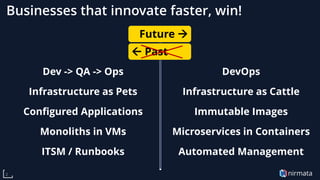
Dev -> QA -> Ops
Infrastructure as Pets
Configured Applications
Monoliths in VMs
ITSM / Runbooks
DevOps
Infrastructure as Cattle
Immutable Images
Microservices in Containers
Automated Management
Businesses that innovate faster, win!
 Past
Future →
nirmata3
Agenda
• Cloud Native Technologies
• How to organize for Cloud Native
• Measuring DevOps success
• Summary and Q&A
Jim Bugwadia
Founder & CEO, Nirmata
Cloud Native Technologies
4
nirmata5
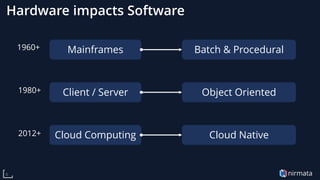
Hardware impacts Software
Mainframes Batch & Procedural
Client / Server Object Oriented
Cloud Computing Cloud Native
1960+
1980+
2012+
nirmata6
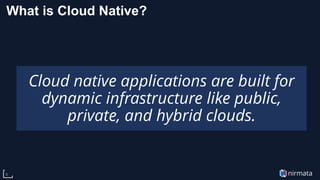
What is Cloud Native?
Cloud native applications are built for
dynamic infrastructure like public,
private, and hybrid clouds.
nirmata7
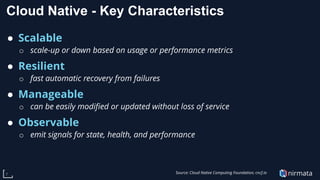
Cloud Native - Key Characteristics
● Scalable
o scale-up or down based on usage or performance metrics
● Resilient
o fast automatic recovery from failures
● Manageable
o can be easily modified or updated without loss of service
● Observable
o emit signals for state, health, and performance
Source: Cloud Native Computing Foundation; cncf.io
nirmata8
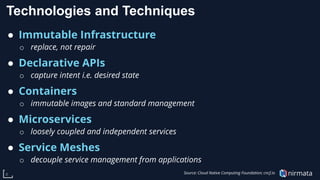
Technologies and Techniques
● Immutable Infrastructure
o replace, not repair
● Declarative APIs
o capture intent i.e. desired state
● Containers
o immutable images and standard management
● Microservices
o loosely coupled and independent services
● Service Meshes
o decouple service management from applications
Source: Cloud Native Computing Foundation; cncf.io
nirmata
Containers are the packaging and runtime for
Cloud Native applications
9
84%of respondents are using containers in
production, a jump of more than 15% from 2018
-- CNCF 2019 Survey
Containers provide:
1. Immutable images
2. Common runtimes
Benefits:
1. Fast
2. Portable
3. Efficient
nirmata
And, Kubernetes is the Cloud Native OS
10
Kubernetes provides:
Automated deployment,
scaling, and management of
containerized applications.
nirmata11
Kubernetes enables
1. Stateless and stateful application management via
declarative APIs
2. Containers lifecycle management
3. Service discovery, load balancing, auto-scaling for
microservices-style architectures
4. Plugins for storage and networking
5. Immutable infrastructure via node auto-scalers and cloud
provider integrations
nirmata12
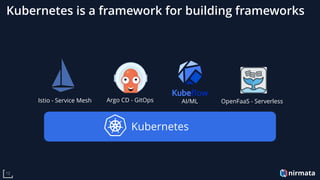
Kubernetes is a framework for building frameworks
Kubernetes
Istio - Service Mesh Argo CD - GitOps AI/ML OpenFaaS - Serverless
nirmata13
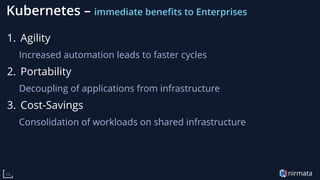
Kubernetes – immediate benefits to Enterprises
1. Agility
Increased automation leads to faster cycles
2. Portability
Decoupling of applications from infrastructure
3. Cost-Savings
Consolidation of workloads on shared infrastructure
nirmata14
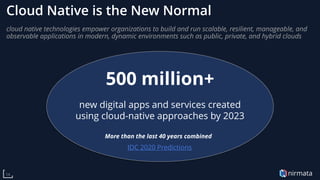
Cloud Native is the New Normal
cloud native technologies empower organizations to build and run scalable, resilient, manageable, and
observable applications in modern, dynamic environments such as public, private, and hybrid clouds
500 million+
new digital apps and services created
using cloud-native approaches by 2023
More than the last 40 years combined!
IDC 2020 Predictions
Organizing Cloud Native
15
nirmata16
Organizing Cloud Native
1. Who does what?
2. What are the high-level processes required?
3. What are some best-practice patterns?
nirmata
The Different Layers
Infrastructure
servers, network, storage
Infrastructure Team
Platform Team
Kubernetes Clusters
Shared Services
Applications
Development Teams
17
Security
nirmata18
The Kubernetes Stack
Kubernetes
Storage
CSI Plugins
Network
CNI Plugins
Identity
Provider
Image
Registry
Ingress
Controllers
CI/CD
Tools
Logging
Monitoring
Security
Compute
Auto-Scalers
nirmata19
What does the platform team provide?
• Kubernetes-as-a-Service
o Operate one or more K8s clusters
o Support different infrastructure types (GPU, bare-metal, etc.)
o Support different cloud providers
o Support different workloads (Windows, stateful apps, etc.)
• Shared Services
o Ingress controllers
o Backup & restore
o Service Mesh
o …
nirmata20
How many clusters?
One Cluster
per App?
One Cluster
per Team?
Shared
clusters?
nirmata21
Single Use Clusters
Advantages:
• Teams can manage their own clusters
• Perceived to be easier
Disadvantages:
• Inefficient resource usage
• More clusters to secure and manage
nirmata22
Shared Clusters
Advantages:
• Improved resource utilization
• Separation of concerns (Dev and Ops)
Disadvantages:
• Requires central Ops / Platform team
• Complex to configure and maintain
nirmata23
Considerations
1. Multiple clusters are inevitable.
2. How many will depend on your organization and
application lifecycle
3. All clusters, including single use clusters, need to be
secured and properly configured
How can we enable self-service for teams and ensure
security and best practices compliance?
nirmata24
A Solution - Virtualization
• Virtualization technologies create a software-defined or
“virtual” form of a physical resources e.g. a server
• Virtualization technologies can make it easier (and faster)
to provision resources
• Virtualization technologies provide segmentation and
isolation.
Is it possible to create a virtual form of a Kubernetes
cluster? What would that look like?
nirmata25
Virtual Kubernetes Clusters How does it work?
• Kubernetes provides all building blocks for isolation and
segmentation across teams:
o Namespaces
o Resource Quotas
o RBAC
o Network Policies
o Pod Security Policies
• Solutions like Nirmata automate the management of
Kubernetes resources to deliver self-service Virtual
Clusters
nirmata26
Virtual Kubernetes Clusters What gets enabled
• Development teams request capacity and services
• Development teams receive a secure and well-configured
Kubernetes endpoint
• Development teams are free to use Kubernetes directly, or
use standardized CI/CD and workload management tools
nirmata27
Section Summary
1. Kubernetes adoption requires a platform team to deploy
and operate clusters, shared services, and integrations
2. Security and infrastructure teams need to be involved
3. Integration with existing systems (IdPs, service desks, etc.)
should be considered
4. Enabling self-service, with proper guard-rails, for
developers is essential to scaling adoption
5. Virtual Kubernetes Clusters can deliver secure and well-
configured Kubernetes endpoints in seconds
Measuring Success
28
nirmata29
“you are what you measure” -- Dr. Nicole Forsgren
1. Metrics matter
2. What you measure shapes
behaviors
3. The wrong metrics can lead to
unexpected results
nirmata30
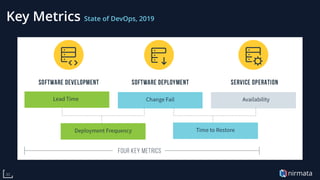
Key Metrics State of DevOps, 2019
nirmata31
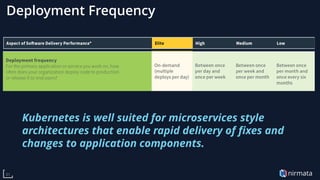
Deployment Frequency
Kubernetes is well suited for microservices style
architectures that enable rapid delivery of fixes and
changes to application components.
nirmata32
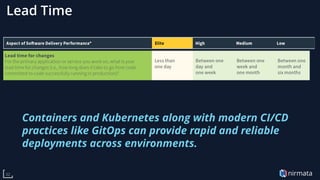
Lead Time
Containers and Kubernetes along with modern CI/CD
practices like GitOps can provide rapid and reliable
deployments across environments.
nirmata33
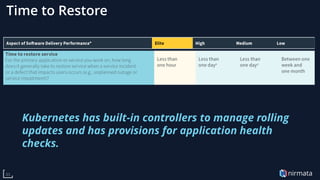
Time to Restore
Kubernetes has built-in controllers to manage rolling
updates and has provisions for application health
checks.
nirmata34
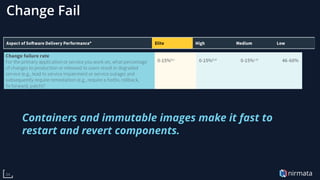
Change Fail
Containers and immutable images make it fast to
restart and revert components.
nirmata35
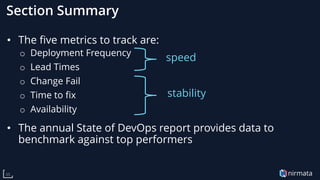
Section Summary
• The five metrics to track are:
o Deployment Frequency
o Lead Times
o Change Fail
o Time to fix
o Availability
• The annual State of DevOps report provides data to
benchmark against top performers
speed
stability
Summary / Q&A
36
nirmata37
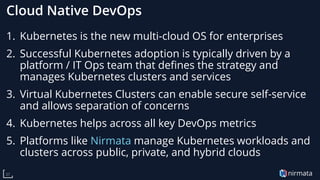
Cloud Native DevOps
1. Kubernetes is the new multi-cloud OS for enterprises
2. Successful Kubernetes adoption is typically driven by a
platform / IT Ops team that defines the strategy and
manages Kubernetes clusters and services
3. Virtual Kubernetes Clusters can enable secure self-service
and allows separation of concerns
4. Kubernetes helps across all key DevOps metrics
5. Platforms like Nirmata manage Kubernetes workloads and
clusters across public, private, and hybrid clouds
Thank-You!
https://try.nirmata.io

Cloud Native DevOps

  • 1.
    Cloud Native DevOps whyKubernetes is a game-changer for enterprises nirmata
  • 2.
    nirmata2 Dev -> QA-> Ops Infrastructure as Pets Configured Applications Monoliths in VMs ITSM / Runbooks DevOps Infrastructure as Cattle Immutable Images Microservices in Containers Automated Management Businesses that innovate faster, win!  Past Future →
  • 3.
    nirmata3 Agenda • Cloud NativeTechnologies • How to organize for Cloud Native • Measuring DevOps success • Summary and Q&A Jim Bugwadia Founder & CEO, Nirmata
  • 4.
  • 5.
    nirmata5 Hardware impacts Software MainframesBatch & Procedural Client / Server Object Oriented Cloud Computing Cloud Native 1960+ 1980+ 2012+
  • 6.
    nirmata6 What is CloudNative? Cloud native applications are built for dynamic infrastructure like public, private, and hybrid clouds.
  • 7.
    nirmata7 Cloud Native -Key Characteristics ● Scalable o scale-up or down based on usage or performance metrics ● Resilient o fast automatic recovery from failures ● Manageable o can be easily modified or updated without loss of service ● Observable o emit signals for state, health, and performance Source: Cloud Native Computing Foundation; cncf.io
  • 8.
    nirmata8 Technologies and Techniques ●Immutable Infrastructure o replace, not repair ● Declarative APIs o capture intent i.e. desired state ● Containers o immutable images and standard management ● Microservices o loosely coupled and independent services ● Service Meshes o decouple service management from applications Source: Cloud Native Computing Foundation; cncf.io
  • 9.
    nirmata Containers are thepackaging and runtime for Cloud Native applications 9 84%of respondents are using containers in production, a jump of more than 15% from 2018 -- CNCF 2019 Survey Containers provide: 1. Immutable images 2. Common runtimes Benefits: 1. Fast 2. Portable 3. Efficient
  • 10.
    nirmata And, Kubernetes isthe Cloud Native OS 10 Kubernetes provides: Automated deployment, scaling, and management of containerized applications.
  • 11.
    nirmata11 Kubernetes enables 1. Statelessand stateful application management via declarative APIs 2. Containers lifecycle management 3. Service discovery, load balancing, auto-scaling for microservices-style architectures 4. Plugins for storage and networking 5. Immutable infrastructure via node auto-scalers and cloud provider integrations
  • 12.
    nirmata12 Kubernetes is aframework for building frameworks Kubernetes Istio - Service Mesh Argo CD - GitOps AI/ML OpenFaaS - Serverless
  • 13.
    nirmata13 Kubernetes – immediatebenefits to Enterprises 1. Agility Increased automation leads to faster cycles 2. Portability Decoupling of applications from infrastructure 3. Cost-Savings Consolidation of workloads on shared infrastructure
  • 14.
    nirmata14 Cloud Native isthe New Normal cloud native technologies empower organizations to build and run scalable, resilient, manageable, and observable applications in modern, dynamic environments such as public, private, and hybrid clouds 500 million+ new digital apps and services created using cloud-native approaches by 2023 More than the last 40 years combined! IDC 2020 Predictions
  • 15.
  • 16.
    nirmata16 Organizing Cloud Native 1.Who does what? 2. What are the high-level processes required? 3. What are some best-practice patterns?
  • 17.
    nirmata The Different Layers Infrastructure servers,network, storage Infrastructure Team Platform Team Kubernetes Clusters Shared Services Applications Development Teams 17 Security
  • 18.
    nirmata18 The Kubernetes Stack Kubernetes Storage CSIPlugins Network CNI Plugins Identity Provider Image Registry Ingress Controllers CI/CD Tools Logging Monitoring Security Compute Auto-Scalers
  • 19.
    nirmata19 What does theplatform team provide? • Kubernetes-as-a-Service o Operate one or more K8s clusters o Support different infrastructure types (GPU, bare-metal, etc.) o Support different cloud providers o Support different workloads (Windows, stateful apps, etc.) • Shared Services o Ingress controllers o Backup & restore o Service Mesh o …
  • 20.
    nirmata20 How many clusters? OneCluster per App? One Cluster per Team? Shared clusters?
  • 21.
    nirmata21 Single Use Clusters Advantages: •Teams can manage their own clusters • Perceived to be easier Disadvantages: • Inefficient resource usage • More clusters to secure and manage
  • 22.
    nirmata22 Shared Clusters Advantages: • Improvedresource utilization • Separation of concerns (Dev and Ops) Disadvantages: • Requires central Ops / Platform team • Complex to configure and maintain
  • 23.
    nirmata23 Considerations 1. Multiple clustersare inevitable. 2. How many will depend on your organization and application lifecycle 3. All clusters, including single use clusters, need to be secured and properly configured How can we enable self-service for teams and ensure security and best practices compliance?
  • 24.
    nirmata24 A Solution -Virtualization • Virtualization technologies create a software-defined or “virtual” form of a physical resources e.g. a server • Virtualization technologies can make it easier (and faster) to provision resources • Virtualization technologies provide segmentation and isolation. Is it possible to create a virtual form of a Kubernetes cluster? What would that look like?
  • 25.
    nirmata25 Virtual Kubernetes ClustersHow does it work? • Kubernetes provides all building blocks for isolation and segmentation across teams: o Namespaces o Resource Quotas o RBAC o Network Policies o Pod Security Policies • Solutions like Nirmata automate the management of Kubernetes resources to deliver self-service Virtual Clusters
  • 26.
    nirmata26 Virtual Kubernetes ClustersWhat gets enabled • Development teams request capacity and services • Development teams receive a secure and well-configured Kubernetes endpoint • Development teams are free to use Kubernetes directly, or use standardized CI/CD and workload management tools
  • 27.
    nirmata27 Section Summary 1. Kubernetesadoption requires a platform team to deploy and operate clusters, shared services, and integrations 2. Security and infrastructure teams need to be involved 3. Integration with existing systems (IdPs, service desks, etc.) should be considered 4. Enabling self-service, with proper guard-rails, for developers is essential to scaling adoption 5. Virtual Kubernetes Clusters can deliver secure and well- configured Kubernetes endpoints in seconds
  • 28.
  • 29.
    nirmata29 “you are whatyou measure” -- Dr. Nicole Forsgren 1. Metrics matter 2. What you measure shapes behaviors 3. The wrong metrics can lead to unexpected results
  • 30.
  • 31.
    nirmata31 Deployment Frequency Kubernetes iswell suited for microservices style architectures that enable rapid delivery of fixes and changes to application components.
  • 32.
    nirmata32 Lead Time Containers andKubernetes along with modern CI/CD practices like GitOps can provide rapid and reliable deployments across environments.
  • 33.
    nirmata33 Time to Restore Kuberneteshas built-in controllers to manage rolling updates and has provisions for application health checks.
  • 34.
    nirmata34 Change Fail Containers andimmutable images make it fast to restart and revert components.
  • 35.
    nirmata35 Section Summary • Thefive metrics to track are: o Deployment Frequency o Lead Times o Change Fail o Time to fix o Availability • The annual State of DevOps report provides data to benchmark against top performers speed stability
  • 36.
  • 37.
    nirmata37 Cloud Native DevOps 1.Kubernetes is the new multi-cloud OS for enterprises 2. Successful Kubernetes adoption is typically driven by a platform / IT Ops team that defines the strategy and manages Kubernetes clusters and services 3. Virtual Kubernetes Clusters can enable secure self-service and allows separation of concerns 4. Kubernetes helps across all key DevOps metrics 5. Platforms like Nirmata manage Kubernetes workloads and clusters across public, private, and hybrid clouds
  • 38.