Private Clouds
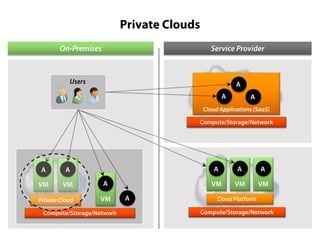
Private Clouds
On-Premises

Service Provider

Users

A
A

A

Cloud Applications (SaaS)
Compute/Storage/Network

A
VM

VM

A

Private Cloud

A
VM

Compute/Storage/Network

A

A

A

VM

A

VM

VM

Cloud Platform
Compute/Storage/Network
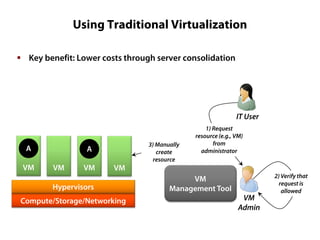
Using Traditional Virtualization
 Key benefit: Lower costs through server consolidation

IT User

A
VM

A
VM

VM

VM

Hypervisors
Compute/Storage/Networking

3) Manually
create
resource

1) Request
resource (e.g., VM)
from
administrator

VM
Management Tool

VM
Admin

2) Verify that
request is
allowed
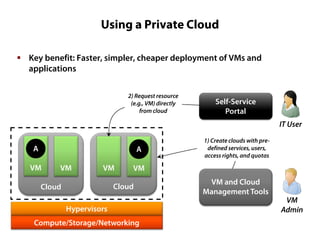
Using a Private Cloud
 Key benefit: Faster, simpler, cheaper deployment of VMs and
applications
2) Request resource
(e.g., VM) directly
from cloud

Self-Service
Portal
IT User

A

A

VM

VM

VM

VM

Cloud

Cloud

1) Create clouds with predefined services, users,
access rights, and quotas

Hypervisors
Compute/Storage/Networking

VM and Cloud
Management Tools

VM
Admin
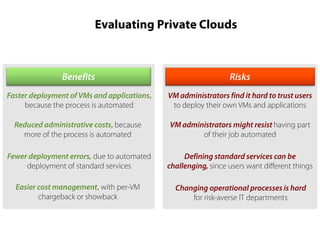
Evaluating Private Clouds

Benefits

Risks

Faster deployment of VMs and applications,
because the process is automated

VM administrators find it hard to trust users
to deploy their own VMs and applications

Reduced administrative costs, because
more of the process is automated

VM administrators might resist having part
of their job automated

Fewer deployment errors, due to automated
deployment of standard services

Defining standard services can be
challenging, since users want different things

Easier cost management, with per-VM
chargeback or showback

Changing operational processes is hard
for risk-averse IT departments
Using a Private Cloud: Example Scenarios
 A dev/test group getting VMs on demand
 A central IT organization in a multi-division company providing VMs
and applications to business unit IT staff in their organization
 A CIO demonstrating innovation
Private Cloud or Public Cloud?
 Private clouds can make internal data centers more efficient
‒ They provide IaaS in your data center
‒ They’re the evolution of virtualization

 But public cloud platforms are the best choice for many new
applications
‒ Such as apps that require elastic capacity

 Organizations will likely use both
‒ It’s not an either/or decision
Combining Private and Public Clouds
 A service provider (e.g., a hoster) can provide a public IaaS cloud using
the same technology that an enterprise uses to create a private cloud
‒ The public and private cloud can be linked together in a hybrid cloud
‒ VMs can potentially be moved between the two

 Example scenarios:
‒ Quickly getting VMs with minimal commitment
‒ Offloading work to the public cloud when more resources are needed
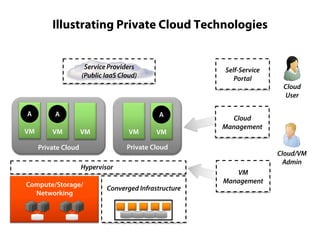
Illustrating Private Cloud Technologies
Service Providers
(Public IaaS Cloud)

A

A

VM

VM

Self-Service
Portal

A
VM

VM

VM

Cloud
Management

Private Cloud

Private Cloud
Hypervisor
Compute/Storage/
Networking

Converged Infrastructure

Cloud
User

Cloud/VM
Admin
VM
Management
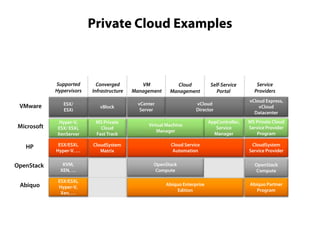
Private Cloud Examples

Supported
Hypervisors

Converged
Infrastructure

VM
Management
vCenter
Server

VMware

ESX/
ESXi

vBlock

Microsoft

Hyper-V,
ESX/ ESXi,
XenServer

MS Private
Cloud
Fast Track

HP

ESX/ESXi,
Hyper-V, …

CloudSystem
Matrix

OpenStack

KVM,
XEN, …

Abiquo

ESX/ESXi,
Hyper-V,
Xen, …

Cloud
Management

Self-Service
Portal

vCloud
Director

Virtual Machine
Manager
Cloud Service
Automation
OpenStack
Compute
Abiquo Enterprise
Edition

AppController,
Service
Manager

Service
Providers
vCloud Express,
vCloud
Datacenter
MS Private Cloud
Service Provider
Program
CloudSystem
Service Provider
OpenStack
Compute
Abiquo Partner
Program
The Impact of Private Clouds
 Private clouds aren’t a substitute for public clouds
‒ The two address different problems

 For many organizations, adopting private clouds is easier than
adopting public clouds
‒ The risks are easier to bear

 Enterprises are likely to adopt private clouds rapidly
Conclusions
 Cloud computing is here
 All three aspects are important:
‒ Cloud applications
‒ Cloud platforms
‒ Private clouds

 A new world is unfolding
‒ Prepare to be part of it

Cloud computing-m3-private-slides

  • 1.
  • 2.
    Private Clouds On-Premises Service Provider Users A A A CloudApplications (SaaS) Compute/Storage/Network A VM VM A Private Cloud A VM Compute/Storage/Network A A A VM A VM VM Cloud Platform Compute/Storage/Network
  • 3.
    Using Traditional Virtualization Key benefit: Lower costs through server consolidation IT User A VM A VM VM VM Hypervisors Compute/Storage/Networking 3) Manually create resource 1) Request resource (e.g., VM) from administrator VM Management Tool VM Admin 2) Verify that request is allowed
  • 4.
    Using a PrivateCloud  Key benefit: Faster, simpler, cheaper deployment of VMs and applications 2) Request resource (e.g., VM) directly from cloud Self-Service Portal IT User A A VM VM VM VM Cloud Cloud 1) Create clouds with predefined services, users, access rights, and quotas Hypervisors Compute/Storage/Networking VM and Cloud Management Tools VM Admin
  • 5.
    Evaluating Private Clouds Benefits Risks Fasterdeployment of VMs and applications, because the process is automated VM administrators find it hard to trust users to deploy their own VMs and applications Reduced administrative costs, because more of the process is automated VM administrators might resist having part of their job automated Fewer deployment errors, due to automated deployment of standard services Defining standard services can be challenging, since users want different things Easier cost management, with per-VM chargeback or showback Changing operational processes is hard for risk-averse IT departments
  • 6.
    Using a PrivateCloud: Example Scenarios  A dev/test group getting VMs on demand  A central IT organization in a multi-division company providing VMs and applications to business unit IT staff in their organization  A CIO demonstrating innovation
  • 7.
    Private Cloud orPublic Cloud?  Private clouds can make internal data centers more efficient ‒ They provide IaaS in your data center ‒ They’re the evolution of virtualization  But public cloud platforms are the best choice for many new applications ‒ Such as apps that require elastic capacity  Organizations will likely use both ‒ It’s not an either/or decision
  • 8.
    Combining Private andPublic Clouds  A service provider (e.g., a hoster) can provide a public IaaS cloud using the same technology that an enterprise uses to create a private cloud ‒ The public and private cloud can be linked together in a hybrid cloud ‒ VMs can potentially be moved between the two  Example scenarios: ‒ Quickly getting VMs with minimal commitment ‒ Offloading work to the public cloud when more resources are needed
  • 9.
    Illustrating Private CloudTechnologies Service Providers (Public IaaS Cloud) A A VM VM Self-Service Portal A VM VM VM Cloud Management Private Cloud Private Cloud Hypervisor Compute/Storage/ Networking Converged Infrastructure Cloud User Cloud/VM Admin VM Management
  • 10.
    Private Cloud Examples Supported Hypervisors Converged Infrastructure VM Management vCenter Server VMware ESX/ ESXi vBlock Microsoft Hyper-V, ESX/ESXi, XenServer MS Private Cloud Fast Track HP ESX/ESXi, Hyper-V, … CloudSystem Matrix OpenStack KVM, XEN, … Abiquo ESX/ESXi, Hyper-V, Xen, … Cloud Management Self-Service Portal vCloud Director Virtual Machine Manager Cloud Service Automation OpenStack Compute Abiquo Enterprise Edition AppController, Service Manager Service Providers vCloud Express, vCloud Datacenter MS Private Cloud Service Provider Program CloudSystem Service Provider OpenStack Compute Abiquo Partner Program
  • 11.
    The Impact ofPrivate Clouds  Private clouds aren’t a substitute for public clouds ‒ The two address different problems  For many organizations, adopting private clouds is easier than adopting public clouds ‒ The risks are easier to bear  Enterprises are likely to adopt private clouds rapidly
  • 12.
    Conclusions  Cloud computingis here  All three aspects are important: ‒ Cloud applications ‒ Cloud platforms ‒ Private clouds  A new world is unfolding ‒ Prepare to be part of it