Cloud Computing: Why You Should Care  October 14, 2010 Audio is only available by calling this number: Conference Call: 866-740-1260; Access Code: 6339392 Sponsored by
Using ReadyTalk Chat & raise hand  All lines are muted If you lose your internet connection, reconnect using the link emailed to you. If you lose your phone connection, re-dial the phone number and re-join. ReadyTalk support:  800-843-9166
You are being recorded… Streaming into Second Life This seminar will be available on the TechSoup website along with past  webinar presentations: www.techsoup.org/go/webinars You will receive a link to this presentation, material and links.  After the webinar, you can ask follow-up questions in our Community Forum: http://bit.ly/ts-cloud Twitter hashtags: #techsoup
Cloud Computing: Why You Should Care Presenters:  Anna Jaeger, Peter Campbell Sponsored by
We are working toward a time when every nonprofit and social benefit organization on the planet has the technology resources and knowledge they need to operate at their full potential.
Home page screen grab
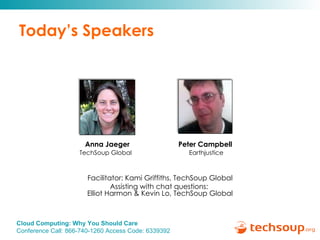
Today’s Speakers Peter Campbell   Earthjustice Anna Jaeger TechSoup Global  Facilitator: Kami Griffiths, TechSoup Global Assisting with chat questions:  Elliot Harmon & Kevin Lo, TechSoup Global
Topic and Objective Topic:  Overview of Cloud Computing - Defining types of cloud computing and how it might apply to your organization Take Aways:  Understand the different types of cloud computing,  Understand how it is impacting nonprofits,  Outline some criteria for use, Mention some challenges of which you should be aware.
Mission of GreenTech Help nonprofits and NGOs reduce their environmental impact through the effective use of technology. ____________________ We help you, reduce the impact of your IT and use IT to reduce the impact of your organization. www.techsoup.org/greentech @TSGreenTech
Quick Audience Poll Knowledge of Cloud Computing Beginner Intermediate Advanced
Last Poll Do you use cloud computing in your organization  or personally ?  Yes No Who knows?!
Defining Cloud Computing Understanding the Types
CyberOptic Group Cloud Definition “ …  cloud computing enables computer  software  and  hardware  resources to be  accessed over the Internet  without the need to have any detailed or specific knowledge of the infrastructure used to deliver the resources, much like a utility model.  You really don't need to know what the phone company or electric company does on there end to enable calls and allow the lights to go on when you flip the switch; and, you really don't want to know as long as when you plug into it, it works.”  The  CyberOptic  Group
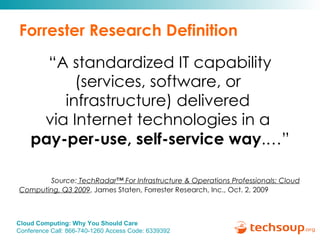
Forrester Research Definition “ A standardized IT capability (services, software, or  infrastructure) delivered  via Internet technologies in a  pay-per-use, self-service way .…” Source:  TechRadar™ For Infrastructure & Operations Professionals: Cloud Computing, Q3 2009 , James Staten, Forrester Research, Inc., Oct. 2, 2009
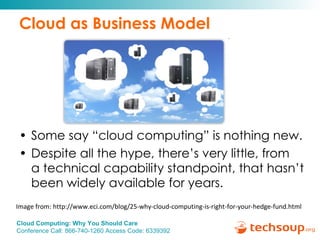
Cloud as Business Model Some say “cloud computing” is nothing new.  Despite all the hype, there’s very little, from  a technical capability standpoint, that hasn’t been widely available for years.  Image from: http://www.eci.com/blog/25-why-cloud-computing-is-right-for-your-hedge-fund.html
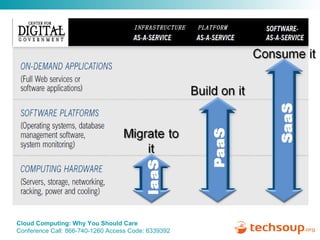
Types of Cloud Computing IaaS: Infrastructure as a service PaaS: Platform as a service SaaS: Software as a Service
INFRASTRUCTURE PLATFORM
Examples of Cloud Providers Amazon – EC2 and S3 (IaaS) Google – App Engine (PaaS) Microsoft – Azure (IaaS & PaaS), BPOS (SaaS) Salesforce – NPO Starter Pack (SaaS) Caution:  Make IT Green: Cloud Computing and its Contribution to Climate Change
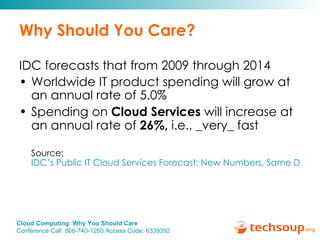
Why Should You Care? IDC forecasts that from 2009 through 2014 Worldwide IT product spending will grow at an annual rate of 5.0% Spending on  Cloud Services  will increase at an annual rate of  26%,  i.e., _very_ fast Source:  IDC’s Public IT Cloud Services Forecast: New Numbers, Same Disruptive Story
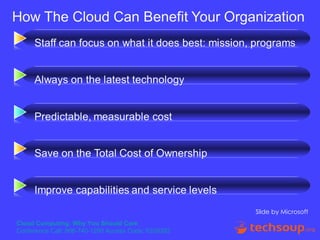
Benefits of Cloud Computing Little to no upfront costs Little to no IT staff required  No onsite servers Rapid deployment  Convenience Always on latest software
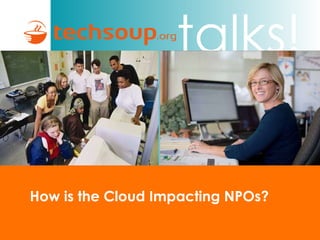
How is the Cloud Impacting NPOs?
Slide by Microsoft
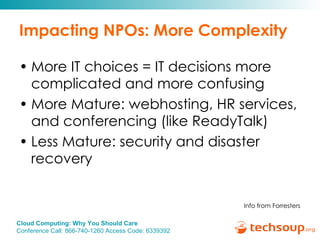
Impacting NPOs: More Complexity More IT choices = IT decisions more complicated and more confusing More Mature: webhosting, HR services, and conferencing (like ReadyTalk)  Less Mature: security and disaster recovery Info from Forresters
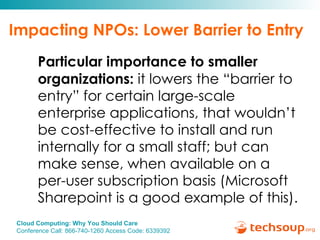
Impacting NPOs: Lower Barrier to Entry Particular importance to smaller organizations:  it lowers the “barrier to entry” for certain large-scale enterprise applications, that wouldn’t be cost-effective to install and run internally for a small staff; but can make sense, when available on a per-user subscription basis (Microsoft Sharepoint is a good example of this).
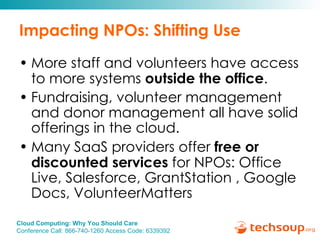
Impacting NPOs: Shifting Use More staff and volunteers have access to more systems  outside the office . Fundraising, volunteer management and donor management all have solid offerings in the cloud. Many SaaS providers offer  free or discounted services  for NPOs: Office Live, Salesforce, GrantStation , Google Docs, VolunteerMatters
Impacting NPOs: Shifting Use Next 6 to 8 years we’ll be in a state of hybrid cloud adoption More people will be using both ‘on premises’ and cloud versions of MS Office Use of computers will change toward easier collaboration/sharing and better access to the office anywhere you are. More flexibility
Impacting NPOs: Software Costs In the next 6 to 8 years, nonprofits will probably  not  be reducing  software  and  IT staffing  costs very much.  Migration to cloud software and services will be gradual and costs will be  shifting , but not going down dramatically.  You’ll probably being paying  more  in  monthly fees , and  less upfront  on buying software packages and servers.
Impacting NPOs: Hardware Costs IT  hardware costs  will gradually go down for nonprofits over the next 6 to 8 years.  You will probably need fewer on premises server computers, and less robust and expensive desktop or laptop computers as more of your work is online. Telecom costs  may increase as more bandwidth and stability is needed.
Summary: Cloud Economics Decreased capital costs Usually, increased operating costs Example 1:  Preferred Hotel Traditional: $210k server refresh and $10k/month Cloud: $10k implementation and $16k/month Example 2: Nevada  Crisis Call Center  Trimmed technology management work by $20,000 annually Eliminated a recurring capital expense of $15,000 More reliable IT services
Why is it green?
Green Benefits Fewer servers  are built and running: fewer toxic materials and water  used to build them fewer toxic materials are  dumped less energy  is consumed in the running of the servers Less powerful client computers:  all the processing is performed on the hosted server(s).  keep your older computers longer  reduces demand for new computers
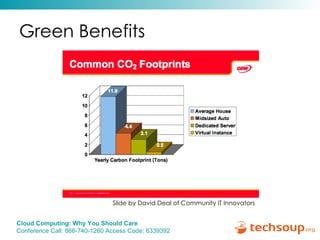
Green Benefits Slide by David Deal of Community IT Innovators
Questions for Green Website Hosting Providers When selecting a provider,  consider these items : $$:  most are comparable or better than traditional hosts   Ease of startup  Features Reliability  How green are they?  Do they buy carbon off-sets or power their operations with their own solar panels? Do they virtualize their servers? Are they certified by anyone? Lists of Green Web Hosts webhostinggeeks.com   WebHostingReport.com   twitter.com/greenwebsites
What are Some Examples?
SaaS Common Examples Software as a Service Document Sharing - Office Live, Google docs, Zoho CRM solutions – Salesforce, Blackbaud, MS Dynamics CRM Online Backup - Mozy Social Networking: LinkedIn, Twitter, Flickr HR Tools: Performance Reviews, Payroll
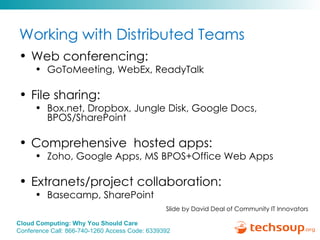
Working with Distributed Teams Web conferencing:   GoToMeeting, WebEx, ReadyTalk File sharing:  Box.net, Dropbox, Jungle Disk, Google Docs, BPOS/SharePoint Comprehensive  hosted apps:  Zoho, Google Apps, MS BPOS+Office Web Apps Extranets/project collaboration:  Basecamp, SharePoint Slide by David Deal of Community IT Innovators
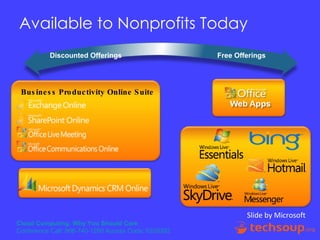
Available to Nonprofits Today Discounted Offerings   Free Offerings Slide by Microsoft Business Productivity Online Suite
Other Free or Discounted Offerings Google Docs Basecamp – 1 project Skype – VuRoom add-on (multi-party) DropBox
Some Criteria for Use
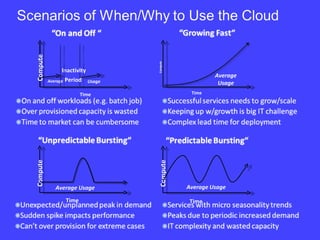
Usage Compute  Time  Average Inactivity Period  Compute  Time  Average Usage  Average Usage Compute  Time   Compute  Time   Average Usage
Organization Specific Criteria Mission critical Security certifications Bandwidth IT staffing: Costs and skill set Remote staff or volunteers Physical office features
Criteria for Use: Questions for Vendors Costs: upfront, ongoing, utility model  Security & Compliance Reliability & SLAs Features  Ease of startup
NIST: Service Level Agreements (SLAs) Contract between customers and service providers of the level of service to be provided Contains performance metrics (e.g., uptime, throughput, response time) Problem management details Documented security capabilities Contains penalties for non-performance From NIST:  Presentation on Effectively and Securely Using the Cloud Computing Paradigm v26
Some Challenges
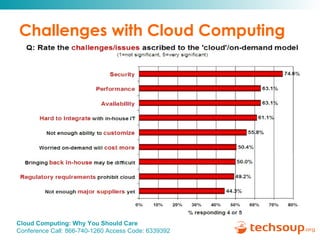
Challenges with Cloud Computing
Risks of Cloud Computing Loss of connectivity Service levels Regulatory compliance:   is provider certified?  Backups:   You should have copies of and access to your data Security
NIST: Analyzing Cloud Security Some key issues:  Trust multi-tenancy Encryption compliance From NIST:  Presentation on Effectively and Securely Using the Cloud Computing Paradigm v26
NIST: General Security Advantages Shifting public data to a external cloud reduces the exposure of the internal sensitive data Cloud homogeneity makes security auditing/testing simpler Clouds enable automated security management Redundancy / Disaster Recovery From NIST:  Presentation on Effectively and Securely Using the Cloud Computing Paradigm v26
NIST: General Security Challenges Trusting vendor’s security model Customer inability to respond to audit findings Obtaining support for investigations Indirect administrator accountability Proprietary implementations can’t be examined Loss of physical control From NIST:  Presentation on Effectively and Securely Using the Cloud Computing Paradigm v26
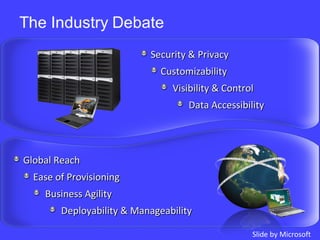
Security & Privacy Customizability Visibility & Control Data Accessibility Global Reach Ease of Provisioning Business Agility Deployability & Manageability Slide by Microsoft
Questions? Submit your questions using the chat box.
Conclusion Cloud has a lot to offer, esp. small nonprofits. Cloud solutions are often greener, easier to implement, and more secure. Cloud solutions are not right for every need or every organization. Talk with your board, staff, volunteers and/or consultants. Decide which is the best first step for your organization.
Thank you! More Info: Come to  www.techsoup.org/greentech  to find other tips and suggestions. Anna S. Jaeger TechSoup Global [email_address] www.techsoup.org   @TSGreenTech Peter Campbell Earthjustice [email_address] www.techcafeteria.com @PeterSCampbell
Resources Cloud Landing Page Comparing Online vs. Traditional Office Software  Why Should Nonprofits Care About Cloud Computing?
Continue the Discussion… Additional questions can be answered by posting in in our Community Forum: http://bit.ly/ts-cloud
Upcoming Webinars Story of an Open Source Library  Thursday, October 21, 11 a.m. Pacific time Security Basics: Keep your Computers Safe  Thursday, October 28, 11 a.m. Pacific time
Thank you to our Webinar Sponsor! ReadyTalk offers dedicated product demos for  TechSoup organizations 4 times per week. For more information:   pages.readytalk.com/techsoup.html
Thank you!   Please complete the post event survey! Kami Griffiths, kami@techsoup.org, 415-633-9392
Appendix
NIST: Cloud Security Advantages Part 1 Data Fragmentation and Dispersal Dedicated Security Team Greater Investment in Security Infrastructure Fault Tolerance and Reliability Greater Resiliency Hypervisor Protection Against Network Attacks Possible Reduction of C&A Activities  (Access to Pre-Accredited Clouds) From NIST:  Presentation on Effectively and Securely Using the Cloud Computing Paradigm v26
NIST: Cloud Security Advantages Part 2 Simplification of Compliance Analysis Data Held by Unbiased Party (cloud vendor assertion) Low-Cost Disaster Recovery and Data Storage Solutions On-Demand Security Controls Real-Time Detection of System Tampering Rapid Re-Constitution of Services Advanced Honeynet Capabilities From NIST:  Presentation on Effectively and Securely Using the Cloud Computing Paradigm v26
NIST: Cloud Security Challenges Part 1 Data dispersal & international privacy laws EU Data Protection Directive and U.S. Safe Harbor program Exposure of data to foreign government and data subpoenas Data retention issues  Need for isolation management Multi-tenancy  Logging challenges Data ownership issues  Quality of service guarantees From NIST:  Presentation on Effectively and Securely Using the Cloud Computing Paradigm v26
NIST: Cloud Security Challenges Part 2 Dependence on secure hypervisors Attraction to hackers (high value target) Security of virtual OSs in the cloud  Possibility for massive outages Encryption needs for cloud computing Encrypting access to the cloud resource control interface Encrypting administrative access to OS instances Encrypting access to applications Encrypting application data at rest Public cloud vs internal cloud security  Lack of public SaaS version control From NIST:  Presentation on Effectively and Securely Using the Cloud Computing Paradigm v26

Cloud Computing Webinar

  • 1.
    Cloud Computing: WhyYou Should Care October 14, 2010 Audio is only available by calling this number: Conference Call: 866-740-1260; Access Code: 6339392 Sponsored by
  • 2.
    Using ReadyTalk Chat& raise hand All lines are muted If you lose your internet connection, reconnect using the link emailed to you. If you lose your phone connection, re-dial the phone number and re-join. ReadyTalk support: 800-843-9166
  • 3.
    You are beingrecorded… Streaming into Second Life This seminar will be available on the TechSoup website along with past webinar presentations: www.techsoup.org/go/webinars You will receive a link to this presentation, material and links. After the webinar, you can ask follow-up questions in our Community Forum: http://bit.ly/ts-cloud Twitter hashtags: #techsoup
  • 4.
    Cloud Computing: WhyYou Should Care Presenters: Anna Jaeger, Peter Campbell Sponsored by
  • 5.
    We are workingtoward a time when every nonprofit and social benefit organization on the planet has the technology resources and knowledge they need to operate at their full potential.
  • 6.
  • 7.
    Today’s Speakers PeterCampbell Earthjustice Anna Jaeger TechSoup Global Facilitator: Kami Griffiths, TechSoup Global Assisting with chat questions: Elliot Harmon & Kevin Lo, TechSoup Global
  • 8.
    Topic and ObjectiveTopic: Overview of Cloud Computing - Defining types of cloud computing and how it might apply to your organization Take Aways: Understand the different types of cloud computing, Understand how it is impacting nonprofits, Outline some criteria for use, Mention some challenges of which you should be aware.
  • 9.
    Mission of GreenTechHelp nonprofits and NGOs reduce their environmental impact through the effective use of technology. ____________________ We help you, reduce the impact of your IT and use IT to reduce the impact of your organization. www.techsoup.org/greentech @TSGreenTech
  • 10.
    Quick Audience PollKnowledge of Cloud Computing Beginner Intermediate Advanced
  • 11.
    Last Poll Doyou use cloud computing in your organization or personally ? Yes No Who knows?!
  • 12.
    Defining Cloud ComputingUnderstanding the Types
  • 13.
    CyberOptic Group CloudDefinition “ … cloud computing enables computer software and hardware resources to be accessed over the Internet without the need to have any detailed or specific knowledge of the infrastructure used to deliver the resources, much like a utility model. You really don't need to know what the phone company or electric company does on there end to enable calls and allow the lights to go on when you flip the switch; and, you really don't want to know as long as when you plug into it, it works.” The CyberOptic Group
  • 14.
    Forrester Research Definition“ A standardized IT capability (services, software, or infrastructure) delivered via Internet technologies in a pay-per-use, self-service way .…” Source: TechRadar™ For Infrastructure & Operations Professionals: Cloud Computing, Q3 2009 , James Staten, Forrester Research, Inc., Oct. 2, 2009
  • 15.
    Cloud as BusinessModel Some say “cloud computing” is nothing new. Despite all the hype, there’s very little, from a technical capability standpoint, that hasn’t been widely available for years. Image from: http://www.eci.com/blog/25-why-cloud-computing-is-right-for-your-hedge-fund.html
  • 16.
    Types of CloudComputing IaaS: Infrastructure as a service PaaS: Platform as a service SaaS: Software as a Service
  • 17.
  • 18.
    Examples of CloudProviders Amazon – EC2 and S3 (IaaS) Google – App Engine (PaaS) Microsoft – Azure (IaaS & PaaS), BPOS (SaaS) Salesforce – NPO Starter Pack (SaaS) Caution: Make IT Green: Cloud Computing and its Contribution to Climate Change
  • 19.
    Why Should YouCare? IDC forecasts that from 2009 through 2014 Worldwide IT product spending will grow at an annual rate of 5.0% Spending on Cloud Services will increase at an annual rate of 26%, i.e., _very_ fast Source: IDC’s Public IT Cloud Services Forecast: New Numbers, Same Disruptive Story
  • 20.
    Benefits of CloudComputing Little to no upfront costs Little to no IT staff required No onsite servers Rapid deployment Convenience Always on latest software
  • 21.
    How is theCloud Impacting NPOs?
  • 22.
  • 23.
    Impacting NPOs: MoreComplexity More IT choices = IT decisions more complicated and more confusing More Mature: webhosting, HR services, and conferencing (like ReadyTalk) Less Mature: security and disaster recovery Info from Forresters
  • 24.
    Impacting NPOs: LowerBarrier to Entry Particular importance to smaller organizations: it lowers the “barrier to entry” for certain large-scale enterprise applications, that wouldn’t be cost-effective to install and run internally for a small staff; but can make sense, when available on a per-user subscription basis (Microsoft Sharepoint is a good example of this).
  • 25.
    Impacting NPOs: ShiftingUse More staff and volunteers have access to more systems outside the office . Fundraising, volunteer management and donor management all have solid offerings in the cloud. Many SaaS providers offer free or discounted services for NPOs: Office Live, Salesforce, GrantStation , Google Docs, VolunteerMatters
  • 26.
    Impacting NPOs: ShiftingUse Next 6 to 8 years we’ll be in a state of hybrid cloud adoption More people will be using both ‘on premises’ and cloud versions of MS Office Use of computers will change toward easier collaboration/sharing and better access to the office anywhere you are. More flexibility
  • 27.
    Impacting NPOs: SoftwareCosts In the next 6 to 8 years, nonprofits will probably not be reducing software and IT staffing costs very much. Migration to cloud software and services will be gradual and costs will be shifting , but not going down dramatically. You’ll probably being paying more in monthly fees , and less upfront on buying software packages and servers.
  • 28.
    Impacting NPOs: HardwareCosts IT hardware costs will gradually go down for nonprofits over the next 6 to 8 years. You will probably need fewer on premises server computers, and less robust and expensive desktop or laptop computers as more of your work is online. Telecom costs may increase as more bandwidth and stability is needed.
  • 29.
    Summary: Cloud EconomicsDecreased capital costs Usually, increased operating costs Example 1: Preferred Hotel Traditional: $210k server refresh and $10k/month Cloud: $10k implementation and $16k/month Example 2: Nevada Crisis Call Center Trimmed technology management work by $20,000 annually Eliminated a recurring capital expense of $15,000 More reliable IT services
  • 30.
    Why is itgreen?
  • 31.
    Green Benefits Fewerservers are built and running: fewer toxic materials and water used to build them fewer toxic materials are dumped less energy is consumed in the running of the servers Less powerful client computers: all the processing is performed on the hosted server(s). keep your older computers longer reduces demand for new computers
  • 32.
    Green Benefits Slideby David Deal of Community IT Innovators
  • 33.
    Questions for GreenWebsite Hosting Providers When selecting a provider, consider these items : $$: most are comparable or better than traditional hosts Ease of startup Features Reliability How green are they? Do they buy carbon off-sets or power their operations with their own solar panels? Do they virtualize their servers? Are they certified by anyone? Lists of Green Web Hosts webhostinggeeks.com WebHostingReport.com twitter.com/greenwebsites
  • 34.
    What are SomeExamples?
  • 35.
    SaaS Common ExamplesSoftware as a Service Document Sharing - Office Live, Google docs, Zoho CRM solutions – Salesforce, Blackbaud, MS Dynamics CRM Online Backup - Mozy Social Networking: LinkedIn, Twitter, Flickr HR Tools: Performance Reviews, Payroll
  • 36.
    Working with DistributedTeams Web conferencing: GoToMeeting, WebEx, ReadyTalk File sharing: Box.net, Dropbox, Jungle Disk, Google Docs, BPOS/SharePoint Comprehensive hosted apps: Zoho, Google Apps, MS BPOS+Office Web Apps Extranets/project collaboration: Basecamp, SharePoint Slide by David Deal of Community IT Innovators
  • 37.
    Available to NonprofitsToday Discounted Offerings Free Offerings Slide by Microsoft Business Productivity Online Suite
  • 38.
    Other Free orDiscounted Offerings Google Docs Basecamp – 1 project Skype – VuRoom add-on (multi-party) DropBox
  • 39.
  • 40.
    Usage Compute Time Average Inactivity Period Compute Time Average Usage Average Usage Compute Time Compute Time Average Usage
  • 41.
    Organization Specific CriteriaMission critical Security certifications Bandwidth IT staffing: Costs and skill set Remote staff or volunteers Physical office features
  • 42.
    Criteria for Use:Questions for Vendors Costs: upfront, ongoing, utility model Security & Compliance Reliability & SLAs Features Ease of startup
  • 43.
    NIST: Service LevelAgreements (SLAs) Contract between customers and service providers of the level of service to be provided Contains performance metrics (e.g., uptime, throughput, response time) Problem management details Documented security capabilities Contains penalties for non-performance From NIST: Presentation on Effectively and Securely Using the Cloud Computing Paradigm v26
  • 44.
  • 45.
  • 46.
    Risks of CloudComputing Loss of connectivity Service levels Regulatory compliance: is provider certified? Backups: You should have copies of and access to your data Security
  • 47.
    NIST: Analyzing CloudSecurity Some key issues: Trust multi-tenancy Encryption compliance From NIST: Presentation on Effectively and Securely Using the Cloud Computing Paradigm v26
  • 48.
    NIST: General SecurityAdvantages Shifting public data to a external cloud reduces the exposure of the internal sensitive data Cloud homogeneity makes security auditing/testing simpler Clouds enable automated security management Redundancy / Disaster Recovery From NIST: Presentation on Effectively and Securely Using the Cloud Computing Paradigm v26
  • 49.
    NIST: General SecurityChallenges Trusting vendor’s security model Customer inability to respond to audit findings Obtaining support for investigations Indirect administrator accountability Proprietary implementations can’t be examined Loss of physical control From NIST: Presentation on Effectively and Securely Using the Cloud Computing Paradigm v26
  • 50.
    Security & PrivacyCustomizability Visibility & Control Data Accessibility Global Reach Ease of Provisioning Business Agility Deployability & Manageability Slide by Microsoft
  • 51.
    Questions? Submit yourquestions using the chat box.
  • 52.
    Conclusion Cloud hasa lot to offer, esp. small nonprofits. Cloud solutions are often greener, easier to implement, and more secure. Cloud solutions are not right for every need or every organization. Talk with your board, staff, volunteers and/or consultants. Decide which is the best first step for your organization.
  • 53.
    Thank you! MoreInfo: Come to www.techsoup.org/greentech to find other tips and suggestions. Anna S. Jaeger TechSoup Global [email_address] www.techsoup.org @TSGreenTech Peter Campbell Earthjustice [email_address] www.techcafeteria.com @PeterSCampbell
  • 54.
    Resources Cloud LandingPage Comparing Online vs. Traditional Office Software Why Should Nonprofits Care About Cloud Computing?
  • 55.
    Continue the Discussion…Additional questions can be answered by posting in in our Community Forum: http://bit.ly/ts-cloud
  • 56.
    Upcoming Webinars Storyof an Open Source Library Thursday, October 21, 11 a.m. Pacific time Security Basics: Keep your Computers Safe Thursday, October 28, 11 a.m. Pacific time
  • 57.
    Thank you toour Webinar Sponsor! ReadyTalk offers dedicated product demos for TechSoup organizations 4 times per week. For more information: pages.readytalk.com/techsoup.html
  • 58.
    Thank you! Please complete the post event survey! Kami Griffiths, kami@techsoup.org, 415-633-9392
  • 59.
  • 60.
    NIST: Cloud SecurityAdvantages Part 1 Data Fragmentation and Dispersal Dedicated Security Team Greater Investment in Security Infrastructure Fault Tolerance and Reliability Greater Resiliency Hypervisor Protection Against Network Attacks Possible Reduction of C&A Activities (Access to Pre-Accredited Clouds) From NIST: Presentation on Effectively and Securely Using the Cloud Computing Paradigm v26
  • 61.
    NIST: Cloud SecurityAdvantages Part 2 Simplification of Compliance Analysis Data Held by Unbiased Party (cloud vendor assertion) Low-Cost Disaster Recovery and Data Storage Solutions On-Demand Security Controls Real-Time Detection of System Tampering Rapid Re-Constitution of Services Advanced Honeynet Capabilities From NIST: Presentation on Effectively and Securely Using the Cloud Computing Paradigm v26
  • 62.
    NIST: Cloud SecurityChallenges Part 1 Data dispersal & international privacy laws EU Data Protection Directive and U.S. Safe Harbor program Exposure of data to foreign government and data subpoenas Data retention issues Need for isolation management Multi-tenancy Logging challenges Data ownership issues Quality of service guarantees From NIST: Presentation on Effectively and Securely Using the Cloud Computing Paradigm v26
  • 63.
    NIST: Cloud SecurityChallenges Part 2 Dependence on secure hypervisors Attraction to hackers (high value target) Security of virtual OSs in the cloud Possibility for massive outages Encryption needs for cloud computing Encrypting access to the cloud resource control interface Encrypting administrative access to OS instances Encrypting access to applications Encrypting application data at rest Public cloud vs internal cloud security Lack of public SaaS version control From NIST: Presentation on Effectively and Securely Using the Cloud Computing Paradigm v26

Editor's Notes

  • #6 TechSoup.org offers nonprofits a one-stop resource for technology needs by providing free information, resources, and support. In addition to online information and resources, we offer a product philanthropy service through which nonprofits can access donated and discounted technology products, generously provided by corporate and nonprofit technology partners.
  • #7 TechSoup Global currently operates its product donation programs with partners in 32 countries. With the number of supporting corporations currently at 37 (offering 392 different donated or discounted products) TechSoup Global has provided approximately 4.9 million donated technology products since program inception to NGOs around the world. The retail price of these donations is roughly equivalent to US$1.4 billion.
  • #18 NIST also refers to 3 delivery mechanisms for cloud computing – the industry is converging on these as well. This is a slide from the Center for Digital Government showing those: Infrastructure as a Service (IaaS) – essentially vendors providing a data center as a service, where customers can buy server instances; Platform as a Service (PaaS) – development tools and environment allowing customers and ISVs to build applications that consume computing, storage, and other services in the cloud rather than relying on on-premise servers to provide those capabilities; and Software as a Service (SaaS) – software applications delivered across the internet.
  • #27 There is not yet an IT system that is fully hosted in the cloud (e.g. You just get your computers to the Internet and everything you need is there). Cloud adoption will be gradual. For instance, you might find a database service that is useful, or an online meeting service like ReadyTalk, or begin using cloud based storage like Windows Live SkyDrive. As time goes on you’ll probably be using more cloud based IT software and services and fewer ‘on premises’ software and services.
  • #38 Add Azure
  • #41 Some possible examples: * Seasonal workers or volunteers Campaigns (advocacy organization) that have spikes in requirements in election years or similar Maybe add some examples to each
  • #44 Source SLA Zone: http://www.sla-zone.co.uk/ Wikipedia definition of SLA: http://en.wikipedia.org/wiki/Service_level_agreement
  • #51 For some, services mark the culmination of the evolution of software. Indeed some – Salesforce.com’s CEO Marc Benioff – even go so far as to say that we’ve reached the end of software. In reality, the deployment choice of deploying software on-premises or handing software to a 3 rd party hosting provider to run as services should be based on business’ – not vendors’ technologies’ – requirements, on the unique advantages and limitations of each approach and in the knowledge that the decision will likely change at some point. For security or privacy reasons, for business differentiating purposes that require exquisitely detailed customization or even for the purposes of the peace of mind of knowing where applications and data reside, software will always have unique benefits over a services model. However, for the ability to deliver solutions readily planet wide, for the flexibility in being able to subscribe to and unsubscribe from services without having to deploy people and hardware within an organization and for the ability to offload – or outsource – non-differentiating technologies, services provide many benefits. The debate is not whether enterprises will run software or services but how they may combine the best of both.
  • #61 C&A: Certification and Accreditation of IT Systems