Cloud Computing Workshop
Barking & Dagenham Chamber of
Commerce
26th March 2014
About Me
• Gaurav Malik (@GauravMalikTwit)
– Senior Lecturer in Computer Science and
Informatics
• PRINCE2 Registered Practitioner
• Microsoft Certified Professional
• Certified Trainer Foundation Certificate in Green IT
• CompTIA Cloud Essentials Certified
– Interests include Green IT, cloud computing,
mobile computing and web applications
development
Workshop Aims
• an introduction to Cloud Computing
• risks, threats and security in cloud based solutions
• getting the best out of the cloud
• empowering your users and customers
• taking the first steps in cloud computing deployment
• saving up for a rainy day
The ICT Lifecycle
• ICT accounts for 2% of global CO2 emissions
• Embodied vs. consumed energy
– Embodied energy is associated with the
manufacture and disposal of ICT
– Consumed energy is associated with use of ICT
• Embodied energy may be up to 50% of total
• Should we replace or not?
*
Some Statistics
• Global electricity consumption by PCs is
growing by 5% year on year
• Electricity consumption accounts for 10%
of average SME’s IT budget (rising to
50%+ in extreme cases)
• Cost of electricity to run a typical
computer over its lifetime greater than
purchase price
• Global data centre electricity consumption
doubled between 2000 and 2005
The Need for Green IT
• The effects of climate change
• The effects of ICT production and disposal
– Large quantities of hazardous materials
– Significant water and energy consumption
– Concentrated mining of precious and non-
precious metals
• Dangerous and exploitative working
practices
Green IT Drivers
• Environmental
– ICT emissions set to rise significantly
• Political
– Improving our reputation
• Social
– Meeting the expectations of others
• Legal
– Meeting regulatory obligations
Cloud Computing - a Definition
• The storing and accessing of applications and
computer data often through a Web browser rather
than running installed software on your personal
computer or office server
• Internet-based computing whereby information, IT
resources, and software applications are provided to
computers and mobile devices on-demand
• Using the Internet to access web-based applications,
web services, and IT infrastructure as a service
What is the Cloud?
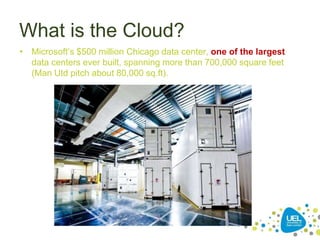
• Microsoft’s $500 million Chicago data center, one of the largest
data centers ever built, spanning more than 700,000 square feet
(Man Utd pitch about 80,000 sq.ft).
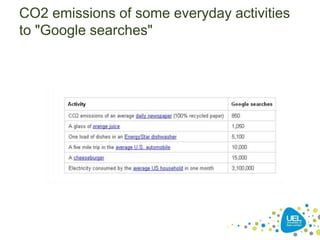
CO2 emissions of some everyday activities
to "Google searches"
Cloud Computing
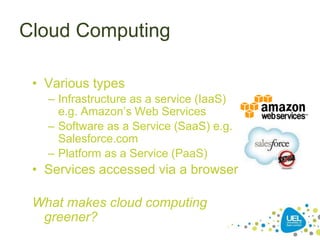
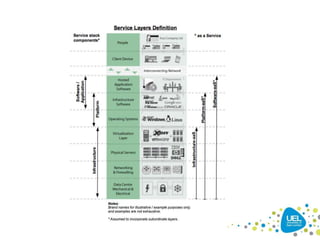
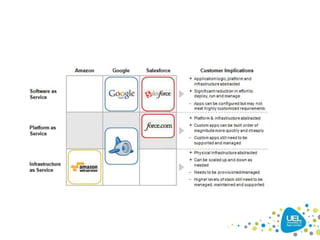
• Various types
– Infrastructure as a service (IaaS)
e.g. Amazon’s Web Services
– Software as a Service (SaaS) e.g.
Salesforce.com
– Platform as a Service (PaaS)
• Services accessed via a browser
What makes cloud computing
greener?
Cloud Architecture and
Characteristics
• typically consists of reliable services
delivered through data centres and built
on servers using virtualisation
• commercial offerings need to meet QoS
requirements and typically offer SLAs
• open standards and open source
software are key to growth of cloud
computing
• free, PAYG or subscription based
*
What is the Cloud?
• It’s not just data centres, but “reselling” capacity in data
centres is key:
– Advantage of economies of scale to reduce the cost-per-unit
service provision and maximize the opportunities for efficient energy
use in power and cooling systems – machine room vs. broom
cupboard?
– Remove redundant server components during production (e.g.
sound cards, USB ports).
– Usage can be maximized – “salesforce.com serves more than
1.5M users (and 55,000 enterprise customers) every day with less
than a 1,000 servers” (500 used to mirror data).
• “As of January 31, 2009, … a single, third-party Web hosting facility
located on the west coast of the United States, leased from Equinix, Inc.
…. replicated in near real-time in a separate [Equinix] back-up facility
located on the east”.
• What infrastructure duplication would occur if each enterprise
customer had their own in-house system?
Where is the Cloud?
• Amazon offers use of data centres in four
availability zones (US East/West, Ireland,
Singapore).
• Amazon.com also uses other data centres.
– In 2003, Amazon began to use Equinix as a data
centre provider. Equinix has 50 data centres in 19
locations worldwide, with 5 data centres, and the
company’s 50th, in and around London.
– The Salesforce CRM runs in Equinix facilities; further
Equinix customers include (or have included)
Myspace.com, NASA, Fox Sports Interactive Media
and Sandisk.
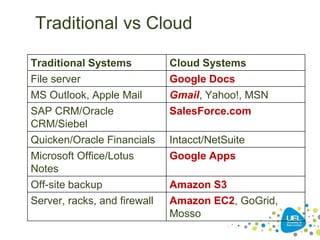
Traditional vs Cloud
Traditional Systems Cloud Systems
File server Google Docs
MS Outlook, Apple Mail Gmail, Yahoo!, MSN
SAP CRM/Oracle
CRM/Siebel
SalesForce.com
Quicken/Oracle Financials Intacct/NetSuite
Microsoft Office/Lotus
Notes
Google Apps
Off-site backup Amazon S3
Server, racks, and firewall Amazon EC2, GoGrid,
Mosso
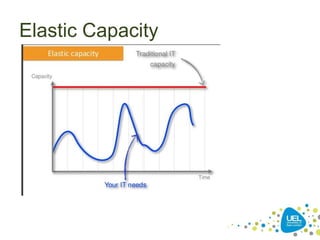
Elastic Capacity
SaaS
• SaaS probably the most mature *aaS of Cloud Computing
– For some, SaaS began with mainframes!
• Software as a package, with license, distributed on media,
installed by individuals / corporates – costs all round.
• Software becomes a download installed by individuals /
corporates – cheaper for producer.
• Software becomes large, difficult to install and configure,
and needs new hardware – more expensive for consumer.
– Company costs increased by software “bloat”; updates
become expensive to install, test, deploy, remove (on failure)
etc.
• Software usable over the internet.
SaaS
• Advantages?
– Bespoke infrastructure not required
– Reduced system administrator loading
– No upfront software costs
– Users supported by the organisation that knows the product
and how to make it work well
– BUT, some setup costs necessary. Training required, but
system consistency preferred, so incremental changes may
reduce training overhead.
• Disadvantages?
– Costs may be “per seat” rather than “per use”.
– Always-on connectivity / “thin pipes” problem.
– Vendor lock-in?
– Trust in third party?
– Limited support in Service Level Agreements?
– Emotional attachment to physical systems?
SaaS: Google Mail / Apps
• Trinity College Dublin
– Legacy email system that lacked the features that
students wanted; Achieved cost savings
associated with labour and operational efficiencies
• University of Westminster
• Reported £1 million savings on IT costs
• Universities of Portsmouth, Sunderland,
Loughborough...
http://www.google.com/a/help/intl/en/edu/customers.html
• Los Angeles City Council (2nd largest US city)
outsources e-mail to Google; $7.25-million
contract (5 years) to move all 30,000 city
employees.
IAAS
• Infrastructure as a Service (IaaS) is the
offering of a computing infrastructure as a
service.
• IaaS involves, rather than purchasing
software, servers, data center space or
network kit, customers buy those
resources as an outsourced provision.
• A IaaS service is usually billed on a utility.
Amazon Web Services (AWS)
• EC2: APIs for provisioning, managing, and
deprovisioning virtual servers inside the Amazon
cloud.
– Any application anywhere on the Internet can launch a
virtual server in the Amazon cloud with a single web
services call.
• Several “data centres” (availability zones)
• Amazon’s EC2 U.S. footprint spans three (or more)
data centers on the East Coast of the U.S. and two (or
more) in Western Europe.
• You cannot mix and match U.S. and European
environments, though you can run traffic between
them.
Adapted from Reese, Ch1.
IaaS
• Amazon Web Services (AWS) – including
EC2, S3, ….
• Rackspace
• Flexiscale
• GoGrid
• Joyent
• Terremark vCloud Express
• ElasticHosts
• NewServers
PAAS
• PaaS offerings facilitate deployment of
applications without the cost and
complexity of buying and managing the
underlying hardware and software and
provisioning hosting capabilities, providing
all of the facilities required to support the
complete life cycle of building and
delivering web applications and services
entirely available from the Internet.
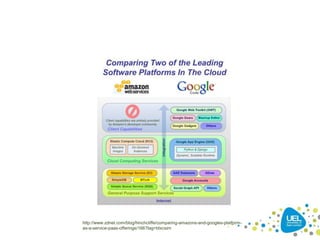
http://www.zdnet.com/blog/hinchcliffe/comparing-amazons-and-googles-platform-
as-a-service-paas-offerings/166?tag=btxcsim
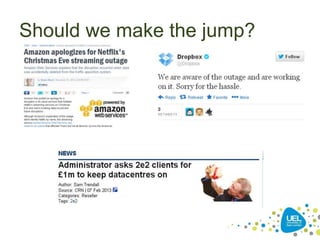
Should we make the jump?
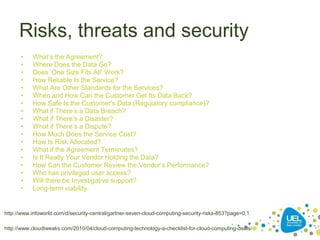
Risks, threats and security
• What’s the Agreement?
• Where Does the Data Go?
• Does ‘One Size Fits All’ Work?
• How Reliable Is the Service?
• What Are Other Standards for the Services?
• When and How Can the Customer Get Its Data Back?
• How Safe Is the Customer’s Data (Regulatory compliance)?
• What if There’s a Data Breach?
• What if There’s a Disaster?
• What if There’s a Dispute?
• How Much Does the Service Cost?
• How Is Risk Allocated?
• What if the Agreement Terminates?
• Is It Really Your Vendor Holding the Data?
• How Can the Customer Review the Vendor’s Performance?
• Who has privileged user access?
• Will there be Investigative support?
• Long-term viability.
*
http://www.infoworld.com/d/security-central/gartner-seven-cloud-computing-security-risks-853?page=0,1
http://www.cloudtweaks.com/2010/04/cloud-computing-technology-a-checklist-for-cloud-computing-deals/
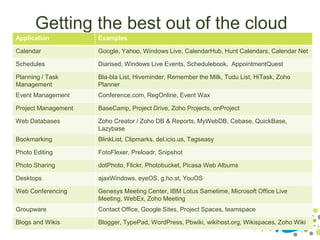
Getting the best out of the cloud
Application Examples
Calendar Google, Yahoo, Windows Live, CalendarHub, Hunt Calendars, Calendar Net
Schedules Diarised, Windows Live Events, Schedulebook, AppointmentQuest
Planning / Task
Management
Bla-bla List, Hiveminder, Remember the Milk, Tudu List, HiTask, Zoho
Planner
Event Management Conference.com, RegOnline, Event Wax
Project Management BaseCamp, Project Drive, Zoho Projects, onProject
Web Databases Zoho Creator / Zoho DB & Reports, MyWebDB, Cebase, QuickBase,
Lazybase
Bookmarking BlinkList, Clipmarks, del.icio.us, Tagseasy
Photo Editing FotoFlexer, Preloadr, Snipshot
Photo Sharing dotPhoto, Flickr, Photobucket, Picasa Web Albums
Desktops ajaxWindows, eyeOS, g.ho.st, YouOS
Web Conferencing Genesys Meeting Center, IBM Lotus Sametime, Microsoft Office Live
Meeting, WebEx, Zoho Meeting
Groupware Contact Office, Google Sites, Project Spaces, teamspace
Blogs and Wikis Blogger, TypePad, WordPress, Pbwiki, wikihost.org, Wikispaces, Zoho Wiki
Taking the first steps in cloud
computing deployment
• Standardisation
• Integration with legacy systems
• The market is full of supposed “Cloud”
providers – but it might not be “Cloud” as you
expect it or if you subscribe to NIST/Gartner
(etc.) definitions or Open Cloud Manifesto.
• A variety of pricing structures exists.
• Everybody has a faster Cloud than everybody
else.
Saving up for a rainy day
• At the macro-economic level, cloud computing helps achieve
economies of scale by centralizing compute power and
democratizing access.
• At the CIO level, cloud computing helps shift the mindset to
commoditize computing power, not servers, and therefore
drive efficiencies via virtualisation and greater utilisation rates
which allows systems to scale up or down due to load
fluctuations.
• At the data center level, cloud computing’s drive towards
consolidation paves the way for new standards for energy
efficiency.
• At the R&D level, cloud computing creates incentives for
software engineers to code more efficient applications, as
often their company will become the host for said applications.
Additional Reading
• Reese, G. (2009) “Cloud Application Architectures:
Building Applications and Infrastructure in the Cloud”.
O'Reilly Media, Inc. ISBN(13): 978-0596156367, 204
pages.
• Above the Clouds:
http://www.eecs.berkeley.edu/Pubs/TechRpts/2009/EECS-2009-28.pdf
• Amazon AWS:
http://docs.amazonwebservices.com/AWSEC2/latest/DeveloperGuide/
• Sun’s Introduction:
http://www.sun.com/featured-articles/CloudComputing.pdf
• Cloud Computing and the Law:
http://www.law.ed.ac.uk/ahrc/gikii/docs3/mowbray.pdf
References
• Images from splitshire.com
THANK YOU
Gaurav Malik
gaurav@uel.ac.uk

Cloud Computing Workshop

  • 1.
    Cloud Computing Workshop Barking& Dagenham Chamber of Commerce 26th March 2014
  • 2.
    About Me • GauravMalik (@GauravMalikTwit) – Senior Lecturer in Computer Science and Informatics • PRINCE2 Registered Practitioner • Microsoft Certified Professional • Certified Trainer Foundation Certificate in Green IT • CompTIA Cloud Essentials Certified – Interests include Green IT, cloud computing, mobile computing and web applications development
  • 3.
    Workshop Aims • anintroduction to Cloud Computing • risks, threats and security in cloud based solutions • getting the best out of the cloud • empowering your users and customers • taking the first steps in cloud computing deployment • saving up for a rainy day
  • 4.
    The ICT Lifecycle •ICT accounts for 2% of global CO2 emissions • Embodied vs. consumed energy – Embodied energy is associated with the manufacture and disposal of ICT – Consumed energy is associated with use of ICT • Embodied energy may be up to 50% of total • Should we replace or not?
  • 5.
    * Some Statistics • Globalelectricity consumption by PCs is growing by 5% year on year • Electricity consumption accounts for 10% of average SME’s IT budget (rising to 50%+ in extreme cases) • Cost of electricity to run a typical computer over its lifetime greater than purchase price • Global data centre electricity consumption doubled between 2000 and 2005
  • 6.
    The Need forGreen IT • The effects of climate change • The effects of ICT production and disposal – Large quantities of hazardous materials – Significant water and energy consumption – Concentrated mining of precious and non- precious metals • Dangerous and exploitative working practices
  • 7.
    Green IT Drivers •Environmental – ICT emissions set to rise significantly • Political – Improving our reputation • Social – Meeting the expectations of others • Legal – Meeting regulatory obligations
  • 9.
    Cloud Computing -a Definition • The storing and accessing of applications and computer data often through a Web browser rather than running installed software on your personal computer or office server • Internet-based computing whereby information, IT resources, and software applications are provided to computers and mobile devices on-demand • Using the Internet to access web-based applications, web services, and IT infrastructure as a service
  • 10.
    What is theCloud? • Microsoft’s $500 million Chicago data center, one of the largest data centers ever built, spanning more than 700,000 square feet (Man Utd pitch about 80,000 sq.ft).
  • 11.
    CO2 emissions ofsome everyday activities to "Google searches"
  • 12.
    Cloud Computing • Varioustypes – Infrastructure as a service (IaaS) e.g. Amazon’s Web Services – Software as a Service (SaaS) e.g. Salesforce.com – Platform as a Service (PaaS) • Services accessed via a browser What makes cloud computing greener?
  • 15.
    Cloud Architecture and Characteristics •typically consists of reliable services delivered through data centres and built on servers using virtualisation • commercial offerings need to meet QoS requirements and typically offer SLAs • open standards and open source software are key to growth of cloud computing • free, PAYG or subscription based *
  • 17.
    What is theCloud? • It’s not just data centres, but “reselling” capacity in data centres is key: – Advantage of economies of scale to reduce the cost-per-unit service provision and maximize the opportunities for efficient energy use in power and cooling systems – machine room vs. broom cupboard? – Remove redundant server components during production (e.g. sound cards, USB ports). – Usage can be maximized – “salesforce.com serves more than 1.5M users (and 55,000 enterprise customers) every day with less than a 1,000 servers” (500 used to mirror data). • “As of January 31, 2009, … a single, third-party Web hosting facility located on the west coast of the United States, leased from Equinix, Inc. …. replicated in near real-time in a separate [Equinix] back-up facility located on the east”. • What infrastructure duplication would occur if each enterprise customer had their own in-house system?
  • 18.
    Where is theCloud? • Amazon offers use of data centres in four availability zones (US East/West, Ireland, Singapore). • Amazon.com also uses other data centres. – In 2003, Amazon began to use Equinix as a data centre provider. Equinix has 50 data centres in 19 locations worldwide, with 5 data centres, and the company’s 50th, in and around London. – The Salesforce CRM runs in Equinix facilities; further Equinix customers include (or have included) Myspace.com, NASA, Fox Sports Interactive Media and Sandisk.
  • 19.
    Traditional vs Cloud TraditionalSystems Cloud Systems File server Google Docs MS Outlook, Apple Mail Gmail, Yahoo!, MSN SAP CRM/Oracle CRM/Siebel SalesForce.com Quicken/Oracle Financials Intacct/NetSuite Microsoft Office/Lotus Notes Google Apps Off-site backup Amazon S3 Server, racks, and firewall Amazon EC2, GoGrid, Mosso
  • 20.
  • 21.
    SaaS • SaaS probablythe most mature *aaS of Cloud Computing – For some, SaaS began with mainframes! • Software as a package, with license, distributed on media, installed by individuals / corporates – costs all round. • Software becomes a download installed by individuals / corporates – cheaper for producer. • Software becomes large, difficult to install and configure, and needs new hardware – more expensive for consumer. – Company costs increased by software “bloat”; updates become expensive to install, test, deploy, remove (on failure) etc. • Software usable over the internet.
  • 22.
    SaaS • Advantages? – Bespokeinfrastructure not required – Reduced system administrator loading – No upfront software costs – Users supported by the organisation that knows the product and how to make it work well – BUT, some setup costs necessary. Training required, but system consistency preferred, so incremental changes may reduce training overhead. • Disadvantages? – Costs may be “per seat” rather than “per use”. – Always-on connectivity / “thin pipes” problem. – Vendor lock-in? – Trust in third party? – Limited support in Service Level Agreements? – Emotional attachment to physical systems?
  • 23.
    SaaS: Google Mail/ Apps • Trinity College Dublin – Legacy email system that lacked the features that students wanted; Achieved cost savings associated with labour and operational efficiencies • University of Westminster • Reported £1 million savings on IT costs • Universities of Portsmouth, Sunderland, Loughborough... http://www.google.com/a/help/intl/en/edu/customers.html • Los Angeles City Council (2nd largest US city) outsources e-mail to Google; $7.25-million contract (5 years) to move all 30,000 city employees.
  • 24.
    IAAS • Infrastructure asa Service (IaaS) is the offering of a computing infrastructure as a service. • IaaS involves, rather than purchasing software, servers, data center space or network kit, customers buy those resources as an outsourced provision. • A IaaS service is usually billed on a utility.
  • 25.
    Amazon Web Services(AWS) • EC2: APIs for provisioning, managing, and deprovisioning virtual servers inside the Amazon cloud. – Any application anywhere on the Internet can launch a virtual server in the Amazon cloud with a single web services call. • Several “data centres” (availability zones) • Amazon’s EC2 U.S. footprint spans three (or more) data centers on the East Coast of the U.S. and two (or more) in Western Europe. • You cannot mix and match U.S. and European environments, though you can run traffic between them. Adapted from Reese, Ch1.
  • 26.
    IaaS • Amazon WebServices (AWS) – including EC2, S3, …. • Rackspace • Flexiscale • GoGrid • Joyent • Terremark vCloud Express • ElasticHosts • NewServers
  • 27.
    PAAS • PaaS offeringsfacilitate deployment of applications without the cost and complexity of buying and managing the underlying hardware and software and provisioning hosting capabilities, providing all of the facilities required to support the complete life cycle of building and delivering web applications and services entirely available from the Internet.
  • 28.
  • 31.
    Should we makethe jump?
  • 33.
    Risks, threats andsecurity • What’s the Agreement? • Where Does the Data Go? • Does ‘One Size Fits All’ Work? • How Reliable Is the Service? • What Are Other Standards for the Services? • When and How Can the Customer Get Its Data Back? • How Safe Is the Customer’s Data (Regulatory compliance)? • What if There’s a Data Breach? • What if There’s a Disaster? • What if There’s a Dispute? • How Much Does the Service Cost? • How Is Risk Allocated? • What if the Agreement Terminates? • Is It Really Your Vendor Holding the Data? • How Can the Customer Review the Vendor’s Performance? • Who has privileged user access? • Will there be Investigative support? • Long-term viability. * http://www.infoworld.com/d/security-central/gartner-seven-cloud-computing-security-risks-853?page=0,1 http://www.cloudtweaks.com/2010/04/cloud-computing-technology-a-checklist-for-cloud-computing-deals/
  • 34.
    Getting the bestout of the cloud Application Examples Calendar Google, Yahoo, Windows Live, CalendarHub, Hunt Calendars, Calendar Net Schedules Diarised, Windows Live Events, Schedulebook, AppointmentQuest Planning / Task Management Bla-bla List, Hiveminder, Remember the Milk, Tudu List, HiTask, Zoho Planner Event Management Conference.com, RegOnline, Event Wax Project Management BaseCamp, Project Drive, Zoho Projects, onProject Web Databases Zoho Creator / Zoho DB & Reports, MyWebDB, Cebase, QuickBase, Lazybase Bookmarking BlinkList, Clipmarks, del.icio.us, Tagseasy Photo Editing FotoFlexer, Preloadr, Snipshot Photo Sharing dotPhoto, Flickr, Photobucket, Picasa Web Albums Desktops ajaxWindows, eyeOS, g.ho.st, YouOS Web Conferencing Genesys Meeting Center, IBM Lotus Sametime, Microsoft Office Live Meeting, WebEx, Zoho Meeting Groupware Contact Office, Google Sites, Project Spaces, teamspace Blogs and Wikis Blogger, TypePad, WordPress, Pbwiki, wikihost.org, Wikispaces, Zoho Wiki
  • 36.
    Taking the firststeps in cloud computing deployment • Standardisation • Integration with legacy systems • The market is full of supposed “Cloud” providers – but it might not be “Cloud” as you expect it or if you subscribe to NIST/Gartner (etc.) definitions or Open Cloud Manifesto. • A variety of pricing structures exists. • Everybody has a faster Cloud than everybody else.
  • 37.
    Saving up fora rainy day • At the macro-economic level, cloud computing helps achieve economies of scale by centralizing compute power and democratizing access. • At the CIO level, cloud computing helps shift the mindset to commoditize computing power, not servers, and therefore drive efficiencies via virtualisation and greater utilisation rates which allows systems to scale up or down due to load fluctuations. • At the data center level, cloud computing’s drive towards consolidation paves the way for new standards for energy efficiency. • At the R&D level, cloud computing creates incentives for software engineers to code more efficient applications, as often their company will become the host for said applications.
  • 38.
    Additional Reading • Reese,G. (2009) “Cloud Application Architectures: Building Applications and Infrastructure in the Cloud”. O'Reilly Media, Inc. ISBN(13): 978-0596156367, 204 pages. • Above the Clouds: http://www.eecs.berkeley.edu/Pubs/TechRpts/2009/EECS-2009-28.pdf • Amazon AWS: http://docs.amazonwebservices.com/AWSEC2/latest/DeveloperGuide/ • Sun’s Introduction: http://www.sun.com/featured-articles/CloudComputing.pdf • Cloud Computing and the Law: http://www.law.ed.ac.uk/ahrc/gikii/docs3/mowbray.pdf
  • 39.
  • 40.