BASIC CONCEPTS
Cloud Computingis not the new concept.
It is in use since long, however, the term became very popular in recent couple
of decades.
Douglas Parkhill used the concept in his Book, “The Challenge of the
Computer Utility” in 1966 which
relates to Cloud Computing.
The first scholarly use of the term “Cloud Computing” was in a 1997 lecture by
Ramnath Chellappa, a B.Tech from IIT BHU, in his talk, titled, “Intermediaries
in Cloud-Computing”, presented at the INFORMS meeting in Dallas in 1997.
Amazon played a key role in the development of cloud computing by
modernizing their data centers, 2006.
Google, IBM and a number of universities embarked on a large scale cloud
computing research projects, largely from 2007 onwards.
Eucalyptus became the first open source platform for deploying private clouds
in 2008.
The then Microsoft's CEO, Steve Ballmer, made his strongest statement of
betting the company's future in the cloud by proclaiming, that about 75
4.
What is CloudComputing?
Cloud computing is the delivery of computing resources like
servers, storage, databases, networking, software, analytics
and more—over the Internet.
Cloud computing seems to be a new phrase but looking into
the concept, we all have been using it from quite a long., e.g.
email services of yahoo, google, sify or others, YouTube,
Google Docs, Social Networking sites, eGranthalaya, etc.
New technology model or new interpretation of web
technologies
Allows to avoid locally hosting multiple servers and
equipments and constantly dealing with hardware failure,
software installs, upgrades and compatibility issues
Simplify processes and save time and money
5.
Characteristics
Resources are sharedamong users. It works very fast in the
distributed computing environment.
It ensures "on-demand" provision of resources, without having
engineers for peak loads.
By sharing common infrastructure, it ensures to work
efficiently with multiple users and multiple applications. It
reduces the cost of services.
It is the characteristic of Cloud computing that users can access it
from any corner of the world simply through the internet
connection because the infrastructure is provided by a third-party.
These applications are easy to maintain as compared to
individual applications, since they are installed on a
common platform and can be accessed from different places.
There are minimum chances of infrastructure failure, so servers
are more reliable and highly available.
6.
Models
Service Models
Infrastructure asa Service (IaaS)
Platform as a Service (PaaS)
Software as a Service (SaaS)
Deployment Models
Private Cloud
Community Cloud
Public Cloud
Hybrid Cloud
7.
Service Models…
Infrastructure asa service (IaaS)
Most basic cloud service model
Providers offers computers, as physical or virtual
machines, block storage, firewalls, load balancers, like
switches and routers, and networks
Users install OS and application software
User responsible for patching and maintaining the
operating systems and application
software
Example:
–Amazon Web Services
–Joyent
Benefits: On-demand Self-Service, Broad network access,
8.
Service Models…
Platform asa Service (PaaS)
Offers operating system, programming
language execution environment, database and
web server
Provides for every phase of software
development and testing
No need to buy and manage the underlying
hardware and software layers by the
customer
Can be specialized around a particular area
like content management
Example:
9.
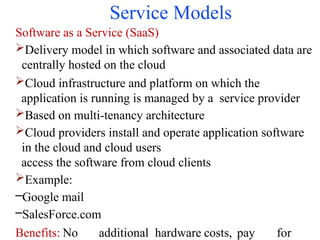
Service Models
Software asa Service (SaaS)
Delivery model in which software and associated data are
centrally hosted on the cloud
Cloud infrastructure and platform on which the
application is running is managed by a service provider
Based on multi-tenancy architecture
Cloud providers install and operate application software
in the cloud and cloud users
access the software from cloud clients
Example:
–Google mail
–SalesForce.com
Benefits: No additional hardware costs, pay for
10.
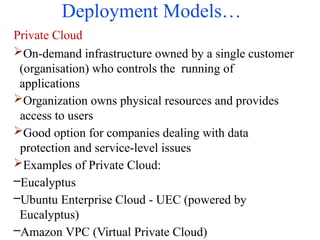
Deployment Models…
Private Cloud
On-demandinfrastructure owned by a single customer
(organisation) who controls the running of
applications
Organization owns physical resources and provides
access to users
Good option for companies dealing with data
protection and service-level issues
Examples of Private Cloud:
–Eucalyptus
–Ubuntu Enterprise Cloud - UEC (powered by
Eucalyptus)
–Amazon VPC (Virtual Private Cloud)
11.
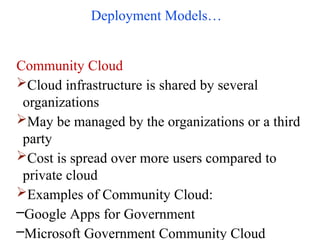
Deployment Models…
Community Cloud
Cloudinfrastructure is shared by several
organizations
May be managed by the organizations or a third
party
Cost is spread over more users compared to
private cloud
Examples of Community Cloud:
–Google Apps for Government
–Microsoft Government Community Cloud
12.
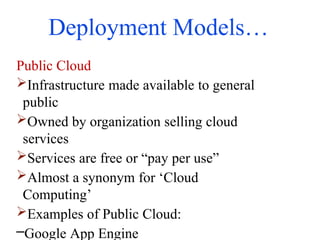
Deployment Models…
Public Cloud
Infrastructuremade available to general
public
Owned by organization selling cloud
services
Services are free or “pay per use”
Almost a synonym for ‘Cloud
Computing’
Examples of Public Cloud:
–Google App Engine
13.
Deployment Models
Hybrid Cloud
Compositionof two or more clouds (private,
community, or public)
Bound together by standardized or proprietary
technology that enables data and application
portability
Examples of Hybrid Cloud:
–Windows Azure (capable of Hybrid Cloud)
–VMware vCloud (Hybrid Cloud Services)
14.
Merits…
Cost Efficiency: Cloudcomputing is probably the most cost
efficient method to use, maintain and upgrade.
Scalability: “Pay as you go” allowing a more efficient control
of expenditures.
Greater security and Accessibility: Access to resources from any
geographical point and the ability to test and evaluate resources
at no cost.
Portability: since the service is available over the web, the
service can be availed through
browser from any part of the world.
Adjustable Storage: In the traditional system, if the server is less
than what we have. The server should be replaced with the new
one. In this computing, the storage capacity can be adjusted
according to the needs of the library, since the storage is controlled
by the service provider.
15.
Merits
Cloud OPAC: Mostof the libraries in the world are having the
catalogue over the web. These catalogues are available with their
libraries local server made it available over the web. If the
catalogue of the libraries made it available through cloud, it will
be more benefit to the users to find out the availability of
materials.
Backup and Recovery: Most cloud service providers are usually
competent enough to handle recovery of information. Hence, this
makes the entire process of backup and recovery much simpler
than other traditional methods of data storage.
Essay Access to Information: Once the users register in the cloud
they can access the information from anywhere, where there is an
internet connection. services, especially in building digital libraries.
Role of LIS professionals in this virtual era is to make cloud based
services as a reliable medium to disseminate library services to their
users with ease of use and trustworthiness.
16.
Demerits
Privacy and securityof data issues: It is very big concern that there is a risk about the privacy
and security of data. It can be accessed by others in cloud and it is more risky when the data is
sensitive such as credit card information of customers. In addition, there is also the risk of data
loss if there is a system failure or in case of improper backup.
Network connectivity and bandwidth: It is also a big concern that this service is directly
connected through internet. If there is connection failure, then the user cannot access.
Providers are supreme power: As these services are provided by third party, the organizations
have very little power to maintain and have to depend on the service providers.
Cost: Initially, the cost of this service could be higher as there are some common services for
all. The organizations can reduce the cost by more usage of these services.
Knowledge and integration: It is very important requirement that the organizations have their
own IT staff who have knowledge of cloud computing. Otherwise it is dependent on the
service provider.
Cloud interoperability issue: Each cloud offering its own way on how cloud
clients/applications/users
interact with the cloud, leading to the "Hazy Cloud" phenomenon.
Service level agreement: Although cloud consumers do not have control over the underlying
computing resources, they do need to ensure the quality, availability, reliability, and
performance of these resources when consumers have migrated their core business functions
onto their entrusted cloud.
17.
Free Cloud StorageServices…
Google
15 GB of free storage
Suite of applications that includes docs, spreadsheets, and
forms
Creation of online files with the availability to edit and
share in real-time
Integrate your Gmail and Google+ accounts
Dropbox
2 GB of free storage
Store photos, docs, and videos
Access from a computer or mobile device
Availability to share all or specific documents with
colleagues
18.
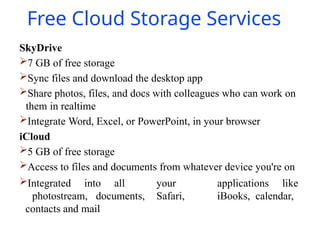
Free Cloud StorageServices
SkyDrive
7 GB of free storage
Sync files and download the desktop app
Share photos, files, and docs with colleagues who can work on
them in realtime
Integrate Word, Excel, or PowerPoint, in your browser
iCloud
5 GB of free storage
Access to files and documents from whatever device you're on
Integrated into all your applications like
photostream, documents, Safari, iBooks, calendar,
contacts and mail
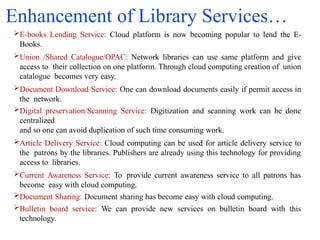
Enhancement of LibraryServices…
E-books Lending Service: Cloud platform is now becoming popular to lend the E-
Books.
Union /Shared Catalogue/OPAC: Network libraries can use same platform and give
access to their collection on one platform. Through cloud computing creation of union
catalogue becomes very easy.
Document Download Service: One can download documents easily if permit access in
the network.
Digital preservation/Scanning Service: Digitization and scanning work can be done
centralized
and so one can avoid duplication of such time consuming work.
Article Delivery Service: Cloud computing can be used for article delivery service to
the patrons by the libraries. Publishers are already using this technology for providing
access to libraries.
Current Awareness Service: To provide current awareness service to all patrons has
become easy with cloud computing.
Document Sharing: Document sharing has become easy with cloud computing.
Bulletin board service: We can provide new services on bulletin board with this
technology.
21.
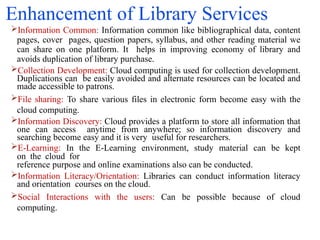
Enhancement of LibraryServices
Information Common: Information common like bibliographical data, content
pages, cover pages, question papers, syllabus, and other reading material we
can share on one platform. It helps in improving economy of library and
avoids duplication of library purchase.
Collection Development: Cloud computing is used for collection development.
Duplications can be easily avoided and alternate resources can be located and
made accessible to patrons.
File sharing: To share various files in electronic form become easy with the
cloud computing.
Information Discovery: Cloud provides a platform to store all information that
one can access anytime from anywhere; so information discovery and
searching become easy and it is very useful for researchers.
E-Learning: In the E-Learning environment, study material can be kept
on the cloud for
reference purpose and online examinations also can be conducted.
Information Literacy/Orientation: Libraries can conduct information literacy
and orientation courses on the cloud.
Social Interactions with the users: Can be possible because of cloud
computing.
22.
Applications in Libraries
Costsavings
Flexibility and innovation
Broad, general IT skills Vs. deep, specialized skill
Cloud OPAC and Cloud ILS
Private clouds, hybrid clouds and community clouds
Allow unfettered access to the cloud
Understand that the cloud may also be a valuable
information resource in its own right
Utilize the cloud to save time and money
Understand the importance of personalization
Don’t miss the most important aspect: Localization
Eliminate redundancy across distributed systems
23.
Role of CloudLibrarian…
To track member information and transactions
To provide Access Pinto students and define
validity. (Pin can be auto generated; Validity can be
set in the software)
To communicate with the member libraries
contributing their resources to cloud for
resource sharing
To communicate with the Ebooks, Journals publishers&
distributors, consortia, database
providers
To discuss with faculty members and subject experts, librarians
for preparing different packages for different faculties and
classes.
To update technological skills
To give technological support to member libraries
24.
Role of CloudLibrarian
To provide interlibrary loan facility
To track usage record of cloud resources
To develop digital collection
To keep record of physical resources too for providing referral
service
To deal with Cloud resource and players and select the best
bargain
To maintain own virtual profile by creating his or her blog or
social network profile to interact with the user. The same
platform can be used for providing reference services and
educating the users on cloud resources or how to use the Cloud
infrastructure.
To use his or her strategic planning and decision making ability
at different stages of
25.
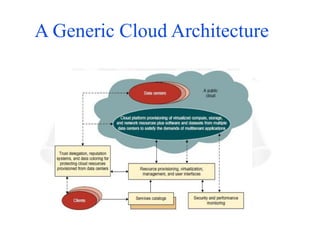
Generic Cloud ArchitectureDesign:
An Internet cloud is envisioned as a public cluster of servers
provisioned on demand to perform collective web services or
distributed applications using data-center resources.
• Cloud Platform Design Goals
• Enabling Technologies for Clouds
• A Generic Cloud Architecture
• Cloud Platform Design Goals
• Scalability
• Virtualization
• Efficiency Reliability
Security Cloud management receives the user request and finds the
correct resources. Cloud calls the provisioning services which invoke
the resources in the cloud. Cloud management software needs to
support both physical and virtual machine
26.
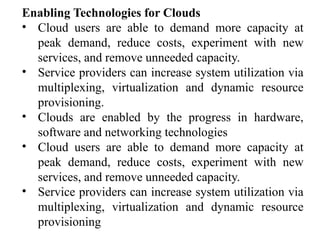
Enabling Technologies forClouds
• Cloud users are able to demand more capacity at
peak demand, reduce costs, experiment with new
services, and remove unneeded capacity.
• Service providers can increase system utilization via
multiplexing, virtualization and dynamic resource
provisioning.
• Clouds are enabled by the progress in hardware,
software and networking technologies
• Cloud users are able to demand more capacity at
peak demand, reduce costs, experiment with new
services, and remove unneeded capacity.
• Service providers can increase system utilization via
multiplexing, virtualization and dynamic resource
provisioning
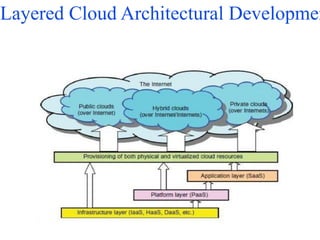
The architecture ofa cloud is developed at three layers
• Infrastructure
• Platform
• Application
Implemented with virtualization and standardization of hardware and
software resources provisioned in the cloud. The services to public,
private and hybrid clouds are conveyed to users through networking
support Infrastructure Layer
• Foundation for building the platform layer.
• Built with virtualized compute, storage, and network resources.
• Provide the flexibility demanded by users.
• Virtualization realizes automated provisioning of resources and
optimizes the infrastructure management process. Platform Layer
• Foundation for implementing the application layer for SaaS
applications.
• Used for general-purpose and repeated usage of the collection of
software resources.
30.
Provides users withan environment to develop their applications,
to test operation flows, and to monitor execution results and
performance. The platform should be able to assure users that
they have scalability, dependability, and security protection
Application Layer
• Collection of all needed software modules for SaaS
applications.
• Service applications in this layer include daily office
management work, such as information retrieval,
document processing, and authentication services.
• The application layer is also heavily used by enterprises in
business marketing and sales, consumer relationship
management (CRM) and financial transactions.
• Not all cloud services are restricted to a single layer.
• Many applications may apply resources at mixed layers.
• Three layers are built from the bottom up with a
dependence relationship
31.
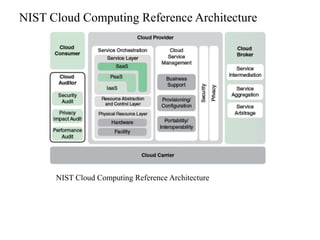
CLOUD REFERENCE ARCHITECTURE
NISTCloud Definition: The National Institute of
Standards and Technology (NIST) defines cloud
computing as a Architecture
Architecture consists of 3 tiers
• Cloud Deployment Model
• Cloud Service Model
• Essential Characteristics of Cloud Computing .
"pay-per-use model for enabling available, convenient
and on-demand network access to a shared pool of
configurable computing resources (e.g., networks,
servers, storage, applications and services) that can be
rapidly provisioned and released with minimal
SDN and NFV
•Cloud computing predates software-defined networking (SDN)
and network functions virtualization (NFV).
• While cloud computing can be, and has been, deployed and
managed without SDN and NFV, both of these technologies are
compelling for both private cloud operators and public cloud
service providers.
• In simplified and generalized terms, what SDN offers is
centralized command and control of network resources and
traffic patterns.
• A single central controller, or a few distributed cooperating
controllers, can configure and manage virtual networks and
provide QoS and security services.
• This relieves network management of the need to individually
configure and program each networking device.
35.
Service Provider Perspective
•A large cloud service provider will deal with thousands of
customers, with dynamic needs for capacity, both in terms of
traffic-carrying capacity and in terms of compute and storage
resources.
• The provider needs to be able to rapidly manage the entire
network to handle traffic bottlenecks, manage numerous traffic
flows with differing QoS requirements, and deal with outages
and other problems.
• All of this must be done in a secure manner. SDN can provide
the needed overall view of the entire network and secure,
centralized management of the network.
• The provider needs to be able to deploy and scale in/out and
up/down virtual switches, servers, and storage rapidly and
transparently for the customer. NFV provides the automated
tools for managing this process.
36.
Private Cloud Perspective
•Large and medium-size enterprises see a number of advantages
to moving much of their network-based operations to a private
cloud or a hybrid cloud.
• Their customers are end users, IT managers, and developers.
Individual departments may have substantial, dynamic IT
resource needs.
• The enterprise typically will need to develop one or multiple
server farms / data centers. As the overall resource demand
grows, the ability to deploy and manage all of the equipment
becomes more challenging.
• In addition, there are security requirements, such as firewalls,
and antivirus deployments.
• Further complicating the scenario is the need for load
balancing as projects grow and consume more resources, thus
the need for rapid scalability and provisioning of devices
becomes more pronounced.
• The need for automated provisioning of virtual networking