Presented By:-
Akash Tripathi
UIT-RGPV
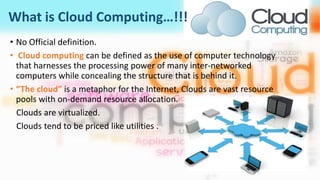
What is Cloud Computing…!!!
• No Official definition.
• Cloud computing can be defined as the use of computer technology
that harnesses the processing power of many inter-networked
computers while concealing the structure that is behind it.
• “The cloud” is a metaphor for the Internet, Clouds are vast resource
pools with on-demand resource allocation.
Clouds are virtualized.
Clouds tend to be priced like utilities .
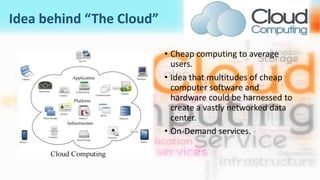
Idea behind “The Cloud”
• Cheap computing to average
users.
• Idea that multitudes of cheap
computer software and
hardware could be harnessed to
create a vastly networked data
center.
• On-Demand services.
BuzzWord Today
Compared to Grid Computing And utility
computing.
Cloud computing infrastructure usually use
virtualization technology.
It’s built is based on Server cluster.
It is used to compete with Dedicated server
and Colocation.
Cloud Computing
• Every user can get it’s own private resource from the
cloud, the cloud resource are provided by the specific
service provider, the user need not contribute its
resource.
• Computing resources, such as servers, can be
dynamically shaped or carved out from its underlying
hardware infrastructure and made available to a
workload.
• Long-lived services based on hardware virtualization.
• Resource side middleware- proprietary.
• User Interface-HTTP[S] ,REST, SOAP, java, API, BitTorrent.
• Commercially funded.
Grid Computing
• Grid computing emphasizes on resource sharing,
every grid node can apply for resource from other
nodes and vice-versa.
• The focus of grid computing is on the ability of
moving a workload to the location of the needed
computing resources, which are mostly remote
and are readily available.
• Short-lived batch-style processing (job execution).
• Resource side middleware-Open source Apache
2.0 .
• User Interface-High Level interface.
• Publicly funded.
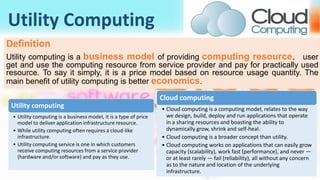
Utility Computing
Definition
Utility computing is a business model of providing computing resource, user
get and use the computing resource from service provider and pay for practically used
resource. To say it simply, it is a price model based on resource usage quantity. The
main benefit of utility computing is better economics.
Utility computing
• Utility computing is a business model, it is a type of price
model to deliver application infrastructure resource.
• While utility computing often requires a cloud-like
infrastructure.
• Utility computing service is one in which customers
receive computing resources from a service provider
(hardware and/or software) and pay as they use.
Cloud computing
• Cloud computing is a computing model, relates to the way
we design, build, deploy and run applications that operate
in a sharing resources and boasting the ability to
dynamically grow, shrink and self-heal.
• Cloud computing is a broader concept than utility.
• Cloud computing works on applications that can easily grow
capacity (scalability), work fast (performance), and never —
or at least rarely — fail (reliability), all without any concern
as to the nature and location of the underlying
infrastructure.
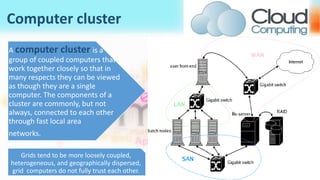
Computer cluster
A computer cluster is a
group of coupled computers that
work together closely so that in
many respects they can be viewed
as though they are a single
computer. The components of a
cluster are commonly, but not
always, connected to each other
through fast local area
networks.
Grids tend to be more loosely coupled,
heterogeneous, and geographically dispersed,
grid computers do not fully trust each other.
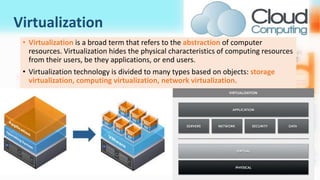
Virtualization
• Virtualization is a broad term that refers to the abstraction of computer
resources. Virtualization hides the physical characteristics of computing resources
from their users, be they applications, or end users.
• Virtualization technology is divided to many types based on objects: storage
virtualization, computing virtualization, network virtualization.
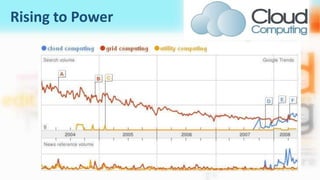
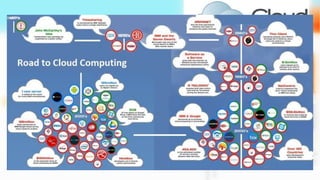
Rising to Power
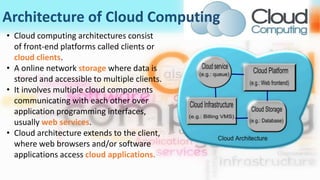
Architecture of Cloud Computing
• Cloud computing architectures consist
of front-end platforms called clients or
cloud clients.
• A online network storage where data is
stored and accessible to multiple clients.
• It involves multiple cloud components
communicating with each other over
application programming interfaces,
usually web services.
• Cloud architecture extends to the client,
where web browsers and/or software
applications access cloud applications.
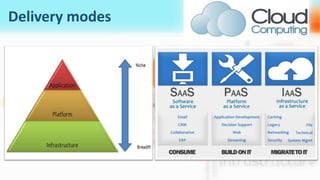
Delivery modes
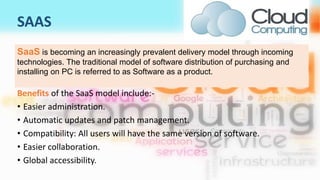
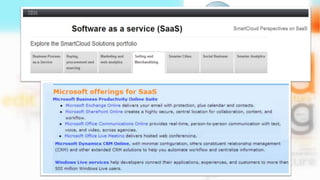
SAAS
Benefits of the SaaS model include:-
• Easier administration.
• Automatic updates and patch management.
• Compatibility: All users will have the same version of software.
• Easier collaboration.
• Global accessibility.
SaaS is becoming an increasingly prevalent delivery model through incoming
technologies. The traditional model of software distribution of purchasing and
installing on PC is referred to as Software as a product.
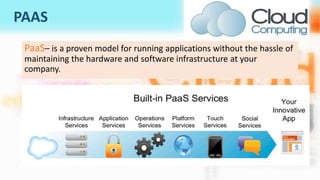
PAAS
PaaS– is a proven model for running applications without the hassle of
maintaining the hardware and software infrastructure at your
company.
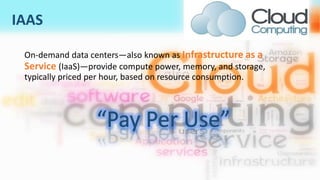
IAAS
On-demand data centers—also known as Infrastructure as a
Service (IaaS)—provide compute power, memory, and storage,
typically priced per hour, based on resource consumption.
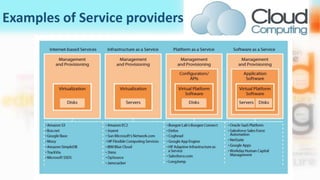
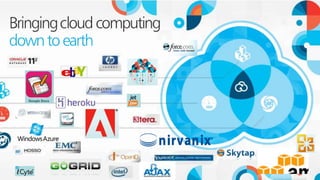
Examples of Service providers
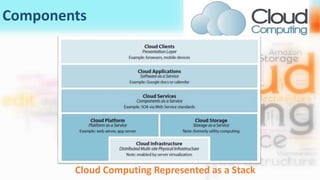
Components
Cloud Computing Represented as a Stack
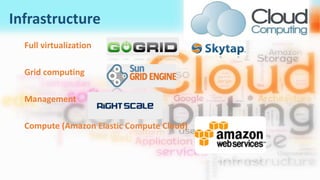
Infrastructure
Full virtualization
Grid computing
Management
Compute (Amazon Elastic Compute Cloud)
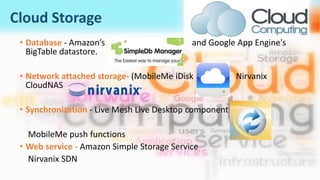
Cloud Storage
• Database - Amazon’s and Google App Engine's
BigTable datastore.
• Network attached storage- (MobileMe iDisk Nirvanix
CloudNAS
• Synchronization - Live Mesh Live Desktop component
MobileMe push functions
• Web service - Amazon Simple Storage Service
Nirvanix SDN
Platform
Web application frameworks
• Ajax (Caspio)
• Python Django (Google App Engine)
• Ruby on Rails (Heroku)
• Web hosting (Mosso, Clustered Cloud)
• Proprietary (Azure, Force.com)
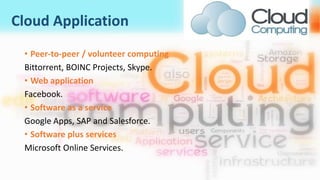
Cloud Application
• Peer-to-peer / volunteer computing
Bittorrent, BOINC Projects, Skype.
• Web application
Facebook.
• Software as a service
Google Apps, SAP and Salesforce.
• Software plus services
Microsoft Online Services.
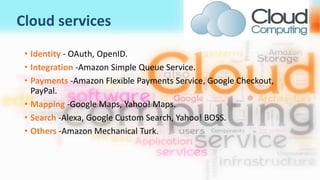
Cloud services
• Identity - OAuth, OpenID.
• Integration -Amazon Simple Queue Service.
• Payments -Amazon Flexible Payments Service, Google Checkout,
PayPal.
• Mapping -Google Maps, Yahoo! Maps.
• Search -Alexa, Google Custom Search, Yahoo! BOSS.
• Others -Amazon Mechanical Turk.
Cloud Client
• Mobile - Android, iPhone, Windows Mobile.
• Thin client - CherryPal, Zonbu, gOS-based systems.
• Thick client / Web browser - Google Chrome, Mozilla Firefox.
Advantages
• Virtual – Physical location and underlying infrastructure details are transparent to users.
• Elastic Scalability – Able to break complex workloads into pieces to be served across an
incrementally expandable infrastructure.
• Efficient – Services Oriented Architecture for dynamic provisioning of shared compute
resources.
• Flexible – Can serve a variety of workload types – both consumer and commercial.
• OS-Application architecture independent
• Usage metered
• No long term commitments
• Cost Efficient
• Almost Unlimited Storage
• Backup and Recovery
• Easy Access to Information
• Quick Deployment
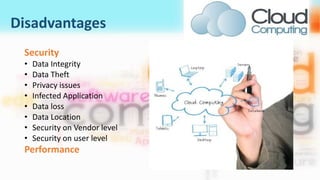
Disadvantages
Security
• Data Integrity
• Data Theft
• Privacy issues
• Infected Application
• Data loss
• Data Location
• Security on Vendor level
• Security on user level
Performance
Future of cloud
• Effect of cloud computing on future IT jobs.
• There will be the need for a higher percentage of Business Analysts in IT.
• There will be the need for a higher percentage of Project Managers
within IT.
• Data integration jobs will increase in demand because the use of multiple
cloud-based vendors.
• Technologists with a deep understanding and working knowledge of
private and hybrid clouds.
• Days of Infrastructure specialists.
• Need for highly skilled security specialists
Thank You…!!!

Cloud computing presentation

  • 1.
  • 3.
    What is CloudComputing…!!! • No Official definition. • Cloud computing can be defined as the use of computer technology that harnesses the processing power of many inter-networked computers while concealing the structure that is behind it. • “The cloud” is a metaphor for the Internet, Clouds are vast resource pools with on-demand resource allocation. Clouds are virtualized. Clouds tend to be priced like utilities .
  • 4.
    Idea behind “TheCloud” • Cheap computing to average users. • Idea that multitudes of cheap computer software and hardware could be harnessed to create a vastly networked data center. • On-Demand services.
  • 5.
    BuzzWord Today Compared toGrid Computing And utility computing. Cloud computing infrastructure usually use virtualization technology. It’s built is based on Server cluster. It is used to compete with Dedicated server and Colocation.
  • 6.
    Cloud Computing • Everyuser can get it’s own private resource from the cloud, the cloud resource are provided by the specific service provider, the user need not contribute its resource. • Computing resources, such as servers, can be dynamically shaped or carved out from its underlying hardware infrastructure and made available to a workload. • Long-lived services based on hardware virtualization. • Resource side middleware- proprietary. • User Interface-HTTP[S] ,REST, SOAP, java, API, BitTorrent. • Commercially funded. Grid Computing • Grid computing emphasizes on resource sharing, every grid node can apply for resource from other nodes and vice-versa. • The focus of grid computing is on the ability of moving a workload to the location of the needed computing resources, which are mostly remote and are readily available. • Short-lived batch-style processing (job execution). • Resource side middleware-Open source Apache 2.0 . • User Interface-High Level interface. • Publicly funded.
  • 7.
    Utility Computing Definition Utility computingis a business model of providing computing resource, user get and use the computing resource from service provider and pay for practically used resource. To say it simply, it is a price model based on resource usage quantity. The main benefit of utility computing is better economics. Utility computing • Utility computing is a business model, it is a type of price model to deliver application infrastructure resource. • While utility computing often requires a cloud-like infrastructure. • Utility computing service is one in which customers receive computing resources from a service provider (hardware and/or software) and pay as they use. Cloud computing • Cloud computing is a computing model, relates to the way we design, build, deploy and run applications that operate in a sharing resources and boasting the ability to dynamically grow, shrink and self-heal. • Cloud computing is a broader concept than utility. • Cloud computing works on applications that can easily grow capacity (scalability), work fast (performance), and never — or at least rarely — fail (reliability), all without any concern as to the nature and location of the underlying infrastructure.
  • 8.
    Computer cluster A computercluster is a group of coupled computers that work together closely so that in many respects they can be viewed as though they are a single computer. The components of a cluster are commonly, but not always, connected to each other through fast local area networks. Grids tend to be more loosely coupled, heterogeneous, and geographically dispersed, grid computers do not fully trust each other.
  • 9.
    Virtualization • Virtualization isa broad term that refers to the abstraction of computer resources. Virtualization hides the physical characteristics of computing resources from their users, be they applications, or end users. • Virtualization technology is divided to many types based on objects: storage virtualization, computing virtualization, network virtualization.
  • 10.
  • 11.
    Architecture of CloudComputing • Cloud computing architectures consist of front-end platforms called clients or cloud clients. • A online network storage where data is stored and accessible to multiple clients. • It involves multiple cloud components communicating with each other over application programming interfaces, usually web services. • Cloud architecture extends to the client, where web browsers and/or software applications access cloud applications.
  • 12.
  • 13.
    SAAS Benefits of theSaaS model include:- • Easier administration. • Automatic updates and patch management. • Compatibility: All users will have the same version of software. • Easier collaboration. • Global accessibility. SaaS is becoming an increasingly prevalent delivery model through incoming technologies. The traditional model of software distribution of purchasing and installing on PC is referred to as Software as a product.
  • 15.
    PAAS PaaS– is aproven model for running applications without the hassle of maintaining the hardware and software infrastructure at your company.
  • 16.
    IAAS On-demand data centers—alsoknown as Infrastructure as a Service (IaaS)—provide compute power, memory, and storage, typically priced per hour, based on resource consumption.
  • 17.
  • 18.
  • 19.
  • 20.
    Cloud Storage • Database- Amazon’s and Google App Engine's BigTable datastore. • Network attached storage- (MobileMe iDisk Nirvanix CloudNAS • Synchronization - Live Mesh Live Desktop component MobileMe push functions • Web service - Amazon Simple Storage Service Nirvanix SDN
  • 21.
    Platform Web application frameworks •Ajax (Caspio) • Python Django (Google App Engine) • Ruby on Rails (Heroku) • Web hosting (Mosso, Clustered Cloud) • Proprietary (Azure, Force.com)
  • 22.
    Cloud Application • Peer-to-peer/ volunteer computing Bittorrent, BOINC Projects, Skype. • Web application Facebook. • Software as a service Google Apps, SAP and Salesforce. • Software plus services Microsoft Online Services.
  • 23.
    Cloud services • Identity- OAuth, OpenID. • Integration -Amazon Simple Queue Service. • Payments -Amazon Flexible Payments Service, Google Checkout, PayPal. • Mapping -Google Maps, Yahoo! Maps. • Search -Alexa, Google Custom Search, Yahoo! BOSS. • Others -Amazon Mechanical Turk.
  • 24.
    Cloud Client • Mobile- Android, iPhone, Windows Mobile. • Thin client - CherryPal, Zonbu, gOS-based systems. • Thick client / Web browser - Google Chrome, Mozilla Firefox.
  • 27.
    Advantages • Virtual –Physical location and underlying infrastructure details are transparent to users. • Elastic Scalability – Able to break complex workloads into pieces to be served across an incrementally expandable infrastructure. • Efficient – Services Oriented Architecture for dynamic provisioning of shared compute resources. • Flexible – Can serve a variety of workload types – both consumer and commercial. • OS-Application architecture independent • Usage metered • No long term commitments • Cost Efficient • Almost Unlimited Storage • Backup and Recovery • Easy Access to Information • Quick Deployment
  • 28.
    Disadvantages Security • Data Integrity •Data Theft • Privacy issues • Infected Application • Data loss • Data Location • Security on Vendor level • Security on user level Performance
  • 29.
    Future of cloud •Effect of cloud computing on future IT jobs. • There will be the need for a higher percentage of Business Analysts in IT. • There will be the need for a higher percentage of Project Managers within IT. • Data integration jobs will increase in demand because the use of multiple cloud-based vendors. • Technologists with a deep understanding and working knowledge of private and hybrid clouds. • Days of Infrastructure specialists. • Need for highly skilled security specialists
  • 31.