Cloud Computingwith BPOS and Windows AzureAVNI GUPTAMicrosoft Student Partner
AgendaWhat’s up with Cloud Computing?How it is relevant to you?Application ScenariosGetting into the core of the CloudUser ExperienceA DEMOSecurity ConcernsBenefitsQuestions & Answers
So, what exactly is the ‘Cloud’?In simple termsDelegate your headache to someone else out there
Focus on what you really want
Pay only for what you use
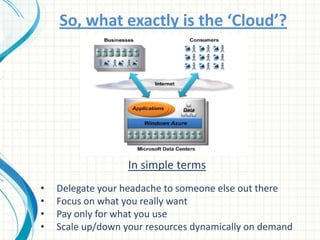
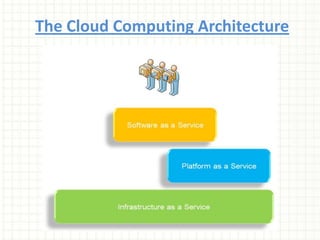
Scale up/down your resources dynamically on demandThe Cloud Computing Architecture
Ok fine, I get it.But does it matter to me?Yes, it does.If you are an IT Professional, Software Developer, Networking Professional or an above average Home Geek or aspiring to be one of them then you should know what Cloud Computing is.
Great! So what is Microsoft doing up in the CLOUD?Microsoft has two main Cloud Platforms which are available for use:-Business Productivity Online Suite (for IT/Infrastructure Professionals)Windows Azure (for Developers/ISVs)
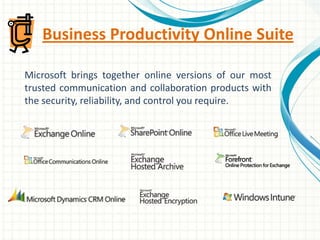
Business Productivity Online SuiteMicrosoft brings together online versions of our most trusted communication and collaboration products with the security, reliability, and control you require.
E-mail, shared calendars, & contactsMicrosoft Exchange Online is a hosted enterprise messaging solution based on Microsoft Exchange Server 2007 and provides the following:Improved e-mail security
Access to e-mail for your employees from virtually anywhere
Enhanced operational efficiency for your IT staff
25-gigabyte (GB) mailbox storage per standard licenseCollaborate on documents, share knowledge, and manage informationSharePoint Online brings together the familiar SharePoint collaboration platform now delivered as an online service making the power of the cloud work for your business.SharePoint Online provides a single, integrated location where employees can efficiently collaborate with team members, share knowledge and find organizational resources and information.
IM & presence awarenessMicrosoft Office Communications Online provides your organization with next-generation communications capabilities, including presence, instant messaging (IM), and PC-to-PC audio and video calling.Office Communications Online delivers embedded presence and a "click-to-communicate" experience with Microsoft Outlook and Microsoft SharePoint Server.
Hosted Web conferencingConnect with your colleagues and engage your customers through real-time meetings, training sessions, and events. Features include:Web client support for remote attendee flexibility
Interactive application/desktop sharing and whiteboard tools
Active speaker video switching, multi-party video, and multi-party VoIP audio
Rich-media presentations, native video conferencing, high-fidelity recording, and Web-cam capabilities
Training and event management with event and class registration and virtual breakout roomsPC management & securityWindows Intune simplifies how businesses manage and secure PCs using Windows cloud services and Windows 7—so your computers and users can operate at peak performance, from virtually anywhere.Windows Intune is a comprehensive solution that includes PC management, malware protection, Windows upgrades, and more.
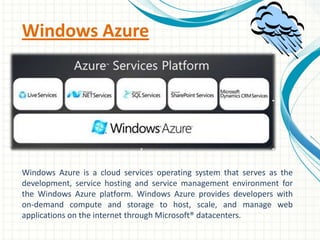
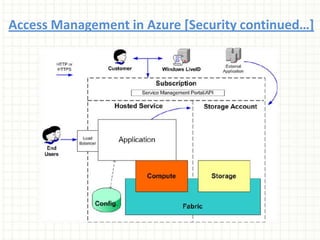
Windows AzureWindows Azure is a cloud services operating system that serves as the development, service hosting and service management environment for the Windows Azure platform. Windows Azure provides developers with on-demand compute and storage to host, scale, and manage web applications on the internet through Microsoft® datacenters.
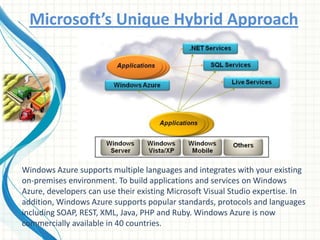
Microsoft’s Unique Hybrid ApproachWindows Azure supports multiple languages and integrates with your existing on-premises environment. To build applications and services on Windows Azure, developers can use their existing Microsoft Visual Studio expertise. In addition, Windows Azure supports popular standards, protocols and languages including SOAP, REST, XML, Java, PHP and Ruby. Windows Azure is now commercially available in 40 countries.
Live Services:Connect with Windows Live with over 500 million people love and use Windows Live services such as Messenger, SkyDrive, and Hotmail. Connect your site with them, their friends, and the things they care most about. We are currently in limited beta testing.NET Services:Service Bus helps to provide secure connectivity between loosely-coupled services and applications, enabling them to navigate firewalls or network boundaries and to use a variety of communication patterns. Services that register on Service Bus can easily be discovered and accessed, across any network topology.SQL Services:Microsoft® SQL Azure™ Database is the secure relational database based on familiar SQL Server technologies that you’ve come to rely on. The difference is that it’s a cloud database running in Microsoft datacenters around the globe. High-availability and fault tolerance are built in – giving you the ability to start small or serve a global customer base immediately.
Content Distribution Network (CDN)The Windows Azure content delivery network (CDN) enhances end user performance and reliability by placing copies of data closer to the user. A user accesses a proximate copy of the data as opposed to having to access a set of central servers. The Windows Azure CDN supports HTTP delivery of public content stored in Windows Azure storage. Content types include web objects (e.g. JPG, CSS, and JavaScript), downloadable objects (media files, software, documents) and other components for Internet delivery.Benefits of the CDN include better performance and user experience for end users who are farther from the source of the content, and are using applications where many ‘internet trips’ are required to complete the loading of a WEB page, and large distributed scale to better handle instantaneous high load, say at the start an event such as a product launch.
Typical Application ScenariosWindows Azure is a service that allows developers to run applications and store data on servers owned and operated by Microsoft. These cloud applications can be targeted at businesses, consumers or both. Some examples are:Enterprises that use Windows Azure to run their own line-of-business, batch processing or large-volume computations.

Cloud computing bpos & windows azure oss

  • 1.
    Cloud Computingwith BPOSand Windows AzureAVNI GUPTAMicrosoft Student Partner
  • 2.
    AgendaWhat’s up withCloud Computing?How it is relevant to you?Application ScenariosGetting into the core of the CloudUser ExperienceA DEMOSecurity ConcernsBenefitsQuestions & Answers
  • 3.
    So, what exactlyis the ‘Cloud’?In simple termsDelegate your headache to someone else out there
  • 4.
    Focus on whatyou really want
  • 5.
    Pay only forwhat you use
  • 6.
    Scale up/down yourresources dynamically on demandThe Cloud Computing Architecture
  • 7.
    Ok fine, Iget it.But does it matter to me?Yes, it does.If you are an IT Professional, Software Developer, Networking Professional or an above average Home Geek or aspiring to be one of them then you should know what Cloud Computing is.
  • 8.
    Great! So whatis Microsoft doing up in the CLOUD?Microsoft has two main Cloud Platforms which are available for use:-Business Productivity Online Suite (for IT/Infrastructure Professionals)Windows Azure (for Developers/ISVs)
  • 9.
    Business Productivity OnlineSuiteMicrosoft brings together online versions of our most trusted communication and collaboration products with the security, reliability, and control you require.
  • 10.
    E-mail, shared calendars,& contactsMicrosoft Exchange Online is a hosted enterprise messaging solution based on Microsoft Exchange Server 2007 and provides the following:Improved e-mail security
  • 11.
    Access to e-mailfor your employees from virtually anywhere
  • 12.
  • 13.
    25-gigabyte (GB) mailboxstorage per standard licenseCollaborate on documents, share knowledge, and manage informationSharePoint Online brings together the familiar SharePoint collaboration platform now delivered as an online service making the power of the cloud work for your business.SharePoint Online provides a single, integrated location where employees can efficiently collaborate with team members, share knowledge and find organizational resources and information.
  • 14.
    IM & presenceawarenessMicrosoft Office Communications Online provides your organization with next-generation communications capabilities, including presence, instant messaging (IM), and PC-to-PC audio and video calling.Office Communications Online delivers embedded presence and a "click-to-communicate" experience with Microsoft Outlook and Microsoft SharePoint Server.
  • 15.
    Hosted Web conferencingConnectwith your colleagues and engage your customers through real-time meetings, training sessions, and events. Features include:Web client support for remote attendee flexibility
  • 16.
  • 17.
    Active speaker videoswitching, multi-party video, and multi-party VoIP audio
  • 18.
    Rich-media presentations, nativevideo conferencing, high-fidelity recording, and Web-cam capabilities
  • 19.
    Training and eventmanagement with event and class registration and virtual breakout roomsPC management & securityWindows Intune simplifies how businesses manage and secure PCs using Windows cloud services and Windows 7—so your computers and users can operate at peak performance, from virtually anywhere.Windows Intune is a comprehensive solution that includes PC management, malware protection, Windows upgrades, and more.
  • 20.
    Windows AzureWindows Azureis a cloud services operating system that serves as the development, service hosting and service management environment for the Windows Azure platform. Windows Azure provides developers with on-demand compute and storage to host, scale, and manage web applications on the internet through Microsoft® datacenters.
  • 21.
    Microsoft’s Unique HybridApproachWindows Azure supports multiple languages and integrates with your existing on-premises environment. To build applications and services on Windows Azure, developers can use their existing Microsoft Visual Studio expertise. In addition, Windows Azure supports popular standards, protocols and languages including SOAP, REST, XML, Java, PHP and Ruby. Windows Azure is now commercially available in 40 countries.
  • 22.
    Live Services:Connect withWindows Live with over 500 million people love and use Windows Live services such as Messenger, SkyDrive, and Hotmail. Connect your site with them, their friends, and the things they care most about. We are currently in limited beta testing.NET Services:Service Bus helps to provide secure connectivity between loosely-coupled services and applications, enabling them to navigate firewalls or network boundaries and to use a variety of communication patterns. Services that register on Service Bus can easily be discovered and accessed, across any network topology.SQL Services:Microsoft® SQL Azure™ Database is the secure relational database based on familiar SQL Server technologies that you’ve come to rely on. The difference is that it’s a cloud database running in Microsoft datacenters around the globe. High-availability and fault tolerance are built in – giving you the ability to start small or serve a global customer base immediately.
  • 23.
    Content Distribution Network(CDN)The Windows Azure content delivery network (CDN) enhances end user performance and reliability by placing copies of data closer to the user. A user accesses a proximate copy of the data as opposed to having to access a set of central servers. The Windows Azure CDN supports HTTP delivery of public content stored in Windows Azure storage. Content types include web objects (e.g. JPG, CSS, and JavaScript), downloadable objects (media files, software, documents) and other components for Internet delivery.Benefits of the CDN include better performance and user experience for end users who are farther from the source of the content, and are using applications where many ‘internet trips’ are required to complete the loading of a WEB page, and large distributed scale to better handle instantaneous high load, say at the start an event such as a product launch.
  • 24.
    Typical Application ScenariosWindowsAzure is a service that allows developers to run applications and store data on servers owned and operated by Microsoft. These cloud applications can be targeted at businesses, consumers or both. Some examples are:Enterprises that use Windows Azure to run their own line-of-business, batch processing or large-volume computations.

Editor's Notes

  • #2 Hello! Good Afternoon.
  • #4 And technically, Cloud Computing is internet-based computing model where shared resources, software, information and computing power are provided to computers and other devices on demand, from a dynamically scalable and a virtualized pool of resources.It’s like electricity – you pay only as much as you use.
  • #8 http://www.microsoft.com/online/default.aspx
  • #9 And technically, Cloud Computing is internet-based computing model where shared resources, software, information and computing power are provided to computers and other devices on demand. It’s like electricity – you pay only as much as you use.Dynamically scalable and virtualized resources from a pool.
  • #14 http://www.microsoft.com/windowsazure/
  • #15 Remember to mention the Microsoft Advantage – cross site syncing.
  • #25 Slides created by Kunal D Mehta on 27th September 2010.Please leave your feedback on the MSP WLG and thank you for downloading! 