


CLOUD – AZURE
          an introduction


     Saravanan Subburayal
             07-Feb-2013
Agenda
•   What is Cloud Computing?
•   Myths
•   Common Product Scenario
•   Cloud Computing Patterns
•   Cloud Offerings
•   Major Cloud Players
•   Microsoft’s Cloud – Azure
•   Azure Services
•   Microsoft Data Centers
•   Windows Azure Instance sizes
•   Summary
                                   2
What is Cloud computing?


                           3
What is Cloud - computing?


Cloud computing is the use of computing
resources (hardware and software) that are
delivered as a service over a network (typically
the Internet)
What is Cloud - computing?


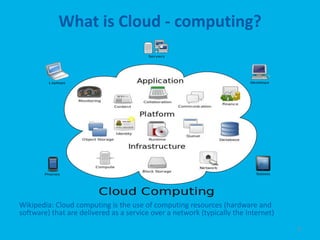
Wikipedia: Cloud computing is the use of computing resources (hardware and
software) that are delivered as a service over a network (typically the Internet)
                                                                                    6
Myths..


          7
Myths..

• It is not safe to move to Cloud.. Security???
• We will be locked into one vendor and lose
  control of its data, if it moves to the cloud.
• My company must move all its applications to
  a cloud service to be able to benefit fully from
  cloud computing.
• Only a small business can gain any cost savings
  benefit out of Cloud Computing.

                                                 8
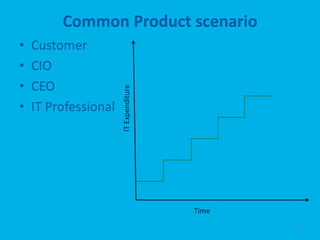
Common Product scenario
•   Customer
•   CIO
•   CEO

                      IT Expenditure
•   IT Professional


                                       Time

                                              9
Cloud computing patterns
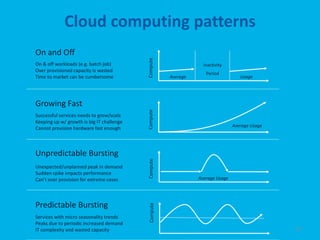
On and Off


                                           Compute
On & off workloads (e.g. batch job)                               Inactivity
Over provisioned capacity is wasted
                                                                   Period
Time to market can be cumbersome                      Average                      Usage


Growing Fast


                                           Compute
Successful services needs to grow/scale
Keeping up w/ growth is big IT challenge
                                                                                Average Usage
Cannot provision hardware fast enough


Unpredictable Bursting                     Compute

Unexpected/unplanned peak in demand
Sudden spike impacts performance
Can’t over provision for extreme cases                          Average Usage


Predictable Bursting
                                            Compute


Services with micro seasonality trends
Peaks due to periodic increased demand
IT complexity and wasted capacity                                                               10
Cloud Offerings
Cloud Offerings (detailed view)


                                  12
Cloud Offerings (Deployment)


                               13
Major Cloud Players


                      14
Microsoft’s view of Cloud


“ An approach to computing that’s about
internet scale and connecting to a variety of
devices and endpoints ”


                                                15
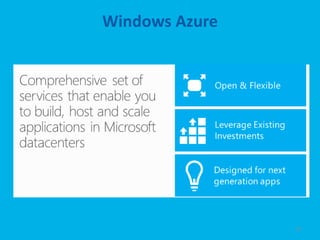
Windows Azure


                16
Windows Azure – provides
• Environments for your apps
• Machines, rack space, switches, connectivity
• Automated deployment & configuration
• Isolation, redundancy,
  load balancing
• Abstraction & Flexibility


                                                 17
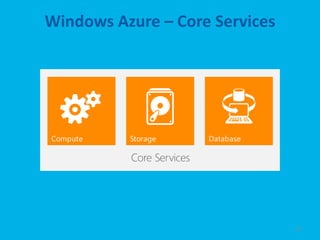
Windows Azure – Core Services


                                18
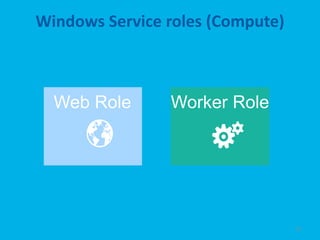
Windows Service roles (Compute)


                                  19
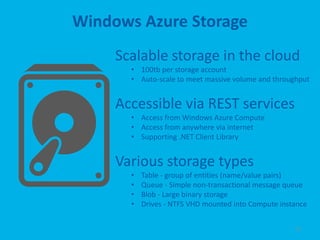
Windows Azure Storage
     Scalable storage in the cloud
       • 100tb per storage account
       • Auto-scale to meet massive volume and throughput


     Accessible via REST services
       • Access from Windows Azure Compute
       • Access from anywhere via internet
       • Supporting .NET Client Library


     Various storage types
       •   Table - group of entities (name/value pairs)
       •   Queue - Simple non-transactional message queue
       •   Blob - Large binary storage
       •   Drives - NTFS VHD mounted into Compute instance


                                                      22
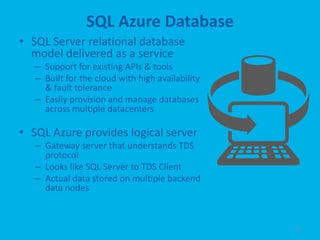
SQL Azure Database
• SQL Server relational database
  model delivered as a service
   – Support for existing APIs & tools
   – Built for the cloud with high availability
     & fault tolerance
   – Easily provision and manage databases
     across multiple datacenters

• SQL Azure provides logical server
   – Gateway server that understands TDS
     protocol
   – Looks like SQL Server to TDS Client
   – Actual data stored on multiple backend
     data nodes


                                                  23
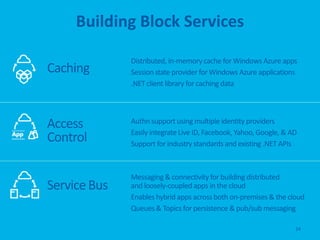
Building Block Services

              Distributed, in-memory cache for Windows Azure apps
Caching       Session state provider for Windows Azure applications
              .NET client library for caching data


Access        Authn support using multiple identity providers
              Easily integrate Live ID, Facebook, Yahoo, Google, & AD
Control       Support for industry standards and existing .NET APIs


              Messaging & connectivity for building distributed
Service Bus   and loosely-coupled apps in the cloud
              Enables hybrid apps across both on-premises & the cloud
              Queues & Topics for persistence & pub/sub messaging

                                                                    24
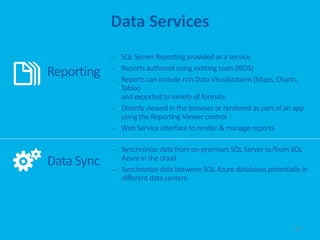
Data Services
            –   SQL Server Reporting provided as a service
            –   Reports authored using existing tools (BIDS)
Reporting   –   Reports can include rich Data Visualizations (Maps, Charts,
                Tablix)
                and exported to variety of formats
            –   Directly viewed in the browser or rendered as part of an app
                using the Reporting Viewer control
            –   Web Service interface to render & manage reports

            – Synchronize data from on-premises SQL Server to/from SQL
              Azure in the cloud
Data Sync   – Synchronize data between SQL Azure databases potentially in
              different data centers


                                                                         25
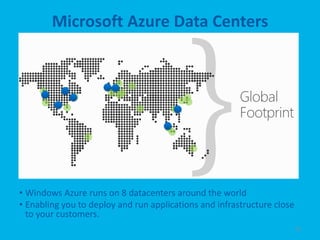
Microsoft Azure Data Centers


• Windows Azure runs on 8 datacenters around the world
• Enabling you to deploy and run applications and infrastructure close
  to your customers.
                                                                         26
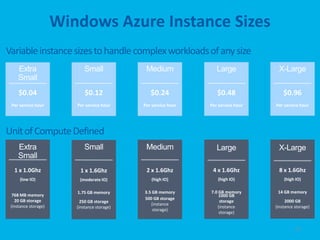
Windows Azure Instance Sizes
Variable instance sizes to handle complex workloads of any size


Unit of Compute Defined


                                                                  27
Summary
Windows Azure provides a comprehensive
set of services that you can selectively
compose to build your cloud apps
Global Data Center Footprint
99.95% Monthly SLA. Pay only for what you use.


Flexible & Open Compute Options
Virtual Machines, Web Sites, & Cloud Services

Managed Building Block Services
SQL Database, Cache, Service Bus, & more


                                                 29
30
31

Cloud - Azure – an introduction

  • 1.
    CLOUD – AZURE an introduction Saravanan Subburayal 07-Feb-2013
  • 2.
    Agenda • What is Cloud Computing? • Myths • Common Product Scenario • Cloud Computing Patterns • Cloud Offerings • Major Cloud Players • Microsoft’s Cloud – Azure • Azure Services • Microsoft Data Centers • Windows Azure Instance sizes • Summary 2
  • 3.
    What is Cloudcomputing? 3
  • 4.
    What is Cloud- computing? Cloud computing is the use of computing resources (hardware and software) that are delivered as a service over a network (typically the Internet)
  • 5.
    What is Cloud- computing? Wikipedia: Cloud computing is the use of computing resources (hardware and software) that are delivered as a service over a network (typically the Internet) 6
  • 6.
  • 7.
    Myths.. • It isnot safe to move to Cloud.. Security??? • We will be locked into one vendor and lose control of its data, if it moves to the cloud. • My company must move all its applications to a cloud service to be able to benefit fully from cloud computing. • Only a small business can gain any cost savings benefit out of Cloud Computing. 8
  • 8.
    Common Product scenario • Customer • CIO • CEO IT Expenditure • IT Professional Time 9
  • 9.
    Cloud computing patterns Onand Off Compute On & off workloads (e.g. batch job) Inactivity Over provisioned capacity is wasted Period Time to market can be cumbersome Average Usage Growing Fast Compute Successful services needs to grow/scale Keeping up w/ growth is big IT challenge Average Usage Cannot provision hardware fast enough Unpredictable Bursting Compute Unexpected/unplanned peak in demand Sudden spike impacts performance Can’t over provision for extreme cases Average Usage Predictable Bursting Compute Services with micro seasonality trends Peaks due to periodic increased demand IT complexity and wasted capacity 10
  • 10.
  • 11.
  • 12.
  • 13.
  • 14.
    Microsoft’s view ofCloud “ An approach to computing that’s about internet scale and connecting to a variety of devices and endpoints ” 15
  • 15.
  • 16.
    Windows Azure –provides • Environments for your apps • Machines, rack space, switches, connectivity • Automated deployment & configuration • Isolation, redundancy, load balancing • Abstraction & Flexibility 17
  • 17.
    Windows Azure –Core Services 18
  • 18.
  • 19.
    Windows Azure Storage Scalable storage in the cloud • 100tb per storage account • Auto-scale to meet massive volume and throughput Accessible via REST services • Access from Windows Azure Compute • Access from anywhere via internet • Supporting .NET Client Library Various storage types • Table - group of entities (name/value pairs) • Queue - Simple non-transactional message queue • Blob - Large binary storage • Drives - NTFS VHD mounted into Compute instance 22
  • 20.
    SQL Azure Database •SQL Server relational database model delivered as a service – Support for existing APIs & tools – Built for the cloud with high availability & fault tolerance – Easily provision and manage databases across multiple datacenters • SQL Azure provides logical server – Gateway server that understands TDS protocol – Looks like SQL Server to TDS Client – Actual data stored on multiple backend data nodes 23
  • 21.
    Building Block Services Distributed, in-memory cache for Windows Azure apps Caching Session state provider for Windows Azure applications .NET client library for caching data Access Authn support using multiple identity providers Easily integrate Live ID, Facebook, Yahoo, Google, & AD Control Support for industry standards and existing .NET APIs Messaging & connectivity for building distributed Service Bus and loosely-coupled apps in the cloud Enables hybrid apps across both on-premises & the cloud Queues & Topics for persistence & pub/sub messaging 24
  • 22.
    Data Services – SQL Server Reporting provided as a service – Reports authored using existing tools (BIDS) Reporting – Reports can include rich Data Visualizations (Maps, Charts, Tablix) and exported to variety of formats – Directly viewed in the browser or rendered as part of an app using the Reporting Viewer control – Web Service interface to render & manage reports – Synchronize data from on-premises SQL Server to/from SQL Azure in the cloud Data Sync – Synchronize data between SQL Azure databases potentially in different data centers 25
  • 23.
    Microsoft Azure DataCenters • Windows Azure runs on 8 datacenters around the world • Enabling you to deploy and run applications and infrastructure close to your customers. 26
  • 24.
    Windows Azure InstanceSizes Variable instance sizes to handle complex workloads of any size Unit of Compute Defined 27
  • 25.
    Summary Windows Azure providesa comprehensive set of services that you can selectively compose to build your cloud apps Global Data Center Footprint 99.95% Monthly SLA. Pay only for what you use. Flexible & Open Compute Options Virtual Machines, Web Sites, & Cloud Services Managed Building Block Services SQL Database, Cache, Service Bus, & more 29
  • 26.
  • 27.

Editor's Notes

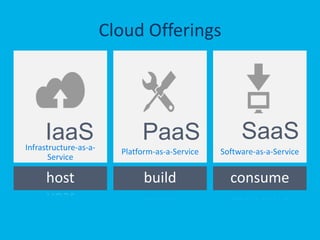
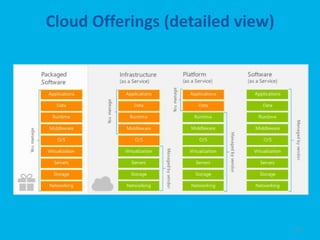
  • #12 Speaking Points:There is a lot of talk in the industry about different terms like Platform as a Service, Infrastructure as a Service, and Software as a Service.Since PDC08 when we first announced the Windows Azure our focus has been on delivering a platform as a service offering where you can build applications. Where the platform abstracts you from the complexities of building and running applications. We fundamentally believe that the future path forward for development is by providing a platform. In fact, as you’ll see in a few minutes, we believe that there are a number of new capabilities that should be delivered as services to the platform.Notes:There is a lot of confusion in the industry when it comes to the cloud. It’s important that you understand both what is happening in the industry and how we think about the cloud. This is the most commonly used taxonomy for differentiating between types of cloud services.The industry has defined three categories of services:IaaS – a set of infrastructure level capabilities such as an operating system, network connectivity, etc. that are delivered as pay for use services and can be used to host applications. PaaS – higher level sets of functionality that are delivered as consumable services for developers who are building applications. PaaS is about abstracting developers from the underlying infrastructure to enable applications to quickly be composed. SaaS – applications that are delivered using a service delivery model where organizations can simply consume and use the application. Typically an organization would pay for the use of the application or the application could be monetized through ad revenue. It is important to note that these 3 types of services may exist independently of one another or combined with one another. SaaS offerings needn’t be developed upon PaaS offerings although solutions built on PaaS offerings are often delivered as SaaS. PaaS offerings also needn’t expose IaaS and there’s more to PaaS than just running platforms on IaaS. ----Slide Objectives:Explain the three established terms in the industry for cloud servicesSpeaking Points:With this in mind, it’s important to understand how to talk about our Cloud Services offerings.There is a lot of confusion in the industry when it comes to the cloud. It’s important that you understand both what is happening in the industry and how we think about the cloud. This is the most commonly used taxonomy for differentiating between types of cloud services.The industry has defined three categories of services:IaaS – a set of infrastructure level capabilities such as an operating system, network connectivity, etc. that are delivered as pay for use services and can be used to host applications. PaaS – higher level sets of functionality that are delivered as consumable services for developers who are building applications. PaaS is about abstracting developers from the underlying infrastructure to enable applications to quickly be composed. SaaS – applications that are delivered using a service delivery model where organizations can simply consume and use the application. Typically an organization would pay for the use of the application or the application could be monetized through ad revenue. It is important to note that these 3 types of services may exist independently of one another or combined with one another. SaaS offerings needn’t be developed upon PaaS offerings although solutions built on PaaS offerings are often delivered as SaaS. PaaS offerings also needn’t expose IaaS and there’s more to PaaS than just running platforms on IaaS.