Enabling Fast, Dynamic Network
Processing with ClickOS
Joao Martins*, Mohamed Ahmed*, Costin Raiciu§, Roberto Bifulco*,
Vladimir Olteanu§, Michio Honda*, Felipe Huici*
* NEC Labs Europe, Heidelberg, Germany
§ University Politehnica of Bucharest
firstname.lastname@neclab.eu, firstname.lastname@cs.pub.ro
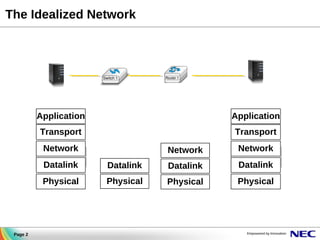
The Idealized Network

Application

Application

Transport

Transport

Network

Network

Network

Datalink

Datalink

Datalink

Physical

Page 2

Datalink
Physical

Physical

Physical
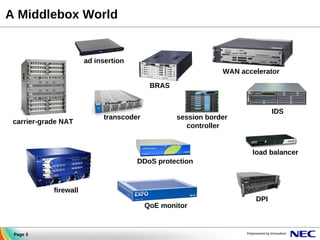
A Middlebox World

ad insertion
WAN accelerator
BRAS

carrier-grade NAT

transcoder

IDS

session border
controller

load balancer
DDoS protection

firewall
QoE monitor

Page 3

DPI
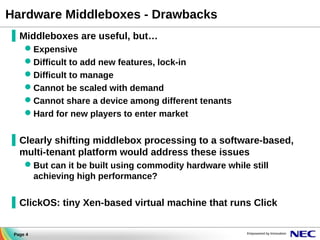
Hardware Middleboxes - Drawbacks
▐ Middleboxes are useful, but…
Expensive
Difficult to add new features, lock-in
Difficult to manage
Cannot be scaled with demand
Cannot share a device among different tenants
Hard for new players to enter market

▐ Clearly shifting middlebox processing to a software-based,
multi-tenant platform would address these issues
But can it be built using commodity hardware while still
achieving high performance?

▐ ClickOS: tiny Xen-based virtual machine that runs Click
Page 4
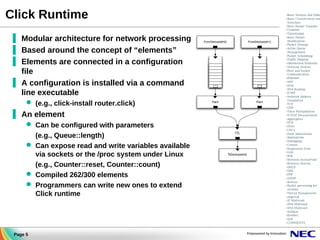
Click Runtime
▐ Modular architecture for network processing
▐ Based around the concept of “elements”
▐ Elements are connected in a configuration
file
▐ A configuration is installed via a command
line executable
 (e.g., click-install router.click)

▐ An element
 Can be configured with parameters
(e.g., Queue::length)
 Can expose read and write variables available
via sockets or the /proc system under Linux
(e.g., Counter::reset, Counter::count)
 Compiled 262/300 elements
 Programmers can write new ones to extend
Click runtime

Page 5
A simple (click-based) firewall example
in

:: FromNetFront(DEVMAC 00:11:22:33:44:55, BURST 1024);

out

:: ToNetFront(DEVMAC 00:11:22:33:44:55, BURST 1);

filter :: IPFilter(
allow src host 10.0.0.1 && dst host 10.1.0.1 && udp,
drop all);
in -> CheckIPHeader(14) -> filter
filter[0] -> Print(“allow”) -> out;
filter[1] -> Print(“drop”) -> Discard();

Page 6
What's ClickOS ?
domU

ClickOS

apps

Click

guest
OS

mini
OS

paravirt

paravirt

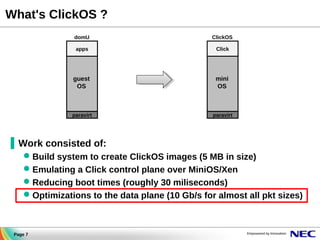
▐ Work consisted of:
 Build system to create ClickOS images (5 MB in size)
 Emulating a Click control plane over MiniOS/Xen
 Reducing boot times (roughly 30 miliseconds)
 Optimizations to the data plane (10 Gb/s for almost all pkt sizes)

Page 7
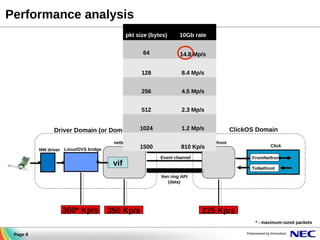
Performance analysis
pkt size (bytes)

10Gb rate

64

14.8 Mp/s

128

8.4 Mp/s

256

4.5 Mp/s

512

2.3 Mp/s

1024

1.2 Mp/s

Driver Domain (or Dom 0)
netback
NW driver Linux/OVS bridge

1500

vif

Xen bus/store
810

Kp/s

ClickOS Domain
netfront

Event channel

Click
FromNetfront
ToNetfront

Xen ring API
(data)

300* Kp/s

350 Kp/s

225 Kp/s
* - maximum-sized packets

Page 8
Main issues
▐ Backend switch ( bridge / openvswitch ) are slow
▐ Copying pages between domains (grant copy) greatly affects packet I/O
– These are done in batches, but still expensive
▐ Packet metadata (skb or mbufs) allocations
▐ MiniOS netfront not as good as Linux
– 225 Kpps VS 430 Kpps Tx
– only 8 Kpps Rx

Page 9

© NEC Corporation 2009
Optimizing Network I/O – Backend Switch
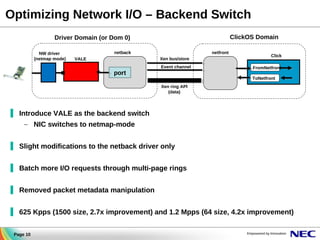
ClickOS Domain

Driver Domain (or Dom 0)
NW driver
(netmap mode)

netback

netfront
Xen bus/store

VALE

port

Event channel

Click
FromNetfront
ToNetfront

Xen ring API
(data)

▐ Introduce VALE as the backend switch
– NIC switches to netmap-mode
▐ Slight modifications to the netback driver only
▐ Batch more I/O requests through multi-page rings
▐ Removed packet metadata manipulation
▐ 625 Kpps (1500 size, 2.7x improvement) and 1.2 Mpps (64 size, 4.2x improvement)
Page 10
Background - Netmap
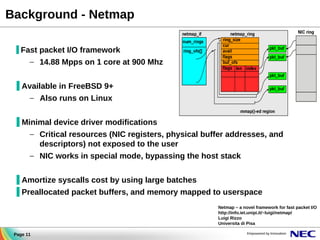
▐ Fast packet I/O framework

– 14.88 Mpps on 1 core at 900 Mhz
▐ Available in FreeBSD 9+
– Also runs on Linux
▐ Minimal device driver modifications
– Critical resources (NIC registers, physical buffer addresses, and
descriptors) not exposed to the user
– NIC works in special mode, bypassing the host stack
▐ Amortize syscalls cost by using large batches
▐ Preallocated packet buffers, and memory mapped to userspace
Netmap – a novel framework for fast packet I/O
http://info.iet.unipi.it/~luigi/netmap/
Luigi Rizzo
Universita di Pisa
Page 11
Background - VALE Software Switch

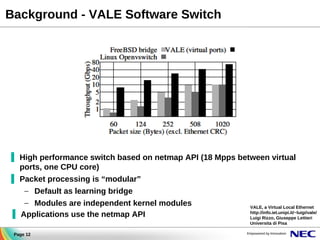
▐ High performance switch based on netmap API (18 Mpps between virtual
ports, one CPU core)
▐ Packet processing is “modular”
– Default as learning bridge
– Modules are independent kernel modules
▐ Applications use the netmap API
Page 12

VALE, a Virtual Local Ethernet
http://info.iet.unipi.it/~luigi/vale/
Luigi Rizzo, Giuseppe Lettieri
Universita di Pisa
Optimizing Network I/O
ClickOS Domain

Driver Domain (or Dom 0)
netfront

netback
NW driver

VALE

Click

Xen bus/store
TX/RX Event channels

FromNetfront
ToNetfront

Netmap API
(data)

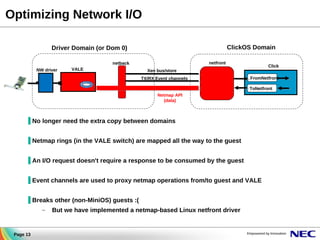
▐ No longer need the extra copy between domains
▐ Netmap rings (in the VALE switch) are mapped all the way to the guest
▐ An I/O request doesn't require a response to be consumed by the guest
▐ Event channels are used to proxy netmap operations from/to guest and VALE
▐ Breaks other (non-MiniOS) guests :(
–

Page 13

But we have implemented a netmap-based Linux netfront driver
Optimizing Network I/O – Initialization and Memory usage
▐ Netmap buffers are contiguous pages in guest memory

KB

# grants

slots

(per ring)

(per ring)

64

135

33

128

266

65

Driver Domain

256

528

130

VALE

512

1056

259

1024

2117

516

2048

4231

1033

▐ Buffers are 2k in size, each page fits 2 buffers
▐ Ring fits 1 page for 64 and 128 slots; (2+ for 256+ slots)

buf slot [0]
buf slot [1]
buf slot [2]
netmap
buffers pool

Vale
Mini-OS

Netback (Xen)

3. ring/bufs pages granted

netfront

app.

netmap API

netback
1. opens netmap device
2. registers a VALE port

Initialization

4. ring grant refs read from the xenstore
buffer refs read from the mapped ring slot
Optimizing Network I/O – Synchronization
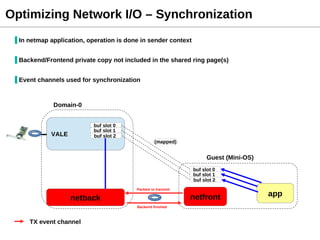
▐ In netmap application, operation is done in sender context
▐ Backend/Frontend private copy not included in the shared ring page(s)
▐ Event channels used for synchronization

Domain-0

VALE

buf slot 0
buf slot 1
buf slot 2

Vale

(mapped)

Guest (Mini-OS)

Netback (Xen)

buf slot 0
buf slot 1
buf slot 2
Packets to transmit

netfront

netback
Backend finished

TX event channel

app
EVALUATION
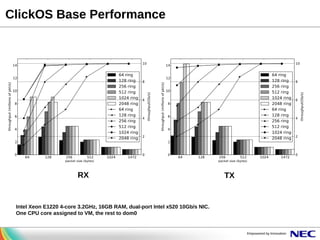
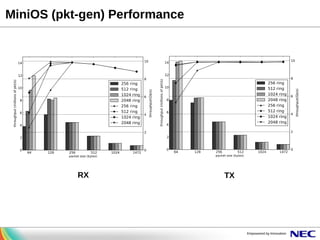
ClickOS Base Performance

RX

Intel Xeon E1220 4-core 3.2GHz, 16GB RAM, dual-port Intel x520 10Gb/s NIC.
One CPU core assigned to VM, the rest to dom0

TX
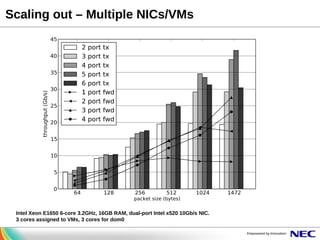
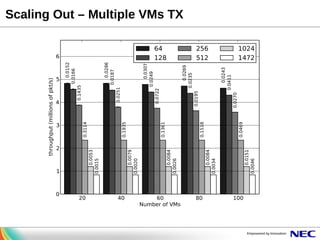
Scaling out – Multiple NICs/VMs

Intel Xeon E1650 6-core 3.2GHz, 16GB RAM, dual-port Intel x520 10Gb/s NIC.
3 cores assigned to VMs, 3 cores for dom0
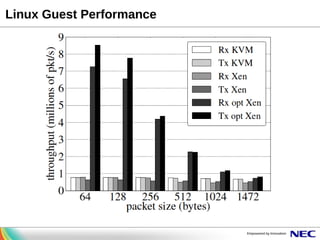
Linux Guest Performance
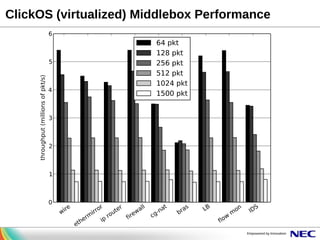
ClickOS (virtualized) Middlebox Performance
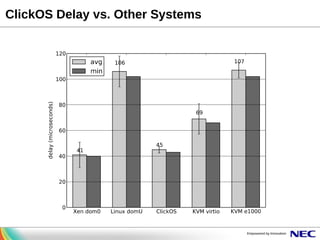
ClickOS Delay vs. Other Systems
Conclusions
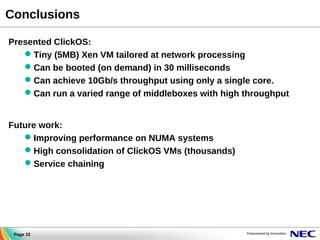
Presented ClickOS:
 Tiny (5MB) Xen VM tailored at network processing
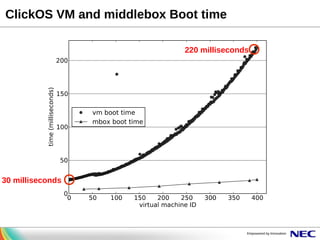
 Can be booted (on demand) in 30 milliseconds
 Can achieve 10Gb/s throughput using only a single core.
 Can run a varied range of middleboxes with high throughput
Future work:
 Improving performance on NUMA systems
 High consolidation of ClickOS VMs (thousands)
 Service chaining

Page 22
MiniOS (pkt-gen) Performance

RX

TX
Scaling Out – Multiple VMs TX
ClickOS VM and middlebox Boot time
220 milliseconds

30 milliseconds

XPDS13: Enabling Fast, Dynamic Network Processing with ClickOS - Joao Martins, NEC

  • 1.
    Enabling Fast, DynamicNetwork Processing with ClickOS Joao Martins*, Mohamed Ahmed*, Costin Raiciu§, Roberto Bifulco*, Vladimir Olteanu§, Michio Honda*, Felipe Huici* * NEC Labs Europe, Heidelberg, Germany § University Politehnica of Bucharest firstname.lastname@neclab.eu, firstname.lastname@cs.pub.ro
  • 2.
  • 3.
    A Middlebox World adinsertion WAN accelerator BRAS carrier-grade NAT transcoder IDS session border controller load balancer DDoS protection firewall QoE monitor Page 3 DPI
  • 4.
    Hardware Middleboxes -Drawbacks ▐ Middleboxes are useful, but… Expensive Difficult to add new features, lock-in Difficult to manage Cannot be scaled with demand Cannot share a device among different tenants Hard for new players to enter market ▐ Clearly shifting middlebox processing to a software-based, multi-tenant platform would address these issues But can it be built using commodity hardware while still achieving high performance? ▐ ClickOS: tiny Xen-based virtual machine that runs Click Page 4
  • 5.
    Click Runtime ▐ Modulararchitecture for network processing ▐ Based around the concept of “elements” ▐ Elements are connected in a configuration file ▐ A configuration is installed via a command line executable  (e.g., click-install router.click) ▐ An element  Can be configured with parameters (e.g., Queue::length)  Can expose read and write variables available via sockets or the /proc system under Linux (e.g., Counter::reset, Counter::count)  Compiled 262/300 elements  Programmers can write new ones to extend Click runtime Page 5
  • 6.
    A simple (click-based)firewall example in :: FromNetFront(DEVMAC 00:11:22:33:44:55, BURST 1024); out :: ToNetFront(DEVMAC 00:11:22:33:44:55, BURST 1); filter :: IPFilter( allow src host 10.0.0.1 && dst host 10.1.0.1 && udp, drop all); in -> CheckIPHeader(14) -> filter filter[0] -> Print(“allow”) -> out; filter[1] -> Print(“drop”) -> Discard(); Page 6
  • 7.
    What's ClickOS ? domU ClickOS apps Click guest OS mini OS paravirt paravirt ▐Work consisted of:  Build system to create ClickOS images (5 MB in size)  Emulating a Click control plane over MiniOS/Xen  Reducing boot times (roughly 30 miliseconds)  Optimizations to the data plane (10 Gb/s for almost all pkt sizes) Page 7
  • 8.
    Performance analysis pkt size(bytes) 10Gb rate 64 14.8 Mp/s 128 8.4 Mp/s 256 4.5 Mp/s 512 2.3 Mp/s 1024 1.2 Mp/s Driver Domain (or Dom 0) netback NW driver Linux/OVS bridge 1500 vif Xen bus/store 810 Kp/s ClickOS Domain netfront Event channel Click FromNetfront ToNetfront Xen ring API (data) 300* Kp/s 350 Kp/s 225 Kp/s * - maximum-sized packets Page 8
  • 9.
    Main issues ▐ Backendswitch ( bridge / openvswitch ) are slow ▐ Copying pages between domains (grant copy) greatly affects packet I/O – These are done in batches, but still expensive ▐ Packet metadata (skb or mbufs) allocations ▐ MiniOS netfront not as good as Linux – 225 Kpps VS 430 Kpps Tx – only 8 Kpps Rx Page 9 © NEC Corporation 2009
  • 10.
    Optimizing Network I/O– Backend Switch ClickOS Domain Driver Domain (or Dom 0) NW driver (netmap mode) netback netfront Xen bus/store VALE port Event channel Click FromNetfront ToNetfront Xen ring API (data) ▐ Introduce VALE as the backend switch – NIC switches to netmap-mode ▐ Slight modifications to the netback driver only ▐ Batch more I/O requests through multi-page rings ▐ Removed packet metadata manipulation ▐ 625 Kpps (1500 size, 2.7x improvement) and 1.2 Mpps (64 size, 4.2x improvement) Page 10
  • 11.
    Background - Netmap ▐Fast packet I/O framework – 14.88 Mpps on 1 core at 900 Mhz ▐ Available in FreeBSD 9+ – Also runs on Linux ▐ Minimal device driver modifications – Critical resources (NIC registers, physical buffer addresses, and descriptors) not exposed to the user – NIC works in special mode, bypassing the host stack ▐ Amortize syscalls cost by using large batches ▐ Preallocated packet buffers, and memory mapped to userspace Netmap – a novel framework for fast packet I/O http://info.iet.unipi.it/~luigi/netmap/ Luigi Rizzo Universita di Pisa Page 11
  • 12.
    Background - VALESoftware Switch ▐ High performance switch based on netmap API (18 Mpps between virtual ports, one CPU core) ▐ Packet processing is “modular” – Default as learning bridge – Modules are independent kernel modules ▐ Applications use the netmap API Page 12 VALE, a Virtual Local Ethernet http://info.iet.unipi.it/~luigi/vale/ Luigi Rizzo, Giuseppe Lettieri Universita di Pisa
  • 13.
    Optimizing Network I/O ClickOSDomain Driver Domain (or Dom 0) netfront netback NW driver VALE Click Xen bus/store TX/RX Event channels FromNetfront ToNetfront Netmap API (data) ▐ No longer need the extra copy between domains ▐ Netmap rings (in the VALE switch) are mapped all the way to the guest ▐ An I/O request doesn't require a response to be consumed by the guest ▐ Event channels are used to proxy netmap operations from/to guest and VALE ▐ Breaks other (non-MiniOS) guests :( – Page 13 But we have implemented a netmap-based Linux netfront driver
  • 14.
    Optimizing Network I/O– Initialization and Memory usage ▐ Netmap buffers are contiguous pages in guest memory KB # grants slots (per ring) (per ring) 64 135 33 128 266 65 Driver Domain 256 528 130 VALE 512 1056 259 1024 2117 516 2048 4231 1033 ▐ Buffers are 2k in size, each page fits 2 buffers ▐ Ring fits 1 page for 64 and 128 slots; (2+ for 256+ slots) buf slot [0] buf slot [1] buf slot [2] netmap buffers pool Vale Mini-OS Netback (Xen) 3. ring/bufs pages granted netfront app. netmap API netback 1. opens netmap device 2. registers a VALE port Initialization 4. ring grant refs read from the xenstore buffer refs read from the mapped ring slot
  • 15.
    Optimizing Network I/O– Synchronization ▐ In netmap application, operation is done in sender context ▐ Backend/Frontend private copy not included in the shared ring page(s) ▐ Event channels used for synchronization Domain-0 VALE buf slot 0 buf slot 1 buf slot 2 Vale (mapped) Guest (Mini-OS) Netback (Xen) buf slot 0 buf slot 1 buf slot 2 Packets to transmit netfront netback Backend finished TX event channel app
  • 16.
  • 17.
    ClickOS Base Performance RX IntelXeon E1220 4-core 3.2GHz, 16GB RAM, dual-port Intel x520 10Gb/s NIC. One CPU core assigned to VM, the rest to dom0 TX
  • 18.
    Scaling out –Multiple NICs/VMs Intel Xeon E1650 6-core 3.2GHz, 16GB RAM, dual-port Intel x520 10Gb/s NIC. 3 cores assigned to VMs, 3 cores for dom0
  • 19.
  • 20.
  • 21.
    ClickOS Delay vs.Other Systems
  • 22.
    Conclusions Presented ClickOS:  Tiny(5MB) Xen VM tailored at network processing  Can be booted (on demand) in 30 milliseconds  Can achieve 10Gb/s throughput using only a single core.  Can run a varied range of middleboxes with high throughput Future work:  Improving performance on NUMA systems  High consolidation of ClickOS VMs (thousands)  Service chaining Page 22
  • 24.
  • 25.
    Scaling Out –Multiple VMs TX
  • 26.
    ClickOS VM andmiddlebox Boot time 220 milliseconds 30 milliseconds