Download to read offline
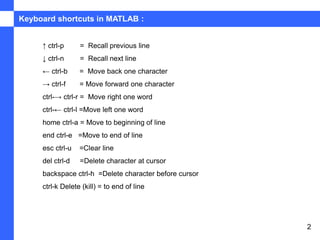
This document discusses keyboard shortcuts in MATLAB for navigating and editing code. It lists shortcuts for recalling previous and next lines, moving the cursor character by character or word by word, moving to the beginning or end of a line, clearing an entire line, and deleting characters either at or before the cursor position or to the end of a line.


![[Deck] What's New in Spark-Iceberg Integration via DSV2.pptx](https://cdn.slidesharecdn.com/ss_thumbnails/deckwhatsnewinspark-icebergintegrationviadsv2-260210005337-25955b12-thumbnail.jpg?width=640&height=640&fit=bounds)


