A round-up on Circular References
Posted on September 16th, 2010 in Learn Excel - 33 comments

Here is a little experiment to freak out excel.
Go to cell C3 and write =C3 and press Enter. Excel would throw up nasty
message saying, “Microsoft did not know what to do. We have a sent a support
engineer to your home, but he is stuck at the round-about near your house.”
Well, not really. But what you did when you wrote the formula =C3 in
cell C3 was, you created a circular reference.

What is a Circular Reference & why use them?
A circular reference is created when you refer to same cell either directly or
indirectly.
We use circular references when we need circular references.

Excel Circular Reference Example:
For eg. (borrowed from John Walkenbach’s Excel 2010 Bible), lets say you run a fictitious company
named Sky is the Ltd.
And you have a strange policy of donation 10% of your profits after tax to charity.
But, in your country, charity donations are tax exempt (they are expenses).
So charity = 10% * after tax profits
after tax profits = (revenues - expenses - charity)*(1-tax rate)

By definition, charity refers to after tax profits, which refers to charity, thus creating a
circular reference.
Now, how would you find out how much to donate to charity?
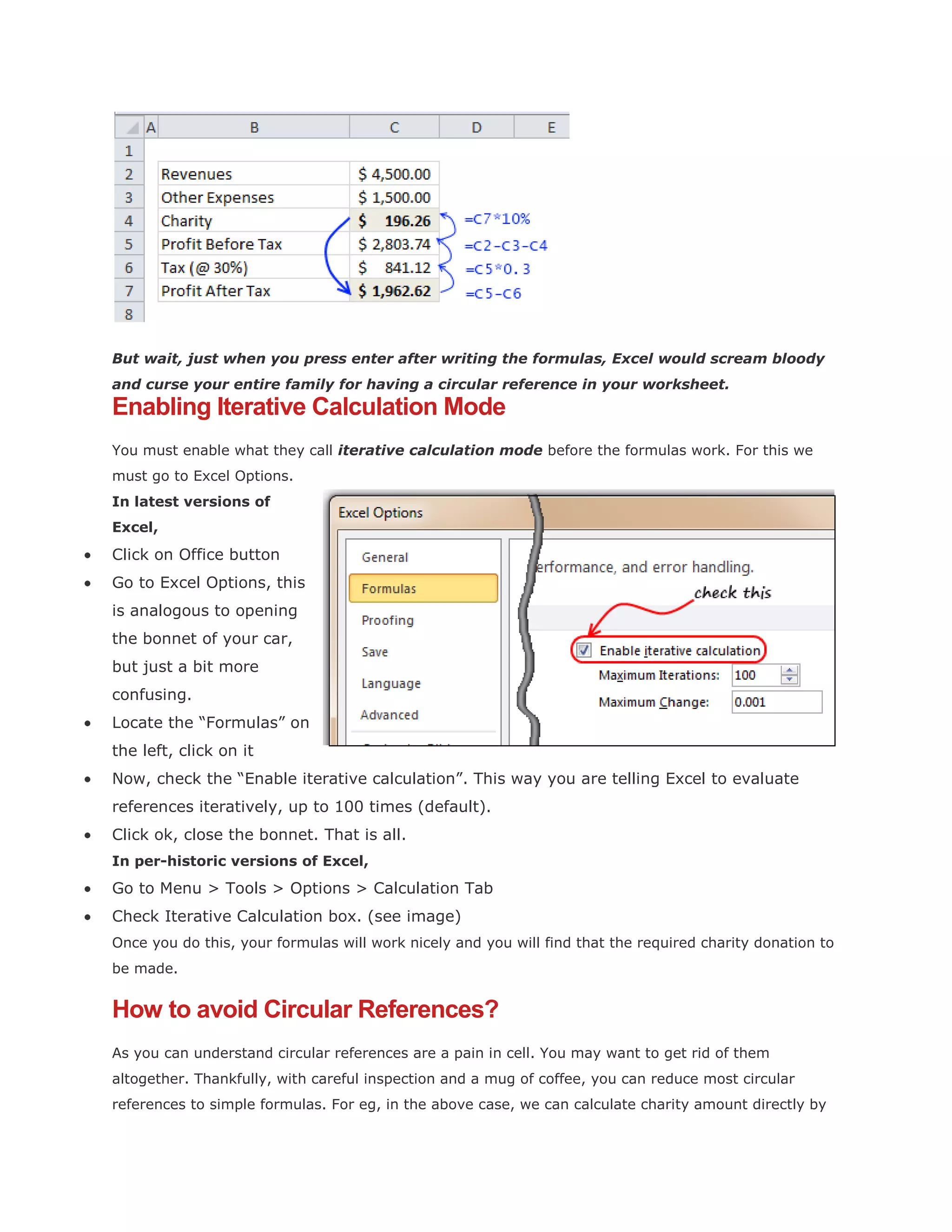
Simple, we write formulas with circular references, like this:
But wait, just when you press enter after writing the formulas, Excel would scream bloody
and curse your entire family for having a circular reference in your worksheet.

Enabling Iterative Calculation Mode
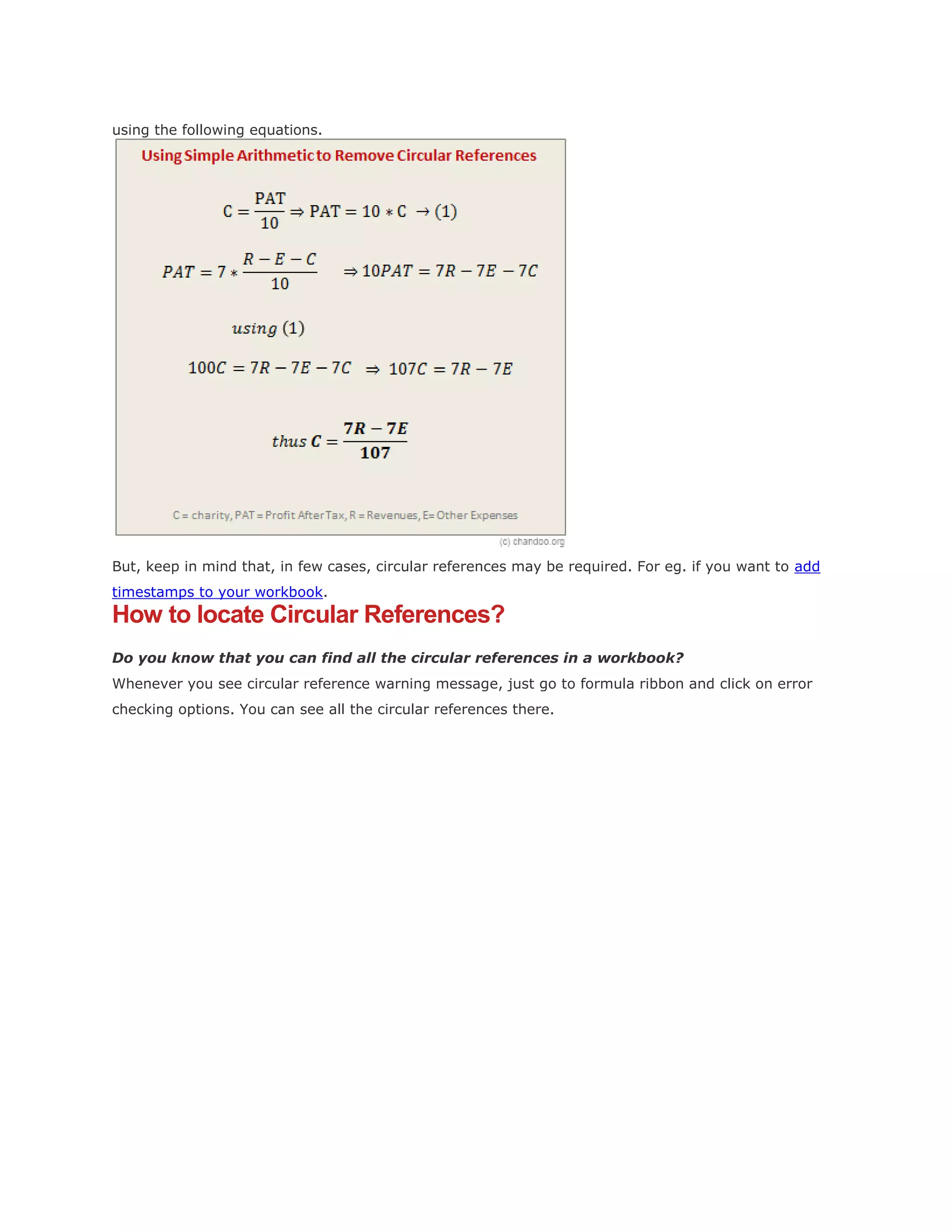
You must enable what they call iterative calculation mode before the formulas work. For this we
must go to Excel Options.
In latest versions of
Excel,

Click on Office button
Go to Excel Options, this
is analogous to opening
the bonnet of your car,
but just a bit more
confusing.
Locate the “Formulas” on
the left, click on it
Now, check the “Enable iterative calculation”. This way you are telling Excel to evaluate
references iteratively, up to 100 times (default).
Click ok, close the bonnet. That is all.
In per-historic versions of Excel,

Go to Menu > Tools > Options > Calculation Tab
Check Iterative Calculation box. (see image)
Once you do this, your formulas will work nicely and you will find that the required charity donation to
be made.

How to avoid Circular References?
As you can understand circular references are a pain in cell. You may want to get rid of them
altogether. Thankfully, with careful inspection and a mug of coffee, you can reduce most circular
references to simple formulas. For eg, in the above case, we can calculate charity amount directly by
using the following equations.

But, keep in mind that, in few cases, circular references may be required. For eg. if you want to add
timestamps to your workbook.

How to locate Circular References?
Do you know that you can find all the circular references in a workbook?
Whenever you see circular reference warning message, just go to formula ribbon and click on error
checking options. You can see all the circular references there.
Circular reference

Circular reference

  • 1.
    A round-up onCircular References Posted on September 16th, 2010 in Learn Excel - 33 comments Here is a little experiment to freak out excel. Go to cell C3 and write =C3 and press Enter. Excel would throw up nasty message saying, “Microsoft did not know what to do. We have a sent a support engineer to your home, but he is stuck at the round-about near your house.” Well, not really. But what you did when you wrote the formula =C3 in cell C3 was, you created a circular reference. What is a Circular Reference & why use them? A circular reference is created when you refer to same cell either directly or indirectly. We use circular references when we need circular references. Excel Circular Reference Example: For eg. (borrowed from John Walkenbach’s Excel 2010 Bible), lets say you run a fictitious company named Sky is the Ltd. And you have a strange policy of donation 10% of your profits after tax to charity. But, in your country, charity donations are tax exempt (they are expenses). So charity = 10% * after tax profits after tax profits = (revenues - expenses - charity)*(1-tax rate) By definition, charity refers to after tax profits, which refers to charity, thus creating a circular reference. Now, how would you find out how much to donate to charity? Simple, we write formulas with circular references, like this:
  • 2.
    But wait, justwhen you press enter after writing the formulas, Excel would scream bloody and curse your entire family for having a circular reference in your worksheet. Enabling Iterative Calculation Mode You must enable what they call iterative calculation mode before the formulas work. For this we must go to Excel Options. In latest versions of Excel, Click on Office button Go to Excel Options, this is analogous to opening the bonnet of your car, but just a bit more confusing. Locate the “Formulas” on the left, click on it Now, check the “Enable iterative calculation”. This way you are telling Excel to evaluate references iteratively, up to 100 times (default). Click ok, close the bonnet. That is all. In per-historic versions of Excel, Go to Menu > Tools > Options > Calculation Tab Check Iterative Calculation box. (see image) Once you do this, your formulas will work nicely and you will find that the required charity donation to be made. How to avoid Circular References? As you can understand circular references are a pain in cell. You may want to get rid of them altogether. Thankfully, with careful inspection and a mug of coffee, you can reduce most circular references to simple formulas. For eg, in the above case, we can calculate charity amount directly by
  • 3.
    using the followingequations. But, keep in mind that, in few cases, circular references may be required. For eg. if you want to add timestamps to your workbook. How to locate Circular References? Do you know that you can find all the circular references in a workbook? Whenever you see circular reference warning message, just go to formula ribbon and click on error checking options. You can see all the circular references there.